
PAGEPRO 1490MF - Multifunction Printer KONICA - Free user manual and instructions
Find the device manual for free PAGEPRO 1490MF KONICA in PDF.


| Product type | Monochrome A4 multifunction printer |
| Brand | Konica Minolta |
| Model | PagePro 1490MF |
| Dimensions (W x D x H) | 447 x 386 x 412 mm |
| Weight | 13 kg |
| Power supply | 220–240 V, 50–60 Hz |
| Power consumption (printing) | 450 W max |
| Main functions | Print, copy, color scan, fax |
| Print speed | Up to 20 ppm (A4) |
| Print resolution | 600 x 600 dpi |
| Copy speed | Up to 20 cpm (A4) |
| Color scanner | Yes, CIS sensor, 600 x 600 dpi optical |
| Fax | Modem 33.6 Kbps, 2.5 s/page, 250 speed dials |
| Paper capacity | 200 sheets (standard tray), 50-sheet automatic feeder |
| Media types | Plain paper, recycled, envelopes, labels, postcards, thick paper |
| Media weight | 60–105 g/m² (tray), 52–162 g/m² (manual) |
| Connectivity | USB 2.0, optional Wi-Fi (WLAN dongle) |
| Display and input | QWERTY keypad for input |
| Economy functions | Eco mode (saves up to 40% toner), deep sleep |
| Security | Device lock code |
| Consumables | Toner cartridge + integrated drum, up to 3000 pages (5% coverage) |
| Maintenance | Clean the exterior with a soft dry cloth; replace the cartridge as prompted |
| Warranty | 1 year on-site (EU, according to local legislation) |
| Spare parts and repairability | Toner cartridge available; for other parts, contact a Konica Minolta authorized center |
| General information | Energy class: Energy Star (model 1480MF); compliant with CE, GS, WEEE |
Frequently Asked Questions - PAGEPRO 1490MF KONICA
User questions about PAGEPRO 1490MF KONICA
0 question about this device. Answer the ones you know or ask your own.
Ask a new question about this device
Download the instructions for your Multifunction Printer in PDF format for free! Find your manual PAGEPRO 1490MF - KONICA and take your electronic device back in hand. On this page are published all the documents necessary for the use of your device. PAGEPRO 1490MF by KONICA.
USER MANUAL PAGEPRO 1490MF KONICA
Compact and affordable A4 home office solution



Next generation technology
providing a cost effective solution
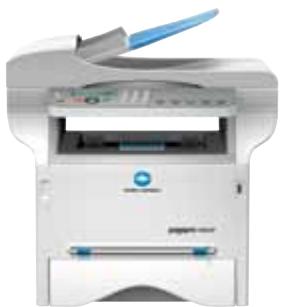
The pagepro 1480MF and 1490MF are the ideal choice for the small office network or home user. The pagepro 1480MF combines monochrome laser printing, fast copying at 20 pages per minute (ppm) and colour scanning, while the pagepro 1490MF adds faxing. These compact all in one printers save space by replacing numerous office devices providing convenience and ease of use with a barely audible operating noise in energy saving mode. An attractive price and low running costs using eco-mode technology, makes them a great addition to your workspace and everything you could need for your home or small office.

Eco-mode, low running costs
Eco-mode allows you to save up to 40% toner, perfect for printing or copying internal documents. Using the digital fax feature on the pagepro 1490MF you can send and receive faxes directly to your PC without printing. In addition, buying and operating a single system costs a lot less than the combined cost of up to four separate devices, as well as taking up far less valuable work space.
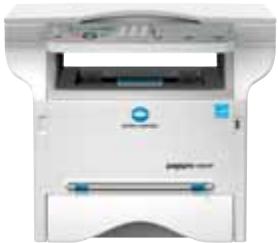
pagepro 1480MF
pagepro 1490MF

Wireless network option with USB
The pagepro 1480MF and 1490MF encourages flexibility utilising the USB port; including print directly from USB, scan to USB and you can even use your USB stick as an extended fax memory. An optional WLAN dongle further boosts flexibility by providing wireless printing and convenient printer sharing without cables. The all in one cartridge which includes the toner and drum is quick and easy to exchange when you eventually have to refill the toner.
| Configuration | pagepro 1480MF | pagepro 1490MF |
| Print Speed | Mono up to 20 ppm | Mono up to 20 ppm |
| X | X | |
| Copy | X | X |
| Scan | X | X |
| Colour Scan | X | X |
| Fax | - | X |
| Automatic document feeder | - | Standard |
| W-Lan Dongle | Optional | Optional |

Clever copying
With a copy speed of 20 pages per minute, the pagepro 1480MF/1490MF are compact copiers which also include a paper saving 2-in-1 and 4-in-1 copy function and lets you zoom in and out between 25 and 400% . The pagepro 1490MF also comes with a user friendly 50 page automatic document feeder which gives you the extra benefit of comfortable hands-free copying of multi-page documents.

Professional printing and media flexibility
As productive GDI printers both the pagepro 1480MF/1490MF offer fast processing of pages in high quality mode. Their generous range of printing features include the n-up feature that allows you to enlarge one page to several pages.
Truly impressive is the pagepro 1480MF/1490MF’s media support, from their standard 250-sheet paper input and flexible media handling of 52 to 162 gsm to the processing of labels, envelopes and thick paper – simply everything you might need in your home or small office!

Smooth colour scanning
Although the pagepro 1480MF and 1490MF are monochrome printing devices they have the ability to scan in colour, helping you make the most of brochures, photos, magazine pages and so much more. Their excellent scanning capabilities include TWAIN and Windows WIA scan, as well as scan-to-
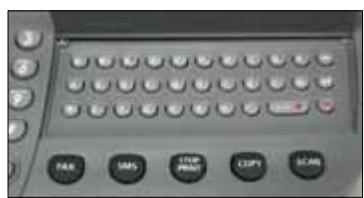
USB of PDF, JPEG and TIFF formats. For ease of use the pagepro 1490MF has a QWERTY keyboard which enables you to easily enter document names.
pagepro 1480MF
pagepro 1490MF

User-friendly faxing
The pagepro 1490MF gives you the benefit of versatile fax communication. You can use your PC to send and receive faxes, taking advantage of the comprehensive address book and avoiding having to print every incoming fax.
The already generous memory can be extended with the fax to USB function so even when the internal memory is full no communication is lost. Other benefits include 250 speed dials, a fax transmission speed of 2.5 seconds per page and cost saving features such as memory send and timer transmission. The 1490MF can also ensure complete confidentiality with the password protected fax inbox functionality.

Exciting extras
Further benefits of the pagepro 1480MF/1490MF include the Companion Suite software which provides you with fast and easy management of your printer straight from your PC. Reliable security is also available with the option to lock your device completely by setting up your own personal access code.

Tea break teasers
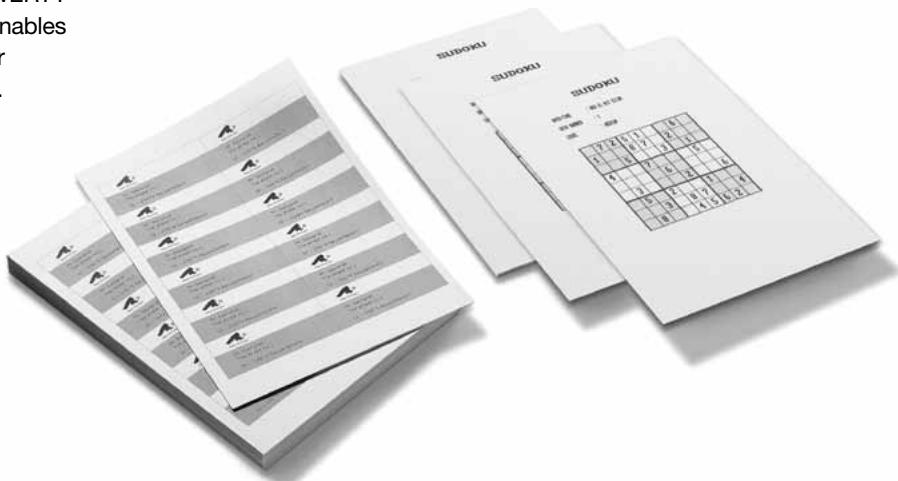
As your work now gets done so much faster, why not solve one of the 400 Sudoku puzzles the pagepro 1480MF/1490MF offer you in their system memory? In work as well as leisure, these smart all in ones are your ideal companions!

KONICA MINOLTA



Works with Windows Vista™

CLEAN PLANET PROGRAM Konica Minolta printer supplies return program

Technical specifications
Print process
Print method
Desktop mono A4 laser beam printer
Page Description language
GDI
Print speed A4
Up to 20 ppm
First page out
13 seconds
Warm-up time
21 second
Max. resolution
600 dpi x 600 dpi
Monthly print volume
750 pages (average)
4,000 pages (maximum)
Print functions
Eco-mode, Direct print from
USB media, N-up, poster mode,
cover mode, watermark, overlay,
Sandbox printing (puzzle + solution)
Copy process
Copy speed
Up to 20 cpm
First copy out
15 seconds
Copy resolution
600 dpi x 600 dpi
Copies
1-99
Zoom range
25-400% (by 1% step)
Copy functions
Eco-mode, ID card copy, N-up,
poster mode, quality adjust
Scan process
Scan technology
CIS image sensor, colour scanner
pagepro 1480MF: flat bed
pagepro 1490MF: flat bed
automatic document feeder
Scan speed
Up to 23 opm monochrome
Up to 8 opm colour
Resolution
600 dpi x 600 dpi (optical)
2400 dpi x 2400 dpi (interpolated)
Scan size
A4,max. 220× 300mm
custom formats
Scan modes
TWAIN scan
Windows WIA scan
Scan-to-USB media
File formats
PDF, JPEG, TIF
Fax process
(pagepro 1490MF only)
Modem speed
33.6 Kbps V.34
Transmit speed
2,5 seconds
Fax compression
MH, MR, MMR, JBIG
Page memory
125 pages
Speed dial
250
Group dial
20
Fax functions
PC-Fax, Receipt to PC, Receipt to
USB media, confidential fax receiving,
auto radial, timer transmission
Hardware and software
capabilities
Processor
100MHz
Memory
32 MB standard
Interface support
USB 2.0
W-LAN 802.11b/g (optional)
Operating system
compatibility
Windows
2000, XP (32), Vista (32)
Windows 7 (32), Server 2003 (32)
Macintosh
OS X 10.3-10.5
Linux
Redhat v. 9.0, SUSE v. 8.2
System functions
Qwerty keyboard
(pagepro 1490MF only)
Operation lock code
Software utilities
Companion Suite Pro
PaperPort 11 SE (with OCR engine)
Paper handling
Automatic document feeder
(pagepro 1490MF only)
50 sheets
Standard paper input
200-sheet paper feeder
(250-sheet @ 64 gsm)
1-sheet manual tray
Standard paper output
50-sheet face down output tray
Printable area
Approx. 4mm from all edges
Media sizes supported
A4,A5,A6,letter,legal
envelope,B5,B6,
Custom sizes
90-148 mm x 216-356 mm
Paper weights
60-105 gsm (paper feeder)
52-162 gsm (manual tray)
Print media
Plain paper, recycled paper
envelope, labels, postcard,
thick paper, letterhead, OH
Physical
Dimensions (W x D x H in mm)
pagepro 1480MF: 447 x 386 x 344
pagepro 1490MF: 447× 386× 412
Weight
pagepro 1480MF: 11,6 kg
pagepro 1490MF: 13kg
Electrical
Input voltage range
220~240V
Frequency
50~60Hz
Power consumption
pagepro 1480MF
450 W or less (average printing)
33 W or less (stand by)
10 W or less (energy save mode)
Power consumption
pagepro 1490MF
450 W or less (average printing)
35 W or less (stand by)
12 W or less (energy save mode)
Environmental
Temperature
10 27^
Humidity
15 ~ 85% RH
Noise levels
53 dB or less (operation)
30 dB or less (stand by)
0 dB (energy save mode)
Regulatory/
Safety conformity
DOC, CE Marking, GS, EMC, WEEE
Energy Star (pagepro 1480MF only)
Consumables
Pre-installed
Toner cartridge: up to 1,000 pages
Replacements
Toner cartridge: up to 3,000 pages
Warranty period and conditions
1 year on-site warranty
(within EU; local law applies)
-
Only pagepro 1480MF
-
All specifications relating to paper capacity refer to A4-size paper of 80 gsm quality.
All specifications relating to scanning, copying or printing speeds refer to A4-size paper that is scanned, copied or printed crosswise in multipage, simplex mode.
The support and availability of the listed specifications varies depending on operating systems, applications, network protocols as well as network and system configurations.
The stated life expectancy of each consumable is based on specific operating conditions such as page coverage for a particular page size (5 % coverage of A4). The actual consumables life will
vary depending on the use and other printing variables including page coverage, page size, media type, continuous or intermittent printing, ambient temperature and humidity. - Some of the product illustrations contain optional accessories.
- Specifications and accessories are based on the information available at the time of printing and are subject to change without notice.
- Konica Minolta does not warrant that any prices or specifications mentioned will be error-free.
Microsoft, Windows and the Windows logo are trademarks, or registered trademarks, of Microsoft Corporation in the United States and/or other countries.
All other brand and product names may be registered trademarks or trademarks of their respective holders and are hereby acknowledged.
For extra information, go to www.konicaminolta.co.uk/printer
Your Konica Minolta Business Solutions Partner:
Konica Minolta
Business Solutions (UK) Ltd
Precedent Drive • Rooksley
Milton Keynes · MK13 8HF
Tel. +44 (0) 1908 208 380
Fax. +44 (0) 1908 208 366
www.konicaminolta.co.uk/printer