
HKX 960 S - INSTALATION MANUAL - Kitchen appliance TEKA - Free user manual and instructions
Find the device manual for free HKX 960 S - INSTALATION MANUAL TEKA in PDF.


| Brand | TEKA |
| Model | HKX 960 S |
| Product type | Built-in steam oven |
| External dimensions (W × H × D) | 595 × 455 × 472 mm |
| Internal dimensions (W × H × D) | 420 × 210 × 390 mm |
| Capacity | 35 L |
| Weight | 32 kg |
| Power supply | 220-240 V ~ 50 Hz |
| Power | 1500 W |
| Main functions | Steam cooking, Regeneration & Sterilization, Vegetable cooking, Fish cooking, Meat cooking, Side dishes, Timer |
| Automatic programs | Over 20 preset programs for vegetables, fish, meat, side dishes, sterilization |
| Water tank | Approx. 1 L capacity, removable, automatic draining at end of cycle |
| Display | Digital display with clock and status messages |
| Cavity material | Stainless steel |
| Door | Removable glass, detachable hinges |
| Interior lighting | Replaceable E14 230-240V/15W bulb |
| Supplied accessories | Perforated tray, non-perforated tray, grid |
| Maintenance and cleaning | Interior cleaning with soapy water, removable side racks, automatic descaling program |
| Descaling | Automatic with recommended DURGOL® solution, cycle about 45 minutes |
| Safety | Child lock (Safety Block), automatic shutdown in case of overheating, steam reduction on opening, burn protection |
| Repairability | Bulb replacement possible by user; other repairs by authorized technician |
| General information | Manual available in several languages, international customer service listed |
Frequently Asked Questions - HKX 960 S - INSTALATION MANUAL TEKA
User questions about HKX 960 S - INSTALATION MANUAL TEKA
0 question about this device. Answer the ones you know or ask your own.
Ask a new question about this device
Download the instructions for your Kitchen appliance in PDF format for free! Find your manual HKX 960 S - INSTALATION MANUAL - TEKA and take your electronic device back in hand. On this page are published all the documents necessary for the use of your device. HKX 960 S - INSTALATION MANUAL by TEKA.
USER MANUAL HKX 960 S - INSTALATION MANUAL TEKA
We ask you to read the instructions in this booklet very carefully as this will allow you to get the best results from using your microwave oven.
KEEP THE DOCUMENTATION OF THIS PRODUCT FOR FUTURE REFERENCE.
Always keep the instruction manual handy. If you lend the microwave oven to someone else, give them the manual as well!
Environmental protection
Disposal of the packaging

The packaging bears the Green Dot mark.
Dispose of all the packaging materials such as cardboard, expanded polystyrene and plastic wrapping in the appropriate bins. In this way you can be sure that the packaging materials will be re-used. Keep all packaging away from small children as it may present suffocation/choking hazard.
Disposal of equipment no longer used
According to European Directive 2002/96/EC on the management of waste electrical and electronic equipment (WEEE), home electrical appliances should not be put into the normal systems for disposal of solid urban waste.
Outdated appliances should be collected separately to optimise component material recovery and recycling rates and to prevent potential harm to human health and the environment. The symbol of a rubbish container superimposed by a diagonal cross should be put on all such products to remind people of their obligation to have such items collected separately.
Consumers should contact their local authorities or point of sale and request information on the appropriate places to leave their old home electrical appliances.
Before disposing of your appliance, render it non-usable by pulling out the power cable, cutting it off and disposing of it.
Contents
Installation instructions 3
Before installation 3 After installation 3
Safety Instructions 4
Description of your oven 6
Basic settings 7
Initial Settings 7 Setting the Clock 7 Water Hardness setting 7 Hiding/Displaying the Clock 8 Safety blocking 8 Timer 9
Basic Functions 10
Steam 10 Regenerating & Sterilising 10
Special Functions 11
Cooking Vegetables 11 Cooking Fish 12 Cooking Meat 13 Side Dishes 14
Water feeding 15
Filling the water tank. 15 Refilling the water tank 15 Emptying the water tank 15
When the oven is working. 16
Interrupting a cooking cycle 16 Altering parameters 16 Cancelling a cooking cycle 16 End of a cooking cycle. 16
Usage, Tables and Tips 17
Use of accessories 17
Care and maintenance 22
Cleaning the cooking space 22 Removing the shelf guides 22 Removing the appliance door 23 24 Suitable descending solutions 24 25 Front surface 26 Oven interior 26 Accessories 26
What should I do if the oven doesn't work? 27
Replacing the light bulb 27
Technical characteristics 28
Description of Functions 28 Display Messages 28 Specifications 28
Installation 58
EN Installation instructions
Before installation
Check that the input voltage indicated on the characteristics plate is the same as the voltage of the power outlet you are going to use.
Open the oven door and take out all the accessories and remove the packing material.
Warning! The front surface of the oven may be covered in a protective film. Before using the oven for the first time, carefully remove this film, starting on the inside.
Make sure that the oven is not damaged in any way. Check that the oven door closes correctly and that the interior of the door and the front of the oven opening are not damaged. If you find any damage contact our Customer Care Centre on the number supplied on the back cover of this handbook.
DO NOT USE THE OVEN if the power cable or the plug is damaged, if the oven does not function correctly or if it has been damaged or dropped. Contact our Customer Care Centre on the number supplied on the back cover of this handbook.
Put the oven on a flat and stable surface. The oven must not be installed close to any sources of heat, radios or televisions.
During installation, make sure that the power cable does not come into contact with any moisture or objects with sharp edges and the back of the oven. High temperatures can damage the cable.
Warning: after the oven is installed, you must make sure you can access the plug.
After installation
The oven is equipped with a power cable and a plug for single-phase (household) current, 230-240V ~ 50Hz.
If the oven is to be installed on a permanent basis, it must be installed by a qualified technician. In such a case, the oven should be connected to a circuit with an all-pole circuit breaker with a minimum separation of 3 mm between contacts.
WARNING: THE OVEN MUST BE EARTHED.
The manufacturer and retailers do not accept responsibility for any damage that may be caused to persons, animals, or property if these installation instructions are not observed.
The oven only functions when the door is closed correctly.
Before the first use, clean the inside of the oven and the accessories, following the cleaning instructions given in the "Oven cleaning" section.
During installation, follow the instructions supplied separately.
Safety Instructions

- Warning! Do not leave the oven unsupervised.
- Warning! If you see smoke or fire, keep the door closed in order to smother the flames. Switch off the oven and take the plug out of the socket or cut off the oven power supply.
- Overheated fat and oil can easily catch fire. Heating oil in the cooking space to sear meat is dangerous and should not be done. Never try to extinguish burning oil or fat with water (danger of explosion)! Smother the flames with a damp cloth and keep all doors and windows closed.
- Warning! Do not use alcohol to cook in the oven. It can cause the overheating of the food. Danger of explosion!
- Warning! This appliance is not intended for use by persons (including children) with reduced physical, sensory, or mental capabilities, or lack of experience and knowledge, unless they have been given supervision or instruction concerning use of the appliance by a person responsible for their safety. Children should be supervised to ensure that they do not play with the appliance.
- Children must be supervised to ensure that they do not play with the appliance. Use the safety locks.
- Warning! During use the appliance becomes very hot. Care should be taken to avoid touching heating elements inside the oven. RISK OF BURNS!
- Warning! Accessible parts may become hot during use. Young children should be kept away.
- Warning! When opening the door during or upon completion of the cooking cycle, be careful of the flow of hot air and/or steam and water drops coming out of the cooking chamber. Step back or to the side to avoid burns.
- Warning! Make sure you never catch the power cables of other electrical appliances in the hot door or the oven. The cable insulation may melt. Danger of short-circuiting!
EN Safety Instructions
This oven is exclusively for domestic use!
The appliance is designed for use in the home for preparing food. No liability is assumed for any damage caused by improper or incorrect use.
Avoid damaging the oven or other dangerous situations by following these instructions:
- Do not cover or obstruct the ventilation openings.
- Do not keep any inflammable object inside the oven as it may burn if the oven is switched on.
- Do not use the oven as a pantry.
- Do not pour spirits (e.g. brandy, whisky, schnapps, etc.) over hot food. Danger of explosion!
- Accessories such as wire racks and trays, etc. get hot in the cooking space. Always wear protective gloves or use oven cloths.
- To avoid being burnt, always use oven gloves for handling dishes and containers and touching the oven.
- Do not lean or sit on the open oven door. This may damage the oven, especially in the hinge zone. The door can bear a maximum weight of 8 kg.
- The racks can bear a maximum load of 8 kg. To avoid damaging the oven, do not exceed this load.
Cleaning:
- The appliance will remain hot for some time after it is switched off and cool down only slowly to room temperature. Please allow sufficient time for the appliance to cool down before, for instance, cleaning it.
- Do not use harsh abrasive cleaners or sharp metal scrapers to clean the oven door glass since they can scratch the surface, which may result in shattering of the glass.
- The door contact surfaces (the front of the cooking space and the inside part of the doors) must be kept very clean in order to ensure the oven functions correctly.
- Please follow the instructions regarding cleaning in the section "Oven Cleaning and Maintenance".
Repairs:
- If the power cable is damaged it should be substituted by the manufacturer, authorised agents or technicians qualified for this task in order to avoid dangerous situations. Furthermore, special tools are required for this task.
- Repair and maintenance work, especially of current carrying parts, can only be carried out by technicians authorised by the manufacturer.
Description of your oven
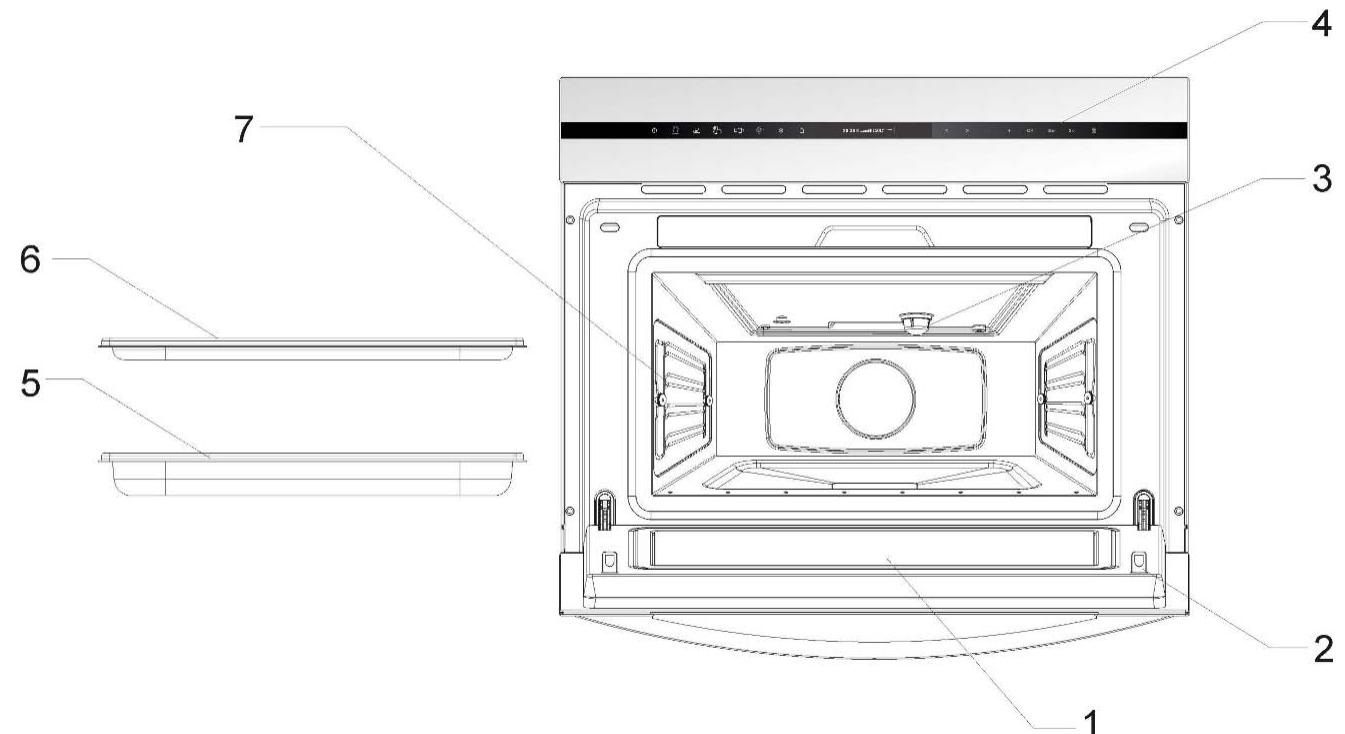
- Door window glass
- Safety catches
- Lamp bulb
- – Control panel
- – Perforated baking tray
- – Baking tray
- Shelf guides
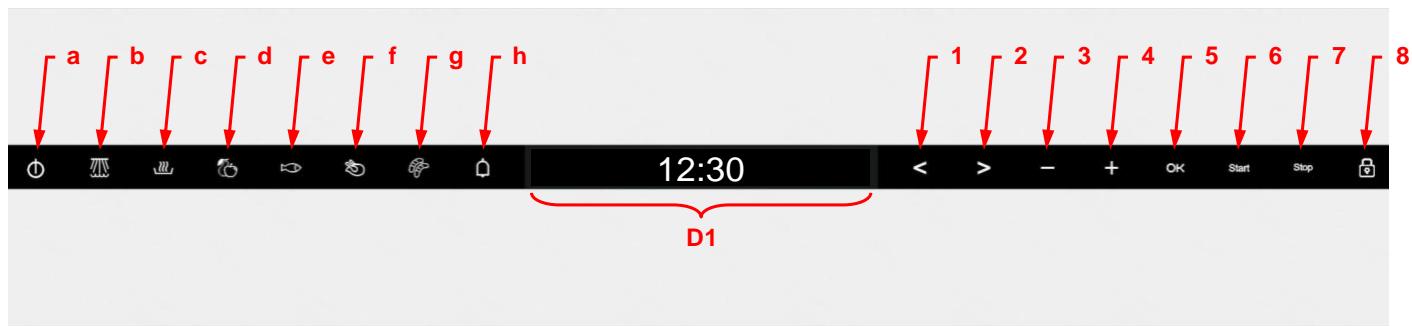
a - ON/OFF key b - Steam function key c - Regenerating & Sterilising function key d - Vegetables function key e - Fish function key f - Meat function key g - Side Dishes function key h - Countdown Timer key
1 - "Left" key 2 - "Right" key 3 - "-" key 4 - "+" key 5 - "OK" key 6 - "Start" key 7 - "Stop" key 8 - "Safety Block" key D1 - Display
Initial Settings
After your steam oven is first plugged in or after a power failure, the clock display will flash to indicate that the time shown is not correct.
The oven will not operate until the clock and the water hardness parameter are set.
To set the clock and the water hardness parameter value, proceed as described in the following chapters.
Setting the clock
The clock display will flash if your appliance is first plugged in or after a power failure, to indicate that the time shown is not correct. To set the clock, proceed as follows:

- Press the "On/Off" key to switch the oven on.
- Hold down the "-" and "+" keys simultaneously. The hour digits will flash (steps 1 and 2 are not necessary when the oven is first plugged in or after a power failure).
- Press the "-" and "+" keys to set the hours.
Water Hardness setting
- Press the OK key to confirm the hours. The minutes digits will flash.
- Press the "-" and "+" keys to set the minutes.
- Press the OK key to confirm the minutes.

The appliance features a system that automatically indicates when it is time to descale.
The system can be optimised for households with very soft water (also through using a water softening appliance) and very hard water, by changing the user settings to the relevant range of water hardness (see table below).
To set the water hardness parameter, proceed as follows:
- Press the "On/Off" key to switch the oven on.
- Press the "Left" and "Right" keys at the same time. The hardness grade will start to flash on the display (steps 1 and 2 are not necessary if your microwave oven is first plugged in or after a power failure).
- Press the "-" and "+" keys to set the correct water hardness parameter value, according to the table below.
- Press the "OK" key to set the parameter. The display shows the clock.
Basic settings
The following table shows the different scales for the water hardness definition.
| Type | Water hardness | Display | |||
| Ca + Mg (ppm) | English deg. [°eH] | French deg. [°dF] | German deg. [°dH] | ||
| Soft water | 0 to 150 | 0 to 11 | 0 to 15 | 0 to 8 | SOFT |
| Medium water | 151 to 350 | 12 to 25 | 16 to 35 | 9 to 20 | MED |
| Hard water | 501 to 500 | 26 to 35 | 36 to 50 | 21 to 28 | HARD |
Hiding/Displaying the Clock

If the clock display disturbs you, you can hide it by proceeding as follows:
- Press the "On/Off" key to switch the oven on.
- Press the "OK" key for 3 seconds. The display will blank.
If you want to see the clock display again, repeat the above procedure.
Safety blocking
The oven functioning can be blocked (for example, to stop it being used by children).

To block the oven, proceed as follows:
- Press the "On/Off" key to switch the oven on.
- Hold down the "Safety Block" key for 3 seconds. The "Safety Block" key lights up and the display shows a key symbol.
The oven will not operate until it is unblocked. To unblock the oven, repeat the above procedure.
Timer
Use this function as an aid in daily kitchen tasks.

To set the Timer, proceed as follows:
- Press the "On/Off" key to switch the oven on.
- Press the "Timer" function key. The key turns red and the display shows:

- Press the "-" and "+" keys to set the desired time.
- Press the OK key. The timer will start to count down.
When the set time has elapsed, the oven will emit three beeps that will be repeated every 30 seconds, and the Timer key will flash. Press the Timer key to cancel the beeps.
While the Timer is running, the Timer key is red. The display and lights show the following:
- If there is no function running, the display shows the Timer counting down and the Timer key is red.
- If there is an active function, the display and keys show the normal function parameters. To check the Timer's remaining time, press the Timer key. The display will briefly show the Timer and resume the function indications after 5 seconds or once the Timer key is pressed again. While the Timer is shown, the remaining time can be changed with the "-" and "+" keys as described above.
Basic Functions
Steam
Use this function to cook and heat up vegetables, potatoes, rice, fish and meat.

- Press the "On/Off" key to switch the oven on.
- Press the "Steam" function key. The key turns red and the display shows:

- Press the "-" and "+" keys to set the desired temperature.
- Press the ">" key. The display shows:

- Press the "-" and "+" keys if you want to set the desired operating time. This setting is optional. Please jump to point 7 if you don't want to set duration.
- If you want to modify any of the above parameters, press the "<" or ">" keys to select the parameter and then the "-" and "+" keys to set a different value.
- Press the Start key. The oven will start to operate.
Important note: The symbol "I" will flash in the display meaning that the temperature inside the oven is lower than the set temperature.
Regenerating & Sterilising
Use this function to regenerate plate dishes and ready-made meals as well as to sterilise and boil down fruit.

- Press the "On/Off" key to switch the oven on.
- Press the "Regenerating & Sterilising" key. The key turns red and the display shows:

- Press the "-" and "+" keys to select the desired program, e.g. "R 01" (see table below).
- Press the “>” key. The display shows:

- Press the “-” and “+” keys if you want to modify the preset Operating Time. This setting is optional.
- Press the Start key. The oven will start to operate.
Important note: The symbol will flash in the display meaning that the temperature inside the oven is lower than the set temperature.
| Programme | Type of Food | Temperature (℃) | Time (min) | Instructions |
| R 01 | Plate dishes | 100°C | 13 | Remove lid from container and put on Perforated baking tray. |
| R 02 | Ready-made meals / frozen | 100°C | 18 | |
| R 03 | Beans | 100°C | 35 | Sterilising: |
| R 04 | Cherries | 80°C | 35 | The times and temperatures refer to 1L preserving jars. |
| R 05 | Plums | 90°C | 35 | |
| R 06 | Baby bottles | 100°C | 12 |
Cooking Vegetables
Use this function to cook the vegetables described in the table below.

- Press the "On/Off" key to switch the oven on.
- Press the "Cooking Vegetables" key. The key turns red and the display shows:

- Press the “-” and “+” keys to select the desired Program, e.g. “A 01” (see table below).
- Press the “>” key. The display shows:

- Press the “-” and “+” keys if you want to modify the preset Operating Time. This setting is optional.
- Press the Start key. The oven will start to operate.
Important note: The symbol \(\mathbb{I}\) will flash in the display, meaning that the temperature inside the oven is lower than the set temperature.
| Programme | Type of Vegetable | Temperature (℃) | Time (min) |
| A 01 | Broccoli / florets | 100 °C | 20 |
| A 02 | Cauliflower / florets | 100 °C | 25 |
| A 03 | Potatoes / pieces | 100 °C | 25 |
| A 04 | Snow peas | 100 °C | 15 |
| A 05 | Asparagus | 100 °C | 25 |
Special Functions
Cooking Fish
Use this function to cook the fish types described in the table below.

- Press the "On/Off" key to switch the oven on.
- Press the "Cooking Fish" key. The key turns red and the display shows:

- Press the "-" and "+" keys to select the desired program, e.g., "B 01" (see table below).
- Press the ">" key. The display shows:

- Press the "-" and "+" keys if you want to modify the preset operating time. This setting is optional.
- Press the Start key. The oven will start to operate.
Important note: The symbol \(\mathbb{I}\) will flash in the display, meaning that the temperature inside the oven is lower than the set temperature.
| Programme | Type of Fish | Temperature (℃) | Time (min) |
| B 01 | Trout | 80 °C | 25 |
| B 02 | Shrimp | 90 °C | 15 |
| B 03 | Fish filet | 80 °C | 18 |
| B 04 | Mussels | 100 °C | 25 |
| B 05 | Lobster | 100 °C | 30 |
Cooking Meat
Use this function to cook the meat types described in the table below.

- Press the "On/Off" key to switch the oven on.
- Press the "Cooking Meat" key. The key turns red and the display shows:

- Press the "-" and "+" keys to select the desired Program, e.g. "C 01" (see table below).
- Press the ">" key. The display shows:
- Press the "-" and "+" keys if you want to modify the preset Operating Time. This setting is optional.
- Press the Start key. The oven will start to operate.
Important note: The symbol I will flash in the display meaning that the temperature inside the oven is lower than the set temperature.
| Programme | Type of Meat | Temperature (℃) | Time (min) |
| C 01 | Chicken breast | 100 ℃ | 30 |
| C 02 | Smoked pork loin / pieces | 100 ℃ | 45 |
| C 03 | Turkey escalope | 100 ℃ | 20 |
| C 04 | Pork filet, whole | 100 ℃ | 25 |
| C 05 | Vienna sausages | 90 ℃ | 15 |
Special Functions
Side Dishes
Use this function to cook the foods described in the table below.

- Press the "On/Off" key to switch the oven on.
- Press the "Side Dishes" key. The key turns red and the display shows:

- Press the "-" and "+" keys to select the desired Program, e.g. "D 01" (see table below).
- Press the ">" key. The display shows:
- Press the "-" and "+" keys if you want to modify the preset Operating Time. This setting is optional.
- Press the Start key. The oven will start to operate.
Important note: The symbol R will flash in the display meaning that the temperature inside the oven is lower than the set temperature.
| Programme | Type of Food | Temperature (℃) | Time (min) |
| D 01 | Sweet yeast dumpling | 100 ℃ | 20 |
| D 02 | Yeast dumpling | 100 ℃ | 25 |
| D 03 | Napkin dumpling | 100 ℃ | 30 |
| D 04 | Rice | 100 ℃ | 35 |
| D 05 | Lentils | 100 ℃ | 40 |
Filling the water tank
All functions require the water tank to be full.
Fill the water tank up to the "MAX" mark with cold, fresh drinking water and introduce it into the slot located above the cavity (approximately 1L).
If the symbol X appears on the display, it means that the water tank is not properly inserted or has been removed.
To clear the message, correctly insert the water tank.
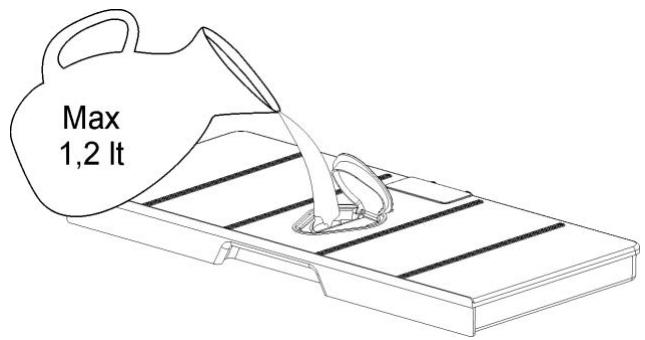
Refilling the water tank
The contents of the water tank normally suffice for one cooking session of 50-60 minutes.
If, however, the water tank needs to be refilled, this is signalled by the symbol \(\mathbb{O}\) flashing on the display, meaning that the water tank is empty.
Warning! Only fill the water tank up to a maximum of 0.5 litres to ensure that the water does not overflow when it is pumped back to the water tank. RISK OF OVERFLOW.
Emptying the water tank
When the appliance is switched off, the residual water is pumped back into the water tank.
While the water is being pumped, the display shows "PUMP".
This message stays on until the temperature of the water reaches \(75^{\circ}\mathrm{C}\) before it can be pumped back to the water tank.
Warning: the water in the tank may be hot. Danger of burns!
After the water is pumped back to the water tank, the display will show the message "DEP", requiring the following actions:
- Remove and empty the water tank.
- Dry the water tank and introduce it back into the slot located above the cavity. Clean and dry the cooking space.
- Leave the appliance door open so that the cooking space can cool down and dry completely.
IMPORTANT NOTE: It is advisable to remove the water tank and empty it after a cooking cycle. This prevents the formation of bacteria and limestone inside the appliance.
If the water tank has not been removed from the oven and a new cooking cycle is started, the oven displays the warning "DEP".
This warning can be cleared by pressing the Stop key and proceed with the new cooking cycle without removing and emptying the water tank.
When the oven is working…
Interrupting a cooking cycle
You can stop the cooking process at any time by pressing the Stop key once.
The oven incorporates a steam-reduction function that is activated when the Stop key is pressed to gradually release the steam from the cavity, so that there is no sudden rush of steam when the appliance door is opened.
This function takes around 3 minutes and during it the display shows the word "VAP".
Warning! When opening the door during or upon completion of the cooking cycle, be careful of the flow of hot air and/or steam coming out of the cooking chamber. Step back or to the side to avoid burns.
At this point:
- The steam generation is interrupted.
- The cavity walls and the water tank are still very hot. Danger of burning!
- The timer stops and the display shows the remaining operating time (if this has been set).
If you wish, at this point you can:
- Turn or stir the food to ensure it will be evenly cooked.
- Change the cooking parameters.
To restart the process, close the door and press the Start key.
Altering parameters
The active function parameters can be altered by pressing the < or > keys to select the parameter and then the - and + keys to set a different value. Press the OK key or wait a few seconds to validate the new parameter value.
Cancelling a cooking cycle
If you wish to cancel the cooking process, press twice the Stop key.
You will then hear a beep and the clock will appear on the display.
End of a cooking cycle
At the end of the set duration or when you press the Stop key to finish the cooking cycle, you will hear three beeps and the display will show the word "End", the oven starts the steam-reduction function.
This function gradually releases the steam from the cavity, so that there is no sudden rush of steam when the appliance door is opened.
This function takes around 3 minutes and during it the display shows the word "VAP".
Warning! When opening the door during or upon completion of the cooking cycle, be careful of the flow of hot air and/or steam coming out of the cooking chamber. Step back or to the side to avoid burns.
The cooling fan can continues to run for a certain length of time after the appliance has been switched off. This is a normal function that is meant to reduce the temperature inside the oven.
The residual water in the boiler is allowed to cool down to 75° C before it can be pumped back to the water tank. While the water is being pumped the display shows "PUMP".
Warning: the water in the tank may be hot. Danger of burns!
When the display shows the word "DEP", this means that the water was pumped and that the water tank can be removed.
Remove the water tank and dry it thoroughly. Let the cooking space cool down for a moment and then clean and dry it with a cloth. The door should be left open for some time so that the appliance can dry completely.
EN Usage, tables and tips
Use of accessories
The perforated container is suitable for cooking fresh or deep frozen vegetables, meat and poultry. In this case it is important that the non-perforated container is introduced into the first level. This way, dripping liquids are collected and the appliance does not get dirty. The perforated container with the food should be inserted into the second level.
The non-perforated container is used to steam sensitive foods, e.g. compotes and dumplings.
The rack is used when cooking with small containers, as for example, dessert bowls and to regenerate plate dishes.
For more precise information refer to the tables.
The suggested times and temperatures are guideline values. The actual cooking time can vary according to the type and quality of the foods.
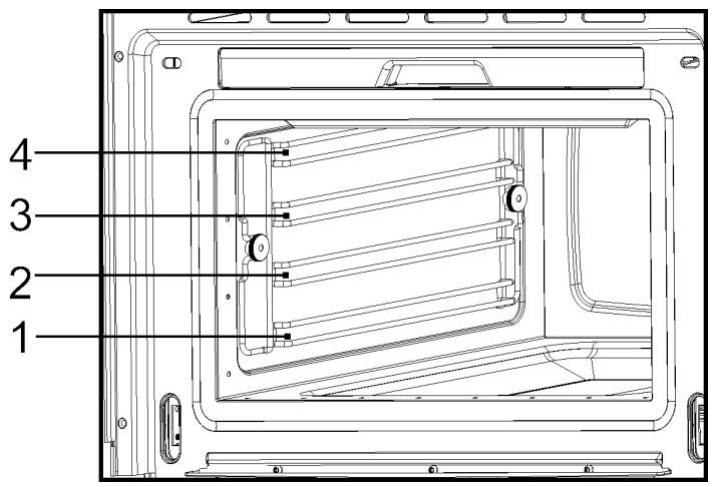
Fish
| Fish | Quantity | Temperature °C | Time min. | Container | Level |
| Gilthead sea bream | 800-1200 g | 80 | 30-40 | Perforated | 2 |
| Trout | 4 x 250 g | 80 | 20-25 | Perforated | 2 |
| Salmon filet | 500-1000 g | 80 | 15-25 | Perforated | 2 |
| Salmon trout | 1000-1200 g | 80 | 25-35 | Perforated | 1/2 |
| King prawns | 500-1000 g | 80 | 15-20 | Perforated | 2 |
| Green-shell mussel | 1000-1500 g | 100 | 25-35 | Perforated | 2 |
| Halibut filet | 500-1000 g | 80 | 20-25 | Perforated | 2 |
| Cockles | 500-1000 g | 100 | 10-20 | Perforated | 2 |
| Lobster | 800-1200 g | 100 | 25-30 | Perforated | 1/2 |
| Cod filet | 1000-1200 g | 80 | 20-25 | Perforated | 2 |
| Blue mussel | 1000-1200 g | 100 | 15-25 | Perforated | 2 |
| Lake trout | 4 x 250 g | 80 | 25-30 | Perforated | 2 |
| Haddock | 1000-1200 g | 80 | 20-25 | Perforated | 2 |
| Tuna filet | 500-1000 g | 80 | 15-20 | Perforated | 2 |
| Pike perch | 4 x 250 g | 80 | 25-30 | Perforated | 2 |
Usage, tables and tips
Meat
| Meat | Quantity | Temperature °C | Time min. | Container | Level |
| Chicken leg | 4-10 | 100 | 40-45 | Perforated | 2 |
| Chicken breast | 4-6 | 100 | 25-35 | Perforated | 2 |
| Smoked pork loin | 500g – 1000 g | 100 | 40-50 | Perforated | 2 |
| Turkey escalope | 4-8 | 100 | 20-25 | Perforated | 2 |
| Pork filet, whole | 4-8 | 100 | 20-30 | Perforated | 2 |
| Sausages | 80-100 | 10-15 | Perforated | 2 |
Eggs
| Eggs | Temperature °C | Time min. | Container | Level |
| Eggs in Glass | 100 | 10-15 | Rack | 2 |
| Eggs, hard | 100 | 15 | Rack | 2 |
| Eggs, soft | 100 | 10-12 | Rack | 2 |
Side dishes
| Side dishes | Quantity | Temperature °C | Time min. | Container | Level |
| Pearl barley + Liquid | 200g + 400 ml | 100 | 30-35 | Rack, glass bowl | 2 |
| Semolina + Liquid | 200g + 300 ml | 100 | 10-20 | Rack, glass bowl | 2 |
| Lentils + Liquid | 200g + 375 ml | 100 | 20-50 | Rack, glass bowl | 2 |
| Rice + Liquid | 200g + 250 ml | 100 | 25-40 | Rack, glass bowl | 2 |
Vegetables
| Vegetables | Temperature °C | Time min. | Container | Level | |
| Eggplant/Aubergine | in slices | 100 | 15-20 | Perforated | 2 |
| Beans | 100 | 35-45 | Perforated | 2 | |
| Broccoli | florets with stalk | 100 | 25-30 | Perforated | 2 |
| Broccoli | florets without stalk | 100 | 15-20 | Perforated | 2 |
| Cauliflower | florets | 100 | 25-30 | Perforated | 2 |
| Cauliflower | whole head | 100 | 40-45 | Perforated | 1 |
| Peas | 100 | 30-35 | Perforated | 2 | |
| Fennel | in stripes | 100 | 15-20 | Perforated | 2 |
| Fennel | cut in half | 100 | 20-30 | Perforated | 2 |
| Potatoes with skin | whole, very small | 100 | 20-25 | Perforated | 2 |
| Potatoes with skin | whole, very big | 100 | 45-50 | Perforated | 2 |
| Potatoes without skin | in pieces | 100 | 20-25 | Perforated | 2 |
| Turnip | in sticks | 100 | 20-25 | Perforated | 2 |
| Snow peas | 100 | 15-20 | Perforated | 2 | |
| Carrots | in slices | 100 | 25-30 | Perforated | 2 |
| Corn cobs | 100 | 50-60 | Perforated | 2 | |
| Bell peppers | in stripes | 100 | 12-15 | Perforated | 2 |
| Hot pepper | 100 | 12-15 | Perforated | 2 | |
| Mushrooms | in quarters | 100 | 12-15 | Perforated | 2 |
| Leeks | in slices | 100 | 10-12 | Perforated | 2 |
| Brussels sprouts | 100 | 25-35 | Perforated | 2 | |
| Celery | in stripes | 100 | 15-20 | Perforated | 2 |
| Asparagus | 100 | 20-35 | Perforated | 2 | |
| Spinach | 100 | 12-15 | Perforated | 2 | |
| Celery stalks | 100 | 25-30 | Perforated | 2 | |
| Courgette | in slices | 100 | 12-18 | Perforated | 2 |
Dumplings
| Dumplings | Temperature °C | Time min. | Container | Level |
| Sweet dumpling | 100 | 20-30 | Not perforated | 2 |
| Sweet yeast dumpling | 100 | 15-20 | Not perforated | 2 |
| Yeast dumpling | 100 | 15-25 | Not perforated | 2 |
| Bread dumpling | 100 | 20-25 | Not perforated | 2 |
| Napkin dumpling | 100 | 25-30 | Not perforated | 2 |
Usage, tables and tips
Desserts
| Desserts | Quantity | Temperature °C | Time min. | Container | Level |
| Stewed apples | 500-1500 g | 100 | 15-25 | Not perforated | 2 |
| Stewed pears | 500-1500 g | 100 | 25-30 | Not perforated | 2 |
| Crème brûlée | 80 | 20-25 | Rack - bowl | 2 | |
| Crème caramel | 80 | 25-30 | Rack - bowl | 2 | |
| Yogurt | 40 | 4-6 hrs. | Rack - bowl | 2 | |
| Stewed peaches | 500-1500 g | 100 | 15-20 | Not perforated | 2 |
Fruit (Sterilising/Boiling down)
| Fruit | Quantity | Temperature °C | Time min. | Container | Level |
| Pears | 4-6 1l glasses | 100 | 30-35 | Rack | 1 |
| Cherries | 4-6 1l glasses | 80 | 30-35 | Rack | 1 |
| Peaches | 4-6 1l glasses | 80 | 30-35 | Rack | 1 |
| Plums | 4-6 1l glasses | 80 | 30-35 | Rack | 1 |
Regenerate
| Warming-up | Quantity | Temperature °C | Time min. | Container | Level |
| Plate dishes | 1-2 | 100 | 12-15 | Rack | 2 |
| Plate dishes | 3-4 | 100 | 15-20 | Rack | 2 |
| Ready-made meals | 100 | 15-20 | Rack | 2 |
Blanch
| Vegetables | Quantity | Temperature °C | Time min. | Container | Level |
| e.g. Beans, Leek | 100 | 10-12 | Perforated | 2 | |
| Curly Kale | 1000-2000 g | 100 | 12-16 | Perforated | 2 |
| Savoy cabbage | 10-20 | 100 | 12-15 | Perforated | 2 |
| White cabbage, whole | 2000-2500 g | 100 | 30-45 | Perforated | 1 |
| Tomatoes, peeled | 80 | 12 | Rack | 2 |
EN Usage, tables and tips
Defrost
| Vegetables / Side dish | Temperature °C | Time min. | Container | Level | |
| Broccoli | florets with stalk | 100 | 15-20 | Perforated | 2 |
| Mixed vegetables | 100 | 15-20 | Perforated | 2 | |
| Spinach leaves | portions | 100 | 10-15 | Not perforated | 2 |
| Cauliflower | florets | 100 | 15-20 | Perforated | 2 |
| Peas | 100 | 15-25 | Perforated | 2 | |
| Curly kale | bigger portion | 100 | 25-35 | Not perforated | 2 |
| Carrots | in slices | 100 | 15-20 | Perforated | 2 |
| Brussels sprouts | 100 | 20-25 | Perforated | 2 | |
| Asparagus | 100 | 25-30 | Perforated | 2 | |
| Ready-made meals | 100 | as required | Rack | 2 | |
| Bread | 100 | 10-25 | Rack | 2 | |
| Rice | 100 | 15-25 | Not perforated | 2 | |
| Lentils | 100 | 15-20 | Not perforated | 2 | |
| Noodles | 100 | 15-20 | Not perforated | 2 | |
Two level cooking
Some suggestions:
When cooking with two levels the rack should always be inserted in the 2nd or 3rd level from the bottom to the top.
This way the usual vessels of porcelain, Jena glass or of stainless steel can be put inside the oven.
The container of cooking perforated or not, will be inserted in the 1st level from the bottom. It can also be cooked with two racks.
Different cooking times are controlled this way:
Foods that need a longer cooking time should be placed in the upper area of the oven. Foods with a shorter cooking time should be placed on the 1st level.
One example: Vegetables, potatoes and fish.
Place the vegetables and potatoes in any suitable container on the rack inserted in the 2nd or 3rd level.
Insert the fish in the 1st level.
When using the perforated tray to cook fish, the non-perforated tray must be inserted in the bottom of the appliance to collect liquid dripping from the fish. This way the appliance is kept clean.
Time: Vegetables and potatoes 25-35 Min.
Time: Fish – depending on type – 15-25 Min.
Select the longest cooking time. Because of the different levels the food is ready at the same time, without any over cooking.
Care and maintenance
Cleaning the cooking space
Avoid using abrasive cleaners such as scouring pads, steel wool, etc. as they can damage the surface.
Wipe the cooking space clean using a damp cloth whilst the appliance is still warm. Finish off by drying the cooking space.
For ease of cleaning, the shelf guides can be removed (see the following chapter).
Removing the shelf guides
Unscrew and remove the knurled nuts 1 in the front of the shelf guides in an anti-clockwise direction.
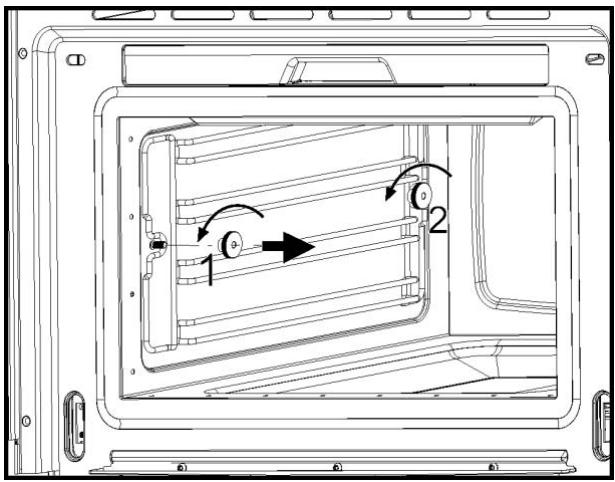
Unscrew and loosen the knurled nuts 2 in the back of the shelf guides in an anti-clockwise direction. Do not completely remove these nuts.
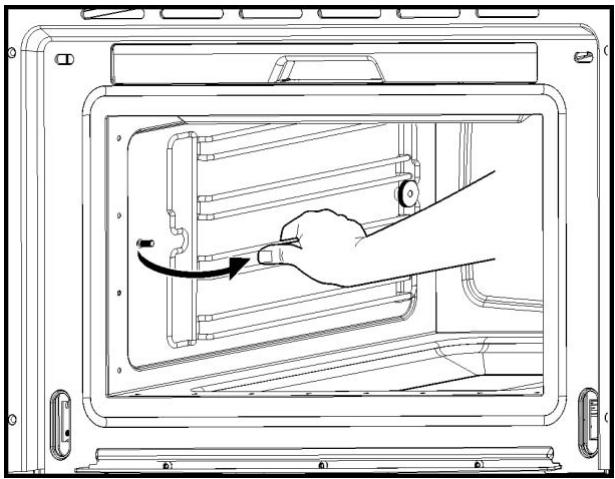
Pull the shelf guides to the inside of the cavity and remove from the front.
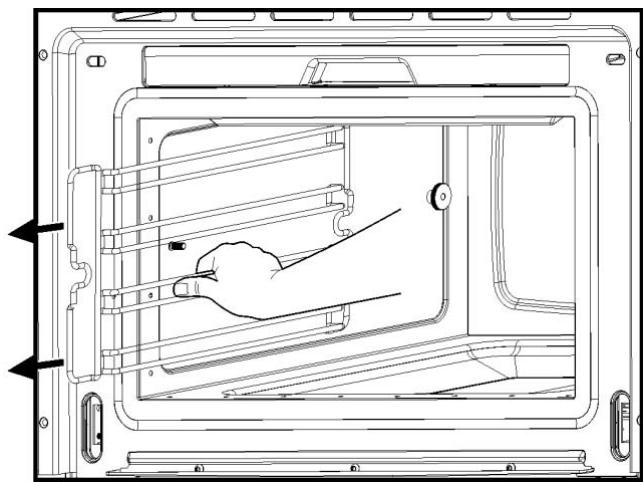
To put them back, insert the shelf guides into the knurled nuts 2 in the back and position on the screws in the front. Screw the knurled nuts 1 and 2 in a clockwise direction till tight.
Removing the appliance door
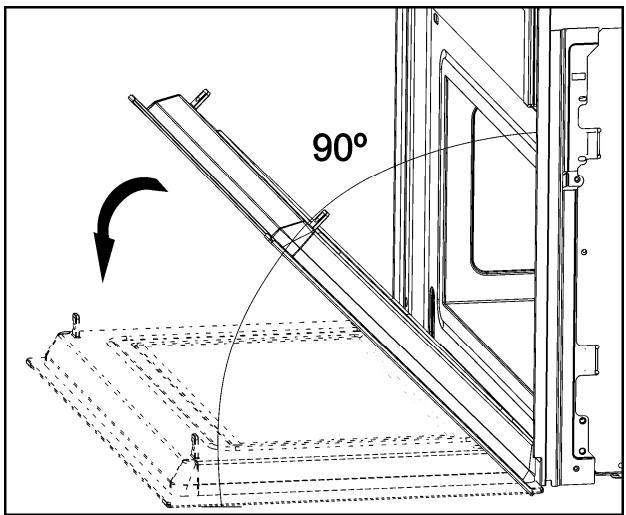
Open the appliance door as far as it will go.
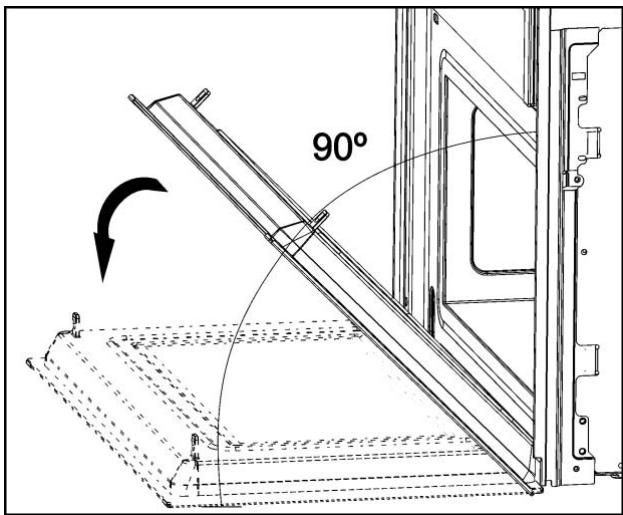
Insert 2 pins inside the holes in the hinges.
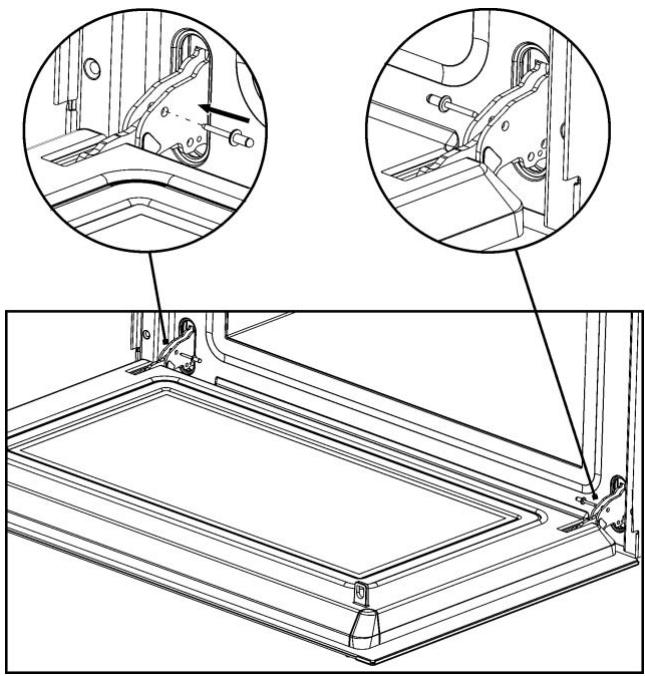
Close the appliance door just enough that it can be lifted out.
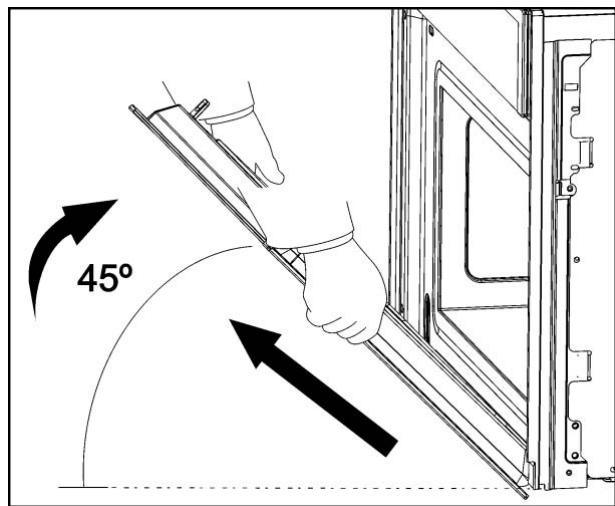
To reassemble, push the hinges into the holes from the front.
Open the appliance door as far as it will go and remove the pins.
Care and maintenance
Descaling
Whenever steam is produced, irrespective of the hardness of the local water supply (i.e. the limescale content of the water), limescale is deposited inside the steam generator.
The time interval between descaling depends on the hardness of the water and frequency of use. If steaming 4 × 30 minutes per week, the appliance must be descaled (depending on water hardness) roughly as follows:
| Water hardness | Descale after about |
| Very soft | 18 months |
| Medium | 9 months |
| Very hard | 6 months |
The appliance automatically detects when descaling is necessary and when this happens the display shows:

If the Descaling procedure is not performed, some cooking cycles after the symbol displayed above starts to flash.
If once again the Descaling procedure is not performed, some cooking cycles after the oven functioning is blocked and the display shows:
CAL

IMPORTANT NOTE: Failure to descale the appliance will likely impair the functioning of or cause damage to the appliance.
Suitable descaling solutions
For descending, use the descending solution "DURGOL®".
This solution allows a professional and careful descaling of your appliance and is available at Customer Care Centres.
Warning! Do not use vinegar or vinegar-based products as they can cause damage to the oven's internal circuit.
Traditional descending solutions are not appropriate because they can contain foaming agents.
Descaling procedure

Warning: For safety reasons, the descending process cannot be interrupted and it takes about 45 minutes.
The appliance can be descaled with the appliance door open or closed. The appliance must be in idle state prior to starting the descending cycle.
To run a descending cycle proceed as follows:
- Press the "On/Off" key to switch the oven on.
- Press the "Left" and "Right" keys at the same time for 5 seconds. The display shows "CAL" and there is an intermittent beep. If you wish to cancel the descale process at this stage press the "Stop" key.
- Press the Start key.
- When the display shows “0.5L”, remove the water tank.
- Pour 0.5 litres of an adequate descending solution into the water tank and put the water tank back.
- Press the "Start" key. The Descale cycle is initiated and takes about 30 minutes.
- When the display shows "1.0L" flashing and the oven emits a beep, remove and empty the water tank.
- Fill the water tank with 1.0 litres of cold water and put the water tank back.
- Press the "Start" key. The first rinsing cycle starts.
- When the display again shows "1.0L" flashing and the oven emits a new beep, remove and empty the water tank.
- Fill the water tank with 1.0 litres of cold water and put the water tank back.
- Press the "Start" key. The second rinsing cycle starts.
- When the rinsing cycle has finished the display shows "End".
- Remove, empty and dry the water tank.
Care and maintenance
Warning! Cleaning should be done with the oven power switched off. Take the plug out of the socket or switch off the oven's power circuit.
Do not use aggressive or abrasive cleaning products, scourers that scratch surfaces or sharp objects, since stains may appear.
Do not use high pressure or steam jet cleaning appliances.
Front surface
Normally you just need to clean the oven with a damp cloth. If it is very dirty, add a few drops of dishwashing liquid to the cleaning water. Afterwards, wipe the oven with a dry cloth.
In an oven with an aluminium front, use a mild glass cleaning product and a soft cloth that does not release any fibres or threads. Wipe from side to side without exerting any pressure on the surface.
Immediately remove limescale, fat, starch or egg white stains. Corrosion can occur under these stains.
Do not let any water get inside the oven.
Oven interior
After use, remove any water on the bottom of the cooking space with a soft cloth. Leave the appliance door open so that the cooking space can cool down.
To remove dirt that is harder to shift, use a nonaggressive cleaning product. Do not use oven sprays or other aggressive or abrasive cleaning products.
Always keep the door and the oven front very clean to ensure that the door opens and closes properly.
Make sure water does not enter the oven ventilation holes.
The glass lamp cover is located on the oven ceiling and can be removed easily for cleaning. For this you just need to unscrew it and clean it with water and dishwashing liquid.
Accessories
Clean the accessories after each use. If they are very dirty, soak them first of all and then use a brush and sponge. The accessories can be washed in a dish washing machine.
What should I do if the oven doesn’t work?
WARNING! Any type of repair must only be done by a specialised technician. Any repair done by a person not authorised by the manufacturer is dangerous.
You do not need to contact Technical Assistance to resolve the following questions:
- The display is not showing! Check if:
- The time indication has been switched off (see section on Basic Settings).
- Nothing happens when I press the keys! Check if:
- The Safety Block is active (see section on Basic Settings).
- The oven does not work! Check if:
- The plug is correctly fitted in the socket.
- The oven's power is switched on.
- When the oven is operating I can hear some strange noises! This is not a problem.
- It has to do with the operating noises that can occur during the cooking process, e.g., by the water pumps in the steam generator.
- The steam inside the cavity produces a pressure build-up and sometimes the cavity walls may produce noise when they react to the pressure.
- These noises are normal, there is no problem.
- The food doesn't heat up or heats very slowly! Check if:
- You have selected the correct operating times and temperature setting.
- The food you have put inside the oven is a larger amount or colder than you usually put in.
- If the message "Err_ " appears in the display, please contact the Customer Care.
- The appliance still makes a noise after the cooking process is finished! This is not a problem.
- The cooling fan keeps on working for some time. When the temperature has dropped sufficiently, the fan will switch itself off.
- The oven switches on but the interior light does not go on!
- If all the functions work properly it is probable that the lamp has blown. You can keep on using the oven.
Replacing the light bulb
To replace the light bulb, proceed as follows:
- Disconnect the oven from the power supply. Take the plug out of the socket or switch off the oven's power circuit.
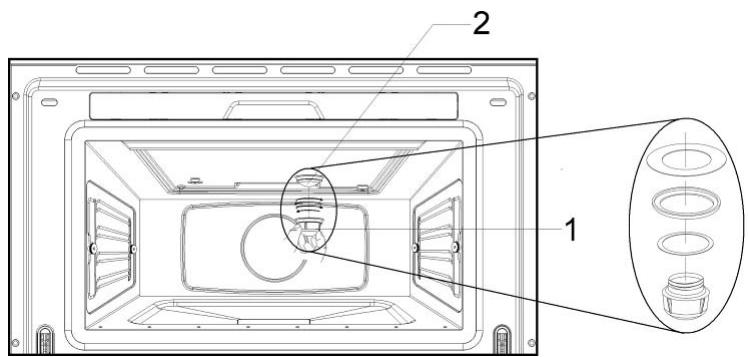
- Unscrew and remove the glass light cover (1).
- Remove the light bulb (2). Warning! The bulb may be very hot.
- Fit a new E14 230-240V/15W bulb. Follow the lamp manufacturer's instructions.
- Screw the glass light cover into place (1). IMPORTANT NOTE: Make sure that the sealing rings are applied in the correct sequence.
- Connect the oven again to the power supply.
Technical characteristics
Description of Functions
| Symbol | Function | Foods |
| Steam | Cooking all sorts of vegetables, rice, cereals and meat. Extracting juice from berries. Simultaneous defrosting and cooking of vegetables. | |
| Regenerating & Sterilising | Regenerating plate dishes and ready-made meals. Sterilising/boiling down fruit. | |
| Cooking Vegetables | Cooking different types of vegetables. | |
| Cooking Fish | Cooking different types of fish. | |
| Cooking Meat | Cooking different types of meat. | |
| Side Dishes | Cooking different types of side dishes. |
Display Messages
| Message | Description |
| Water tank | |
| U | Flashing – water tank is empty. Please refill. |
| M | Indication that water tank is missing. |
| DEP | The water tank must be removed, emptied and reinserted. |
| Entkalken | |
| VAP | Indication that steam reduction process is ongoing. |
| PUMP | Indication that hot water is being pumped to the water tank. |
| Descaling | |
| CAL | Appliance must be descaled. |
| Flashing – descaling starts. | |
| 0.5L | Feed 0,5 litre descaling solution into the water tank. |
| 1.0L | Feed 1,0 litre of cold water into the water tank for rinsing. |
| System warnings | |
| HOT | Temperature in the Electronic Board is too high. |
| Err_ | Call Customer Care |
Specifications
AC Voltage 220-240 V / 50 Hz Power required 1500 W - Exterior dimensions (W × H × D) 595 × 455 × 472 mm - Interior dimensions (W × H × D) 420 × 210 × 390 mm Oven capacity 35 L Weight 32 kg
After your steam oven is first plugged in or after a power failure, the clock display will flash to indicate that the time shown is not correct.
The oven will not operate until the clock and the water hardness parameter are set.
Setting the clock
To set the clock and the water hardness parameter value, proceed as described in the following chapters.

- Push the oven completely into the cabinet and center it.
- Open the door and fasten the appliance to the cabinet using the four screws provided. Insert the screws through the front holes.
39011 SANTANDER (Spain)
Tel: 34 - 942 - 35 50 50
Fax: 34-942-347694
mail@teka.com

www.teka.com
35708 Haiger (Germany)
Tel: 49 - 2771 - 8141 - 0
Fax: 49 – 2771 – 8141 – 10
HKX 960 S

| Dumplings | Temperature °C | Time min. | Container | Level |
| Sweet dumpling | 100 | 20-30 | Not perforated | 2 |
| Sweet yeast dumpling | 100 | 15-20 | Not perforated | 2 |
| Yeast dumpling | 100 | 15-25 | Not perforated | 2 |
| Bread dumpling | 100 | 20-25 | Not perforated | 2 |
| Napkin dumpling | 100 | 25-30 | Not perforated | 2 |
Desserts
Open the appliance door as far as it will go.
Remove the side grills
39011 SANTANDER (Spain)
Tel: 34-942-355050
Fax: 34-942-347694
mail@teka.com

www.teka.com
35708 Haiger (Germany)
Tel: 49-2771-8141-0
Fax: 49-2771-8141-10
- ENVIRONMENTAL PROTECTION
- DISPOSAL OF THE PACKAGING
- DISPOSAL OF EQUIPMENT NO LONGER USED
- CONTENTS
- EN INSTALLATION INSTRUCTIONS
- BEFORE INSTALLATION
- AFTER INSTALLATION
- WARNING: THE OVEN MUST BE EARTHED
- SAFETY INSTRUCTIONS
- EN SAFETY INSTRUCTIONS
- THIS OVEN IS EXCLUSIVELY FOR DOMESTIC USE
- AVOID DAMAGING THE OVEN OR OTHER DANGEROUS SITUATIONS BY FOLLOWING THESE INSTRUCTIONS
- CLEANING
- REPAIRS
- DESCRIPTION OF YOUR OVEN
- INITIAL SETTINGS
- SETTING THE CLOCK
- WATER HARDNESS SETTING
- BASIC SETTINGS
- HIDING/DISPLAYING THE CLOCK
- SAFETY BLOCKING
- TIMER
- BASIC FUNCTIONS
- STEAM
- REGENERATING & STERILISING
- COOKING VEGETABLES
- SPECIAL FUNCTIONS
- COOKING FISH
- COOKING MEAT
- SIDE DISHES
- FILLING THE WATER TANK
- REFILLING THE WATER TANK
- EMPTYING THE WATER TANK
- WARNING: THE WATER IN THE TANK MAY BE HOT. DANGER OF BURNS
- WHEN THE OVEN IS WORKING
- INTERRUPTING A COOKING CYCLE
- ALTERING PARAMETERS
- CANCELLING A COOKING CYCLE
- END OF A COOKING CYCLE
- EN USAGE, TABLES AND TIPS
- USE OF ACCESSORIES
- USAGE, TABLES AND TIPS
- TWO LEVEL COOKING
- SOME SUGGESTIONS
- CARE AND MAINTENANCE
- CLEANING THE COOKING SPACE
- REMOVING THE SHELF GUIDES
- REMOVING THE APPLIANCE DOOR
- DESCALING
- CAL
- SUITABLE DESCALING SOLUTIONS
- DESCALING PROCEDURE
- FRONT SURFACE
- OVEN INTERIOR
- ACCESSORIES
- WHAT SHOULD I DO IF THE OVEN DOESN’T WORK
- REPLACING THE LIGHT BULB
- TECHNICAL CHARACTERISTICS
- SPECIFICATIONS
- REMOVE THE SIDE GRILLS
Brand : TEKA
Model : HKX 960 S - INSTALATION MANUAL
Category : Kitchen appliance