EasyManual
HARD DRIVE - External hard drive LACIE - Free user manual and instructions
Find the device manual for free HARD DRIVE LACIE in PDF.


Questions des utilisateurs sur HARD DRIVE LACIE
0 question sur cet appareil. Repondez a celles que vous connaissez ou posez la votre.
Poser une nouvelle question sur cet appareil
Download the instructions for your External hard drive in PDF format for free! Find your manual HARD DRIVE - LACIE and take your electronic device back in hand. On this page are published all the documents necessary for the use of your device. HARD DRIVE by LACIE.
USER MANUAL HARD DRIVE LACIE
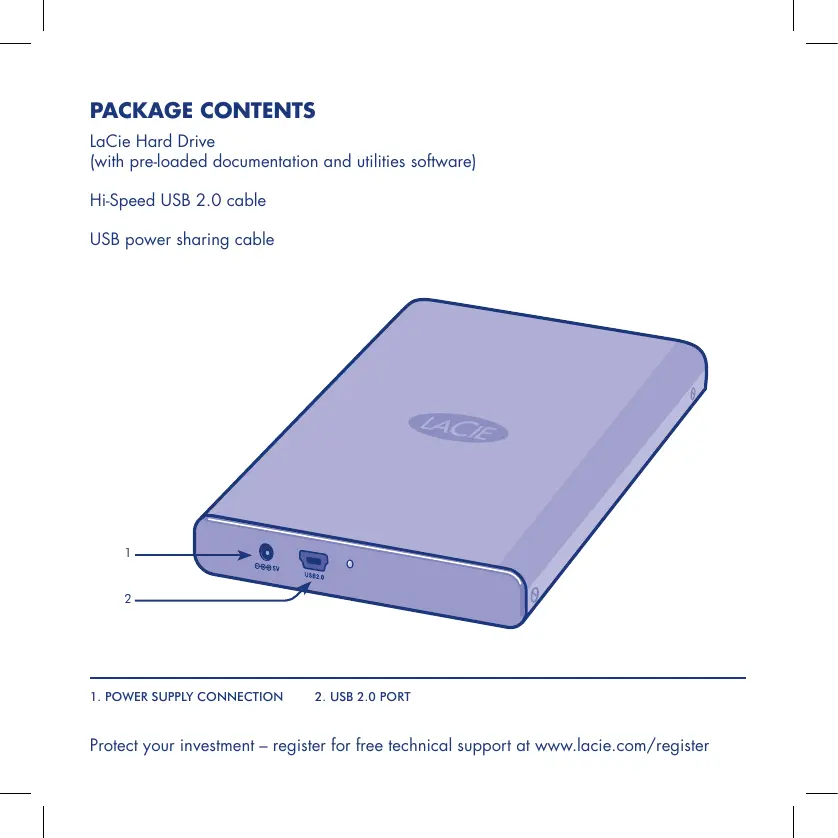
(with pre-loaded documentation and utilities software)
Hi-Speed USB 2.0 cable
USB power sharing cable
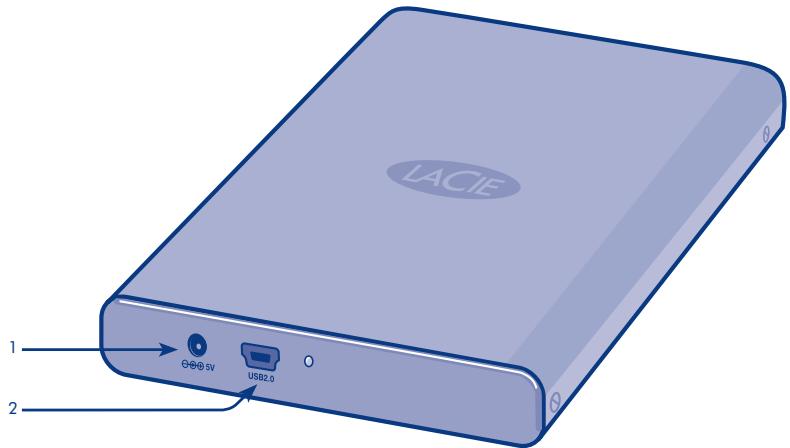
- POWER SUPPLY CONNECTION 2. USB 2.0 PORT
Protect your investment - register for free technical support at www.lacie.com/register
Plug-and-Play Setup for Windows and Mac OS X
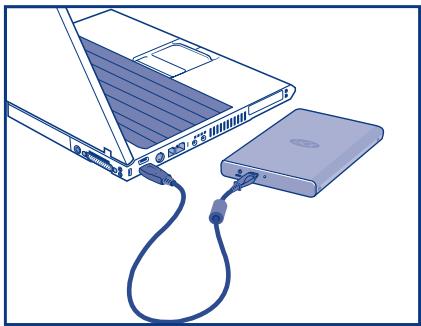
- Connect the USB cable to the drive.
- Connect the USB cable to your computer.
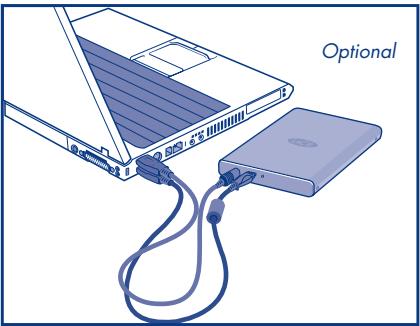
Optional: Some computers limit USB bus power. If your drive does not power on after connecting the USB cable, you may need to connect the USB power sharing cable to power your drive. Then reconnect the USB cable to the drive and to the computer.
- Refer to the pre-loaded User Manual for more detailed information and to install the included software.
For the latest documentation and software updates, please visit www.lacie.com and click on "Support and Downloads."
NOTE: The LaCie Hard Drive is pre-formatted as a FAT32 volume. Mac Users: Mac OS X 10.3 or later required to mount FAT32 volumes over 127GB.
For optimum performance: Mac users:Reformat in HFS+. Windows users:Reformat in NTFS. See User Manual for more details.
Disconnection
Windows
- Double-click the Safely Remove Hardware icon in the system tray (bottom right corner of the screen).
- Select USB Mass Storage Device from the list and click Stop. Click OK to confirm the selection of the LaCie drive to be disconnected.
- You can safely disconnect the USB cable.
Mac
- Drag the hard drive icon to the trash.
- When the icon disappears from the desktop, you can safely disconnect the USB cable
Warranty Information
LaCie warrants your product against any defect in material and workmanship, under normal use, for the designated warranty period. The warranty becomes effective from the date of shipment. In the event this product is found to be defective within the warranty period, LaCie will, at its discretion, repair or replace the defective product.
This warranty is void if:
- The product was operated/stored in abnormal use or maintenance conditions;
- The product is repaired, modified or altered, unless LaCie expressly authorizes such repair, modification or alteration in writing;
- The product was subjected to abuse, neglect, electrical fault, improper packaging, accident or acts of nature;
The product was installed improperly;
The serial number of the product is defaced or missing; - The broken part is a replacement part such as a pickup tray, etc.
- The tamper seal on the casing is broken.
FR LaCie Mobile Disk USB 2.0
KpaTkoe pyKOBoIcTBo IIO yCTaHOBKe
YctaHOBka nO texHONoru Plug-and-Play B cIcTeMax Windows u Mac OS X
1.ПоdkлioчnteОднКоheцKa6eЯUSBKпрвody.
2.Дугов KoHeu NOdKlIOUHTe K KomIbIOpTepy.
3.Дононгеловиун Информалич OБ стained BpOgPAMMORO ObSceNCHENH, BXOJIaERoB KOMPINkT NocSTABKIM, CB nPdEBAHTeINbO 3aRpyKEnHMpyKOyOBdTeB NoIb3OBaTEiRn.
4m0b6y nunlhynncnue hne cdeHnue u noobnene npzopammo 0o6cehneu, nocemtme e6-caim www.lacie.com u b6bepmu cbbny (fTdoepkxa uma mepuaanl dna aazpykua).
Donohumnelhno: o omelnbHx moelbKomnblmepeo umhaue cheepu uhy USB orapauueho. Ecnu noce noknloehna Kaebna USB npubod he 8knuaemc, 03mKNO, nompeyemc nocklouene USB-Kabena paenpdehenna naayzku b k aquecheut cummoHnka Donohumelhno zekmponunumaHou. Iocne 3mozo noe mopHO nooknloume Kab6n USB K npubod y komnboemye.
IPNMEAHAHE. Ipuoeo LaCie Hard Drive npedapumtnbno oomfopmatupoaan b paunobouc cuscme FAT32,Ja nonb0aemene KOMnbOpoeo Mac: nokknuehme moMoE FAT32 pasepmo 6oee 127 86 0e3mKHO mbo kcu cusceme Mac OS X 10.1 uu 6oone no3neH vecepri.
Docmukheue onmmumalbHou npou3bodumelbHocmu
aallll lllllllllllllll
JUUBS JSS Juae ciay icaii jao jajll cliai i
jlaiall clogleao
Jn Jnnnnnnnnnnnnnnnnnnnnnnnnnnnnnnnnnnnnnnnnnnnnnnnnnnnnnnnnnnnnnnnnnnnnnnnnnnnnnnnnnnnnnnnnnnnnnnnnnnnnnnnnnnnnnnnnnnnnnnnnnnnnnnnnnnnnnnnnnnnnnn
Aalalal alalal 1a aalal aalal LaCie gaaanl alalal Dlaagaaa
ylll llll yly jlll l
Aaia 1
aLaiy jll 1 Jaiil 1 Jla Cie aJ ai LaCie
aalal gall glalg alalglal gie gail gialg jllaljll jllal j
.
11 1111111111111111111111
ailllll llllllgl 2gall llllll p
Contact Us
LaCie USA
22985 NW Evergreen Pkwy
Hillsboro, OR 97124
sales@lacie.com
LaCie France
17, rue Ampère
91349 Massy Cedex
sales.fr@lacie.com
LaCie Asia (HK)
25/F Winsan Tower
98 Thomson Road
Wanchai, Hong-Kong
sales asia@lacie.com
LaCie Asia (Singapore)
Centennial Tower, Level 34
3 Temasek Avenue
Singapore 039190
sales.asia@lacie.com
LaCie Australia
458 Gardeners Rd.
Alexandrio, NSW 2015
sales.au@lacie.com
LaCie Belgium
Vorstlaan 165/Bld
du Souverain 165
1160 Brussels
sales.benelux@lacie.com
Copyright © 2007, LaCie
711632 070702
LaCie Canada
235 Dufferin St.
Toronto, Ontario M6K 1Z5
sales.ca@lacie.com
LaCie Germany
Am Kesselhaus 5
D-79576 Weil Am Rhein
sales.de@lacie.com
LaCie Italy
(Sweden, Denmark, Norway,
Finland)
Sveavagen 90,5tr
11359 Stockholm,Sweden
sales.nordic@lacie.com
LaCie Spain
C/Nunez Morgado,3, 5^a pl.
28036 Madrid
sales.es@lacie.com
LaCie Switzerland
Davidsbodenstrasse 15 A
4004 Basel
sales.ch@lacie.com
LaCie United Kingdom and Ireland
LaCie LTD - Friendly House
52-58 Tabernacle Street
London, England EC2A 4NJ
UK: sales.uk@lacie.com
Ireland: sales.ie@lacie.com
LaCie Worldwide Export
17, rue Ampere
91349 Massy Cedex, France
sales.intl@lacie.com
support.intl@lacie.com
Visit www.lacie.com for more
information on LaCie products.