EasyManual
STARCK - External hard drive LACIE - Free user manual and instructions
Find the device manual for free STARCK LACIE in PDF.


Questions des utilisateurs sur STARCK LACIE
0 question sur cet appareil. Repondez a celles que vous connaissez ou posez la votre.
Poser une nouvelle question sur cet appareil
Download the instructions for your External hard drive in PDF format for free! Find your manual STARCK - LACIE and take your electronic device back in hand. On this page are published all the documents necessary for the use of your device. STARCK by LACIE.
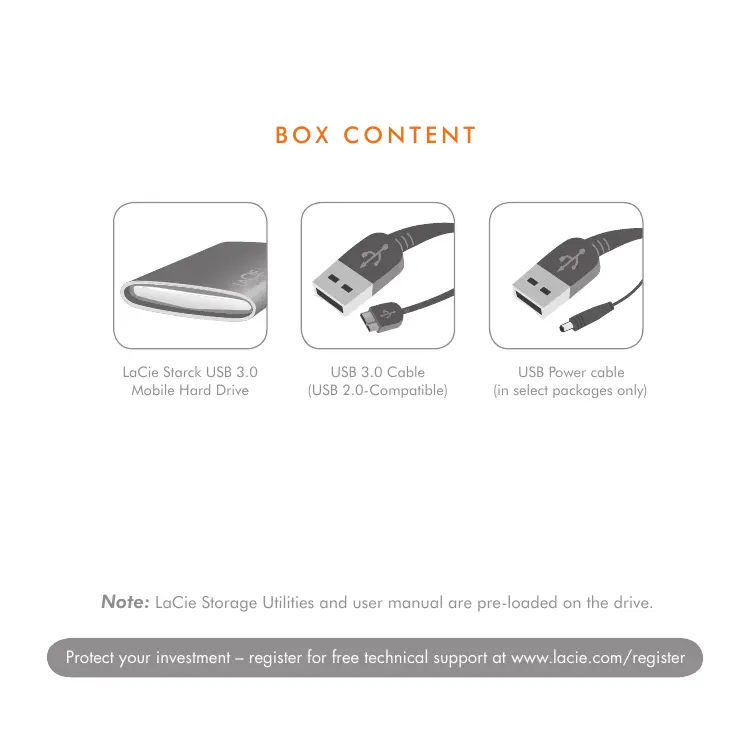
USER MANUAL STARCK LACIE
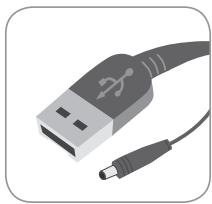
USB Power cable
(in select packages only)
Note: LaCie Storage Utilities and user manual are pre-loaded on the drive.
SETUP STEPS
LaCie Setup Assistant
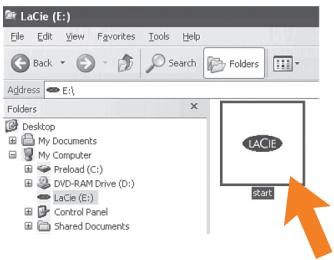
WINDOWS (start.exe)
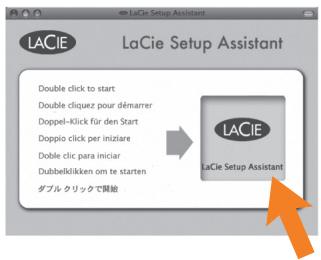
MAC
2
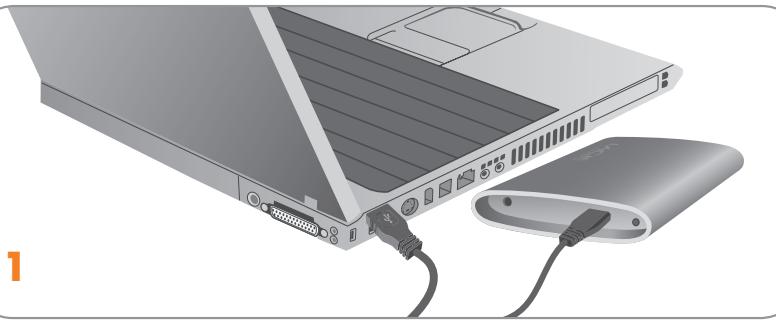
- Connect the USB 3.0 cable to your computer.
- Launch LaCie Setup Assistant.
Windows users: Double-click the LaCie drive icon in "My Computer".
Mac users: Double-click the "LaCie Setup Assistant" icon on your desktop.
Notes
If you do not launch LaCie Setup Assistant or if you quit LaCie Setup Assistant after the formatting has begun, your drive will not be ready to use and will require manual formatting.
Using LaCie Setup Assistant does not prevent you from using your computer's native disk utility program to format or partition your LaCie drive. Simply follow the Setup Assistant through completion, then use your computer's native disk utility (Disk Management for Windows or Disk Utility for Mac) to reformat your drive. See the user manual for more information.
Mobile hard drives may require additional power. Connect a USB power cable to the drive and to your computer's USB port to ensure adequate power. If a USB power cable is not included in the packaging, you can purchase one from www.lacie.com/accessories/
Warranty Information
LaCie warrants your product against any defect in material and workmanship, under normal use, for the designated warranty period. For more details concerning your warranty, please read the User Manual preloaded on the hard drive. For a detailed list of product warranties, visit: www.lacie.com/products/warranty.htm.
For the latest documentation and software updates, please go to: http://www.lacie.com/us/support/documents/index.htm?id=10007
.LaCie Setup Assistant 2
. (J) My Computer 豆 LaCie Jauu Jauu Jauu Jauu Jauu Jauu Jauu Jauu Jauu Jauu Jauu Jauu Jauu Jauu Jauu Jauu Jauu Jauu Jauu Jauu Jauu Jauu Jauu Jauu Jauu Jauu Jauu Jauu Jauu Jauu Jauu Jauu Jauu Jauu
Lal "LaCie Setup Assistant" jolj Jd:Mac
山
Jalal jlll knnn nn nnnn nn nnnnnn nn nnnnnn nn nnnnnn nn nnnnnn nn nnnnnn nn nnnnnn nn nnnnnn nn nnnnnn nn nnnnnn nn nnnnnn nn nnnnnn nn nnnnnn nn nnnnnn nn nnnnnn nn nnnnnn nn nnnnnn nn nnnnnn nn nnnnnn nn nnnnnn nn nnnnnn nn nannn
a
g d j 1 1 1 1 1 1 1 1 1 1 1 1 1 1 1 1 1 1 1 1 1 1 1 1 1 1 1 1 1 1 1 1 1 1 1 1 1 1 1 1 1 1 1 1 1 1 1 1 1 1 0.
Clogall jaojolipsslll jll jbl
Aailllll lall USB 1111111111111111111111111111111111111111111111111111111
juliall cloglan
Jaa Jai Jaalal Jaaal Jaaal Jaaal Jaaal Jaaal Jaaal Jaaal Jaaal Jaaal Jaaal Jaaal Jaaal Jaaal Jaaal Jaaal Jaaal Jaaal Jaaal Jaaal Jaaal Jaaal Jaaal Jaaal Jaaal Jaaal Jaaal Jaaal Jaaal Jaaal Jaaal Jaaal Jaaal Jaaal Jaa
. www.lacie.com/products/warranty.htm :
:5j j j j j j j j j j j j j j j j j j j j j j j j j j j j j j j j j j j j j j j j j j j
http://www.lacie.com/us/support/documents/index.htm?id=10007
CONTACT US
LaCie Asia
25/F Winsan Tower
98 Thomson Road
Wanchai, Hong-Kong, China
info.asia@lacie.com
LaCie Australia
458 Gardeners Road
Alexandria, NSW 2015
info.au@lacie.com
LaCie Benelux
Vorstlaan / 165 Bld du Souverain
B-1160 Brussels, Belgium
info.benelux@lacie.com
LaCie Canada
235 Dufferin St.
Toronto, Ontario M6K 1Z5
info.ca@lacie.com
LaCie France
17, rue Ampère
91349 Massy Cedex
info.fr@lacie.com
LaCie Germany
Am Kesselhaus 5
D-79576 Weil Am Rhein
info.de@lacie.com
LaCie Italy
Milano Business Park
Edificio B1
(Sweden, Denmark, Norway, Finland)
Sveavagen 90,5tr
113 59 Stockholm, Sweden
info.nordic@lacie.com
LaCie Spain
C/NunezMorgado,3,5a pl.
28036 Madrid
info.es@lacie.com
LaCie Switzerland
Davidsbodenstrasse 15A
4004 Basel
info.ch@lacie.com
LaCie United Kingdom and Ireland
LaCie Ltd, Power Road Studios
114 Power Road
Chiswick, London, UK W4 5PY
UK: info.uk@lacie.com
Ireland: info.ie@lacie.com
LaCie USA
22985 NW Evergreen Pkwy
Hillsboro, OR 97124
sales@lacie.com
LaCie Worldwide Export
17, rue Ampère
91349 Massy Cedex, France
sales.intl@lacie.com
support.intl@lacie.com