USER MANUAL D2 QUADRA LACIE
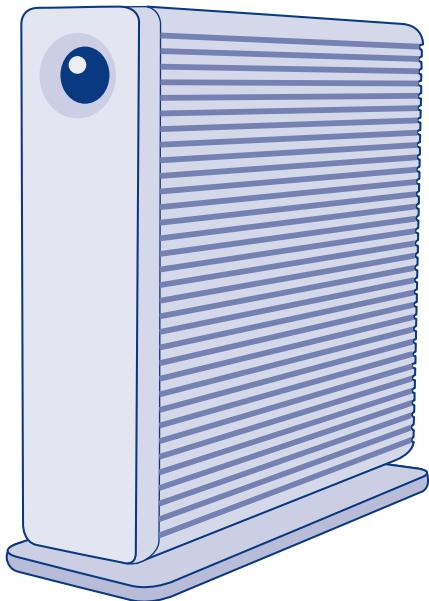
Design by Neil Poulton
Quick Install Guide
Box Content
LaCie d2 Quadra Hard Disk
Power supply kit
FireWire 800 cable
FireWire 400 cable
Hi-Speed USB 2.0 cable
eSATA cable
Quick Install Guide
Vertical stand kit
LaCie Storage Utilities and User Manual are pre-loaded on the drive.
Protect your investment - register for free technical support at www.lacie.com/register
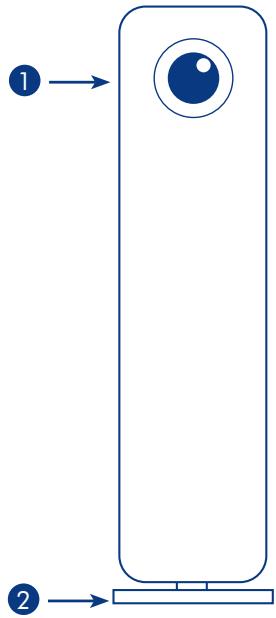
Front View
- Shortcut Button with Activity LED
- Removable stand
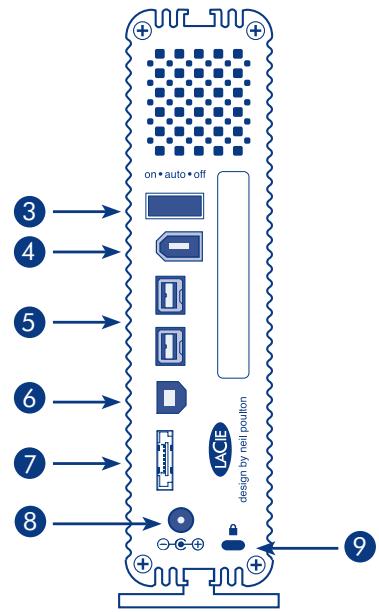
Rear View
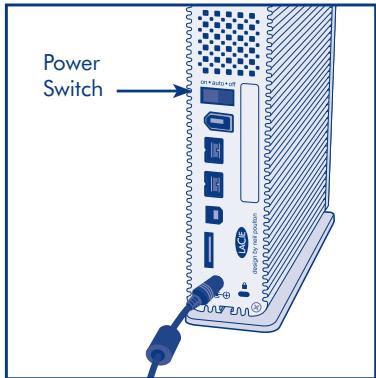
- Power switch
- FireWire 400 port
- FireWire 800 ports
- USB 2.0 port
- eSATA port
- Power adapter connection
- Chain lock option
Setup Steps
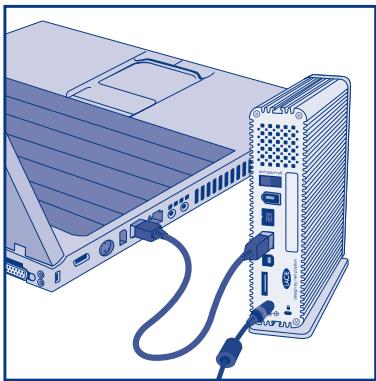
- Connect the power supply.
- Connect the USB, FireWire or eSATA cable to your computer and to the drive.
- Turn on the drive by moving the power switch to On or Auto (drive powers on/hibernates automatically). The drive will mount in My Computer (Windows) or on your desktop (Mac).
-
Before using your drive, LaCie Setup Assistant software must be launched to format your drive. It will:
-
Optimize your drive according to your needs
- Copy the manual and utilities on your drive
To launch LaCie Setup Assistant:
Windows users: Double-click the LaCie drive icon in My Computer.
Mac users: Double-click the "LaCie Setup Assistant" icon on your desktop.
NOTE: If you do not launch LaCie Setup Assistant or if you quit LaCie Setup Assistant after the formatting has begun, your drive will not be ready to use and will require manual formatting. The user manual and utilities will not be available on your drive and will have to be downloaded from the LaCie website: www.lacie.com
NOTE: Using LaCie Setup Assistant does not prevent you from using your computer's native disk utility program to format or partition your LaCie drive. Simply follow the Setup Assistant through completion, then use your computer's native disk utility (Disk Management for Windows or Disk Utility for Mac) to reformat your drive.
- Install LaCie Shortcut Button software to enable the feature.
Precautions
Do not stack more than 3 LaCie d2 Quadra Hard Disks together. Do not expose the drive to temperatures over 35^ C (95^ F) or 30^ C (86^ F) when stacked. Do not expose the device to liquids. Use only the power supply shipped with the device.
LaCie warrants your product against any defect in material and workmanship, under normal use, for the designated warranty period. The warranty becomes effective from the date of shipment. In the event this product is found to be defective within the warranty period, LaCie will, at its discretion, repair or replace the defective product.
This warranty is void if:
- The product was operated/stored in abnormal use or maintenance conditions;
- The product is repaired, modified or altered, unless LaCie expressly authorizes such repair, modification or alteration in writing;
- The product was subjected to abuse, neglect, electrical fault, improper packaging, accident or acts of nature;
- The product was installed improperly;
The serial number of the product is defaced or missing;
- The broken part is a replacement part such as a pickup tray, etc.
- The tamper seal on the casing is broken.
See the User Manual (pre-loaded on the drive) for more information.

Manufacturer's Declaration for CE Certification
We, LaCrie, solemnly declare that this product conforms to the following European standards: Class B EN60950, EN55022, EN55024.
With reference to the following conditions: 73/23/EEC Low Voltage Directive; 89/336/EEC EMC Directive

LaCie Hard Disk
Tested to comply with FCC standards for home or office use
MepblnpedoctoPOXHOCTN
He npKnloaHne 3npBodAoLaCudraHardSkOndOBpeMeHHo. He npBeprae npBODoBaeCTBIO TEMnepatyp CbIbe 35 ^ C ,ecni OH ne pKnlochEn KOMMbTopey, nCbIbe 30 ^ C - ecnio npKIOuChEn. He npDysckaiTe NoJaDaHn JkiDKoCTHa npBodNcIOnbIyte ToJIbKO ITOCHNYIK NITAHNA, BXOJDAE B KOMPNEKT NOCTABKn.
HΦopMaζη o rapaHTnHOM 06cIyXmbHm
PnHOPMaBbHO 3KcNpyataunn KOMaNaHnlaLaCie rapaHTmpyet OTCyTCTBne IIO6bIe DEeKToB B MaTePnaIaNx N c6OpKe 3dEInnB TceHne CPOka, Yka3aHHoRb G rapaHTmHOM TAnOHe. 1paAHTNcUHTaETCR DeICTBNTHoN CO dHa NoCTabKn TOBaPa. EcnB TceHne rapaHTmHOrO CPOka 6dyuT o6hApyeKbI, KOMaNaHnlaLaCie 6b3yETc rTOpeMOHTnpOBaTb IIN 3aMeHInb 3dEInne PNO CBOeMy yCMOTpEHNo.
TapaHTnAHHynpyeTc,eCn:
He co6jIoandaIcB yCIOBn3KcNpyaTaun, XpaHEnn 1nn TexHnueCKOrO 06CnyJbAHn 3dennia;
i3dennie 6bIIO OTpeMOHTnpoBaHO, MoDnOu npoBaHO nI IN 3MeHNO 6e3 NcBmHOrO pa3peHnKOMtAHn LaCie;
- YC0NBA 3KcNpyaTnIiEeBbIbHApNeBbIbBcBn C6bEeKbHMbOpaJIeHNEM, KOPOTKHM 3MbKANHEm, HNEaIeKJAEuienyAynokAOB INI NPOBPeDEHAnBMe BpezYIte TCTXmHbNb6EcbTbn
i3dene6bIyo yCTaHOBnEHO HnpabNlboHO;
- cepinHbH HOMep n3dennr CTept nIIN OTCyTCTByeT;
- NOBpeXdEHHaJeTaeTalb (HaNPmEp, POnDbemHbI JIoTOK N T. n.) OTHOCNTcK KaTEROpn CMeHHbIX;
- nILOM6a Ha KOpnyce n3dEJIy NOBpeXkDeHa.
DOnOJIHnITeIbHyIO INHΦOpMaIcIgCM.BpyKOBoDCTBe NIOIb3OBATeIa, npEdbapITeJIbHO 3aRpyKeHHOM Ha nPIMBOID.


EL Bñmuata Eykatáσtaonc
LaCie Setup Assistant y
gale gali jall aee.
aalalal alaae aaleaalalalalalalal
:LaCie Setup Assistant
.(j)My Computer LaCie JzJzJzJzJzJzJzJzJzJzJzJzJzJzJzJzJzJzJzJzJzJzJzJzJzJzJzJzJzJzJzJzJzJzJzJzJzJzJzJzJz
"LaCie Setup Assistant" :Mac
Aaill 15 y aai i 15 J LaCie Setup Assistant 15 y aiai aai jy bai jy ai lai:
LaCie Setup Assistant 2
e e 15
aJgssll gale aalxoxlall axell alaxl alxell g Setup Assistant xcl y ixoxlall
Mac Disk Utility Windows Disk Management)
LaCie Shortcut Button
a
(90) 482345678901000000000000000000000000000000000000000000000000000000
Jgall 10000000000000000000000000000000000000000000000
jiaai liang
Jn Jn Jnnnnnnnnnnnnnnnnnnnnnnnnnnnnnnnnnnnnnnnnnnnnnnnnnnnnnnnnnnnnnnnnnnnnnnnnnnnnnnnnnnnnnnnnnnnnnnnnnnnnnnnnnnnnnnnnnnnnnnnnnnnnnnnnnnnnnnnnnnnnnn
Aalalal alalal alalal alalal alalal alalal alalal alalal alalal alalal alalal alalal
y
aalalalalalalalalalalalalalalalalalalalalalalalalalal
y
to 1000
ailll lll lll lle 2gall ll pail pia bai
e aal l jy jall gle uall (uajll djxg (gl aln) paxaill lgl


LaCie USA
22985 NW Evergreen Pkwy
Hillsboro, OR 97124
sales@lacie.com
LaCie France
17, rue Ampère
91349 Massy Cedex
sales.fr@lacie.com
LaCie Asia (HK)
25/F Winsan Tower
98 Thomson Road
Wanchai, Hong-Kong
sales.asia@lacie.com
LaCie Asia (Singapore)
Centennial Tower, Level 34
3 Temasek Avenue
Singapore 039190
sales.asia@lacie.com
LaCie Australia
458 Gardeners Rd.
Alexandria, NSW 2015
sales.au@lacie.com
LaCie Belgium
Vorstlaan 165/Bld
du Souverain 165
1160 Brussels
sales.benelux@lacie.com
LaCie Canada
235 Dufferin St.
Toronto, Ontario M6K 1Z5
sales.ca@lacie.com
LaCie Germany
Am Kesselhaus 5
D-79576 Weil Am Rhein
sales.de@lacie.com
LaCie Italy
LaCie Middle East FZE
LIU-E6,PO Box 293860,
Dubai Airport Free Zone,
Dubai, U.A.E.
sales.me@lacie.com
LaCie Nordic
(Sweden, Denmark, Norway, Finland)
Sveavagen 90,5tr
113 59 Stockholm, Sweden
sales.nordic@lacie.com
LaCie Spain
C/NunezMorgado,3, 5^ pl.
28036 Madrid
sales.es@lacie.com
LaCie Switzerland
Davidsbodenstrasse 15 A
4004 Basel
sales.ch@lacie.com
LaCie United Kingdom and Ireland
LaCie LTD - Friendly House
52-58 Tabernacle Street
London, England EC2A 4NJ
UK: sales.uk@lacie.com
Ireland: sales.ie@lacie.com
LaCie Worldwide Export
17, rue Ampere
91349 Massy Cedex, France
sales.intl@lacie.com
support.intl@lacie.com
Visit www.lacie.com for more
information on LaCie products.
Copyright © 2007, LaCie
712111 071126
LACIE