
AG-790 - Audio Receiver TEAC - Free user manual and instructions
Find the device manual for free AG-790 TEAC in PDF.



| Product type | Audio receiver |
| Brand | TEAC |
| Model | AG-790 |
| Output power | 100 + 100 watts RMS (0.9% THD, 1 kHz, 8 Ω) |
| Total harmonic distortion | 0.05% (at 80 watts, 1 kHz) |
| PHONO input sensitivity | 6.5 mV / 22 kΩ |
| LINE input sensitivity | 230 mV / 22 kΩ |
| PHONO frequency response | 20 Hz to 20 kHz, ±3 dB |
| LINE frequency response | 20 Hz to 35 kHz, -3 dB |
| PHONO signal-to-noise ratio | 75 dB (IHF-A) |
| LINE signal-to-noise ratio | 90 dB (IHF-A) |
| Tone control | Bass ±10 dB at 100 Hz, Treble ±10 dB at 10 kHz |
| Contour control | +4 dB at 100 Hz |
| FM tuner section | 87.5 MHz to 108.0 MHz, 50 kHz steps |
| AM tuner section | 522 kHz to 1620 kHz, 9 kHz steps |
| Power supply | 230 V AC, 50 Hz |
| Power consumption | 280 W |
| Supplied accessories | Remote control unit, batteries, AM loop antenna, FM wire antenna |
| Safety | Leave ventilation space, do not block openings, do not expose to moisture, do not open |
| Maintenance | Clean with a soft cloth or a diluted solution of mild soap |
Frequently Asked Questions - AG-790 TEAC
User questions about AG-790 TEAC
0 question about this device. Answer the ones you know or ask your own.
Ask a new question about this device
Download the instructions for your Audio Receiver in PDF format for free! Find your manual AG-790 - TEAC and take your electronic device back in hand. On this page are published all the documents necessary for the use of your device. AG-790 by TEAC.
USER MANUAL AG-790 TEAC
AM/FM Stereo Receiver
OWNER'S MANUAL
MANUEL DU PROPRIÉTAIRE
MANUAL DEL USUARIO
BEDIENUNGSANLEITUNG
Thank you for choosing TEAC. Read this manual carefully to get the best performance from this unit.
Before Use 3
Remote Control Unit. 4
Connecting Antennas 4
Connection. 6
Names of Each Control 8
Basic Operation. 10
Radio Reception 13
Preset Tuning 14
RDS 15
RDS (PTY) 15
RDS (PTY Search) 16
TroubleShooting 17
Specifications 18
Disposal of your old appliance
- When this crossed-out wheeled bin symbol is attached to a product it means the product is covered by the European Directive 2002/96/EC.
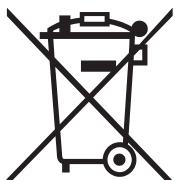
- All electrical and electronic products should be disposed of separately from
the municipal waste stream via designated collection facilities appointed by the government or the local authorities. - The correct disposal of your old appliance will help prevent potential negative consequences for the environment and human health.
- For more detailed information about disposal of your old appliance, please contact your city office, waste disposal service or the shop where you purchased the product.
Before Use
Read this before operation
- As the unit may become warm during operation, always leaves sufficient space around the unit for ventilation.
The ventilation holes should not be covered. Make sure there is at least 50 cm (18 inches) of space above and at least 10 cm (4 inches) of space on each side of the unit. Do NOT place anything on top of the unit. - The voltage supplied to the unit should match the voltage as printed on the rear panel. If you are in any doubt regarding this matter, consult an electrician.
- Choose the installation location of your unit carefully. Avoid placing it in direct sunlight or close to a source of heat. Also avoid locations subject to vibrations and excessive dust, heat, cold or moisture.
- Do not place the unit on the amplifier/receiver.
- Do not open the cabinet as this might result in damage to the circuitry or electrical shock. If a foreign object should get into the unit, contact your dealer or service company.
- When removing the power plug from the wall outlet, always pull directly on the plug, never yank the cord.
- Do not attempt to clean the unit with chemical solvents as this might damage the finish. Use a clean, dry or slightly damp cloth.
- Keep this manual in a safe place for future reference.
CAUTION
Ensure this product is not exposed to dripping or splashing and that no object filled with liquids, such as vases, is placed on the product.
Do not install this equipment in a confined space such as a book case or similar unit. Allow adequate air circulation around this product.
CAUTION Regarding Placement
To maintain proper ventilation, be sure to leave a space around the unit (from the largest outer dimensions including projections) equal to, or greater than, shown below.
Left and Right Panels : 10 cm
Rear Panel : 10 cm
Top Panel : 50 cm
The receiver and some other TEAC components which have IR mark on the front panel can be operated by the provided "UR" remote control unit.
When operating the remote control unit, point it towards the REMOTE SENSOR on the front panel of the receiver (or other TEAC component).
- Even if the remote control unit is operated within the effective range, remote control operation may be impossible if there are any obstacles between the unit and the remote control.
- If the remote control unit is operated near other appliances which generate infrared rays, or if other remote control devices using infrared rays are used near the unit, it may operate incorrectly. Conversely, the other appliances may operate incorrectly.
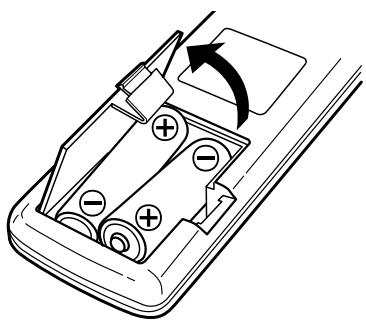
Battery Installation
- Remove the battery compartment cover.
- Insert two "AA" (R6 or SUM-3) dry batteries. Make sure that the batteries are inserted with their positive "⊕" and negative "⊗" poles positioned correctly.
- Close the cover.
Battery Replacement
If the distance required between the remote control unit and main unit decreases, the batteries are exhausted. In this case replace the batteries with new ones.
Precautions concerning batteries
- Be sure to insert the batteries with correct positive “⊕” and negative “ ” polarities.
- Use batteries of the same type. Never use different types of batteries together.
- Rechargeable and non-rechargeable batteries can be used. Refer to the precautions on their labels.
- When the remote control unit is not to be used for a long time (more than a month), remove the batteries from the remote control unit to prevent them from leaking. If they leak, wipe away the liquid inside the battery compartment and replace the batteries with new ones.
- Do not heat or disassemble batteries and never dispose of old batteries by throwing them in a fire.
FM Indoor Antenna
Connect the lead-type FM antenna to the FM 75Ω socket, extend the lead and tune the tuner to your favorite station (see page 13). Adjust the antenna in a suitable location like a window frame or wall until the reception is best and then affix the antenna in that position using thumb tacks, push pins or any other suitable means.
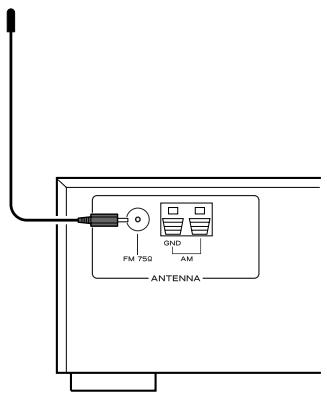
FM Outdoor Antenna
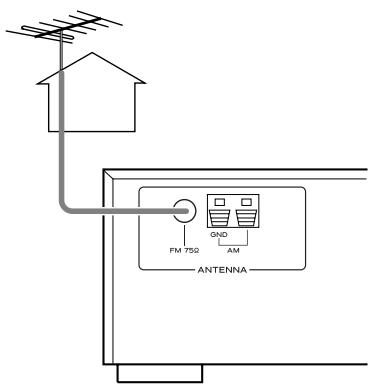
In an area where FM signals are weak, it will be necessary to use an outdoor FM antenna. Generally, a 3-element antenna will be sufficient; if you live in an area where the FM signals are particularly weak, it may be necessary to use one with 5 or more elements.
- Disconnect the FM indoor antenna when using an outdoor antenna.
AM Indoor Loop Antenna
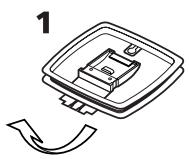
The high-performance AM loop antenna provided with this unit is sufficient for good reception in most areas. To stand the loop antenna on a surface, fix the claw to the slot in the antenna base.
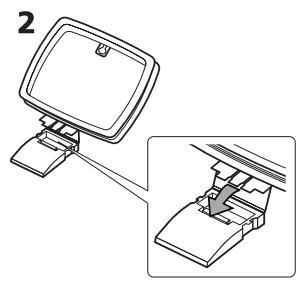
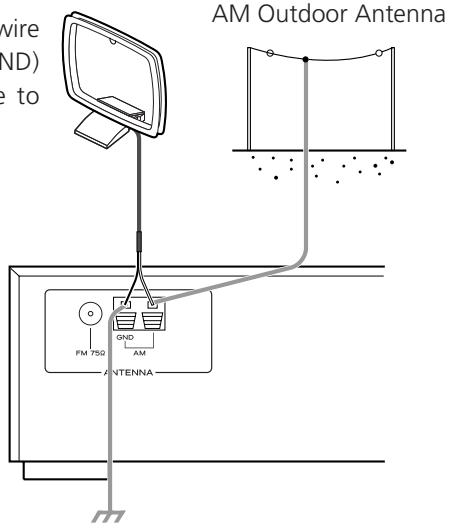
Connect the loop antenna's wires to the AM antenna terminals.
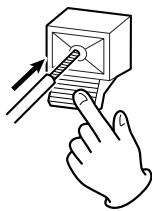
How to connect:
Press the lever, insert the end of the cord, then release the lever. Make sure it is fastened securely by pulling the cord lightly. Make sure only the bare, stripped wire is inserted in the jack and that no plastic insulation is preventing contact between the antenna wire and terminal.
Place the antenna on a shelf or hang it on a window frame, etc., in the direction which gives the best reception. Keep all other wires such as power cords, speaker wires or interconnect wires as far away as possible from the antenna.
AM Outdoor Antenna
If the AM loop antenna provided does not deliver sufficient reception (often due to being too far from the transmitter or in a concrete building, etc.), it may be necessary to use an outdoor AM antenna.
Use either a high quality commercial AM antenna or, if not available, an insulated wire more than 5m (15 feet) long, strip one end, and connect this to the terminal as shown. The antenna wire should be strung outdoors or indoors near a window. For better reception, connect the GND terminal to a reliable ground.
Note:
Even when using an outdoor AM antenna, do not disconnect the AM loop antenna.
AM Loop Antenna: Connect the black wire to the left jack (GND) and the white wire to the right jack.
CAUTION:
- Switch off the power to all equipment before making connections.
- Read the instructions of each component you intend to use with this unit.
- Be sure to insert each plug securely. To prevent hum and noise, avoid bundling the signal interconnection cables together with the AC power cord or speaker cables.
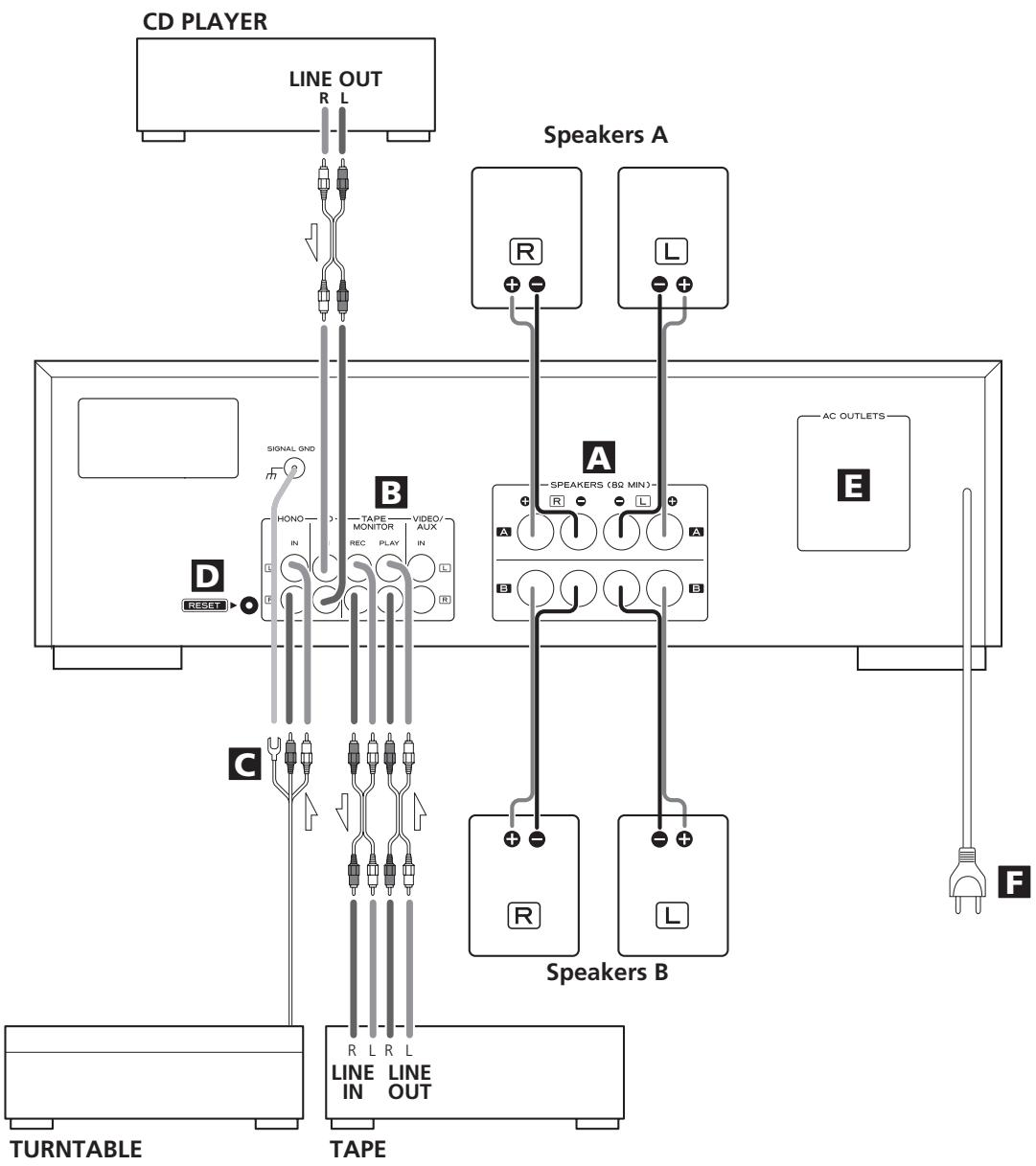
A Speaker Connections
Caution:
To avoid damaging the speakers with a sudden high-level signal, be sure to switch the power off before connecting the speakers.
- Check the impedance of your speakers. Connect speaker with an impedance of 8 ohms or more.
- The black speaker terminals are - (negative).
Generally, the + side of the speaker cable is marked to make it distinguishable from the - side of the cable. Connect this marked side to the + terminal and the unmarked side to the black - terminal.
- Prepare the speaker cables for connection by stripping off approximately 10mm or less of the outer insulation. (Removing too much insulation may lead to a short circuit if the bared wires should come in contact with each other.) Twist the strands of the stripped wires tightly together:
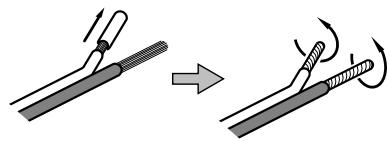
Caution:
The metal portions of the two separate wires should not touch or an electrical short can occur. Shorted wires can create a fire hazard or induce a failure in your equipment.
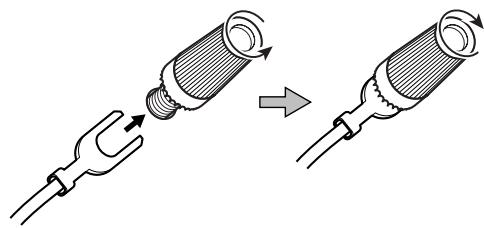
How to connect
- Turn the terminal cap counterclockwise to loosen it. The speaker terminal caps cannot be fully removed from the base.
2.Insert the wire into the terminal fully and turn the terminal cap clockwise to securely connect it.
Make sure none of the wire insulation is under the terminal, only the bare, stripped wire.
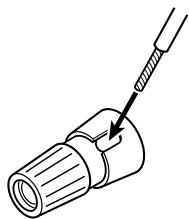
- Make sure it is fastened firmly by pulling the cable lightly.
CD, TAPE MONITOR, VIDEO/AUX jacks
Analog 2-channel audio signal is input or output from these jacks. Connect the component with commercially-available RCA cables.
Make sure to connect:
white plug white jack (L: left channel)
red plug red jack (R: right channel)
C PHONO jacks/SIGNAL GND terminal
Connect the turntable's RCA pin cords to PHONO jacks.
Make sure to connect:
white plug white jack (L: left channel)
red plug red jack (R: right channel)
Connect the turntable's ground cord to SIGNAL GND terminal.
RESET switch
In the following cases, function buttons may not work properly.
- When the system is damaged by electrical shock.
- When the power is irregular or has electrical noises.
In these cases, press the RESET switch once or twice with a pencil or a ball-point pen lightly.
All the settings kept in memory (such as preset stations) will be erased.
AC Outlet (Unswitched)
This outlet is active only when the unit is on or standby.
When the power switch of the main unit is off, the outlet is inactive.
Caution:
Make sure that the total power consumption of all equipment connected to the outlet does not exceed 100 watts or 1A.
Power cord (AC)
- Be sure to connect the power cord to an AC outlet which supplies the correct voltage.
Hold the power plug when plugging or unplugging the power cord. Never pull or yank on the power cord.
A POWER switch
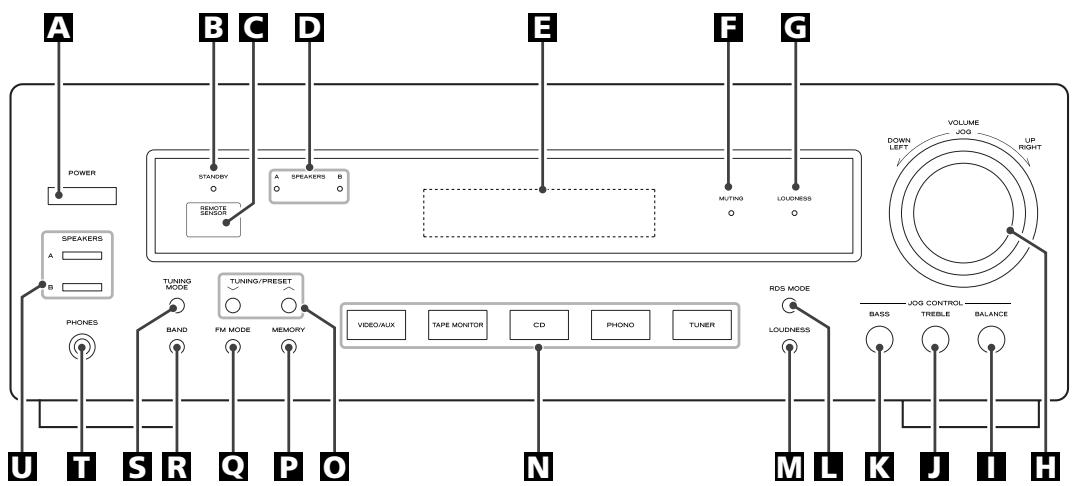
Press this switch to turn the unit on or off.
The equipment draws nominal non-operating power from the AC outlet with its POWER switch in the OFF position.
STANDBY indicator
This indicator lights when the unit is in the standby mode. In the standby mode, press the POWER button of the remote control unit or the Input buttons of the main unit to turn the unit on.
When the unit is turned on, the indicator goes off.
C REMOTE SENSOR
When operating the remote control unit, point it towards the REMOTE SENSOR.
SPEAKERS indicator
This indicator lights when the SPEAKERS button (A or B) is set to on.
E Display
When the unit is on, the current status of the unit is displayed.
F MUTING indicator
This indicator blinks during the muting.
LOUDNESS indicator
This indicator lights when the LOUDNESS button is set to on.
VOLUME/JOG
Turn this knob (or press the VOLUME buttons of the remote control unit) to adjust the volume.
1 BALANCE button
Press this button and turn the VOLUME/JOG dial to adjust.
TREBLE button
Press this button and turn the VOLUME/JOG dial to adjust.
BASS button
Press this button and turn the VOLUME/JOG dial to adjust.
L RDS MODE button
In FM tuner mode, use this button for RDS function.
RDS is available in European countries only.
W LOUDNESS button
Use this button to compensate for the loss of bass at low volumes.
INPUT (CD, PHONO, TUNER, TAPE MONITOR, VIDEO/AUX)
Used to select a function.
When the unit is in the standby mode, press any one of these buttons to turn the unit on.
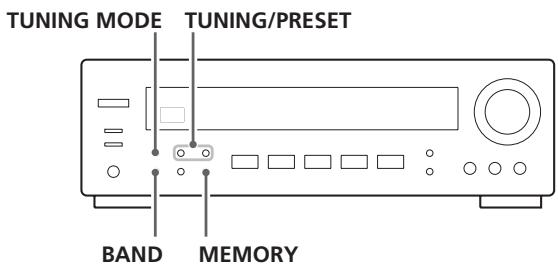
TUNING/PRESET buttons
In the manual tuning mode, use these buttons to tune in a station.
In the preset tuning mode, use these buttons to select a preset channel.
P MEMORY button
Use this button to store preset channels into memory.
FM MODE button
Use this button to select stereo or monaural.
BAND button
Use this button to select FM or AM.
TUNING MODE button
Use this button to select the manual tuning mode or the preset tuning mode.
T PHONES jack
For private listening, insert the headphones plug into this jack, and adjust the volume by turning the VOLUME knob.
SPEAKERS buttons
Use these buttons to turn on or off the speakers.
on : Sound is output from the speakers.
off : No sound is output from the speakers.
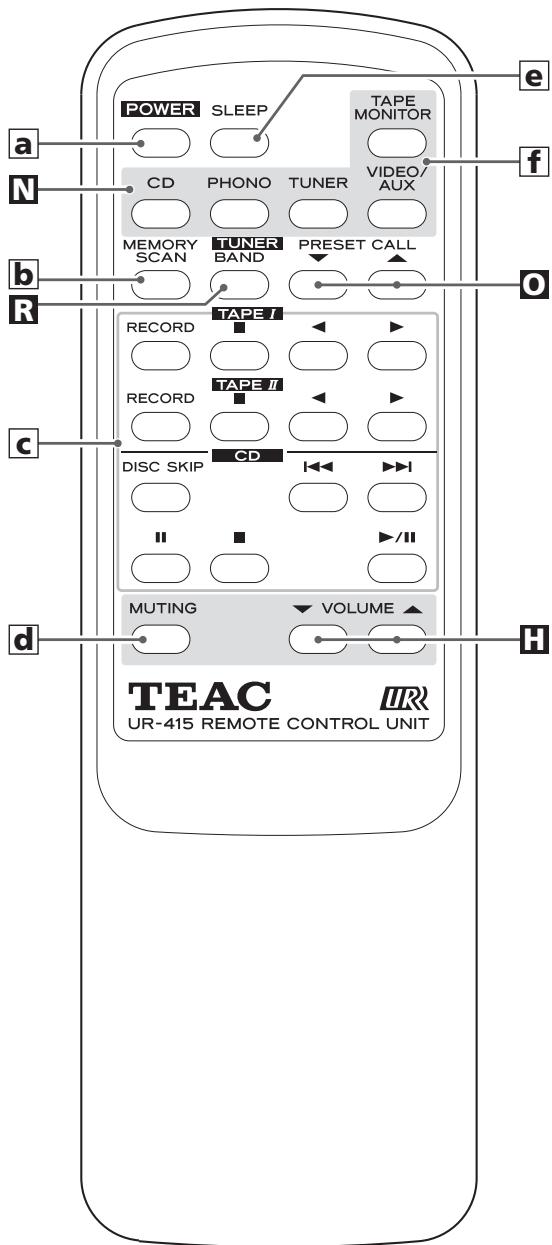
a POWER (standby/on) button
When the power switch of the main unit is depressed, use this button to turn the unit on or standby.
b MEMORY SCAN button
Use this button to scan preset channels.
Operation buttons for TEAC's cassette tape deck and CD player
Use these buttons to operate TEAC components with mark.
d MUTING button
Use this button to mute the sound.
e SLEEP button
Use this button to set sleep timer.
INPUT
(CD, PHONO, TUNER, TAPE MONITOR, VIDEO/AUX)
Used to select a function.
Note:
To simplify explanations, instructions in this manual refer to the names of the buttons on the front panel only. Associated controls on the remote control will also operate similarly.
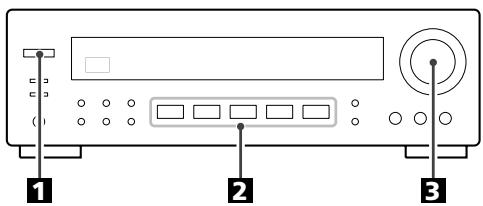
Press the POWER switch.
The unit is turned on.
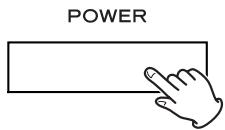
- When the unit is turned on, the MUTING indicator lights momentarily. This is not a malfunction.
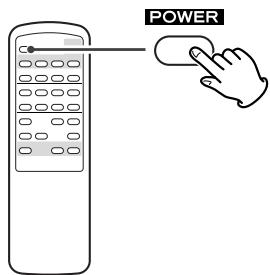
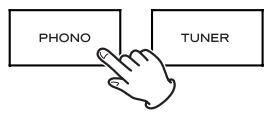
- When the unit is in the standby mode and the standby indicator is lit, press the POWER button of the remote control unit or any of the Input buttons of the main unit (TUNER, PHONO, CD, TAPE MONITOR or VIDEO/AUX) to turn the unit on.
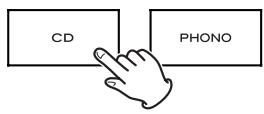
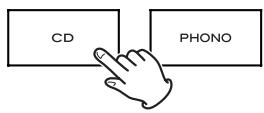
2 Select a source by pressing the corresponding Input button.
Tape Monitor
Press the TAPE MONITOR button to turn on or off the tape monitor function. When the tape monitor is on, the "TAPE MON" indicator lights on the display.
To listen to the TAPE, turn the tape monitor function ON using the TAPE MONITOR button.
To listen to a source other than TAPE
If the tape monitor function is ON ("TAPE MON" indicator is lit), press the TAPE MONITOR button to turn it off.
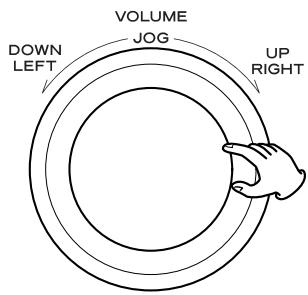
3 Play the source, and gradually turn up the volume to the required level by turning the VOLUME knob.
Recording
- Select the source to be recorded using the corresponding Input button.
-
Start recording.
-
If a 3-head cassette tape deck is connected to TAPE MONITOR (PLAY and REC) jacks, and if the tape monitor function is set to on during recording, you can listen to not the source sound but the sound being recorded. Press the TAPE MONITOR button to turn on or off the tape monitor function.
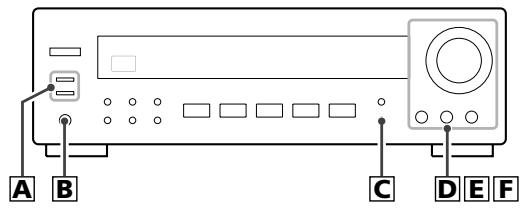
A Selecting the speakers
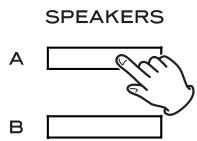
Press the SPEAKERS button (A or B) to turn the speakers on or off.
When ON is selected, the SPEAKERS indicator lights.
Caution:
If the speakers are connected to the SPEAKERS A terminals, turn the SPEAKER A on using the SPEAKERS A button. If no speakers are connected to the SPEAKER B terminal, be sure to turn off the SPEAKER B button, or no sound will be output from SPEAKER A, and vice versa.
B Listening through headphones
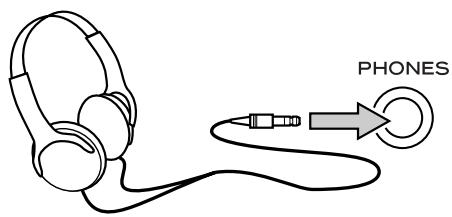
For private listening, first reduce the volume level on the receiver to minimum. Then insert the plug from your headphones into the PHONES jack, and adjust the volume by turning the VOLUME knob.
If you want to cut off the sound from speakers, press the SPEAKERS button to turn it off.
CAUTION
Always lower the volume level prior to plugging in your headphones. TO AVOID DAMAGING YOUR HEARING - Do not place your headphones on your head until after you have plugged them in.
C LOUDNESS button
This button compensate for the loss of bass at low volumes. Set this button to the OFF position when listening at normal levels.
LOUDNESS

Bass Control
This control is used for adjusting the level of the low frequency sound range.
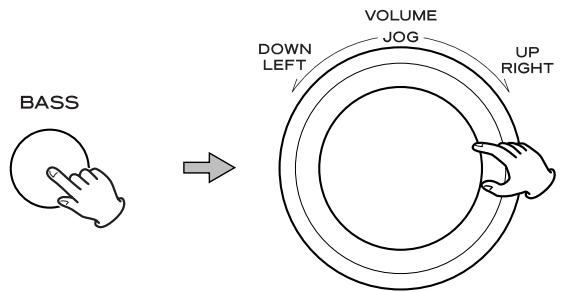
- Press the BASS button. "BAS" appears on the display.
- Within 3 seconds, turn the JOG dial to adjust the level.
The level can be adjusted in 2 steps from -10 to +10 .
E Treble Control
This control is used for adjusting the level of the high frequency sound range.
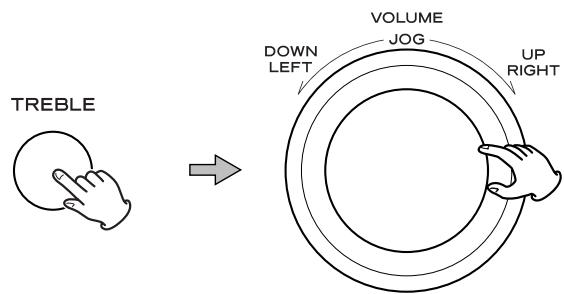
- Press the TREBLE button. "TRE" appears on the display.
- Within 3 seconds, turn the JOG dial to adjust the level.
The level can be adjusted in 2 steps from -10 to +10 .
F How to adjust the balance between the left and right speakers
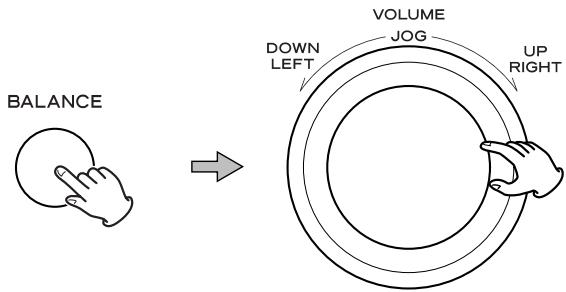
- Press the BALANCE button. "BAL" appears on the display.
- Within 3 seconds, turn the JOG dial to adjust the level.
The level can be adjusted from L + 16 to R + 16 :
$$ L + 1 6 \dots L + 1 \leftarrow C E N T \rightarrow R + 1 \dots R + 1 6 $$
Normally, select "CENT (center)".
Sleep Timer
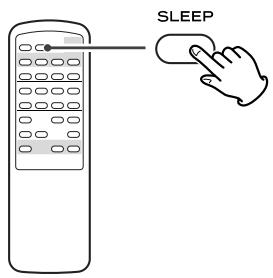
The power can be switched off after a specified amount of time.
Press the SLEEP button repeatedly until desired time appears on the display.
The sleep time can be changed in steps of 10 minutes.
SLEEP 90 (80, 70...or 10)
The SLEEP indicator lights, and the power will be switched off 90 (80, 70...or 10) minutes later.
Normal display
Sleep timer is off.
- When you set the sleep timer, the display is dimmed.
- If you want to check the remaining time, press the SLEEP button once. The remaining time will be displayed for about 3 seconds, and return to the normal display.
Muting
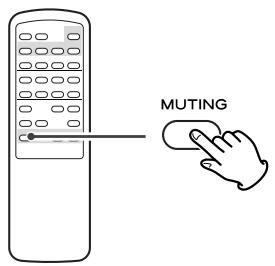
To mute the sound temporarily, press the MUTING button. Press the MUTING button again to restore the sound.
- While muting is engaged, the MUTING indicator blinks.
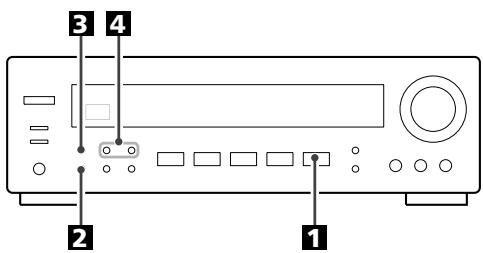
Press the TUNER button.
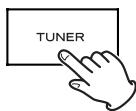
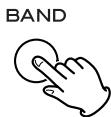
2 Select AM or FM by pressing the BAND button.
3 If "CH" indicator is lit, press the TUNING MODE button to select the manual tuning mode.
The "CH" indicator disappears from the display.
This button is used to change the tuning mode.
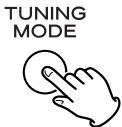
4 Select the station you want to listen to (auto selection).
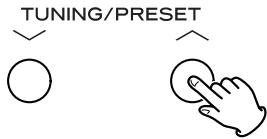
Hold down the TUNING/PRESET button for 0.5 to 2 seconds. When a station is found, the tuning process will stop automatically.
If you want to stop the tuning process, press the TUNING/PRESET button.
Selecting stations which cannot be tuned automatically (manual selection)
When the TUNING/PRESET button is pressed momentarily (0.5 second or less), the frequency changes by a fixed step.
Press the TUNING button repeatedly until the station you want to listen to is found.
- "TUNED" is displayed when a broadcast is correctly tuned in.
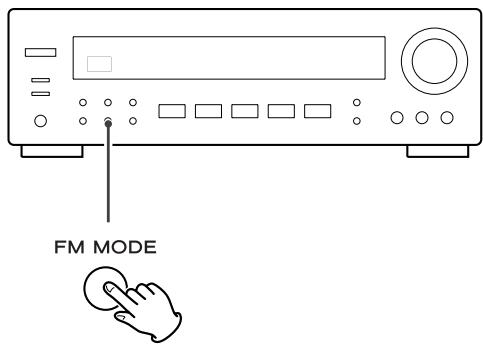
FM MODE Button
Pressing this button alternates between Stereo mode and Mono mode.
Stereo
FM stereo broadcasts are received in stereo.
The "STEREO" indicator lights on the display when an FM stereo broadcast is tuned in.
- If the sound is distorted and the "STEREO" indicator light flashes, the signal is not strong enough for good stereo reception. In this case, change to MONO mode.
Mono
To compensate for weak FM stereo reception, select this mode. Reception will now be forced monaural, reducing unwanted noise.
Manual Memory Presetting
You can store FM and AM stations from Channel 1 to 30 respectively.
1 Tune in a station you want to listen to (see steps 1 to 4 of page 13).
Press the MEMORY button.

MEMORY
While the "MEMORY" indicator is blinking, select a preset channel to store the station using the TUNING/PRESET buttons, and then press the MEMORY button.
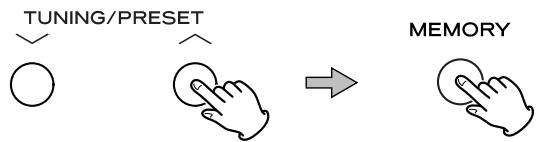
To store more stations, repeat steps 1 to 3.
Memory Backup
If the POWER switch of the main unit is turned off or the power supply is interrupted for 3 days or longer, all the settings kept in memory (such as preset stations) will be erased.
To avoid loosing your preset stations, it is advisable to keep your AG-790 in the STANDBY mode when not in use.
How to select preset stations
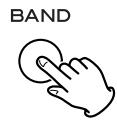
1 Select AM or FM by pressing the BAND button.
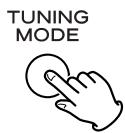
2 If "CH" indicator is not lit, press the TUNING MODE button to select the preset tuning mode.
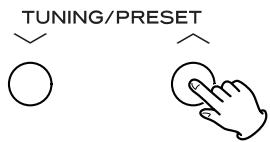
3 Select a preset channel using the TUNING/PRESET buttons.
Memory Scan
- Select AM or FM by pressing the BAND button.
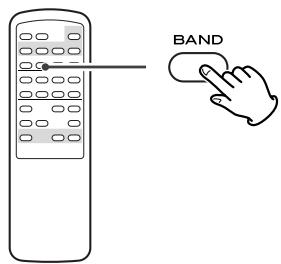
- Press the MEMORY SCAN button of the remote control unit.
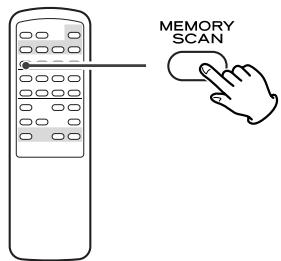
The preset channels stored in memory are scanned at 5 seconds intervals. When the station you want to listen to is found, press the MEMORY SCAN button again to stop scanning.
- A preset channel with no signal will be skipped.
The Radio Data System(RDS) is a broadcasting service which allows stations to send additional information along with the regular radio programme signal.
RDS works on the FM waveband in Europe only.
1 Tune in an FM station (see steps 1 to 4 of page 13).
Press the RDS MODE button.
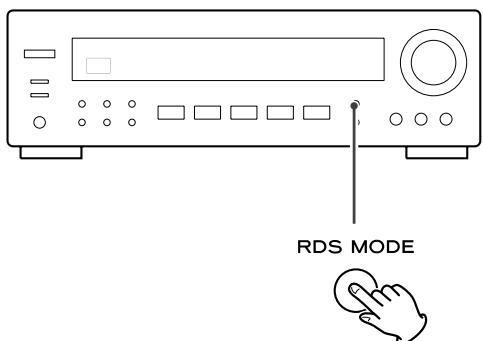
Each time the RDS MODE button is pressed briefly, the RDS mode is changed as follows:
PS (Programme Service name)
When you select PS, "PS" will blink for about 4 seconds and then PS or a station's name will be displayed. If there is no PS data, the frequency will be displayed.
PTY (Programme Type)
When you select PTY, "PTY" will blink for about 4 seconds and then the programme type will be displayed. If there is no PTY data, the frequency will be displayed.
RT (Radio Text)
When you select RT, "RT" will blink for about 4 seconds and then the news of stations composed of up to 64 symbols will be displayed.
If there is no RT data, the frequency will be displayed.
TA (Traffic Announcement)
When you select TA, "TA" will blink for 4 seconds and then the unit searches for a traffic announcement.
- If the station stops broadcasting traffic announcement, the tuner will find other stations repeatedly.
CT (Clock Time)
displays the information about times provided from the station.
When you select CT, "CT" will blink for about 4 seconds and then the clock time will be displayed.
If there is no CT data, RDS mode will be switched to PS mode automatically.
RDS (PTY)
NEWS : brief announcements, events, public opinion, reports, actual situations.
AFFAIRS : a kind of suggestion including practical announcements other than news, documents, discussion, analysis and so on.
INFO : daily information or reference such as weather forecast, consumer guide, medical assistance and so on.
SPORT : sports related programs.
EDUCATE : educational and cultural information.
DRAMA : all kinds of radio concert and serial drama.
CULTURE : all aspects of national or local culture including religious events, philosophy, social science, language, theatre, and so on.
SCIENCE : programs on natural science and technology
VARIED : popular programs such as quiz, entertainment, private interview, comedy, satire and so on.
POP M : program on commercial, practical and popular songs, and sale volume of discs, etc.
ROCK M : practical modern music generally composed and played by young musicians.
EASY M : popular music usually lasting for less than 5 minutes.
LIGHT M : classical music, instrumental music, chorus, and light music favored by non-professionals.
CLASSICS : orchestra including great operas, symphony, chamber music and so on.
OTHER M : other music styles(Rhythm & Blues, Reggae, etc.)
WEATHER : weather reports, forecast
FINANCE : financial reports, commerce, trading
CHILDREN : children's programs
SOCIAL : social affairs
RELIGION : religious programs
PHONE IN : program in which the public expresses its view by phone.
TRAVEL : travel reports
LEISURE : programs concerning recreational activities
JAZZ : jazz music
COUNTRY : country music
NATION M : national music
OLDIES : music from the so-called golden of popular music
FOLK M : folk music
DOCUMENT:documentaries
TEST
ALARM : a program notifying an emergency or a natural disaster.

A station can be searched by this function.
1 Select FM by pressing the BAND button.
Press the RDS MODE button for more than 2 seconds.
"SEARCH" blinks on the display.
Select the desired PTY programme using the TUNING/PRESET buttons.
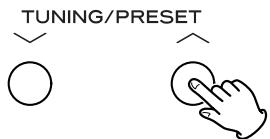
You can select from 31 kinds (see page 15). The programme blinks in the display.
4 Press the MEMORY button.
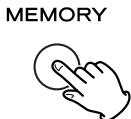
Blinking of the programme stops.
Press the TUNING/PRESET button.
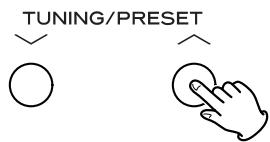
Searching will start.
- When the programme that you have selected is found, searching will stop and the programme type will be displayed.
- If the same programme type is not found during PTY Search, it will stop at the beginning frequency.
- If you want to stop searching, press the RDS MODE button.
If you experience problems with this unit, please take the time to look through this chart and see if you can solve the problem yourself before you call your dealer or TEAC service center.
No power
Check the connection to the AC power source. Check and make sure the AC source is not a switched outlet and if it is, the switch is turned on. Make sure there is power to the AC outlet by plugging another item such as a lamp or fan.
No sound from speakers.
Adjust the volume.
Set the BALANCE control to "CENT"
Check the connection to the speakers.
If your speakers are connected to the SPEAKER A terminals, make sure the SPEAKER A button on the front panel is depressed. If you have no speakers connected to the SPEAKER B terminals, Make sure the SPEAKER B button on the front panel is not depressed. Only select the SPEAKER outputs with speakers connected.
If the tape monitor function is ON and the "TAPE MON indicator is lit, press the TAPE MONITOR button to turn it off.
The volume of SPEAKERS A is different from that of B.
The volume and sound quality may differ depending on the speaker's size, etc. If you want to use SPEAKERS A and B simultaneously with the same volume, connect exactly the same type of speakers to the SPEAKERS A and B terminals.
The sound is noisy or humming.
The unit is too close to a TV set or similar appliances. Relocate the units so they no longer interfere with each other, or turn them off.
Connect the turntable's ground cord to the SIGNAL GND terminal.
Sound cuts off during listening to the music or no sound even though power is ON.
Speaker impedance is less than prescribed for this unit.
Turn the power off and reduce the volume.
Low bass response.
Speaker polarity ( / ) is reversed. Check all speakers for correct polarity.
Cannot listen to any station, or signal is too weak.
Make sure the antenna is properly connected.
Tune in the station properly.
If a TV is near the unit, turn it off.
Install the antenna again after relocating it to a better reception position.
An external antenna may be required.
Though the broadcast is stereo, it sounds monaural.
Press the FM MODE button.
Remote control doesn't work.
Press the POWER switch of the main unit to turn it on.
If the batteries are dead, change the batteries.
Use remote control unit within the range (5m /15ft) and point at the front panel.
Clear obstacles between the remote control unit and the main unit.
If a strong light is near the unit, turn it off.
If normal operation is not restored, unplug the power cord from the outlet and plug it again.
Maintenance
If the surface of the unit gets dirty, wipe with a soft cloth or use diluted neutral cleaning liquid. Be sure to remove any fluid completely. Do not use thinner, benzine or alcohol as they may damage the surface of the unit.
Amplifier Section
Output Power .100 + 100 watts RMS (0.9 % THD, 1 kHz, 8 ohms)
Total Harmonic Distortion. 0.05 % (at 80 watts,1 kHz)
Input Sensitivity/Impedance PHONO: 6.5 mV/22 kohms, LINE: 230 mV/22 kohms
Frequency Response. PHONO: 20 Hz to 20 kHz, ±3 dB, LINE: 20 Hz to 35 kHz, -3 dB
Signal-to-Noise Ratio. PHONO: 75 dB (IHF-A), LINE: 90 dB (IHF-A)
Tone Control. BASS: ±10 dB at 100 Hz, TREBLE: ±10 dB at 10 kHz
Loudness Control +4 dB at 100 Hz
FM Tuner Section
Tuning Range 87.5 MHz to 108.0 MHz, 50 kHz steps
Useable Sensitivity. Mono: 10 dBμV/m
50 dB Quieting Sensitivity . Mono: 15 dBuV/m, Stereo: 33 dBuV/m
Image Rejection Ratio 35 dB
AM Suppression Ratio. 50 dB
Harmonic Distortion (1 kHz) . Mono: 0.5% , Stereo: 0.5%
Frequency Response 20 Hz to 15 kHz, -3 dB
Stereo Separation (1 kHz) 35 dB
Signal-to-Noise Ratio Mono: 70 dB, Stereo: 65 dB (IHF-A)
AM Tuner Section
Tuning Range 522 kHz to 1,620 kHz, 9 kHz steps
Usable Sensitivity. 55 dB
Total Harmonic Distortion 1% at 100dB V / m
Signal-to-Noise Ratio. 40 dB at 100 dBμV/m
General
Power Requirements. 230 V AC, 50 Hz
Power Consumption 280 W
AC Outlet (Total 100 W max) Unswitched x 1
Dimensions (W x H x D) 435 x 144 x 330 mm
Weight (net) 7.4 kg
Standard Accessories
AM Loop Antenna x 1
FM Antenna x 1
Remote Control Unit x 1
Battery (AA, R6, SUM-3) x 2
- Design and specifications are subject to change without notice.
- Illustrations may differ slightly from production models.
Sommaire
Touches Tuning/PRESET
L+16 ... L+1 ← CENT → R+1 ... R+16
TA (Traffic Announcement/Infos Trafic)
Prise de courant (totale 100 W max) UNSWITCHED (Non-commutable) x 1
Dimensions (L x H x P) 435 x 144 x 330 mm
Poids (net) 7,4 kg
Accessoires standard
Antenna de boucle AM x 1
Antenne FM x 1
Pile (AA, R6, SUM-3) x 2
A Interruptor principal POWER
SLEEP 90 (80, 70...ó 10)
COUNTRY : música country.
No sound from speakers.
Pila (AA, R6, SUM-3) x 2
RDS (Programmi PTY) 79
RDS (Ricerca PTY) 80
Ricerca guasti 81
PS (Programme Service name)
TA (Traffic Announcement)
Normaliter selecteert u "CENT (center)".
Sleep Timer
PS (Naam programma service)
RDS (PTY Programma's)
SPORT :programma's over sport.
This appliance has a serial number located on the rear panel. Please record the model number and serial number and retain them for your records.
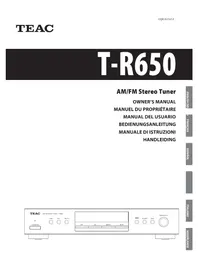
- AM/FM Stereo Receiver
- Thank you for choosing TEAC. Read this manual carefully to get the best performance from this unit.
- Disposal of your old appliance
- Before Use
- Read this before operation
- CAUTION
- CAUTION Regarding Placement
- Battery Replacement
- Precautions concerning batteries
- FM Indoor Antenna
- FM Outdoor Antenna
- AM Indoor Loop Antenna
- How to connect:
- AM Outdoor Antenna
- Note:
- CAUTION:
- A Speaker Connections
- How to connect
- CD, TAPE MONITOR, VIDEO/AUX jacks
- C PHONO jacks/SIGNAL GND terminal
- RESET switch
- AC Outlet (Unswitched)
- Power cord (AC)
- A POWER switch
- STANDBY indicator
- C REMOTE SENSOR
- SPEAKERS indicator
- E Display
- F MUTING indicator
- LOUDNESS indicator
- VOLUME/JOG
- BALANCE button
- TREBLE button
- BASS button
- L RDS MODE button
- W LOUDNESS button
- INPUT (CD, PHONO, TUNER, TAPE MONITOR, VIDEO/AUX)
- TUNING/PRESET buttons
- P MEMORY button
- FM MODE button
- BAND button
- TUNING MODE button
- T PHONES jack
- SPEAKERS buttons
- a POWER (standby/on) button
- b MEMORY SCAN button
- Operation buttons for TEAC's cassette tape deck and CD player
- d MUTING button
- e SLEEP button
- INPUT
- (CD, PHONO, TUNER, TAPE MONITOR, VIDEO/AUX)
- Press the POWER switch.
- Select a source by pressing the corresponding Input button.
- Tape Monitor
- To listen to a source other than TAPE
- Recording
- A Selecting the speakers
- B Listening through headphones
- C LOUDNESS button
- Bass Control
- E Treble Control
- F How to adjust the balance between the left and right speakers
- Sleep Timer
- SLEEP 90 (80, 70...or 10)
- Normal display
- Muting
- Selecting stations which cannot be tuned automatically (manual selection)
- Stereo
- Mono
- Manual Memory Presetting
- Memory Backup
- How to select preset stations
- Memory Scan
- PS (Programme Service name)
- PTY (Programme Type)
- RT (Radio Text)
- TA (Traffic Announcement)
- CT (Clock Time)
- RDS (PTY)
- No power
- No sound from speakers.
- The volume of SPEAKERS A is different from that of B.
- The sound is noisy or humming.
- Sound cuts off during listening to the music or no sound even though power is ON.
- Low bass response.
- Cannot listen to any station, or signal is too weak.
- Though the broadcast is stereo, it sounds monaural.
- Remote control doesn't work.
- Maintenance
- Amplifier Section
- FM Tuner Section
- AM Tuner Section
- General
- Standard Accessories
- Sommaire
- Touches Tuning/PRESET
- TA (Traffic Announcement/Infos Trafic)
- Accessoires standard
- A Interruptor principal POWER
- SLEEP 90 (80, 70...ó 10)
- PS (Naam programma service)
- RDS (PTY Programma's)
Brand : TEAC
Model : AG-790
Category : Audio Receiver