
ZYWALL 2WG - VPN Router ZYXEL - Free user manual and instructions
Find the device manual for free ZYWALL 2WG ZYXEL in PDF.



| Product Type | VPN Firewall Router |
| Brand | ZYXEL |
| Model | ZYWALL 2WG |
| Category | VPN Router |
| Dimensions (W x D x H) | 220 x 150 x 35 mm |
| Weight | 1.2 kg |
| Power Supply | 12V DC power adapter |
| Power Consumption | 15 W |
| Interfaces | 4 LAN/DMZ ports, 1 WAN port, 1 Console port, 1 AUX port, 1 3G card slot |
| VPN Features | IPSec, IKE, VPN tunnels |
| Operating Mode | Router or bridge (transparent firewall) |
| Security Features | Firewall, NAT, content filtering, DMZ |
| Management | Web configurator (web interface) |
| Default IP Address | 192.168.1.1 |
| Default Password | 1234 |
| Reset Button | Yes (rear panel) |
| LED Indicators | PWR, CARD, LAN/DMZ, WAN |
| Operating Temperature | 0°C to 40°C |
| Operating Humidity | 10% to 90% (non-condensing) |
| Certifications | See www.zyxel.com |
| Package Contents | ZyWALL, Ethernet cables, power adapter, blue console cable, black AUX cable |
Frequently Asked Questions - ZYWALL 2WG ZYXEL
User questions about ZYWALL 2WG ZYXEL
0 question about this device. Answer the ones you know or ask your own.
Ask a new question about this device
Download the instructions for your VPN Router in PDF format for free! Find your manual ZYWALL 2WG - ZYXEL and take your electronic device back in hand. On this page are published all the documents necessary for the use of your device. ZYWALL 2WG by ZYXEL.
USER MANUAL ZYWALL 2WG ZYXEL
Copyright © 2007. All rights reserved.
Overview
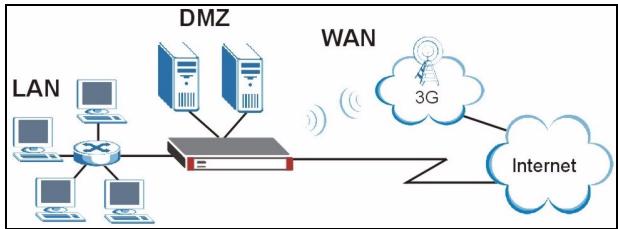
The ZyWALL 2WG is a firewall with VPN, bandwidth management, content filtering and many other features. You can use it as a transparent firewall and not reconfigure your network nor configure the ZyWALL's routing features. When the ZyWALL is in router mode, you can also insert a 3G wireless card to add a second WAN. The ZyWALL increases network security by adding the option to change port roles from LAN to DMZ for use with publicly accessible servers. This guide covers the initial connections and configuration needed to start using the ZyWALL in your network.
See the User's Guide for more information on all features.
You may need your Internet access information.
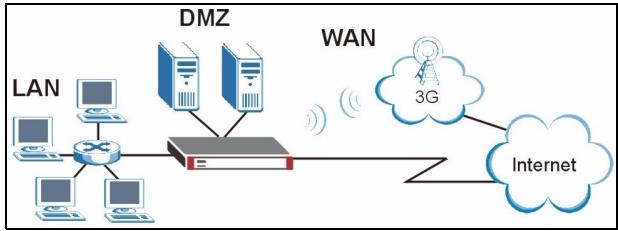
This guide is divided into the following sections.
1 Hardware Connections
2 Accessing the Web Configurator
3 Bridge Mode
4 Internet Access Setup and Product Registration
5 DMZ
6 NAT
7 Firewall
8 VPN Rule Setup
9 Troubleshooting
1 Hardware Connections
You need the following.
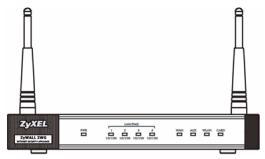
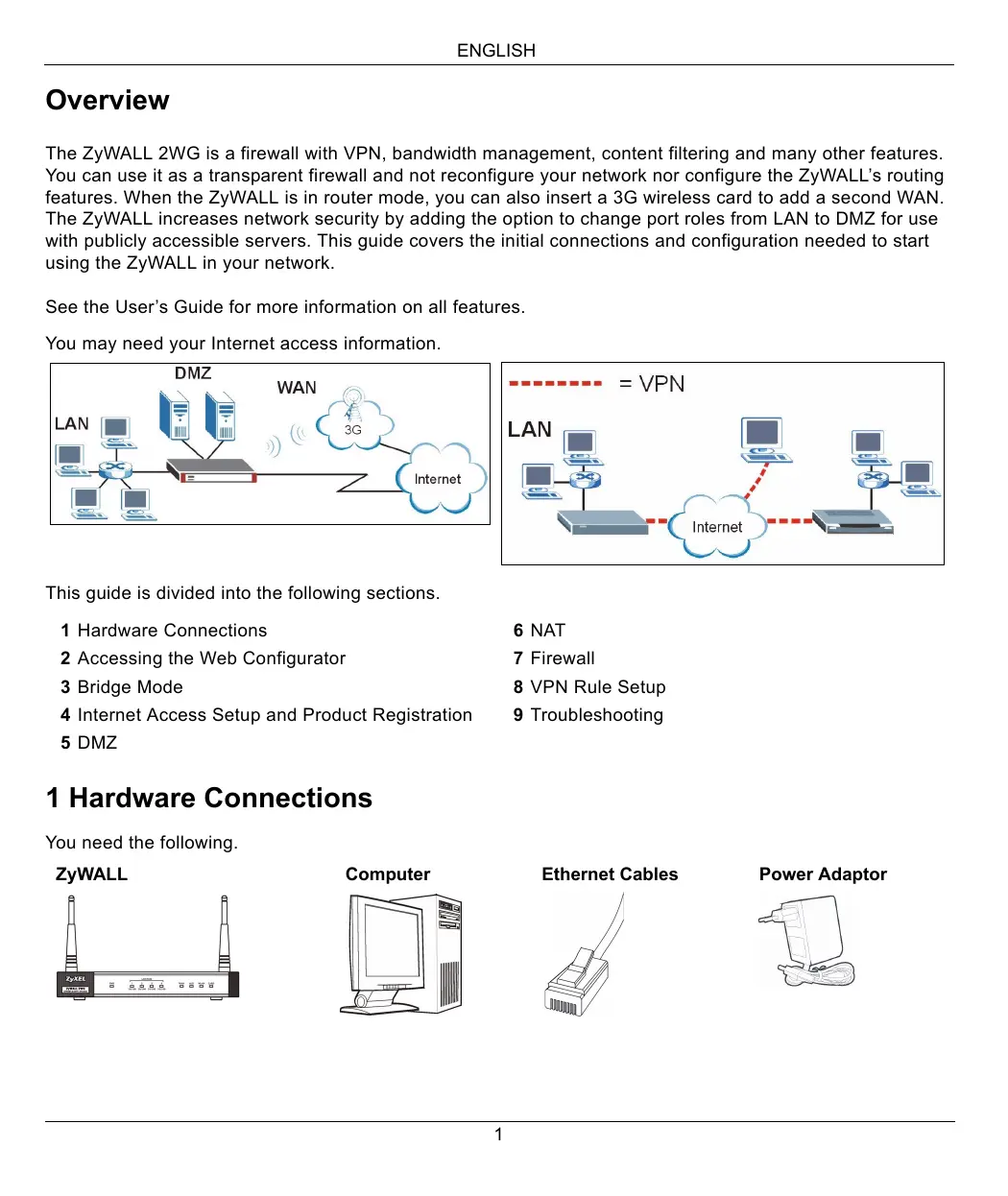
ZyWALL

Computer
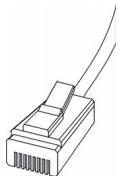
Ethernet Cables
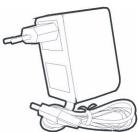
Power Adaptor
Do the following to make hardware connections for initial setup.
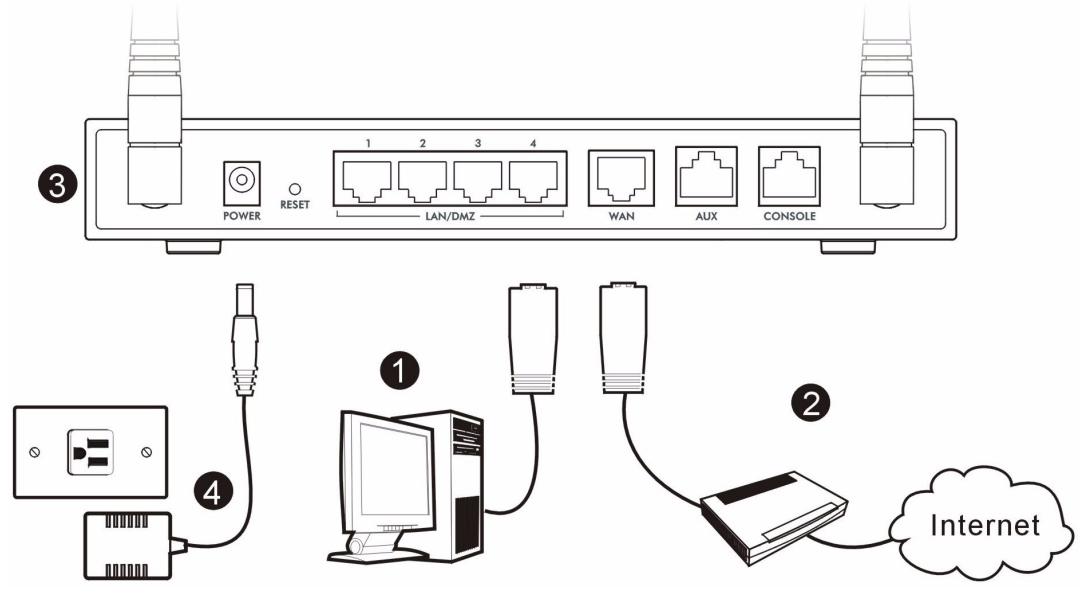
1 Use an Ethernet cable to connect the LAN/DMZ port to a computer. If you configure these ports as DMZ ports in the LAN or DMZ screen through the web configurator, you can also use Ethernet cables to connect public servers (web, e-mail, FTP, etc.) to the LAN/DMZ ports.
2 Use another Ethernet cable to connect the WAN port to an Ethernet jack with Internet access.

Use the blue console cable if you want to connect the CONSOLE port to your computer. Use the black dial backup cable if you want to connect the AUX port to an analog modem.
3 Insert a 3G wireless card into the card slot on the side panel to access the Internet wirelessly via a 3G network. At the time of writing, you can only use the Sierra AC850/860 3G wireless card in the ZyWALL.
4 Use the included power adaptor to connect the power socket (on the rear panel) to a power outlet.
5 Look at the front panel. The PWR LED turns on. The CARD, LAN/DMZ and WAN LEDs turn on and stay on if the corresponding connections are properly made.
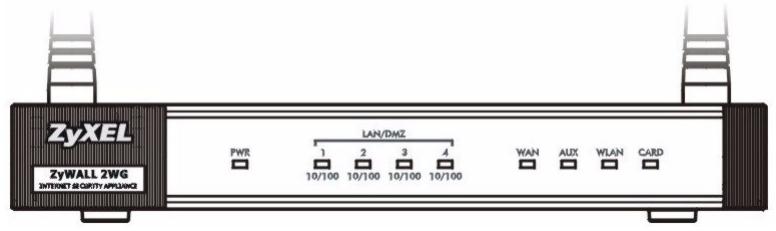

If none of the LEDs are on, check your connections, and inspect your cables for damage. Make sure that you have the power adaptor connected to the ZyWALL and plugged in to an appropriate power source. Make sure the power source is turned on. If the LEDs are still off, contact your local vendor.
2 Accessing the Web Configurator
Use this section to configure the WAN 1 interface for Internet access.
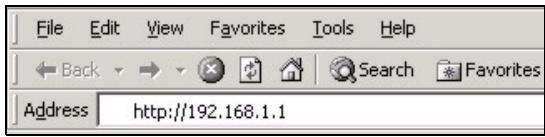
1 Launch your web browser. Enter 192.168.1.1 (the ZyWALL's default IP address) as the address.
2 Click Login (the default password 1234 is already entered).
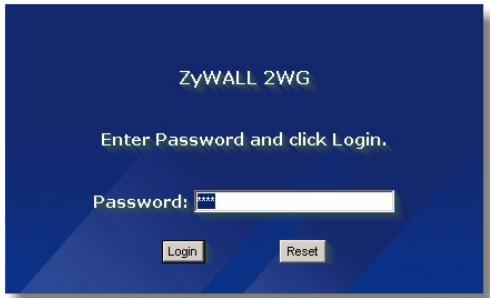

If the login screen does not display, check your browser's security settings and make sure your computer's Ethernet card is installed and functioning properly.
Your computer should be also set to get an IP address automatically from a DHCP server. See Set Up Your Computer's IP Address for more information.
3 Change the login password by entering a new password and clicking Apply.
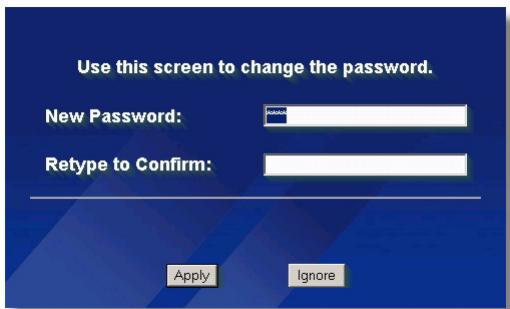
4 Click Apply to replace the ZyWALL's default digital certificate.
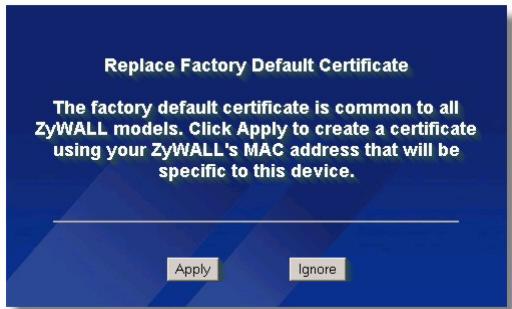

If you changed the password and have forgotten it, you need to return the ZyWALL to the defaults (password is 1234, LAN IP address is 192.168.1.1, etc.). Press the RESET button (on the rear panel) until the PWR LED starts to blink, then release it.
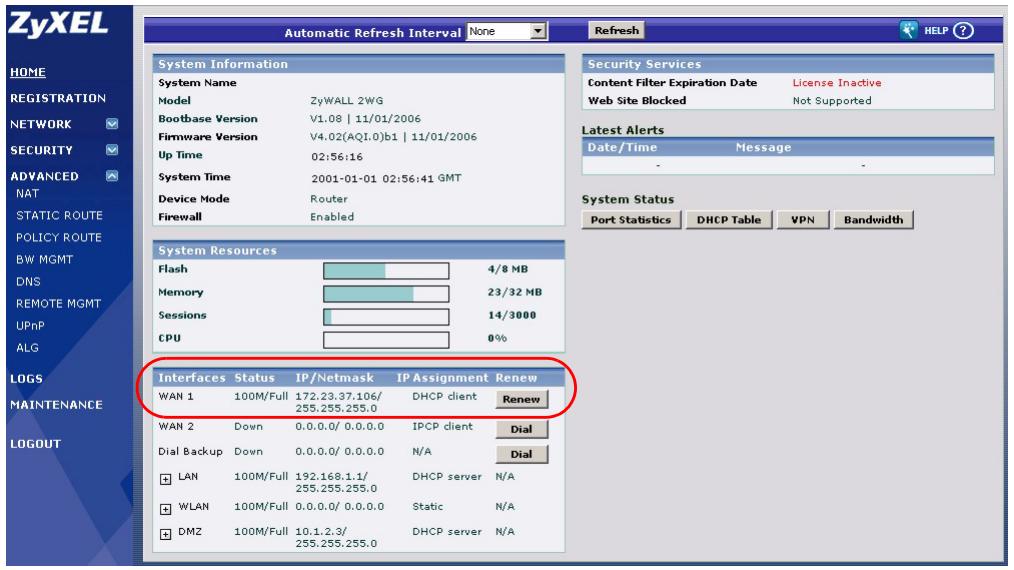
5 The HOME screen opens.
The ZyWALL is in router mode by default. Continue to the next step if you want to use routing features such as NAT, DHCP and VPN.
Go to section 3 if you prefer to use the ZyWALL as a transparent firewall.
6 Check the network status table. If the WAN 1 status is not Down and there is an IP address, go to section 5.
If the WAN 1 status is Down (or there is not an IP address), click the Wizard icon and use section 4 to configure WAN 1.
Use the NETWORK WAN screens if you need to configure WAN 2. You can also configure load balancing between the WAN connections.
3 Bridge Mode
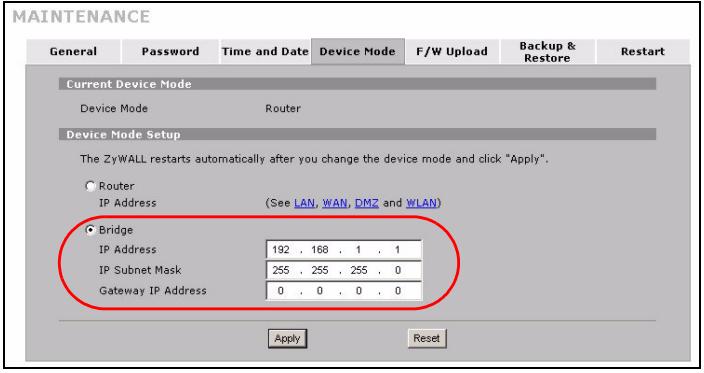
When you set the ZyWALL to bridge mode, it functions as a transparent firewall. Do the following to set the ZyWALL to bridge mode.
1 Click MAINTENANCE in the navigation panel and then Device Mode.
2 Select Bridge and configure a (static) IP address subnet mask and gateway IP address for the ZyWALL's LAN, WAN, DMZ and WLAN interfaces.
3 Click Apply. The ZyWALL restarts.
Skip to section 5 if you have servers that you need to be accessible from the WAN.
4 Internet Access Setup and Product Registration
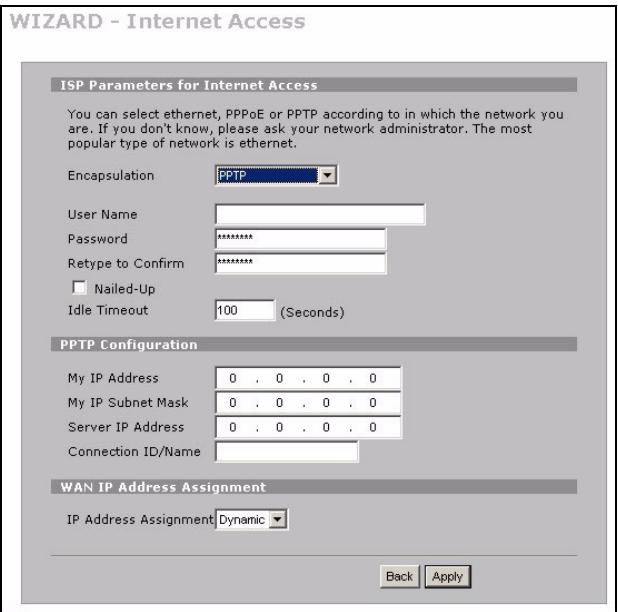
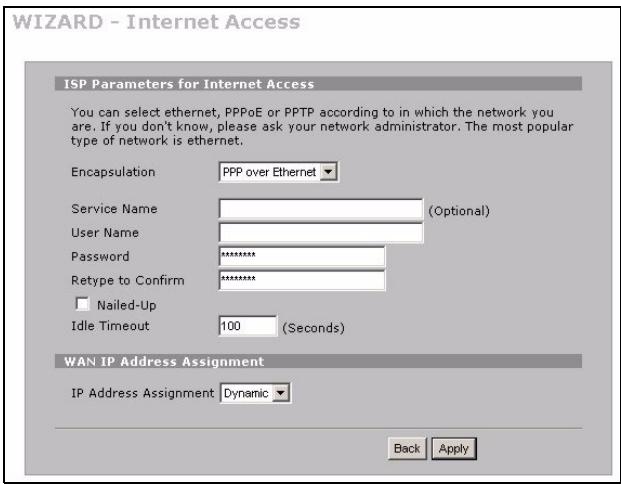
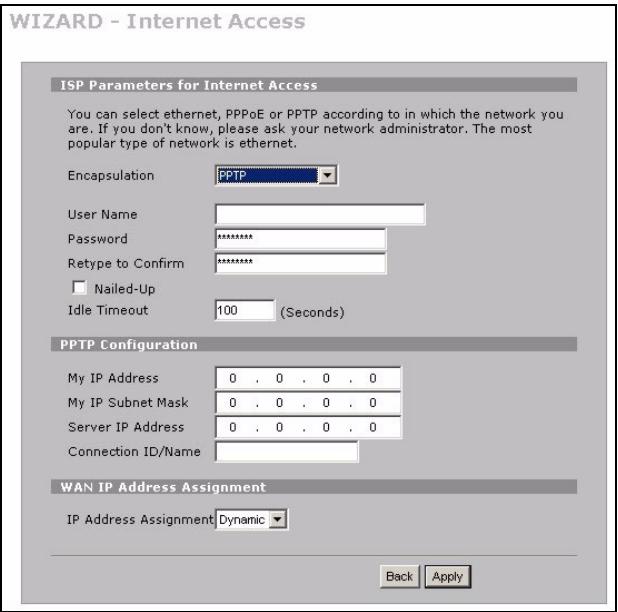
1 Click the Wizard icon ( ) in the HOME screen and then the Internet Access Setup link to open the Internet access wizard.
Enter the Internet access information exactly as given to you.
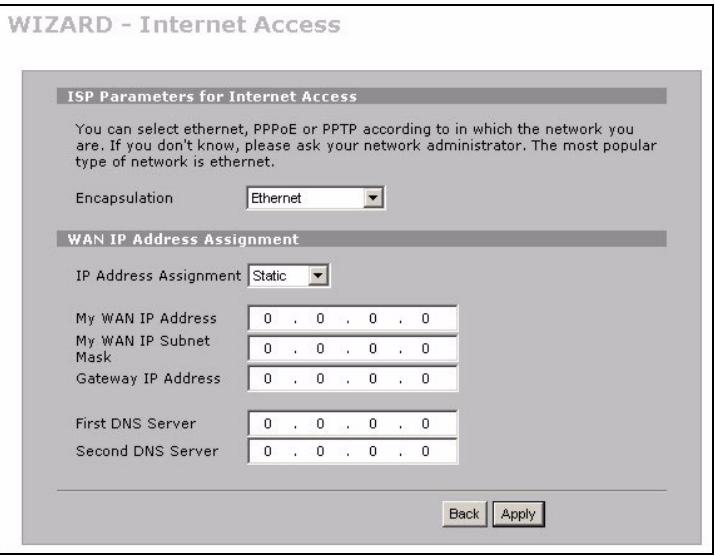
If you were given an IP address to use, select Static in the IP Address Assignment drop-down list box and enter the information provided.

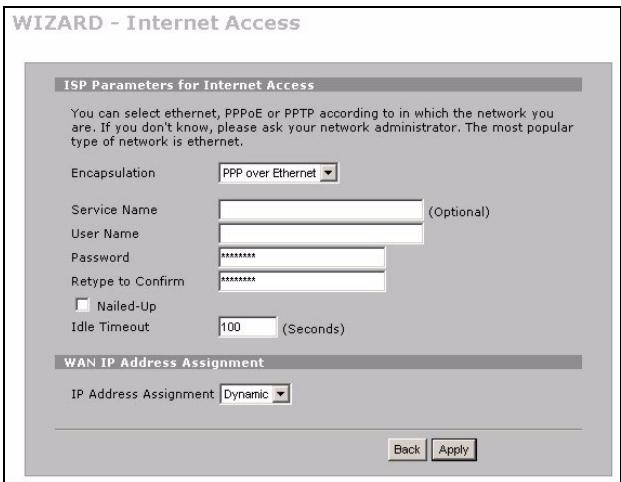
The fields vary depending on what you select in the Encapsulation field. Fill them in with the information provided by the ISP or network administrator.
Click Apply when you are done.
- Ethernet Encapsulation
Configure a Roadrunner service in the NETWORK WAN screens (use the WAN tab).
- PPP over Ethernet or PPTP Encapsulation
Select Nailed-Up when you want your connection up all the time (this could be expensive if your ISP bills you for Internet usage time instead of a flat monthly fee).
To not have the connection up all the time, specify an idle time-out period (in seconds) in Idle Timeout.
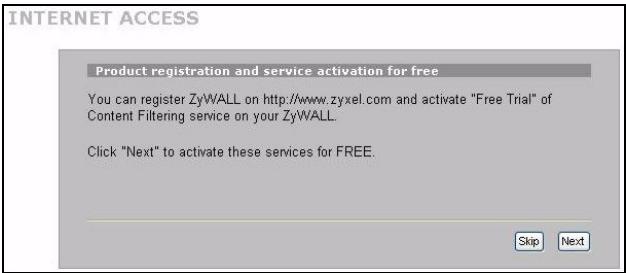
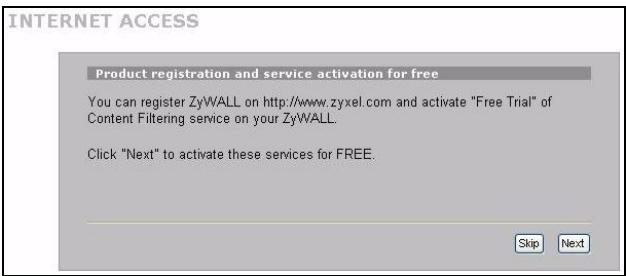
2 Click Next to display the screen where you can register your ZyWALL with myZyXEL.com (ZyXEL's online services center) and activate the free content filtering trial application. Otherwise, click Skip and then Close to complete Internet access setup.
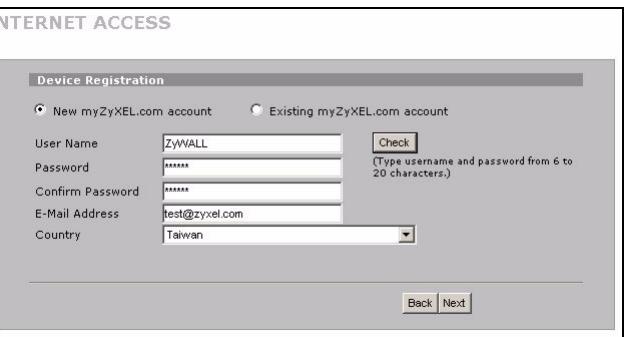
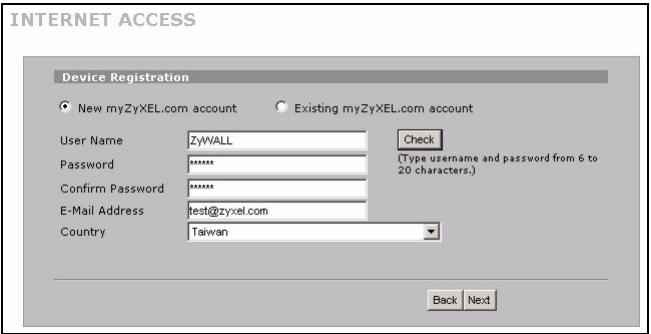
3 If you already have an account at myZyXEL.com, select Existing myZyXEL.com account and enter account information. Otherwise, select New myZyXEL.com account and fill in the fields below to create a new account and register your ZyWALL. Click Next.
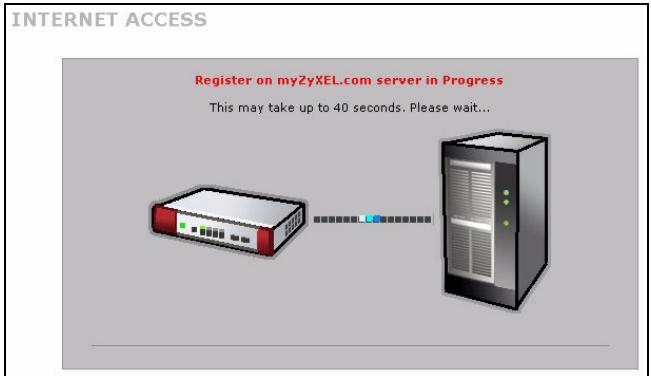
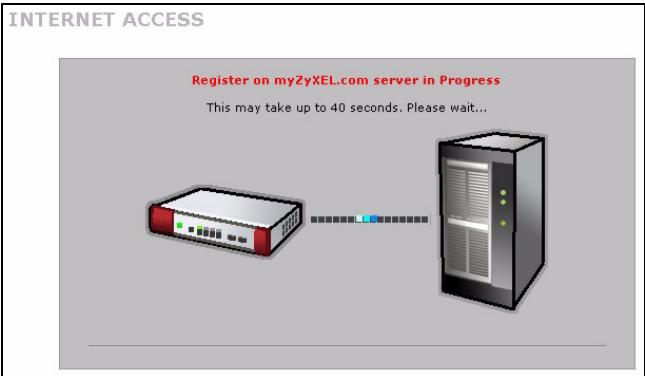
4 Wait for the registration progress to finish.
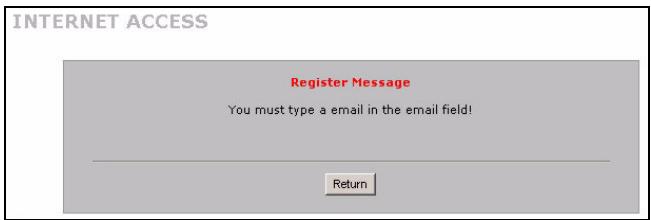
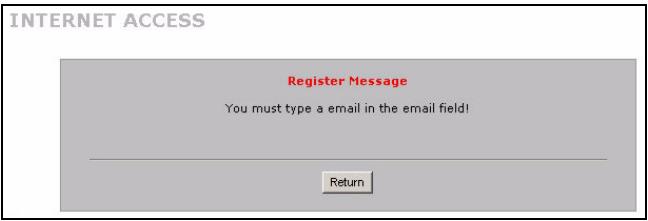
5 The following screen displays if the registration was not successful. Click Return to go back to the Device Registration screen and check your settings.
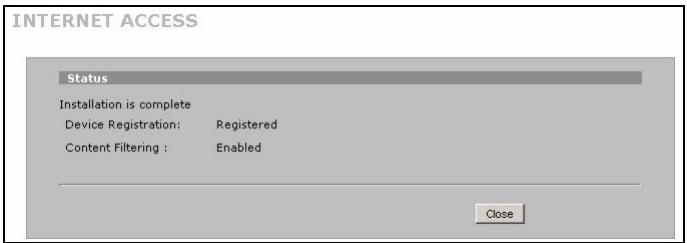
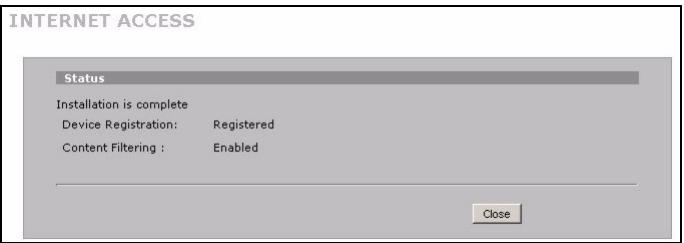
6 Click Close to leave the wizard screen when the registration and activation are done.

If you want to activate a standard service with your iCard's PIN number (license key), use the REGISTRATION Service screen. See the User's Guide for details.

If you cannot access the Internet via WAN 1, check the ZyWALL's connection to the Ethernet jack with Internet access. Make sure the Internet gateway device (such as a DSL modem) is working properly. Click WAN in the navigation panel to verify your settings.
5 DMZ
The DeMilitarized Zone (DMZ) allows public servers (web, e-mail, FTP, etc.) to be visible to the outside world and still have firewall protection from DoS (Denial of Service) attacks.
You can assign TCP/IP configuration via DHCP to computers connected to the DMZ ports. Otherwise, configure the computers with static IP addresses (in the same subnet as the DMZ port's IP address) and DNS server addresses. Use the ZyWALL's DMZ IP address as the default gateway.
Do the following to configure the DMZ if the ZyWALL is in routing mode.
Note: You do not need to configure DMZ with bridge mode, skip to section 7.
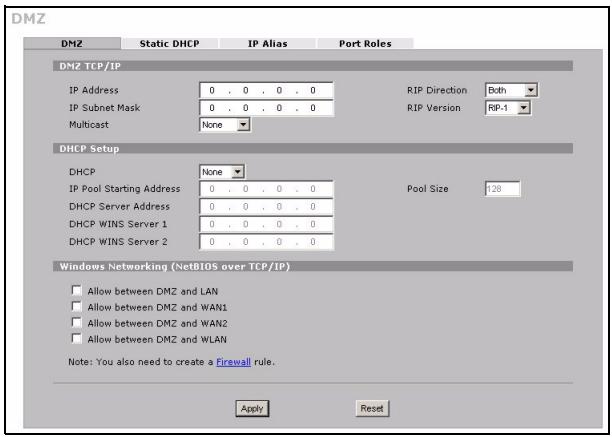
1 Click NETWORK > DMZ in the navigation panel.
2 Specify an IP address and subnet mask for the DMZ interface.
If you use private IP addresses on the DMZ, use NAT to make the servers publicly accessible (see section 6).
A public IP address must be on a separate subnet from the WAN port's public IP address. If you do not configure NAT for the public IP addresses on the DMZ, the ZyWALL routes traffic to the public IP addresses on the DMZ without performing NAT. This may be useful for hosting servers for NAT unfriendly applications.
3 Click Apply.
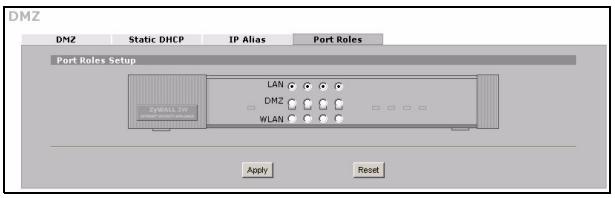
4 By default, LAN/DMZ ports 1 to 4 are all LAN ports. To configure a port as a DMZ port, click the Port Roles tab, select its radio button next to DMZ and click Apply.
6 NAT
NAT (Network Address Translation - NAT, RFC 1631) means the translation of an IP address in one network to a different IP address in another. You can use the NAT Address Mapping screens to have the ZyWALL translate multiple public IP addresses to multiple private IP addresses on your LAN (or DMZ).
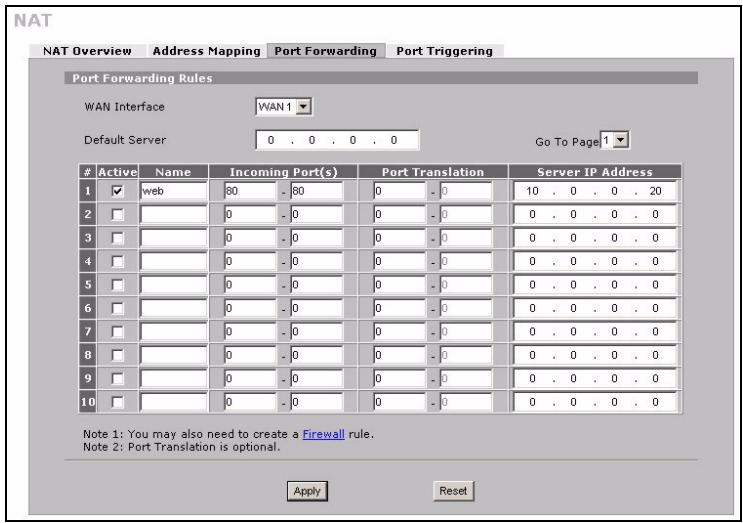
The following example allows access from the WAN1 to an HTTP (web) server on the DMZ. The server has a private IP address of 10.0.0.20.
1 Click ADVANCED, NAT in the navigation panel and then Port Forwarding.
2 Select the WAN connection (WAN1) for which you want to configure port forwarding rules.
3 Select the Active check box.
4 Type a name for the rule.
5 Type the port number that the service uses.
6 Type the HTTP server's IP address.
7 Click Apply.
7 Firewall
You can use the ZyWALL without configuring the firewall.
The ZyWALL's firewall is pre-configured to protect your LAN from attacks from the Internet. By default, no traffic can enter your LAN unless a request was generated on the LAN first. The ZyWALL allows access to the DMZ from the WAN or LAN, but blocks traffic from the DMZ to the LAN.
If you are using the ZyWALL in router mode, continue with the next section. For bridge mode, you are done with initial configuration.
8 VPN Rule Setup
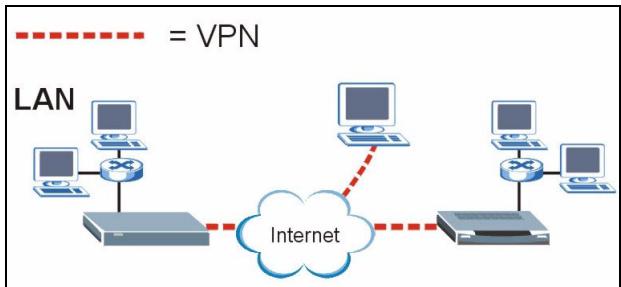
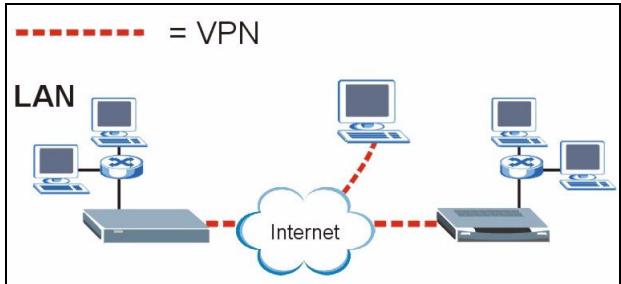
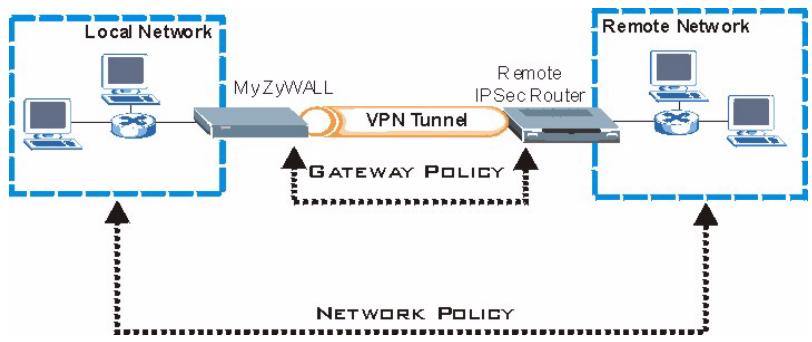
A VPN (Virtual Private Network) tunnel gives you a secure connection to another computer or network.
A gateway policy identifies the IPSec routers at either end of a VPN tunnel.
A network policy specifies which devices (behind the IPSec routers) can use the VPN tunnel.
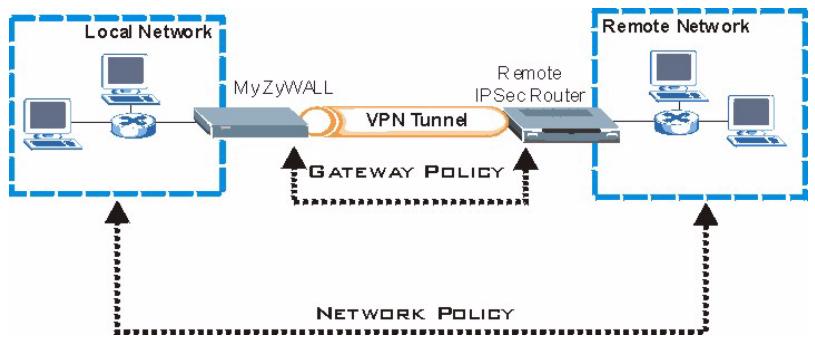
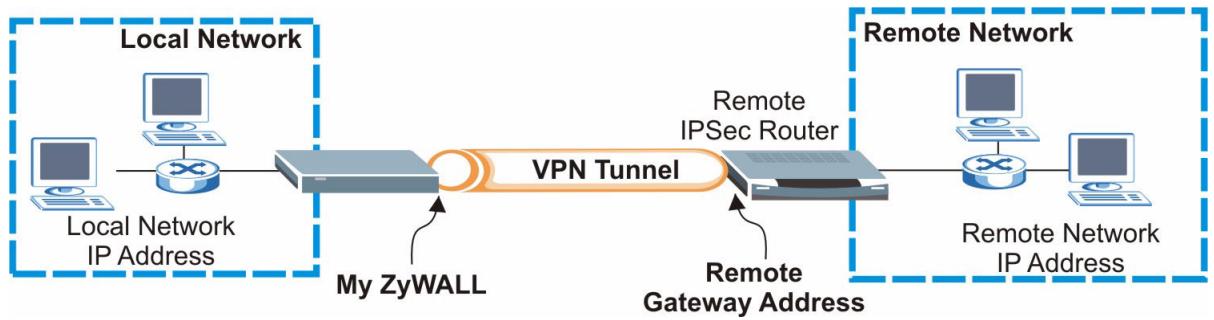
This figure helps explain the main fields in the wizard screens.
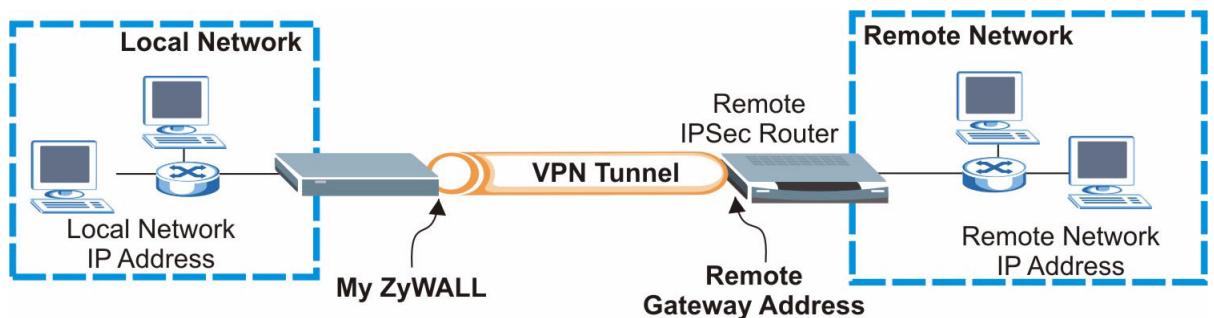
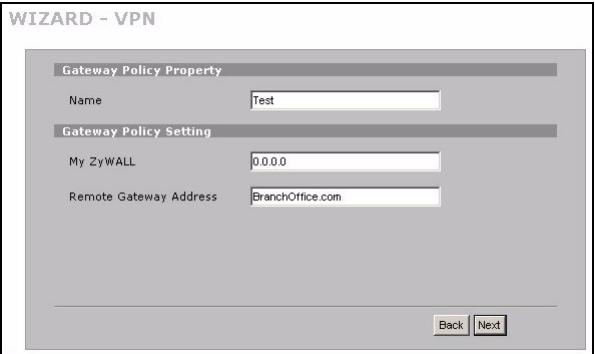
1 Click the Wizard icon ( ) in the HOME screen and then the VPN Setup link to open the VPN wizard.

Your settings are not saved when you click Back.
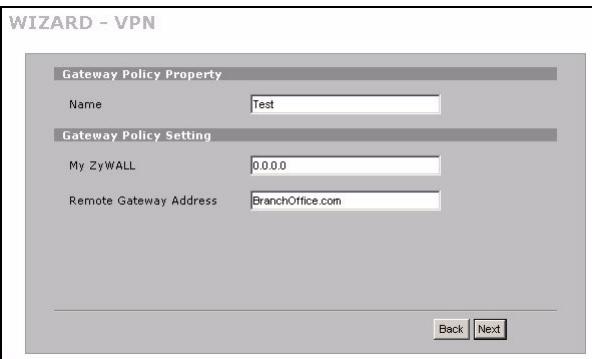
2 Use this screen to configure the gateway policy.
Name: Enter a name to identify the gateway policy.
Remote Gateway Address: Enter the IP address or domain name of the remote IPSec router.
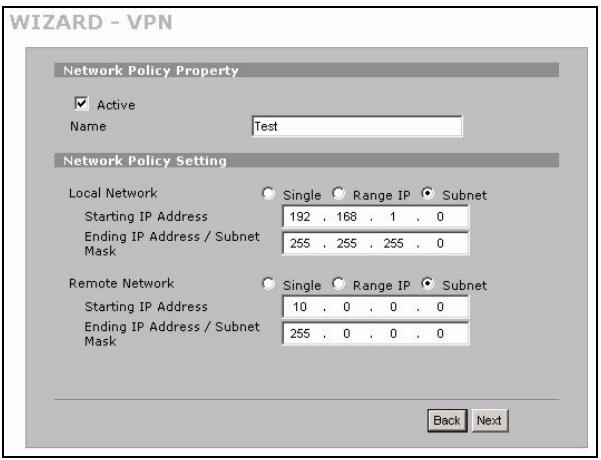
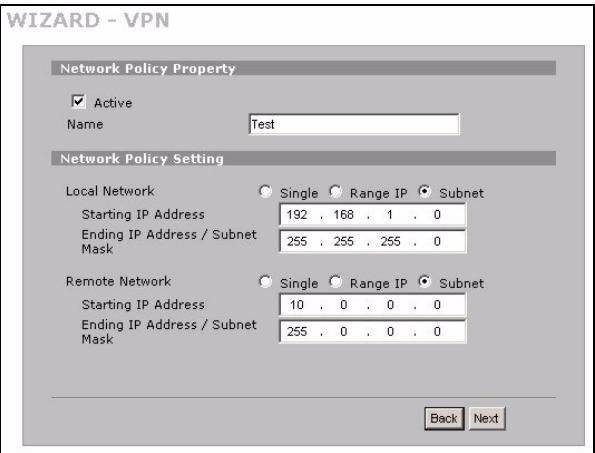
3 Use this screen to configure the network policy.
Leave the Active check box selected.
Name: Enter a name to identify the network policy.
Select Single and enter an IP address for a single IP address.
Select Range IP and enter starting and ending IP addresses for a specific range of IP addresses.
Select Subnet and enter an IP address and subnet mask to specify IP addresses on a network by their subnet mask.

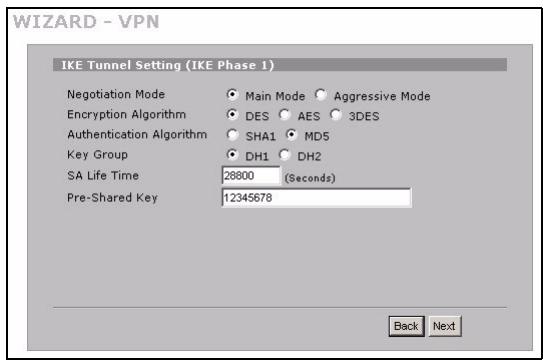
Make sure that the remote IPSec router uses the same security settings that you configure in the next two screens.
Negotiation Mode: Select Main Mode for identity protection. Select Aggressive Mode to allow more incoming connections from dynamic IP addresses to use separate passwords.

Multiple SAs (security associations) connecting through a secure gateway must have the same negotiation mode.
Encryption Algorithm: Select 3DES or AES for stronger (and slower) encryption.
Authentication Algorithm: Select MD5 for minimal security or SHA-1 for higher security.
Key Group: Select DH2 for higher security.
SA Life Time: Set how often the ZyWALL renegotiates the IKE SA (minimum 180 seconds). A short SA life time increases security, but renegotiation temporarily disconnects the VPN tunnel.
Pre-Shared Key: Use 8 to 31 case-sensitive ASCII characters or 16 to 62 hexadecimal ("0-9", "A-F") characters. Precede a hexadecimal key with a "0x" (zero x), which is not counted as part of the 16 to 62 character range for the key.
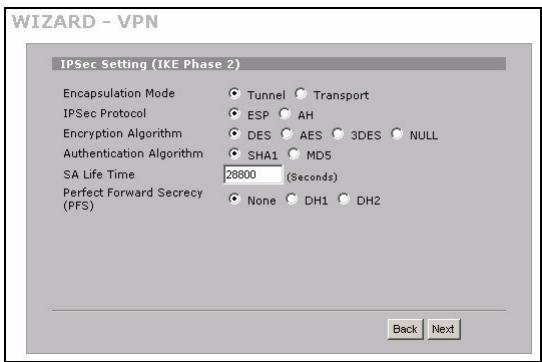
Encapsulation Mode: Tunnel is compatible with NAT, Transport is not.
IPSec Protocol: ESP is compatible with NAT, AH is not.
4 Use this screen to configure IKE (Internet Key Exchange) tunnel settings.
6 Check your VPN settings. Click Finish to save the settings.

8.1 Using the VPN Connection
Use VPN tunnels to securely send and retrieve files, and allow remote access to corporate networks, web servers and e-mail. Services work as if you were at the office instead of connected through the Internet.
5 Use this screen to configure IPSec settings.
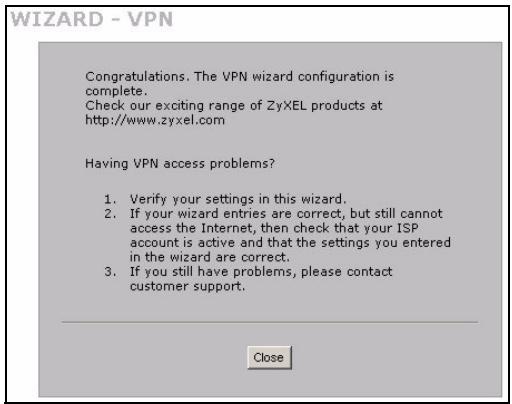
7 Click Close in the final screen to complete the VPN wizard setup. Continue with the next section to activate the VPN rule and establish a VPN connection.
For example, the "test" VPN rule allows secure access to an web server on a remote corporate LAN. Enter the server's IP address (10.0.0.23 in this example) as your browser's URL. The ZyWALL automatically builds the VPN tunnel when you attempt to use it.
Click SECURITY > VPN in the navigation panel and then the SA Monitor tab to display a list of connected VPN tunnels (the "test" VPN tunnel is up here).
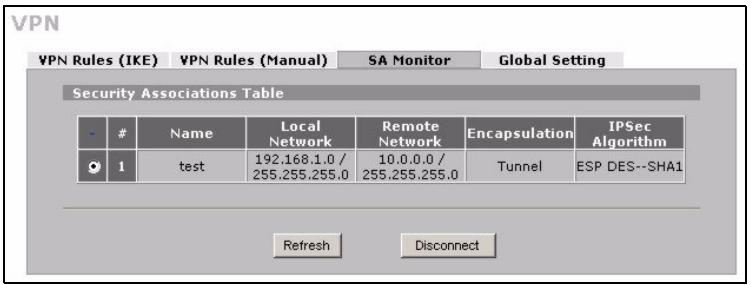

If you cannot establish a VPN connection, make sure the ZyWALL and the remote IPSec router use the same VPN settings. Click VPN in the navigation panel to configure advanced settings. Access a web site to check that you have a successful Internet connection.
Set Up Your Computer's IP Address
This section shows you how to set up your computer to receive an IP address in Windows 2000, Windows NT and Windows XP. This is ensures that your computer can communicate with your ZyWALL.
1 In Windows XP, click Start, Control Panel.
In Windows 2000/NT, click Start, Settings, Control Panel.
2 In Windows XP, click Network Connections.
In Windows 2000/NT, click Network and Dial-up Connections.
3 Right-click Local Area Connection and then click Properties.
4 Select Internet Protocol (TCP/IP) (under the General tab in Windows XP) and click Properties.
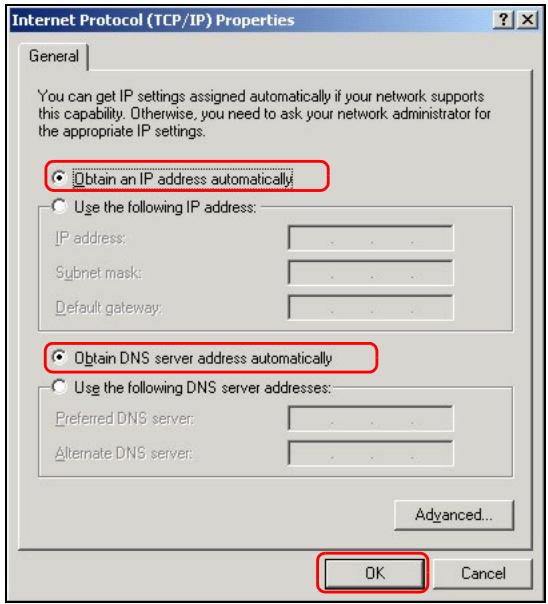
5 The Internet Protocol TCP/IP Properties screen opens (the General tab in Windows XP). Select the Obtain an IP address automatically and Obtain DNS server address automatically options.
6 Click OK to close the Internet Protocol (TCP/IP) Properties window.
7 Click Close (OK in Windows 2000/NT) to close the Local Area Connection Properties window.
8 Close the Network Connections screen.
Procedure to View a Product's Certification(s)
1 Go to www.zyxel.com.
2 Select your product from the drop-down list box on the ZyXEL home page to go to that product's page.
3 Select the certification you wish to view from this page.
Übersicht
In this work, we present a new approach to the analysis of the WAN 1-Schnittstelle for the Wiener-Wintner equation. The WAN 1-Schnittstelle is a well-known solution to the Wiener-Wintner equation in the context of the Wiener-Wintner equation.
Network Policy Setting
Local Network
Starting IP Address
Ending IP Address / Subnet Mask

Single Range IP Subnet
- 168 . 1 . 0
255 . 255 . 255 . 0
Remote Network
Starting IP Address
Ending IP Address / Subnet Mask

Single Range IP Subnet
-
-
- 0
-
-
-
- 0
-
Back
Next

You can select ethernet, PPPoE or PPTP according to in which the network you are. If you don't know, please ask your network administrator. The most popular type of network is ethernet.
Encapsulation

WAN IP Address Assignment
IP Address Assignment

My WAN IP Address
My WAN IP Subnet Mask
Gateway IP Address
First DNS Server
Second DNS Server
Back
Apply
- PPP over Ethernet oppure encapsulamento PPTP
Bam notpebyotcyaetnbie daHHbIe IJIa NOdkHoueHnK INHTepHeTy.
Данhoe pykoBoDCTBO BkIIOuAe TcIeIyIoUne pa3dJIbI.
1Подключенеобудаьпя.
2 Doctyn K Web-KoHpIpyatopy
3 Pekim MekceTeBOrO MOCTa
4 Hac troka doctya B INtepnet npereiptpaunia n3dennn
5 DMZ
6 TpaHcJIaIe cTeBbIX aIpecoB
7 MexceTeBOJ 3KpaH
8 Hac troka npabnBnpyaHbNoy cTHO (VPN)
9 POnck n yCtpaHHe HeNCnPpABHoCTe
You can select ethernet, PPPoE or PPTP according to in which the network you are. If you don't know, please ask your network administrator. The most popular type of network is ethernet.
Encapsulation

WAN IP Address Assignment
IP Address Assignment

My WAN IP Address

My WAN IP Subnet Mask

Gateway IP Address

First DNS Server

Second DNS Server



- PPP noBepx Ethernet nll nHkancyIaIa PPTP
Bb6epnte Nailed-Up (IOctoHHoe), ecn Bbl XOTte IMMeTb NOCToHHoe COeINHeHne (TaKOE coeINHeHne MOKET 6bITb DOCTaTOHNO DOpOrHM, ecn INHTepHT-IPoBaAdep 6epet PnATy 3a BpeMnCNoJIb3OBAHn INHTepHT, a He nCNoJIb3yEt yCTaHOJIeHHbI MecayHbI TaupΦ).
YTo6bI He noDcpeKINBaTb NocToaHHOe CoeHNHeHne, BBeiTe INHTepBaJn BpeMeHn IpocToA (B CeKyHdax) B none Idle Timeout (Bpem npocToA).
2 Μεικηνιte KHOπKy Next (Далee), чтобы ВьзВаь OKHO, в КOTOPOM Bbl може Заргострпорвать ваш ZуWALL на саиуZyXEL.com (цeHTp onлайн обслухиваня компани ZуXEL) иakTNИРОВАТь бecлathь сильт рcodржаняпpoбhoe пиюжен.В дpyrom сучae,шENKHITe Skip (Прочuctь)и 3aTeM Close(ЗakpbTb)дя завершени Habстpoйdoctуна ВИNTepHET.
3 EcIn Bbl yke perncptpnoBaHnsc h a caIte myZyXEL.com, BbIbePnte Existing myZyXEL.com account (CyueCTByuOuJe yuethble daHHble myZyXEL.com) u BBeDHTe napametpy uyeTHbIX daHHbIX. B dpyrom cnUyae, BblbePnte New myZyXEL.com account (HOBBie yuethble daHHble myZyXEL.com) n 3anOpHnTe noJra, paCNoJIOKeHHbIe HNKe, dJa C03daHnRA HOBbIX yuethblx daHHbIX n peRncTpaunz ZyWALL. UeKHNte no KhoNke Next (DaJIee).
4 Ptojoknte, noka 3aBepuNTc npoecpeRnCTpaun.
5 Ecnn pernctpaun He BbInonHeHa, nOBnTcna CneDyUoOee OkHo. UeKnTe Return (BepHytbc) dIa BO3Bpata K OKHy Device Registration (Perncptaun yCTpoiCTBa) n npOBepbte hAcTpoiKn.
6 Μεικητe Close (3aKpbIb), γΤΟ𝑏ι 3aKpbIb OKHO MacTepa nocJIe BbINOJIHEnIa PerɪnCTpaɪnɪ n aKTɪBɪpOBAɪŋ cʌŋk6.

Для akтуци CTандартно слухь C HomepOM PIN Baшeй KapToчк (Пиценоньи КИЧ) ИСпОлььуетс OkHO REGISTRATION Service (Слухьа PEGNCTPAЦИ). Поюбпсс CB.В Тхнистом руковостve.

EcnBbHe MoKeTe BOITN B INHTepHET uee3 TBC 1,TO npOBepbTe NOKJIoueHne ZyWALL K pa3bemy Ethernet uee3 KOtOpbI npoICxOuNT DocTyn B INHTepHET. Y6eINTecb B HopMaJIbHOpa6ote WIIIO3OBORO yCTpOcTBA (TaKOrO KaK MOdEM DSL).UeJIKNITE Ha KHOJKe WAN (TBC)Ha naHeJI NaBnraaun, UTo6bl npOBepnt Baun HAcTpoiKn.
5 DMZ
ZyWALL MoXHO IcNoIb3OBaTb, He BblOnHЯ HacToPoiKу MekCeTeBOrO 3KpaHa.
IapametpbMeKcTeBOrO 3kpaHa ZyWALL npedcytaHOBneHb TaK, TTObbl oecneuBaTb 3aunTy IokaJIbHOI CETn OT aTak n3 CETn INHTepHe. IyoMOnUaHHIO TpaNk B IokaJIbHyIO CETb He npOnyckaETcra, NOKa CHaJana ot He He NoctynIT 3anpoc. ZyWALL pa3pe7aet DoCTyn K DMZ n3 IIO6aJIbHOI CETn ININ JokaJIbHOI CETn, HO bNoKnpye TpaNk OT DMZ B IokaJIbHyIO CETb.
EcnZyWALL haoiTcB peKIMe MapwpyTaauu, nepexoIte K cneDyuOeMy pa3dny. B peKIMe moCTa Bbl 6yndepe6oTaTb C hauJIbHoi KOHfIgurauei.
8 Hac trokka npabnl BnptyaJIbHOJ qactHOJ CETN (VPN)
TynHeIb VPN (Virtual Private Network - BnrtYaIbHaJ yacThaIceTb) o6ecneuBaet 3aunueHnoe coeINHeHne K npyromy KOMpbHTepy IJIc cTeI.
CtpaTeTnIu3a onpeIeIeT MapIpyTu3aToPbI IPSec Ha KaKdOM KOHcE TyHHeJIa VPN.
Ceteba noINTka onpeJeIeT yctpoiCTBa (3a MapuTy3aTopamn IPSec), KOTOpbIe MOryT nCnoJIb3OBAt TyHHeJIb VPN.
Cneyuoua cxema oBxchreT OCHBbIe NOJI B OKHax MaTepa.
1 Μεικηνιte Na 3NaUke Wizard (MacTeP) (B OKHe HOME (ДOMAUHЯ), a 3aTeM Na Ccblnke VPN Setup (HacToPIKa VPN),УTObI OTKpbITb MacTeP HAcToPIK.

BbIbepuTe Single (OuH) n BBeDuTe IP-aDpec.
Bb6epTe Range IP (ДиаэоH IP) И ВБeДиTe NaJIbHbI I KOHeuHbI IP aDpeCa ДЯ KOHKpeTHoro Diana3OHa IP-aDpeCoB.
BbI6epnte Subnet (POncTe) n BVeIte IP-aIpec macky noIcTe n Ira onpeIeHnIg IP-aIpecoB B cTe n IO Mace noIcTe.

Y6eIntecb, yTO ydaJIeHnBi MapuTy3aTOp IPSec nCnoJIb3yeTe Te Je HAcTpoKn 6e3ONaChOCTn, yTO bdyT HAcTPOeHb I B CJIeDyUoUx DByX OKhA.
Negotiation Mode (Pexim corlacobHn): BbIePeTe Main Mode (OCHOBHn peKIM) nIra 3aIHTbl KOHneHnAJIbHocTn. BbIePeTe Aggressive Mode (PcCKoBaHHbI peKIM), uTObI pa3peWntb MHOKeCTBO BXoJauNX IOnkIIouHeHn C dINHaMnueckmN IP-aDpeCaMn n pa3JIuHbIMn npoJIaMn.

Heckonbko 6e30nacnbix CoeINHeHni, POnKIIuOaEMbIX Yepe3 IJIIO3 CnCTEmbl 6e30nacHOCTN DoJKNbI IMetb ODiHaKOBbI peKIM cOrnaCobHnA.
Encryption Algorithm (Алгоргийmsифразвaria):Быберпгes nii AES дя boilee haedxho (mHee) siofpoBaHn.
You can select ethernet, PPPoE or PPTP according to in which the network you are. If you don't know, please ask your network administrator. The most popular type of network is ethernet.
Encapsulation
Ethernet
WAN IP Address Assignment
IP Address Assignment

My WAN IP Address
My WAN IP Subnet Mask
Gateway IP Address
-
-
- 0
-
-
-
- 0
-
-
-
- 0
-
First DNS Server
Second DNS Server
-
-
- 0
-
-
-
- 0
-
- PPP over Ethernet eller PPTP
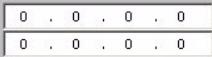
You can select ethernet, PPPoE or PPTP according to in which the network you are. If you don't know, please ask your network administrator. The most popular type of network is ethernet.
Encapsulation

WAN IP Address Assignment
IP Address Assignment

My WAN IP Address
My WAN IP Subnet Mask
Gateway IP Address
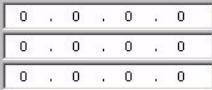
First DNS Server
Second DNS Server
- PPP over Ethernet 或 PPTP 封装
- Overview
- Hardware Connections
- Accessing the Web Configurator
- Bridge Mode
- Internet Access Setup and Product Registration
- - Ethernet Encapsulation
- - PPP over Ethernet or PPTP Encapsulation
- DMZ
- NAT
- Firewall
- VPN Rule Setup
- Using the VPN Connection
- Set Up Your Computer's IP Address
- Procedure to View a Product's Certification(s)
- Übersicht
- Network Policy Setting
- WAN IP Address Assignment
- - PPP over Ethernet oppure encapsulamento PPTP
- - PPP noBepx Ethernet nll nHkancyIaIa PPTP
- Hac trokka npabnl BnptyaJIbHOJ qactHOJ CETN (VPN)
- - PPP over Ethernet eller PPTP
- - PPP over Ethernet 或 PPTP 封装
Brand : ZYXEL
Model : ZYWALL 2WG
Category : VPN Router