
USG 300 - Firewall ZYXEL - Free user manual and instructions
Find the device manual for free USG 300 ZYXEL in PDF.

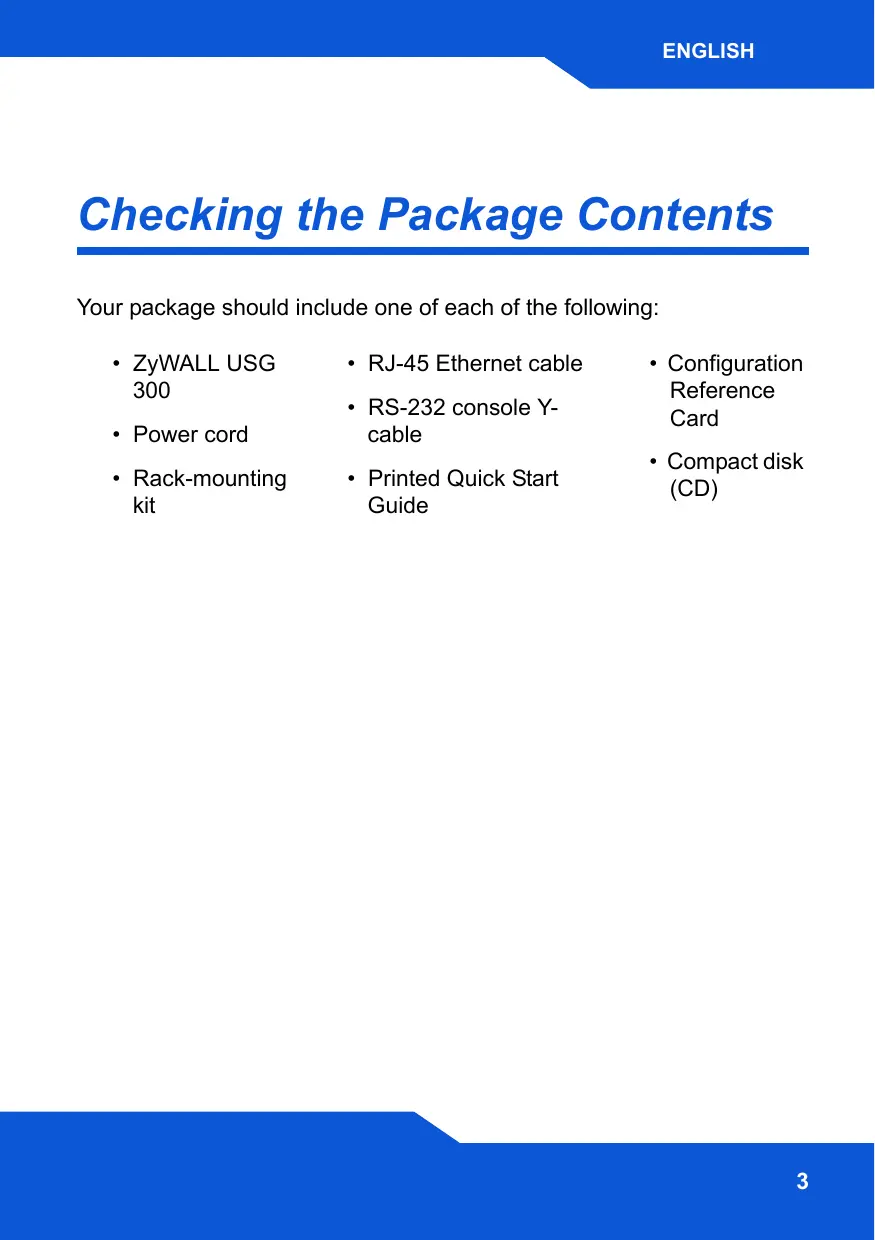


| Product type | Firewall |
| Brand | ZYXEL |
| Model | USG 300 |
| Dimensions (W x D x H) | 440 x 300 x 44 mm (1U) |
| Weight | Approximately 5 kg |
| Power supply | AC 100-240 V, 50/60 Hz |
| Network ports | 7 RJ-45 ports (ge1-ge7), 1 RS-232 console port, 1 RS-232 AUX port, 1 USB port, 1 PCMCIA card slot |
| Main features | Firewall, VPN, IDP, content filtering, routing, DHCP, DMZ, 3G/4G support (via USB card) |
| Default configuration | LAN IP address: 192.168.1.1, password: 1234 |
| Maintenance and cleaning | Disconnect power before cleaning. Use a soft, dry cloth. Do not use abrasive products. |
| Safety | Default password must be changed immediately. Reset button to restore factory defaults. |
| Spare parts and repairability | Contact your local dealer or Zyxel for any defective parts. No user-serviceable parts. |
| Package contents | ZyWALL USG 300, power cord, rack mount kit, RJ-45 Ethernet cable, RS-232 console cable, quick installation guide, configuration reference card, CD |
Frequently Asked Questions - USG 300 ZYXEL
User questions about USG 300 ZYXEL
0 question about this device. Answer the ones you know or ask your own.
Ask a new question about this device
Download the instructions for your Firewall in PDF format for free! Find your manual USG 300 - ZYXEL and take your electronic device back in hand. On this page are published all the documents necessary for the use of your device. USG 300 by ZYXEL.
USER MANUAL USG 300 ZYXEL
Unified Security Gateway
Firmware v2.11
Edition 1, 11/2008
| DEFAULT Login DETAILS | |
| IP Address: | https://192.168.1.1 |
| Username: | admin |
| Password: | 1234 |
| CONTENTS | |
| ENGLISH | 3 |
| DEUTSCH | 17 |
| ESPÁÑOL | 33 |
| FRANÇAIS | 47 |
| ITALIANO | 61 |
| PYCCKM | 89 |
| 简体中文 | 103 |
| 繁體中文 | 115 |
ZyXEL
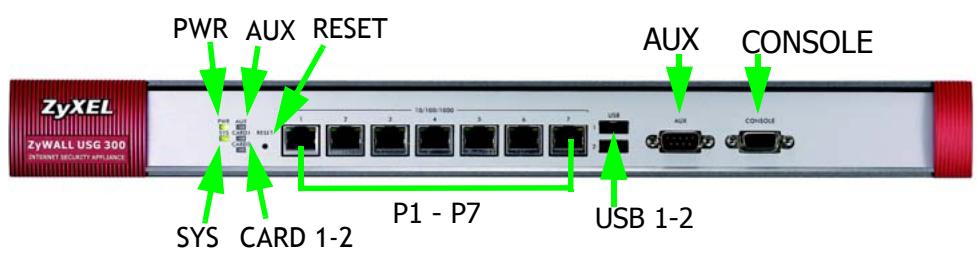
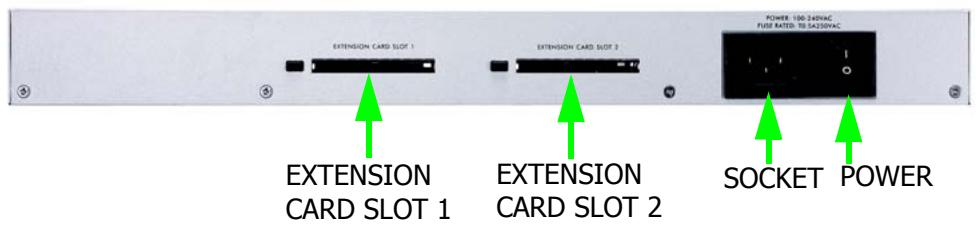
Front and Rear Panels
Checking the Package Contents
Your package should include one of each of the following:
ZyWALL USG 300
Power cord
- Rack-mounting kit
- RJ-45 Ethernet cable
-
RS-232 console Y-cable
Printed Quick Start Guide -
Configuration Reference Card
- Compact disk (CD)
Rack-mounted Installation
Mount the ZyWALL in a 19-inch rack or place it on a sturdy, flat surface.
Leave 10cm of clearance at the sides and 20~cm in the rear.
- Align one bracket with the holes on one side of the ZyWALL and secure it with the included bracket screws. Similarly, attach the other bracket.
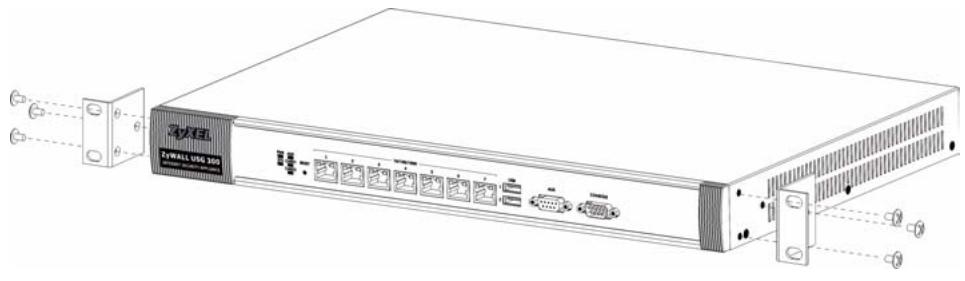
- After attaching both mounting brackets, position the ZyWALL in the rack by lining up the holes in the brackets with the appropriate holes on the rack. Secure the ZyWALL to the rack with the rack-mounting screws.

Connecting the Hardware
Make sure that the power switch on the rear panel is turned off before you make the hardware connections.

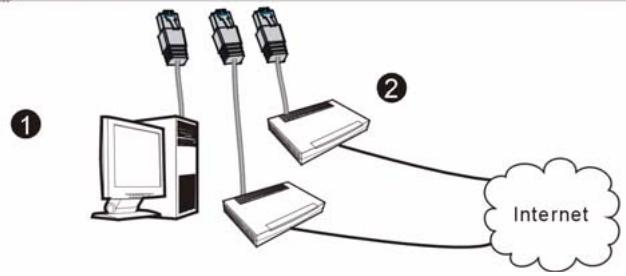
- It is recommended that you configure the ZyWALL before using it to protect your network. Use an Ethernet cable to connect a computer to port 1.
- Use another Ethernet cable(s) to connect port 2 and/or port 3 to an Ethernet jack with Internet access.

-
Use the included power cord to connect the power socket on the rear panel to a power outlet.
-
Push the power switch to the on position and look at the front panel. The PWR light turns on. The SYS light blinks during system testing and initialization and then stays on when the system is ready.
Web Login
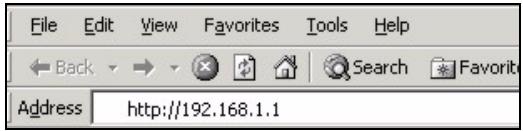
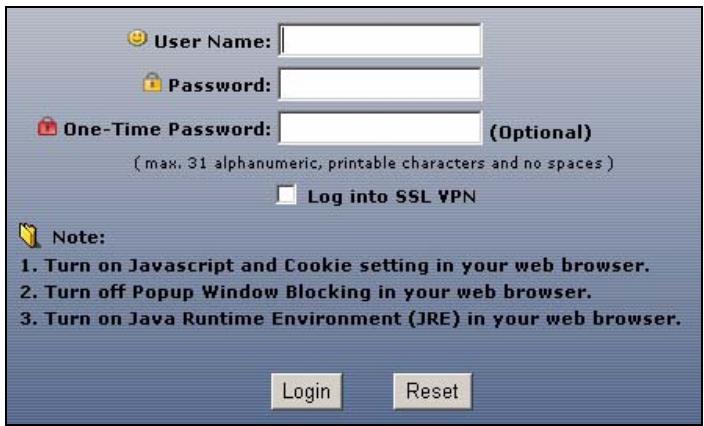
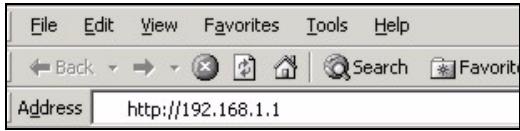
- Launch your web browser and go to http://192.168.1.1 (the ZyWALL automatically redirects you to https:// 192.168.1.1).
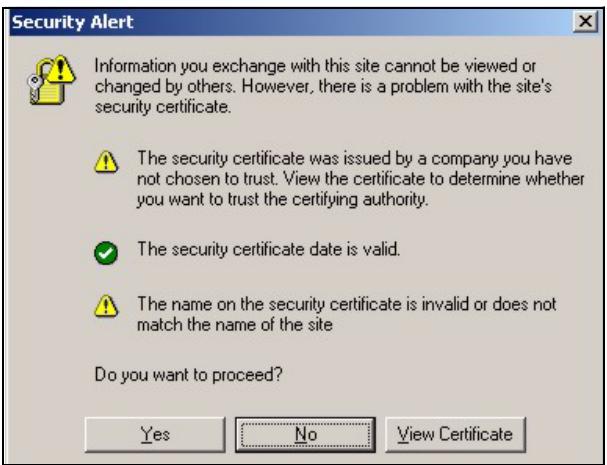
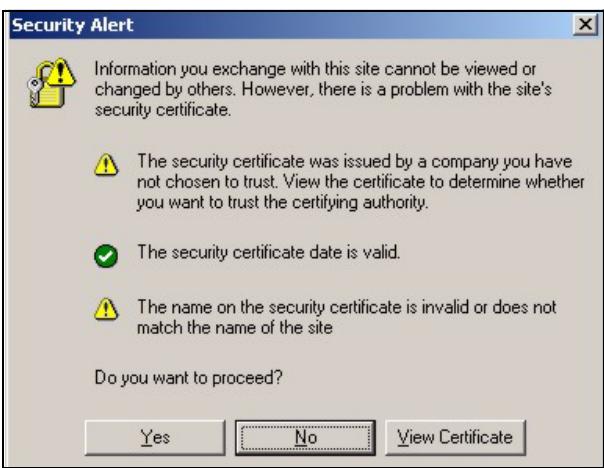
- Click Yes to proceed if you get a security alert or certificate screen.
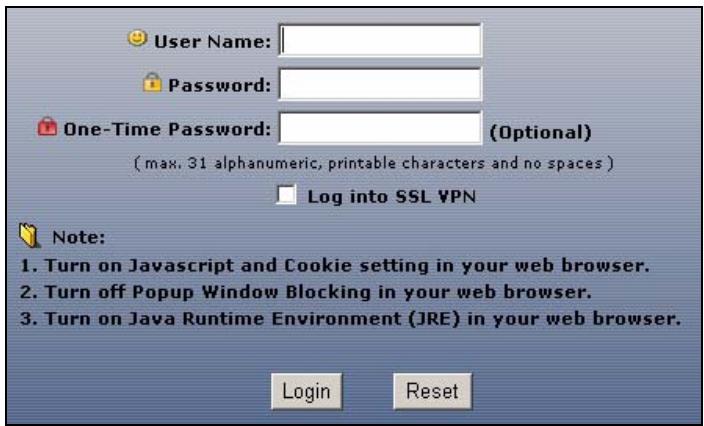
- Enter admin as the user name and 1234 as the password. Click Login.
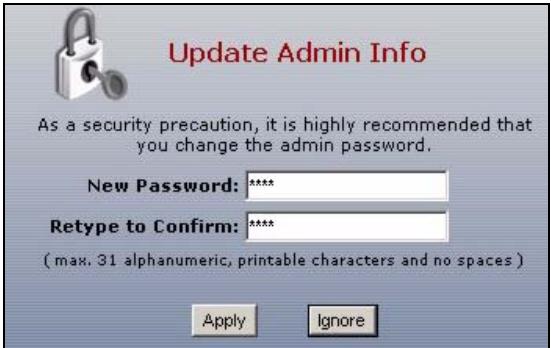
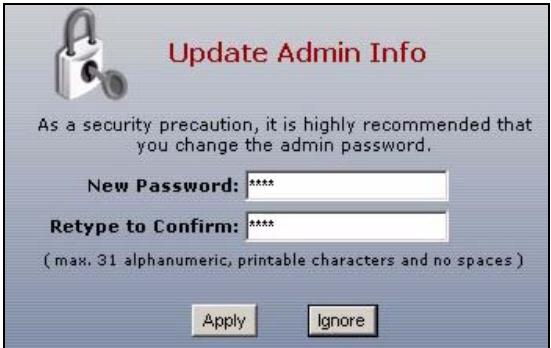
- It is strongly recommended that you change the password. Type and retype a new password, and click Apply.
Installation Setup Wizard
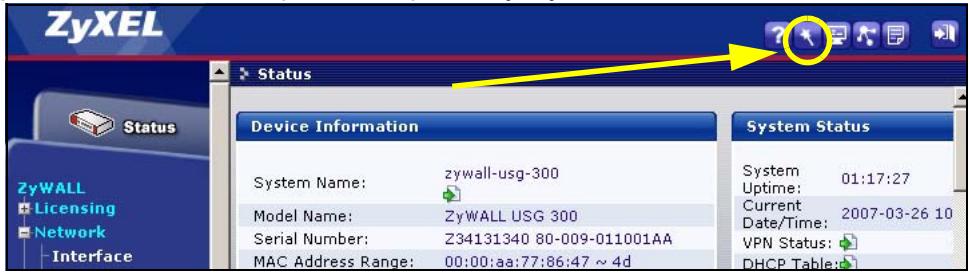
The Status screen opens. Click the Wizard icon in the upper right corner.
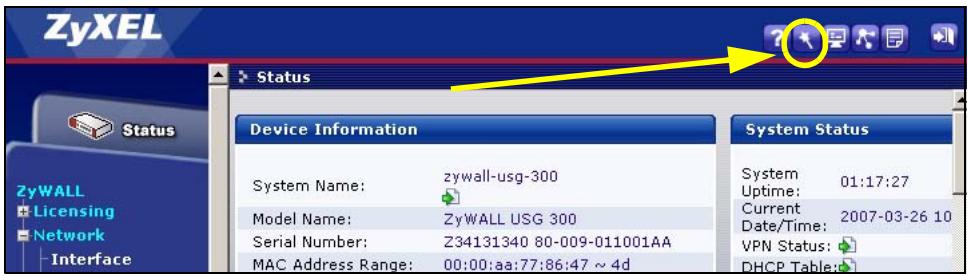
Use an installation setup wizard to connect to the Internet and register the ZyWALL and/or activate trial services, like IDP and content filter.
Use the installation wizard only for initial configuration starting from the default configuration.
Changes you make in the installation wizard may not be applied if you have already changed the ZyWALL's configuration.
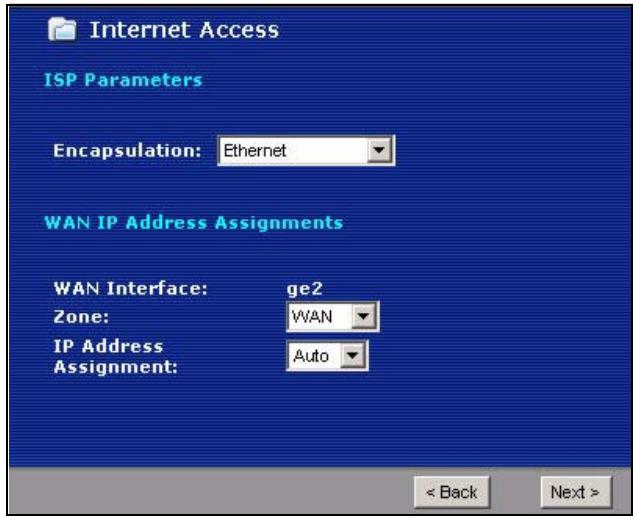
- INSTALLATION SETUP, ONE ISP sets up a single Internet connection for ge2.

INSTALLATION SETUP, ONE ISP
(helps user quickly configure the ZyWALL USG 300 to secure Internet connection)

INSTALLATION SETUP, TWO ISP
(helps user quickly configure the ZyWALL USG 300 to secure Internet connection)
- INSTALLATION SETUP, TWO ISP sets up Internet connections for ge2 and ge3.
The wizard screens vary depending on the encapsulation type you use. Refer to information provided by your ISP and the web help screens to know what to enter in each field. You can leave fields blank if you don't have that information.
Default Settings and Port Details
The ZyWALL is configured for the following network topology by default.
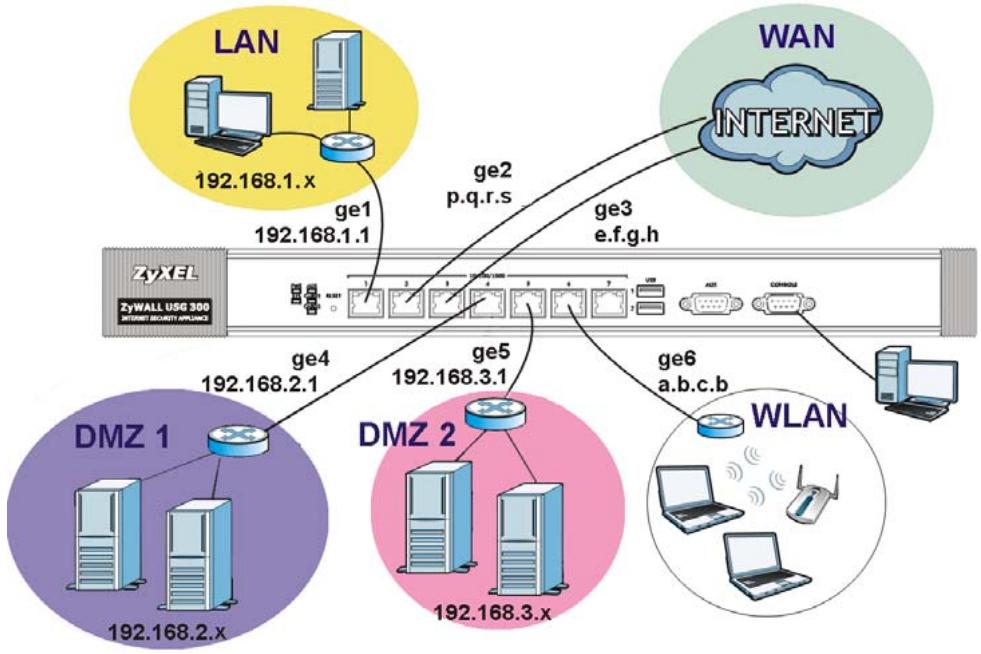
| Port | Interface | Zone | IP Address and DHCP Settings | Suggested Use With Default Settings |
| 1 | ge1 | LAN | 192.168.1.1, DHCP server enabled | Protected LAN |
| 2, 3 | ge2, ge3 | WAN | DHCP clients | Connections to the Internet |
| 4 | ge4 | DMZ | 192.168.2.1, DHCP server disabled | Public servers (such as web, e-mail and FTP) |
| 5 | ge5 | DMZ | 192.168.3.1, DHCP server disabled | Public servers (such as web, e-mail and FTP) |
| 6 | ge6 | WLAN | 10.59.0.1, DHCP server enabled | Wireless access points |
| 7 | ge7 | None | None, DHCP server disabled | Optional |
| AUX | aux | None | None | Auxiliary modem |
| CONSOLE | N/A | None | None | Local management |
| Label | Type | Description |
| USB | USB | Connect a (USB) 3G wireless card to access the Internet through a 3G network. At the time of writing, you can use the Huawei E220, E270. |
| P1~P7 | RJ-45 | Use 8-wire Category 5e or above Ethernet cables to connect routers, switches, computers, routers, access points, and so on. |
| AUX | RS-232 | Use an RS-232 console cable to connect dial backup/dial-in modem. |
| CONSOLE | RS-232 | Use an RS-232 console cable to connect a local computer for command-based management. |
| EXTENSION CARD SLOT | PCMCIA | Insert a wireless LAN card to use the wireless LAN feature. At the time of writing, you can use ZyXEL's G-170S wireless card. You can optionally insert a 3G wireless card to access the Internet wirelessly via a 3G network. At the time of writing, you can use a Sierra Wireless AC850, AC860, AC880 or AC881 3G wireless card. |
Troubleshooting
| Problem | Corrective Action |
| None of the LEDs turn on. | Make sure that you have the power cord connected to the ZyWALL and plugged in to an appropriate power source. Make sure you have the ZyWALL turned on. Check all cable connections. |
| If the LEDs still do not turn on, you may have a hardware problem. In this case, you should contact your local vendor. | |
| Cannot access the ZyWALL from the LAN. | Check the cable connection between the ZyWALL and your computer or switch. Refer to section for details. |
| Ping the ZyWALL from a LAN computer. Make sure your computer's Ethernet card is installed and functioning properly. Also make sure that its IP address is in the same subnet as the ZyWALL's.In the computer, click Start, (All) Programs, Accessories and then Command Prompt. In the Command Prompt window, type "ping" followed by the ZyWALL's LAN IP address (192.168.1.1 is the default) and then press [ENTER]. The ZyWALL should reply. | |
| If you've forgotten the ZyWALL's password, use the RESET button. Press the button in for about 5 seconds (or until the PWR LED starts to blink), then release it. It returns the ZyWALL to the factory defaults (password is 1234, LAN IP address 192.168.1.1 etc.; see your User's Guide for details). | |
| If you've forgotten the ZyWALL's IP address, you can use the commands through the console port to check it. Connect your computer to the CONSOLE port using a console cable. Your computer should have a terminal emulation communications program (such as HyperTerminal) set to VT100 terminal emulation, no parity, 8 data bits, 1 stop bit, no flow control and 115200 bps port speed. | |
| Cannot access the Internet. | Check the ZyWALL's connection to the Ethernet jack with Internet access. Make sure the Internet gateway device (such as a DSL modem) is working properly. |
| Check ge2's status in the Status screen. Use the installation setup wizard again and make sure that you enter the correct settings. |
Procedure to View a Product's Certification(s)
- Go to www.zyxel.com.
- Select your product from the drop-down list box on the ZyXEL home page to go to that product's page.
- Select the certification you wish to view from this page.
(helps user quickly configure the ZyWALL USG 300 to secure Internet connection)

INSTALLATION SETUP, TWO ISP
(helps user quickly configure the ZyWALL USG 300 to secure Internet connection)
- INSTALLATION SETUP, TWO ISP
(helps user quickly configure the ZyWALL USG 300 to secure Internet connection)

INSTALLATION SETUP, TWO ISP
(helps user quickly configure the ZyWALL USG 300 to secure Internet connection)
のインーネット接続を1つ設定します。
Bcmpoehhbi web-cepep
- 3anycntte web-6pay3epипердnte Na CTpaHnucyhttp://192.168.1.1
(ронзовдет)
aBtOMaTnueckoe nepenapBneHne Ha aDpec https://192.168.1.1).
- B clyuae BbIBOda KaKnx-JIb6o 3aInpocOB Ha NpOITBepXdEHeNe IOTeHcnaJIbHO He6e3OpacHbIX Opepaun nn npneMa ceptnФkATOB dJa IpoJOnJKeHnHaJxMnte Yes.
- BVeДиTeВ noIe User name nIЯ nOJIb3OBaTeIЯ admin N B noIe Password — napOl' 1234. Haxmite KhoNkY Login.
- PekomEnDyEcra3y JKe CMeHnTb npOJIb. HAbepnTe HObI npOJIb B nOJe New Password n eune pa3 — B noIe Retype to Confirm; 3aTeM haxmTe KHOJKy Apply.
Macmepпервональноюнасmpоуku Installation Setup Wizard
После OTКрытия заранa Status BOCNoIb3yITeСь 3HaчКOM Wizard,pacnoJIOxKeHHbIMВпразВOMВерх hemугly.
Macep nepbohaJIbHOH hAcTpoIKN installation setup wizard cnyjntdЯ poKJIoueHnK INTEpeHETy n perncTpaun yCTpoIcTBa ZyWALL n/nnn AKTINBaUNn Ipo6HOrO DoCTyNa K DOONJHNTeNbHbIM cepBVCam, TaKIMkak cnyj6a ObhApUxKeHnN n IpeDOTBpaUeHnR BTOPKeHn NnN qInIbTpKOHTeHTa.
IcnoJb3yume Macmep installation setup wizard moJbko dny nepeOHaayalbH02o KOHfUzypupOeaHua ycmpoucmea, haxodyaeseoc8 cocmoaHu nocmaKu.
EcnKoHpUpyaun ycTpoiCTBa ZyWALL yxe 6bIJa n3MeHeHa, BHeceHne n3MeHnB Hee C nOMOuMactepa installation setup wizard MOKeT OKa3aTbcra HeBO3MOXHbIM.
(helps user quickly configure the ZyWALL USG 300 to secure Internet connection)

INSTALLATION SETUP, TWO ISP
(helps user quickly configure the ZyWALL USG 300 to secure Internet connection)
eHCTBeHHO CoeHHeHc NHTepHeTOM,Yepe3 npT GE2.
(helps user quickly configure the ZyWALL USG 300 to secure Internet connection)

INSTALLATION SETUP, TWO ISP
(helps user quickly configure the ZyWALL USG 300 to secure Internet connection)
爲ge2與ge3設定網際網路連線。
- Unified Security Gateway
- Front and Rear Panels
- Checking the Package Contents
- Rack-mounted Installation
- Leave 10cm of clearance at the sides and 20~cm in the rear.
- Connecting the Hardware
- Web Login
- Installation Setup Wizard
- INSTALLATION SETUP, ONE ISP
- INSTALLATION SETUP, TWO ISP
- Default Settings and Port Details
- Troubleshooting
- Procedure to View a Product's Certification(s)
- Bcmpoehhbi web-cepep
- Macmepпервональноюнасmpоуku Installation Setup Wizard
Brand : ZYXEL
Model : USG 300
Category : Firewall