
URC 6211 - Universal remote ONE FOR ALL - Free user manual and instructions
Find the device manual for free URC 6211 ONE FOR ALL in PDF.



| Product Type | Universal remote control |
| Brand | ONE FOR ALL |
| Model | URC 6211 |
| Dimensions (approx.) | 20 cm x 5 cm x 2 cm |
| Weight (approx.) | 100 g |
| Power supply | 2 AAAA alkaline batteries (not included) |
| Battery life | Varies with usage; replace batteries within 5 minutes to retain programming |
| Housing material | ABS plastic |
| Color | Black |
| Main functions | Power, CH+/-, VOL+/-, Mute, MAGIC key for setup |
| Setup methods | Direct code entry (5 digits) or automatic search |
| Number of available codes | Over 150 pre-set codes |
| Infrared range | Up to 10 meters |
| Indicator light | Red LED under the Power key |
| Compatibility | TVs of all brands (codes listed for many brands) |
| Warranty | 1 year against manufacturing defects |
| Maintenance and cleaning | Wipe with a soft, dry cloth. Do not use chemicals or abrasives. |
| Safety | Do not expose to moisture or extreme temperatures. Use only AAAA alkaline batteries. |
| Spare parts and repairability | No replaceable parts available. Product not user-serviceable. |
| General information | Universal remote from the ONE FOR ALL series. Works with most TVs. Programming is retained when changing batteries (if done within 5 minutes). |
Frequently Asked Questions - URC 6211 ONE FOR ALL
User questions about URC 6211 ONE FOR ALL
0 question about this device. Answer the ones you know or ask your own.
Ask a new question about this device
Download the instructions for your Universal remote in PDF format for free! Find your manual URC 6211 - ONE FOR ALL and take your electronic device back in hand. On this page are published all the documents necessary for the use of your device. URC 6211 by ONE FOR ALL.
USER MANUAL URC 6211 ONE FOR ALL
FEATURES AND FUNCTIONS 3
SET UP
(To set up the ZAPPER for your Television)
Direct code set up 4
Search Method 6
Code Blink Out 7
SET-UP CODES
Television 82
TROUBLESHOOTING
Helpful Hints 8
Installing the batteries
The ZAPPER needs 2 new "AAAA" alkaline batteries.
1 Remove the battery cover from the back of the ZAPPER by pressing down on the tab.
2 Match the batteries to the + / - marks inside the battery case, then insert the batteries.
3 Press the battery cover back into place.
Important notes:
- In order to avoid having to reprogram your ZAPPER after you remove the batteries, you will need to insert new batteries within 5 minutes. Also, it is best that you do not use rechargeable batteries.
Features and Functions
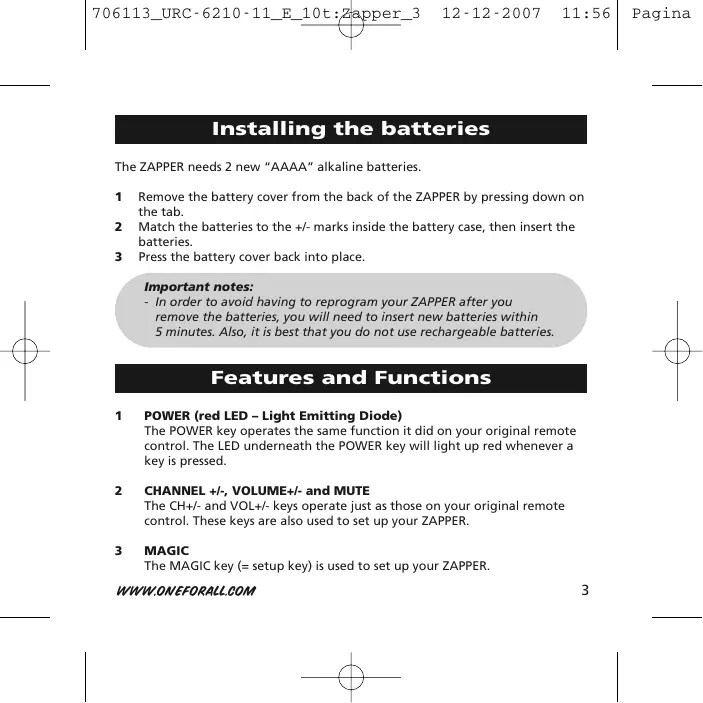
1 POWER (red LED - Light Emitting Diode)
The POWER key operates the same function it did on your original remote control. The LED underneath the POWER key will light up red whenever a key is pressed.
2 CHANNEL +/- VOLUME +/- and MUTE
The CH + / - and VOL + / - keys operate just as those on your original remote control. These keys are also used to set up your ZAPPER.
3 MAGIC
The MAGIC key (= setup key) is used to set up your ZAPPER.
Direct code set up
To set up the ZAPPER for your Television follow the instructions below.
1 Find your Television code in the Set-Up Code section (page 82-107). Codes are listed by brand name. The most popular codes are listed first.
2 Make sure your TV is switched on (not on standby).
3 Press and hold the MAGIC key until the LED blinks twice (The LED underneath the POWER key will blink once then twice).
4 Enter your 5-digit code according to the chart below. The LED underneath the POWER key will blink twice.
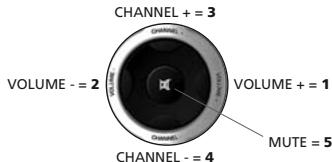
5 Now, aim the ZAPPER at your Television and press POWER. If your Television switches OFF, your ZAPPER should be ready to operate your device.
6 Turn your device back on and try all the remote's functions to ensure they are working properly. If the functions do not work properly, repeat steps 1-5 using another code listed under your brand.
For example: To enter a Sony TV code 33121, you would press CHANNEL +, CHANNEL +, VOLUME +, VOLUME -, VOLUME +.
If your television does not respond to the ZAPPER after you have tried all the codes listed for your brand, try the Search Method described on page 6.
Make sure you write your correct 5 digit code in the boxes provided on this page.
Important notes:
- Some codes are quite similar. If your television does not respond or is not functioning properly with one of the codes, follow steps 1-5 with each code listed for your brand.
- If none of the codes listed for your brand operate your television, follow the Search Method described in the next section. The Search Method can be used even if your brand is not listed at all.
- Write the code for your TV in the boxes provided below for easy future reference.
TV Code
Search Method
If your Television does not respond to the ZAPPER after trying all the codes listed for your brand, try searching for your code. To search for your TV code:
1 Turn on your TV.
2 Press and hold the MAGIC key until the LED blinks twice (The LED underneath the POWER key will blink once then twice).
3 Next, press the MUTE, CHANNEL-, CHANNEL-.
4 Point the ZAPPER at your television. Next, alternate between POWER and CHANNEL - until your Television turns off. You may have to press these keys many times (up to 150!), so please be patient. Remember, you must aim the ZAPPER at your device the entire time you are searching for your code.
5 When your device turns off, press and release MAGIC to store the code. The ZAPPER should now be ready to operate your Television. Turn your device back on and try all the remote's functions to ensure they are working properly. If some of the ZAPPER'S commands are not operating correctly, try the search method again, you may be using the wrong code.
Code Blink Out
After you have used the Search Method, you can find out which code the ZAPPER responded to by blinking back the code. It's handy to know your Television code for future reference. Remember, you can only blink back your code after the ZAPPER is operating your device.
To blink out your TV code:
1 Press and hold the MAGIC key until the red LED blinks twice (the LED underneath the POWER key will blink once then twice).
2 Next, press MUTE, CHANNEL-, CHANNEL+.
3 For the first digit of your 5-digit code, press VOLUME + and count the red blinks.
4 For the second digit, press VOLUME - and count the red blinks.
5 For the third digit, press CHANNEL + and count the red blinks.
6 For the fourth digit, press CHANNEL - and count the red blinks.
7 For the fifth digit, press MUTE and count the red blinks.
Write the code for your TV in the boxes provided on page 5.
Problem:
Solution:
| Your brand is not listed in the ONE FOR ALL code section? | Try the search method. |
| The ONE FOR ALL does not operate your television? | A) Try all the codes listed for your brand. B) Try the search method. |
| The ONE FOR ALL is not performing commands properly? | You may be using the wrong code. Try Direct Set-Up again trying each code listed under your brand or start the search method over again to locate the proper code. |
| You cannot reach channel 10 and above on your TV. | If your original remote did not have CHANNEL +/- keys, the ZAPPER may not operate this function. |
| The ONE FOR ALL does not respond after pressing a key? | Make sure you are using new batteries and are aiming the ONE FOR ALL at your device. |
| LED does not blink when you press a key? | Replace batteries with 2 new “AAAA” alkaline batteries. |
Customer Service
In the UK
E-mail: ofahelp@uebv.com (*)
Fax : +31 53 432 9816
Tel. : 0901-5510010 (£ 0,50 per minute)
In Australia
E-mail: ofahelp@uebv.com (*)
Fax : 03 9672 2479
Tel. : 1300888298
In New Zealand
E-mail: ofahelp@uebv.com (*)
Fax : (06) 878 2760
Tel. : 0508 ONE 4 ALL (663 4 255)
Slovakia
E-mail: ofa@dsi.sk
Fax : +421 55 611 8111
Tel. : +421 55 611 8131
Web. : www.dsi.sk
In Ireland
E-mail: ofahelp@uebv.com (*)
Fax : +31 53 432 9816
Tel. : 016015986
In South Africa
E-mail : support@oneforall.co.za
Fax : 011 298 2302
Tel. : 0860 100551
Tel. : 011 4173000
Ukraine
(^*) Just send a blank message, you'll get auto-reply.
Deutsch
Inhaltsverzeichnis
EINSETZEN DER BATTERIEN 11
FUNKTIONEN 11
EINSTELLUNG
UNIVERSAL ELECTRONICS INC/ONE FOR ALL warrants to the original purchaser that this product will be free from defects in materials and workmanship under normal and correct use for a period of one (1) year from the date of original purchase. This product will be replaced free of charge if it has been proven to be defective within the one (1) year warranty period. This warranty does not cover cartons, carrying cases, batteries, broken or marred cabinets or any other item used in connection with the product. Any further obligation than listed above is excluded. To obtain warranty service during the warranty period, please call us at the number mentioned on the Customer Service page. Please notice that we need your purchase receipt so that we may establish your eligibility for service.
If you have bought this product for purposes which are not related to your trade, business or profession, please remind that you may have legal rights under your national legislation governing the sale of consumer goods. This guarantee does not affect those rights.
Deutsch
Universal Electronics BV
Europe & International
P.O.Box 3332
7500 DH, Enschede
The Netherlands
C E
Italiano
Universal Electronics BV
Europe & International
P.O.Box 3332
7500 DH, Enschede
The Netherlands
Universal Electronics BV
Europe & International
P.O.Box 3332
7500 DH, Enschede
The Netherlands

URC-6210 / URC-6211
706107
RDN-1061207