
URC 3710 - Universal remote ONE FOR ALL - Free user manual and instructions
Find the device manual for free URC 3710 ONE FOR ALL in PDF.


| Product Type | Universal Remote Control |
| Brand | ONE FOR ALL |
| Model | URC 3710 |
| Dimensions (approx.) | 20 x 5 x 2 cm |
| Weight (with batteries) | Approximately 200 g |
| Power | 4 AAA/LR6 alkaline batteries |
| Display Type | Red LED under the ON button |
| Number of Buttons | Approximately 30 buttons |
| Infrared Range | Up to 10 meters (typical) |
| Main Functions | Direct setup, code search, macros, Key Magic, key copy, TV commands, volume, menu, text |
| Compatible Devices | TVs, LCD, plasma, projectors, rear projectors |
| Programming Method | Code entry or automatic search |
| Number of Codes in Memory | More than 150 codes |
| Macro | Up to 35 button sequences per macro |
| Key Magic | Programming missing functions via 5-digit code |
| Maintenance and Cleaning | Wipe with a soft, dry cloth |
| Safety | Avoid moisture, use new alkaline batteries, do not short-circuit |
| Spare Parts and Repairability | User-replaceable batteries; contact customer service for repair |
| Warranty | Legal warranty of conformity |
Frequently Asked Questions - URC 3710 ONE FOR ALL
User questions about URC 3710 ONE FOR ALL
0 question about this device. Answer the ones you know or ask your own.
Ask a new question about this device
Download the instructions for your Universal remote in PDF format for free! Find your manual URC 3710 - ONE FOR ALL and take your electronic device back in hand. On this page are published all the documents necessary for the use of your device. URC 3710 by ONE FOR ALL.
USER MANUAL URC 3710 ONE FOR ALL
Instruction manual 4
Deutsch
(to find out which code is currently programmed) 10
EXTRA FEATURES
- Macros (sequence of commands) 11
- Key Magic® (how to program missing functions from your original lost or broken remote) 13
- Key Move (how to copy a function to another key) 14
PROBLEM & SOLUTION 15
CUSTOMER SERVICE 15
Installing the batteries
Your ONE FOR ALL needs 4 new "AAA/LR6" alkaline batteries.
Press "Battery Unlock" to unlock the battery cover from the back of your ONE FOR ALL.
2 Match the batteries to the + and - marks inside the battery case, then insert the batteries.
3 Place the battery cover back into place.
The Keypad
1 OFF To switch off your equipment
2 MAGIC To set up your ONE FOR ALL.
Additionally the MAGIC key may be used as SHIFT key.
3 ON To switch on your equipment
4 Number Keys
If your original remote has an 20 key, this function can be found under the AV key.
If your original remote has an 10 or -/- key, this function can be found under the -/- key.
5 :AV/Input or 20 or C/P
6 Volume +/- and Mute Keys
If the device you programmed does not have volume functionality, you will obtain the VOL +/- and Mute functionality from your Television.
MAGIC Volx =Colour+/-
7 MENU Menu
8 EXIT
Exit the Menu
9 Channel +/- Keys
: MAGIC CH+ = Brightness +/-
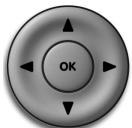
10 to navigate in Menu operation and confirm your choice pressing the OK key
: Guide
11

12

: Recall
13

14

:Info or OSD
15

16

:PIP
17

18

:TextOn
:Hold/Stop
6
19

:Textoff
20

: Red (fastext)
21

:green (fastext)
22

: Yellow (fastext)
23

: Blue (fastext)
- Some functions can be reached simply pressing and releasing the MAGIC key before pressing the corresponding function (the MAGIC key will remain shifted for 10 seconds).
Direct code set up
Example: To set up the ONE FOR ALL for your television:
1

Find the code for your device (e.g. Bennett
Television) in the Code list (page 124 - 132 in the manual). Codes are listed by device type and brand name. The most popular code is listed first.
Make sure your device is switched on (not on standby).
2

Press and hold down the MAGIC key (for approximately 3 seconds) until the red LED (underneath the ON key) blinks twice.
The red LED will blink once, then twice.

x2
3
Enter your four-digit device code using the number keys (e.g. Bennett code 0556). The red LED will blink twice to confirm that the code is stored.
4

Now, aim the ONE FOR ALL at your device and press OFF. If your device switches off, the ONE FOR ALL is ready to operate your device.

5

Next, switch your device back on (pressing ON, a number key or CH+ ) and try all the remote's functions to ensure they are working properly. If the functions do not work properly, repeat steps 1-5 using another code listed under your brand.
If your device does not respond, follow steps 1 to 4 with each code listed for your brand. If none of the codes listed for your brand operate your device OR if you your brand is not listed at all, try the search method described on page 9.
Some codes are quite similar. If your device does not respond or is not functioning properly with one of the codes, try another code listed under your brand.
Search Method
If your device does not respond to the ONE FOR ALL after you have tried all the codes listed for your brand.
The Search Method may also work if your brand is not listed at all.
The Search Method allows you to find the code for your device by scanning through all the codes contained in the memory of the ONE FOR ALL.
Example: To search for your TV code:
1 Switch on your television (not on standby) and aim your ONE FOR ALL at your TV.
2 Press and hold down the MAGIC key (for approximately 3 seconds) until the red LED (underneath the ON key) blinks twice.
The red LED will blink once, then twice.
Press 9 9 1. The red LED will blink twice.
4 Next, press OFF.
5 Aim the ONE FOR ALL at your Device. Now press CH+ over and over, until your e.g. Television switches off.
- Every time you press the CH + key the ONE FOR ALL will send out a POWER signal (the function you chose at step 4) from the next code contained in the memory.
- You may have to press this key many times (up to 150 times) so please be patient.
- If you skip past a code, you can go to the previous code(s) by pressing the CH- key.
- Remember to keep pointing the ONE FOR ALL at your Device while pressing this key.
As soon as your Device switches off, press the MAGIC key to store the code.
If your Device does not switch on pressing the ON key, simply press the ON key, a number key or CH+ to switch your e.g. Television back on.
Code Blink out
(To find out which code is currently programmed)
Once you have Set-Up your ONE FOR ALL, you can blink back your SET-UP CODE for future reference.
Example: To blink out your Television code:
Press and hold down the MAGIC key (for approximately 3 seconds) until the red LED (underneath the ON key) blinks twice. The red LED will blink once, then twice
2 9 0 Press 9 9 0. The red LED will blink twice.
For the first digit of your four-digit code, press 1 and count all the red blinks.
3 2 For the second digit, press 2 and count all the red blinks.
4 3 For the third digit, press 3 and count all the red blinks.
5 For the fourth digit, press 4 and count all the red blinks.
Now you have your four-digit code.
- If there are no blinks, the digit is "0".
- If you are not sure how many times it blinked, simply press the corresponding digit again to repeat the blink-back.
Quick Code Reference
Device
Code
Macros (Sequence of commands)
Macros (Direct)
You can program your ONE FOR ALL to issue a sequence of commands at the press of one button. Any sequence of commands you regularly use can be reduced to one key stroke for your convenience.
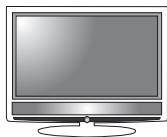
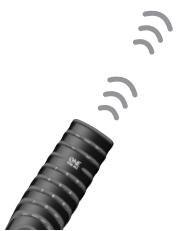
Example: To switch your Television to Channel 3 textpage 801 with one single keypress (e.g. red key):
1 Press and hold down the MAGIC key (for approximately 3 seconds) until the red LED (underneath the ON key) blinks twice. The red LED will blink once, then twice.
2 Press 9 95.
3 Then press the Red key to which the Macro will be assigned.
4 Next press 3, TEXT ON, 801.
5 To store the Macro, press and hold down the MAGIC key until the red LED underneath the ON key will blink twice.
Each MACRO can consist of a maximum of 35 key strokes.
- If you had to hold down a key for a few seconds on the original remote control to get a function, this function may not work in a macro on your ONE FOR ALL remote.
- If you program a Macro on a key, the original function will become shifted (excluding Red, Green, Yellow and Blue). Press the MAGIC then the key to access it.
Extra Features
To erase the Macro from the Red key, press:
1 Press and hold down the MAGIC key (for approximately 3 seconds) until the red LED (underneath the ON key) blinks twice. The red LED will blink once, then twice.
2 Press 9 9 5. The red LED will blink twice.
3 Then press the Red key.
4 Press and hold down the MAGIC key (for approximately 3 seconds) until the red LED (underneath the ON key) blinks twice.
Shifted Macros
If you do not want to sacrifice any key it is also possible to install a "Shifted Macro".
If for example, you want to program a shifted Macro on the TEXT key.
Example: To switch your Television to Channel 3 textpage 801 with one single keypress (e.g. MAGIC then the TEXT key):
To erase the Shifed Macro from the TEXT key press:
1 Press and hold down the MAGIC key (for approximately 3 seconds) until the red LED (underneath the ON key) blinks twice. The red LED will blink once, then twice.
2 Press 9 9 5. The red LED will blink twice.
3 Then press MAGIC followed by the TEXT key to which the Macro will be assigned.
4 Next press 3, TEXT ON, 801.
5 To store the Macro, press and hold down the MAGIC key (for approximately 3 seconds) until the red LED (underneath the ON key) blinks twice.
To erase all Macro and Shifted Macro:
MAGIC 995 MAGIC
-
Here you must press and hold down the MAGIC key until the red LED underneath the ON blinks twice.
-
If you place a Macro shifted on a digit key, access the original function by pressing the MAGIC key twice and then the digit key.
Key Magic
how to program missing functions
Key Magic® is an exclusive ONE FOR ALL feature that ensures that many functions of your original remote control can be operated - even those that do not have their own key on the ONE FOR ALL keypad. Frequently used functions can be assigned to a key of your choice using the Key Magic feature of your ONE FOR ALL.
In order to program a certain function with Key Magic you need to know the corresponding function code. As these function codes vary with different types of devices, they cannot be found in the manual. You can request your function codes calling our consumer service or by sending us a fax or e-mail.
Please mention:
- The 4-digit set-up code your device is working with.
- How the function was labelled on your original remote control.
Once you obtain(ed) your function code(s) from customer service, programming the code is easy:
1 Press and hold down the MAGIC key until the red LED (underneath the TV key in this example) blinks twice. The red LED will blink once, then twice.
2 Press 9 94. The red LED will blink twice.
3 Press the MAGIC key once.
4 Enter the 5-digit function code (provided by customer service).
5 Press the key to which the function will be assigned. The red LED will blink twice.
EXTENDED FUNCTION REFERENCE (first entry is an example):
| DEVICE: TV | SET-UP CODE: 0556 | FUNCTION: 16/9 format | FUNCTION CODE: 00234 |
- To access the function you have programmed, press the corresponding device key first.
- Please note all the extended function codes you obtain from customer service for easy future reference.
Key Move How to copy a function to another key
Key Move allows you to configure the keypad as you wish.
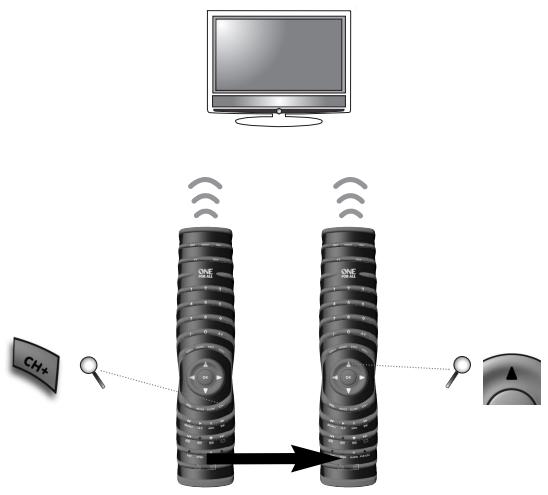
Example: how to Key Move the "CH+" function to the "MENU+" key:
1 Press and hold down the MAGIC key (for approximately 3 seconds) until the red LED (underneath the ON key) blinks twice. The red LED will blink once, then twice.
2 Press 9 9 4. The red LED will blink twice.
3 Press the key you wish to move (e.g. CH+ ).
4 Press the key to which the function will be assigned (e.g. MENU+). The red LED will blink twice.
To restore the MENU+ key to it's original function press:
MAGIC 994 MENU+ MENU+ (^)
(**) Press and hold down the MAGIC key until the red LED will blink twice.
Not valid for fuctions obtained through Key Magic.
Problem & Solution
Problem:
Solution:
Croatia
| Your brand is not listed in the code section? | Try the search method on page 9. |
| The ONE FOR ALL does not operate your device(s)? | A) Try all the codes listed for your brand. B) Try the search method on page 9. |
| The ONE FOR ALL is not performing commands properly? | You may be using the wrong code. Try repeating the Direct Set-Up using another code listed under your brand or start the search method over again to locate the proper code. |
| Problems changing channels? | Enter the programme number exactly as you would on your original remote. |
| The ONE FOR ALL does not respond after pressing a key? | Make sure you are using new batteries and are aiming the ONE FOR ALL at your device. |
| The red LED does not blink when you press a key? | Replace batteries with 4 fresh, new “AAA” alkaline batteries. |
Customer Service
In the UK
E-mail: ofahelp@uebv.com (*5)
Fax :+31534329816
Tel. : 0901-5510010 (£ 0,50 per minute)
In Ireland
E-mail: ofahelp@uebv.com (*5)
Fax :+31534329816
Tel. :016015986
In Australia
E-mail: ofahelp@uebv.com (*5)
Fax :0396722479
Tel. : 1300888298
In South Africa
E-mail : support@oneforall.co.za
Fax :0114173274
Fax :0114173275
Tel. :0114173074
Tel. :0114173075
CS. :0860 100551
In New Zealand
E-mail: ofahelp@uebv.com (*5)
Fax : (06) 878 2760
Tel. :0508 ONE 4 ALL (663 4 255)
Ukraine
(^*5) Just send a blank message, you'll get auto-reply.
EINLEGENDER BATTERIEN 17
DAS TASTENFELD 17