Bakefry 3000 Touch Steel Connected - Washing machine CECOTEC - Free user manual and instructions
Find the device manual for free Bakefry 3000 Touch Steel Connected CECOTEC in PDF.


User questions about Bakefry 3000 Touch Steel Connected CECOTEC
0 question about this device. Answer the ones you know or ask your own.
Ask a new question about this device
Download the instructions for your Washing machine in PDF format for free! Find your manual Bakefry 3000 Touch Steel Connected - CECOTEC and take your electronic device back in hand. On this page are published all the documents necessary for the use of your device. Bakefry 3000 Touch Steel Connected by CECOTEC.
USER MANUAL Bakefry 3000 Touch Steel Connected CECOTEC
Safety instructions 7
-
Parts and components 37
-
Before use 37
-
Operation 38
-
Wi-Fi connectivity and mobile App 42
-
Cleaning and maintenance 42
-
Technical specifications 42
-
Disposal of old electrical and electronic appliances 43
-
Technical support and warranty 43
-
Copyright 43
-
Simplified eu declaration of conformity 43
SOMMAIRE
EN • The coding in this manual is generic and applies to all code variants of the appliance.
Read these instructions thoroughly before using the appliance. Keep this instruction manual for future reference or new users.
- All safety instructions must be closely followed when using the appliance.
- This appliance is designed for domestic use only and is not intended for bars, restaurants, farmhouses, hotels, motels, and offices.
-
This appliance can be used by children aged 8 years and above and people with reduced physical, sensory, or mental capabilities or lack of experience and knowledge if they have been given supervision or instruction concerning use of the appliance in a safe way and understand the hazards involved. Children must not play with the appliance. Cleaning and user maintenance should not be carried out by unsupervised children.
-
Keep this appliance and its power cable out of reach of children under the age of 8.
This symbol means: CAUTION: hot surface. Accessible surfaces may reach high temperatures when the appliance is in operation. - The appliance is not intended to be operated by means of an external timer or a separate remote-control system.
- Make sure that the mains voltage matches the voltage stated on the rating label of the appliance and that the wall outlet is earthed.
- Do not immerse the cable, plug, or any other non-removable part of the appliance in water or any other liquid. Do not expose the electrical connections to water. Make sure your hands are dry before handling the plug or switching on the device.
- Unplug the appliance from the main power supply when not in use.
- Check the power cable regularly for visible damage. If the cable is damaged, it must be replaced by the official Cecotec Technical Support Service to avoid any danger.
- Do not operate the appliance if its cable, plug, or body show visible damage, do not operate properly, or have been dropped.
- Do not twist, bend, pull, or damage the power cable. Protect it from sharp edges and heat sources. Do not allow the cable to touch hot surfaces. Do not let the cable hang over the edge of the working surface or worktop.
- Turn off and unplug the appliance from the mains supply when not in use and before cleaning it. Pull from the plug, not the cable, to disconnect it from the outlet.
-
Supervise children to prevent them from playing with the appliance. Close supervision is necessary when the appliance is being used by or near children.
-
Place the appliance on a dry, stable, flat, heat-resistant surface.
- Do not cover the appliance while in use.
- Do not leave the appliance unattended while in use. Unplug it from the power supply when you finish using it and before leaving the room.
- Do not try to repair the appliance by yourself. Contact the official Cecotec Technical Support Service.
- Do not place the device on or near combustible materials such as tablecloths or curtains. The temperature of accessible surfaces may be high when the appliance is in operation. Do not place the appliance on or near hot gas, an electric cooker, or an active oven.
- Do not place the appliance against the wall or any other devices. Leave a safety distance of 10 cm on the back of the appliance and 10 cm on each side. Do not place any object on top of the appliance when in use.
- During operation, hot steam is released through the air outlet openings. Keep your hands and face at a safety distance from the steam and from the air outlet openings. Hot air may be blown out of the appliance when the tray is removed.
INSTRUCTIONS DE SÉCURITÉ
- Control panel
- Door handle
- Racks
- Door
- Non-slip feet
NOTE:
The graphics in this manual are schematic representations and may not exactly match the device.
2. BEFORE USE
- This appliance is packaged in a way as to protect it during transport. Take the appliance out of its box and remove all packaging materials. You can keep the original box and other packaging elements in a safe place to prevent damage to the device if you need to transport it in the future. In case the original packaging is disposed of, make sure all packaging materials are recycled accordingly.
- Make sure all parts and components are included and in good conditions. If there is any piece missing or in bad conditions, contact the official Cecotec Technical Support Service immediately.
Box content
- Oven
- Temperature probe
- Frying tray
- Baking tray
- Oven rack
- Pizza stone
- Removable grease-collection tray
- Rotisserie with handle
- Mould
- Metal handle
ENGLISH
3. OPERATION
Before using the oven for the first time
- Remove all accessories from the oven. Wash them in warm, soapy water with a soft cloth.
- Rinse and dry thoroughly.
- Wipe the bottom and top of the oven interior with a soft, damp cloth.
- Dry it properly.
When using the oven for the first time, it may give off a faint smell of smoke for 5-15 minutes. This is normal. With use, it will stop emitting smoke. Open a window to ensure sufficient ventilation.
Accessories
The accessories contained in the air-fryer oven are as follows:
1. Food thermometer. Fig. 2
It is used to determine the internal temperature of food. Insert the tip of the probe as close as possible to the centre of the thickest part of the food. (Only use with Grill or Roast functions).
2. Frying tray. Fig. 3
Use with Airfry or Dehydrate functions to improve results. Allow it to cool completely before putting it in the dishwasher. If washing by hand, do not use abrasive cleaning products.
3. Rack. Fig. 4
It is suitable for baking, grilling and toasting. It can be used on its own or placed on top of a tray (baking or pizza tray). Allow it to cool completely before putting it in the dishwasher. If washing by hand, do not use abrasive cleaning products.
4. Baking tray. Fig. 5
Suitable for baking, roasting or grilling. Cover with baking paper or aluminium foil for easier cleaning.
5. Grease-collection tray. Fig. 6.
If you place it at the bottom of the oven, it is used to collect crumbs or grease that may be released by the food during cooking. Removable to facilitate cleaning.
6. Rotisserie. Fig. 7
It is used to roast meat (e.g. chicken) evenly.
7. Rotisserie handle. Fig. 8
Used to safely insert and remove the rotisserie.
Control panel
Figure 9
- Homepage icon
- Light on/off indicator light
- Successful pairing indicator light
- Wi-Fi indicator light
- Settings icon
- Light on/off icon
- Child Lock icon: this icon locks and unlocks the display to prevent unintentional touching. Press for two seconds to activate the function.
- Locked display indicator light
- Power icon: used to switch on the oven, cancel the ongoing programme and put the oven into standby mode.
- Start/Pause icon: used to start cooking or interrupt the programme in progress.
Cooking programmes
| Programme | Preheating | Default temperature (°C) | Default time | Adjustable temperature range (°C) | Adjustable time range |
| Roast | Yes | 200 | 35 min | 100-200 | 1-60 min |
| Grill Medium rare | Yes | 220 | 16 min | 100-220 | 1-60 min |
| Medium | Yes | 220 | 18 min | 100-220 | 1-60 min |
| Medium well | Yes | 220 | 20 min | 100-220 | 1-60 min |
| Well done | Yes | 220 | 23 min | 100-220 | 1-60 min |
| Pizza Frozen | Yes | 200 | 15 min | 55 - 200 | 1-60 min |
| Fresh | Yes | 200 | 10 min | 55 - 200 | 1-60 min |
| AirFry Frozen fries | No | 200 | 18 min | 55 - 200 | 1-60 min |
| Hand-cut fries | No | 200 | 20 min | 55 - 200 | 1-60 min |
| Toast Light toast | No | 220 | 5 min | 100-220 | 1-10 min |
| Medium toast | No | 220 | 6 min | 100-220 | 1-10 min |
| Dark toast | No | 220 | 7 min | 100-220 | 1-10 min |
| Bake | No | 180 | 30 min | 55-220 | 1-60 min |
| Bagel | No | 200 | 15 min | 55-220 | 1-60 min |
| Dehydrate | No | 70 | 30 min | 55-90 | 1-120 min |
| Slow cooking | No | 90 | 120 min | 55-180 | 1-480 min |
| Keep warm | No | 60 | 30 min | 55-80 | 1-20 min |
Using the rotisserie
To use the rotisserie, follow these steps:
- If you have not already done so, place the grease-collection tray in the bottom of the oven.
- Secure the food in the rotisserie using the clips. To do this, loosen the screws.
- Then, fix the food by adjusting the clips. Then retighten the screws. Make sure that there is enough space to remove the rotisserie with the handle when cooking is finished. Fig. 10
- First, insert the end of the rotisserie that does not have the groove into the hole in the oven intended for this purpose by 5 mm. Fig. 11
- Next, insert the other end of the rotisserie (which does have the groove) into the bracket on the other side of the oven. Fig. 12
NOTE: make sure that the rotisserie and the food to be prepared can rotate freely.
- After cooking, remove the rotisserie using the handle provided. To do this, insert the hook at the ends of the handle into the holes of the rotisserie. Fig. 13
Beeping
- Each time an operation is performed, the oven will beep.
- When the Airfry programme reaches the halfway point of the cooking cycle, the oven will beep twice to remind you to turn the food for even cooking.
- When automatic preheating is complete, in Roast, Grill and Pizza modes, the oven will beep 5 times.
- Once the cooking time has finished, the oven will beep ten times.
Using the air-fryer oven
- Insert the grease-collection tray into the bottom of the oven.
- Then, introduce the food.
- To do this, place them on the tray or rack.
- Slide the accessory to be used into the desired guide.
A When selecting the Roast, Grill or Pizza programme, do not put food in the oven until the automatic preheating has finished; only insert the accessories.
NOTE:
- Make sure that nothing is within 3 cm (about the width of a teaspoon) of the oven heating elements.
- When the oven is operating at a very high temperature, this distance must be considerably greater.
- Plug in the oven.
- Check the input voltage indicated on the rating label of the oven and make sure that it matches your mains voltage.
- Plug the power cable correctly into a power outlet. The display will light up.
- Select the desired programme.
A Scroll through the 10 programmes on the display and select one to start cooking.
B Alternatively, adjust the temperature/time of the selected programme to get the preferred doneness.
C You can start cooking now.
D The oven features 10 programmes. The default settings are optimised for various types of dishes and food. As you become familiar with the use of the oven, you will be able to make small adjustments to suit your taste.
- When the cooking is finished, the food is ready to serve.
Remove the used accessory and the food from the oven using oven gloves (or the rotisserie handle, if applicable).
- Switch off the oven.
Switch off the appliance and unplug from the power outlet.
4. WI-FI CONNECTIVITY AND MOBILE APP

By scanning the following QR code you will be able to access the app download option and an instruction manual explaining how to pair your appliance:
5. CLEANING AND MAINTENANCE
- Disconnect the plug from the socket before cleaning.
- Wait until the oven and its accessories have cooled down.
- Do not immerse the oven in water.
- Clean the appliance after each use, otherwise food residues left in the oven may catch fire when cooking again.
- After use, wipe the outside of the oven and the grease-collection tray with a soft, damp cloth and dry thoroughly. You can use a non-abrasive liquid soap or a mild spray solution to clean the stains.
- To clean the door, use glass cleaner or a mild cleaning agent and a damp sponge. Do not use abrasive cleaners or scouring pads as they may scratch the surface.
- Allow the accessories to cool completely before cleaning. Accessories can be damaged if they come into contact with cold water when they are still hot.
- After each use, wipe the bottom, top and walls of the oven with a soft, non-abrasive, damp cloth to prevent residue build-up. Dry it properly.
- Do not use abrasive cleaning products or metal utensils on any of the oven's interior or exterior surfaces or to clean the accessories.
- Allow all accessories and oven parts to dry completely before using the oven again.
- Be sure to put the grease-collection tray back into the oven after cleaning and before use.
6. TECHNICAL SPECIFICATIONS
Product reference: 03809
Product: Bake&Fry 3000 Touch Steel Connected
Voltage: 220 - 240 V\~
Frequency: 50/60 Hz
Rated power: 1700 W
Technical specifications may change without prior notification to improve product quality. Made in China | Designed in Spain
7. DISPOSAL OF OLD ELECTRICAL AND ELECTRONIC APPLIANCES

This symbol indicates that, according to the applicable regulations, the product and/or batteries must be disposed of separately from household waste. When this product reaches the end of its shelf life, you should dispose of the cells/batteries/accumulators and take them to a collection point designated by the local authorities.
Consumers must contact their local authorities or retailer for information concerning the correct disposal of old appliances and/or their batteries.
Compliance with the above guidelines will help protecting the environment.
8. TECHNICAL SUPPORT AND WARRANTY
Cecotec shall be liable to the end user or consumer for any lack of conformity that exists at the time of delivery of the product under the terms, conditions, and deadlines established by the applicable regulations.
It is recommended that repairs be carried out by qualified personnel.
If at any moment you detect any problem with your product or have any doubt, do not hesitate to contact the official Cecotec Technical Support Service at +34 963 210 728.
9. COPYRIGHT
The intellectual property rights over the texts in this manual belong to CECOTEC INNOVACIONES, S.L. All rights reserved. The contents of this publication may not, in whole or in part, be reproduced, stored in a retrieval system, transmitted, or distributed by any means (electronic, mechanical, photocopying, recording or similar) without the prior authorization of CECOTEC INNOVACIONES, S.L.
10. SIMPLIFIED EU DECLARATION OF CONFORMITY
Cecotec Innovaciones hereby declares that this air-fryer oven, model 03809_Bake&Fry 3000 Touch Steel Connected is in conformity with the Radio Equipment Directive 2014/53/EU.
The full text of the EU Declaration of Conformity can be found on the following website: https://cecotec.es/es/information/declaration-of-conformity
FRANÇAIS
1. PIÈCES ET COMPOSANTS
Image 1
4. CONNETTIVITÀ WI-FI E APP

Product: Bake&Fry 3000 Touch Steel Connected
Voltage: 220 - 240 V\~
Frequentie: 50/60 Hz
Nominaal vermogen: 1700 W
Ürün: Bake&Fry 3000 Touch Steel Connected
Voltaj: 220 - 240 V\~
Frekans: 50/60 Hz
Nominal güç 1700 W
Fig./Img./Abb./Afb./Rys. 2

Fig./Img./Abb./Afb./Rys. 3

Fig./Img./Abb./Afb./Rys. 4

Fig./Img./Abb./Afb./Rys. 5

Fig./Img./Abb./Afb./Rys. 6

Fig./Img./Abb./Afb./Rys. 7

Fig./Img./Abb./Afb./Rys. 8

Fig./Img./Abb./Afb./Rys. 9

Fig./Img./Abb./Afb./Rys. 10
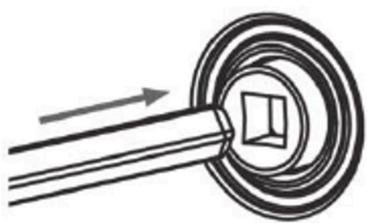
Fig./Img./Abb./Afb./Rys. 11

Fig./Img./Abb./Afb./Rys. 12

Fig./Img./Abb./Afb./Rys. 13
www.cecotec.es
- SOMMAIRE
- INSTRUCTIONS DE SÉCURITÉ
- NOTE
- BEFORE USE
- BOX CONTENT
- ENGLISH
- OPERATION
- BEFORE USING THE OVEN FOR THE FIRST TIME
- ACCESSORIES
- FOOD THERMOMETER. FIG. 2
- FRYING TRAY. FIG. 3
- RACK. FIG. 4
- BAKING TRAY. FIG. 5
- GREASE-COLLECTION TRAY. FIG. 6
- ROTISSERIE. FIG. 7
- ROTISSERIE HANDLE. FIG. 8
- CONTROL PANEL
- FIGURE 9
- USING THE ROTISSERIE
- BEEPING
- USING THE AIR-FRYER OVEN
- WI-FI CONNECTIVITY AND MOBILE APP
- CLEANING AND MAINTENANCE
- TECHNICAL SPECIFICATIONS
- DISPOSAL OF OLD ELECTRICAL AND ELECTRONIC APPLIANCES
- TECHNICAL SUPPORT AND WARRANTY
- COPYRIGHT
- SIMPLIFIED EU DECLARATION OF CONFORMITY
- FRANÇAIS
- PIÈCES ET COMPOSANTS
- IMAGE 1
- CONNETTIVITÀ WI-FI E APP
Brand : CECOTEC
Model : Bakefry 3000 Touch Steel Connected
Category : Washing machine