
MP3 PLAYER - Mp3 player SWEEX - Free user manual and instructions
Find the device manual for free MP3 PLAYER SWEEX in PDF.

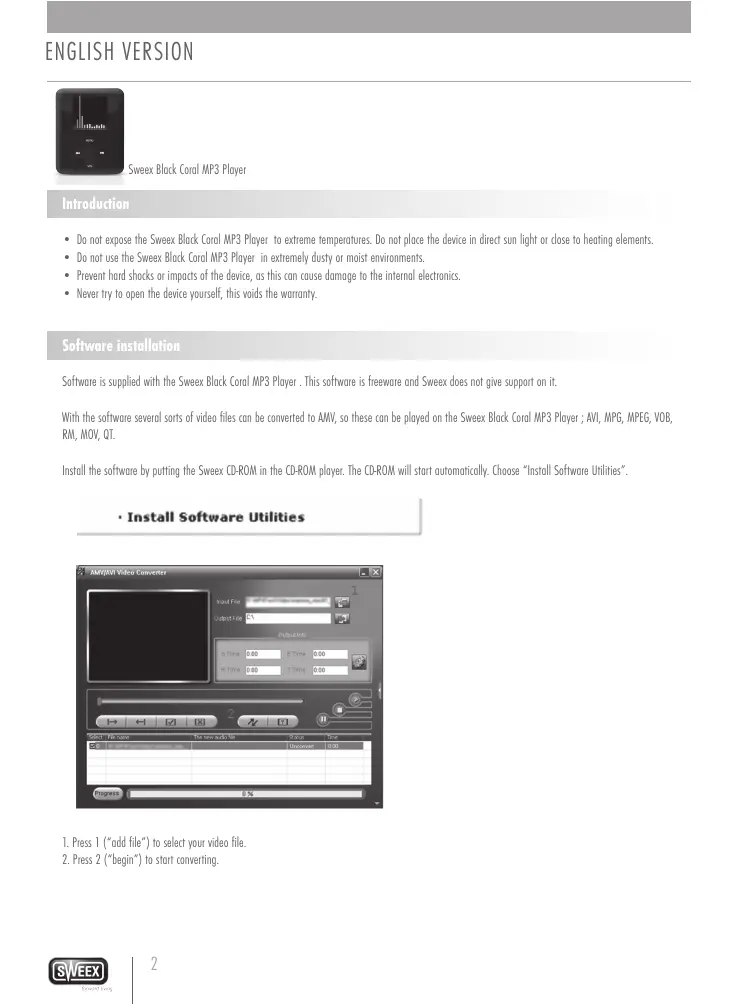


| Product type | MP3 player with video, photo, voice recording and e-book functions |
| Power supply | Rechargeable via USB port (cable included) |
| Connectivity | USB 2.0 (removable disk) |
| Main functions | MP3 playback, video (AMV), voice recording, photo display, e-book reading |
| Supported video formats | AVI, MPG, MPEG, VOB, RM, MOV, QT (conversion to AMV via software) |
| Menu languages | English, Dutch, French, German, Italian, Spanish, Swedish, Polish, Korean, Chinese, Czech, Japanese, Portuguese, Danish, Russian, Thai |
| Warranty | 2 years within the EU (manufacturing defects) |
| Safety | Avoid extreme temperatures, dust, humidity, shocks; do not open |
| Maintenance and cleaning | Clean with a soft dry cloth; avoid any contact with liquids |
| Spare parts and repairability | Not user-repairable; contact the dealer for warranty |
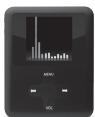
| General information | Brand SWEEX, model MP3 PLAYER (Black Coral) |
Frequently Asked Questions - MP3 PLAYER SWEEX
User questions about MP3 PLAYER SWEEX
0 question about this device. Answer the ones you know or ask your own.
Ask a new question about this device
Download the instructions for your Mp3 player in PDF format for free! Find your manual MP3 PLAYER - SWEEX and take your electronic device back in hand. On this page are published all the documents necessary for the use of your device. MP3 PLAYER by SWEEX.
USER MANUAL MP3 PLAYER SWEEX
Versao Portuguese 26
PycckayBepn 30
Wersja polska 34
At maximum power, the prolonged listening to this music player can damage the users ears.
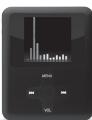
Sweex Black Coral MP3 Player
Introduction
- Do not expose the Sweex Black Coral MP3 Player to extreme temperatures. Do not place the device in direct sun light or close to heating elements.
- Do not use the Sweex Black Coral MP3 Player in extremely dusty or moist environments.
- Prevent hard shocks or impacts of the device, as this can cause damage to the internal electronics.
- Never try to open the device yourself, this voids the warranty.
Software installation
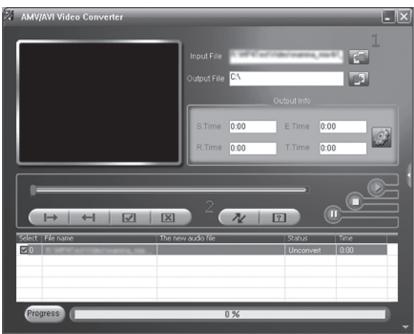
Software is supplied with the Sweex Black Coral MP3 Player . This software is freeware and Sweex does not give support on it .
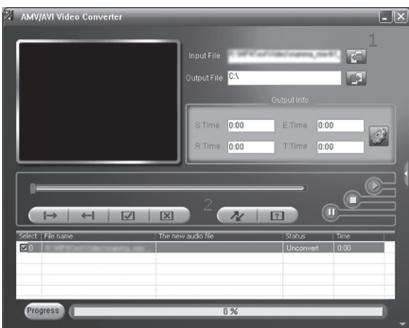
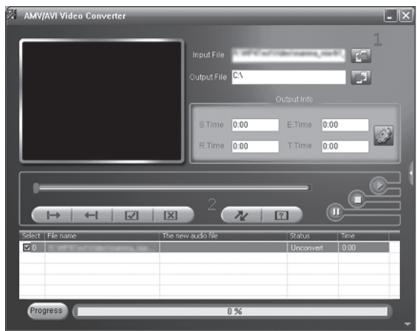
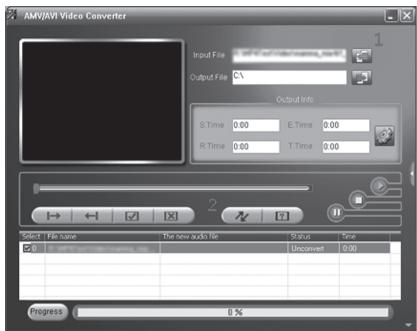
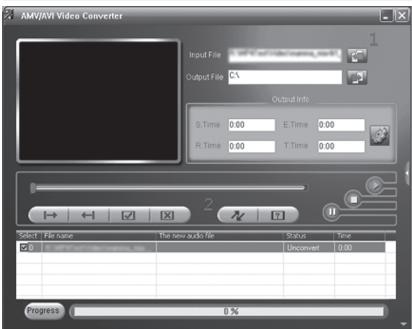
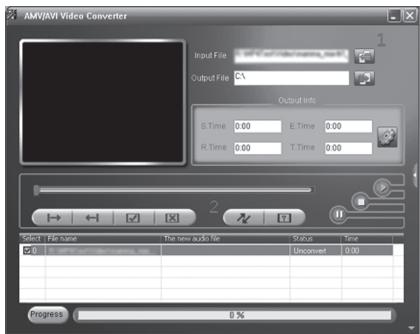
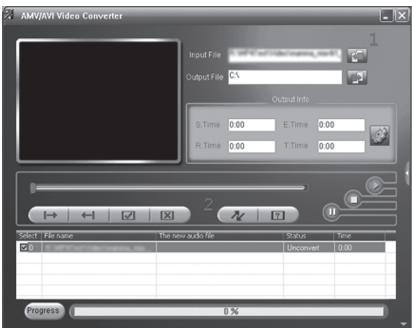
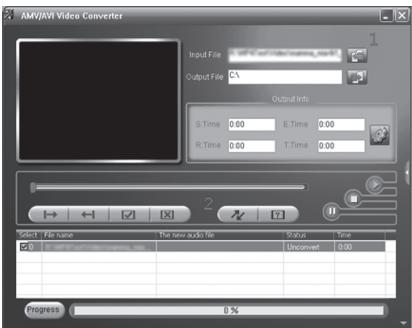
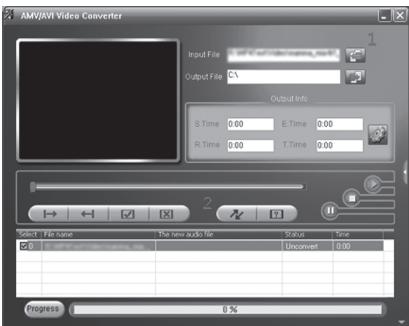
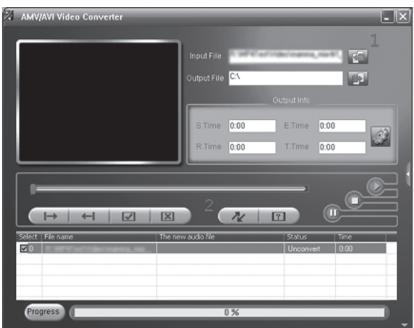
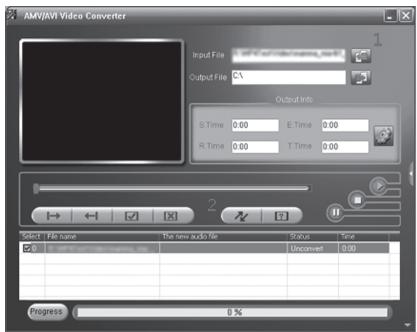
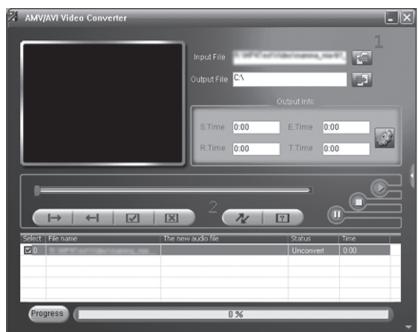
With the software several sorts of video files can be converted to AMV, so these can be played on the Sweeex Black Coral MP3 Player; AVI, MPG, MPEG, VOB, RM, MOV, QT.
Install the software by putting the Sweex CD-ROM in the CD-ROM player. The CD-ROM will start automatically. Choose "Install Software Utilities".
Install Software Utilities
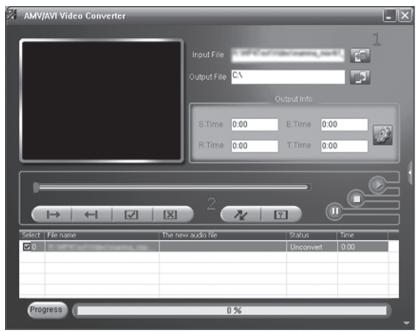
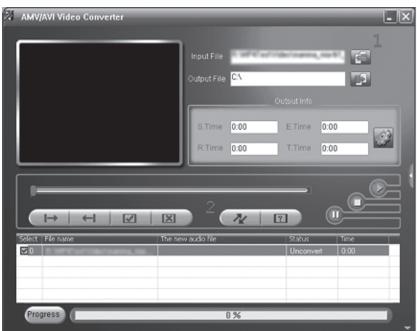
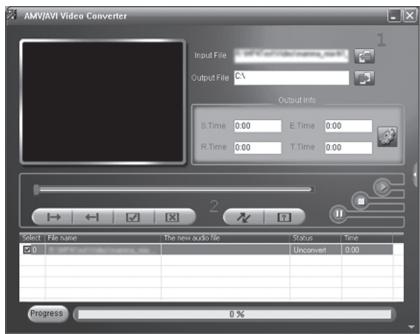
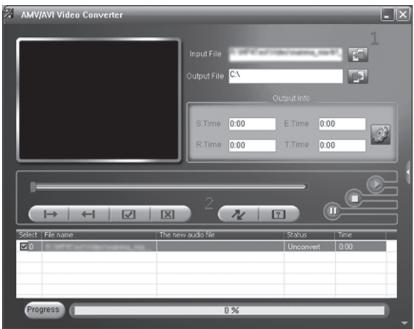
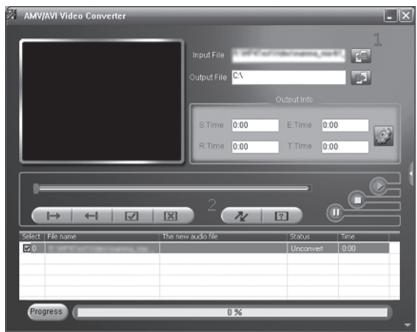
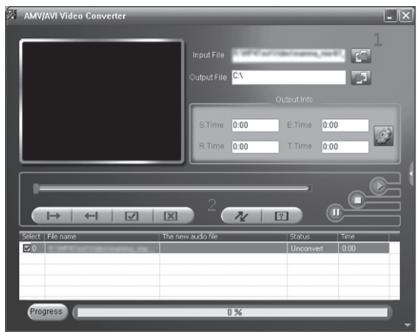
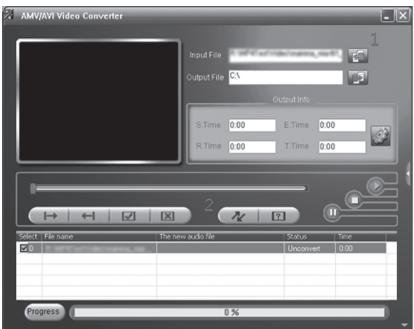
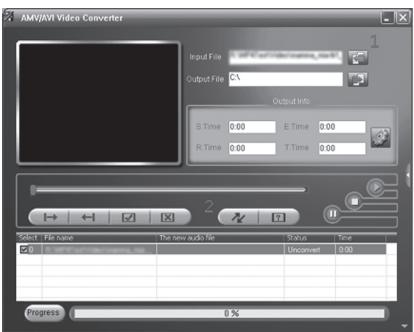
- Press 1 ("add file") to select your video file.
- Press 2 ("begin") to start converting.
Transferring files to the Sweex Black Coral MP3 Player
Connect the Sweeex MP3 Player with the supplied USB cable to the computer. Windows will detect the device, give it a drive letter, and indicate it as a removable disc with the name "Sweeex MP3". You can now manage your music and video files through windows explorer. You can also save other sorts of files and documents on the Sweeex MP3 Player. This way you can also use it as an USB memory stick.
Operation
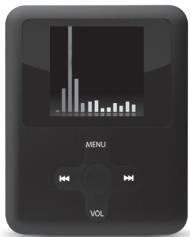
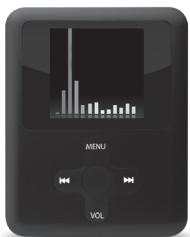
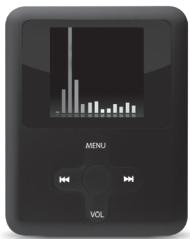
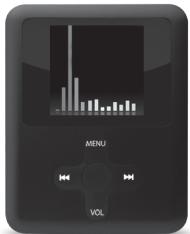
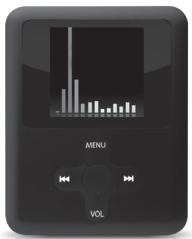
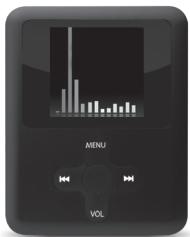
Buttons:
Menu : Open menu, select menu option,
Next menu option, fast forward
: Previous menu option, rewind
O :On/off,play/pause
VOL :Volume
Switching on the Sweex MP3 Player.
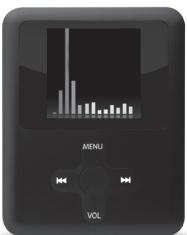
On the upper side there is a main switch. Switch it to "ON". By briefly pressing the Button you turn on the Sweex MP3 Player.
After turning on the SweeK MP3 Player you are in the main menu. To directly enter the main menu at any time press the menu button Menu for three seconds.
The menu
The menu of the Sweex MP3 Player is available in multiple languages. Go to "Setup" and choose the third line by pressing twice ("Language"). The following languages are available: English, Dutch, French, German, Italian, Spanish, Swedish, Polish, Korean, Chinese, Czech, Japanese, Portuguese, Danish, Russian, Thai.
Scroll through the menu with the and buttons. Use Menu to choose the menu option and go one step back by pressing "Exit".
The options in the main menu are:
Setup : Device settings and information
Movie : Play video files
Music : Play music files
Record : Record sound
Voice : Playback sound recordings
Photo : View photos
E-Book : Reading text files
Playback of sound and video files
For music go to the menu option "Music". For movie go to "Movie". Press Menu to access your files. Press to play back. Also use to stop or pause. With the buttons and you can go to the previous or next file.
In pause mode you can enter the menu with the Menu button to select different options such as: deleting files and playing files out of a different folder.
During playback of music you can enter the menu with the Menu button to change different options such as: repeat (repeat function) and equalizer settings.
To change the volume during playback of music or video files press the volume button. Now you can change the volume with the and buttons. When you playback a video there is no indication of the volume level, but you can still adjust the volume after pressing the volume button.
Recording sound
To record sound go the menu option "Record". Press the Menu button to choose "Rec type" in the menu and to determine the format of the recording.
Fine REC = WAV 32 Kbps
Long REC = WAV 8 Kbps
Fine VOR = ACT 32 Kbps
Long VOR = ACT 8 Kbps
To start recording press . To pause and continue recording use the same button. To stop recording press the button for 3 seconds. The recorded files are saved numbered in the "Record" folder of the player. Playing back the recorded files can be done by choosing the option "Voice" in the main menu.
Switching off
Switching off the Sweeck Black Coral MP3 Player is done by pressing the button for 3 seconds. You can use the main switch on the back of the device to prevent the player from being switched off accidentally.
Charging
Charging the Sweex Black Coral MP3 Player is done with the supplied USB cable through a free USB port on your computer.
Warranty
Thank you for purchasing this Sweex product. Sweex devotes ample attention and care to the quality, reliability, functionality, durability and user friendliness of all its products. In this way Sweex distinguishes itself in the market and can we convince you as a buyer to continue purchasing products of the Sweex brand. We wish you a lot of pleasure with your purchase.
An important extra advantage for you is the possibility of product registration.
You can register the product you purchased online on www.sweex.com/productregistration.
By registering your product Sweex offers you a number of important yet equally useful advantages.
For example, if you wish so, you are regularly informed by us of the latest developments in our assortment by means of a digital newsletter.
Where applicable, you also automatically receive the latest drivers and/or firmware from us for the product you purchased to preserve or improve the compatibility and the performance.
Moreover, our support desk can assist you faster in case of possible support questions about the product if you registered the product.
Sweex warranty conditions.
2-year standard warranty within the EU
- In a standard manner a warranty period of 2 years as from the purchase date is available for this Swee x product within the EU.
- Should you wish to invoke this warranty within the first 2 years after the purchase then you can directly apply to the point of sale where you purchased the product for the conditions and procedures.
Matters that are excluded from the warranty
- The warranty of Sweex only covers manufacturing defects. Excluded from the warranty are accessories like batteries, rechargeable batteries and also supplied software, where applicable.
- The liability of Sweex is limited to the costs of repair and/or replacement of the product covered by the warranty.
- The standard warranty is null and void if the product has been opened, changes have been made, physical damage was caused to the product and if the product is used for another purpose than for which it is originally meant.
All brand names and associated rights mentioned in this manual are and remain the sole property of the rightful claimant.
Install Software Utilities

Fine REC = WAV 32 KBit/s
Long REC = WAV 8 Kbit/s
Fine VOR = ACT 32 KBit/s
Long VOR = ACT 8 KBit/s
Install Software Utilities
Software installation
Install Software Utilities
Beschikbaar zijn de volgende talen: English, Dutch, French, German, Italian, Spanish, Swedish, Polish, Korean, Chinese, Czech, Japanese, Portuguese, Danish, Russian, Thai.
Install Software Utilities
O :Marche/Arret,Lecture/Pause
VOL :Volume
| Fine REC = WAW 32 Kσ/s |
| Long REC = WAW 8 Kσ/s |
| Fine VOR = ACT 32 Kσ/s |
| Long VOR = ACT 8 Kσ/s |
Reprodctor MP3 Black Coral
Introduccion
Install Software Utilities
Install Software Utilities
Install Software Utilities
1.ДяБьборвидаофайlaцEkнITE1("doabntbФain").
2.Дя erо пeoobpa30BaHnHa ьнite 2("haHTb").
Ipeeda qaiIOB ha Sweex Black Coral MP3 Ineep
Плкочи EP3-плесуmpсгхКOMьнштетусnomоью пилагаemorkaбяету USB. Windows 6hapuynt устсв,则псьоту EMМИОпЕДСТЕ КAK CBМьHДИСК ПОД ИЗВАИЕМ "SweeX MP3".Tenebp ВБ можеуypаibTMy3bIakIbHbIMNиBIDeoФaIamc nnomoцьnoюpoBoDnHaKia windows.Ha MP3-плесу MOKHO经 coxpaarabdpyrtniTbI paimOB. Btaiakxe moKTe IcNoIb3ObTa erB KcaeCTBe 3aONMHaIOUero yctpoicTBa C mHTeppecom USB.
UnpaBJIeHne
KhoNk:
Menu :OTKpbITb MeHIO,BbI6paTb NYHKT MeHIO,
:CneyuounnIpyHKMeHIO,pepeMoTKaBpeep
:PpebIyIuIyNHT MeHIO,nepeMOTaHa3aI
O :BkIIOUeHHe/ByIKIOUeHHe,BOcPON3BeJeHHe/nay3a
VOL :PergunpoBka rpmKoCTn
Bknoyehne MP3-npeepa Sweex.
Ha Bepxne CTOpoe HaxOHTcBbKJIIOHateIb NITAHINy. YctAHOBIne erO B noIOXeHne "ON" (BkJ.). YTo6bl BKIOHHTb MP3-nIeep Sweex, KpATKO HAXMITE KHONKY O
Iocne BknoeHnMP3-tnpeepa Sweex otKpoetc gnabHoe MeHIO. Iy napeXoDa B rnaBHOe MeHIO B JIO6oe BpeM, HAKIMaTe KhoNkY MeHIO Menu B TeueHne Tpex CekyHd.
MeHIO
MeHIO MP3-tneepa Sweex DocTyHNO Ha HeckOJIbKIN Xa3bIaX. IpeepiDte B MeHIO "Setup" (HaCTpoIka) N BbIbepnte TpeTbIO CTPOKy DBOHbIM ZeIYKOM "Language" -J3bIK).
MeHIO doCTyHNO ha cnEduOxuX TaIbKaX: anTnIckn, roTanIaDCkN, 0paHcy3ckN, HemeUckN, tnaIbAHCkn, nAnCkN, 7beDckN, noBckN, KopeickN, KtTaikckN, YeUckN, npOHCKN, npOTyraBckN, DatckN, pycckN taIKckN.
TapaHTnHbIe ycNoBnS Sweex.
2-Netra cTahapTha rapaTnB pamkax EC.
CTaHdapTHbI 2-JeHTnI rapaHTnIbI cpoK Ha daHHbI npOyKT Sweex npedocTabIeTcA M0MeHTa nOKyIKn HA TeppITOpIM EC.
Ecnbl bI NOXELAETe AKTBNBINPOOBATb HACTORUUYO rapaHTNIO B TENEHNIE NEPBbIX DByX JET C MOMEHTA NOKYTK, TO Bb MOKETe HENOCPECTBENHO OOBAPITbC BYNTK pnpaJx, Ie Bb pnipObePm daHHb npDyKt, IpnI NpOyuHn HnΦopMaun O COOTBTCTBYOxH xuONBIAx INpuOeIpyax.
Cnyuay, He BXoJaIeB rapaHTnIO.
TapHTMfPmMbSweexpactpTaHETCAToBkoHaIPOIN3BDCTBEHNbIepeKtbl.TapHTMHe pACnPoCTPAHETCAHaTakMe KOMTIKEKTOOJIe, KaK batapeKNI, nepe3aepaXaMeBle aKKyMITTopbi, a TAKKE NOCTABRIEMOE nprrpAMMHOE oecieHHE (ecIMTPMMHMO).
OTBETCTBEHOCbIΦIPMbI SWEEX ORpAHUHBAETCA CTMOCTbIO peMOHTa W/INN 3AMEnbI IpOyKTA, B OTHoUeHN N KToPOrO DeiCTByet rapAHTNIA.
CTaHapTnAra rapAnTHIe TepReT cBIO 3aKOnHHy CmN,ecIN npOdyKT nDBeprAcn BcKpbTIuB, Hero BHOcInbc M3MeHeHnA, npOdykTy npUHHebl mExAHueckne NOBpeXdEHNr E cIN npOdyKT nCtJb3oBaNcH He No Ha3HaHeHIO.
Bce HAMMEHOBAHNAI TOPOBbIX MAPOK IM CBRAHHbIE C HMMN Ippaba, YK33AHbIe B HACTOJI EINCTpyuyni, AIBJHOrTc ICKNIQHTeJIbHOI CO6CTBEHNOCbIO 3AIKOHbIX npetehdENTOB.
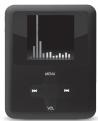
Odturzac MP3 Black Coral
Wpwadzenie
Install Software Utilities
Install Software Utilities
| Fine REC = WAV 32 Kbps |
| Long REC = WAV 8 Kbps |
| Fine VOR = ACT 32 Kbps |
| Long VOR = ACT 8 Kbps |
Install Software Utilities
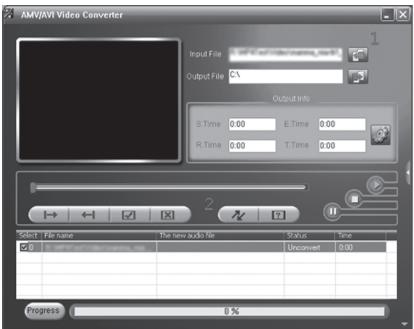
- Tryk pα 1 ("add file")["tilfoj fil"] for at vaelge videofilen.
- Tryk pä 2 ("begin")["begynd"] for at starte konverteringen.
Overforsel af filer til Black Coral MP3 Afpiller
| Fin REC = WAV 32 Kbps |
| Long REC = WAV 8 Kbps |
| Fin VOR = ACT 32 Kbps |
| Long VOR = ACT 8 Kbps |
Install Software Utilities
Fin REC = WAV 32 Kbps
LngREC = WAV8Kbps
Fin VOR = ACT 32 Kbps
LngVOR = ACT8Kbps
Install Software Utilities
Install Software Utilities
- Natjote 1 "npoo0hkn apxieou" ia va eaiaeEeTe to apxieio aoc bivteo.
- Pntnote 2 (evapEn) yia va apxioe i n eetporn.
Metapopapaxeifwσtn zuokeuN Avattaywyng MP3 Black Coral
Suvodet n oukeun avanapaywic MP3 nC Swee stov umoloyi tne me to napexovo kaaldbio USB. Ta Windows 8a evtionouv tn oukeun, 8a nTc amobawou ev a ovua ovaovadac kai thn vepauovav a aipoiuevnuov madokou ne to ovua "Swee MP3". Tupa mopeite va diaxipeitere ta apxeia oac mouakcnk kai bivteo meuow ncs EEEpuvnoc twv Windows. Mnpoeite enicva anomekute kai alla sien apxeiav kay yvpapov stn oukeun avanapaywic MP3 nC Swee. Me tv npanto auto mopeite va tn xpnajmonoierte kai avstik mynh USB.
Aetoupyia
πλκτρα:
Menu :Avoivya mevoi, atooboyr eimaiyoic mevoi
: Etoeyn Etniaynevou yyoyon npowen
H :Ppnoyouoev enllooye vou ,etavaopopa
O :Evepytoinoin/antivepeytoinoin,avatapaywytnrauon
VOL :Evraonnou
Evpeytooinn tns oukeungs avattapaywyns MP3 tns Sweex.
Tniv muaupa uapceivac yevikos diakomtns. the tov sto ON (Evepyomoin) Pianuovs ouvoia to nikpo O evpyomoeine touokun avanapaywic MP3 ng Sweex.
ApoEvEpyoTnOeTe Tn OoKeun ovamapoyuyuMP3 nS Sweek, BpiKeote oTo BoaKo meou. Ia va EioBete aEueioc oTo BoaKo meou omoiaHmote otuynr tonntote to tnaItropeuMnu Via pria deurepoletnia.
To µ
To jevo ts ouoekunov avamapoywyn MP3 ts Swee kdiBtea o noAles yluosoc, Metapeite stny emloy "Setup" (Deltaoppwn) kai emlete ny prin ypaun ("Language" - Tluoo) manuivros duo qopcs .
Atiivai o efcs yioe Aylkia, Oalavikia, Taliikia, Iotavikia, Sounikia, Tovlivikia, Kopeatikia, Toxikia, Iatuvikia, Ptoyolikia, Davikia, Pwokia, TaillovdEka.
MeKAnKInBeTe Ie eio 0o To eioue To aI KAI. XpOIOJOMIOJIe MEnu yia oAmoeEeTe Tm EMIyoi neu Oeiou kai meTaeBe Te Vc Bnia mTieovos "Exit" (E50oc).
O1 eTIIoyEs oTo βaαi oEvou Eivai:
Fine REC = WAV 32 Kbps
Long REC = WAV 8 Kbps
Fine VOR = ACT 32 Kbps
Long VOR = ACT 8 Kbps
Iia vapxieTe Tny evypaon mntote O I ia maun kai ouvexion ts yypaipns xynpmaotne to ibio mktpo O. Iia va diakoyete nvy ppayn mntote to pkihtpo Oya 3 deutpoketra. Ta yevpaopueva apceia atoienkeovtai aptejmuve ro taeklo "Record" ts ouakeun avatapayuys. H avatapayuyi tuv yeyepauivuavpeiuu mptoe va yive i me tyenlkyo "Voice"(Pnuiv) oto baoikko nevou.
Atevepyomoin
H ameepoion ng ts Suuekei Avatapayuyu, MP3 Black Coral vivetai mnuwro y 3 dvepeleto ro tkiapo H Mnpoeite va yonpoanmote to yiwk biokomtn o wipoc ts sukeuiyia y a u eumdoie tne dehme ane eepoyoiang n suaoukuiyauuyiy.
ΦopTion
Install Software Utilities
- Hatnchtb 1 ("doatn fain"),io6 opatn Biodeoafn.
- Hatnchitb 2 ("ctapt"), zuob 3anyctntn npouc ekOBpeTauii.
Zanic painib B nleep Black Coral MP3 Pnleep
ПдкнчьМР3-ппссEWP6оДКOMNTOKIOKABeIOnUSB3KOMNNTYNoCTaIK.WindSЗИЗдпсгш,надаctb MyHITeRуВКOTsIbAByIcNtCaTbBkAeIbOrKrIbKIMnHdC2ImEHEM"SWEeMP3".ПСИЯБOrO BnMochTepeHecOHTmMyNKyTa bIeOpaIahNeep3PobIDhNikWINDs.BuToKoTbMochTe36peRtIiHIIuBnDfaiJIbTaDokymTeHb NaPeeCpiSweeMP3.TakHMChINOM,Bn MochTeBVKOPCTOBVbATnHOB KOKST3ZanAMrTObyOOrOpnpTcPO USB.
BukopncTannn
Khonkn:
Menu :BIDKPMBAe MEHIO, Bn6ip napameTpIB MEHIO
H :HaCyTHINIpyHTMeHO,nepeMOKBApeep
:nonepednIpyHKMENHO,nepeMOKaHa3aD
O :BKN./BNIKn.,nporpabaTn/Nay3a
VOL :nyHcTb
YbimKHeHHnI pIeepa SweeX MP3.
Pepemmukh 3haxodmtcbn ha bexpnk hactnni pmpctpo. Ppeeknoohb I koro B noonokhenra "Bkn." WbIaKMM HATNCHEHM HA KONIKO MOKHBA BIMKHYTH Tneep SweeX MP3 Player. Picta BBIMKHNH Pnepca SweeX MP3 Biuipmcbsra tonlohe MeHIO. UopeeNt BeaoccepeDho do roanobHOr MO Heo, HATNCHTb Ha KONIKY MEHO B Menu B 6ydb-ram MOMENT Ta ytpmmkyte II npotrAOMT TPbox cekyhd.
MeHIO
MeHIO pIeepa SwcE MP3 doctyHne pi3HHM MOAMn. 3aiKjTb B "Setup" (YctahOBx) Ta o6eip TpTei nHIO, dNHI HATNCHBYHn Ha 出 ("MOA"). DoctynHn HactynHn MoB: aHTINbcky, rOIIaHcDcKa, 0paHcybka, HmEcbka, IaTIbcky, icIaNbcky, 8beDcbka, IONbckx, KoepeCbkx, KITaHcbkx, Yecbka, RIOhCbkx, npotryanbcKa, dAtcbkx, poCtcbkx, taTcbkx.
Habirajau no MeHO aJIO HIOEbC KHOIaMM Ta ta CxOpiCTaIEcB KIOIOo Menu , o6 obpatn napametp MeHO ta nepeiItb Ha oDIN nyHKT HAZd, HATMcyuBun "Exil (BHXid).
NapamETPNrONoBHOrMoHIO:
Setup (YctaHOBka) : HactpOikn ta hOpmaJia npo npCTpi
Movie : BiTbOpEHn BiDeoPaiiB
Music (My3nka) : BiTBopeHn My3nHnX paJIIB
Record (3aɪnɪc) : 3aɪnɪc 3bɪyʊ
Voice(To1oc):BiTbOpHn3aNcaHOro3Byky
Photo (Φto) : neperlnd φotorpaïn
E-Book (EneKtpoHa KnHa) : yntaHna TeKCTOBnx paJIb
BidTBopenHn 3bky a6o BideophiinB
IgB iBtBopHnM yMmN nepeiBb M MeHO "Music" (Mysk), Ing npeiTnDy kninB nepeiBb M MeHO "Movie" (Bideo). HATcHtB Menu, oob nepenTo do qainib. HATcHtB O IaB iBtBepHn. TaKoK CKOpCtaiTeBc B O npb 3ynInHn abo pni3yInHn BtBopHeHn. 3do nOIOKTO HOONK ta BV moKeTe nepeTn do nOIOpeHnBO DO hAcTyHNOf oainny.
B pexnMI nay3n Bm moxete nepeytno do meNHO 3a donomorOIO kHONIK Mnu I dny BMbpy piHOMAHITHX napametripB: BndaneHHaFaiNB ta bIDTBPOHNHaFaiNB 3 pIHINK
B pcknni BvdTbpeHH MyzIKn Bm MoKte TneepHn do MeHIO 3a donomTOO KONIK MnuI da 3MIHN neBHX npametpi, hapKnaIad; nobtop (fhyNua nOBtpy) Ta Hacptpkm Eknaiaepey.
Iio63MHInrnyHCTbNtacBIDTBPoeHHMy3nMBO abo BIDe, HATCHbHa HKNKIOYrhyOCTi. PICTaIcTOBbBm3MOXeTe3MHINrYYHCTb KHOKAMNI HIK. PmB iDITBPOEHII BEOe BIDCYTH INKIAUJIPIIBr rHyOCTi, anE BcE 0e X MOKeTe HauaHTyBaTb rHyHCTb, HATCHBuHn HAKNIOYrhyOCTi.
3annc 3Byky
Lio6 3aNcMAtn 3bYk, nepeIdItb M bEmo "Record" (3aMnc). HATnCtHb KHOmKy Menu , Lio6 o6pTa npHTK "Rec type" (Ttn 3aNmCy) B mENo Ta BHKaHauTn foPmPat 3aNmCy.
Fine REC = WAV 32 K6ir/c
Long REC = WAV 8 K6ir/c
Fine VOR = ACT 32 K6ir/c
LongVOR = ACT8K6ir/c
Ira nochatky 3aicny Hataichitb Oio6 np3yinHnT Ta npdoBximTa nac BIKOPMCTOBYte TY camy KHONKY
OIO6 3yHHTMzIaNc, HATMCITb KHOJNy Ora yTmYWte II npTPOAM 3 cKyH2d. 3ZnMCaHf PAIMN 5epeiraTOBc 3 HOMepAM B nAJIg "Record" Ha nIeepi. BiDToBPENH 3aIINCAHX
paimi 4dIHHoCTbCRAI XHIXM BMBOOP npAmETpy "Voice" (TOnoc) B oRIOBNMY MEHO.
BmKHeHH
BMMKHeHHn pneepa Swee Black Coral MP3 ncep 3dckHOctb 7uXOM HATmCHeHHn KIOHNI II TA yTPMMAHH II npTcROM 3 cekHyD, Bn MOKeTe BMKOpCTOBayt HOrOBHnnpeMeHHN HA zadni noBepHn pncTPO, uO6 yHNHTy BNAtADKOBO RMMKHeHHn pneepy.
3apyaKa
3aepka npeepa Black Coral MP3 Pnepc 3duiiHIOeTbca 3a donomoroIO KabeIO USB uee3 BInhNI nopT USB BaOro kOMN'otepa.
TapaNTIA
IkyeBAM 3a te, 10 cykunmIO npOyduKIO SwEe. Swee pNnJIeR OocbMBy aye Ta nKiYtBcraPNO kIXCTb, hauHcHCTb, yDNUOHNHbTb, doBorTpBNiBaNtBb, bNIOpCHTAHNA TApYCHyTb y KOpNCrBuHHI B6y-koA cboSeBcI. Came UIM KOMBHNIE SWEE iepdriHeBa na PnHKy dI uINHs, i 3ABpKn Ioumy Moe nepeKoHATn BAC hndanIkyNTBnI pNDyUO 6BPeDA Hxu. BSAkEMo BtNlki pmeHMHxBpaKeBnI bDy NOKyCN.
Ie OJHa BaxnBa IpeBaA nIaBac-MoXnIMiBCTb peCtpaI pIpoDykuII.
Bn Mokete 3apeectpyaun npoyukjio, kay Bn Kynnnn OH-naHn Ha caii www.sweex.com/productregistration.
Peeepctpauii baooi npoyuui Swee x npoohye bam prd kaxlmhix Ta dyke kopincnHex nepebar.
HapnKiaH3, 3A BAAIMM 6aXHHMM B MOKETe peryrIHPIO OTPMYBAYNTi BID HAC IHOPOMAUIO POOCTAHNIPO30PbOH Y HAIUIH OHEMHNATyPI Y BMTTADI ENEKTPOHOIT PO3CIMTN HOHN. Y pa3i Heo5fXHocTi, B I TAKOZ OPTRMYBATIME BID HAC OCTAHNI DpAIBEpaTA/abpoDyukii, JIK BY KYNMI, UO6 6beeperttn a bdo NOKPAUHTIN II cymnicht Ta e4ebVTHBCtBciknytaaui.
Kpim TOrO, haw zentp nDTPMmK WbUdne HadaCTB Bam dONOMGY, JxO y BAC BNHKyTB bdy-PAI NITAHNA YIOO nDTPMmK Ipodkyii, iNcTA TORO, JAK Bn 3apeCPTye tnoPdoykui.
YMOBN rapaHTTI Sweex.
Ctanhaptna 2-piHa rapantiny mexkax EC
Bunapkn, He nepedbayeni rapahtieo
3a3aunu y npodukui Sweex y mekax CC Mae raptantio npotrrom 2 pokib, noohnauhui bD datn nookyikm.
Aik BN BnKoPcTObyE tio rapaHtIO pnoTOrIOM npuXH 2 pokB 3 MOMENTY noKyIMN, BV MOKETe 3aepHyTMcB 63ntocpeJeHbO do TIE TOUYK NPOdky, DE BN KYNIM NPOdykU, 31HO 3i BCTAHOBENHM yMOBAAM TM onpaKOM.
Taparnt SweeN Toxnpmbae Nmue depeKtbn Bnpo6HnTBA. JIra pataHr He nooMnOcEbCra Ha KOMnEeKtuOHi, Taik JxB atapei, akymyIaTrophi batapei, afo Hadahe nporpanHe 3a6e3neuHHn, y pa3i Heo6XIOHCTi.
BjDnOJIaJIbHcIbTb Sweex 6mExyTeBcra BHTpTaAMHa peMOHT Ta/60 ZAMHy npOdykUJI, Jka nepeI6BaHcA rapaHTIEo.
CTaIepTbIraepTbAhyIeBc, kiau npOduKyjua blyIbIXpNtA, aob B hyl spObeHm3MnH, npOduKyj 6byNo HaeceH oIshno OnoKoDxHeHH, abO kiau npOduKy j 3actocOByEBCr 36 5dyJ-IAKO IHUO METO, KIM II POHTKOBIO PPKHAnHH.
Yci HsBn 6pnd Ta cymichi npaba, kki 3aoytobc y cybmo Nocibnky, 3aIIwaOtcbN BkNIOHIO BlaChicIO zaoHNOI pTeHdENTy.
MP3 Sweeex Black Coral
Install Software Utilities
- Kliknite na 1 ("add file") a vyberte svoj sutor s videom.
- Klinikne na 2 ("begin") a spustite konvertovanie.
Prenos suborov do MP3 prehravaça Sweex Black Coral
MP3 prehřávač Sweeny tripojte k pociča mu pomocu dodaného USB kábla. Windows rozpożná zariadenie a prideli mu pismeno mechniak y bude sa o nom zmiěnofov ako o odstrātnífnom disku s názvom „Sweeny Black Coral MP3 Player". Teraz možěte pomocu prieskumnika Windows spravová svije súbory s hudbou a videom. Do MP3 prehřávač
Sweex si taktiez mozte uklada vstety druhy inych sutorov a dokumentov a zaroven ho tak mozte pouziv'a kdo pamatovi zariadenie USB.
Ovladanie
Tlacidía:
Menu : Otvorenie ponuky, vyber moznosti ponuky
Prechod na dalsiu moznost ponuky, pretacanie dopredu
1: Prechod k predchadzajucej položke ponuky, pretacanie dozadu;

VOL : Hlasitost.
Fine REC = WAV 32 Kbps
Long REC = WAV 8 Kbps
Fine VOR = ACT 32 Kbps
Long VOR = ACT 8 Kbps
Ak chete spustif nahrvanie, stace tlaodio. Ak chete nahravku pozastavi a potom v nejPokraovaf, pouze na to presne to iste tlaiodio. Ak chete nahrvanie ukoncif, stace na 3 sekundy tlaiodio. Nahrané soubry su ocsilvano a ulozene v prehvači do adresá „Record". Prehravanie nahranychs suborov uskutochnite pomocu moznosti „Voice" v hlavnje ponuke.
VypnutieMP3 prehravac Sween Black Coral uskutochnite stlaenim tiaidla 0 na 3 sekundy. Aby st predi nahodnemu zapnuti prehrava, mozte pouzih hainve tiaidio na zadnej strane zariaidenia.
Nabijanie MP3 prehravaa Sweex Black Coral je mozne pomocu dodaneho USB kábla cze vofny USB port alebo pomocu samostnej USB nabijačky.
Podmienky záruky Sweex.
Dakujeme vam z nakuq tohto produktu Sweex. Sweex kladie doraz na kvalit, spolahilovst, funkcnost, tvacnost a uizvaltesku pristupnost vsetjich svojich produktov. Takymtosposobom sa Sweex na tru odilisue a snazi sa presvedcit vab, ayse staje nadalei kupovalvi rovbykza nasky Sweex. V saim vrybokom vam ze lame veia radosti.
Dalisou dolezitou yhodou pre vás je moznosf registráce produktu.
Produkt, ktory ste si zakupiliMZeze zaregistrovaT online na adrese www.sweex.com/productregistration.
Pozaregistrovani vasho produktu vam Sweex ponoka mnoho dolezitzych a uzilocnych vhyod.
Install Software Utilities
- Kattintson az 1-estre ("add file") a videofajj kivaliasztsaHOz.
- Kattinson a 2-ese ("begin") a konvertalias elinditasaioh.
Long REC = WAV 8 Kbps
Fine VOR = ACT 32 Kbps
Long VOR = ACT 8 Kbps
Install Software Utilities
Long REC = WAV 8 Kbps
Fine VOR = ACT 32 Kbps
Long VOR = ACT 8 Kbps
Kako bist e zapoceli smanje pritsnite gumb. Kako bist pauzirali i nastavili smanje upotrijbeite isti gumb. Kako bist zavrsln smanje pritsnite gumb na 3 sekunde. Smiljene datoteke su brojcano označene te pohranjene u mapi plejera „Record". Reproduciranje smiljenih datoteka se moze izvesti pomoću mogucnosti „Voice" u glavnom izborniku.
Gašenje Sweex Black Coral MP3 plejera se izvodi pritikom na gumb Na 3 sekunde. Možete upotrijebiti i glavni prekidač na pozadini uredaja kako bi sprijecili slujno paljenje plejera.
Punjenje Sweex Black Coral MP3 plejera je moguce pomoćtu akobé priloženog USB kabla preko slobodnog USB ulaza il preko posbnog USB punjača.
Install Software Utilities
- ⅢpaKneHa 1 (add file), 3a da n3bepeTe Baw bIneo foaiN.
- Ⅱрakhete Ha 2 (begin"),3a da CTAPtnpate KOHBeptpTaHeto
Tpancfepe na faJnoBe KbM MP3 pIeepa Sweex Black Coral
Cbpxe MP3 nneepa Sweex kmb kcmnOtpc b USK Kabena, koTo bIe o dcstabEn c nneepa. Wnds ue pao3n3ae yctpoiCTBOTO u ne oponepe Dnyka 3a hero, kato ro nponepein kat OcmneHm nck C hnmHeMoBaHme "Sweex Black Coral MP3 Player". Cera moxete da ynpaaBnabe MykAnHnre i Bnde paoJnOBeTe cn C Wnd s Explorer. Moxete da cbxpanHte BCNakBv Bd painnoe H MP3 nneepa Sweex n EdnOBpemHHO da ro 3n0n3Bate kato USB namet.
Unpablenne
Бутон:
Menu :OTbapHHe Ha MeHIOTo,IM36Op HA ONIaR OT MeHIOTO;
▶▶I :KbM cIeIbauaTa OIuH Ma HMeHOTo, Hanpei;
1:KbMcIeIBaIaTAtOnIHaMeHHTO,Ha3ad;
O :BkIIOUBAHe/M3KIIIOUBAHe,Bb3npOM3BExKDaHe/nay3a;
VOL :CnilaHa3Bvka.
BknouBaHa Ha MP3 nneepa
IaBnHHT npEbkNIOBATE en CE hAMPA oTOpe. IpEbkNOHcTe ha ON'. Kato 3a kpatko HATNCHE 6bON, BkNOHcATE MP3 nneepa Sweex.
Cnied BkIIOUBaHe Na MP3 nIIeepa Sweex nonadate B MeHOTo. 3a da CE bBpHete He3abABHO B IraHBTO MeHIO OT KbTeO I da e, HATMCHETe 3a TPMceKHyDn ByToHa Menu .
MeHIOTo
MeHIOHO MP3 nIeepa Sweex e HAIHNO HA p31nHm EzMn. OITpeB "Setup" u36bepeT pTeTATA JIMN Kato 0pakhtoe DbyKpaTHo 1 (Language").
Hannu cnae nne tte eumn. anhnnncx, xoanaDcK, fpehckn, hemckn, ntaaHaNCK, hcaanckn, ubeckn, noonckn, kopeckn, kntaekn, uekkn, npOHTaONCK, daTCK, pyCK, taaiAnckm.
IpeBbptete np3 meHIOTo C 6byTOH I nI a. H3bepTe OUIATA OT MeHIOTo C 6byTH Mnu I ce BbPHTe CTbNka Ha3a, KATO u3bepTe "Exit"
OnuNTe B rJnABHOTo MeHIO ca:
| Music | :Bb3npo03B6E9dAne Ha My3iKaIhIn φaIINoBe |
| Movie | :Bb3npo03B6E9dAne Ha BvIeO φaIINoBe |
| Record | :AyDnO 3aIInC |
| Voice | :Bb3npo03B6E9dAne Ha ayDnO 3aIInC |
| Photo | :PiPrrEiD Ha ChmKm |
| Setup | :HactpOkaHa yCTpOietBOTo IN HfOpMaIg |
| E-Book | :Yetene Ha TEKCTOnB φaIINoBe |
Bb3npm3BExKaHe Na ayduH bVdeo paJnoBe
3a Myzika, npemHHete KbM onuia o MeHIOo "Music". 3a pfimn, npemHHete KbM onuia o MeHOTo "Movie". HatncHete Menu, 3a da nperrneDate pfainobete cN. HatncHete O, 3a bSbnpom3BcXdAe. Nsion3BaIte O, 3a da cnpeTe nIi 3a na3a. C6byOHITE▶ I n I < npemHHabate KbM cndeBauaian mIn pndxOdnHma fain.
B pexim nay3a mojete da n36epete pa3iunHn onlum ot MeHOTo c byToHa Menu, kato n3tpBaHe ha pfainObe H b5npO3BExJ daHTo IM ot npyra nanka na nnieepa.
Korato Bb3np03B6zxdaTe My3nka, MoKTe Da Bb3eTe B MeHToC bYtoHa Menu, 3a Da N36peTe dpyuOniM, KaTo nobTopeHme (repe tucfiie) n HcTpoMn Ha eKbanaia3epa.
3a da npOMeHHTe CnIATA ha 3bYka no BBePE Ha b3npO3BExEhAne ha My3Nka WnBnDEo, HATNCHEte 6bTOna 3a Cnla ha 3bYka. CnED TOBA MOKETe da peryNIpate cInata ha 3bYka c 6bTOnHa ▶ I I | Ako Bb3npO3BExEaDte BnDeo, PnHATNcKaHe ha 6bTOna 3a Cnla ha 3bYka HMRnWnDnKApria 3A HnBO T ha 3bYka, HO Bce nak MoKete ro peryNIpate.
3annc ha aydno
3a 3anic ha aydnio, pemmmhe TcBm oniura ot meHIOTo "Record". HatncHete Menu, 3a da n3bepete ,Rec type" B meHIOto n da onpeDenite foPMATA ha 3anica.
| Fine REC = WAV 32 Kbps |
| Long REC = WAV 8 Kbps |
| Fine VOR = ACT 32 Kbps |
| Long VOR = ACT 8 Kbps |
3a da cTAPNTPATE 3anica, HATNCHETE 6byTOHa 0.3a da noCTABITE 3ANICA B naYIa nDa npOblXnITe da 3anlncBate, IN3ONL3BAITE CbUH 0.3a da 3abpIhTe 3ANICA, HATNCHETE 6byTOHa 03a 3cKUYIN. 3ANCAHNTe faINIOBE ca HOMEPRANH IN 3anAMTeHN B nAnka "Record" Ha nneepa. Bb3nPOI3BEXDAHETO ha 3anlncAHTe PdAIIOBE CTBA C ONLIHTA, Voice"OT TIAHOTO MEHO.
NkIOHbAeHO Ha MP3 nIeepa SweeX Black Coral CTaba c HATKcAbe Ha 6yToHa 3a 3ceKHyDi. MoxTe da IaIIOJIbATEi ngBmH npEeKnIOBAten Ha Tp6Ba ha Ieepa, 3a da npedeTBPATITE cnlyHnOto BKOIOBAHe HA yCTPOICTBOtO.
3aepjndeta h MP3 pneepa SweeB Black Coral e b3moxno c npedctabnra USB kabeen qpe3 cbo6oien USB noprt h Ka mntotbnp nye3 otdenho USB zaprdo h yctpoiCTBO.
TapaunonHn ycnobna Ha Sweex.
Bnaorapim Bn,ye Knybate To3n npdykt Ha Sweex.Sweex OTaDa TOnMa BHImaHne I pRmka H KaueCTBO,HaJeKdHocCTTa, fkyHKUHOAHIOCTTA, TpaHIOCTTA n cncOTATA h NaON3BaHe h BCNUK CCBn npdykTNI To 30n HauN Hswee ce OTNcHaa H na3apa n HMe moXem Da Bn prINBEHcEM kato Knybayh npdykTITE h Mapkata Sweex. XeNaEiBn PnpMTH MOMENTI C BaWata HOBA NOKyika.
Baxka do nbohntenha B3mOxHocT ha npodykta e HeroBaTa peHnCTpaia.
Mochete dans perictparate produkta, koitto cte zakunin onnain ha apec "http://www.sweex.com/productregistration" www.sweex.com/ productregistration.
Pn peHCTpaunraHa Baunna npOdyKT Sweex Bn nppeIana peMa BaxHN n EIOHOBpeMeHNO yOboHN b3MOXHOCTM.
Hapimep, ako nCKate, moxe ype3 eJektpoHEn bOJeTIN da sbdTe peyIaRHO INHcOpMipanH OT hac 3a haH-NOBITE pa3pa60TKN B Hauin acoptIMeHT.
Korato e npinnojxmo, 3a 3ana3bahe m nio noob6paBaHe na cbBmecTImoCTTa n pOIN3BOJNTENHOCTTa, ABTOMaTHNO ue noIyHtete n Hau-HOBITE dpAbeRn mInn fbpMpyer 3a npOkykTA, KOITc Tc 3akymnn.
OcbeH ToBa, aKo cTe peHCTPpAIN npOdyKT, hauMHT OTdEa 3a noDpBxKa MoKe 6bpr30 da Bn nomORHe 3a BCRAKBN Bb3MOXHN Bbnpoc nnoDpBxKATA My.
TapaunonHn ycnobna Ha Sweex.
2-rodima hca tana daptha rapaunb va pamknte ha EC
- Ctaanaptno 3a npoykntte Ha Sweeex ce npedlarra rapaunohen nepnoD ot 2 roinHn ot daTata ha zakynBahe B pamKeHa EC.
Ako MCKate da IImnoI3Bate Ta3n rapaunu npre 3bPbNte 2 roDmHn Cne3 akynpuBaHTo, 3a ycNoBn Hnpueym, MoKxTe da ce obpHete duKeTHo KbM TbProBaCa, OT KOITTO cte 3akynmnpOdykTa.
Cnyan, KOnto ce m3KlIOvBaT ot rapaunra
Tapaunrta Ha Swee nokpriba camo npom3b0dctbeHnepeKTH. B rapaunrrta He ca bKIOHn akcecoapn kato batein, akymyIatopn h batein n ocBEN TOBA codTpEep, KbTeO e pnploXMMo.
- 3adbIxKeHnIa Ha Sweex ca orpaHnueHn do pa3xoIeTe 3a peMOHT n/IIIN CmRAHa Ha npOdykTBA rapaHnIa.
- CtaHaprtHaTata rapaHnma e HeBaIIMHa HneDeIeCTBmTeHNa, aKo npOdykTbT e 6bn OTBaRn, bIM Ca hAnpaBeHn npOMHeN, e pnuHHeNAf3uHecKa nopeBaHa n npOdykTa n aKo npOdykTb T e 3nONl3BaH 3a dpyra Uen, pa3nMHa OT opImHaHTo My npEa3aHHeHMe.
BcHnKIMHeHa H a MapKn i CbIpaHte c TOba npaba, cnOMeHaT B To3n HapbHnk ca n octabat c6cbTeHoCT Ha npabOMaun IpeDABHTen Ha npabaTa 3a TxA.

MP3 Player Sweex Black Coral
MP3 Player Sweex Black Coral
Install Software Utilities
Fine REC = WAV 32 Kbps
Long REC = WAV 8 Kbps
Fine VOR = ACT 32 Kbps
Long VOR = ACT 8 Kbps
Install Software Utilities
- Klikk 1 ("add file") for â velge din videofil.
- Klikk 2 ("begin") for à beginnne konvertering.
Slik flytes filer til Sweex Black Coral MP3-spilleren
Koble Sweex MP3-spilleren til datamaskinen med den medfolgende USB-kabelen. Windows vil oppdage apparatet, som vil fä tidelt en diskbokstav og bli vist som utskiftbart media med navnet "Sweex Black Coral MP3 Player". Via Windows Ultorsker kan du nà handtere dine musikk- og videofiler. Du kan ögså lagre andre typer filer og dokumenter på Sweex MP3-spilleren og bruke den som USB-minnebrikke.
Kontroll
Knapper:
Menu : Apner menyen, velger menyvalg,
▶▶I : Til nestled menyvalg, spel fremover
: Til forrige menyvalg, spol bakover
O : Av/pa, spill av/pause
VOL :Volum (lydnivá)
Fine REC = WAV 32 Kbps
Long REC = WAV 8 Kbps
Fine VOR = ACT 32 Kbps
Long VOR = ACT 8 Kbps
For a starte optekat trykker du pa O. For avslutte ell ta pause i optekat trykker du pa samme knapp O. For a avslutte optekat holder du O -knappen innate i 3 sekunder. Lydliene du tar blir lagret i nummerert rekkefolge i "Record" -mappen pa spilleren. Spill av de lagrede lydliene med valget "Voice" i hovedmenyen.
"Install Software Utilities"
Install Software Utilities
EC Declaration of Conformity
We,
Sweex Europe B.V.
Ampereweg 3
2627BG Delft
The Netherlands
Declare under our sole responsibility that the product:
Brand name
: Sweex
Model no.
:MP450/MP451/MP452/MP453
Product description
: Sweex Black Coral MP3 Player
To which this declaration is based on with the full compliance of the following European norms and standards:
EMC Directive
:EN55022:2006+A1:2007
EN 55024:1998 + A1:2001 + A2:2003
EN 61000-3-2:1995 + A1:2006
EN 61000-3-3:1998 + A1:2001 + A2:2003
The measurements shown in this test report were made in accordance with the procedures given in the:
EMC DIRECTIVE
:2004/108/EC
Signed, Delft, 19-05-2009
Sweex Europe BV

R. Ramaekers,
Purchase Director
- INTRODUCTION
- SOFTWARE INSTALLATION
- TRANSFERRING FILES TO THE SWEEX BLACK CORAL MP3 PLAYER
- OPERATION
- BUTTONS
- SWITCHING ON THE SWEEX MP3 PLAYER
- THE MENU
- THE OPTIONS IN THE MAIN MENU ARE
- PLAYBACK OF SOUND AND VIDEO FILES
- RECORDING SOUND
- SWITCHING OFF
- CHARGING
- WARRANTY
- SWEEX WARRANTY CONDITIONS
- 2-YEAR STANDARD WARRANTY WITHIN THE EU
- MATTERS THAT ARE EXCLUDED FROM THE WARRANTY
- INSTALL SOFTWARE UTILITIES
- INTRODUCCION
- IPEEDA QAIIOB HA SWEEX BLACK CORAL MP3 INEEP
- UNPABJIEHNE
- KHONK
- BKNOYEHNE MP3-NPEEPA SWEEX
- MEHIO
- TAPAHTNHBIE YCNOBNS SWEEX
- 2-NETRA CTAHAPTHA RAPATNB PAMKAX EC
- CNYUAY, HE BXOJAIEB RAPAHTNIO
- WPWADZENIE
- OVERFORSEL AF FILER TIL BLACK CORAL MP3 AFPILLER
- METAPOPAPAXEIFWΣTN ZUOKEUN AVATTAYWYNG MP3 BLACK CORAL
- AETOUPYIA
- ΠΛΚΤΡΑ
- EVPEYTOOINN TNS OUKEUNGS AVATTAPAYWYNS MP3 TNS SWEEX
- TO Μ
- O1 ETIIOYES OTO ΒAΑI OEVOU EIVAI
- ATEVEPYOMOIN
- ΦOPTION
- BUKOPNCTANNN
- KHONKN
- YBIMKHEHHNI PIEEPA SWEEX MP3
- NAPAMETPNRONOBHORMOHIO
- BIDTBOPENHN 3BKY A6O BIDEOPHIINB
- 3ANNC 3BYKY
- BMKHEHH
- 3APYAKA
- TAPANTIA
- CTANHAPTNA 2-PIHA RAPANTINY MEXKAX EC
- BUNAPKN, HE NEPEDBAYENI RAPAHTIEO
- PRENOS SUBOROV DO MP3 PREHRAVAÇA SWEEX BLACK CORAL
- OVLADANIE
- TLACIDÍA
- PODMIENKY ZÁRUKY SWEEX
- TPANCFEPE NA FAJNOBE KBM MP3 PIEEPA SWEEX BLACK CORAL
- UNPABLENNE
- БУТОН
- BKNOUBAHA HA MP3 NNEEPA
- MEHIOTO
- ONUNTE B RJNABHOTO MEHIO CA
- BB3NPM3BEXKAHE NA AYDUH BVDEO PAJNOBE
- 3ANNC HA AYDNO
- TAPAUNONHN YCNOBNA HA SWEEX
- 2-RODIMA HCA TANA DAPTHA RAPAUNB VA PAMKNTE HA EC
- CNYAN, KONTO CE M3KLIOVBAT OT RAPAUNRA
- MP3 PLAYER SWEEX BLACK CORAL
- SLIK FLYTES FILER TIL SWEEX BLACK CORAL MP3-SPILLEREN
- KONTROLL
- KNAPPER
- EC DECLARATION OF CONFORMITY
Brand : SWEEX
Model : MP3 PLAYER
Category : Mp3 player