
T-CHARGE STAND CONTACTLESS NW - Gaming Accessories THRUSTMASTER - Free user manual and instructions
Find the device manual for free T-CHARGE STAND CONTACTLESS NW THRUSTMASTER in PDF.



| Product type | Contactless charging station for Wii remotes |
| Brand | THRUSTMASTER |
| Model | T-CHARGE STAND CONTACTLESS NW |
| Compatibility | Nintendo Wii, Wiimotes (with or without silicone covers and Wii MotionPlus) |
| Power supply | USB (USB port of the Wii console or any other self-powered USB port) |
| Charging technology | Contactless (without connector) by induction |
| Number of rechargeable remotes | 2 Wiimotes simultaneously |
| Type of included battery | Rechargeable battery for each Wiimote (provided in the pack) |
| Charging time | Approximately 8 to 10 hours for 2 Wiimotes |
| Battery life per Wiimote | 12 to 15 hours depending on use |
| LED indicators | Blue (charging), Green (full battery) |
| Console support function | Slot to attach the Nintendo Wii console to the station |
| Safety | Do not expose to moisture, dust, or sunlight; do not twist cables; do not short-circuit |
| Maintenance | Keep in a dry place; clean with a soft cloth |
| Temperature after charging | Slightly warm (normal, safe) |
| Required console modes | Active mode (green LED) or Standby mode (orange LED, requires WiiConnect24) |
| Warranty | 2 years from date of purchase |
| Manufacturing | China |
| Technical support | Website: ts.thrustmaster.com; phone according to country |
| Recycling | Do not dispose of with household waste; drop off at WEEE collection point |
Frequently Asked Questions - T-CHARGE STAND CONTACTLESS NW THRUSTMASTER
User questions about T-CHARGE STAND CONTACTLESS NW THRUSTMASTER
0 question about this device. Answer the ones you know or ask your own.
Ask a new question about this device
Download the instructions for your Gaming Accessories in PDF format for free! Find your manual T-CHARGE STAND CONTACTLESS NW - THRUSTMASTER and take your electronic device back in hand. On this page are published all the documents necessary for the use of your device. T-CHARGE STAND CONTACTLESS NW by THRUSTMASTER.
USER MANUAL T-CHARGE STAND CONTACTLESS NW THRUSTMASTER
T-Charge Stand Contactless+ NW
T-Charge Stand
Contactless+ NW
For/Fur/Pour: Nintendo® Wii™
User Manual
TECHNICAL FEATURES
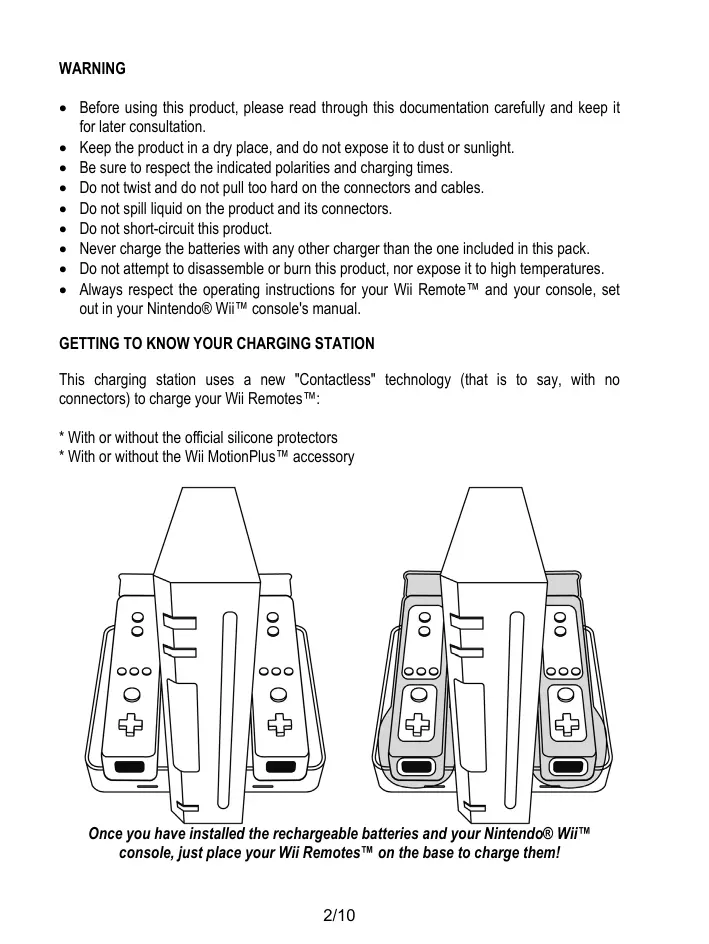
- Rechargeable batteries
- Charging cradles for Wii Remotes™
- Attachment system for Nintendo® Wii™ console
-
USB charging connector
-
Location for Nintendo® Wii™ console
- Charge level LEDs for Wii Remotes™
- Indentations for trigger B on Wii RemotesTM
WARNING
- Before using this product, please read through this documentation carefully and keep it for later consultation.
- Keep the product in a dry place, and do not expose it to dust or sunlight.
- Be sure to respect the indicated polarities and charging times.
- Do not twist and do not pull too hard on the connectors and cables.
- Do not spill liquid on the product and its connectors.
- Do not short-circuit this product.
- Never charge the batteries with any other charger than the one included in this pack.
- Do not attempt to disassemble or burn this product, nor expose it to high temperatures.
- Always respect the operating instructions for your Wii Remote™ and your console, set out in your Nintendo® Wii™ console's manual.
GETTING TO KNOW YOUR CHARGING STATION
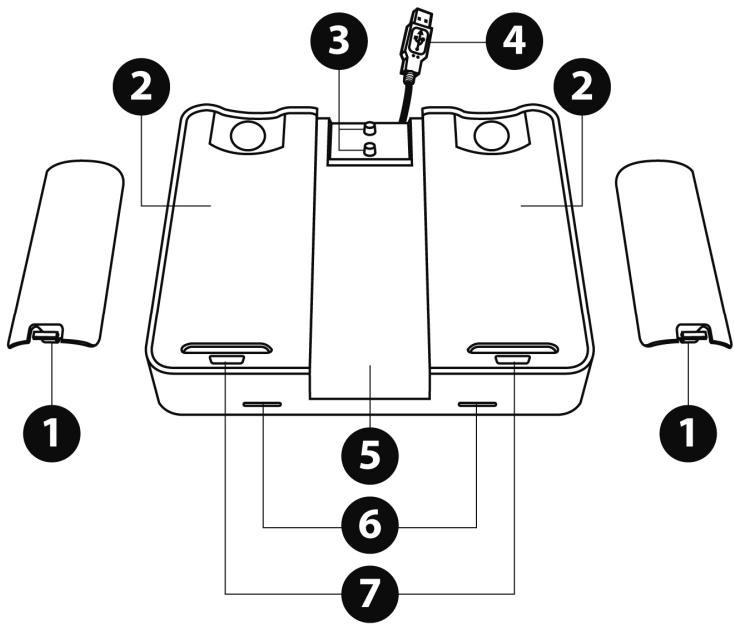
This charging station uses a new "Contactless" technology (that is to say, with no connectors) to charge your Wii Remotes™:
- With or without the official silicone protectors
- With or without the Wii MotionPlus™ accessory
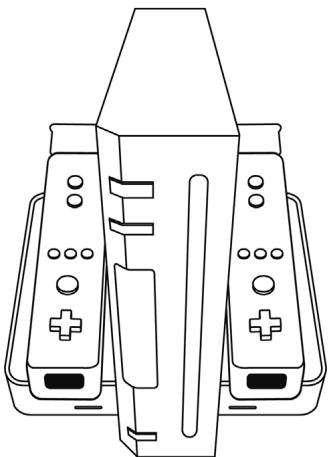
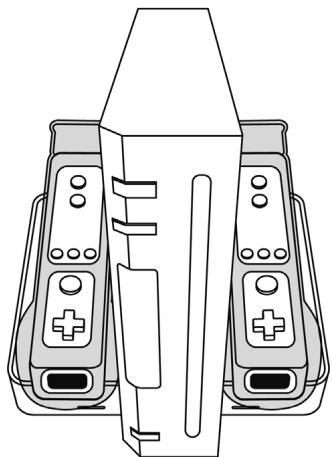
Once you have installed the rechargeable batteries and your Nintendo® Wii™ console, just place your Wii Remotes™ on the base to charge them!
INSTALLING THE RECHARGEABLE BATTERY
- Remove your Wii Remote™'s original battery compartment cover and batteries (Make sure to keep the original battery compartment cover in a safe place, so you don't lose it!).
- Insert the rechargeable battery (1) into the battery compartment on your Wii Remote™.
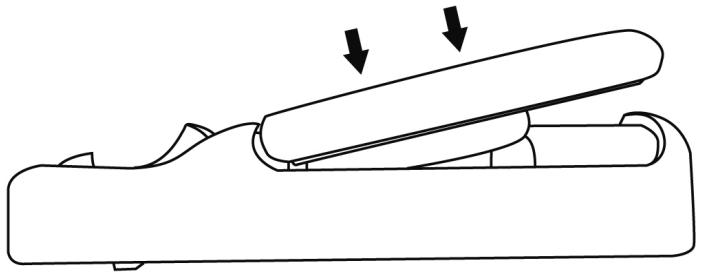
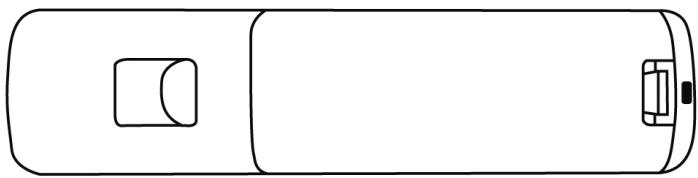
The rechargeable battery is now properly installed!
INSTALLING THE NINTENDO® WII™ CONSOLE ON THE CHARGING STATION
- Position the Nintendo® Wii™ console in its dedicated spot in the middle of the charging station (5).
- Slide the console towards the back of the charging station, so that the attachment system (3) will be positioned underneath the corresponding spot on the console.
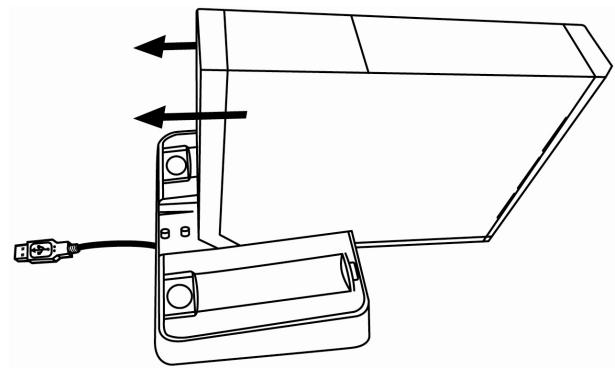
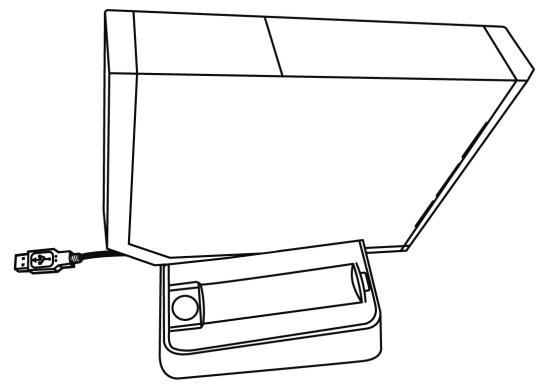
Once the console is properly positioned, you will hear and feel a slight "click", and your console will be secured in place.
- Connect the charging station's USB connector (4) to one of the 2 USB ports located at the back of your Nintendo® Wii™ console.
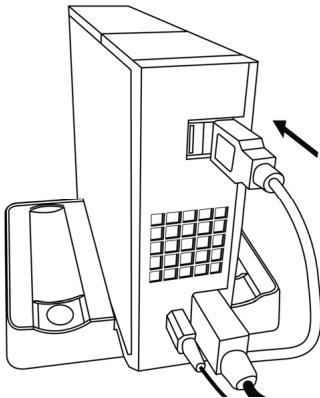
When the connection is made, the charging station's 2 charge level LEDs (6) light up very briefly to indicate that the unit is functioning properly.
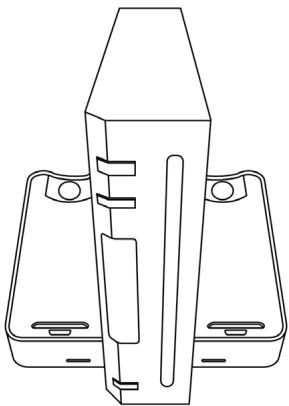
The charging station is now operational, and is ready for your Wii Remotes™!
CHARGING YOUR WII REMOTES™ ON THE CHARGING STATION
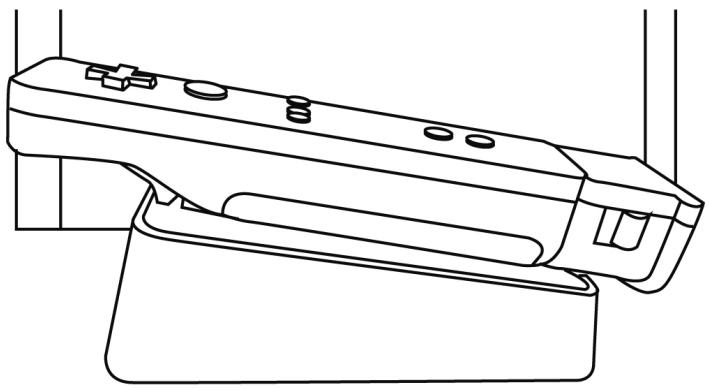
- Simply place your Wii Remote™ on one of the charging cradles (2) (with the pointer positioned towards the front, and trigger B positioned in the corresponding indentation (7) on the cradle).
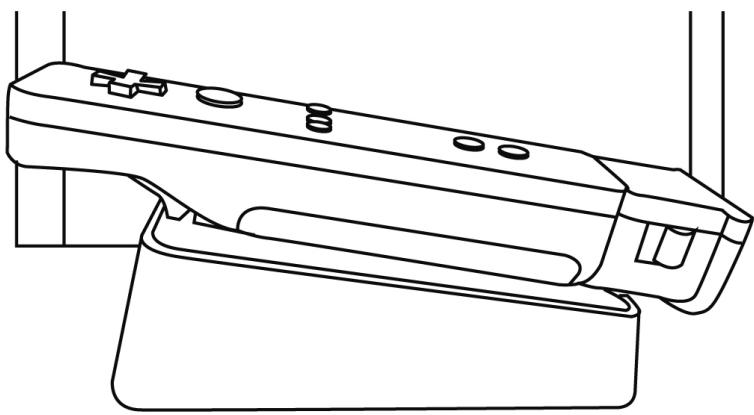
Once the Wii Remote™ is properly positioned, the corresponding charge level LED lights up in blue and charging begins.
CHARGE LEVEL LEDs (6) ON THE CHARGING STATION
- The left LED indicates the charge level of the Wii Remote™ located on the left.
- The right LED indicates the charge level of the Wii Remote™ located on the right.
- BLUE LED = the Wii Remote™'s battery is charging.
GREEN LED = the Wii Remote™'s battery is fully charged.
Approximate charging time: roughly 8 to 10 hours for 2 Wii Remotes™
Average battery life: 12 to 15 hours per Wii Remote™ per charge, depending on the type of use
NOTES
- The station will only charge if the rechargeable battery has been properly installed in the Wii Remote™, and the Wii Remote™ is properly positioned in its charging cradle.
- To charge the Wii Remotes™, your Nintendo® Wii™ console must be in "Active mode" or "Standby mode":
Active mode: LED on Wii™ is GREEN
- Standby mode: LED on Wii™ is ORANGE
= this requires that you enable "WiiConnect24" mode on your console. Please refer to the operating instructions for your Nintendo® Wii™ console for information on how to enable this mode.)
- To charge your Wii Remotes™, the charging station can also be connected to any other device featuring a self-powered USB port.
- As a result of the unit's "Contactless" technology (with no connectors), the back of your Wi-Fi Remote™ (or of your silicone protector) and the charging cradle on the station will both be slightly warm to the touch once charging is complete. This is absolutely normal, and poses no risk to either the user or the hardware. The temperature will automatically cool down and return to normal in a few seconds.
TROUBLESHOOTING
The charge level LEDs will not light up, and the rechargeable batteries will not charge, if:
- The rechargeable batteries are improperly inserted in the Wii Remotes™.
- The Nintendo® Wii™ console is disabled, unplugged or improperly connected (= if the Wii™ console's LED is OFF or RED).
- The charging station's USB connector (4) is improperly connected at the back of the Wii™ console.
TECHNICAL SUPPORT
If you encounter a problem with your product, please go to http://ts.thrustmaster.com and click Technical Support. From there you will be able to access various utilities (Frequently Asked Questions (FAQ), the latest versions of drivers and software) that may help to resolve your problem. If the problem persists, you can contact the Thrustmaster products technical support service ("Technical Support"):
By email:
In order to take advantage of technical support by email, you must first register online. The information you provide will help the agents to resolve your problem more quickly. Click Registration on the left-hand side of the Technical Support page and follow the on-screen instructions. If you have already registered, fill in theUsername and Password fields and then click Login.
By telephone:
| United Kingdom | 08450800942 Charges at local rate | Monday to Friday from Noon to 4pm and 5pm to 10pm Saturday from 9am to Noon and 1pm to 7pm Sunday from 9am to Noon and 1pm to 4pm |
| United States | 1-866-889-5036 Free | Monday to Friday from 7am to 11am and from Noon to 5pm Saturday and Sunday from 7am to Noon (Eastern Standard Time) |
| Canada | 1-866-889-2181 Gratisuit / Free | Monday to Friday from 7am to 11am and from Noon to 5pm Saturday and Sunday from 7am to Noon (Eastern Standard Time) |
| Denmark | 80887690 Free | Monday to Friday from 1pm to 5pm and 6pm to 11pm (English) Saturday from 9am to 1pm and 2pm to 8pm Sunday from 10am to 1pm and 2pm to 5pm |
| Sweden | 0200884567 Free | Monday to Friday from 1pm to 5pm and 6pm to 11pm (English) Saturday from 9am to 1pm and 2pm to 8pm Sunday from 10am to 1pm and 2pm to 5pm |
| Finland | 0800 913060 Free | Monday to Friday from 2pm to 6pm and 7pm to Midnight (English) Saturday from 10am to 2pm and 3pm to 9pm Sunday from 11am to 2pm and 3pm to 6pm |
WARRANTY INFORMATION
Worldwide, Guillemot Corporation S.A. ("Guillemot") warrants to the consumer that this Thrustmaster product will be free from material defects and manufacturing flaws for a period of two (2) years from the original date of purchase. Should the product appear to be defective during the warranty period, immediately contact Technical Support, who will indicate the procedure to follow. If the defect is confirmed, the product must be returned to its place of purchase (or any other location indicated by Technical Support).
Within the context of this warranty, the consumer's defective product will, at Technical Support's option, be either repaired or replaced. Where authorized by applicable law, the full liability of Guillemot and its subsidiaries (including for indirect damages) is limited to the repair or replacement of the Thrustmaster product. The consumer's legal rights with respect to legislation applicable to the sale of consumer goods are not affected by this warranty.
This warranty shall not apply: (1) if the product has been modified, opened, altered, or has suffered damage as a result of inappropriate or abusive use, negligence, an accident, normal wear, or any other cause not related to a material defect or manufacturing flaw; (2) in the event of failure to comply with the instructions provided by Technical Support; (3) to software not published by Guillemot, said software being subject to a specific warranty provided by its publisher.
Additional warranty provisions
In the United States of America and in Canada, this warranty is limited to the product's internal mechanism and external housing. Any applicable implied warranties, including warranties of merchantability and fitness for a particular purpose, are hereby limited to two (2) years from the date of purchase and are subject to the conditions set forth in this limited warranty. In no event shall Guillemot Corporation S.A. or its affiliates be liable for consequential or incidental damage resulting from the breach of any express or implied warranties. Some States/Provinces do not allow limitation on how long an implied warranty lasts or exclusion or limitation of incidental/consequential damages, so the above limitation may not apply to you. This warranty gives you specific legal rights, and you may also have other legal rights which vary from State to State or Province to Province.
COPYRIGHT
© 2009 Guillemot Corporation S.A. All right reserved. Thrustmaster® is a registered trademark of Guillemot Corporation S.A. Wili™ is a trademark of Nintendo Co., Ltd. All other trademarks and brand names are hereby acknowledged and are property of their respective owners. Illustrations not binding. Contents, designs and specifications are subject to change without notice and may vary from one country to another. Made in China.
ENVIRONMENTAL PROTECTION RECOMMENDATION
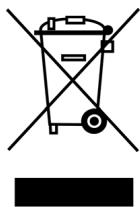
At the end of its working life, this product should not be disposed of with standard household waste, but rather dropped off at a collection point for the disposal of Waste Electrical and Electronic Equipment (WEEE) for recycling.
This is confirmed by the symbol found on the product, user manual or packaging. Depending on their characteristics, the materials may be recycled. Through recycling and other forms of processing Waste Electrical and Electronic Equipment, you can make a significant contribution towards helping to protect the environment.
Please contact your local authorities for information on the collection point nearest you.
FAQs, tips and drivers available at www.thrustmaster.com
T-Charge Stand
Contactless+ NW
INFORMATIONS RELATIVES À LA GARANTIE
INFORMATIE MET BETREKKING TOT DE GARANTIE
RICARICARE I TUOI WII REMOTE™ CON LA CHARGING STATION
3APRAIKA YCTPOICTB WII REMOTE™ HA 3APRAIDHO CTAHUIN
- Посто разmetite Wii Remote™ Ha ondnoи n3 noctabok Дялард (2) (указамь дожен Бымн habрашиен впешед, ampuzeep B haxodumbc8 coombemcmeyioe m yanybeneu (7) noocmaeku).
Iocne npaeunbnoy ycmnoeKu Wili RemoteTM 3a2opaemc coombemcmeyouo uhdukamop ypoeh 3apra da ycmpoicmeo Hayunaem 3apxkambc.
INHANKATOPbI YPOBHA 3APRAA (6) HA 3APRAHOI CTAHUN
BbIbJIeHHe HEnCIPABHOCTeI
Thrustmaster is a division of the Guillemot Corporation group