
SPORTS PACK NW - Gaming Accessories THRUSTMASTER - Free user manual and instructions
Find the device manual for free SPORTS PACK NW THRUSTMASTER in PDF.

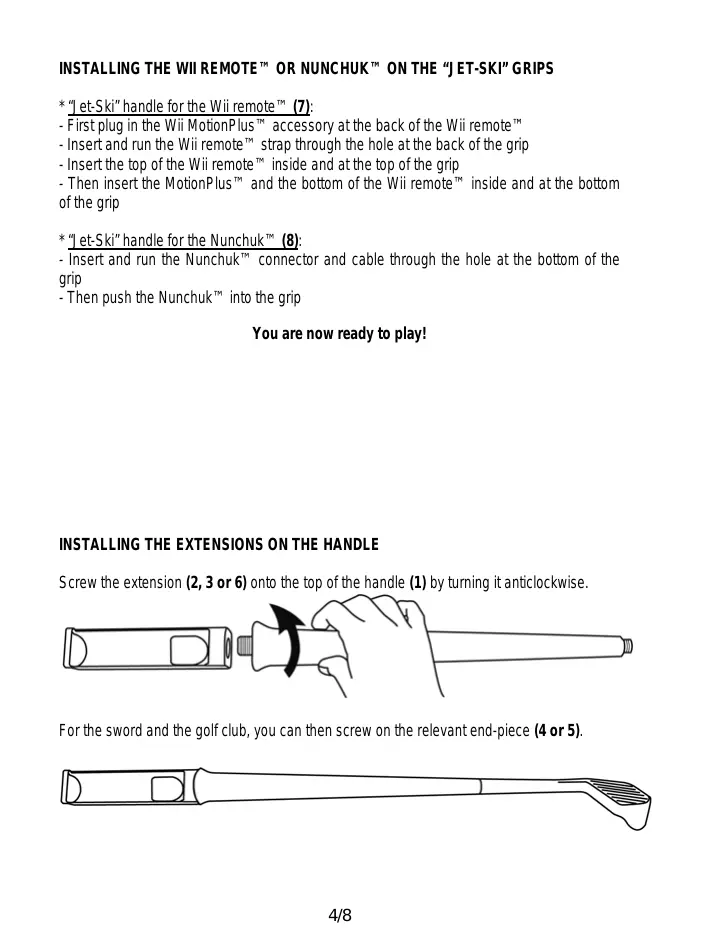


| Product type | Game accessory for Nintendo Wii |
| Brand | THRUSTMASTER |
| Model | SPORTS PACK NW |
| Compatibility | Nintendo Wii (Wiimote and Nunchuk) |
| Package contents | Handle, Ping-Pong Racket Extension, Golf Club and Sword Extension (with tips), Tennis Racket Extension, Jet-Ski Handle for Wiimote, Jet-Ski Handle for Nunchuk |
| Material | ABS Plastic |
| Weight | Approximately 500 g |
| Power supply | None (passive accessory) |
| Main functions | Transforms the Wiimote and Nunchuk into a tennis racket, ping-pong paddle, golf club, sword, and jet-ski handles for sports games |
| Safety | Always use the Wiimote wrist strap, do not hit objects or people, leave clear space around you |
| Maintenance and cleaning | Clean with a soft, dry cloth. Do not use solvents. |
| Warranty | 2 years against material and manufacturing defects |
| Technical support | Website: ts.rthrustmaster.com, phone: 0 826 09 21 03 (France) |
| General information | Made in China. Do not discard with household waste, recycle at end of life. |
Frequently Asked Questions - SPORTS PACK NW THRUSTMASTER
User questions about SPORTS PACK NW THRUSTMASTER
0 question about this device. Answer the ones you know or ask your own.
Ask a new question about this device
Download the instructions for your Gaming Accessories in PDF format for free! Find your manual SPORTS PACK NW - THRUSTMASTER and take your electronic device back in hand. On this page are published all the documents necessary for the use of your device. SPORTS PACK NW by THRUSTMASTER.
USER MANUAL SPORTS PACK NW THRUSTMASTER
USER MANUAL
MANUEL DE L'UTILISATEUR
BENUTZERHANDBUCH
HANDLEIDING
MANUALE D'USO
MANUAL DEL USUARIO
MANUAL DO UTILIZADOR
PykoBoDCTBO NOIb3OBaTeJ
THRUSTMASTER
SPORTS PACK+ NW
SPORTS PACK+ NW
For Nintendo® Wii™
User Manual
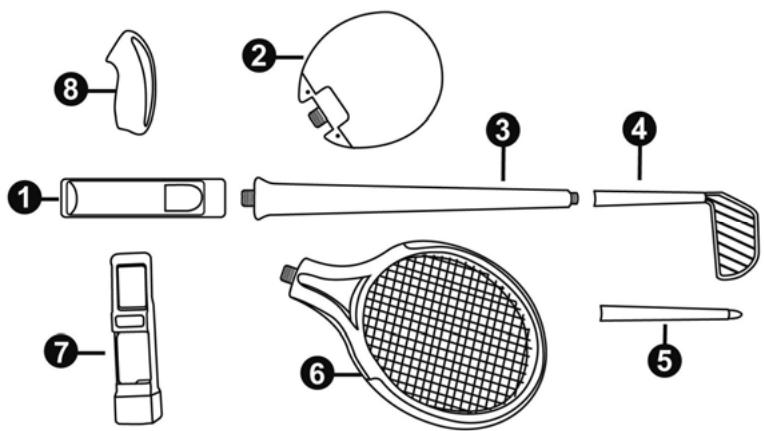
TECHNICAL FEATURES
- Handle for the Wii remoteTM
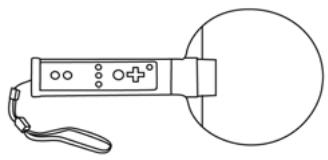
- "Ping-Pong racke" extension
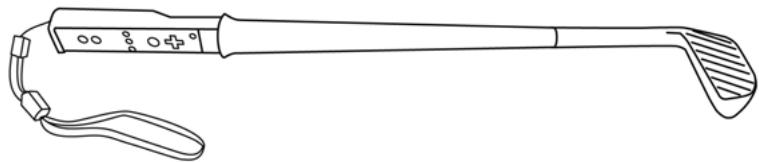
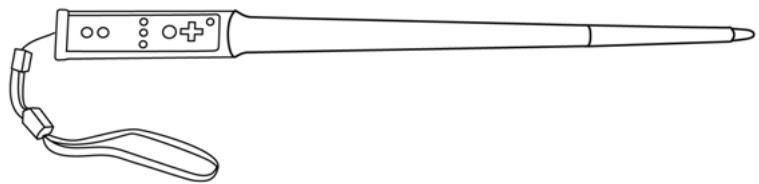
- "Golf Club" and "Sword" extension
- "Golf Club" end-piece
-
"Sword" end-piece
-
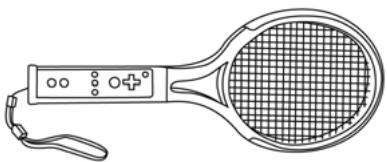
"Tennis jacket" extension
- "Jet-ski" grip for Wii remote™ with MotionPlus
- "Jet-ski" grip for Nunchuk™
WARNING
- Before using this product, please read through this documentation carefully and keep it for later consultation.
Always install the Wii remote™ strap and adjust it around your wrist, even when the Wii remote™ is fitted in the handle (1) or the grip (7).
Always respect the operating instructions for your Wii remote™ set out in your Nintendo® Wii™ console's manual. - During the gaming phases on Wii™, when you must use the pointer, all you have to do is lift up the front of the Wii remote™ from its compartment in the handle then put it back in its original position after use.
This product is designed exclusively for use as a gaming accessory. You must not use it for any other purpose — especially not for hitting objects or people.
During the gaming phases: firmly hold the accessory's handle (1) (to avoid letting go of the accessory), fit the Wii remote™ strap around your wrist, do not make exaggerated movements and leave enough space around you (so as not to damage the accessory or surrounding equipment).
Thrustmaster cannot be held liable in the event of any damage arising from the inappropriate use of this product.
ACCESSIONS
-
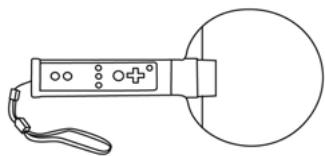
Ping-pong racket:
-
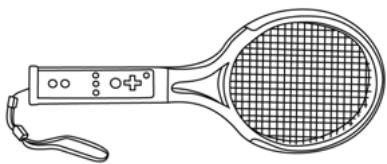
Tennis racket:
- Golf club:
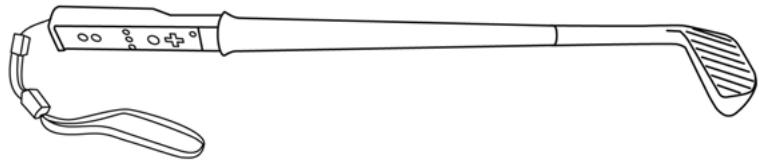
* Sword:
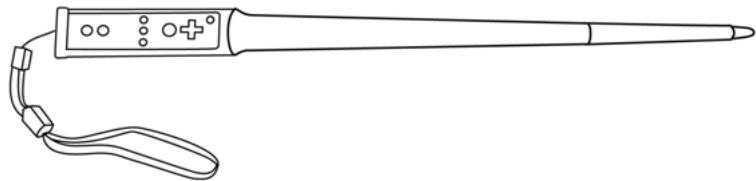
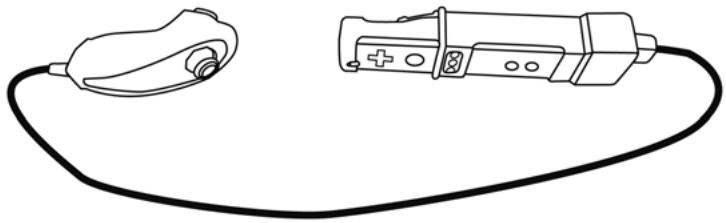
- Jet-Ski:
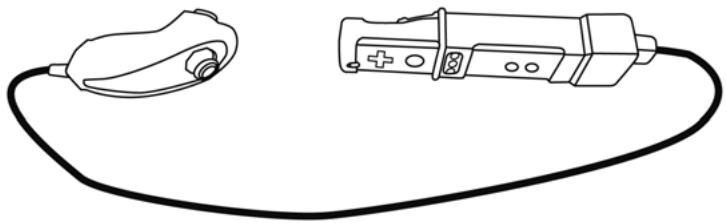
INSTALLING THE WII REMOTE™ OR NUNCHUK™ ON THE "JET-SKI" GRIPS
- "Jet-Ski" handle for the Wii remoteTM (7):
- First plug in the Wii MotionPlus™ accessory at the back of the Wii remote™
- Insert and run the Wii remote™ strap through the hole at the back of the grip
- Insert the top of the Wii remote™ inside and at the top of the grip
-
Then insert the MotionPlus™ and the bottom of the Wii remote™ inside and at the bottom of the grip
-
"Jet-Ski" handle for the Nunchuk™ (8).
- Insert and run the Nunchuk™ connector and cable through the hole at the bottom of the grip
- Then push the Nunchuk™ into the grip
You are now ready to play!
INSTALLING THE EXTENSIONS ON THE HANDLE
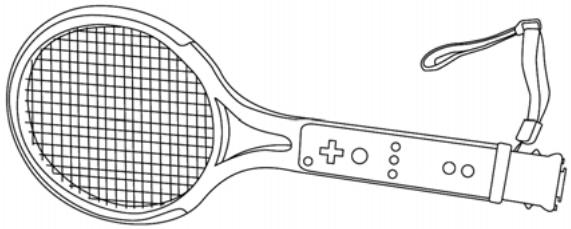
Screw the extension (2, 3 or 6) onto the top of the handle (1) by turning it anticlockwise.

For the sword and the golf club, you can then screw on the relevant end-piece (4 or 5).

INSTALLING THE WII REMOTE™ IN THE HANDLE
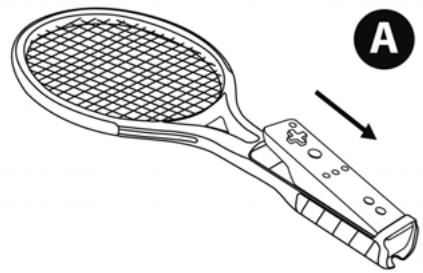
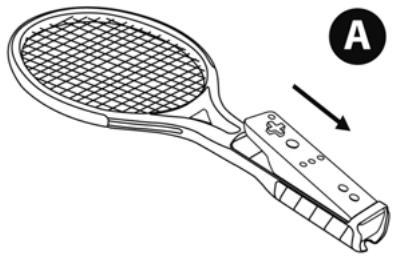
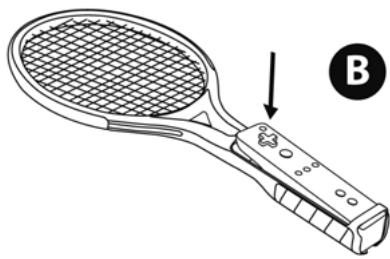
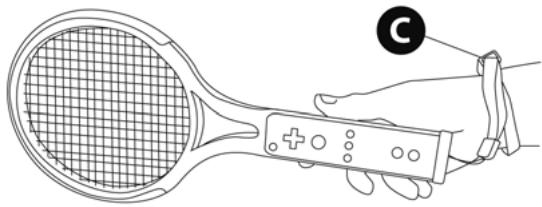
Fit the Wii remoteTM in the compartment of the handle (1). To do this:
A) Push the bottom of the Wii remote™ under the support bar at the end of the handle
B) Push down the front end of the Wii remoteTM
C) Attach and adjust the Wii remote™ strap around your wrist
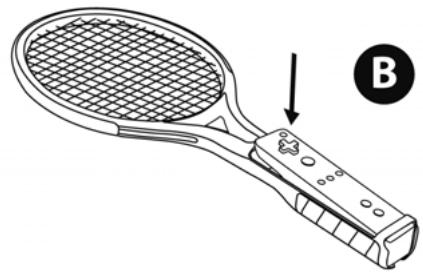
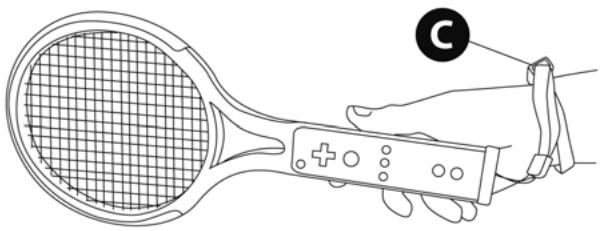
You are now ready to play!
INSTALLING THE WII MOTIONPLUS™
Once the Wiimote™ is fitted in the handle's compartment: just plug the Wii MotionPlus™ on the back of the Wii remote™
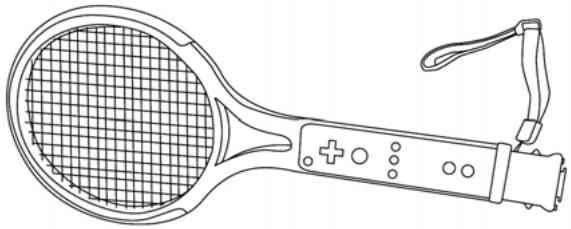
USING THE POINTER OR REMOVIDING THE WII REMOTE™ FROM THE HANDLE
D) Lift up the Wii remote™ by pushing on the hole at the back of the handle
E) You can then:
- Use the Wii remoteTM pointer without removing it from the handle
- Or, remove the Wii remote™ completely from the handle
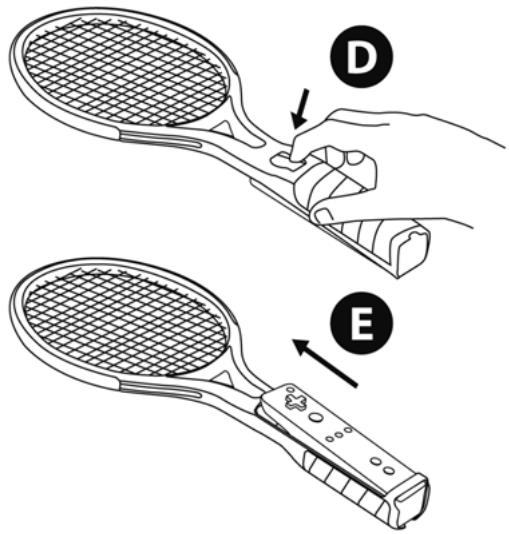
TECHNICAL SUPPORT
If you encounter a problem with your product, please go to http://its.thrustmaster.com and click Technical Support. From there you will be able to access various utilities (Frequently Asked Questions (FAQ), the latest versions of drivers and software) that may help to resolve your problem. If the problem persists, you can contact the Thrustmaster products technical support service ("Technical Support"):
By email:
In order to take advantage of technical support by email, you must first register online. The information you provide will help the agents to resolve your problem more quickly. Click Registration on the left-hand side of the Technical Support page and follow the on-screen instructions. If you have already registered, fill in theUserName and Password fields and then click Login.
By telephone:
| United Kingdom | 08450800942 Charges at local rate | Monday to Friday from Noon to 4pm and 5pm to 10pm Saturday from 9am to Noon and 1pm to 7pm Sunday from 9am to Noon and 1pm to 4pm |
| United States | 1-866-889-5036 Free | Monday to Friday from 7am to 11am and from Noon to 5pm Saturday and Sunday from 7am to Noon (Eastern Standard Time) |
| Canada | 1-866-889-2181 Gratuit / Free | Monday to Friday from 7am to 11am and from Noon to 5pm Saturday and Sunday from 7am to Noon (Eastern Standard Time) |
| Denmark | 80887690 Free | Monday to Friday from 1pm to 5pm and 6pm to 11pm (English) Saturday from 9am to 1pm and 2pm to 8pm Sunday from 10am to 1pm and 2pm to 5pm |
| Sweden | 0200884567 Free | Monday to Friday from 1pm to 5pm and 6pm to 11pm (English) Saturday from 9am to 1pm and 2pm to 8pm Sunday from 10am to 1pm and 2pm to 5pm |
| Finland | 0800 913060 Free | Monday to Friday from 2pm to 6pm and 7pm to Midnight (English) Saturday from 10am to 2pm and 3pm to 9pm Sunday from 11am to 2pm and 3pm to 6pm |
WARRANTY INFORMATION
Worldwide, Guillemot Corporation S.A. ("Guillemot") warrants to the consumer that this Thrustmaster product will be free from material defects and manufacturing flaws for a period of two (2) years from the original date of purchase. Should the product appear to be defective during the warranty period, immediately contact Technical Support, who will indicate the procedure to follow. If the defect is confirmed, the product must be returned to its place of purchase (or any other location indicated by Technical Support).
Within the context of this warranty, the consumer's defective product will, at Technical Support's option, be either repaired or replaced. Where authorized by applicable law, the full liability of Guillemot and its subsidiaries (including for indirect damages) is limited to the repair or replacement of the Thrustmaster product. The consumer's legal rights with respect to legislation applicable to the sale of consumer goods are not affected by this warranty.
This warranty shall not apply: (1) if the product has been modified, opened, altered, or has suffered damage as a result of inappropriate or abusive use, negligence, an accident, normal wear, or any other cause not related to a material defect or manufacturing flaw; (2) in the event of failure to comply with the instructions provided by Technical Support; (3) to software not published by Guillemot, said software being subject to a specific warranty provided by its publisher.
Additional warranty provisions
In the United States of America and in Canada, this warranty is limited to the product's internal mechanism and external housing. Any applicable implied warranties, including warranties of merchantability and fitness for a particular purpose, are hereby limited to two (2) years from the date of purchase and are subject to the conditions set forth in this limited warranty. In no event shall Guillemot Corporation S.A. or its affiliates be liable for consequential or incidental damage resulting from the breach of any express or implied warranties. Some States/Provinces do not allow limitation on how long an implied warranty lasts or exclusion or limitation of incidental/consequential damages, so the above limitation may not apply to you. This warranty gives you specific legal rights, and you may also have other legal rights which vary from State to State or Province to Province.
COPYRIGHT
© 2009 Guillemot Corporation S.A. All right reserved. Thrustmaster® is a registered trademark of Guillemot Corporation S.A. Wili™ is a trademark of Nintendo Co., Ltd. All other trademarks and brand names are hereby acknowledged and are property of their respective owners. Illustrations not binding. Contents, designs and specifications are subject to change without notice and may vary from one country to another. Made in China.
ENVIRONMENTAL PROTECTION RECOMMENDATION
At the end of its working life, this product should not be disposed of with standard household waste, but rather dropped off at a collection point for the disposal of Waste Electrical and Electronic Equipment (WEEE) for recycling.
This is confirmed by the symbol found on the product, user manual or packaging.
Depending on their characteristics, the materials may be recycled. Through recycling and other forms of processing Waste Electrical and Electronic Equipment, you can make a significant contribution towards helping to protect the environment.
Please contact your local authorities for information on the collection point nearest you.
FAQs, tips and drivers available at www.thrustmaster.com
SPORTS PACK+ NW
Pour Nintendo® Wii™
INFORMATIONS RELATIVES À LA GARANTIE
Hergestell in China.
INFORMATIE MET BETREKKING TOT DE GARANTIE
TEXHNUECKNEXAPAKTEPNCNTNKN
- RykoTka dЯ WiimoteTM
- YdHnHnTeB"PaKetKa dIy HAcToJbHOrTeHHNa"
- YdHnHtEnb KKnOuKa dny roIbΦa? n «Ulnara»
- HakoHeuHnK "Kliouka dIra roIbpa
-
HakoHeuHnK "UnaTa"
-
YdHnHnTeIb "PaKetKa DnIa 6OJIbWoOro TeHHICA"
- Ручка «Гидаочкл» Д reasonably Wiimote™ c MotionPlus
- Pучka «Гидаразикл» Дэг Nunchuk™
PENEYIPPEXDEHNE:
Ipeed noJIb3OBAHnEM n3dJIeNEM BHNMaTeJIbHO O3HaKOMbTeCb C HAcToauei DokymentaUneu XpaHIne ee dIg NOJyUeHnA JaJIbHeuXs CBeDeHn.
Bcerda npicoeDnHnTe K n3dEInH ToTmIaK dJa WiimoteTM, oTperyInpoBaB erO no BaWemy 3aIaCtBIO, daXe eCIN WiimoteTM BcTaBnEH B pykoTky (1) mI IN B pyKy (7).
Bcerda cneyuTe INHCTpyKuIN no noJIb3OBAHnIO WiimoteTM nVHCTpyKuIN no 3KcNJIyataaUNrPOBoI npICCTabKn Nintendo® WiiTM
Ecn npn irpe Ha WiiTM hynkHO BOCNoIb3ObaTc8 yka3KoN, npoCTo NOHIMTe nepeDHHIO uactb WiimoteTM, BbHyB ee n3 OTceBa pykoTKe, a noCte NoJIb3OBAHINy yka3KO BePHNTe BCE Ha MecTo.
Hactoee H3dJIne npedHa3NaeHo NCKIIOHTeBHO nra IcNoB3OBAHnB KaueCTBe akceccyapa dnnr ngbl.
3anpeaetcNcnoIb3ObaTb N3dJIeNe dIy INhIX cIeN, B YactHOCTn IJra HaHeceHryapOB NO ppeMetam IIN No IIOJAM.
Bo BpemrIrpbl: kpenko depKnTe pykOaTy (1) Akceccyapa (TuObI He BbInyctMb BCE n3py), 3akpennte TemJk WiimoteBokpyr 3anactb, He denaite NmHnx DnIXeHn HBCerda HMeite BOKpyr Bac doCTaTOHo MecTa (TuObI He NOBpeDHTb akceccyapnn Okpykaioune npedMeTbI).
Thrustmaster He Hecet NIKAKO OTBETCTBEHOCTHa 3a BO3MOXHbIe NOBPExKeHnBA BnDu HnPaBnBHorO nCnONb3OBaHnHaN 3dEInn.
PA3JIuHbIe AKCECCAYPbI
PaKetkaДЯнHactonbHoroTeHHICA
PaKetKa dIa 60JIbUoro TeHHICA
KIIouka dIra roIbfa
- Unara:
*FJnnpouKn:
YCTAHOBKA WIIMOTE™ IJIN NUNCHUK™ B PUYKU «ГИДРOLИКЛ»
-PyuKa «Гирocик»дя WiimoteTM (7):
-Bhauane nodklnouite ae kceccayp Wii MotionPlusTM K 3aedne nane WiimoteTM
BCTabTe temJIK WiimoteTM nponyctnte ero uepe3 OTbepctne Ha 3aDHeu qactn pyuk
- BCTabbTe BepxHIOU qactb WiimoteTM BHyTpb BepxHeu qactn pyKu
- 3aTeM BCTaBbTe MotionPlus™и НХнHоч acTb Wiimote™ BByTp b HXHNeч acTn pyuKn
*PyuKa «ГиДрОцИКЛ» ДЯл Nunchuk™ (8):
- BCTabBe Te Ka6eBb C BvIko TEmJIK NunchukTM n npOnyctnte ero uepe3 OTBepCTne Ha 3aDneu cactn pyKIN
-3aTeM BCTaBte Nunchuk TM BHTpb pyKu
Tenepb MoXNo HauHamb u2py!
YCTAHOBKA YDINIHHTJEI PYKOKTNI
PπnKpyTnte yDInHntel (2, 3 unu 6) K BepxHei qactn pykoTkn (1), NOBopaunBaJ ee npotNB uacOB CTpeKN.

IJIaIaIaI N KIIIOUkN IJIra TOnbIa HABINHTnTe COOBETCTBHyOuNHaKoHHeuNK (4 unu 5).

YCTAHOBITE WIIMOTE™ B PYKORTKY
UctahOBHTe WiimoteTM B OTEcK pyKoRTkn (1).IINr 3Toro:
A)Подсунь Te HIXHIOU Yacb WimoteTM noI ydePknBaIoU nepeKnadHy B HIXHne Yactn pyKoTkn
B) BctabbTe nepeHIOu cactb WiimoteTM
C) Bctabte temnK WiimoteTM n oTperynpye ero no Baewemy 3aenCTbO
Tenepb MoXHO haUHamb uzy!
YCTAHOBKA WII MOTIONPLUS™
Iocne yctaHOBKn WiimoteTM B oTceK pykoAeKN: npocTo nOdklnHOnTe Wii MotionPlusTM K 3aDne naHEni WiimoteTM
NCIOJIb3OBAHHe YKA3KN IJIN CHRTNE WIIMOTE™ C PYKORTKN
Thrustmaster is a division of the Guillemot Corporation group
- THRUSTMASTER
- SPORTS PACK+ NW
- TECHNICAL FEATURES
- WARNING
- ACCESSIONS
- INSTALLING THE WII REMOTE™ OR NUNCHUK™ ON THE "JET-SKI" GRIPS
- INSTALLING THE EXTENSIONS ON THE HANDLE
- INSTALLING THE WII REMOTE™ IN THE HANDLE
- INSTALLING THE WII MOTIONPLUS™
- USING THE POINTER OR REMOVIDING THE WII REMOTE™ FROM THE HANDLE
- TECHNICAL SUPPORT
- By email:
- WARRANTY INFORMATION
- Additional warranty provisions
- COPYRIGHT
- ENVIRONMENTAL PROTECTION RECOMMENDATION
- INFORMATIONS RELATIVES À LA GARANTIE
- INFORMATIE MET BETREKKING TOT DE GARANTIE
- TEXHNUECKNEXAPAKTEPNCNTNKN
- PENEYIPPEXDEHNE:
- PA3JIuHbIe AKCECCAYPbI
- YCTAHOBKA WIIMOTE™ IJIN NUNCHUK™ B PUYKU «ГИДРOLИКЛ»
- YCTAHOBKA YDINIHHTJEI PYKOKTNI
- YCTAHOBITE WIIMOTE™ B PYKORTKY
- YCTAHOBKA WII MOTIONPLUS™
- NCIOJIb3OBAHHe YKA3KN IJIN CHRTNE WIIMOTE™ C PYKORTKN
Brand : THRUSTMASTER
Model : SPORTS PACK NW
Category : Gaming Accessories