
DUOSET 2 - Headphones PLANTRONICS - Free user manual and instructions
Find the device manual for free DUOSET 2 PLANTRONICS in PDF.


| Product Type | Headset |
| Brand | Plantronics |
| Model | DUOSET 2 |
| Design | Adjustable headband with swivel earpiece for right or left ear |
| Usage | Can be used in headband or over-the-ear mode |
| Microphone | Directional microphone with noise cancellation |
| Voice tube | Present on some models for better voice clarity |
| Connectivity | Wired: modular connectors (2.5 mm, 3.5 mm) depending on version |
| Estimated weight | Approximately 100 g |
| Maintenance | Clean with a damp cloth every month; replace the foam ear cushion every 6 months; replace the voice tube every 6 months |
| Included accessories | Foam ear cushion, ear cushion holder, headband, over-the-ear loop, clothing clip, Quick Disconnect connector (depending on model) |
| Special features | Quick Disconnect connector for call hold; line pick-up button (some DECT models) |
| Compatibility | Landline phones, DECT, GSM, AirSet adapters |
Frequently Asked Questions - DUOSET 2 PLANTRONICS
User questions about DUOSET 2 PLANTRONICS
0 question about this device. Answer the ones you know or ask your own.
Ask a new question about this device
Download the instructions for your Headphones in PDF format for free! Find your manual DUOSET 2 - PLANTRONICS and take your electronic device back in hand. On this page are published all the documents necessary for the use of your device. DUOSET 2 by PLANTRONICS.
USER MANUAL DUOSET 2 PLANTRONICS
Interface Business Park
Binknoll Lane
Woolton Bassett
Wiltshire
SN4 8QQ
ENGLAND
Tel: +44 1793 842200
Fox: +44 1793 848853
Plantronics Denmark
Anderson Nexvej 29
2860 Søborg
Denmark
T: +45 39551051
F: +45 39551052
Plantronics B.V.
Antareslaan 9
Plantronics Nordic Region
Oskarsvagen 10
S-702 14 Örebro
Sweden
Tel: +46 19 121930
Fax: +46 19 121933
Plantronics Ltd, Interface Business Park, Bincknoll Lane, Wootton Bassett,
Wiltshire SN4 8QQ. ENGLAND
www.plantronics.com

PLANTRONICS
Plantronics, the Plantronics name, logo design and StarBase® are Registered Trademarks
of Plantronics, Inc. AirSet, DuoSet and Quick Disconnect are Trademarks of Plantronics, Inc.
© 1999 Plantronics, Ltd. All rights reserved.
Printed in the U.K.
AeLL-2L4E
DUOSET™ II
User Guide
Brugsanvising
Gebruiksaanwijzing
Käytöopas
Anneau support contour
d'oreille
Kabelführung am
Ohrhaken
Fig.1 Remove the earhook and pivot ball ring from the headset.
Fig.2 Fit both the foam ear cushion and the ear cushion holder onto the receiver. There are notches on the ear cushion which should be aligned with the boom.
Fig.3 Insert the ball joint of the headband into the socket on the back of the receiver.
Fig.4 Place the headband over the top of your head, with the cushion resting comfortably on your ear. The T-Bar should be positioned above your other ear. If necessary, the length of the headband can be extended.
The headset can be worn with the receiver on either ear. Simply rotate the receiver on the headband to suit.
Fig.5 Noise Cancelling Models
Angle the boom towards your mouth.
Fig.6 Voice Tube Models
Hold the headset securely against your ear with one hand. With your other hand, adjust the voice tube so that the tip sits two finger-widths from the corner of your mouth. Your voice will sound clearer if you avoid positioning the voice tube in front of your mouth.
Polaris Models
The Polaris models are fitted with a standard modular connector. To use this model, simply insert the connector into the headset port of a compatible telephone.
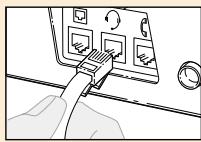
StarBase® 2000/2010 Models
Plug the headset modular connector into the headset socket of the StarBase 2000/2010 telephone.
DECT&GSM Models
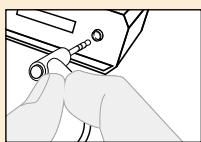
If you are using a DECT or GSM telephone, plug the 2.5mm connector into the headset port of the telephone or adapter.
AirSet™ Models
Plug the 3.5mm connector into the AirSet remote unit.
DIAGRAM KEY
PREPARED THE HEADSET FOR OVER-THE-EAR USE:
Fig.1 Unsnap the headband from the back of the receiver.
Fig.2 Remove both the foam ear cushion and the moulded cushion holder from the receiver. They can be removed as one item.
Fig.3 Press the pivot ball ring onto the headset, aligning it with the microphone boom. Insert the earhook into either the left or right hand side of the pivot ball ring, depending which ear the headset is to be worn on.
Fig.4 Place the headset over your ear as shown in the diagram and a&b gently press the receiver against your ear for a comfortable fit. Adjust the conformable earhook around your ear in order to obtain a comfortable fit.
The headset cable can be slotted over the top of the earhook, for greater ease of use and comfort.
Fig.7 Clothing Clip
The clothing clip helps to keep the headset free from the weight of the headset cable. Attach the clip to your clothing at a comfortable level.
Fig.8 Quick Disconnect™ Connector
Some headset models are equipped with a Quick Disconnect Connector. When you separate the Quick Disconnect, you place an on-going conversation 'on hold' without removing the headset. Before using your headset, join the Quick Disconnect to the mating connector of your adapter cable. To put your call 'on hold', grasp the Quick Disconnect as shown, and pull straight apart. To resume your conversation, reconnect the two halves.
Fig.9 Hook Switch Control
For certain DECT applications, the headset is available with an inline hook switch control. You can use this switch to answer or end a call.
GB TROUBLESHOOTING
Replace the foam ear cushion every 6 months.
Replace the voice tube every six months.
Clean cable and headset with a moist cloth once a month or when necessary.
PROBLEM
Callers cannot hear me
Items to check
Make sure that the boom is facing your mouth.
Check that the headset is correctly plugged into your telephone or amplifier.
For voice tube models, determine if the voice tube is blocked, by removing it and speaking into the silver tube. If your caller can now hear you, simply replace the voice tube with a new one.
Check that the Quick Disconnect is connected correctly.
PROBLEM
I cannot hear callers
Check that the headset is correctly plugged into your telephone or amplifier.
Make sure that the receiver is correctly placed against your ear.
Check that the Quick Disconnect is connected correctly.
PROBLEM
Headband is uncomfortable
Adjust the headband by lengthening or shortening the band.
PROBLEM
Earhook is uncomfortable
Try adjusting the conformable earhook to suit your ear.
OVERSIGT DK
SADAN FORBERDEDES HOVEDSATTET TIL BRUG OVER HOVEDET
Fig.8 Quick Disconnect™boutkat
Brand : PLANTRONICS
Model : DUOSET 2
Category : Headphones