
BT500 - Bluetooth Headset JABRA - Free user manual and instructions
Find the device manual for free BT500 JABRA in PDF.


User questions about BT500 JABRA
0 question about this device. Answer the ones you know or ask your own.
Ask a new question about this device
Download the instructions for your Bluetooth Headset in PDF format for free! Find your manual BT500 - JABRA and take your electronic device back in hand. On this page are published all the documents necessary for the use of your device. BT500 by JABRA.
USER MANUAL BT500 JABRA
© 2005 GN Netcom A/S. All rights reserved. Jabra is a registered trademark, wholly owned by GN Netcom Inc., and MiniGels is a trademark of GN Netcom Inc. in the USA, and these trademarks may be registered in other countries. US and foreign patents pending. Design and specifications subject to change without notice. The Bluetooth® word mark and logos are owned by the Bluetooth SIG, Inc. and any use of such marks by the companies in the GN Netcom Group is under license.


RELEASE YOUR JABRA
Jabra
Bluetooth® Headset
User Manual
Jabra
Fig. 1
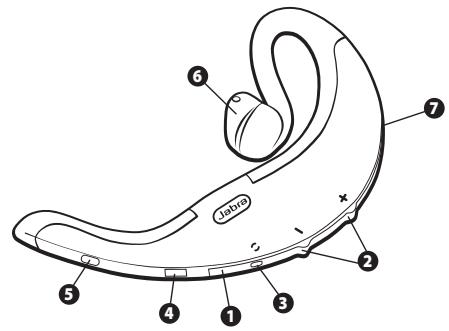
Fig. 2
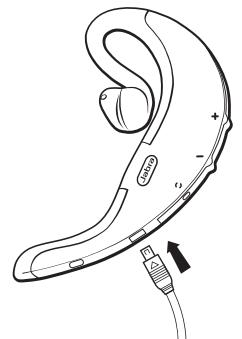
Fig. 3
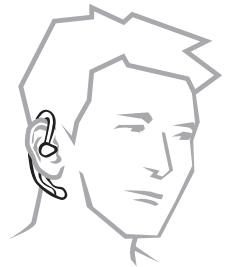
Fig. 4
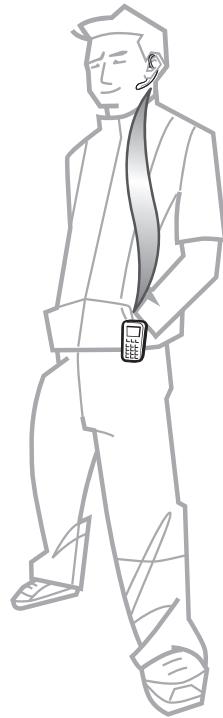
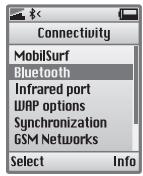
Fig. 5
English 1
Francais 11
Espanol 21
English
Thank you. 2
- Charge your headset 3
- Turn on your headset 4
- Pair it with your phone 4
- Wear it how you like it 4
- How to 4
6.What the lights mean. 5 - Using a Jabra Bluetooth adapter 6
- Troubleshooting & FAQ 6
9.Need more help? 7 - Taking care of your headset 7
- Warranty 7
- Certification and safety approvals 8
- Glossary 10
Thank you
Thank you for purchasing the Jabra BT500 Bluetooth® Headset. We hope you enjoy it!
This instruction manual will get you started and help you make the most of your headset.
Remember, driving comes first, not the call!
Using a mobile phone while driving can distract you and increase the likelihood of an accident. If driving conditions demand it (such as bad weather, high traffic density, presence of children in the car, difficult road conditions), pull off the road and park before making or answering calls. Also, try to keep conversations short and do not make notes or read documents.
Always drive safely and follow local laws.
About your Jabra BT500
- LED light
Red indicates battery level (charging or low)
- Green indicates fully charged battery
- Volume up (+), volume down (-); to mute, press both at once
- Pairing button - press to put headset into pairing mode
-
Charging socket
-
Answer/end button
-
Press to turn headset on (blue flash burst indicates success)
- Press and hold to turn headset off (blue flash burst indicates success)
-
Tap to answer or end a call
-
MiniGelTM - rotate 180^ to fit left ear.
-
LED light
-
Blue indicates mode (pairing, active or standby)
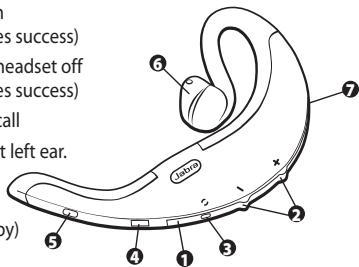
What your headset can do
Your Jabra BT500 lets you do all this:
Answer calls
End calls
Reject calls
Voice dialing (phone dependent)
Last number redialing
Call waiting
Put call on hold
Mute
Specifications
- Talk time up to 8 hours/standby time up to 240 hours
- Rechargeable battery with charging option from AC power supply, PC via USB cable or car charger (not included)
Weight 0.67 oz (19 g) - Operating range up to 30 feet (approx. 10 meters)
- Headset and hands-free Bluetooth profiles
- Bluetooth specification (see glossary) version 1.2
GETTING STARTED
The Jabra BT500 is easy to operate. The answer/end button on the headset performs different functions depending on how long you press it.
| Instruction: | Duration of press: |
| Tap | Press briefly |
| Press | Approx: 1 second |
| Press and hold | Approx: 5 seconds |
1 Charge your headset
Make sure that your Jabra BT500 headset is fully charged before you start using it. Use the AC adapter to charge from a power socket, or charge directly from your PC with the USB cable provided. Connect your headset as shown in fig. 2. When the LED light is solid red, your headset is charging. When the LED light is green, it is fully charged.
2 Turn on your headset
Press the answer/end button to turn on your headset.
- Press and hold the answer/end button to turn off your headset.
3 Pair it with your phone
Before you use your Jabra BT500, you need to pair it with your mobile phone.
-
Put the headset in pairing mode
Make sure the headset is on.
Press the pairing button marked -
Set your Bluetooth phone to 'discover' the Jabra BT500
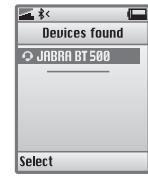
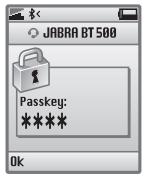
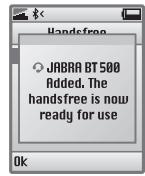
Follow your phone's instruction guide. This usually involves going to a 'setup,' connect' or 'Bluetooth' menu on your phone and selecting the option to 'discover' or 'add' a Bluetooth device.* (See example from a typical mobile phone in fig. 5.)
- Your phone will find the Jabra BT500
Your phone then asks if you want to pair with it. Accept by pressing 'Yes' or 'OK' on the phone and confirm with the passkey or PIN = 0000 (4 zeros). Your phone will confirm when pairing is complete. In case of unsuccessful pairing, repeat steps 1 to 3.
4 Wear it how you like it
The Jabra BT500 is ready to wear on your right ear. If you prefer the left, gently rotate the MiniGel™ ear piece 180^ . See fig. 1.
For optimal performance, wear the Jabra BT500 and your mobile phone on the same side of your body or within line of sight. In general, you will get better performance when there are no obstructions between your headset and your mobile phone.
5 How to...
Answer a call
- Tap the answer/end button on your headset to answer a call.
End a call - Tap the answer/end button to end an active call.
Reject a call*
- Press the answer/end button when the phone rings to reject an incoming call. Depending on your phone settings, the person who called you will either be forwarded to your voice mail or hear a busy signal.
Make a call
- When you make a call from your mobile phone, the call will (subject to phone settings) automatically transfer to your headset.
Activate voice dialing*
- Tap the answer/end button. For best results, record the voice-dialing tag through your headset. Please consult your phone's user manual for more information about using this feature.
Redial last number*
Press the answer/end button.
Call waiting and placing a call on hold*
This lets you put a call on hold during a conversation and answer a waiting call.
- Press the answer/end button once to put the active call on hold and answer the waiting call.
- Press the answer/end button to switch between the two calls.
- Tap the answer/end button to end the active conversation.
Adjust sound and volume*
- Press the volume up or down (+ or -) to adjust the volume. Show fig. 1.
- To mute, press both volume up and down at the same time. A low beep alert plays during a muted call.
To un-mute, tap either of the volume buttons.
*Dependent on your phone supporting this feature
6 What the lights mean
| What you see | What this means |
| Flashing blue light | Flashing every second: active on a call |
| Flashing blue light | Flashing every three seconds: in standby mode |
| Flashing red light | Running low on battery |
| Solid red light | Charging |
| Solid green light | Fully charged |
| Solid blue light | In pairing mode – see section 3 |
7 Using a Jabra Bluetooth adapter
If you want to use the Jabra BT500 with a non Bluetooth mobile phone, the Jabra A210 adapter is the answer.
The Jabra A210 gives you a cordless connection with the following headset features: answer/end call, voice dial function (if supported by the phone) and mute. Rejecting a call, last number redial and putting a call on hold might not be supported through the headset jack in the mobile phone.
To pair the Jabra BT500 with the Jabra A210
The pairing process is a little different: (see section 3 for pairing instructions)
Put your Jabra BT500 in pairing mode.
- Put the Jabra A210 adapter in pairing mode. Consult the Jabra A210 user manual for more information.
- In close proximity to each other. You do not need a dedicated pin code to pair the two Jabra products.
Making/answering a call when using the Jabra A210
- When you make a call from your mobile phone, the call will automatically transfer to the headset (if it is turned on).
- To answer a call: either tap the answer/end button on your headset or press the answer button on your mobile phone.
8 Troubleshooting & FAQ
I hear crackling noises
For the best audio quality, always wear your headset on the same side of your body as your mobile phone.
I cannot hear anything in my headset
- Increase the volume on the headset.
- Ensure that the headset is paired with the phone.
- Make sure that the phone is connected to the headset – if it does not connect either from the phone's Bluetooth menu or by tapping the answer/end button, follow the pairing procedure (see section 3).
I have pairing problems even though my phone indicates otherwise
You may have deleted your headset pairing connection in your mobile phone. Follow the pairing instructions in section 3.
Will the Jabra BT500 work with other Bluetooth equipment?
The Jabra BT500 is designed to work with Bluetooth mobile phones. It can also work with other Bluetooth devices that are compliant with Bluetooth version 1.1 or 1.2 and support a headset and/or hands-free profile.
I cannot use reject call, call on hold, redial or voice dialing
These functions are dependent on your phone supporting them. Please check your phone's manual for further details.
9 Need more help?
- Web: www.jabra.com (for the latest support info and online User Manuals)
- E-mail: Tech Support: techsupp@jabra.com Information: info@jabra.com
- Phone: 1 (800) 327-2230 (toll-free in USA and Canada)
10 Taking care of your headset
Always store the Jabra BT500 with the power off and safely protected.
- Avoid storage at extreme temperatures (above 45^ / 113^ - including direct sunlight - or below -10^ / 14^ ). This can shorten battery life and may affect operation. High temperatures may also degrade performance.
- Do not expose the Jabra BT500 to rain or other liquids.
11 Warranty
Jabra limited product warranty. Jabra is a wholly owned trademark of GN Mobile (GN Netcom A/S). Jabra warrants to Purchaser that for a period of one (1) year after the date of purchase (the "Warranty Period") of any Jabra Product ("Product") by Purchaser, the Product will substantially conform to Jabra's published specifications for the Product on the date of Purchaser's purchase of the Product, subject to the terms herein. Purchaser shall notify Jabra of any nonconformance during the Warranty Period and obtain a written return material authorization ("RMA") and an RMA number for the nonconforming Product from Jabra and return the nonconforming Product to Jabra, freight prepaid, with a statement describing the nonconformity. Jabra's exclusive obligation with respect to nonconforming Product shall be, at Jabra's option and expense, to repair or replace such Product so that it substantially conforms with its published specifications on the date of Purchaser's purchase, or, if Jabra, in Jabra's sole discretion, determines that it is not possible to repair or replace the Product, Jabra may, at Jabra's option, refund to Purchaser the purchase price paid for the Product. THE FOREGOING IS PURCHASER'S SOLE AND EXCLUSIVE REMEDY FOR BREACH OF WARRANTY BY JABRA WITH RESPECT TO THE PRODUCT. The warranty set forth above shall not apply to any Product which has not been properly used or handled in accordance with the instructions supplied by Jabra, lost or misplaced for any reason, or which has been modified,
repaired or altered, except by Jabra or at a Jabra authorized service facility, or which has been subjected to faulty installation, misuse, abuse, or which the Product defect is attributable to any failure or damage which is beyond the reasonable control of Jabra. This warranty is available only to Purchaser, and does not extend to any distributors, retailers, or other resellers of the Product. This warranty applies only to new Jabra products purchased from authorized retail sellers. This warranty does not apply to: "open box purchases", resales by private parties or any other third party purchases by unauthorized distributors. Transfer of Jabra products through any unauthorized distributor renders our manufacturer's warranty null and void. BUYER BEWARE: any Jabra product sold by a private party or unauthorized distributor and not by an authorized Jabra retail seller is sold on an "as is" or "with all faults" basis with respect to Jabra. As such, the entire risk as to the quality and performance of such products will be with the buyer if the unauthorized distributor will not cover the costs of repairing defects. Should such products prove defective following their purchase, the buyer or unauthorized distributor, and not the manufacturer or its authorized retail sellers, assumes the entire cost of all necessary servicing or repair. Therefore, buyers are strongly encouraged to purchase Jabra products only from Jabra authorized retail sellers. THE FOREGOING WARRANTY ARE THE SOLE WARRANTYES, EXPRESS OR IMPLIED, GIVEN BY JABRA IN CONNECTION WITH THE PRODUCT, AND JABRA DISCLAIMS ALL OTHER WARRANTYES, INCLUDING WARRANTYES OF MERCHANTABILITY, FITNESS FOR A PARTICULAR PURPOSE AND NONINFRINGEMENT OF THIRD PARTY RIGHTS. JABRA SHALL NOT BE LIABLE FOR ANY SPECIAL, INCIDENTAL OR CONSEQUENTIAL DAMAGES IN CONNECTION WITH THE PRODUCT, EVEN IF JABRA HAS BEEN ADVISED OF THE POSSIBILITY OF SUCH DAMAGES. THE LIABILITY OF JABRA HEREUNDER FOR ALL CLAIMS SHALL NOT EXCEED THE AMOUNT PAID BY PURCHASER TO JABRA FOR THE PRODUCT GIVING RISE TO JABRA'S LIABILITY.
12 Certification and safety approvals
FCC
This device complies with part 15 of the FCC Rules. Operation is subject to the following two conditions: (1) This device may not cause harmful interference, and (2) this device must accept any interference received, including interference that may cause undesired operation.
Users are not permitted to make changes or modify the device in any way. Changes or modifications not expressly approved by Jabra will void the user's authority to operate the equipment.
This equipment has been tested and found to comply with the limits for a Class B digital device, pursuant to part 15 of the FCC Rules. These limits are designed to provide reasonable protection against harmful interference in
a residential installation. This equipment generates, uses and can radiate radio frequency energy and, if not installed and used in accordance with the instructions, may cause harmful interference to radio communications. However, there is no guarantee that interference will not occur in a particular installation. If this equipment does cause harmful interference to radio or television reception, which can be determined by turning the equipment off and on, the user is encouraged to try to correct the interference by one or more of the following measures:
Reorient or relocate the receiving antenna.
- Increase the separation between the equipment and receiver.
- Connect the equipment into an outlet on a circuit different from that to which the receiver is connected.
- Consult the dealer or an experienced radio/TV technician for help.
The user must place the base 8'' (20cm) or more from any personnel in order to comply with FCC RF exposure requirements.
Industry Canada
Operation is subject to the following two conditions: (1) This device may not cause interference and (2) This device must accept any interference, including interference that may cause undesired operation of the device.
The term "IC:" before the certification/registration number only signifies that registration was performed based on a Declaration of Conformity indicating that Industry Canada technical specifications were met. It does not imply that Industry Canada approved the equipment.
CE
This product is CE marked according to the provisions of the R & TTE Directive (99/5/EC)
Hereby, Jabra, declares that this product is in compliance with the essential requirements and other relevant provisions of Directive 1999/5/EC.
For further information please consult http://www.gnnetcom.com
Please note that this product uses radio frequency bands not harmonised within EU. Within EU this product is intended to be used in Austria, Belgium, Denmark, Finland, France, Germany, Greece, Ireland. Italy, Luxembourg, The Netherlands, Portugal, Spain, Sweden, United Kingdom and within EFTA in Iceland, Norway and Switzerland.
Bluetooth
The Bluetooth® word mark and logos are owned by the Bluetooth SIG, Inc. and any use of such marks by Jabra is under license. Other trademarks and trade names are those of their respective owners.
13 Glossary
1 Bluetooth is a radio technology that connects devices, such as mobile phones and headsets, without wires or cords over a short distance (approx. 30 feet). Get more information at www.-bluetooth.com.
2 Bluetooth profiles are the different ways that Bluetooth devices communicate with other devices. Bluetooth phones support either the headset profile, the hands-free profile or both. In order to support a certain profile, a phone manufacturer must implement certain mandatory features within the phone's software.
3 Pairing creates a unique and encrypted link between two Bluetooth devices and lets them communicate with each other. Bluetooth devices will not work if the devices have not been paired.
4 Passkey or PIN is a code that you enter on your mobile phone to pair it with your Jabra BT500. This makes your phone and the Jabra BT500 recognize each other and automatically work together.
5 Standby mode is when the Jabra BT500 is passively waiting for a call. When you 'end' a call on your mobile phone, the headset goes into standby mode.