MDH20 - Dehumidifier MILL - Free user manual and instructions
Find the device manual for free MDH20 MILL in PDF.


| Product Type | Dehumidifier with heating function |
| Brand | Mill |
| Model | Dehumidifier Heating |
| Dimensions (L x W x H) | 30 x 20 x 50 cm |
| Weight | 10 kg |
| Power supply | 220-240 V, 50 Hz |
| Power | 500 W (dehumidification) / 1500 W (heating) |
| Dehumidification capacity | 20 L/day (at 30°C, 80% RH) |
| Water tank | 5 L with auto shut-off |
| Main functions | Dehumidification, supplemental heating, ventilation mode |
| Maintenance and cleaning | Clean the air filter monthly with a vacuum cleaner |
| Safety | Auto shut-off when tank is full, frost protection, overheat safety |
| Spare parts and repairability | Air filter and tank available as spare parts |
| General information | Appliance designed for domestic use, energy class A |
Frequently Asked Questions - MDH20 MILL
User questions about MDH20 MILL
0 question about this device. Answer the ones you know or ask your own.
Ask a new question about this device
Download the instructions for your Dehumidifier in PDF format for free! Find your manual MDH20 - MILL and take your electronic device back in hand. On this page are published all the documents necessary for the use of your device. MDH20 by MILL.
USER MANUAL MDH20 MILL
Made from recycled material
FCS® C206031


Scandinavian home comfort
Mill is a Norwegian brand that develops heating and indoor air quality products tailored for your modern home. Inspired by Scandinavian nature, our products are designed to sustain the toughest of climates to ensure safe, efficient and comfortable temperatures, as well as good air quality.
Mill products are praised for their minimalistic and elegant features as they blend in naturally with any modern interior. Our advanced and user-friendly technology will support a relaxing and healthy home space with reliable temperatures and air quality. Mill's vision is to develop products that create an enjoyable and harmonic household atmosphere, enhancing both comfort and style; the ultimate Scandinavian home comfort.
We hope you enjoy your Mill product.
Follow us on social media:

fb.com/millnorway

@millnorway

millnorway.com

post@millnorway.com
Content
P.2 | Product description
P. 3 | Important safety information
P. 10 Product specifications
P. 10 Product overview
P. 11 | Installation
P. 12 | Operation
P. 14 Drainage
P. 16 | Maintenance
P. 17 | Trouble shooting
P. 18 | Decommissioning
P. 19 | Warranty
P.20 | Disposal
Product description
The dehumidifier is used to remove excessive moisture from the air. The resulting reduction in relative humidity protects buildings and their contents from the adverse effects of excess humidity.
The environmentally friendly R290 is used as the refrigerant in this application. R290 has no damaging influence on the ozone layer (ODP), a negligible greenhouse effect (GWP) and is available worldwide. Because of its efficient energy properties, R290 is highly suitable as a coolant for this application. Special precautions must be taken into consideration due to the coolant's high flammability.
Symbols from the unit and user manual
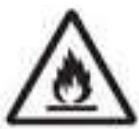
 | This unit uses a flammable refrigerant. If refrigerant leaks and comes in contact with fire or heating part, it will create harmful gas and there is risk of fire. |
 | Read the USER MANUAL carefully before operation. |
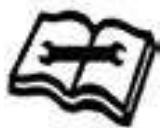
 | Further information is available in the USER MANUAL, SERVICE MANUAL, and the like. |
 | Service personnel are required to carefully read the USER MANUAL and SERVICE MANUAL before operation. |
Important safety information
THE FOLLOWING SHOULD ALWAYS BE OBSERVED FOR SAFETY
- This appliance is intended to be used by expert or trained users in shops, in light industry and on farms, or for commercial use by lay persons.
- This appliance can be used by children aged from 8 years and above and persons with reduced physical, sensory or mental capabilities or lack of experience and knowledge if they have been given supervision or instruction concerning use of the appliance in a safe way and understand the hazards involved. Children shall not play with the appliance. Cleaning and user maintenance shall not be made by children without supervision.
- The unit is designed only for use with R-290(propane) gas as the designated refrigerant.
- The refrigerant loop is sealed. Only a qualified technician should attempt to service!
- Do not discharge the refrigerant into the atmosphere.
• R-290 (propane) is flammable and heavier than air. - It collects first in low areas but can be circulated by the fans.
- If propane gas is present or even suspected, do not allow untrained personnel to attempt to find the cause.
- The propane gas used in the unit has no odor.
- The lack of smell does not indicate a lack of escaped gas.
-
If a leak is detected, immediately evacuate all persons from the store, ventilate the room and contact the local fire department to advise them that a propane leak has occurred.
-
Do not let any persons back into the room until the qualified service technician has arrived and that technician advises that it is safe to return to the store.
- No open flames, cigarettes or other possible sources of ignition should be used inside or in the vicinity of the units.
- Component parts are designed for propane and non-incentive and non-sparking. Component parts shall only be replaced with identical repair parts.
FAILURE TO ABIDE BY THIS WARNING COULD RESULT IN AN EXPLOSION, DEATH, INJURY AND PROPERTY DAMAGE



Please read this manual carefully and fully understand before operating your dehumidifier.
Operational precautions
WARNING! To reduce the risk of fire, electric shock or injury to persons or property.
- If the supply cord is damaged, it must be replaced by the manufacturer, its service agent or similarly qualified persons in order to avoid a hazard.
- The appliance shall be disconnected from its power source during maintenance.
- Always operate the unit from a power source of equal voltage, frequency and rating as indicated on the product identification plate.
• Always use a power outlet that is grounded.
- Unplug the power cord when cleaning or when not in use.
- Do not operate with wet hands. Prevent water from spilling onto the unit.
- Do not immerse or expose the unit to rain, moisture or any other liquid.
- Do not leave the unit running unattended. Do not tilt or turn over the unit.
- Do not unplug while the unit is operating.
- Do not unplug by pulling on the power cord.
- Do not use an extension cord or an adapter plug.
- Do not put objects on the unit.
- Do not climb or sit on the unit.
- Do not insert fingers or other objects into the air outlet.
- Do not touch the air inlet or the aluminum fins of the unit.
- Do not operate the unit if it is dropped, damaged or showing signs of product malfunction.
- Do not clean the appliance with any chemicals.
- Ensure the unit is far away from fire, inflammable, or explosive objects.
- The unit shall be installed in accordance with national wiring regulations.
- Do not use means to accelerate the defrosting process or to clean, other than those recommended by the manufacture.
- The appliance shall be stored in a room without continuously operation sources (for example: open flames, an operating gas appliance or an operating electric heater).
- The appliance shall be stored so as to prevent mechanical damage from occurring.
- Do not piece or burn, even after use.
- Be aware that refrigerants may not contain an odour.
- Pipe-work shall be protected from physical damage and shall not be installed in an unventilated space, if that space is smaller than 4m^2 .
- Compliance with national gas regulations shall be observed.
- Keep any required ventilation openings clear of obstruction.
- The appliance shall be stored in a well-ventilated area where the room size corresponds to the room area as specified for operation.

Any person who is involved with working on or breaking into a refrigerant circuit should hold a current valid certificate from an industry-accredited assessment authority, which authorizes their competence to handle refrigerants safely in accordance with an industry, recognized assessment specification.

Servicing shall only be performed as recommended by the equipment manufacturer. Maintenance and repair requiring the assistance of other skilled personnel shall be carried out under the supervision of the person competent in the use of flammable refrigerants.
If you don't understand something or need help, please contact the dealer services.
Checks to the area
Prior to beginning work on systems containing flammable refrigerants, safety checks are necessary to ensure that the risk of ignition is minimized. For repair to the refrigerating system, the following precautions shall be complied with prior to conducting work on the system.
Work procedure
Work shall be undertaken under a controlled procedure so as to minimize the risk of a flammable gas or vapor being present while the work is being performed.
General work area
All maintenance staff and others working in the local area shall be instructed on the nature of work being carried out. Work in confined spaces shall be avoided. The area around the workspace shall be sectioned off. Ensure that the conditions within the area have been made safe by control of flammable material.
Checking for presence of refrigerant
The area shall be checked with an appropriate refrigerant detector prior to and during work, to ensure the technician is aware of potentially flammable atmospheres. Ensure that the leak detection equipment being used is suitable for use with flammable refrigerants, i.e. no sparking, adequately sealed or intrinsically safe.
Presence of fire extinguisher
If any hot work is to be conducted on the refrigeration equipment or any associated parts, appropriate fire extinguishing equipment shall be available to hand. Have a dry powder or CO2 fire extinguisher adjacent to the charging area.
No ignition sources
No person carrying out work in relation to a refrigeration system which involves exposing any pipe work that contains or has contained flammable refrigerant shall use any sources of ignition in such a manner that it may lead to the risk of fire or explosion. All possible ignition sources, including cigarette smoking, should be kept sufficiently far away from the site of installation, repairing, removing and disposal, during which flammable refrigerant can possibly be released to the surrounding space. Prior to work taking place, the area around the equipment is to be surveyed to make sure that there are no flammable hazards or ignition risks. “No Smoking” signs shall be displayed.
Ventilated area
Ensure that the area is in the open or that it is adequately ventilated before breaking into the system or conducting any hot work. A degree of ventilation shall continue during the period that the work is carried out. The ventilation should safely disperse any released refrigerant and preferably expel it externally into the atmosphere.
Checks to the refrigeration equipment
Where electrical components are being changed, they shall be fit for the purpose and to the correct specification. At all times the manufacturer's maintenance and service guidelines shall be followed. If in doubt consult the manufacturer's technical department for assistance.
The following checks shall be applied to installations using flammable refrigerants:
- The charge size is in accordance with the room size within which the refrigerant containing parts are installed.
- The ventilation machinery and outlets are operating adequately and are not obstructed.
- If an indirect refrigerating circuit is being used, the secondary circuit shall be checked for the presence of refrigerant.
- Marking to the equipment continues to be visible and legible. Markings and signs that are illegible shall be corrected.
- Refrigeration pipe or components are installed in a position where they are unlikely to be exposed to any substance which may corrode refrigerant containing components, unless the components are constructed of materials which are inherently resistant to being corroded or are suitably protected against being so corroded.
Checks to electrical devices
Repair and maintenance to electrical components shall include initial safety checks and component inspection procedures. If a fault exists that could compromise safety, then no electrical supply shall be connected to the circuit until it is satisfactorily dealt with. If the fault cannot be corrected immediately but it is necessary to continue operation, an adequate temporary solution shall be used. This shall be reported to the owner of the equipment so all parties are advised.
Initial safety checks shall include:
- Those capacitors are discharged: this shall be done in a safe manner to avoid possibility of sparking.
- That there no live electrical components and wiring are exposed while charging, recovering or purging the system.
- That there is continuity of earth bonding.
Product specifications
MDH12
Capacity: 12L/day, 220V, 50 Hz
Power consumption: 200W
Rated current: 1.2 A
Full water tank quantity: 2.0L
Sound Pressure Level: Max 38 dB
Air circulation: 120m3/h
Working temperature: 5-35 degrees Celsius
Recommended Room size: 8-15 m3
Refrigerant: R290
Timer: 1-24 hr
Product dimensions: 255x230x446 mm
N-W: 10kg
MDH20
Capacity: 20L/day, 220V, 50 Hz
Power consumption: 420W
Rated current: 2.3 A
Full water tank quantity: 4.0L
Sound Pressure Level: Max 41 dB
Air circulation: 160m3/h
Working temperature: 5-35 degrees Celsius
Recommended Room size: 20-30 m3
Refrigerant: R290
Timer: 1-24 hr
Product dimensions: 305x240x495 mm
N-W: 12.8kg
Product overview
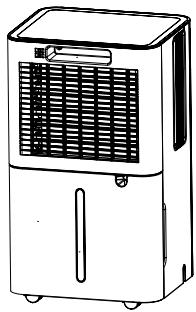
PRODUCT VIEW MDH12
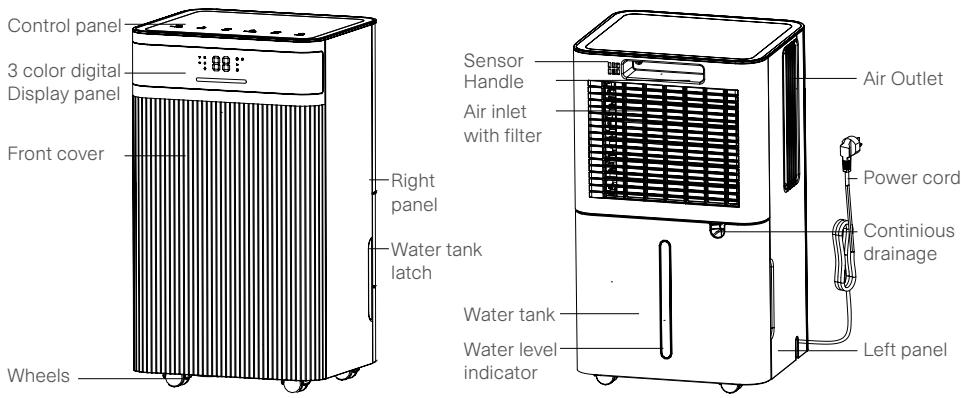
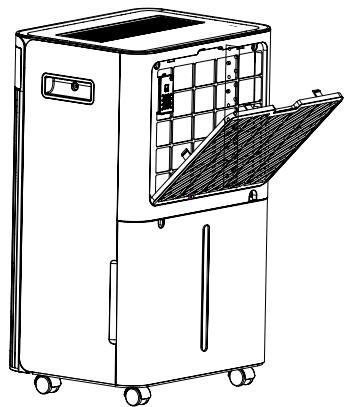
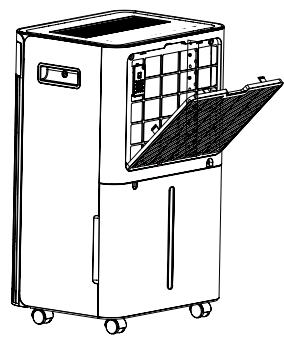
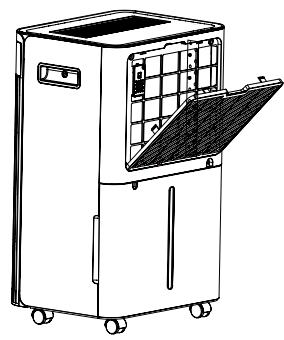
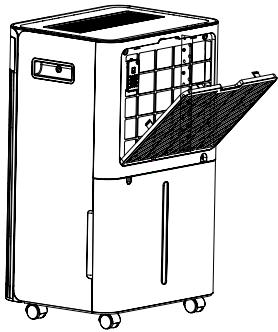
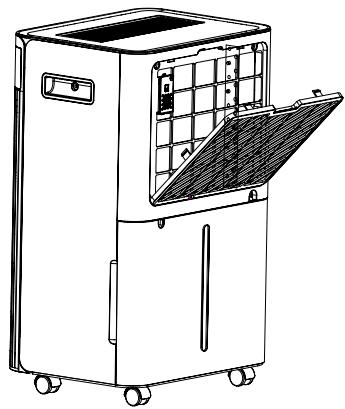
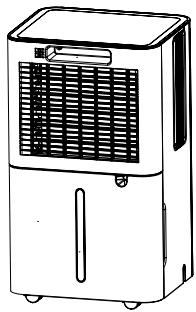
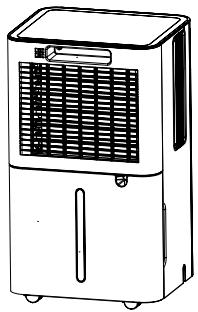
PRODUCT VIEW MDH20

Installation
LOCATION
- Place the unit on a firm, level surface in an area with at least 30 cm of free space around it to allow for proper air circulation.
-
Never install the unit where it could be subject to:
-
Heat sources such as radiators, heat registers, stoves or other products that products that produce heat.
- In an area where oil or water may be splashed.
- Direct sunlight.
- Mechanical vibration or shock.
- Excessive dust.
- Lack of ventilation, such as cabinet or bookcase.
- Uneven surface.


WARNING! Install the unit in rooms which exceed 4m^2 . Do not install the unit in a place where inflammable gas may leak.
NOTE! The manufacture may provide other suitable example or may provide additional information about the refrigerant odour.
OPERATING THE DEVICE SAFELY:
- Check the device after unpacking for any damages or scratches on it.
- Operate this unit in an ambient temperature from 5^ to 35^ .
- Do not use in the outdoors. This dehumidifier is intended for indoor residential applications only.
- Do not operate near walls, curtains, or other objects that may block inlet and outlet.
- Keep the air inlet and outlet free of obstacles.
- Adjusting the wind deflector in the upward direction prior to start up.
- If tipped more than 45^ , allow the unit to set upright for at least 24 hours before starting up.
- Keep doors and windows close for better energy saving.
- Do not operate or store the unit in direct sunlight or rain.
- It is normal for air outlet to feel warm to touch after continuous operation on hot days.
• Empty the water tank before moving the device. - Make sure the water tank is correctly fitted otherwise the unit will not operate properly.
- The dehumidifier starts up in the mode selected when the unit was last used.
- The dehumidifier starts dehumidifying if the room humidity is 3% higher than the selected humidity.
- There is a protective 3-minutes time delay of the compressor. Wait 3 minutes for the dehumidifier to resume dehumidification.
Operation
CONTROL PANEL
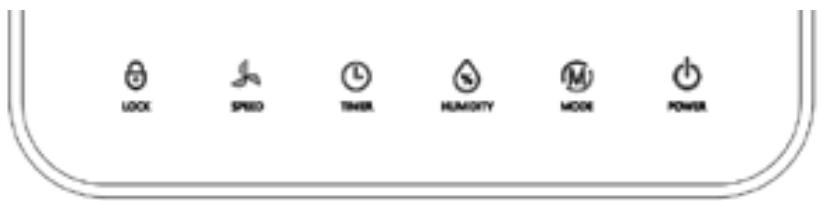

Power
Press the STAND-BY button to turn on the machine, the running indicator lights up and the default fan speed is high, and the default humidity setting is 50%. When the machine is running, press the power button to turn off, the running indicator light goes off and the compressor stops immediately, and then the fan will shut down after 30 second's delay.

Mode button
Auto mode - continuously drying mode cycle, press once to switch the mode from one to another, the corresponding indicator lights up.
Long press the mode button to choose sleeping mode.
- Auto mode ⚙: When ambient humidity > set humidity +3%, the fan and compressor start working as set.
When ambient humidity < set humidity -3%, the compressor stops working and the fan stops working after 30 seconds' delay.
Both fan speed and humidity can be adjusted under auto mode.
After setting the humidity, the LED back to display the ambient humidity.
- Continuously drying mode ☐: The machine continues to run, not affected by ambient humidity.
Fan speed is adjustable, humidity setting cannot be adjusted.
- Sleeping mode 📋: Long press the 📋 mode button to select the sleep mode.
In sleeping mode, if no operation in 10 seconds, the power indicator and sleep indicator turn dark gradually, and other indicators and digital screen are off.
Press any button will be restored in normal display.
Other functions are the same as auto dehumidifying mode.
In sleeping mode, the fault code is not displayed, the wind speed and the humidity are adjustable.
In sleeping mode, when the water tank is full, the machine will not alarm, but the water tank full indicator light will be on to remind that the water tank is full, and you need to empty the water tank.

HUMIDITY Set button
Press this button to set the humidity (30-80%) or timing time (1-24h)
To humidity adjusting, press one time to add 5%humidity value, the humidity adjusting follow the order as below:30%-35%-40%-45%-50%-55%-60%-65%-70%-75%-80%-30%cycle
To timing, press one time to add 1 hour's timing value, the timing follow the order as below:00-01-02-03-04-05-06-07-08-09-10-11-12-13-14-15-16-17-18-19-20-21-22-23-24-00 cycle

Timer button
Press the timing key to set timing / check timing / cancel timing
a) In the non-timing state: press the timing key to enter the timing setting state. The digital screen flashes to display the timing time. During the flashing period of the digital screen, press the adjustment key to adjust the timing time (0 \~ 24h).
b) In the timing state: press the timing key, and the digital screen flashes to display the remaining timing time. Press the timing key again during the flashing period of the digital screen to cancel the timing.

Fan Speed button
High speed - low speed cycle, press button once to switch and then the corresponding indicator lights up.

Child-Lock
Press and hold this button for 3 seconds to open the lock function, the indicator light will be on, and you cannot operate other buttons except this one. Press and hold this button for 3 seconds again to close the lock function, the indicator light will be off.
3 COLOR DIGITAL DISPLAY
Ambient Humidity≤45%, The light show Blue.
45<Ambient Humidity<65%, The light show Green.
Ambient Humidity≥65%, The light show Red.
If the LED display Error code, the light will show red.
Drainage
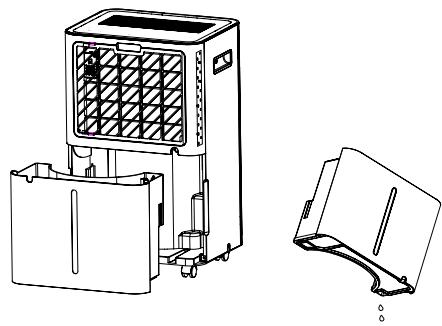
EMPTYING THE WATER TANK
- For MDH12: When the tank is full, the unit will beep 5 times, and "FL" will appear on the display. To prevent water leakage, the device will automatically stop operating.
- For MDH20: When the tank is full, the unit will beep 5 times, and "FL" will appear on the display. To prevent water leakage, the device will automatically stop operating.
- Press the POWER button to turn off the unit.
- Pull on the water tank and simply slide out of the body of the dehumidifier.
• Empty the water into an area with a drain or outside. - Clean the inside of the tank as well as the outside.
- Replace the empty tank back into the unit.
- Press the POWER button to resume operating.
MDH12

MDH20

WARNING!
- Do not discard water tank magnets and plastic rivets. Otherwise, the machine will not automatically stop working when the water tank is full, and the condensed water will overflow and damage the floor of the room.

- Please be sure to clean the condensed water in the water tank before resetting the working mode of the machine.
- If the water tank is dirty, rinse it with clean water. Avoid using detergents, steel balls, chemical dust removers, diesel oil, benzene, diluents or other solvents. Otherwise, the water tank will be damaged and leak.
- Replace the empty tank back into the unit. Otherwise, the water full indicator may remain red, and the machine cannot restart.
CONTINUOUS DRAINING
For continuous operation or unattended dehumidification, please connect the attached drain hose to the unit. Condensate water can be automatically flow into a bucket or drain by gravity.
- Straighten the drainage pipe
- Insert one end of the drain into the drain into the cistern hole and connect the other end to the bathroom, outdoor or bucket like container, or the prescribed drainage area.
MDH12

MDH20

WARNING!
- Please do not block the drain or drainpipe, if the phenomenon of blocking, condensed water will flow into the water tank.
- Please do not bend the drainpipe. The height of the drainpipe should be lower than the outlet.
- The drainpipe shall be securely connected to the outlet.
Maintenance
Note: before cleaning and maintaining the machine, be sure to turn off the machine and pull the power plug to prevent electric shock.
CLEANING THE AIR FILTER (every two weeks)
Dust collects on the filter and restricts the airflow. The restricted airflow reduces the efficiency of the system and if it becomes blocked it can cause damage to the unit.
The air filter requires regular cleaning. The air filter is removable for easy cleaning. Do not operate the unit without an air filter, or the evaporator may be contaminated.
- MDH12: Take the water tank from the body, and then pull out the filter from the bottom of the back cover.
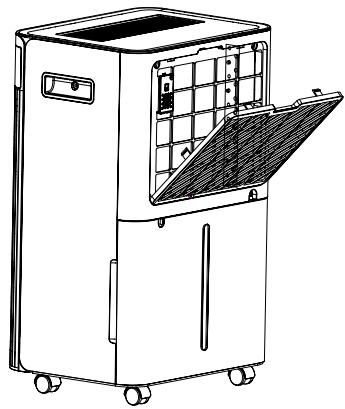
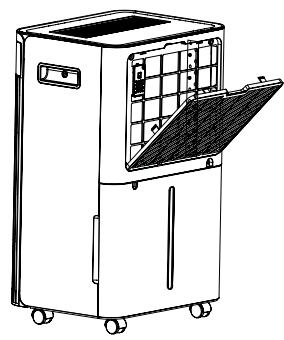
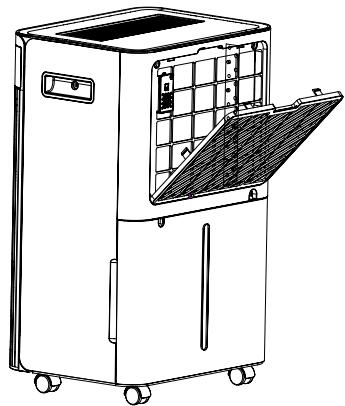
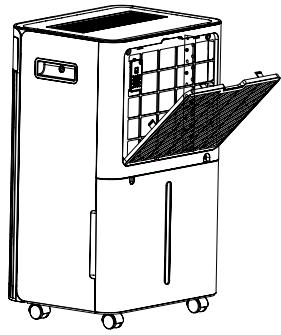
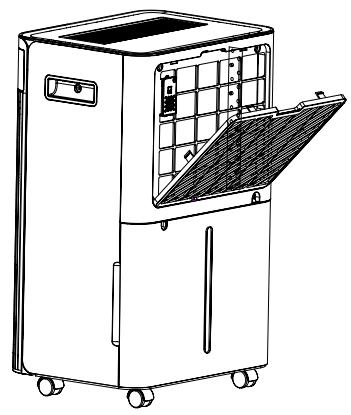
MDH20: Pull out the filter from the back cover.
MDH12

MDH20

- Use a vacuum cleaner to gently absorb the dust on the surface.
If the filter is very dirty, wash it with water and a soft detergent and dry it thoroughly afterwards.

3. Put the filter back.
MDH12

MDH20

Trouble shooting
1. FUNCTIONING TEMP.
5^ C ≤ Ambient Temp. ≤ 35^ C
When the ambient temp is lower or higher than the functioning temp, the dehumidifier stops.
When 5^ ≤ Ambient temp. ≤ 16^ , the compressor automatically defrosts at intervals; during defrosting, the compressor stops, and the fan keeps running.
2. BEFORE CALLING FOR SERVICE
Before contacting professional service, please review the trouble shooting list that includes common occurrences that are not the result of a defect in workmanship or materials.
| Problem | Possible Cause | Solution |
| Not working | No power supply | Connect to a functioning outlet and switch on. |
| Water Full Indication Flashes | Drain water tank and reset it, or re-position the water tank to right place. | |
| Room temperature < 5°C, or >35 °C | Self-Protection designed to protect the unit. Can not work under such temperature. | |
| Bad functioning | Is the air filter clogged? | Clean the air filter as instructed. |
| Is the intake duct or discharge duct obstructed? | Remove the obstruction from the discharge duct or intake duct. | |
| No air intake | Is the filter clogged? | Wash the filter. |
| Loud noise when running | Is the machine put in the plat place? | Put the machine on the plat ground. |
| Is the filter clogged? | Wash the filter. | |
| E1/E2 | Humidity sensor problem | Change a sensor. |
| FL | Water tank full | Empty the water tank. |
Decommissioning
STORAGE
Long-term storage - If you will not be using the unit for an extended period (more than a few weeks) it is best to clean the unit and dry it out completely. Please store the unit per the following steps:
- Press the power button to switch off and unplug the unit.
- Drain the remaining water from the unit.
- Clean the filter and let the filter dry completely in a shaded area.
- Collect the power cord at the water tank.
- Re-install the filter at its position.
-
The unit must be kept in an upright position when in storage.
-
Preserving the machine in ventilating, dry, non-corrosive gas and safe place indoor.
ATTENTION: The evaporator inside the machine must be dried out before the unit is packed to avoid component damage and molds. Unplug the unit and place it in a dry open area for days to dry it out. Another way to dry the unit is to set the humidity point more than 5% higher than the ambient humidity to force the fan to dry the evaporator for a couple of hours.
Warranty
Mill offers consumers 5 years warranty for any Mill product from date of purchase by a consumer. For business customers, a warranty period of 2 years will apply (applicable in case the end-users are businesses).
This warranty provides the customer with a right to, at Mill's reasonable discretion, either repair, replacement of a defected product, or alternatively a refund.
The warranty only covers defects that originates from Mill. The customer will therefore not have a valid warranty claim if the defect is a result of circumstances such as the following:
- Negligent use, misuse, neglect, or careless operation of the product not in accordance with the Mill user manual.
-
Defects caused by transport incurred outside Mill's responsibility.
-
Normal wear and tear, including parts that might wear out over time as for example batteries for remote controls (if applicable), filters, tubes, and lamps for outdoor heating etc.
- Damage because of use not in accordance with the rated power and Hz.
- Damage caused by inadequate product maintenance.
- Damage from electrical outages, power surges and/or weather.
- Damage as the result of not installing or assembling the product in accordance with the Mill user manual.
- Use of parts and accessories, i.e., filter, which are not official Mill certified components.
• Repairs or alterations carried out by parties other than Mill or its authorized agents. - Minor deviations from the stated quality that are insignificant for the value and soundness of the product or deviations that the customer could reasonably expect.
• Devices used with third-party software or equipment. - Software and connectivity issues due to local restrictions in accessing our cloud services.
- Software and connectivity issues due to non-supported third-party devices.
- App or cloud/online service downtime does not fall under warranty.
Mill must provide evidence that the product's damage has not existed when the product was sold to the customer within the first year after the purchase.
For the avoidance of doubt, this warranty does not provide the customer or any third party with any right to damages, compensation nor price reduction of any kind. Mill will not have any obligation under this warranty to cover any losses incurred by the customer or any third party.
These warranty terms are only valid for customers, who purchase products through authorized Mill resellers.
The customer's rights and remedies pursuant to applicable mandatory law will not be limited nor affected by this warranty.
The seller will handle the warranty claim on behalf of Mill. To make a claim under this warranty, an end-consumer has to follow the steps described below.
Claims Process / Required Documentation
- Contact the Mill Authorised Reseller where you purchased the product. Bring your original receipt for the purchase, serial number of the product, and the faulty product.
- The Mill Authorised Reseller tests the product and evaluates if the claim is covered by the end-consumer warranty.
- If the claim is covered by the warranty, the Mill Authorised Reseller, in accordance with instructions from Mill and based on consumer law, decides whether to repair, replace or refund the product.

Disposal
WARNING! Releasing refrigerant into the atmosphere is strictly forbidden!
Do not dispose of electrical appliances as unsorted municipal waste, use separate collection facilities. Contact your local government for information regarding the collection systems available. If electrical appliances are disposed of in landfills or dumps, hazardous substances can leak into the groundwater and get into the food chain, damaging your health and well-being.
mill
Mill International AS


3-FARGET DIGITAL SKJERM
MDH20
ADVARSEL!
KONTINUERLIG T∅MMING
MDH20
MDH20
Feilsøking
1. ARBEIDSTEMPERATUR
5 °C ≤ Omgivelsestemperatur. ≤ 35 °C
3 FARVET, DIGITALT DISPLAY
MDH20

ADVARSEL!
KONTINUERLIG DRÆNING
MDH20

MDH20
Fejlfinding
1. FUNKTIONSTEMP
5^ C ≤ omgivende temp. ≤ 35 °C.

3 DIGITAL DISPLAY I FÄRG
MDH20

WARNING!
MDH20

MDH20
Felsökning
1. ARBETSTEMPERATUR
5^ C ≤ Omgivande temp. ≤ 35 ^ C

MDH20

VAROITUS!
MDH20
MDH20

Vianmääritys
1. TOIMINTALÄMPOTILA
3-KLEURS DIGITALE SCHERM
MDH20

WAARSCHUWING!
MDH20

MDH20

Problemen oplossen
1. FUNCTIONERENDE TEMP.
5^ ≤ Omgevingstemperatuur ≤ 35^

MDH20

AVERTISSEMENT!
MDH20
MDH20
Dépannage
1. TEMPÉRATURE DE FONCTIONNEMENT

MDH20

HOIATUS!
MDH20
3. Asetage filter tagasi.
MDH12

MDH20
Veaotsing
1. TÖÖTEMP.
5 °C ≤ Ümbritseva öhu temp. ≤ 35 °C

MDH20

¡SPÈJIMAS!
MDH20
MDH20

Sutrikimų šalinimas
1. DARBINÉ TEMP.


3 KRĀSU DIGITĀLAIS DISPLEJS
MDH20

BRĪDINĀJUMS!
3. lelieciet filtru atpakal.
MDH12
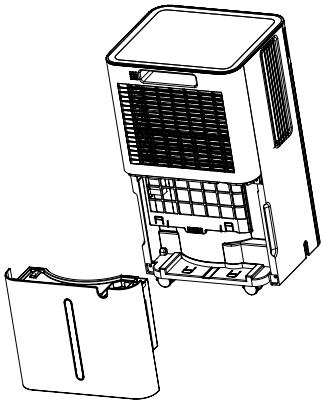
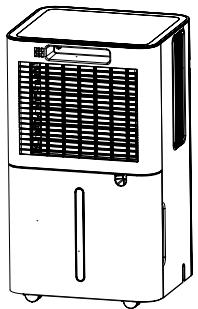
MDH20

Traucējummeklēšana
1. DARBA TEMPERATÜRA
5^ C ≤ Vides temperatūra ≤ 35^ C


- Scandinavian home comfort
- Follow us on social media:
- Content
- Product description
- Symbols from the unit and user manual
- Important safety information
- THE FOLLOWING SHOULD ALWAYS BE OBSERVED FOR SAFETY
- FAILURE TO ABIDE BY THIS WARNING COULD RESULT IN AN EXPLOSION, DEATH, INJURY AND PROPERTY DAMAGE
- Operational precautions
- Checks to the area
- Work procedure
- General work area
- Checking for presence of refrigerant
- Presence of fire extinguisher
- No ignition sources
- Ventilated area
- Checks to the refrigeration equipment
- Checks to electrical devices
- Product specifications
- MDH12
- MDH20
- Product overview
- PRODUCT VIEW MDH20
- Installation
- LOCATION
- OPERATING THE DEVICE SAFELY:
- Operation
- Power
- Mode button
- HUMIDITY Set button
- Timer button
- Fan Speed button
- Child-Lock
- COLOR DIGITAL DISPLAY
- Drainage
- EMPTYING THE WATER TANK
- WARNING!
- CONTINUOUS DRAINING
- Maintenance
- CLEANING THE AIR FILTER (every two weeks)
- Put the filter back.
- Trouble shooting
- FUNCTIONING TEMP.
- BEFORE CALLING FOR SERVICE
- Decommissioning
- STORAGE
- Warranty
- Claims Process / Required Documentation
- Disposal
- WARNING! Releasing refrigerant into the atmosphere is strictly forbidden!
- 3-FARGET DIGITAL SKJERM
- ADVARSEL!
- KONTINUERLIG T∅MMING
- Feilsøking
- ARBEIDSTEMPERATUR
- FARVET, DIGITALT DISPLAY
- KONTINUERLIG DRÆNING
- Fejlfinding
- FUNKTIONSTEMP
- DIGITAL DISPLAY I FÄRG
- Felsökning
- ARBETSTEMPERATUR
- VAROITUS!
- Vianmääritys
- TOIMINTALÄMPOTILA
- 3-KLEURS DIGITALE SCHERM
- WAARSCHUWING!
- Problemen oplossen
- FUNCTIONERENDE TEMP.
- AVERTISSEMENT!
- Dépannage
- TEMPÉRATURE DE FONCTIONNEMENT
- HOIATUS!
- Asetage filter tagasi.
- Veaotsing
- TÖÖTEMP.
- ¡SPÈJIMAS!
- Sutrikimų šalinimas
- DARBINÉ TEMP.
- KRĀSU DIGITĀLAIS DISPLEJS
- BRĪDINĀJUMS!
- lelieciet filtru atpakal.
- Traucējummeklēšana
- DARBA TEMPERATÜRA
Brand : MILL
Model : MDH20
Category : Dehumidifier