Max Wifi 1500 - Heating MILL - Free user manual and instructions
Find the device manual for free Max Wifi 1500 MILL in PDF.


| Product type | Connected electric radiator |
| Brand | Mill |
| Model | Mill Max Wifi 1500 |
| Power | 1500 W |
| Power supply | 230 V / 50 Hz |
| Dimensions (W x H x D) | 60 x 42 x 10 cm |
| Weight | 5.2 kg |
| Connectivity | Wi-Fi (2.4 GHz) |
| Compatible app | Mill Heat (iOS and Android) |
| Main functions | Weekly programming, smart thermostat, voice control via assistants (Alexa, Google Home), Eco mode, open window detection |
| Maintenance and cleaning | Unplug the device, let it cool down, dust with a soft dry cloth. Do not use abrasive products. |
| Safety | Automatic shut-off in case of overheating, frost protection, child safety (lock) |
| Spare parts | Anti-allergy filter (ref. MILLFILTER), stabilizer feet |
| Repairability index | 7.5 / 10 |
| Energy class | A+ |
| Warranty | 5 years |
Frequently Asked Questions - Max Wifi 1500 MILL
User questions about Max Wifi 1500 MILL
0 question about this device. Answer the ones you know or ask your own.
Ask a new question about this device
Download the instructions for your Heating in PDF format for free! Find your manual Max Wifi 1500 - MILL and take your electronic device back in hand. On this page are published all the documents necessary for the use of your device. Max Wifi 1500 by MILL.
USER MANUAL Max Wifi 1500 MILL
WiFi Convection heater

EN This product is only suitable for well insulated spaces or occasional use.
SLO Ta izdelek je primeren samo za dobro izolirane prostore ali občasno uporabo.
NL Dit product is alleen geschikt voor goed geïsoleerde ruimtes of incidenteel gebruik.
FR Ce produit est seulement approprié aux espaces bien isolés ou à l'utilisation occasionnelle
DE Dieses Produkt ist nur für gut isolierte Räume oder gelegentlichen Gebrauch geeignet.
HR Ovaj proizvod je namijenjen za prostorije sa dobrom izolacijom ili za povremenu upotrebu.
EE See toode sobib kasutamiseks ainult hästi soojustatud ruumides või lühiajaliseks kütmiseks.
LV Šis produkts ir piemērots tikai labi izolētām telpām vai nepatstāvigai lietošanai.
LT Šis gaminys tinkamas tik itin sandariose vietose ar nekasdieniam naudojimui.
PL Produkt jest przeznaczony wyłącznie do wykorzystania w dobrze izolowanych przestrzeniach lub do użytku okazjonalnego.
IT Questo prodotto è adatto solo per spazi ben isolati o uso occasionale
CZ Tento výrobek je vhodný pouze pro dobře izolované prostory nebo příležitostné použití.
SK Tento výrobok je vhodný iba pre dobre izolované priestory alebo príležitostné použitie.
Scandinavian home comfort
Mill is a Norwegian brand that develops heating and indoor air quality products tailored for your modern home. Inspired by Scandinavian nature, our products are designed to sustain the toughest of climates to ensure safe, efficient and comfortable temperatures, as well as good air quality.
Mill products are praised for their minimalistic and elegant features as they blend in naturally with any modern interior. Our advanced and user-friendly technology will support a relaxing and healthy home space with reliable temperatures and air quality. Mill's vision is to develop products that create an enjoyable and harmonic household atmosphere, enhancing both comfort and style; the ultimate Scandinavian home comfort.
We hope you enjoy your Mill product.
Follow us on social media:

fb.com/millnorway

@millnorway

millnorway.com
Content
P. 2-3 | Important safety information
P. 4 | Specifications
P. 4 | Before first use
P. 4 | First use
P. 4 | Description of heater
P. 4 | Parts
P. 5 | Assembly
P. 5 | Temperature calibration
P. 5 | Memory function
P. 5 | Resetting the heater
P. 5 | "Open Window" function
P. 6 | Instructions
P. 6 | Usage without WiFi connection
P. 6 | Child lock
P. 7 | Commercial lock
P. 7 | Usage with WiFi connection
P. 8 | Color codes (WiFi control light)
P. 8 | Activating WiFi
P. 8 | Deactivating WiFi
P. 8 | Reconnecting WiFi
P. 8 | Delete WiFi settings
P. 9 | Maintenance
P. 9 | Warranty
P. 9 | Waste disposal
Please read the instructions carefully before use. Take good care of this manual for later use.

STORE THIS INSTRUCTION MANUAL FOR FUTURE USE!
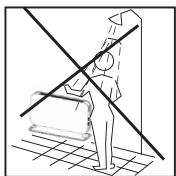
NEVER TOUCH YOUR HEATER OR ITS CASING WITH WET HANDS!

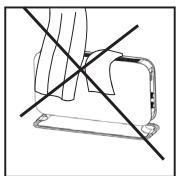
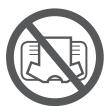
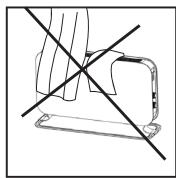
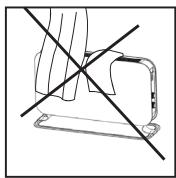
IN ORDER TO AVOID OVERHEATING, DO NOT COVER THE HEATER.
Important safety information
You must obey common safety guidelines when using electrical products, especially in the presence of children.

WARNING! To avoid electric shock or damage due to the heat, always make sure the plug is pulled out before the heater is moved or cleaned.
READ THE INSTRUCTIONS CAREFULLY
- The product is intended for home use only.
- Make sure the heater is connected to the house's regular mains as indicated on the heater.
- New heaters will produce a specific odor when used the first time. This will stop after a short time and is completely harmless.
- Check for any pieces of packing foam or cardboard that may have fallen into the heating elements of the heater. These pieces must be removed to avoid unpleasant odors.
- Prevent the heater from overheating - do not cover.
- Always turn off the heater and unplug it when not used for a long period of time.
- Pay special attention if the heater is used in rooms where children, the handicapped or elderly reside.
- The heater should not be set up directly beneath an electrical socket outlet.
- The cord must not be laid under any kind of carpet. Make sure the cord is laid in such a way that nobody can trip on it.
- The heater must not be used if either the cord or plug is damaged.
- The heater must not be used if it has been dropped on the floor is damaged in any other way causing it to malfunction.
- The cord must be repaired by the manufacturer or by an expert if it has been damaged, to avoid dangerous situations.
- Avoid using extension cords, which may overheat and could possibly start a fire.
-
Never cover the air vents on the heater. Avoid potential fire hazards by making sure the air intakes are not blocked or covered. The heater should be used in rooms with normal flat floors.
-
The heater should not be installed in close proximity to flammable materials of any kind because there can always be a risk of fire.
- The heater must never be used in rooms where gasoline, paint or other flammable liquids are stored, such as in a garage
- Never touch an electric heater with wet hands. The heater should be installed so a person showering or taking a bath cannot come into direct contact with it.
- Some parts of this product can become very hot and cause burns. Particular attention has to be given where children and vulnerable people are present.
- The heater must be switched off, the plug removed and the heater must cool down before it is moved.
- Avoid overloading the mains (the circuit) where the heater is connected. The heater may overload the electrical circuit if other electrical devices are plugged into the same socket outlet.
- Do not use this heater in small rooms when they are occupied by persons not capable to leaving the room on their own, unless constant supervision is provided.
- The product cannot be used by children under 8 years of age and persons with reduced physical or mental abilities or lack of experience and knowledge unless they have been given supervision or instruction in the safe use of the product and understand the hazards involved.
- Children should not play with the product. Cleaning and maintenance should not be done by unsupervised children.
- Children under the age of 3 should be kept away from the product, unless they are under constant supervision.
- Children aged 3 to 8 years are only permitted to turn the product ON/OFF, assuming the heater is mounted according to the assembly instructions and the children have received instruction or supervision in the safe use of the product and understand the hazards involved.
- Do not use this heater in the immediate surroundings of a bath, a shower or a swimming pool.
Specifications
| Model | Thermostat | Color | Amperage | Power (W) | WiFi |
| CO1200WIFI3 | WiFi | White | 220-240V~, 50-60Hz | 1200 | 802.11 b/g/n |
Maximum transmitting power: ≤20dBm
Frequency range: 2400-2483.5MHz
Before first use
After unpacking the heater, check to make sure the product was not damaged during transport. Contact the retailer or importer if you discover any visible damages to the product. Keep the outer packaging to transport the heater in the future. If you want to dispose the packaging, make sure it is done properly. Keep plastic bags away from children.
First use
After turning on the heater for the first time or after an extended period without use, the heater can produce a burnt odor for a short time. This is normal.
Please read all the instructions carefully before use. Save the instruction manual for future use.
It is also normal for the heater to make "sounds" when it warms up or cools down.
Description of heater
See figure 1 on separate illustration sheet
- Heat emission
- LED display
- Thermostat + WiFi button
- Settings button
- ON/OFF
- Legs (aluminum)
Parts
See figure 2 on separate illustration sheet
• 8 screws (pre-mounted)
- 2 foot brackets
• 2 rails for the feet
Assembly
See figure 3 on separate illustration sheet
- Remove the pre-mounted screws on both legs before you Insert the legs into the brackets, so that you get a stable foot
- Attach the legs to the brackets by tightening 2 screws into each bracket
- Remove the pre-mounted screws from the bottom of the heater and place the heater gently on its head to mount the feet.
-
Two screws must be fastened on each foot bracket
-
NEVER USE THE HEATER BEFORE THE LEGS HAVE BEEN TIGHTLY SCREWED
Temperature calibration
See figure 4 on separate illustration sheet
It may occur deviation between the temperature registered by the heater and the actual temperature in the room. This can be caused by several reasons, however, the most common is that the heater is placed in a fair distance from where you usually reside. When you set the temperature to for example 22 degrees, it is only natural that you expect the same temperature where your sofa is placed for instance. However, the temperature sensor is placed on the product itself, and therefore a deviation in temperature may occur. To adjust this, all Mill heaters are equipped with a calibration function, which enables you to adjust the temperature registered by the heater. N.B! The room must have achieved a stable temperature before any calibration.
Press Ⓧ 2 times and use + or – to set the actual temperature observed in the room. Confirm with Ⓧ or wait 15 seconds for automatic confirmation.
Memory function
If the heater is connected to WiFi it will automatically reconnect with WiFi (where all temperatures are saved) after a power cut.
Resetting the heater
See figure 5 on separate illustration sheet
Turn off the heater's main switch. Turn the heater back on, within 5 seconds press and hold ⚙. After 20 seconds the display will show "Fr", once you see "Fr" release ⚙ and the heater will reset to factory settings.
"Open window" function
The heater has an "open window" function that is activated instantly when it registers a sudden drop in temperature with more than 5 degrees Celsius in 15 minutes. The heater will automatically stop heating and FO will be visible in the display of the heater.
While in open window mode, it will maintain 5^ C (to avoid frost damage).
The heater will automatically start heating again if temperature increase by at least 3 degrees within 15 minutes.
You can switch the heater back to normal mode by pressing the settings button 1 time. Open window function can be disabled/enabled by pressing and holding the settings button for 3 seconds. You can also disable/enable open windows function from the app if configured to WiFi.
The heater will stay in open window mode for maximum 1 hour, it then will go back to normal heating mode.
Instructions
Control panel
See figure 6 on separate illustration sheet
A
- Thermostat and WiFi button
- Settings button
- ON/OFF button
B
- Power indicator – shows whether the heater is using power or not
- ON/OFF indicator
- WiFi indicator
- Desired room temperature
- Thermostat and WiFi button
WARNING! BE SURE THE FOOT IS FITTED CORRECTLY AND ACCORDING TO THE INSTRUCTIONS BEFORE USING THE HEATER!
Usage without WiFi connection
- Plug the heater into a grounded outlet.
- Press the ON/OFF button.
- Turn the thermostat to the desired temperature while looking at the display. As soon as the room temperature drops below this level, the heater will automatically start again. When the room has reached the desired temperature again, the heater will turn itself off.
- The thermostat goes from 5 to 35°C.
- If you want to change the temperature in the room, repeat step 3.
- The heater has an overheat protection that turns the device off if any parts become extremely off.
- To turn off the heater, press the ON/OFF button. Should the heater be left unused for a longer period, pull out the plug.
Child lock
You can enable/disable child lock from the app. But in addition, you can also enable/disable child lock from the heater itself. Turn off the heater using the main power switch. Turn the heater back on, within 5 seconds press the and hold ⚙️.

After 3 seconds the display will show "CH", once you see "CH" release ⏻ and the heater enables/disables child lock.
Commercial lock
You can enable and disable commercial lock from inside the app. But in addition, you can enable/disable commercial lock from the heater itself. Turn off the heater using the main power switch. Turn the heater back on, within 5 seconds press the and hold ⏻ After 10 seconds the display will show "CO", once you see "CO" release ⏻ and the heater enables/disables commercial lock.
Usage with WiFi connection
A free app is available for downloading for iOS and Android.
By connecting your heaters with the iOS/Android device you can do the following:
- Control all your heaters situated in multiple locations. Everything is controlled with the Mill-app (with same user)
- Set up weekly programs (or use the standard program already available in the app) by using the 4 modes: Comfort, Sleep, Away and OFF
- Override the set programs for the whole house, a specific room or a specific heater. There is no need to edit your program if you get home earlier than normal one day
- Enable vacation mode for saving energy while you are away. The app will automatically increase the temperature in your house before you get back home
- Share your house with other family members, making control easy
- If internet is down the heater will follow its weekly program which is stored on the heater. One can easily turn off the WiFi on the heaters and control them manually, so that the heaters keep an even temperature throughout the whole day and night.
• + many other things
To download the app search for “MillNorway” in Appstore or Google Play and install the app on your device.
Before use:
Be aware that the Mill app must be installed before you can connect your heaters to your WiFi network. You can then simply follow the instructions given in the app when connecting your heaters. The heaters will connect directly to your router via WiFi with 2,4 Ghz mode b/g/n. Bluetooth is needed for provisioning, so make sure its enabled.
Minimum OS requirement: iOS 8.0 and Android 5.0.
Go to our help desk at millnorway.com for more information or if you have any questions regarding the Mill app, connecting to WiFi or other relating questions.
ATTENTION ! The heaters will be connected directly to your WiFi router and it is therefore important to make sure the router has sufficient capacity for the number of active devices connected at the same time.
Color codes (WiFi control light)
The heater has not been connected to WiFi. The heater keeps an even temperature throughout the whole day and night
The heater is online in the Mill cloud
The heater's WiFi is deactivated by the user
When installing/connecting the Mill-app and cloud, the light will flash in various speed. This is normal.
The heater has a problem connecting to or finding the WiFi signal. Please do the following:
- Please turn the heater OFF and ON again.
- Please restart the WiFi router
- Please check the WiFi router to make sure the capacity is sufficient for the number of active devices connected at the same time
- Please make sure 2,4 Ghz is activated. If the problem persists, please get in touch with support.
The heaters are offline and have no contact with the Mill cloud
Activating WiFi
See figure 7 on separate illustration sheet
Press «add heater» on the home screen in the Mill-app. Follow the instructions in the app.
Deactivating WiFi
See figure 8 on separate illustration sheet
Press 1 time on the WiFi button. The heater can now be used as described on page 6 (usage without WiFi connection). Relevant only if WiFi is already installed.
Reconnecting WiFi
See figure 9 on separate illustration sheet
Press the WiFi button 1 time. Relevant only if WiFi is already installed.
Delete WiFi setting
See figure 10 on separate illustration sheet
Delete WiFi settings: Press and hold WiFi button for 5 seconds
Maintenance
- For cleaning, always unplug the heater and leave it to cool.
- Wipe the heater regularly with a damp cloth and dry the surface before turning on the heater again.
- The heater must be cleaned at least once a month during the heating season.
CAUTION! The heater should never be immersed in water.
Avoid using detergents to clean the heater.
Never let any water get inside the heater; this can be hazardous.
- Dust etc. should be removed with a soft cloth.
- The heater can be stored in a dry and clean place.
- If the heater stops working, do not attempt to repair it yourself because it can cause a fire hazard and/or electric shock.
Warranty
The warranty is valid for 2 years. The heater will be replaced during this time should any malfunction occur. The warranty applies if the heater is used according to these instructions, the customer can present a purchase receipt and as long as this product is only used for private household purposes. If the heater malfunctions in any way, please contact the store where it was purchased or the importer.
Waste disposal
The symbol 📁 indicates that this product is not to be disposed of together with household waste. This product must be delivered to a recycling service or container for electrical appliances and electronic equipment. This is done to avoid health risks and prevent harm to the environment. Local businesses (or the environmental station in your neighborhood) are required by law to accept and recycle such products, as a means of environmentally sound disposal.

mill
Mill International B.V.
De Giesel 5
6081 PG Haelen
The Netherlands
millnorway.com
Vsebina

TA NAVODILA ZA UPORABO SHRANITE ZA KASNEJŠE PREVERJANJE!
NIKOLI SE NE DOTIKAJTE GRELNIKA ALI OHIŠJA Z MOKRIMI ROKAMI!

De heater is online in de Mill cloud.


CONSERVEZ CE MANUEL POUR UNE FUTURE UTILISATION!
NE JAMAIS TOUCHER VOTRE CHAUFFAGE OU SON BOÎTIER AVEC DES MAINS MOUILLÉES!

AFIN D'ÉVITER TOUTE SURCHAUFFE, NE COUVREZ PAS LE CHAUFFAGE.
Verrouillage commercial

BEWAHREN SIE DIESES HANDBUCH FÜR DEN SPÄTEREN GEBRAUCH AUF!

SAČUVAJTE OVA UPUTSTVA ZA NAKNADNO KORIŠTENJE!
NIKAD NE DODIRUJTE GRIJALICU ILI NJENO KUĆIŠTE S MOKRIM RUKAMA!

KAKO BI SE IZBJEGLO PREGRIJAVANJE, GRIJALICA SE NE SMIJE PREKRIVATI.

SÄILITAGE KASUTUSJUHEND HILISEMAKS KASUTAMISEKS!
ÄRGE PUUDUTAGE SEADET JA SELLE KORPUST MÄRGADE KÄTEGA!
Oluline ohutusteave
LUGEGE JUHENDIT HOOLIKALT

SAGLABĀJIET ISNTRUKCIJU TURPMĀKAI LIETOSANAI!
NEKAD NEPIESKARIETIES
SILDITAJAM VAI TÄ DETAŁAM
AR MITRAM ROKAM!

LAI IZVAIRITOS NO PARKARŠANAS, NEAPKLAJIET SILDITAJU!
SAUGOKITE ŠIĄ INSTRUKCIJĄ VĚLESNIAM NAUDOJIMUI!
NIEKADA NELIESKITE ŠILDYTUVO AR JO KORPUSO DRĚGNOMIS RANKOMIS!

KAD IŠVENGTUMĖTE PERKAITIMO, ŠILDYTUVO NEUŽDENKITE.
Svarbi saugumo informacija

ZACHOWAJ TĘ INSTRUKCJĘ DO PÓŹNIEJSZEGO WYKORZYSTANIA!
NIE DOTYKAJ GRZEJNIKA ANI JEGO OBUDOWY MOKRYMI DŁOŃMI!
ABY UNIKNĄĆ PRZEGRZANIA, NIE NALEŻY NICZYM ZAKRYWAĆ GRZEJNIKA.
CONSERVARE QUESTO MANUALE
D'ISTRUZIONE PER USO FUTURO!
NON TOCCARE MAI IL TUO RISCALDATORE O
I SUOI RIVESTIMENTI CON MANI BAGNATE!

PER EVITARE IL SURRISCALDAMENTO, NON COPRIRE IL RISCALDATORE

ULOŽTE TENTO NÁVOD K POUŽITÍ PRO BUDOUCÍ POTŘEBU!
NIKDY SE NEDOTÝKEJTE SVÉHO OHŘÍVAČE NEBO JEHO OBALU VLHKOU RUKOU!

ABY NEDOŠLO K PŘEHŘÁTÍ, NEZAKRÝVEJTE TOPENÍ
ULOŽTE TENTO NÁVOD NA POUŽITIE PRE BUDÚCU POTREBU!
NIKDY SA NEDOTÝKAJTE SVOJHO
OHRIEVAČA ALEBO JEHO OBALU
VLHKOU RUKOU!

ABY NEDOŠLO K PREHRIATIU, NEZAKRÝVAJTE KÚRENIE
Seasonal energy efficiency
Information requirement for the electric local space heaters
Model identifier(s): CO1200WIFI3
| Item | Symbol | Value | Unit | Item | Unit |
| Head Output | Type of heat input, for electric storage local space heaters only (select one) | ||||
| Nominal heat output | Pnom | 1,20 | kW | manual heat charge control, with integrated thermostat | No |
| Minimum heat output (indicative) | Pmin | 1,20 | kW | manual heat charge control with room and/or outdoor temperature feedback | No |
| Maximum continuous heat output | Pmax,c | 1,20 | kW | electronic heat charge control with room and/or outdoor tempe- rature feedback | No |
| Auxiliary electricity consumption | fan assisted heat output | No | |||
| At nominal heat output | elmax | N/A | kW | Type of heat output/room temperature control (select one) | No |
| At minimum heat output | elmin | N/A | kW | single stage heat output and no room temperature control | No |
| In standby mode | eISB | 0,0 | kW | Two or more manual stages, no room temperature control | No |
| with mechanic thermostat room temperature control | No | ||||
| Seasonal space heating energy efficiency | ηs | 39 % | with electronic room temperature control | No | |
| electronic room temperature control plus day timer | No | ||||
| electronic room temperature control plus week timer | Yes | ||||
| Other control options (multiple selections possible) | |||||
| room temperature control, with presence detection | No | ||||
| room temperature control, with open window detection | Yes | ||||
| with distance control option | Yes | ||||
| with adaptive start control | No | ||||
| with working time limitation | No | ||||
| with black bulb sensor | No | ||||
| Contact details | Mill International AS Grini Næringspark 10, 1361 ∅sterås, Norway | ||||
mill
Mill International B.V.
De Giesel 5
6081 PG Haelen
The Netherlands
millnorway.com



- WiFi Convection heater
- Scandinavian home comfort
- Follow us on social media:
- Content
- Please read the instructions carefully before use. Take good care of this manual for later use.
- Important safety information
- READ THE INSTRUCTIONS CAREFULLY
- Specifications
- Before first use
- First use
- Description of heater
- See figure 1 on separate illustration sheet
- Parts
- See figure 2 on separate illustration sheet
- Assembly
- See figure 3 on separate illustration sheet
- Temperature calibration
- See figure 4 on separate illustration sheet
- Memory function
- Resetting the heater
- See figure 5 on separate illustration sheet
- "Open window" function
- Instructions
- Control panel
- See figure 6 on separate illustration sheet
- A
- B
- Usage without WiFi connection
- Child lock
- Commercial lock
- Usage with WiFi connection
- To download the app search for “MillNorway” in Appstore or Google Play and install the app on your device.
- Before use:
- Color codes (WiFi control light)
- Activating WiFi
- See figure 7 on separate illustration sheet
- Deactivating WiFi
- See figure 8 on separate illustration sheet
- Reconnecting WiFi
- See figure 9 on separate illustration sheet
- Delete WiFi setting
- See figure 10 on separate illustration sheet
- Maintenance
- Warranty
- Waste disposal
- mill
- Mill International B.V.
- Vsebina
- Verrouillage commercial
- SÄILITAGE KASUTUSJUHEND HILISEMAKS KASUTAMISEKS!
- Oluline ohutusteave
- LUGEGE JUHENDIT HOOLIKALT
- Svarbi saugumo informacija
- Seasonal energy efficiency
Brand : MILL
Model : Max Wifi 1500
Category : Heating