CLEANER ORCA 300 1 - Swimming Pool Edenea - Free user manual and instructions
Find the device manual for free CLEANER ORCA 300 1 Edenea in PDF.


| Product type | Automatic pool cleaner robot |
| Brand | Edenea |
| Model | CLEANER ORCA 300 107104 1 |
| Usage | In-ground or above-ground pool |
| Dimensions (L x W x H) | 42 x 38 x 26 cm |
| Weight | 7.2 kg |
| Power supply | Wired: 24 V DC power adapter |
| Power | 150 W |
| Cable length | 15 m |
| Filtration | Washable cartridge filter (fine and coarse) |
| Filtration flow rate | 12 m³/h |
| Cleaning programs | Automatic, edge, quick cycle |
| Mobility | Random movement with obstacle detection |
| Maximum slope | Up to 45° |
| Brush | Active brush for walls and floor |
| Noise level | 55 dB(A) |
| Protection rating | IP68 (submersible) |
| Maintenance | Clean the filter after each use; rinse the brushes |
| Safety | Automatic stop out of water; very low voltage transformer |
| Spare parts available | Filter, brushes, cable, wheels |
| Warranty | 2 years |
Frequently Asked Questions - CLEANER ORCA 300 1 Edenea
User questions about CLEANER ORCA 300 1 Edenea
0 question about this device. Answer the ones you know or ask your own.
Ask a new question about this device
Download the instructions for your Swimming Pool in PDF format for free! Find your manual CLEANER ORCA 300 1 - Edenea and take your electronic device back in hand. On this page are published all the documents necessary for the use of your device. CLEANER ORCA 300 1 by Edenea.
USER MANUAL CLEANER ORCA 300 1 Edenea
natural_image
Blue cleaning brush tool with gray handle and black textured base (no text or symbols visible)Ref 107104 – EAN13 : 3660231413146

natural_image
Abstract blue and white geometric background with curved white bands (no text or symbols)AUTOMATISCHER SCHWIMMBADBODENSAUGER ORCA 300
BETRIEBSANLEITUNG
natural_image
Exploded view diagram of a smart appliance showing internal components and wiring (no text or labels)natural_image
Person operating a white robotic device on a tiled floor, no visible text or symbols
natural_image
White handheld electronic device with a coiled cable and a small label on the side (no visible text or symbols)natural_image
Person operating a white rectangular device in a pool with water flowing (no visible text or symbols)
natural_image
Person operating a submerged scientific instrument in a flooded environment (no visible text or symbols)2.3. Erste Schritte
Bedienpanel
natural_image
Interior view of a white appliance with open doors and internal compartments, marked by red circles (no text or symbols visible)Environmental Programmes, WEEE European Directive


The Orca 300 pool cleaner user manual is intended to give you all the information you need for optimal installation and maintenance.
For safety reasons, it is essential to familiarize yourself with this document and keep it in a safe and familiar place after installation for future reference.
I.I Safety measures and general conditions of use

Be sure to strictly observe the use of the device under its operating conditions. Read this manual carefully and use the device in accordance with the manual. No liability for any loss or injury resulting from improper use can be held against the manufacturer.
General instructions
- For safety reasons, it is recommended to attach the power unit with the supplied power cord to a fixed location at least 3.5 m from the pool edge.
- Use only accessories recommended or sold by the manufacturer.
- This equipment is not intended for use by children under 8 years of age or persons with reduced physical, sensory or mental abilities, or who lack experience and knowledge, unless they have been supervised or instructed in the use of the equipment by a person responsible for their safety. Children should be supervised to ensure that they do not play with the device, or climb on it.
- If the electrical wire is damaged, it must be replaced by service professionals.
- Do not operate the cleaner when it is out of the water.
- Do not operate the unit when people are in the pool.
- To remove the unit from the water, never pull the cable, always use the handle.
- For optimal performance, before turning on the unit, make sure there is no air inside (or air bubbles from the unit that must be completely immersed in the bottom of the pool).
- Before turning on the unit, make sure that the filter bags are properly installed and that the cable is fully extended to avoid any winding that could affect the performance of the cleaning unit or damage it.
- The filter panels must be rinsed and cleaned after each use.
- It is imperative to turn off the pool cleaner when servicing, cleaning or when it is not in use.
- The transformer can only be opened by our after-sales service. Any opening of the device by a person outside our service network would result in the loss of warranty.
- Do not use the cleaning device outside the environment and the conditions described in this manual.
• This device is intended only for cleaning the pool. - Ensure that the HP of the water is between 7.0-7.2
- It is prohibited to pierce the cover of the unit with nails or other sharp objects, and it is prohibited to hit, hit or throw the unit.
• After use, the cleaner must be stored in a cool, ventilated place, out of direct sunlight.
I.2 Presentation
The ORCA 300 robot is a very efficient and energy efficient pool cleaning robot. Thanks to its elaborate control programs, it can automatically clean the walls, bottom and water line of the pool. At the same time, it filters the pool water and removes suspended particles without the need to replace the pool water. It is totally environmentally friendly.
To work safely, the robot operates on 28 Volts direct current.
I.3 Packaging
natural_image
Blue industrial scrubber with coiled cable and black wheels (no visible text or symbols)| No. | Designation | Réf. | Qté | comments |
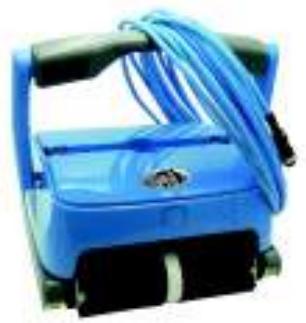
| 1 | Device | 107104 | 1 | In box |
| 2 | Power supply unit | 1 | In box | |
| 3 | Operating instruction and safety wire | 1 | In box |
1.4 Technical informations
| Input Voltage : 220 VAC (230 VAC | Frequency : 50Hz/60Hz |
| Output Voltage : DC 28V | Output power : 150W |
| Cleaning cycle : 1H/ 2H/3H | Filtering capacity: appr. 15 cbm/h |
| Filter density: 10 micorns | Moving speed : envr. 10m/min |
| depth max : 2.5m | Max Cleaning surface : 130 m2 |
| Working temperature : 0°+40° | IP grade: Cleaner IPX8;Power supply unit: IPX5 |
c. Spare components


2.0 OPERATING INSTRUCTIONS FOR POOL CLEANERS
2.1 Cautions
a. Power supply unit position
The power supply unit must be correctly positioned so that the device can reach all corners of the pool and must be fixed at a minimum distance of 3.50 metres from the edge of the pool.

Before connecting the cleaning device to the power supply, check that the voltage and frequency of your electrical network correspond to the instructions on the label on the back of the power supply AND THAT YOUR INSTALLATION CONTAINS A
DIFFERENTIAL PROTECTION OF 30 MA.

2.2 Important !
a. To immerse the cleaner
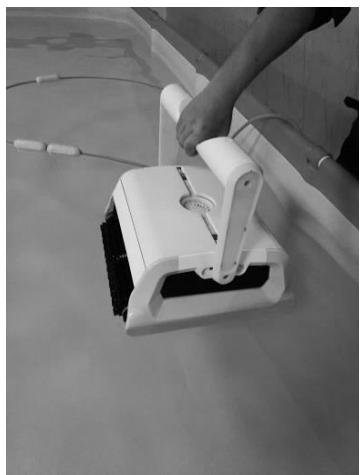
Lift the device by the handle or belt and plunge it into the pool. Present the device vertically facing the wall. Tilt the unit to the side to remove trapped air from the inside. The pool cleaner will then sink to the bottom of the pool.
natural_image
Person using a white manual cleaning tool on a tiled floor (no text or symbols visible)
natural_image
White handheld electronic device with a coiled cable and a small label on the side (no visible text or symbols)b. To get the cleaner out of the water
Use the handle to remove the unit from the water, not the cable, otherwise the unit may be damaged..
Tip: First remove the filter boxes by the handle to reduce the weight of the cleaner, and then remove the device.

natural_image
Person operating a white rectangular device with a cable, placed on a surface with water in the background (no visible text or symbols)
natural_image
Person operating a medical or electrochemical device in a flooded environment (no visible text or symbols)2.3 First-hand experience
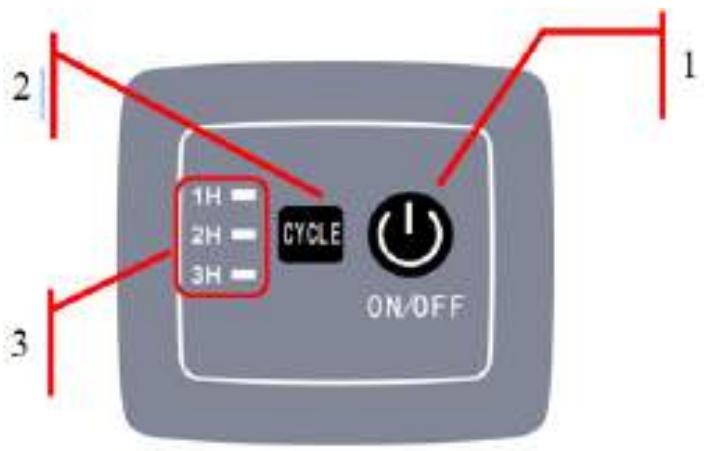
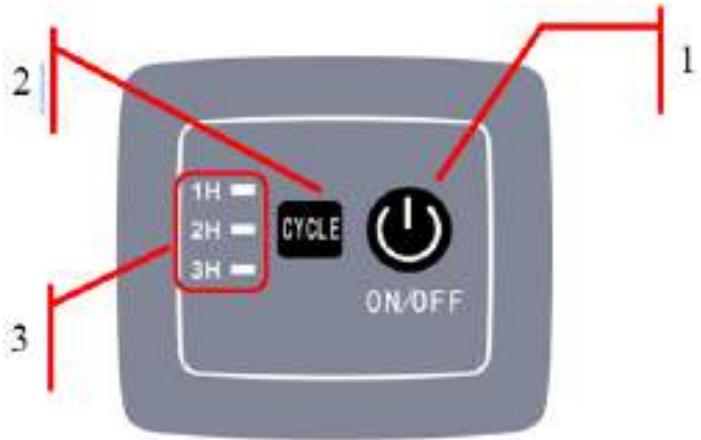
Control panel

| No. | indicator | Description | Fonction | ||
| 1 | ON/ OFF | Power on / off | Press this button, the cleaner starts; press it a second time, the cleaner is off. | ||
| 2 | CYCLE | To choose working cycle | When the cleaner is on, use this button to choose preferred working time. | ||
| 3 | indicator | indicator | 1H flashes | Cleaning starts for 1 hour | |
| 2H flashes | Cleaning starts for 2 hours | ||||
| 3H flashes | Cleaning begins for a period of 3 hours | ||||
| 1H, 2H et 3H flash together | The cleaning stops | ||||
| Symbol | Signification | Proposition | |||
| Failure | 1H and 3H flash with warning sound | Power suppl overload | Stop the cleaner and check if the impeller is not obstructed by a foreign object. | ||
3.0 MAINTENANCE AND ADJUSTMENT OF POOL CLEANERS
3.1 filter cleaning
a. Unplug the device.
b. Remove the device from the water
If the device is in the pool, pull on the cable carefully until you can grab the handle. Use only the handle (absolutely not the cable) to pull it out of the water and then put the unit down until the largest amount of water flows out of the unit.
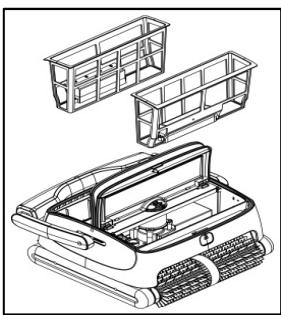
c. Remove the filters :
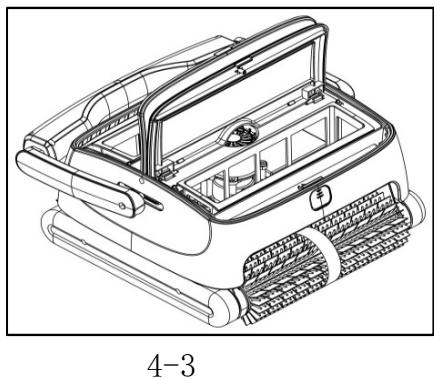
Put the cleaner on the ground, press the buttons (4-1), the covers unlock (4-2), open the covers (4-3), and remove the filters (4-4)

natural_image
Technical line drawing of a vehicle chassis with internal compartments and grilles (no text or symbols)
natural_image
Technical line drawing of a mechanical device with three views of a grid structure (no text or symbols)d. Rinse and clean the filter (4-5).
Put the filter under water until the water is clean.

natural_image
Line drawing of a cabinet or enclosure with internal compartments and a handle (no text or symbols)4-5
e. Reinstall the filters.
Pay attention to the good position and close the covers by pressing the buttons.

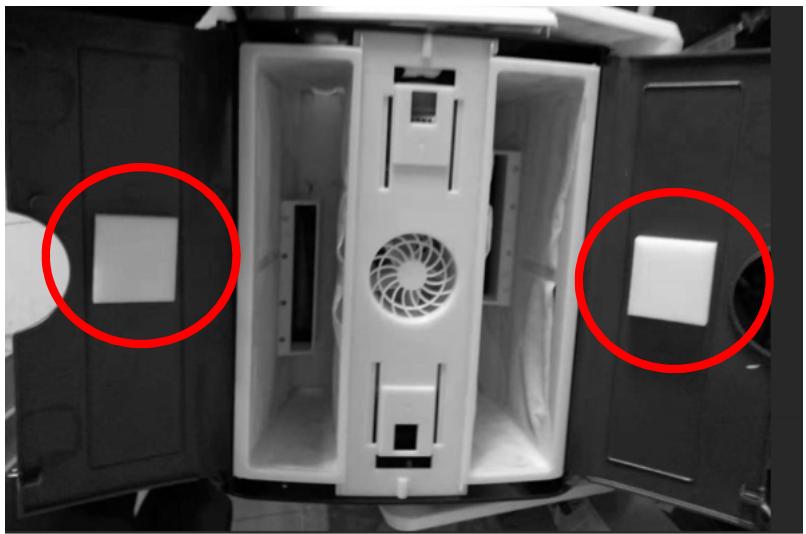
3.2 Foam Installation
Attention: If your cleaner is in good performance, please ignore this instruction.
The below instruction is only used for special situation where the cleaner has difficulties to climb the pool walls.
Stick two foams on the reverse surface of top cover (see below picture), make sure the two foams are in the middle part of top cover.
natural_image
Interior view of a computer case with two red-circled square panels on the left side (no text or symbols visible)4.0 FREQUENTLY ASKED QUESTIONS

Attention! In any case, always comply with the safety instructions set out in point I.I. at the beginning of this manual in order to avoid potential mechanical or physical
damage..
| Observation | Possible reason | Solution |
| The cleaner moves but does not pump water | Electrical problem or obstruction of driving mechanisms | Check all connections, turn the cleaner off and on again.Check that nothing obstructs the drive mechanisms. |
| The cleaner does not move but sucks in | Obstruction of drive mechanisms or motor problem. | Check that nothing obstructs the drive mechanisms.In case of engine problems, contact the service department. |
| Indicators 1H and 3H flash with a beep. | Pump overload | Stop the cleaner and check if the impeller is not obstructed by a foreign object. |
5.0 WARRANTY
This product has undergone various quality and safety tests carried out by the plant's technical department.
Warranty information:
- The warranty period is 24 months of use on the engine and PCB, from the date of purchase and is established according to the terms of the consumer code, as well as the legal warranty against defects and hidden defects that applies in any case under the conditions of the items in the country of purchase.
- The warranty will be void if the product is handled or repaired by unqualified persons outside the authorized repair services.
- Broken parts are not covered by the warranty.
- The warranty covers only factory defects, it does not cover damage caused by improper use of the item.
- Any claim made or repair made during the warranty period will be subject to the mandatory presentation of the purchase invoice.

Environmental Programmes, WEEE European Directive
Please respect the European Union regulations and help to protect the environment.
Return non-working electrical equipment to a facility appointed by your municipality that properly recycles electrical and electronic equipment. Do not dispose them in unsorted waste bins.
For items containing removable batteries, remove batteries before disposing of the product.
Oceas SARL - 66, avenue des Champs Elysées - 75008 PARIS - FRANCE
I.0 PRE REQUIS
natural_image
Blue industrial cleaning or cleaning device with coiled cable and black wheels (no visible text or symbols)1.4 Informations techniques

2.2 Important !
a. Pour immerger le robot
natural_image
Person using a handheld device on a tiled floor, no visible text or symbols
natural_image
White handheld electronic device with a cable, placed on a reflective surface (no visible text or symbols)natural_image
Person operating a white rectangular device on a floating platform (no visible text or symbols)
natural_image
Person operating a medical or electrochemical device in a flooded environment (no visible text or symbols)2.4 Prise en main
Panneau de commande
natural_image
Line drawing of a cabinet or storage unit with windows and a handle (no text or symbols)4-5
natural_image
Interior view of a refrigerator with open doors and visible vent slots, circled in red (no text or symbols)4.0 QUESTIONS FRÉQUENTES

natural_image
Blue industrial cleaning or cleaning device with coiled cable and mechanical components (no visible text or symbols)natural_image
Person using a handheld device on a tiled floor (no visible text or symbols)
natural_image
White handheld electronic device with a coiled cable and a small paper label, placed on a surface (no visible text or symbols)natural_image
Person operating a white water rehabilitation device on a boat (no visible text or symbols)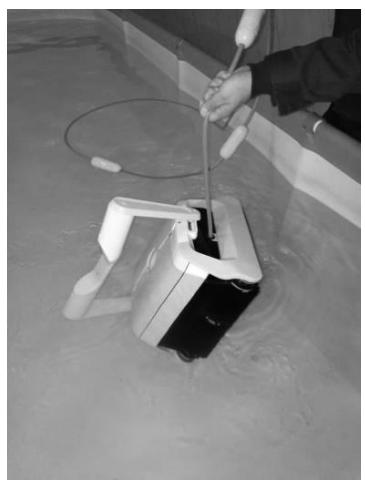
natural_image
Person operating a medical or electrochemical device in a flooded environment (no visible text or symbols)natural_image
Line drawing of a mechanical assembly or frame structure with no visible text or symbols4-5
natural_image
Interior view of a white electronic device with two red-circled square cutouts on the left side (no text or symbols visible)natural_image
Blue industrial scrubber with coiled cable and black base (no visible text or symbols)natural_image
Person using a white robotic device on a tiled floor, no visible text or symbols
natural_image
White handheld device with a coiled cable and a small paper label, placed on a tiled surface (no visible text or symbols)natural_image
Person operating a white robotic device in a pool with water flowing (no visible text or symbols)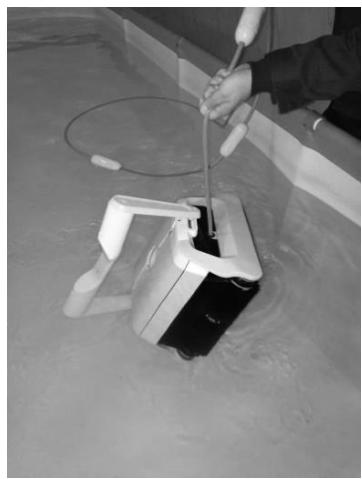
natural_image
Person operating a medical or electrochemical device in a flooded environment (no visible text or symbols)2.3 Iniziare
natural_image
Technical line drawing of a vehicle chassis with internal compartments and wheels (no text or symbols)4-3
natural_image
Technical line drawing of a mechanical device with multiple housing compartments (no text or symbols)43
4-4
natural_image
Line drawing of a cabinet or enclosure with internal compartments and a handle (no text or symbols)4-5
natural_image
Interior view of a white industrial machine with two red-circled components, no visible text or symbols4.0 DOMANDE FREQUENTI

natural_image
Blue industrial cleaning or cleaning device with coiled cable and wheels (no visible text or symbols)natural_image
Person using a white robotic device on a tiled floor, no visible text or symbols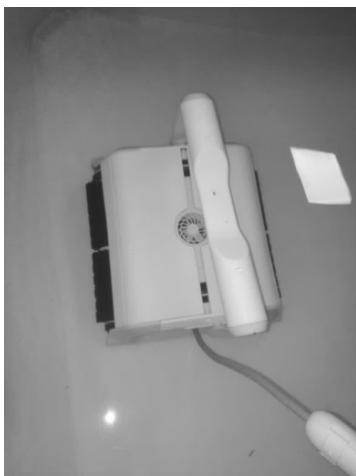
natural_image
White handheld electronic device with a cable and a small label, placed on a plain surface (no visible text or symbols)robô da água
Use a alça para
remover o
natural_image
Person operating a white robotic device in a pool with water flowing (no visible text or symbols)
natural_image
Person operating a handheld device in a flooded environment (no visible text or symbols)
natural_image
Technical line drawing of a car air vent assembly (no text or symbols)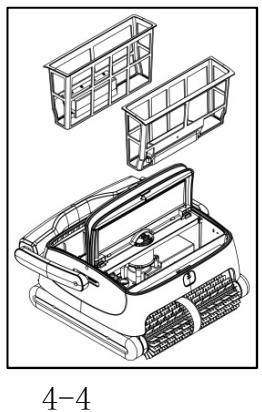
natural_image
Technical line drawing of a car interior with storage compartments and exhaust grilles (no text or symbols)natural_image
Line drawing of a cabinet or enclosure with internal compartments and a handle (no text or symbols)natural_image
Interior view of a device casing with visible vent and doorways, marked by two red circles (no text or symbols)4.0 PERGUNTAS MAIS FREQUENTES

2.2. Belangrijk!
natural_image
Person using a white robotic cleaning tool on a tiled floor (no text or symbols visible)
natural_image
White handheld electronic device with a coiled cable and a small label on the side (no visible text or symbols)natural_image
Person operating a white water heater device in a tank (no visible text or symbols)
natural_image
Person operating a submerged scientific instrument in a flooded environment (no visible text or symbols)2.3. Eerste stappen
Bedieningspaneel

natural_image
Line drawing of a cabinet or cabinet frame with windows and doors, no text or symbols presentnatural_image
Interior view of a white industrial machine with two red-circled openings and a central fan (no visible text or symbols)Environmental Programmes, WEEE European Directive

natural_image
Blue cleaning brush tool with gray handle and black textured base (no text or symbols visible)MANUAL CU INSTRUCTIUNI DE EXPLOATARE
1.0 OBSERVATII GENERALE
natural_image
Exploded view diagram of a smart appliance showing internal components and wiring (no text or labels)natural_image
Person operating a white robotic device on a tiled floor, no visible text or symbols
natural_image
White handheld electronic device with a coiled cable and a small label on the right side (no visible text or symbols)b.Scoaterea din apă
natural_image
Person operating a white water rehabilitation device on a floating platform (no visible text or symbols)
natural_image
Person operating a handheld device in a flooded environment (no visible text or symbols)2.3. Primii pași
Panou de operare

natural_image
Technical line drawing of two mechanical components with no visible text or symbolsnatural_image
Line drawing of a cabinet or enclosure with internal compartments and a handle (no text or symbols)f. Reinstalarea cartușelor filtrante
natural_image
Interior view of a device showing a central air vent and two red-circled areas, no text or symbols visible.4. ÎNTREBĂRI FRECVENTE

natural_image
Symbol of a trash bin crossed with a diagonal line and a horizontal bar below (no text or labels)natural_image
Blue and gray cleaning brush tool with adjustable handle and wheels (no text or symbols visible)BRUKSANVISNING
1.0 ALLMÄNNA UPPLYSNINGAR
natural_image
Exploded view diagram of a smart appliance showing internal components and casing (no text or labels)Kontrollpanel, undersida
Kontrollpanel, undersida
Elektronikkretskort
2.0 BRUKSANVISNING
2.1. Varningar
2.2. Viktigt!
natural_image
Person using a robotic vacuum cleaner on tiled floor (no text or symbols visible)
natural_image
White handheld electronic device with a coiled cable and a small label on the side (no visible text or symbols)natural_image
Person operating a white water rehabilitation device on a floating platform (no visible text or symbols)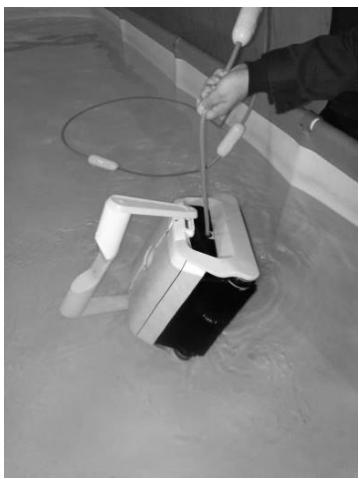
natural_image
Person operating a handheld device in a flooded environment (no visible text or symbols)natural_image
Line drawing of a cabinet or enclosure with internal compartments and a handle (no text or symbols)natural_image
Interior view of a white industrial machine with open doors and internal compartments, marked by red circles (no text or symbols visible)4.0. VANLIGA FRÅGOR

natural_image
Symbol of a trash bin crossed with a diagonal line, no text or labels present



- AUTOMATISCHER SCHWIMMBADBODENSAUGER ORCA 300
- BETRIEBSANLEITUNG
- Erste Schritte
- Environmental Programmes, WEEE European Directive
- I.I Safety measures and general conditions of use
- General instructions
- I.2 Presentation
- I.3 Packaging
- Technical informations
- OPERATING INSTRUCTIONS FOR POOL CLEANERS
- Cautions
- a. Power supply unit position
- Important !
- a. To immerse the cleaner
- b. To get the cleaner out of the water
- First-hand experience
- MAINTENANCE AND ADJUSTMENT OF POOL CLEANERS
- filter cleaning
- d. Rinse and clean the filter (4-5).
- e. Reinstall the filters.
- Foam Installation
- FREQUENTLY ASKED QUESTIONS
- WARRANTY
- Warranty information:
- I.0 PRE REQUIS
- Informations techniques
- a. Pour immerger le robot
- Prise en main
- QUESTIONS FRÉQUENTES
- Iniziare
- DOMANDE FREQUENTI
- robô da água
- PERGUNTAS MAIS FREQUENTES
- Belangrijk!
- Eerste stappen
- MANUAL CU INSTRUCTIUNI DE EXPLOATARE
- OBSERVATII GENERALE
- b.Scoaterea din apă
- Primii pași
- f. Reinstalarea cartușelor filtrante
- ÎNTREBĂRI FRECVENTE
- BRUKSANVISNING
- ALLMÄNNA UPPLYSNINGAR
- BRUKSANVISNING
- Varningar
- Viktigt!
- VANLIGA FRÅGOR
Brand : Edenea
Model : CLEANER ORCA 300 1
Category : Swimming Pool