
RHYTHMNBLUE - Car stereo PARROT - Free user manual and instructions
Find the device manual for free RHYTHMNBLUE PARROT in PDF.



| Product Type | Bluetooth CD/MP3 car stereo with integrated hands-free kit |
| Brand | Parrot |
| Model | RHYTHMNBLUE |
| Category | Car stereo |
| Power supply | 12 V with negative ground |
| Main functions | Bluetooth hands-free, CD/MP3 player, RDS tuner, voice control, remote control, detachable anti-theft faceplate |
| Supported formats | CD, CD-R, CD-RW, MP3 (ID3 Tag) |
| Supported Bluetooth profiles | Handsfree (HFP), Headset (HSP), Object Push (OPP) for phonebook synchronization |
| Connectivity | Bluetooth, external microphone input |
| Display | LCD screen displaying information (title, album, artist, elapsed time, RDS station name) |
| Anti-theft system | Detachable faceplate, complete removal of unit with keys |
| Maintenance and cleaning | Clean CDs from center outward with a suitable cloth; do not use solvents (benzene, alcohol) |
| Safety | Do not disassemble device (laser risk); use fuse of same rating; moderate volume to hear external warnings |
| Operating temperature | Avoid extreme temperatures; wait for cabin temperature to normalize before use |
| Remote control battery | Replacement: unknown battery type, observe polarity, keep out of reach of children |
| Updates | Via Bluetooth (software update), available on Parrot website |
| General information | Manual available in multiple languages; technical support by email/phone (Mon-Fri 9am-6pm) |
Frequently Asked Questions - RHYTHMNBLUE PARROT
User questions about RHYTHMNBLUE PARROT
0 question about this device. Answer the ones you know or ask your own.
Ask a new question about this device
Download the instructions for your Car stereo in PDF format for free! Find your manual RHYTHMNBLUE - PARROT and take your electronic device back in hand. On this page are published all the documents necessary for the use of your device. RHYTHMNBLUE by PARROT.
USER MANUAL RHYTHMNBLUE PARROT
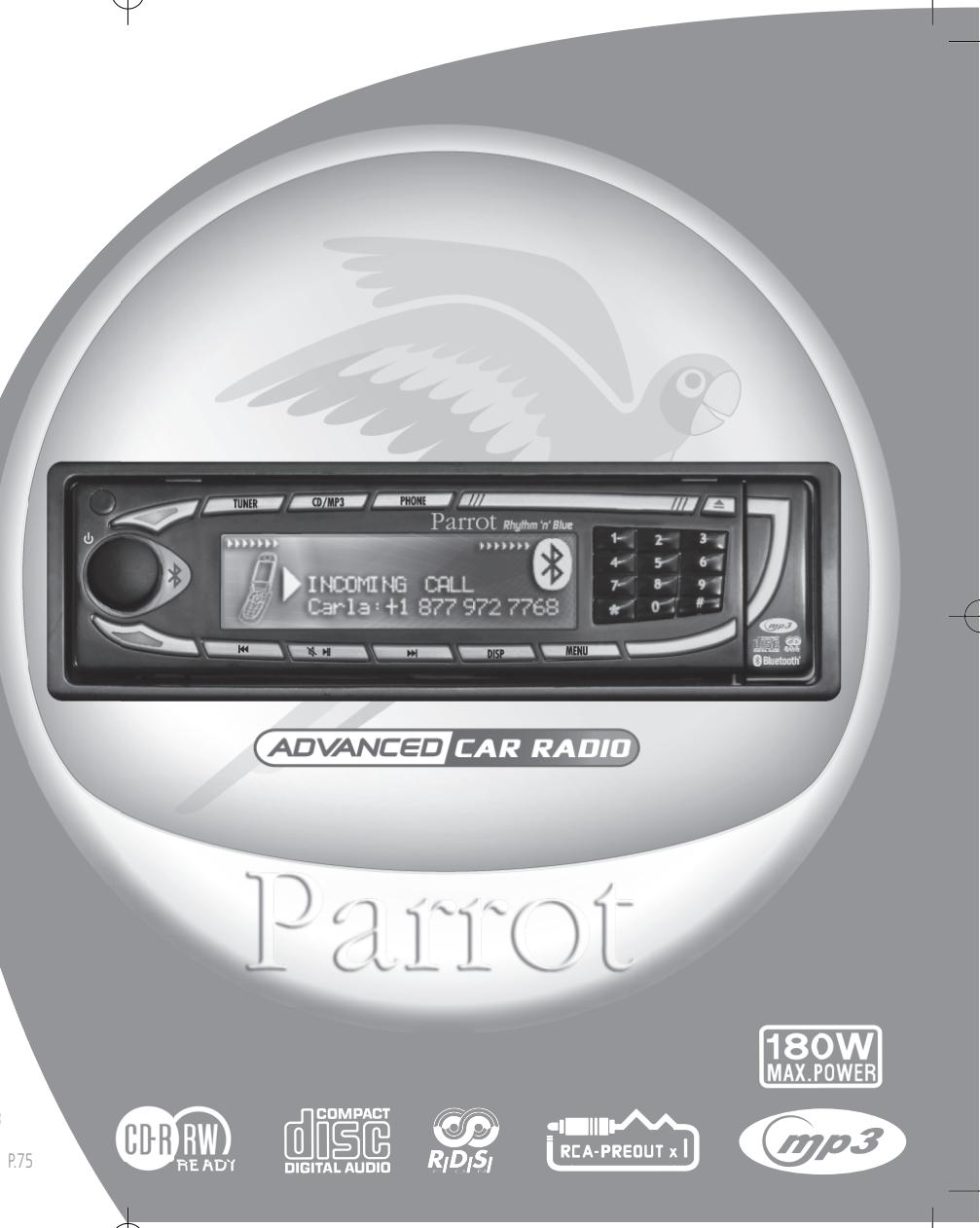
CD/MP3 Hands-free Receiver
RHYTHM N'BLUE User manual
For Bluetooth Mobile Phone
Bluetooth
Warning
The manufacturer Parrot S.A. and its affiliates should not be held liable towards end users or third parties to prejudice caused by misusage of the product, nor for usage that would be in violation of local traffic regulations and laws.
Disclaimer
The information in this document is subject to change without notice and does not represent a commitment on the part of vendor. No warranty or representation, either expressed or implied, is made with respect of quality, accuracy or fitness for any particular purpose of this document. The associated with it at any time without obligation to notify any person or organisation of such changes. In no event will the manufacturer to liable for direct, indirect, special, incidental or consequential damages arising out of the use or inability to use this product or documentation, even if advised of the possibility of such damages. This document contains material protected by copyright. All right are reserved. No part of this manual may be reproduced or transmitted in any forme, by any means or for any purpose without express written consent. Product names appearing in this document are mentioned for identification purposes only. All trademarks, product names appearing in this document are registered property of their respective owners.
FCC Compliance Statement

Federal Communications Commission
This device complies with part 15 of the FCC rules. Operation is subject to the following two conditions.
- This device may not cause harmful interference.
- This device must accept any interference received, including interference that may cause undesired operation.
Declaration of Conformity

We, Parrot S.A. of 174 quai de Jemmapes, 75010 Paris, France, declare under our sole responsibility that our product, the Parrot Rhythm n' Blue, to which this declaration relates is in conformity with appropriate standards EN300328, EN301489-17, EN 60950 following the provision of Radio Equipment and Telecommunication Equipment directive, with requirements covering EMC directive 89/336/EEC and Low Voltage directive 73/23/EEC.
Bluetooth®
The Bluetooth® word mark and logos are owned by the Bluetooth® SIG, Inc. and any use of such marks by Parrot S.A. is under license. Other trademarks and trade names are those of their respective owners.
Correct Disposal of This Product ( Waste Electrical & Electronic Equipment )

Applicable in the European Union and other European countries with separate collection systems). This marking shown on the product or its literature, indicates that it should not be disposed with other household wastes at the end of its working life. To prevent possible harm to the environment or human health from uncontrolled waste disposal, please separate this from other types of wastes and recycle it responsibly to promote the sustainable reuse of material resources. Household users should contact either the retailer where they purchased this product, or their local government office, for details of where and how they can take this item for environ, mentally safe recycling. Business users should contract their supplier and the terms and conditions of the purchase contract. This product should not be mixed with other commercial wastes for disposal.
Rhythm n'Blue Directions for use
SAFETY INFORMATION
PRECAUTIONS
Only use on a 12V electrical system with a negative earth.
When replacing the fuse, use one with the same amp rating. Using a fuse with a higher amp rating could damage the system.
Do not dismantle the system. The laser beam of the CD player is dangerous for your eyes.
Ensure that foreign objects are not inserted into the system: they could cause the system to malfunction or jeopardise your safety, such as electrocutions or exposure to the laser.
If your vehicle has been exposed to very high or very low temperatures for a prolonged period, wait until the inside of the car has returned to a normal temperature before using the device.
The sound volume of the car stereo should not be too loud: you should be able to hear outside warning signals or sirens.
NOTES ON CDs
Playing a damaged or dusty CD could result in the disc jumping during playback.
Hold CDs as shown in the illustration opposite.
Do not touch the unprinted side.
Avoid getting any types of marks on the readable side of the CD.
Do not expose a CD to direct sunlight or excessive temperatures.
Wipe dirty CDs from the centre outwards with an appropriate cloth. Never use solvents, such as benzene or alcohol.
This car stereo cannot read 3'' CDs (8 cm).
Never use 3'' CDs or discs with an irregular shape. They could get stuck and cause the unit to malfunction.
BEFORE SWITCHING ON
Do not set the volume too high - doing so might prevent you from hearing sounds outside the car.
The car must be stationary before working on the system.
CAUTION
Do not remove the unit's cover. Do not repair the system yourself. Please contact your retailer or a specialist technician.
PRESENTATION
Thank you for choosing a Parrot car stereo.
You can now take full advantage of a Bluetooth® CD/MP3 car stereo with a built-in hands-free kit. All the features sported by a top-of-the-range hands-free kit are available: phonebook synchronisation, caller ID display, exceptional audio quality inside the car, dual call management, compatibility with all Bluetooth® phones, and much more.
YOUR CAR STEREO'S BLUETOOTH® FEATURES
This system is equipped with the Bluetooth® technology, which enables the wireless exchange of data between electronic systems. In the present case, your Bluetooth® phone is connected to the car stereo. Depending on your phone
(*) this synchronises the phone's phonebook in the car stereo's memory, which will subsequently allow you to call people directly from the phonebook, see the caller's name displayed, and so on. You can also answer calls, hang up and control the call volume with the car stereo's green and red buttons and the scroll wheel. The built-in voice recognition feature allows you to use several functions without taking your hands off the wheel.
(^*) :Applies to certain phones.
For further information, visit our website:
"www.parrot.biz, at the section entitled Technical Support, User Guides"
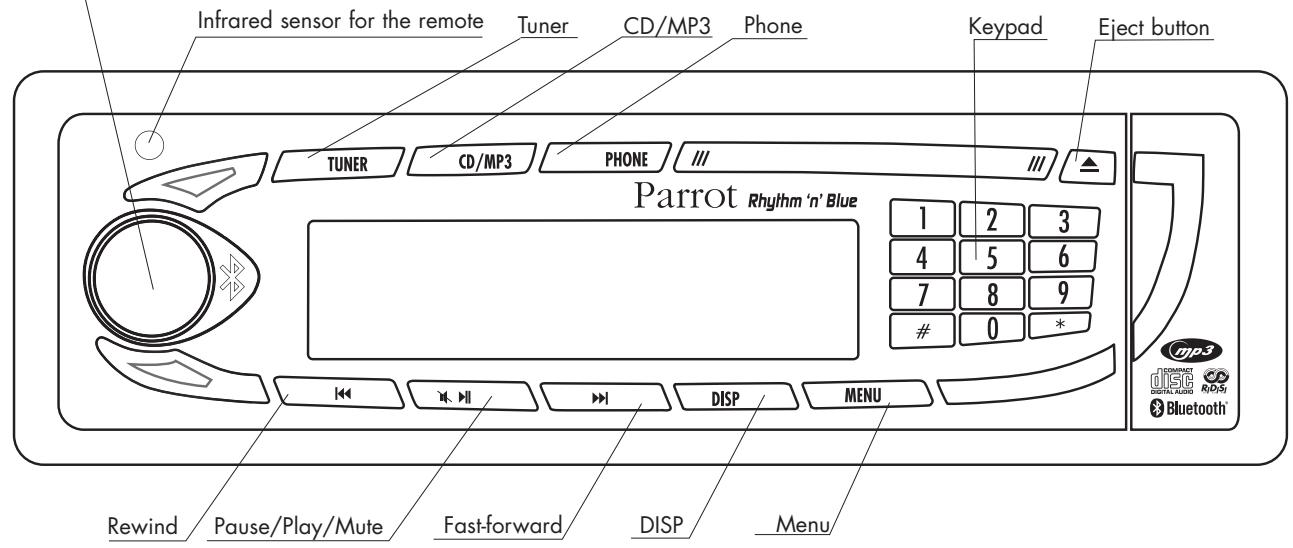
FRONT PANEL
To turn the car stereo on, press the rotary button. To turn the car stereo off, hold down the same button for two seconds.
ANTI-THEFT SYSTEM
Without the detachable front panel, the system cannot be used.
Removing the front panel
- Press the eject button (in the top right) to tip the front panel.
- Move the panel sideways to the left.
Pull the right side of the panel away from the car stereo and then the left side. - Store the panel in the carry case and take it with you.
Replacing the front panel
- Insert the left side of the front panel into the car stereo.
- Then insert the right side of the panel into the car stereo.
- Push the panel up until you hear a click.
Removing the entire stereo
- Remove the car stereo's front panel and casing.
- Insert the keys into the appropriate holes until they remain stuck.
Pull the stereo towards you.
INSTALLATION GUIDE
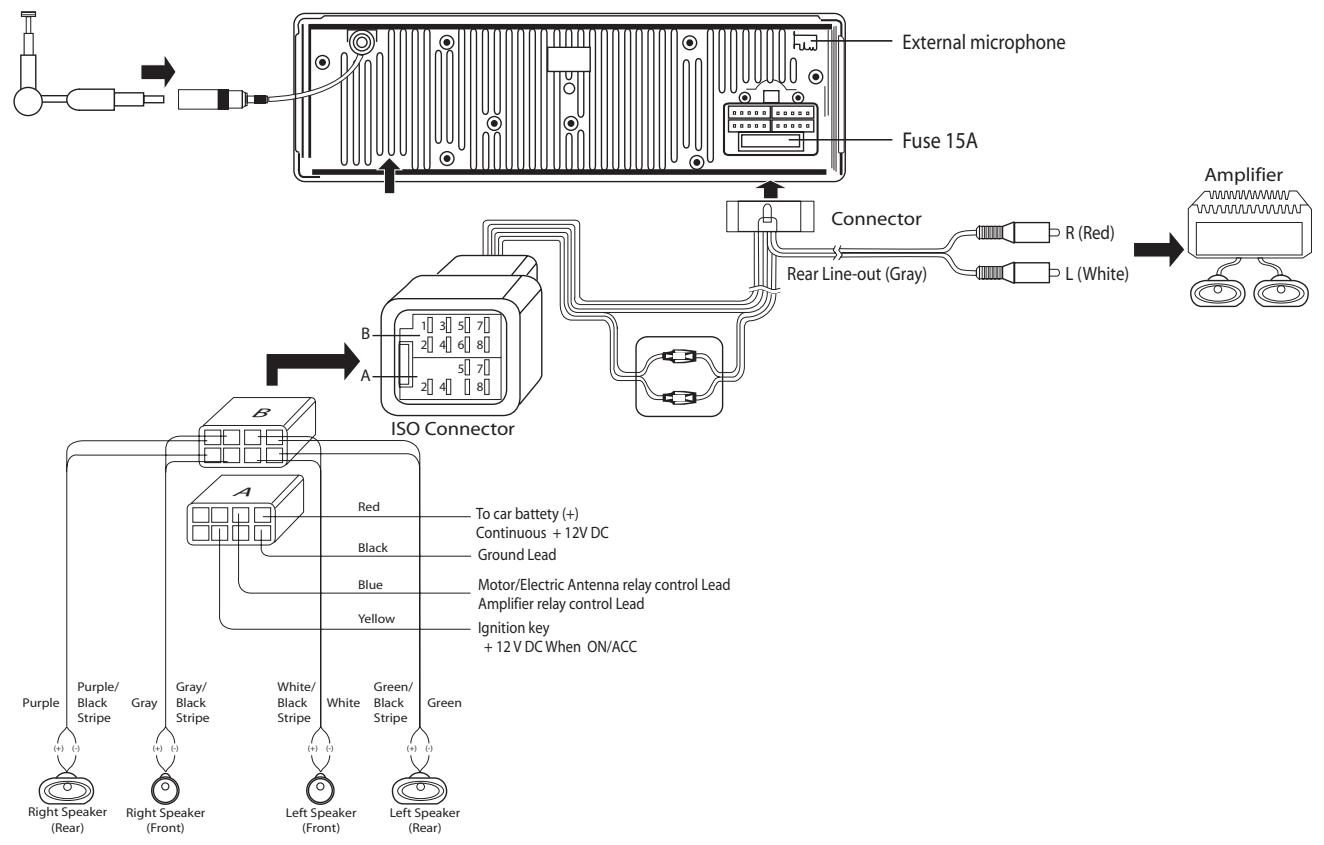
Note: to ensure that your settings are memorised, check that the ignition 12 V and the constant 12 V supply are not reversed. Otherwise, you will have to enter all your settings again.
REMOTE CONTROL
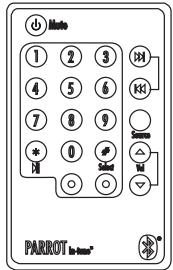
Using the remote control
- The on/off button is used to turn the car stereo on and off.
- Source is used to change from one mode to another: Tuner, CD/MP3 and then Phone
- In CD/MP3 mode, the fast-forward and rewind arrows let you skip from one track to another by means of a quick press. They are also used to simply go for words/back wards in a track. In Tuner mode, they allow you to skip from one radio station to ano ther.
- The play/pause button is used for playing CDs.
- When you receive an incoming call, press the green button to answer and the red button to hang up.
- You can also dial a phone number on the remote control. To do so, change to Phone
mode (via the Source button or by pressing the Phone button directly on the car stereo's front panel) and then dial the num ber on the keypad. Once the number has been dialled, press the green button to call.
Note:
the "+" prefix can be obtained by pressing the zero button for two seconds.
Replacing the battery in the remote control When the remote control no longer works properly or you experience problems controlling the car stereo with the remote control, replace the remote control's battery. Ensure that the battery is facing the correct polarity when fitting the replacement.
- Remove the battery cover by pressing the button.
- Insert the new battery with the (+) side facing you. Replace the cover.
CAUTION :
The battery must be stored out of the reach of children. If a child accidentally swallows the battery, seek medical advice immediately. Do not recharge, open, heat or throw onto a heat source. Any of these actions could cause sparks and start a fire. Do not store the battery with other metallic materials. This could cause sparks and start a fire. Do not handle the battery with tweezers. This could cause sparks and start a fire.
DIFFERENT FEATURES MODE
First of all, turn the car stereo on. To do so, press the rotary button.
To turn the car stereo off, hold down the same button for two seconds.
There are three major features, which can be accessed directly via the car stereo's front panel: Tuner, CD/MP3 and Phone mode
Each MODE ENABLES THE CAR STEREO TO BE USED IN A DIFFERENT WAY:

TUNER (OR RADIO) MODE
Press the Tuner button to listen to the radio. The fast-forward and rewind arrows let you search for stations on a step-by-step basis. If you hold down either arrow, the system will automatically search for the next station.
When you are tuned into a station, hold down a number on the front panel's keypad (long press) to assign a shortcut number. Subsequently, to go straight to a memorised station, simply press the corresponding number. When the station is memorised, the assigned shortcut number is displayed at the same time as the station's frequency.

CD/MP3 (OR DISC PLAYBACK) MODE
Press CD/MP3 to listen to a CD.
You can move from one track on the CD to another by pressing fast-forward or rewind. To move quickly forwards or backwards in a track, hold down the fast-forward or rewind button for more than half a second. When playing an MP3 disc, the LCD screen successively displays the following information: title of the song, album and artist, and always the time elapsed.
You can also select the track directly on the CD via the keypad.

PHONE MODE
Press Phone to change the system to phone mode.
Once connected with your Bluetooth® phone, you will be given information on your mobile phone's battery and signal levels.
Your operator is also displayed ()
You can access your phonebook simply by turning the scroll wheel.
You can then browse through the alphabet.
Select the corresponding letter for the required contacts.
If your contacts have more than one phone number, press the scroll wheel again to access the numbers and then the green button to call.
To view your call records, press the rotary button.
All the calls made, missed and received are displayed.
(*) These features depend on your phone.
MENUS
Pressing the Menu button opens the Settings menu.
You can fully use all the car stereo's features and define the audio settings, backlight and all the Bluetooth® features.
You can browse through the menus using the scroll wheel.
Pressing the scroll wheel opens the selected menu, allowing you to make any required adjustments to the selected feature.
Menu description and structure
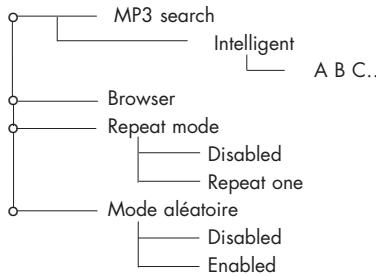
- CD/MP3 :
Used to define the way in which you wish to listen to your CDs: search, play back options, etc.
- CD/MP3
TUNER :
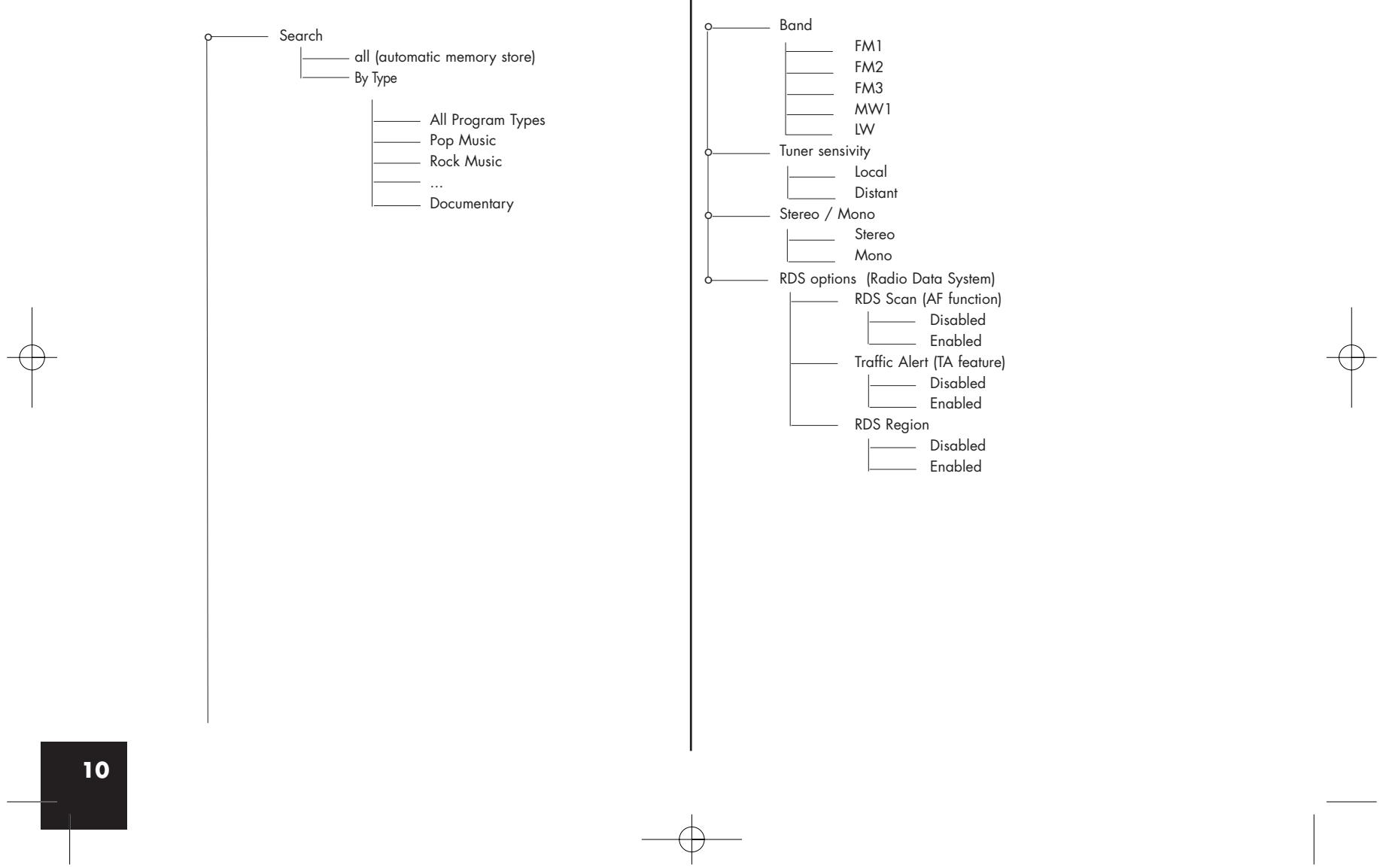
Some information about RDS:
- The RDS (RDS Scan) option displays the radio station's name and searches for alternative frequencies if the reception signal fades. This feature is also called "RDS Alternative Frequencies (AF)".
- Once enabled, the "RDS Region" feature keeps the settings of the current station when searching for alternative frequencies.
For example, a radio station broadcasting local programmes to a specific region will not be replaced by the same station broadcasting national programmes when searching for alternative frequencies.
- The "Traffic Program" indicator (RDS TP) determines whether the radio station can broadcast traffic information.
- If the "Traffic Alert" feature (RDS TA) is enabled and the current station can broadcast traffic information ("Traffic Program" indicator enabled), the car stereo automatically switches to Tuner mode when traffic information is broadcast.
- If the "Traffic Alert" feature is enabled and the current station does not broadcast traffic information ("Traffic Program" indicator disabled), the following screen is displayed on the car stereo:

TUNER
BLUETOOTH :
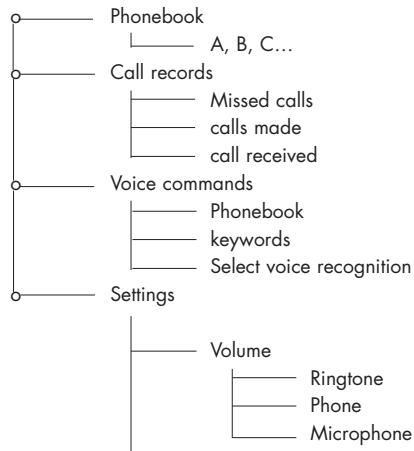
This menu lets you manage all the Bluetooth features on your car stereo: phonebook management, assigning of voiceprints, display, language.
- Phonebook: access to the phonebook memorised in the car stereo.
- Call records: list of calls missed, made and received.
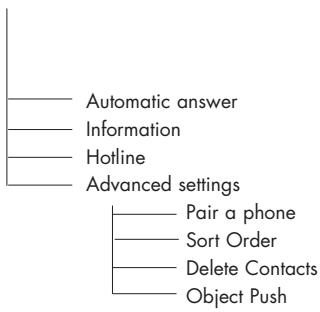
- In the Settings subdirectory:
The paired devices option displays the name of the Bluetooth phone with which your car stereo is connected in hands-free mode.
Once enabled, the automatic answer feature immediately answers any incoming call.
With some phones, a specific mode must be enabled before pairing (Pair a phone), so that as many features as possible can be supported.
Once again on specific phones, the Object Push feature is used to receive contacts when automatic synchronisation is not available.
Bluetooth
Note : some functions depend on your phone and might therefore be disabled.
FEATURES IN PHONE MODE: hands-free (Bluetooth)
Press Phone to change the system to Phone mode.
Phones compatible with the Bluetooth® technology use either the Hands-free or the Headset profile for transferring the call to the car stereo. The Hands-free profile offers the most features.
When using your car stereo in Tuner or CD/MP3 mode, the unit automatically switches to Phone mode if someone calls you. After the call, the car stereo returns to Tuner or CD/MP3 mode. The driver does not need to take any action. The same applies when you make a call via the car stereo..
Pairing:
Pairing is the first connection between your Bluetooth® phone and the car stereo. This procedure is initiated via your phone. Search for any Bluetooth® peripherals. Once "Parrot Car Stereo" is found, select it and your phone prompts you to enter a four-digit code. Enter 1234 and confirm. After the necessary data has been exchanged, you are now Bluetooth® connected with the car stereo. With some phones, a special mode needs to be enabled prior to pairing for access to more features. Refer to Bluetooth > Settings > Pair a phone.
Synchronising the phone's phonebook:
With some Bluetooth phones, the phonebook is automatically synchronised in the kit's memory. If your phone does not support automatic synchronisation, you can also use the Object Push feature on your phone to send contacts from your phone to the car stereo by Bluetooth®. When synchronising the phonebook, the Bluetooth® icon scrolls over the screen. Refer to your phone's user guide or our website for details on how to proceed: "www.parrot.biz, at the section entitled Technical Support, User Guides"
Answering / Hanging up :
To answer a call, press the green button above the scroll wheel. Once you have finished your conversation, press the red button to hang up.
Discreet mode:
During a call, press the green button to switch the conversation over to the phone. Press the green button again to return the call to hands-free mode. This feature is only available on phones with a Hands-free profile.
Caller ID :
When an incoming call is received, the caller's name or number is displayed. This feature is only available on certain phones.
Making a call via the car stereo's interface :
Two options are available:
Change to Phone mode. Dial the phone number directly via the keypad and then press the green button. To dial a number with "+" as the prefix, quickly press the zero key twice. You can also use the voice recognition feature (see below).
Voice recognition :
You can make calls using the car stereo's voice recognition feature. To do so, contacts must be memorised in the kit's memory (automatic synchronisation of the phonebook or contacts sent individually from the phone). You must have first recorded the keywords: home, work, office, and so on, as well as the magic word "phone".
Once you have recorded the names, keywords and magic word, you can call a contact as follows:
Say: Phone... (Beep)... Anna... (Beep)... Home... and the car stereo automatically dials Anna's home number.
Similarly, if Anna calls you, you will hear "Anna". Press the green button to answer the call. Press the red button to end the call. The car stereo automatically returns to Tuner, CD/MP3 or Phone mode.
You can also use the following sequence for using the voice recognition feature, but without keywords:
Press the green button and the radio or CD is muted. You will hear a beep. Say the required person's name after the beep and if necessary, specify house, work or office (if available).
Note: When recording the keywords and magic word, park your vehicle in a quiet place with the windows closed and the heater/air conditioner off. This is necessary to obtain a higher recognition rate.
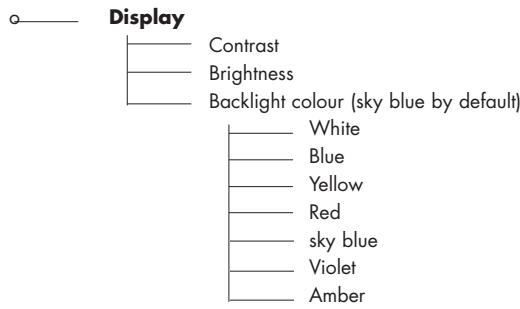
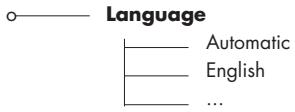
PREFERENCES :
This menu allows you to select your language, the display colour and all the audio features to fine-tune the hearing levels inside the vehicle.


UPDATING YOUR CAR STEREO
To take advantage of the latest improvements (new compatible phones, new features, etc.), you can update your car stereo by Bluetooth.
To do so, enable the option in Bluetooth > Settings > Advanced settings > Software update, and then use a computer fitted with Bluetooth to download the latest version to your car stereo (available from our website).
For further information, visit our website: www.parrot.biz
TROUBLESHOOTING
In the event of a malfunction, immediately disconnect the car stereo.
This unit must not be used in abnormal conditions, such as if there is no sound or unpleasant smells are detected from the unit, to avoid any risk of electrocution.
On no account should you try to repair the unit yourself.
General:
The car stereo does not come on.
The car's ignition is switched off. Turn the key in the ignition to the ACC position (on). Check the wiring. The fuse has blown. Replace the fuse.
No sound:
Check that the car stereo's volume is not at the lowest setting.
Also ensure that the Mute function has not been enabled (sound cut off).
Radio :
- Excessive noise with a station:
The station that you are listening to is too far away for an optimal signal. Choose another station with a better signal.
- Preset stations lost:
The car stereo's power supply is not set up correctly.
Check that the battery wire is correctly fitted (ignition 12 V and constant 12 V).
Disc :
The disc is inserted, but it does not play.
The disc is upside-down.
The disc must be inserted with the name of the artist/CD facing upwards. The disc is dirty or damaged. Clean the disc or change the CD.
The CD jumps or the sound quality is poor.
The disc is dirty or damaged. Clean the disc or change the CD.
- Vibrations when driving the car cause the CD to jump. The angle for fitting the car stereo must be less than 30^ .
Check that the car stereo has been securely fitted in the appropriate place.
CD/MP3: error messages.
The icon below is displayed: this means that there is no CD in the player.

The icon below is displayed: this means that your CD does not contain any files in MP3 format.

TECHNICAL SPECIFICATIONS
CD / CD-R / CD-RW / MP3, ID3 Tag.
Manual flip-down front panel.
Output power: 4x45W.
Line out: 4 channel x 4V/4ch x 2V
DSP: Classic, rock, pop, flat.
Power / Speaker wire: ISO.
Colour screen
Bluetooth flash updates for the latest version.
External microphone.
Uses your car's speakers for greater listening comfort.
Bluetooth®
Bluetooth® profiles supported:
- Hands-free 0.96 and 1.0.
- Headset 1.0.
- Object Push 1.0.
Synch ML 1.0.
HOTLINE
- Our hotline is at your disposal.
You can contact the hotline by email or telephone
(open from Monday to Friday between 9 am and 6 pm - GMT+1). - For further information, visit our website at www.parrot.biz.
MODEPHONE (OU TELPHONIE)
Manual flip-down front panel.
Output power: 4 × 45 ~W .
Line out : 4 channel x4V/4ch x2V
DSP:Classic,rock,pop,flat.
Power / Speaker wire : ISO.
Ecran couleur.
- Handsfree 0.96 et 1.0.
- Headset 1.0.
- Object Push 1.0.
Synch ML 1.0.
HOTLINE
Menu description and structure
- CD/MP3 :
- Handsfree 0.96 e 1.0.
- Headset 1.0.
- Object Push 1.0.
Synch ML 1.0.
LINEA DIRECTA
DSP: Classic, Rock, Pop, Flat
Manual flip-down front panel.
Output power: 4 × 45 ~W .
Line out: 4 channel x4V/4ch x2V
DSP: Classic, rock, pop, flat.
Power / Speaker wire: ISO.
Ecrà cores.
- Handsfree 0.96 e 1.0.
- Headset 1.0.
- Object Push 1.0.
Synch ML 1.0.
HOTLINE
- CD/MP3 Hands-free Receiver
- Warning
- Disclaimer
- FCC Compliance Statement
- Declaration of Conformity
- Bluetooth®
- Correct Disposal of This Product ( Waste Electrical & Electronic Equipment )
- Rhythm n'Blue Directions for use
- SAFETY INFORMATION
- PRECAUTIONS
- NOTES ON CDs
- BEFORE SWITCHING ON
- CAUTION
- PRESENTATION
- YOUR CAR STEREO'S BLUETOOTH® FEATURES
- FRONT PANEL
- ANTI-THEFT SYSTEM
- Removing the front panel
- Replacing the front panel
- Removing the entire stereo
- REMOTE CONTROL
- Using the remote control
- Note:
- CAUTION :
- DIFFERENT FEATURES MODE
- Each MODE ENABLES THE CAR STEREO TO BE USED IN A DIFFERENT WAY:
- TUNER (OR RADIO) MODE
- CD/MP3 (OR DISC PLAYBACK) MODE
- PHONE MODE
- MENUS
- Menu description and structure
- TUNER :
- TUNER
- BLUETOOTH :
- FEATURES IN PHONE MODE: hands-free (Bluetooth)
- Pairing:
- Synchronising the phone's phonebook:
- Answering / Hanging up :
- Discreet mode:
- Caller ID :
- Making a call via the car stereo's interface :
- Voice recognition :
- Once you have recorded the names, keywords and magic word, you can call a contact as follows:
- PREFERENCES :
- UPDATING YOUR CAR STEREO
- TROUBLESHOOTING
- General:
- Radio :
- Disc :
- TECHNICAL SPECIFICATIONS
- HOTLINE
- MODEPHONE (OU TELPHONIE)
- LINEA DIRECTA
Brand : PARROT
Model : RHYTHMNBLUE
Category : Car stereo