
P7000 - Auxiliary heating ZIBRO - Free user manual and instructions
Find the device manual for free P7000 ZIBRO in PDF.


| Product type | Portable air conditioner (cooling, dehumidification, ventilation) |
| Brand | ZIBRO |
| Model | P7000 |
| Power (W) | 815 W |
| Cooling capacity | 7,000 BTU/h (2.051 kW) |
| Airflow | 260 m³/h |
| Power supply | 220-230 V ~ 50 Hz |
| Current | 3.8 A |
| Net weight | 32 kg |
| Refrigerant | R22 (0.52 kg) |
| Functions | Cooling, dehumidification, ventilation, louver oscillation (LOUVER), timer (TIMER), SLEEP mode |
| Controls | Touch control panel with digital display |
| Water tank | With full level indicator light and safety shut-off |
| Air filter | Washable carbon filter (clean every 2 weeks) |
| Fan speed | 3 speeds (high, medium, low) |
| Operating temperature range | 15 °C to 35 °C |
| Maintenance | Clean filter every 2 weeks, exterior with damp cloth, empty and dry tank |
| Safety | Grounded outlet required; do not use near water; automatic shut-off after 3 min if tank full; do not cover the unit |
| Warranty | 24 months (excluding normal filter wear) |
| Included accessories | Connection kit: 2 window hoses, connection piece, water drain hose, air exhaust hose |
Frequently Asked Questions - P7000 ZIBRO
User questions about P7000 ZIBRO
0 question about this device. Answer the ones you know or ask your own.
Ask a new question about this device
Download the instructions for your Auxiliary heating in PDF format for free! Find your manual P7000 - ZIBRO and take your electronic device back in hand. On this page are published all the documents necessary for the use of your device. P7000 by ZIBRO.
USER MANUAL P7000 ZIBRO
E PANNES, CAUSES ET SOLUTIONS
CONDITIONS DE GARANTIE
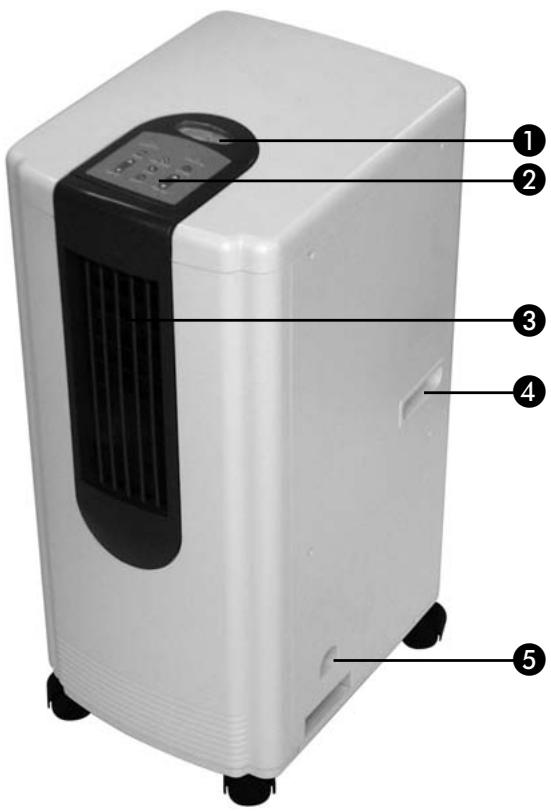
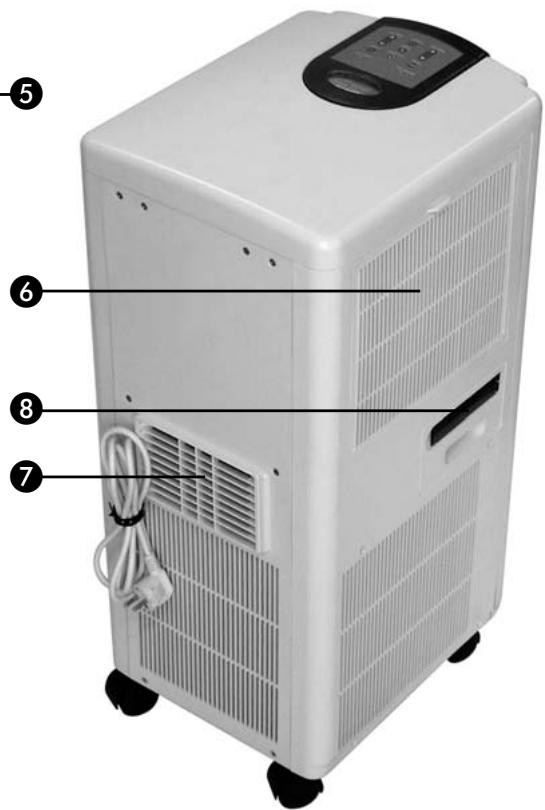
Information display
Control panel
Air grille
4 Handle
Water reservoir
6 Air filter
Hot air exhaust
External water drainage duct
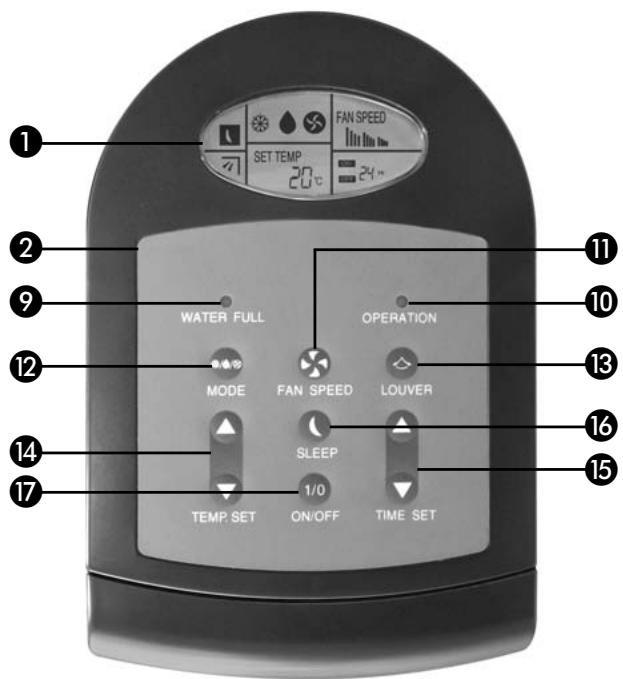
CONTROL PANEL
Warning light 'reservoir full'
10 On/off light
Ventilator speed selector button
Function selection button
13 'LOUVER' button
14 Temperature adjustment buttons
15 Time selection buttons
16 'SLEEP' button
17 'ON/OFF' button
1 READ THE DIRECTIONS FOR USE FIRST.
2 IN CASE OF ANY DOUBT, CONTACT YOUR DEALER.
Dear Sir, Madam,
Congratulations on the purchase of your Zibro Clima air conditioner.
In addition to air cooling, this air conditioner has two other functions, namely air dehumidification and circulation. The mobile Zibro Clima air conditioner is extremely easy to operate and move.
You have acquired a high quality product that will provide you with many years of pleasure, on condition that you use it responsibly. Reading these instructions for use before operating your Zibro Clima will optimise its life span.
We wish you coolness and comfort with your Zibro Clima.
Yours sincerely,
PVG International b.v.
Customer service department
A INSTALLATION
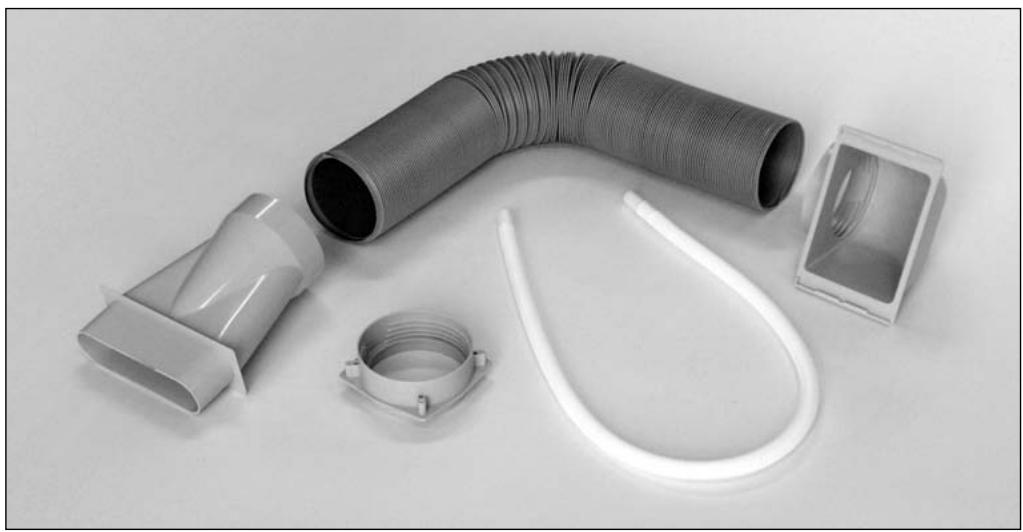
1 On purchasing this air conditioner, you received two boxes containing:
the air conditioner
the connection set, consisting of:
2 window attachments
1 connector
1 water drainage hose
1 air exhaust hose
2 Remove all the packing material and keep it together with the boxes for storage and/or future transport.
Place the air conditioner on a level and stable floor, and ensure that there is adequate circulation by leaving a gap of at least 50 cm all around the machine.
4 Insert the plug into an earthed socket (the machine will emit an audible signal).
5 Your Zibro Clima is now ready to use.
B OPERATION
Press the ON/OFF button to activate the air conditioner. A green light will illuminate on the control panel and the machine will emit an audible signal.
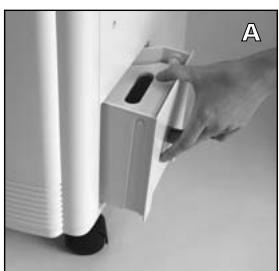
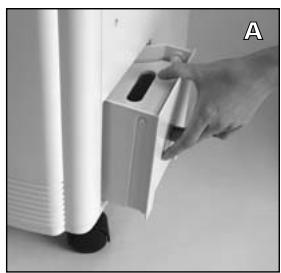
2 Ensure that the water reservoir is empty and inserted correctly. You will hear an audible signal and a red light will illuminate when the water reservoir is full ⑤. First empty the reservoir (fig. A).
You can now select from the three functions:
1. AIR COOLING
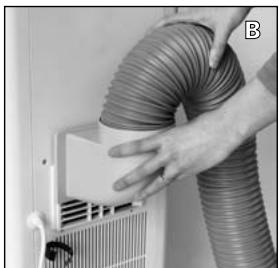
1 Attach the connector to the hose.
2 Connect the hose to the machine and check that it is firmly attached (fig. B).
Press the 'MODE' button to select the cooling function. will appear on the display.
4 Use the 'TEMP SET' buttons 14 to select the desired temperature between a minimum of 15^ and a maximum of 30^ .
5 Select the desired ventilator speed with the 'FAN SPEED' button 1: High, medium or low

ATTENTION
Do not use heat sources in a room where the air conditioner is in operation. The air conditioner must be used when the ambient room temperature is between 15^ and 35^ . Ice may form if the ambient room temperature is below 15^ . The machine will switch itself off automatically if the ambient room temperature rises above 35^ .
'SLEEP' SETTING
This setting can only be used when the cooling function is activated. Press the 'SLEEP' button 16. will appear on the display. Every hour the temperature will rise 1^ . After 6 hours the airconditioner will automatically turn off. Pressing the 'SLEEP' button again de-activates this function.
2. AIR DEHUMIDIFICATION
Press the 'MODE' button to select the de-humidification function. will appear on the display.

ATTENTION
An air exhaust hose is not required for this function. We recommend that you close all windows and doors for optimum results. The operational range of the de-humidifier is between 12^ and 30^ .
3. AIR CIRCULATION
Press the 'MODE' button to select the circulation function. will appear on the display.
2 Select the desired ventilator speed with the 'FAN SPEED' button ①: high, medium or low
'LOUVER' BUTTON
Pressing the 'LOUVER' button ⑬ activates an extra option. The vertical blinds 'turn' from left to right and back again to distribute the air over a larger area. Pressing the 'LOUVER' button again de-activates this function.
C WATER DRAINAGE
The red warning light will flicker and the machine will emit a sequence of 8 audible signals when the water reservoir is full. A safety system ensures that the compressor is switched off after 3 minutes. However, the ventilator will continue to circulate air. Switch the machine off before removing and emptying the water reservoir (fig. A).
EXTERNAL DRAINAGE DUCT
If required, it is possible to connect a drainage hose to the machine.
To do this, follow the directions below:
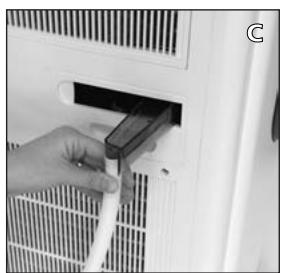
1 Pull the drainage spout ⑧ out of the machine.
2 Connect the small hose to the drainage spout (fig. C).
3 Drain the water through the hose to a water storage container.
4 Remove the hose after use. Perform these operations carefully to ensure that the drainage duct remains intact.
D 'TIMER' SETTING
Using the Timer setting, the airconditioner will turn on or off automatically. To do this, follow the directions below:
1 Press the 'TIME SET' button ⑤ while the airconditioner is activated. 24 Hr and OFF will appear on the display.
Select with the 'TIME SET' button after how many hours you want the airconditioner to de-activate.
Press the 'TIME SET' button while the airconditioner is de-activated. 24 Hr and ON will appear on the display.
Select with the 'TIME SET' button after how many hours you want the airconditioner to activate.
E PROBLEMS, CAUSES AND SOLUTIONS
Contact your dealer if you are unable to solve problems with the aid of the following hints.
| PROBLEM | CAUSE | SOLUTION |
| The machine does not work. | The plug is not in the socket. | Insert the plug into the socket. |
| The water reservoir is full. | Empty the water reservoir. | |
| The water reservoir is fitted incorrectly. | Insert the water reservoir correctly. | |
| A function has been selected, but the machine does not work. | Is the timer on? | The machine activates at the set time. |
| The machine provides no or insufficient cooling. | The temperature is lower than 15°C. | Pull the filter grille open and check for ice on the evaporator. |
| The air filter is dirty. | Clean the air filter. | |
| The machine provides no or insufficient de-humidification. | There is ice on the surface of the evaporator. | The machine is set to thaw. The compressor will restart after thawing. |
| The air filter is dirty. | Clean the air filter. |
F MAINTENANCE
Switch the machine off with the 'ON/OFF' button ⑦ and remove the plug from the socket before cleaning it. For reasons of safety it is forbidden to use large quantities of water during cleaning:
-
Clean the outside with a damp cloth and then dry it off. Do not use alcohol or cleaning agents.
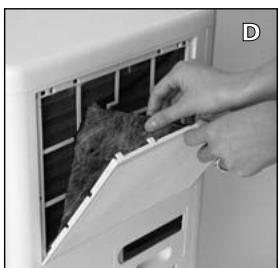
Clean the air filter 6 every two weeks. This must be carried out in the following manner: -
Remove the grille.
- Remove the charcoal filter from the grille (fig. D).
- Clean the filter and the grille with a diluted solution of detergent.
- Dry the filter and the grille and re-insert them.
Clean and dry the water reservoir 5, and then replace it.
Clean the front (grille) with a vacuum cleaner.

STORAGE
Follow these directions if you do not intend to use the machine for an extended period of time:
- Allow the interior of the machine to dry completely by running the ventilator for some time.
Allow the machine to cool. - Switch the machine off with the 'ON/OFF' button ⑦ and then remove the plug from the socket. Attach the cable to the back of the machine with the strap provided.
Empty the reservoir (see chapter C).
Clean and/or replace the filter. These are available at your dealer. - Store the Zibro Clima vertically, in a plastic bag and in a dry and well-ventilated area.

TIPS FOR SAFE USE
The machine was designed to cool, de-humidify and circulate air. This means that it must not be used for any other purpose.
It is both dangerous and forbidden to modify the machine.
Always contact your supplier if repairs are required.
It is forbidden for children to play with the machine. The machine may only be used by adults.
The machine must always be connected to the power supply with an earthed connection.
Always switch the machine off if you wish to carry out maintenance or cleaning.
Do not place the machine near heat sources, flammable installations/materials (e.g. curtains) or explosive environments.
Do not expose the machine to direct sunlight.
It is forbidden to cover the machine or insert foreign objects into the machine.
Do not direct the air stream at animals or children.
The difference between the indoor and outdoor temperature may not exceed 6^ C .
Always wait 3 minutes before re-activating the machine.
Do not use the macine in the immediate surrounding of a bath, a shower or a swimmingpool.
Do not use and extension cable or multi-socket plugboard.
- Switch the machine on and off with the ON/OFF switch ⑦ and not with the plug. Unplug the machine, when you go away for a longer period of time (e.g. holidays).
Remove the water reservoir before moving the air conditioner.

GUARANTEE CONDITIONS
The air conditioner is supplied with a 24-month guarantee, commencing on the date of purchase. All material and manufacturing defects will be repaired or replaced free of charge within this period. The following rules apply:
1 We expressly refute all further damage claims, including claims for collateral damage.
2 Repairs to or replacement of components within the guarantee period will not result in an extension of the guarantee.
3 The guarantee is invalidated if any modifications have been made, non genuine parts are fitted or repairs are carried out by third parties.
4 Components subject to normal wear, such as the filter, are not covered by the guarantee.
The guarantee is valid only when you present the original, dated purchase invoice and if no modifications have been made.
The guarantee is invalid for damage caused by neglect or by actions that deviate from those in this instruction booklet.
7 Transportation costs and the risks involved during the transportation of the air conditioner or air conditioner components shall always be for the account of the purchaser.
To prevent unnecessary expense, we recommend that you always first carefully consult the instructions for use. Take the air conditioner to your dealer for repairs if these instructions do not provide a solution.
J
| TECHNICAL SPECIFICATIONS | P7000 | P9000 |
| Mains voltage (V, Hz) | 220-230V~, 50Hz | 220-230V~, 50Hz |
| Capacity (W) | 815 | 1100 |
| Cooling capacity | 7.000 BTU/h (2,051 kW) | 9.000 BTU/h (2,637 kW) |
| Amperage (A) | 3,8 | 5,3 |
| Air capacity | 260 m³/h | 260 m³/h |
| Net weight (kg) | 32 | 33 |
| Cooling agent | R 22 (0,52 kg) | R 22 (0,6 kg) |
N.B. The air cooling capacity varies according to the ambient temperature and humidity in the room.