
D116 - Auxiliary heating ZIBRO - Free user manual and instructions
Find the device manual for free D116 ZIBRO in PDF.


| Product type | Portable dehumidifier |
| Brand | ZIBRO |
| Model | D116 |
| Dimensions (L x W x H) | 345 x 240 x 560 mm |
| Net weight | 16.0 kg |
| Power consumption | 0.3 kW |
| Mains voltage | 220-240 V / 50 Hz |
| Electrical current | 1.3 A |
| Dehumidification capacity (32°C, 80% RH) | 16 L / 24 h |
| Water tank capacity | 3.5 L |
| Maximum room volume | 150 m³ |
| Treatable volume | 70 - 105 m³ |
| Operating temperature range | 5 - 32 °C |
| Sound level | 42 dB |
| Protection class | IP 20 |
| Refrigerant | R134A |
| Refrigerant weight | 200 g |
| Automatic defrost | Yes |
| Adjustable hygrostat | 30 % - 85 % |
| Compressor type | Piston |
| Programmable timer (off) | 1 - 12 hours |
| Air filter | 3 layers: screen, 3M Filtrete, activated carbon |
| Permanent drainage | Possible via hose Ø 13 mm |
| Warranty | 2 years |
Frequently Asked Questions - D116 ZIBRO
User questions about D116 ZIBRO
0 question about this device. Answer the ones you know or ask your own.
Ask a new question about this device
Download the instructions for your Auxiliary heating in PDF format for free! Find your manual D116 - ZIBRO and take your electronic device back in hand. On this page are published all the documents necessary for the use of your device. D116 by ZIBRO.
USER MANUAL D116 ZIBRO
Congratulations with the purchase of your dehumidifier. You have acquired a high quality product which will give you many years of pleasure, if you use it responsibly. Please read the user's manual first in order to ensure the optimum life span of your dehumidifier. On behalf of the manufacturer, we provide a two-year warranty on material- or manufacturing defects.
Enjoy your dehumidifier.
Yours sincerely,
PVG International B.V.
Customer Service Department
1 PLEASE READ THE USER'S MANUAL FIRST.
2 IF YOU HAVE ANY DOUBTS, CONSULT YOUR DEALER.
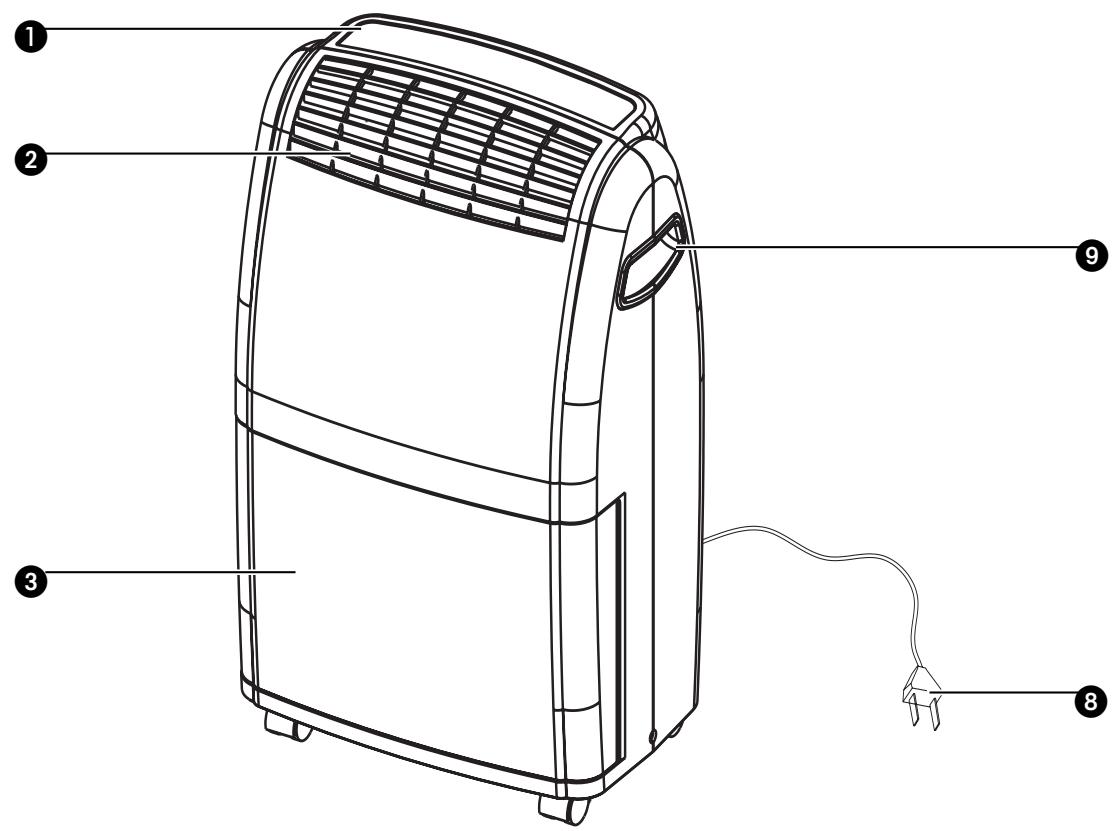
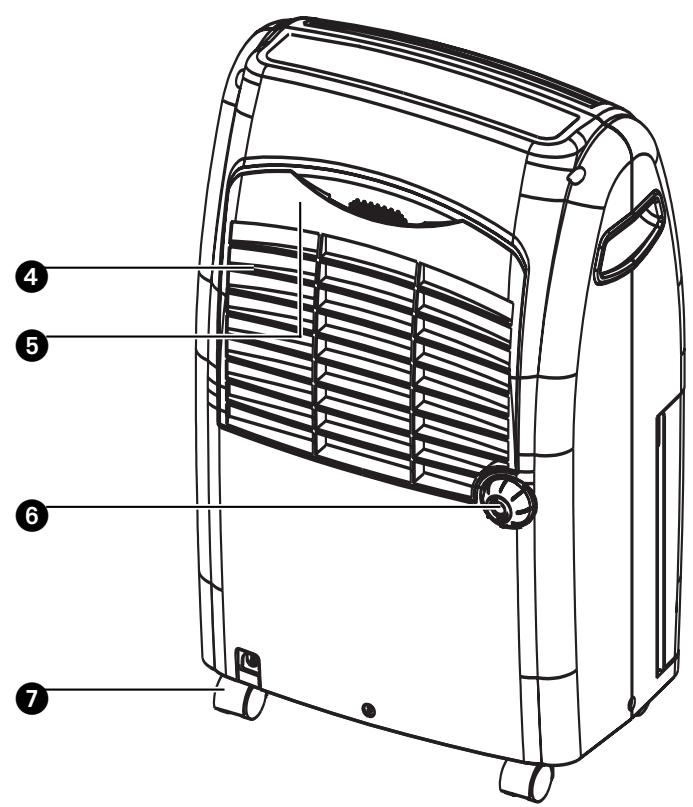
IMPORTANT COMPONENTS
Control panel
Dry air outlet
3 Removable water container
4 Humid air inlet
Air filter
Drainage spout (ø 13 mm) with cap
Castor
Plug and cord
9 Handle
SAFETY INSTRUCTIONS
Install the device only when it complies with local regulations, by-laws and standards. The unit is only suitable for use in dry locations, indoors. Check the mains voltage and frequency. This unit is only suitable for earthed sockets, connection voltage 220-240 V. / 50 Hz.
GENERAL
- To obtain optimum performance from your dehumidifier, do not place it near a radiator or any other heat source.
- Ensure that all windows are closed in order to achieve maximum efficiency.
- The capacity of the dehumidifier depends on the temperature and the humidity in the room. At lower temperatures, less moisture will be removed.
- Ensure that the screen filter is kept clean. This prevents unnecessary power consumption and guarantees optimum efficiency.
- If the power supply has been interrupted, the defumidifier will restart after three minutes. The automatic delay protects the compressor.

IMPORTANT
The device MUST always have an earthed connection. If the power supply is not earthed, you may not connect the unit. The plug must always be easily accessible when the unit is connected. Read these instructions carefully and follow the instructions.
Before connecting the unit, check the following:
- The voltage supply must correspond with the mains voltage stated on the rating label.
- The socket and power supply must be suitable for the current stated on the rating label.
- The plug on the cable of the device must fit into the wall socket.
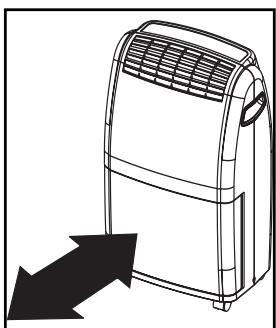
The device must be placed on a flat and stable surface.
The electricity supply to the device must be checked by a recognised professional if you have any doubts regarding the compatibility.
- This device is manufactured according to CE safety standards. Nevertheless, you must take care, as with any other electrical device.
- Do not cover the air inlet and outlet grill.
- Empty the water reservoir before moving the unit.
- Never allow the device to come into contact with chemicals.
- Never spray the unit with or submerge in water
- Do not insert objects into the openings of the unit.
- Always remove the plug from the electric power supply before cleaning or replacing the unit or components of the unit.
- Never use an extension cable to connect the device to the electric power supply. If there is no suitable, earthed wall socket available, have one installed by a recognised
electrician.
- For safety reasons take care when children are in the surrounding of the device, as with any other electrical device.
- Have any repairs only carried out by a recognised service engineer or your supplier. Follow the instructions for use and maintenance as indicated in the user manual of this device.
Always remove the plug of the unit from the wall socket when it is not in use. - A damaged power cord or plug must always be replaced by a recognised electrician or your supplier.

ATTENTION!
- Never use the device with a damaged power cord, plug, cabinet or control panel. Never trap the power cord or allow it to come into contact with sharp edges.
- Failing to follow the instructions may lead to nullification of the guarantee on this device.
THE CONTROL PANEL

This light indicates that the defrost function has been activated. This is necessary to prevent excessive formation of ice in the device.

This light indicates that the water container is full. The device switches off automatically.

ON-/OFF-button

Ventilator-button

Timer button

Adjustment buttons hydrostat

Heating button (DX118)

1 Insert the plug in the wall outlet.
2 Ensure that the water container has been positioned correctly. If the light switches on when you use the device for the first time, remove the water container from the device and replace it in the correct position.
Press the -button to switch the dehumidifier on. The -adjustment buttons are used to set the desired humidity level. The hydrostat is adjustable from 30% to 85% . The value increases by 5% each time you press the button. The display indicates the set humidity (SET HUMIDITY) and also the relative humidity (ROOM HUMIDITY).
The device starts to dehumidify when the relative humidity in the room is higher than the set value.
The device switches off automatically when the set value is reached, and restarts when the humidity in the room rises again.
4 Select the ventilator speed by pressing the -button. You can select two settings: 已 ( = low) and 已 (=) high).
5 The timer function enables you to switch the device off after a certain time. The operating time can be set between 1 and 12 hours with the -button. Every time you press the button, the running time is extended by 1 hour. This will be shown on the display. When the pre-set time has elapsed, the device will switch off.
The dehumidifier DX118 is equipped with a heating function. Press the button to turn on the heating. By pressing the button again, the heating function will be turned off.
7 Press the -button to turn the device off.
AIR FILTER
The D116 and DX118 dehumidifiers are equipped with a 3-layer filter package to clean the circulated room air. The filters are delivered with a separately packed 3M^TM FiltreteTM filter and an active carbon filter. These filters must be placed according to instructions before operating the dehumidifiers.
1 Screen filter; to remove bigger dust particles.
2 3M^TM FiltreteTM filter; to remove unhealthy particles from the air such as pollen, bacteria, animal dander and dust.
3 Active carbon filter sheet; to remove odours.
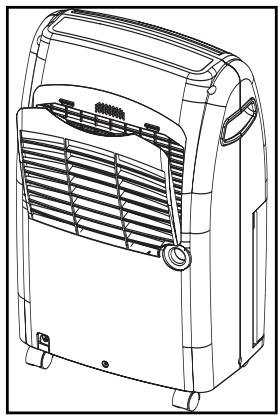
The filter holder on the backside of the unit can be opened. Active carbon filter and 3M^TM FiltreteTM filter can be removed. Screen filter is part of the filter holder.
1 The screen filter has to be cleaned regularly with a vacuum cleaner to avoid blocking of the air flow.
The positive/negative electro statically charged 3M^TM FiltreteTM filter is recommended to be changed every 3 months. Unusual dirt, construction work, pets, the presence of smokers and running the dehumidifier unit continuously can shorten the life time of the 3M^TM FiltreteTM filter.
New filter
Recommended change of filter
The active carbon sheet can be cleaned with a vacuum cleaner when dusty but has to be changed at the same time as the 3M^TM FiltreteTM filter.

NOTE!
- Never use the dehumidifier without the screen filter!
- To run the unit without active carbon sheet and/or 3M^TM FiltreteTM filter package does not bring any harm to the dehumidifier. In that case unhealthy dust is not removed.
- Replacement filters are available at your dealer.
WATER DRAINAGE
When the water container is full, the light switches on and the dehumidifier switches off automatically. Empty the container and replace it in the correct position. The device will restart.
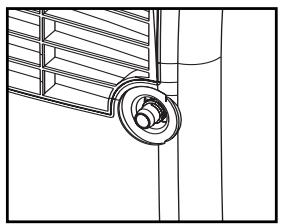
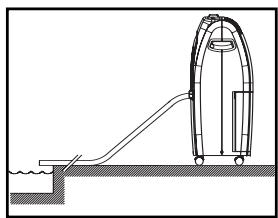
If desired, it is possible to connect a drainage hose to the device for permanent water drainage. Follow these steps:
1 Unscrew the cap on the back.
2 Remove the rubber stop from the drainage spout.
3 Connect the drainage hose and ensure that the end of the hose is lower than the spout, otherwise the water will not drain and flooding may occur.
Place the end of the drainage hose in a water outlet.
When you no longer wish to use the permanent water drainage, disconnect the drainage hose from the device. Push the rubber stop back into the drainage spout and replace the cap. Ensure that the water container is positioned correctly.
CLEANING

WARNING!
Switch off the unit and remove the plug from the mains before cleaning the appliance or filter, or before replacing the filters.
Clean the housing with a soft, damp cloth. Never use aggressive chemicals, petrol, detergents or other cleansing solutions. For maintenance of the filters, refer to Chapter "Air Filter".

NOTE!
Never use this dehumidifier without the screen filter.
STORAGE
If the machine will not be used for a long period of time, take the following steps:
1 Remove the plug from the socket and empty the container. Allow the container and the dehumidifier to dry completely.
2 Clean the air filter.
Store the device in a dust-free location, preferably covered with a sheet of plastic.
TROUBLESHOOTING
Check the following before contacting technical support:
| Problem | Cause | Solution |
| The unit does not work. | The powercord is not connected. | Insert the plug into the wall outlet. |
| The hydrostat setting is too low. | Turn the hydrostat to the desired setting. | |
| The water container is full. | Remove the water from the container. | |
| The water container has not been replaced correctly. | Place the water container in the correct position. | |
| The device does not dehumidify. | The air filter is clogged. | Clean the air filter. |
| The temperature or relative humidity in the room where the device is operating is too low. | It is normal that the device does not dehumidify in these conditions. | |
| The dehumidifier works, but reduces the relative humidity insufficiently. | The room is too large. | We recommend using a dehumidifier with a greater capacity. |
| There are too many sources of humidity. | We recommend using a dehumidifier with a greater capacity. | |
| There is too much ventilation. | Reduce ventilation (e.g. close curtains and shut doors). |
CONDITIONS OF WARRANTY
There is a two-year warranty on your dehumidifier from the date of purchase. All material or manufacturing defects will be repaired free of charge.
The following applies:
- All claims for compensation, including consequential damage, will not be entertained.
- Any repairs or replacement of components during the warranty period will not result in an extension of the warranty period.
- The warranty will expire if any alterations have been made, not genuine components have been fitted or if the dehumidifier has been repaired by a third party.
- Components subject to normal wear and tear, such as the air filter, are not covered by the warranty.
- The warranty is only valid on presentation of the original, unaltered, and date-stamped purchase receipt.
-
The warranty does not cover damage caused by actions that deviate from those as described in the user's manual or by neglect.
-
Transportation costs and the risks involved during the transportation of the dehumidifier or components shall always be for the account of the purchaser.
To prevent unnecessary expenses, we recommend that you always carefully read the user's manual first. If this does not provide a solution, take the dehumidifier to your distributor for repair.
TECHNICAL SPECIFICATIONS
| Model | D116 | DX118 | |
| Power consumption | kW | 0.3 | 0.35 |
| Power consumption (heating) | kW | - | 0.95 |
| Power supply | V / Hz / Ph | 220-240 / 50 / 1 | |
| Current (nom.) | A | 1.3 | 1.5 / 4.1 |
| Dehumidifying capacity* | L / 24h | 16 | 18 |
| Capacity water container | L | 3.5 | |
| Air flow (nom.)** | m³/h | 150 | |
| For rooms up to** | m³ | 70 - 105 | 80 - 120 |
| Operating range | °C | 5-32 | |
| Automatic defrost | Yes | ||
| Hydrostat | Yes | ||
| Compressor type | Piston | ||
| Refrigerant type / charge | r / gr | R134A / 200 gr | R134A / 210 gr |
| Pressure suction / discharge | bar | 12 / 24 | |
| Dimensions (w x d x h) | mm | 345 x 240 x 560 | |
| Net weight | kg | 16.0 | 16.5 |
| Gross weight | kg | 17.0 | |
| Noise level | dB | 42 | 45 |
| Unit Protection | IP | IP 20 | |
- Moisture removal at 32°C, 80%RH
** To be used as indication
Subject to change without prior notice.
PERFORMANCE GRAPH
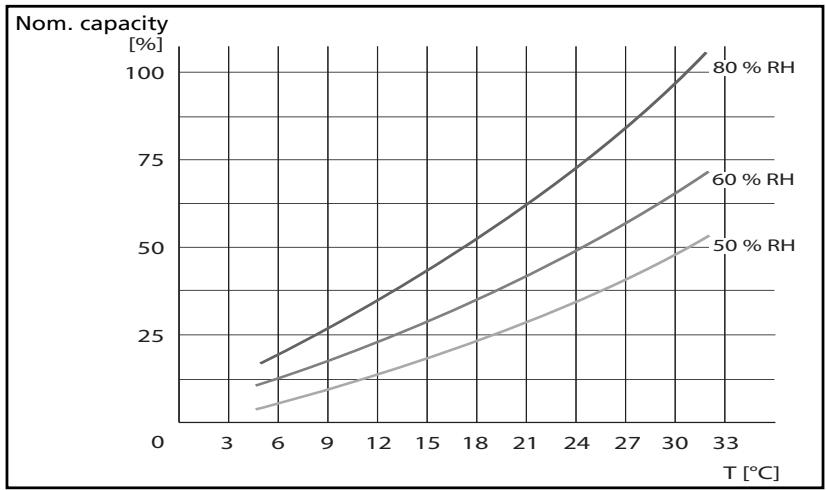
(to be used as indication only)
Waste electrical products should not be disposed with household waste. Please recycle where facilities exist. Check with your local authority or retailer for recycling advice.
Egregio signore, gentile signora,
Holloway Bank, Wednesbury
West Midlands WS10 OAW
tel.: +44 121 506 1818
fax: +44 121 505 1744
email: gases@lister.co.uk
ITALIA
PVG Italy SRL
Via Niccolò Copernico 5
50051 CASTELFIORENTINO (FI)
tel: +39 571 628 500
fax: +39 571 628 504
email: pvgitaly@zibro.com
N NORGE
Sunwind -Gylling A/S
Rudsetta 71-75 / P.O. Box 64
N-1309 RUD
tel: +4767171370
fax: +47 67 17 13 80
email: pvgint@zibro.com
NEDERLAND
PVG International B.V.
P.O.Box 96
5340 AB OSS
tel: +31 412 694 694
fax: +31 412 622 893
email: pvgnl@zibro.com
PORTUGAL
Gardena, Lda