USER MANUAL UNIVERSAL REMOTE CONTROL ND 4689 MEDION
Do not expose your remote control to the dust, the sun, humidity, high temperatures or strong vibrations.
Never mix old and new batteries together.
Do not clean the product with a corrosive or acid solution.
Do not try to repair the remote control by your own.
Do not watch with optical tools.
GENERAL INTRODUCTION
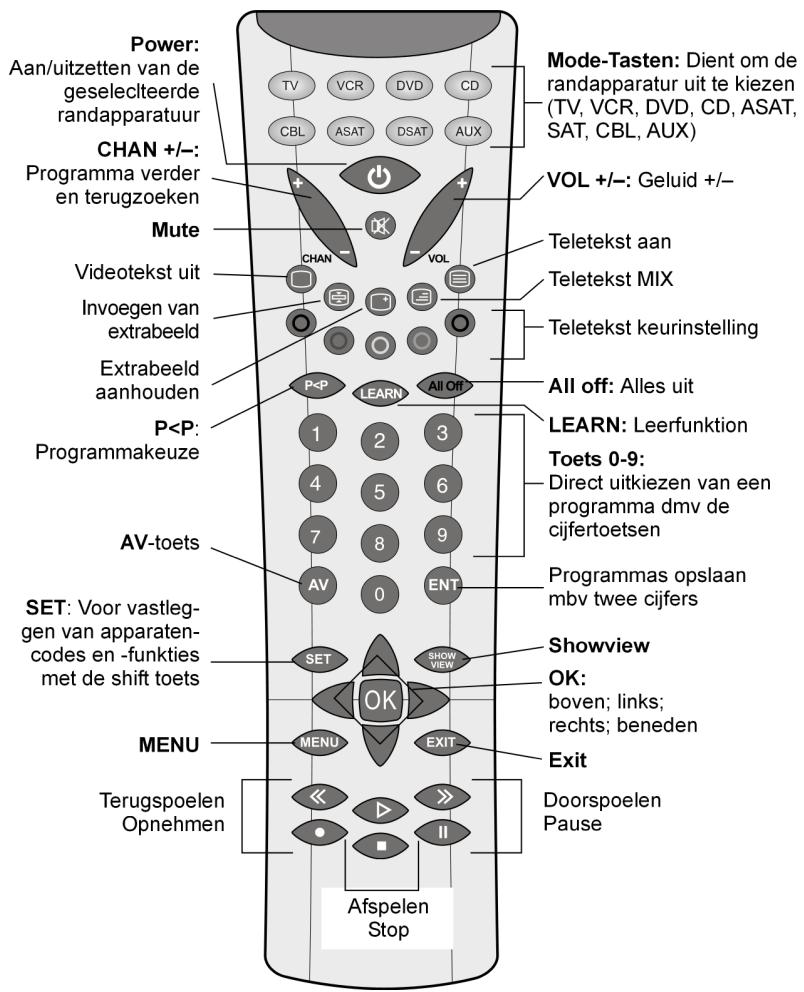
This remote control is designed to control up to 8 devices such as:
TV Television with Videotext
VCR Video Camera Recorder
DVD DVD player
CD CD player
ASAT Analog Satellite
DSAT Digital Satellite
CBL Cable
AUX Auxiliaries (TV, VCR, SAT, CD, DVD...)
Please read this user guide carefully before using the remote control. Put it in a safe place, in case you would need to read it again or to give it to a third person.
PUT THE BATTERIES IN
The remote control works with 2 LRO3 batteries. We advise to use alkaline units.
-
Open the cover on the back of the remote control
-
Check the + / - polarity on the batteries and inside the compartment
-
Insert the batteries
-
Close the cover.
If the batteries are changed, a new setup may be necessary. We advise you to write your appliance code on this user guide. Do not throw batteries in the general household waste disposal. They must be thrown in specific collectors.
PROGRAMMING THE APPLIANCE CODE
The code of the appliances you wish to control are included in the code list here enclosed. Look up the brand of your appliance and note the code numbers.
Switch on manually the appliance you wish to control.
- Press and hold the "SET" key for 3 sec. about, until the LED indicator lights continuously.
- Release the "SET" key.
- Press and release the mode key of the device you wish to control (TV, VCR, DVD, CD, SAT, AUX).
- Enter the 3 digit code from the library table. The LED turns off after the each press.
- If you entered the code correctly, the LED turns off after the last digit press. If incorrectly entered, the LED blinks for 3 seconds and then goes off.
- The code entry is finished..
CODE SEARCH (MANUAL SEARCH)
If you have tested all the available codes for your type of appliance and brand, and if your equipment does not respond to the remote control, try the automatic code search. By this way, you may find the code of your appliance, even if your brand is not included in the code list.
- Switch on manually the appliance you wish to control (TV, VCR etc...)
- Press and hold the "SET" key for 3 sec. about, until the LED indicator lights continuously.
- Release the "SET" key.
- Press and release the mode key of the device you wish to control (TV, VCR, DVD, CD, SAT, AUX).
- Press repeatedly (up to 350 times) "POWER" or "CHAN+" or "PLAY" (only for a VCR), until the appliance turns off or reacts normally.
- Briefly press "OK" button to stock the code.
EN-16


There are a huge number of different code numbers, but in the same cases it is possible that only the most common functions are available. With certain special models it might be that the described operating method may not function.
The search starts after the last 3 digits registered code.
SEARCH CODE (AUTOMATIC SEARCH)
You can also use the automatic search. Please proceed as follow:
- Switch on manually the appliance you wish to control (TV, VCR etc...)
- Press and hold the "SET" key for 3 sec. about, until the LED indicator lights continuously.
- Release the "SET" key.
- Press and release the mode key of the device you wish to control (TV, VCR, DVD, CD, SAT, AUX).
-
Point the remote control in the direction of the appliance you wish to control and press and release "CHAN +" key. The remote control starts the search and sends a code every second. Each time a code is sent, the LED turns on.
-
As soon as the appliance reacts to the remote control, press the "OK" button. If you did not press OK touch in time, you can step back by pressing CHAN- as many times as necessary, to come back to the code which made the device react. If you wish to slow down the search process (one code each 3 sec. instead of each 1 sec.), press and release CHAN+ twice (see step 5). By this way, you will have more time to confirm a code, but the search process will be longer.
CODE SEARCH UNDER BRAND NAME
This feature offers the possibility to launch the automatic search by brand. You will find the brand code in the code table, under "search code under brand name". Proceed as follows:
- Switch on manually the appliance you wish to control (TV, VCR etc...)
- Press and hold the "SET" key for 3 sec. about, until the LED indicator lights continuously.
- Release the "SET" key.
- Press and release the mode key of the device you wish to control (TV, VCR, DVD, CD, SAT, AUX). Enter the one digit code of the brand code table "Search under brand name".
- Press repeatedly "POWER" or "CHAN+" or "PLAY", until the appliance reacts normally. Proceed quickly in order to prevent the launching of the automatic search.
- Briefly press "OK" button to stock the code.
When all the codes have been sent, the LED blinks during 3 sec.
IDENTIFYING THE CODE
- Press and hold the "SET" key for 3 sec. about, until the LED indicator lights continuously.
- Release the "SET" key.
- Press and release the mode key of the device you wish to control (TV, VCR, DVD, CD, SAT, AUX). The LED blinks.
- Press again "SET". The LED blinks again.
- To identify the first digit press each number button from 0 - 9 until the LED turns Off. At this step, the number you pressed is the first digit of the code. To find the 2nd and 3rd digit, repeat the above process.
- When the third digit has been found the LED will go off.
- The identification of the code is finished.
LEARNING FUNCTION
The MD4689 remote control can stock certain functions which are not included in the entered code, even appliance codes which are not in the code list. You need your original remote control for this. To avoid mistakes, please follow the below advice.
- Use new batteries for both remote controls.
Only one appliance code can be stocked per Mode key
- Point your existing remote at the MD4689 remote (front to front) with a distance of about 5 centimetres between the remotes.
- You can stock up to 150 codes. When the memory capacity is full, the LED will blink during 3 seconds.
Learning a key can take 3 seconds
- Always check that the MD4689 key you wish to teach a code is free or does not correspond to an important function.
- No functions may be stored under the following keys: LEARN, SET, ALL OFF, P<P, SHOWVIEW, and any other MODE key.
- Experiment by learning 1 code initially (to ensure compatibility) and then clear the stored learned commands before completely learning your original remote's keyboard.
SETTING PROCESS
- Press and hold the "SET" key for 3 sec. about, until the LED indicator lights continuously.
- Release the "SET" key.
- Press and release the mode key of the device you wish to control (TV, VCR, DVD, CD, SAT, AUX). The LED blinks.
- Press "LEARN" key.
- Press and release the button on the MD4689 remote which will learn the function. (The LED permanently lights on).
- Press the function key on your original remote that you want to transmit. Hold the key until the LED on the MD4689 blinks once. (Any wrong setting is indicated by a blinking of the LED)
- Repeat steps 5 and 6 for each function you want to learn.
- When you're finished learning all the keys, press "SET".
TO CLEAR ALL STORED LEARNED COMMANDS UNDER A MODE KEY
- Press and hold the "SET" key for 3 sec. about, until the LED indicator lights continuously.
- Release the "SET" key.
- Press and release the mode key of the device you wish to control (TV, VCR, DVD, CD, SAT, AUX). The LED blinks.
- Press and release "LEARN" key twice.
- Press the "SET"key.
All learned commands entries under that mode are now cleared.
TO CLEAR ALL STORED LEARNED COMMANDS, UNDER ALL MODES
- Press and hold the "SET" key for 3 sec. about, until the LED indicator lights continuously.
- Release the "SET" key.
- Press and release the LEARN key twice.
- Press the "SET"key.
All Learned Command entries are now cleared.
"ALL OFF" FUNCTION
Press and release the POWER key to turn off the selected appliance (for ex. TV). The corresponding Mode key lights on during 1 second.
To switch oft all the appliances, proceed as follows:
- Press and release the "ALL-OFF" key
The selected device turns off and the Mode key lights on
- Press immediately again the ALL-OFF" key, during 3 seconds. All the preset appliances turn off one after the other, which can take 3 seconds. Then the Mode key is off. The remote control must stay pointed at the appliances, until the Mode key light turns off.
The POWER key allows to turn on AND oft certain appliances. These devices will be switched ON with "ALL-OFF" function, if they were OFF just before.
TOGGLE FUNCTION
You can zap between 2 distant channels by pressing "P<P" key. Proceed as follow:
- Switch on manually the appliance you wish to control (TV, VCR etc...)
- Press and hold the "SET" key for 3 sec. about, until the LED indicator lights continuously.
- Release the "SET" key.
- Press "P<P" key and the mode key of the device you wish to control.
- Enter the first channel number (3 digits as a max)
- Press again "P<P" key and the mode key of the device you wish to control
- Enter the second channel number (3 digits as a max)
- Press "P<P" key to end the setting
Certain TV sets have also a Toggle function (depending on the manufacturer, it can zap from the present and the previous channel). This function can be activated by pressing A/V or -1-- keys on your remote control.
AUTOZAPPING
When the TV mode key is selected, if you press once on the SHOWVIEW key, all the stocked channels will be scanned (point the remote control at the device). To stop the scanning, press once CHAN- key.
NORMALUSE
After having finished the setup of all A/V appliances, the MD 4689 remote control exactly activates the main functions as your original remote control. Paint the remote at the selected appliance and press the desired Mode key. Now all the functions of the selected device can be activated with your MD 4689 remote control. For each transmitted IR signal, the MODE key lights on.
UNIVERSAL FUNCTIONS
Certain functions such as the "volume", "mute", may be activated whatever the Mode key which is functioning.
Example: The last selected appliance is a VCR, but you would like to control the volume of your TV. Proceed as follow:
- Press the TV mode
- Press and hold the "SET" key for 3 sec. about, until the LED indicator lights continuously.
- Release the "SET" key.
- Press the "Mute" key during 8 seconds about, till the LED turns on a second time
SHIFT FUNCTION
Certain keys of the remote control may include a second function. To access to this second function, press and release "SET" key (the LED blinks), then press the key corresponding to this second function.
TROUBLE SHOOTINGS AND SOLUTIONS
The remote doesn't work:
- Are the A/V appliances plugged in and turned on
- Check that the batteries have the correct polarity position in the battery compartment
If the batteries are too weak, change them by new ones.
Several codes are available under my appliance brand. Which one is right?
To find the right code, try the codes of the list one by one, till you find one which makes the remote control work correctly.
The A/V appliances do not respond to certain remote control orders.
Try other codes till the appliances react correctly at the commands.
If you do not succeed, either with the manual code search or with the automatic code search, it means that your appliance may not be compatible with the remote control.

INHOU
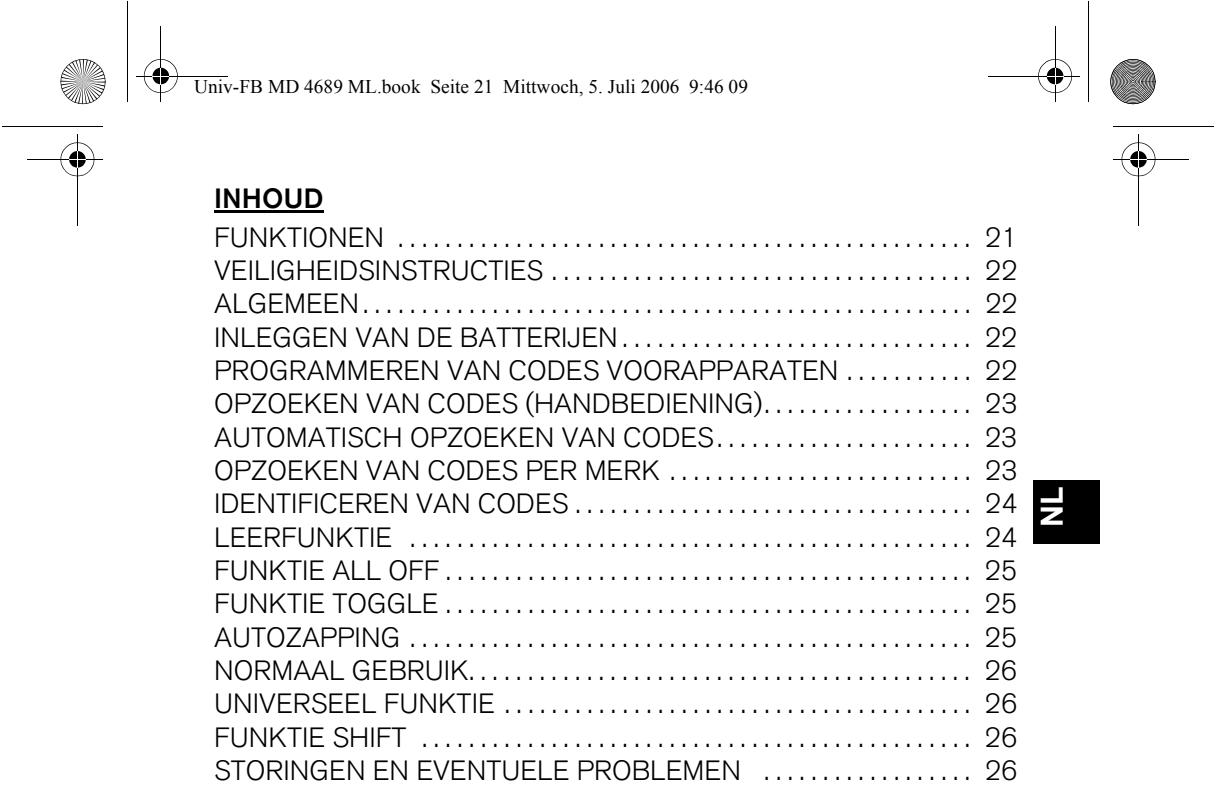
FUNKTIONEN 21
VEILIGHEIDSINSTRUCTIES 22
ALGEMEEN 22
INLEGGEN VAN DE BATTERIJEN 22
PROGRAMMEREN VAN CODES VOORAPPARATEN 22
OPZOEKEN VAN CODES (HANDBEDIENING) 23
AUTOMATISCH OPZOEKEN VAN CODES 23
OPZOEKEN VAN CODES PER MERK 23
IDENTICEREN VAN CODES 24
LEERFUNKTIE 24
FUNKTIE ALL OFF 25
FUNKTIE TOGGLE 25
AUTOZAPPING 25
NORMAAL GEBRUIK. 26
UNIVERSEEL FUNKTIE 26
FUNKTIE SHIFT 26
STORINGEN EN EVENTUELE PROBLEMEN 26
FUNKTIONEN
VEILIGHEIDSINSTRUCTIES
BUSQUEDA DE CÓDIGOS (BUSQUEDA MANUAL) 35
BUSQUEDA DE CÓDIGOS (BUSQUEDA AUTOMÁTICA) 35
BUSQUEDA DE CÓDIGOS SEGUN LA MARCA 35
BUSQUEDA DE CÓDIGOS (BUSQUEDA MANUAL)
FJARRPROGRAMMING. 48
FJARRPROGRAMMING 48
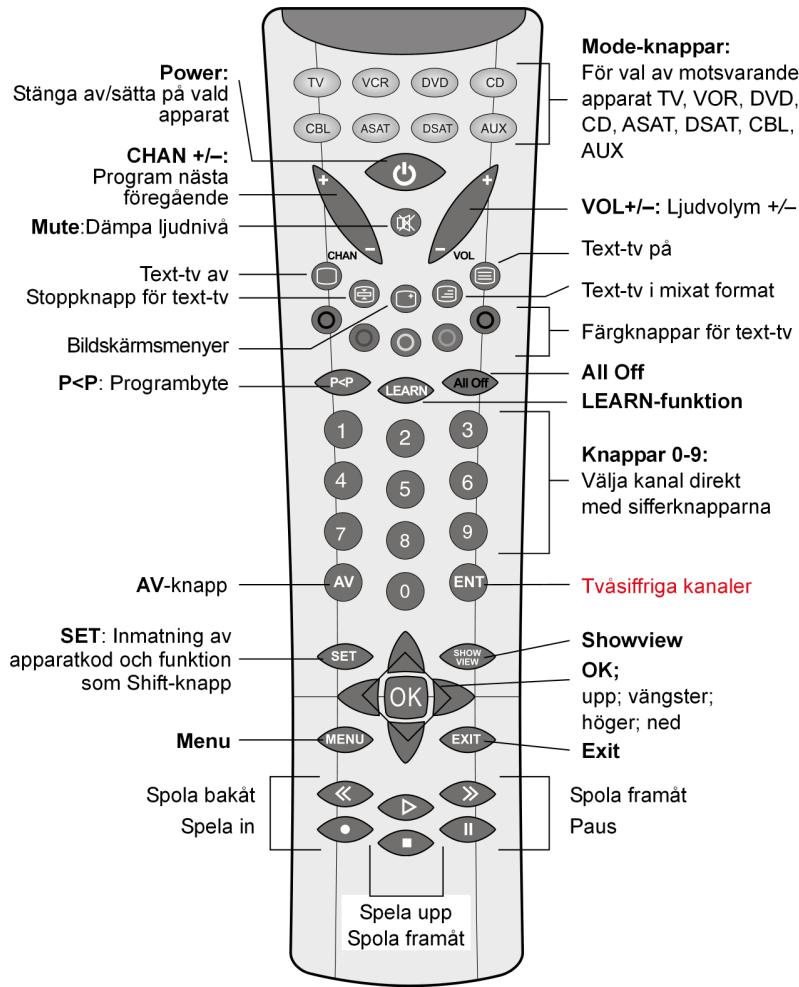
ALL OFF-FUNKTION 49
KNAPP FOR KANALVAXLING 49
AUTO-ZAPPING 49
NORMALANVÄNDNING 49
UNIVERSELLA FUNKTIONER 50
SHIFT-FUNKTION 50
MOJLIGAFELORSAKER 50
FUNKTIONER
SAKERHETSANVISNINGAR