
RDS CAR RADIO MD 41550 - Car stereo MEDION - Free user manual and instructions
Find the device manual for free RDS CAR RADIO MD 41550 MEDION in PDF.


| Product type | RDS car radio with CD/MP3 player |
| Brand and model | MEDION RDS CAR RADIO MD 41550 |
| Dimensions (W x D x H) | 178 x 155 x 50 mm |
| Power supply | 12 V DC, negative ground |
| Fuses | 0.5 A (red) and 15 A (pink) |
| Output power | 4 x 25 W RMS (peak music power) |
| Radio bands | FM (87.5-108 MHz), MW (522-1620 kHz), LW (144-288 kHz) |
| FM sensitivity | 3 µV (signal/noise ratio = 30 dB) |
| FM stereo separation | > 30 dB |
| CD/MP3 player | MPEG 64-320 kbps, 20 Hz-20 kHz, ISO9660 and Joliet formats |
| Radio functions | RDS, PTY, TA, EON, AF/REG, memory for 18 stations (6 per band) |
| CD/MP3 functions | Random play, repeat, scan, pause, search by title/artist |
| Equalizer | Sound presets (P. EQ) |
| Front panel | Detachable, angle adjustable (0 to 2 positions) |
| Outputs | Stereo Cinch (RCA) output for external amplifier |
| Antenna | Antenna relay (yellow cable) for motorized antenna |
| Safety | Horizontal installation < 30°, avoid heat and dust, protection fuses |
| Maintenance | Clean the panel with a soft cloth, avoid moisture |
| Repairability | Replaceable fuses, detachable front panel |
Frequently Asked Questions - RDS CAR RADIO MD 41550 MEDION
User questions about RDS CAR RADIO MD 41550 MEDION
0 question about this device. Answer the ones you know or ask your own.
Ask a new question about this device
Download the instructions for your Car stereo in PDF format for free! Find your manual RDS CAR RADIO MD 41550 - MEDION and take your electronic device back in hand. On this page are published all the documents necessary for the use of your device. RDS CAR RADIO MD 41550 by MEDION.
USER MANUAL RDS CAR RADIO MD 41550 MEDION
PI: Program Identification Code
EON: Enhanced Other Networks Information
PTY: Program Type Code
PI: Program Identification Code
EON: Enhanced Other Networks Information
PTY: Program Type Code
- P.EQ: Equalizer
- ^: Volume up
- OPEN/CLOSE: Control unit release
- DISPLAY
- EJECT: CD eject
- Station search/tuning
- AF/REG: RDS mode and/or regional programme mode On
- PTY: Programme Type Code includes programmes such as news, music, sport etc. depending on the broadcaster
- SEL
(MULTIJOG): Volume, bass, treble, balance and fader setting
- MUT (sound off) when using phone, for example
- MODE: Switches between radio/CD/MP3/number key 7
- v : Volume down
- DSP/0: Show programme, time, frequency and PTY settings / number key 0
- RESET: Reset to factory settings
- Station keys 1-6
- PAU: Pause (for CD/MP3)
- SCN: Scan (plays about 10 sec. of CD titles /MP3)
- RPT: Title (CD/MP3) repeat
- SHF: Shuffle - random playback (CD/MP3)
-
-
- BND/LOU: Band selection / Loudness
- AMS/MP3: Automatic station memory/switching frequency display/station name
- -<<: Station search/tuning
Back/number key 8
Forward/number key 9
- POWER: On/Off
- TA: Traffic Announcement Identification
- CD drive: To insert CD
- ANGLE Set control unit to positions 0-2
SAFETY PRECAUTION
- Place the unit into the corresponding slot or choose a place where it can be installed without impeding the driver in his usual driving job.
- Shortly connect the cables before finally installing the unit. Make sure that they are correctly connected and that the system works properly.
- If any changes at the car are necessary, contact your car dealer / service shop.
- Install the unit in a way that nobody will by injured when the car is suddenly stopped.
- If the unit is installed at an angle of more than 30^ from horizontal it may no longer give an optimum performance.
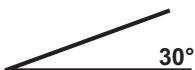
- Avoid installing the unit in the vicinity of high temperatures (e.g. caused by direct sunlight or hot air from the heating system), dust, dirt or excessive vibrations.
B

CONTENTS
FUNCTIONS 2
SAFETY PRECAUTION 3
BEFORE SWITCHING ON 5
INSTALLATION 5
INSTALLATION OF THE RADIO IN THE ISO SLOT OF YOUR CAR 5
- Detaching and attaching the operating panel 6
ISO ADAPTER PLUG 6
Aerial relay cable 6
- Stereo Cinch output 6
ADJUSTING THE PANEL 7
CABLE CONNECTIONS 8
BASIC OPERATION 9
- Switching on/off 9
Volume 9
Bass 9
Trebles 9
Balance 9
Fader 9
Loudness 9 - Display 9
Mode 9
Equalizer 9 - Reset 9
RADIO 10
- Selecting the frequency range 10
- Selecting a station 10
- Preset stations 10
- Pre-setting stations 10
Recall preset station 10
Automatic memory system (AMS) 10 - Scanning of preset stations 10
RegionalProgramme Mode 11 - PTY (Programme Type) 11
- TA Traffic announcements 11
EON TA local mode 11
EONDXMode 11 - RDS (Radio Data System) 12
CD PLAYER 13
- Inserting and removing of CDs 13
- Skipping tracks 13
- Pause CD 13
- Fast forward and reverse 13
-Playback of all tracks. 13 - Repeating a track 13
RandomPlayback 13
MP3 PLAYBACK 14
Search for tracks (numbers) 14
Search for interpreters 14
- Keys table of allocations 15
ID3-TAG FUNCTION 15
TROUBLESHOOTING 16
SPECIFICATIONS 17
BEFORE SWITCHING ON
Remove in any case both transport securing screws at the upper radio housing before starting with the installation (marked by red flags)!
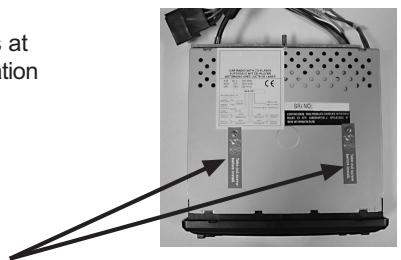
transport securing device
INSTALLATION
This car radio is simple to install in every standard ISO radio slot.
If your car has no standard ISO radio slot please contact you car dealer.
Installation of the radio in the ISO slot of your car.
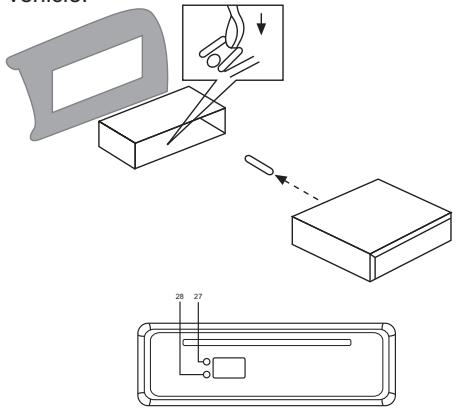
Remove the installation frame from the radio.
Push the installation frame into the radio slot in the dashboard of your car.
Bend the lugs in the installation frame using a screw driver to firmly fix the frame in the vehicle.
Check that the frame is firmly seated.
Connect the ISO socket block to the ISO plugs of your vehicle.
Connect the aerial cable of the vehicle with the aerial plug of the car radio.
Carefully push the radio into the installation frame.
Make sure that you do not pinch the cables! Push the RESET button (27) with a ball-point pen. Attach the operating panel.
ATTENTION!
Please use the ISO connections of the car radio for the connection. Depending on the car model, the matching ISO adapter plugs (counter-pieces in the car) are commercially available.
If the adapter connections are removed from or cut off the cable, then your warranty claim is no longer valid!
DETACHING AND ATTACHING THE OPERATING PANEL
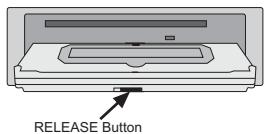
- Press the OPEN/CLOSE button (3) on the front panel. The front panel will flip down and you can see the CD-compartment.
- Move the RELEASE button on the front panel to the left, and pull on the front panel to detach it from the unit.
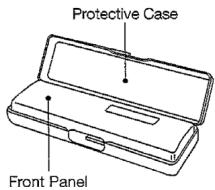
- For safekeeping, always store the front panel in the supplied protective case immediately after being removed. Protective Case
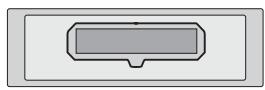
TO RE-ATTACH THE FRONT PANEL
- Place the front panel over the bracket and push it towards the unit, a 'click' sound should be heard.
- Note that if the front panel fails to lock in position properly, you probably didn't place the panel at the correct angle.
ISO Adapter plug
Caution!
Use the ISO adapter plug of the car radio to ensure a safe electrical connection.
Important notes!
Ensure that the pink backup cable is attached to the permanent plus pole (for the station memory). After all connections have been made, press the RESET button (27).
Aerial relay cable
The yellow cable is supplied for a relay-controlled aerial.
The relay will automatically extend the aerial when the unit is switched on and retracts it when it is switched off.
Caution:
Do not connect the yellow cable to the motor cable, this may damage the unit.
Stereo Cinch output
External units (e.g. amplifier) can be connected to these terminals (red and white chinch output).
ADJUSTING THE PANEL
Panel angle adjustment
You can adjust the panel angle for easy viewing.
Adjusting faceplate angle:
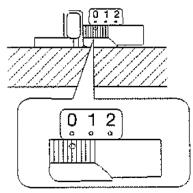
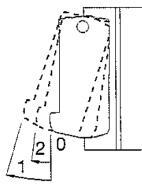
Press the Button OPEN/ CLOSE to flip the front panel down. Press the button ANGLE on the front of the CD compartment to select the panel angle. Adjustment may be made from 0 to 2.
After you have set the angle, press OPEN/ CLOSE again.
5
Note:
Firmly slide the switch until it clicks.
Do not apply excessive force to the panel under settings 1 or 2.
- Set the angle adjustment switch to "0" before removing the panel.
CABLE CONNECTIONS
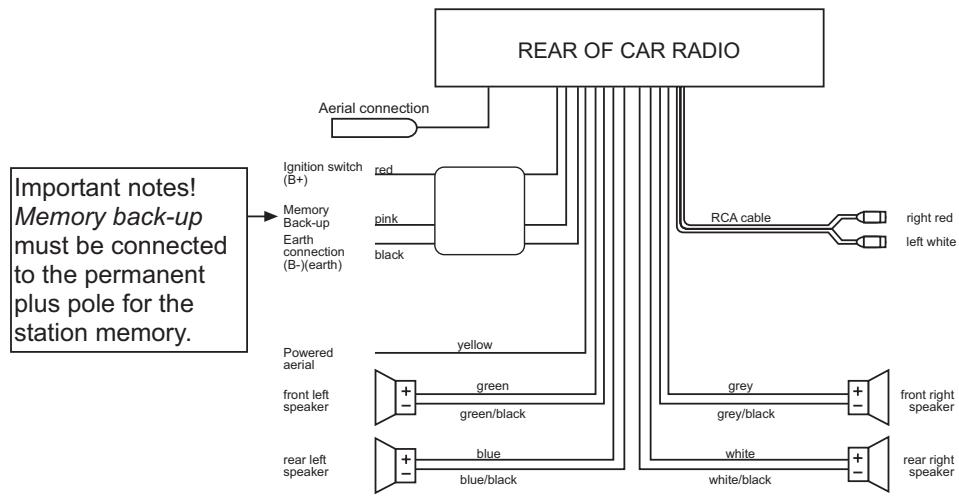
for a four-speaker (quadro) system

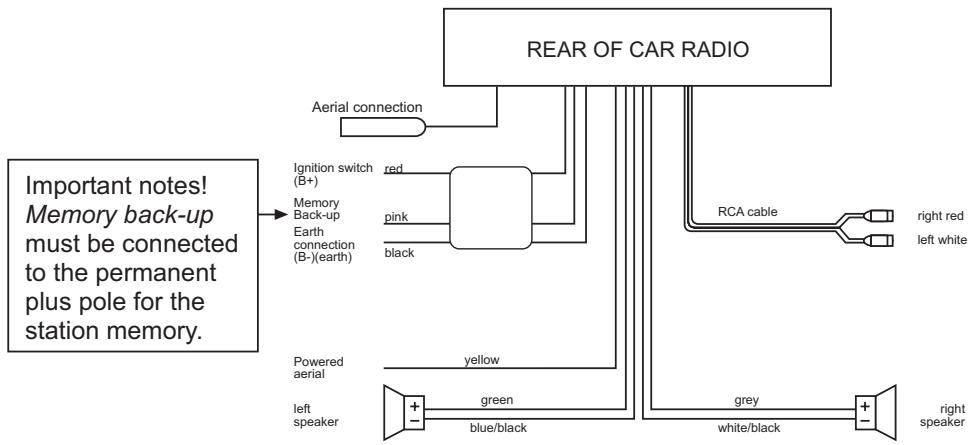
for a two-speaker (dual) system
BASIC OPERATION
- Switching on /off
Press the PWR button (9) to switch on/off the unit.
Volume
Adjust the volume by pressing buttons ^ (11) and v (12).
Control the volume only to a level that you are still able to hear the acoustic signals of approaching ambulances/fire service/police cars!
Bass
Press SEL button (10) once to set the bass. Press the buttons ^ (11) or v (12) to increase or lower the bass.
- Trebles
Press SEL button (10) twice to set the trebles. Press the buttons ^ (11) or v (12) to increase or lower the trebles.
Balance
Press SEL button (10) three times to set the balance. Press the buttons ^ (11) or v (12) to set the balance of the right and left speakers.
Fader
Press SEL button (10) four times to set the fader. Press the buttons ^ (11) or v (12) to set the fader of the front and rear speakers.
- Loudness
Keep the BND/LOU button pressed until you hear a signal sound. The display shows LOUD ON or LOUD OFF. This increases the deep frequencies at low volume to a psychoacoustically correct listening level.
- Display
Press the DSP/0 button (15) to scan the following information:
Programme name
Frequency
Time (is set automatically with RDS reception)
PTY settings
(These RDS functions are broadcast by the radio stations in differing quality and contents. You find more information in the chapter RADIO under RDS).
Mode
You can switch between radio and CD by pressing the MOD button (6).
Equalizer
FLAT CLASSICS POPM ROCK M DSP OFF
- Reset
To reset your car radio to the works settings, press the RESET button (28) using a ball-point pen. You find this button behind the operating panel!
Press the RESET button
-
before using the unit for the first time after connecting all the cables,
-
if all the function buttons are not working correctly,
-if an error message appears in the display.
RADIO
- Selecting the frequency range
Press the LOU/BND button (13) to change between VHF (F1, F2, F3), medium wave (MW) and long wave (LW). You can memorise six radio stations in each band.
- Selecting a station
Give the Tune buttons I < C < (16) or I (17) a short press, and the unit will automatically search for the next station. If you press one of the TUNE button for two seconds, it switches to a manual search for stations. The display shows MANUAL.
Now you can select and save the station by pressing the TUNE button. After a short waiting period, the unit switches back into the automatic station-search mode.
- Preset stations
In each wave band up to six stations can be memorised and recalled using the station buttons 1-6 (14).
- Pre-setting stations
- Press the BND/LOU button (13) to select the frequency range.
- Press the TUNE button I << (16) or I >> (17) to select a station.
- Keep one of the station buttons 1-6 (14) pressed for approx. 3 seconds. A signal sound confirms the storage of the station.
- Recall preset station
- Press the BND/LOU button (13) to select the frequency range.
- Press the station button (14) to recall the preset station.
Automatic memory system (AMS)
Keep the AMS/MP3 button (18) pressed until you hear a signal sound. The display shows SEARCH. The station search stops for approx. 5 sec. at each found station. The number flashing in the display shows the number of the station key where the corresponding station is to be stored. The tuner automatically scans past stations with a weak reception.
- Scan of preset stations
Automatic scanning of the preset stations in the wave band.
- Press the BND/LOU button (13) to select the frequency range.
- Give the the AMS/MP3 button (18) a short press. Now all stations are played for some seconds. When the desired station is reached, give the AMS/MP3 button (18) a short press.
Regional Programme Mode
Some stations broadcast different regional programmes. To select only the alternative frequencies of the desired regional programme keep the AF/REG button (3) pressed for some time until a signal sound will be audible to switch the mode on or off. The display shows REG ON/REG OFF.
- PTY (Programme Type)
To activate the menu, press the PTY button (1).
You can now choose the type of programme your station is to broadcast from the following categories:
| MUSIC | LANGUAGE | |
| 1 | POP M, ROCK M | NEWS, AFFAIRS, INFO |
| 2 | EASY M, LIGHT M | SPORT, EDUCATE, DRAMA |
| 3 | CLASSICS, OTHER M | CULTURE, SCIENCE, VARIORED |
| 4 | JAZZ, COUNTRY | WEATHER, FINANCE, CHILDREN |
| 5 | NATION M, OLDIES | SOCIAL, RELIGION, PHONE IN |
| 6 | FOLK M | Travel, Leisure, Document |
(The information given depends on the radio station)
6
- TA Traffic announcements
Press the TA button (2) for a short time to switch the TA mode on or off.
When the TA mode is switched on and traffic announcements are broadcast, and the unit has been switched to CD or AUX, the unit is automatically switched to radio reception. The unit temporarily switches to the EON network station, if EON finds a traffic announcement on a different programme. If the volume has been reduced to below the threshold, it will be increased. The TA function during the traffic announcements is interrupted by pressing the TA button (2). This does not switch off the TA mode. If the TA button (2) is pressed for longer, the EON TA LOCAL / EON TA DISTANCE mode is selected.
With this mode it is possible to allocate information to EON TA when you listen for instance to a station without traffic announcements. If there is a traffic announcement on another station frequency the unit automatically switches to this station for this period of time. As soon as the announcement is finished the unit switches back to the previous station.
EON TA local mode
When the EON TA LOCAL mode has been selected, the EON TA LO flashes for a few seconds in the display. The mode for the local region has been selected.
EON DX mode
If the EON DX mode was selected EON TA DX flashes in the display for a few seconds. The mode for distant regions has been selected.
RDS (Radio Data System)
RDS is a service of the radio stations. Besides the usual music and text pieces, additional information is broadcast in form of encoded digital signals which can be evaluated by the car radio.
Press the AF/REG button (3) to switch the RDS mode on and off. When the RDS mode is active, the symbol AF appears in the display. When a station is received, the name of the programme and other information is shown on the display (8).
This information given depends on the radio station.
Different RDS services are offered:
PI: Program Identification Code
The radio can identify the received station using the PI code.
PS: Program Service Name
With the feature Program Service the station name can be displayed.
AF: Alternative Frequencies
The radio automatically selects the alternative frequency of the same programme with the best reception.
TP/TA: Traffic Program/Traffic Announcement
EON: Enhanced Other Networks Information
If there is any traffic announcement it is switched over to a station with traffic announcements within the station chain when you listen to a non-traffic announcement station.
PTY: Program Type Code
Using Program Type the radio can look for stations with programme contents which can be preselected, e.g. sport, news, rock, pop,...
CD-PLAYER
- Inserting and removing of CDs
Insert the CD in the slit (5). CD playback starts.
The display shows S--CDP (i.e. "search track"). To remove the CD, press the EJECT button (4).
Playback stops and the CD is ejected. The unit switches to radio mode.
- Skip tracks
Press the TUNE button |<< (16) or button >>| (17) to skip to the next track.
The number of the track is shown in the display (8).
CD pause
During playback, press the PAU button (20) and the CD playback is paused. When the PAU button (20) is pressed again, the CD restarts.
- Fast forward and fast backward
Press the TUNE button |<< (16) or button >>| (17) during playback for longer to start fast forward/ backward.
- Playback of all tracks
Press the SCN button (21) and the first 10 seconds of every track are played. Press the SCN button (21) again to restart normal playback.
B
- Repeating a track
Press the RPT button (22) to continuously repeat the track. Press the RPT button (22) again to deactivate this function.
- Random Playback
Press the SHF button (23) to shuffle between all tracks on the CD in a random order.
Note:
- Driving on bumpy roads could cause the CD to skip. A short play time improves the performance. Skipping does not cause damage to the CD.
- Moisture and high humidity can cause malfunctions of the CD player. Switch on the car heating, and allow moisture to evaporate before operating.
- Do not subject the CD player to any extremely high or low temperatures.
- Do not drive with an ejected CD in the slit.
MP3 PLAYBACK
The playback starts automatically when a MP3 CD-ROM is inserted. You find the individual key functions in the chapter CD Player.
You can directly select the track or interpreter. Please take into account that most of the MP3 functions are dependent on the type of creation of the MP3 CD.
- Search for tracks (numbers)
Press the AMS/MP3 button (18) once. The display shows MP3T ....
Enter the number of the desired track by pressing the keys given in the table.
Press the BND/LOU button (13) to confirm the input or wait for approx. 5 sec. until the unit automatically skips to the selected track.
Search for interpreters
Press the AMS/MP3 button (18) twice. The display shows a flashing ....
Enter the name of the desired interpreter by pressing the keys given in the table.
Observe that the SEL button (10) must be pressed after the input of every character before the next one can be entered (character shift).
Press the BND/LOU button (13) to confirm the input.
Now, the unit searches for the corresponding track.
Press the BND/LOU button once again if the unit has found the desired interpreter. The track is played now.
Note:
The search function depends on the created MP3 CD.
Table keys of allocations
| AMS/MP3 (18) | Select settings |
| BND/LOU (13) | Confirm |
| 1 (14) | A, B, C, 1 |
| 2 (14) | D, E, F, 2 |
| 3 (14) | G, H, I, 3 |
| 4 (14) | J, K, L, 4 |
| 5 (14) | M, N, O, 5 / 10 track down |
| 6 (14) | P, Q, R, 6 / 10 track up |
| MODE (6) | S, T, U, 7 |
| |<< (16) | V, W, X, 8 |
| >>| (17) | Y, Z, space, 9 |
| SEL (10) | Character shift to the right |
| DISP/0 (15) | 0,_, -, +, |
| ▲ (11)▼ (12) | Scroll function A-Z / 0-9 |
G
Note:
If you create MP3 CD-ROM please make sure that the tracks are stored individually or in directories. Never mix tracks or directories since it could lead to problems during the playback. All standard codings are suitable for playback.
ID 3-TAG FUNCTION
You can store additional information when creating a MP3 CD. This can be information on the interpreter, track, album name or year of publication of the piece of music or a short comment. We recommend an ID3-tag editor to enter this information.
This information is shown in the display after the scanning during the playback. So it is possible to display, besides the track number, the name of the track or interpreter during the playback of MP3 CDs (dependent on the stored information on the MP3 CD).
To scan it press the DSP/0 button (15). The ID3-tag entry of the current playback is shown after each keypress:
TRACK - INTERPRETER - ALBUM NAME - YEAR OF PUBLICATION - COMMENT
TROUBLESHOOTING
| Problem | Cause | Solution |
| The unit cannot be switched on. | The ignition is not switched on. | Switch on the ignition by turning the key. |
| The fuse is defect. | Change the fuse. | |
| The CD cannot be loaded or ejected. | There is already a CD in the unit. | Remove the CD from the player, then insert a new CD. |
| The CD has been inserted upside-down. | Always insert the CD with the writing facing upwards. | |
| The CD is very dirty or defect. | Clean the CD or try to play another one. | |
| Temperature in the car is too high. | Allow to cool until the ambient temperature is back to normal. | |
| Condensation. | Switch off the unit for a few hours and then try again. | |
| No sound | Volume set to minimum. | Turn up the volume to the desired level. |
| The cables are not correctly connected. | Check the cable connections. | |
| Function buttons do not work. | The built-in microcomputer cannot function due to noise. | Press RESET button. |
| The operating panel is not seated correctly. | Check that the operating panel is seated correctly and firmly. | |
| CD skips. | The installation angle of the unit is greater than 30°. | Adjust the installation angle to less than 30°. |
| The CD is very dirty or defect. | Clean the CD or try to play another one. | |
| Defective self-burned CDs | Check the CD in another unit | |
| Radio not functioning. Automatic station selector not functioning. | The aerial cable is not correctly connected. | Firmly plug in the aerial cable. |
| The broadcast signals are too weak. | Select the transmitter manually. | |
| Station memory not functioning. | The pink cable is not connected to the permanent plus pole. | Check the cable connections. |
SPECIFICATIONS
General
Operating voltage: DC 12 V, negative earth connection
Housing dimensions: 178 × 155 × 50 mm (WxDxH)
Peak music power output 4 x 25W R.M.S.
Fuse: 0.5 Ampere (red), 15 Ampere (pink)
MP3/CD-Player
MPEG Rate 64-320K
Frequency range 20 Hz~20 kHz
MP3Playback ISO9660&Joliet format of MP3
Radio
| For 3 frequency bands | |
| Frequency range | FM |
| IF | 87.5 to 108 MHz |
| Sensitivity | 10.7 MHz |
| (Signal-to-noise ratio = 30 dB) | 3 μV |
| Stereo separation | > 30 dBu |
| Frequency range | MW |
| IF | 522 to 1620 MHz |
| (Signal-to-noise ratio = 30 dB) | 45 kHz |
| Stereo separation 32 dBu | |
| Frequency range | LW |
| IF | 144 to 288 MHz |
| Sensitivity | 450 kHz |
| (Signal-to-noise ratio = 30 dB) | 35 dBu |
CD-Player
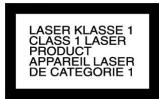
Use only CDs labelled as follows:

Laser class 1
Subject to technical modifications.
FONCTIONS
Mode programme regional 11
Cable antenna-relais
PI: Program Identification Code
EON: Enhanced Other Networks Information
PTY: Program Type Code
- Automatism lagring (AMS)
Hold AMS/MP3-tasten (18) trykt, til der hørs en signallyd. I displayet vises SEARCH. Søgningen stopper ved hver fundet station i ca. 5 sekunder. Ciffret, som blinker i displayet, viser lagerpladstastens nummer, på hvilket den modsvarende station lagres.
Ved stationer, som/DDe modtages godt, fortseiter sogningen automatisk.
Gennemlobe forprogrammeringen
- PTY (program-type/art)
PI: Program Identification Code
EON: Enhanced Other Networks Information
PTY: Program Type Code
- POWER: Accensione/spegnimento
- TA: Traffic Announcement Identification
PI: Program Identification Code
TP/TA: Traffic-Program/Traffic-Announcement
EON: Enhanced Other Networks Information
PTY: Program Type Code