
PF-660 - Printer KYOCERA - Free user manual and instructions
Find the device manual for free PF-660 KYOCERA in PDF.



| Product Type | Printer |
| Brand | KYOCERA |
| Model | PF-660 |
| Dimensions (W × D × H) | 670 mm × 580 mm × 705 mm (26 3/8" × 22 13/16" × 27 3/4") |
| Weight | Approx. 45 kg (99.21 lb) |
| Supported paper sizes (inches) | 11 × 17", 8 1/2 × 14", 8 1/2 × 11", 11 × 8 1/2" |
| Supported paper sizes (metric) | A3, A4, A4R |
| Supported paper weight | 60 to 200 g/m² |
| Supported paper types | Plain, recycled, color, thick |
| Optional cassette capacity | Up to 4000 sheets (80 g/m²) |
| Ambient temperature | 10°C to 32.5°C |
| Ambient humidity | 15% to 80% |
| Paper loading indicator | Yes (green = loading possible, red = capacity exceeded) |
| Main functions | Printing, automatic paper loading |
| Cleaning | Unplug before cleaning; call a technician for internal parts |
| Safety | Do not disassemble; avoid water and metal objects; unplug if abnormal |
| Repairability | Contact after-sales service; do not repair yourself |
| User manual | 88 pages, multilingual (FR, DE, EN, ES, IT, etc.) |
Frequently Asked Questions - PF-660 KYOCERA
User questions about PF-660 KYOCERA
0 question about this device. Answer the ones you know or ask your own.
Ask a new question about this device
Download the instructions for your Printer in PDF format for free! Find your manual PF-660 - KYOCERA and take your electronic device back in hand. On this page are published all the documents necessary for the use of your device. PF-660 by KYOCERA.
USER MANUAL PF-660 KYOCERA
Safety Information 3
Part Names 8
Loading Paper 9
Loading Paper in the Side Feeder 10
Troubleshooting 12
Paper Jams 13
Specifications 15
2 Deutsch
Please read the Operation Guide before using this product. After reading, keep it close to the machine for easy reference.
Refer to the Operation Guide for the machine for information on the service representative for your product.
The sections of this Operation Guide and parts of this product marked with symbols are safety warnings meant to protect the user, other individuals and surrounding objects, and ensure correct and safe usage of the product.
The symbols and their meanings are indicated below..

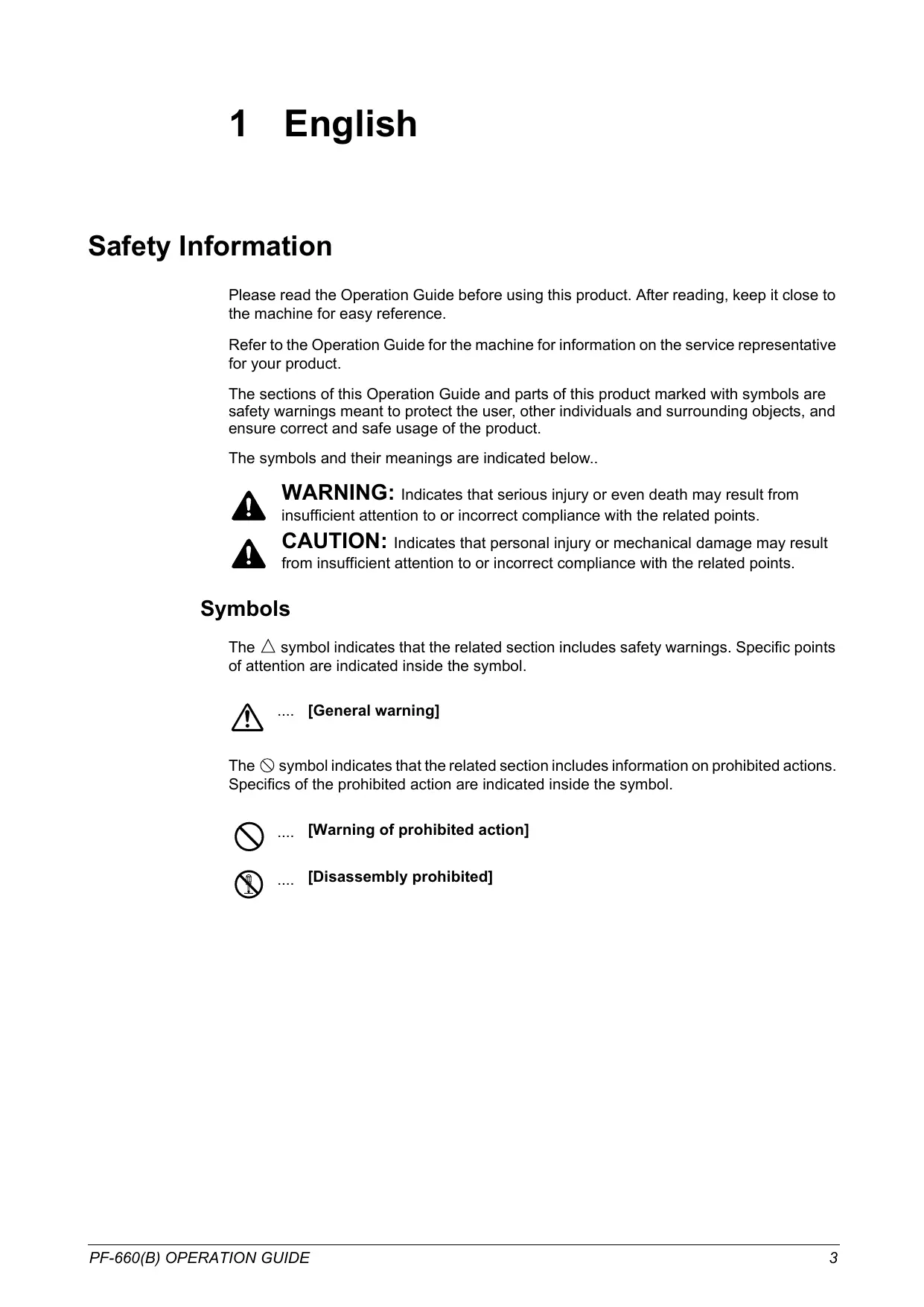
WARNING: Indicates that serious injury or even death may result from insufficient attention to or incorrect compliance with the related points.

CAUTION: Indicates that personal injury or mechanical damage may result from insufficient attention to or incorrect compliance with the related points.
Symbols
The symbol indicates that the related section includes safety warnings. Specific points of attention are indicated inside the symbol.

[General warning]
The symbol indicates that the related section includes information on prohibited actions. Specifics of the prohibited action are indicated inside the symbol.

[Warning of prohibited action]

[Disassembly prohibited]
The symbol indicates that the related section includes information on actions which must be performed. Specifics of the required action are indicated inside the symbol.

[Alert of required action]

[Remove the power plug from the outlet]

[Always connect the product to an outlet with a ground connection]
Please contact your service representative to order a replacement if the safety warnings in this Guide are illegible or if the guide itself is missing (fee required).
INSTALLATION PRECAUTIONS
Environment

CAUTION
Avoid placing this product on or in locations which are unstable or not level. Such locations may cause the product to fall down or fall over. This type of situation presents a danger of personal injury or damage to the product.

Avoid locations near radiators, heaters, or other heat sources, or locations near flammable items, to avoid the danger of fire.

Other precautions
The requirements for the operating environment are as follows:
- Temperature: 10^ C to 32.5^ C( 50^ Fto90.5^ F)
- Humidity: 15% to 80% .
Note that ambient environmental conditions, such as ventilation, may affect performance.
The following locations should be avoided:
- Avoid locations near a window or with exposure to direct sunlight.
- Avoid locations with vibrations.
- Avoid locations with drastic temperature fluctuations.
- Avoid locations with direct exposure to hot or cold air.
Handling of plastic bags

WARNING
Keep the plastic bags that are used with this product away from children. The plastic may cling to their nose and mouth causing suffocation.

PRECAUTIONS FOR USE
Cautions when using this product

WARNING
DO NOT place metallic objects or containers with water (flower vases, flower pots, cups, etc.) on or near this product. This type of situation presents a danger of fire or electrical shock should any water fall inside.

DO NOT damage, break or attempt to repair the power cable. DO NOT place heavy objects on the power cable, pull it, bend it unnecessarily or cause any other type of damage. These types of situations present a danger of fire or electrical shock..

NEVER attempt to repair or disassemble this product or its parts as there is a danger of injury or fire or electrical shock.

If this product becomes excessively hot, smoke appears, there is an odd smell, or any other abnormal situation arises, there is a danger of fire or electrical shock. Immediately turn OFF (O) the machine's main power switch, remove the machine's power plug from its outlet and contact your service representative.

If anything harmful (paper clips, water, other fluids, etc.) falls into this product, immediately turn the machine OFF (O) at the main power switch, remove the copier/printer power plug from its outlet and then contact your service representative. If you continue to use this product without taking these steps, there is a danger of fire or electrical shock.

ALWAYS contact your service representative for maintenance or repair of internal parts.


CAUTION
For safety purposes, ALWAYS turn OFF (O) the machine's main power switch and remove the machine's power plug from its outlet when performing cleaning operations on this product.

DO NOT touch the ejection tray when the product is in operation as there is a danger of injury.

If dust accumulates within this product, there is a danger of fire or other trouble. It is therefore recommended that you consult with your service representative in regard to cleaning of internal parts. This is particularly effective if accomplished prior to seasons of high humidity. Consult with your service representative in regard to the cost of cleaning the internal parts of the product as well.

Other Precautions
DO NOT place heavy objects on this product or cause other damage to the product.
When lifting or moving the product, contact your service representative.
Do not touch electrical parts, such as connectors or printed circuit boards. They could be damaged by static electricity.
DO NOT attempt to perform any operations not explained in this Operation Guide.
Safety Instructions Regarding the Disconnection of Power
Caution: The power plug is the main isolation device! Other switches on the equipment are only functional switches and are not suitable for isolating the equipment from the power source.
DECLARATION OF CONFORMITY
TO
2004/108/EC, 2006/95/EEC, 93/68/EEC and 1999/5/EC

We declare under our sole responsibility that the product to which this declaration relates is in conformity with the following specifications.
EN55024
EN55022 Class B
EN61000-3-2
EN61000-3-3
EN60950-1
EN60825-1
EN300 330-1
EN300 330-2
WARNING
This equipment has been tested and found to comply with the limits for a Class B digital device, pursuant to Part 15 of the FCC Rules. These limits are designed to provide reasonable protection against harmful interference in a residential installation. This equipment generates, uses and can radiate radio frequency energy and, if not installed and used in accordance with the instructions, may cause harmful interference to radio communications. However, there is no guarantee that interference will not occur in a particular installation. If this equipment does cause harmful interference to radio or television reception, which can be determined by turning the equipment off and on, the user is encouraged to try to correct the interference by one or more of the following measures:
Reorient or relocate the receiving antenna.
- Increase the separation between the equipment and receiver.
- Connect the equipment into an outlet on a circuit different from that to which the receiver is connected.
- Consult the dealer or an experienced radio/TV technician for help.
The use of a non-shielded interface cable with the referenced device is prohibited.
CAUTION — The changes or modifications not expressly approved by the party responsible for compliance could void the user's authority to operate the equipment.
This device complies with Part 15 of FCC Rules and RSS-Gen of IC Rules.
Operation is subject to the following two conditions; (1) this device may not cause interference, and (2) this device must accept any interference, including interference that may cause undesired operation of the device.
- The above warning is valid only in the United States of America.
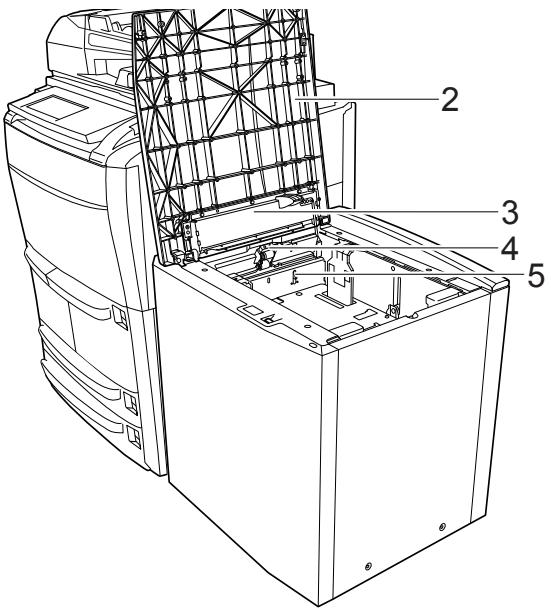
Part Names
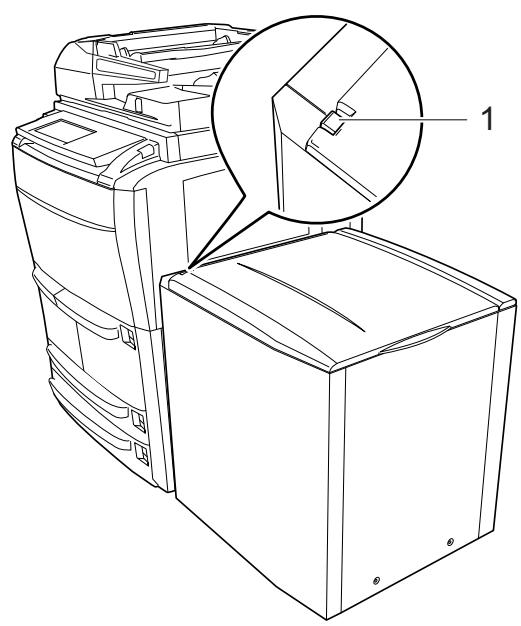
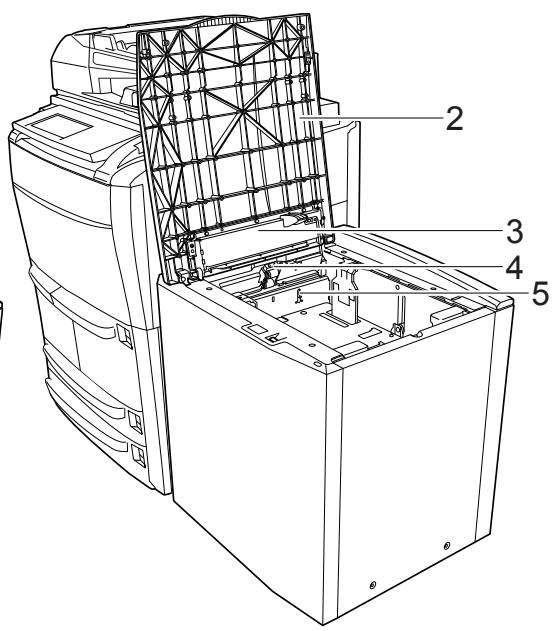
1 Release Lever
2 The top cover
3 Loading Paper indicator
4 The switch for the paper lifter
5 The detect switch
Loading Paper
For details on the types of paper supported, refer to Paper in the Appendix of the Advanced Operation Guide.
Before Loading Paper
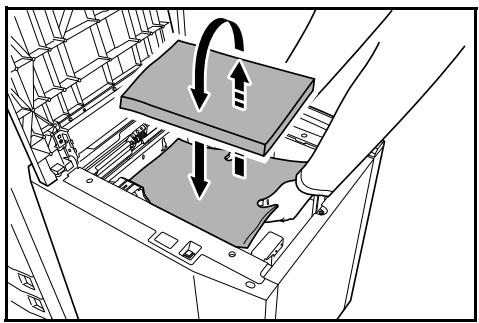
When you open a new package of paper, follow the instructions as below to fan through the paper prior to loading.
1 Holding the paper on both sides, bend the edges downward so that the middle curves upward.
2 Holding your thumbs in place toward the center, unbend the paper so that the bottom sheet is back at its original position. Your thumbs should prevent the stack from straightening out, forming a hill-like shape.
3 Fluff the paper, raising one hand and lowering the other, then
alternating. The individual sheets are slightly lifted, separated from each other.
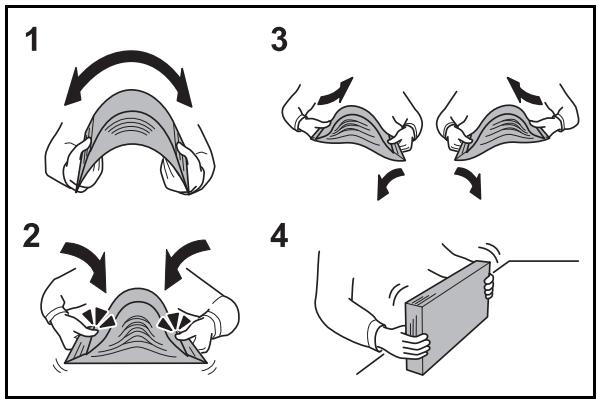
4 Align the sheets by tapping the stack on a flat surface.
If the paper is curled or folded, straighten it before loading. Paper that is curled or folded may cause paper jams.
IMPORTANT: If you copy onto used paper (paper already used for copying), do not use paper that is stapled or clipped together. This may damage the copier or cause poor image quality.
If ejected copies are not flat or are stacked unevenly, turn the paper in the side feeder over and reload it.
Avoid exposing opened paper to high temperatures and high humidity as dampness may cause copying problems. Seal any remaining paper after loading the side feeder in its original package. If the copier will not be used for a prolonged period, protect all paper from humidity by removing from the side feeder and sealing in the original package.
Loading Paper in the Side Feeder
The side feeder has a capacity of 4000 sheets standard paper(80g/m²). The following paper sizes can be used in side feeder.
Inch models: 11 × 17", 81/2 × 14", 81/2 × 11", 11 × 81/2"
Metric models: A3, A4, A4R
NOTE: After loading paper, be sure to specify the type of the paper loaded in the side feeder on the operation panel. The available options are plain, recycled, colored paper and thick paper.
For details, refer to the Operation Guide for the machine.
Consult your Dealer or Service Representative for changing the paper sizes.
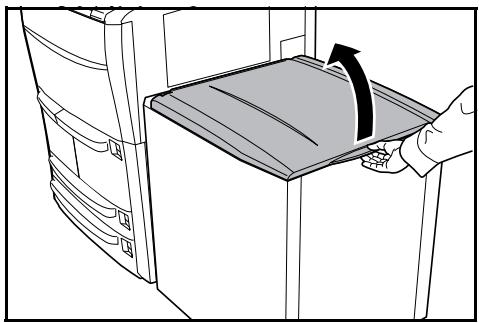
1 Open the top cover.
2 Align the paper flush against the left side in the back of the feeder as you load it.
NOTE: Before loading the paper, be sure that it is not curled or folded. Paper that is curled or folded may cause paper jams. Load the paper with the side to be copied face-up.
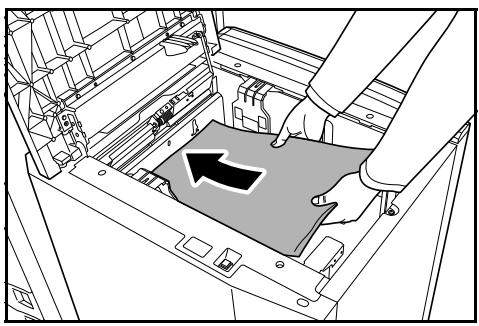
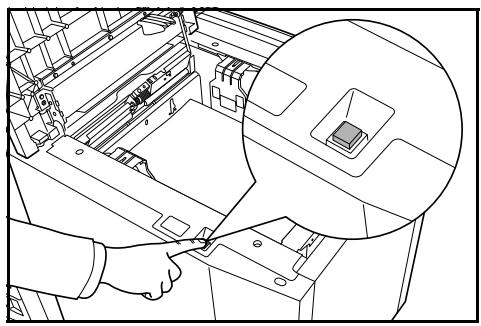
NOTE: The side feeder detects the paper when the paper touches the detect switch. The paper lifter descends for approximately 500 sheets after three seconds.
Paper can be added after the paper lifter is stopped.
Do not touch the paper lifter when it is running.
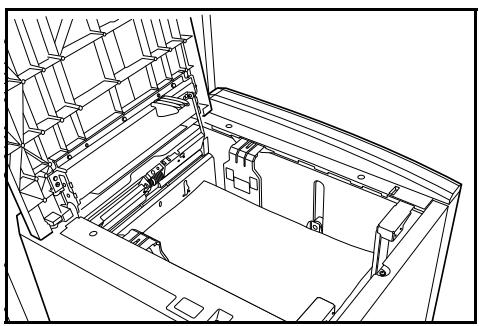
While the paper lifter has lighted in green, it is available to descend the paper lifter manually.
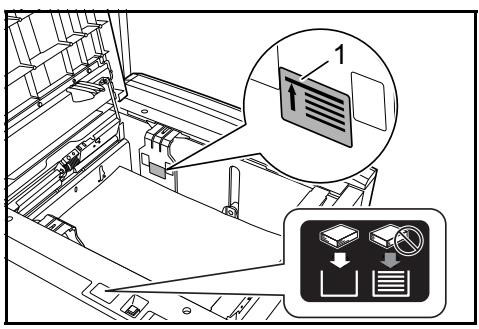
IMPORTANT: If the paper exceeds the indicated level (1) when the paper lifter is at the bottom, the loading paper indicator lights in red and the error message is displayed.
Ensure that the paper does not exceed the indicated level (1).
For details of the error messages, refer to Responding to Error Messages on page 12.
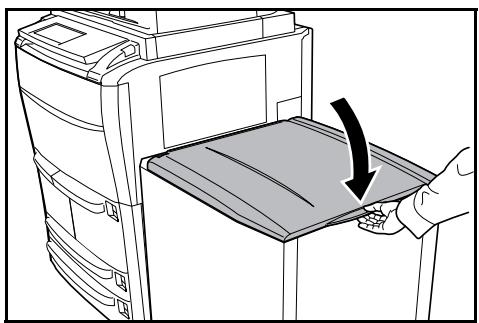
3 Close the top cover softly.
Loading Paper indicator
The details of the loading paper indicator are as follows.
| Display | Condition | Description |
| Lights in green color | It is available to load the paper. | |
| Blinks in green color | The paper lifter is descended at the bottom. It is available to load the paper until the level indicated. | |
| Lights in red color | It is unavailable to load the paper. Ensure that the loaded paper does not exceed the indicated level. |
Troubleshooting
Solving Malfunctions
The table below provides general guidelines for problem solving.
If a problem occurs with your copier, check the checkpoints and perform procedures indicated on the following pages. If the problem persists, contact your Service Representative.
| Symptom | Checkpoints | Corrective Actions | Reference Page |
| The paper often jams. | Is the paper loaded properly? | Load the paper properly. | page 10 |
| Is the paper of the supported type? Is it in good condition? | Remove the paper, turn it over, and reload it. | page 9 | |
| Is the paper curled, folded, or wrinkled? | Replace the paper with new paper. | page 10 | |
| Are there any loose scraps or jammed paper in the side feeder? | Remove any jammed paper. | page 13 |
Responding to Error Messages
If the touch panel displays any of these messages, follow the corresponding procedure.
| Error Messages | Checkpoints | Corrective Actions | Reference Page |
| Reset Side Paper Deck.(Reset side feeder.) | Is the side feeder installed correctly on the copier? | Install the side feeder securely to the copier. | — |
| Add paper in drawer 5.(Add paper cassette 5.) | Is the indicated cassette out of paper? | Load paper. | page 10 |
| Check the side feeder.Paper capacity exceeded.Reload paper in the side feeder. | Is the maximum storage capacity of the side feeder exceeded? | Remove paper from the side feeder so that it becomes less than the maximum capacity. | page 10 |
| Paper misfeed.Remove paper. | — | If a paper jam occurs, the location of the jam is indicated on the touch panel and the copier stops.Leave the copier on (l position) and follow the instruction to remove the jammed paper. | page 13 |
| Side Paper Deck is out of order.Select another paper drawer.(Side feeder is out of order.Select another paper cassette.) | — | The side feeder has malfunctions and is temporarily unavailable. Contact your Service Representative or Authorized Service Center promptly. To continue copying, use the other cassette. | — |
Paper Jams
If the paper is jamed in the side feeder, Paper missfeed is displayed on the touch panel and the copier stops. Refer to these procedures to remove the jammed paper.
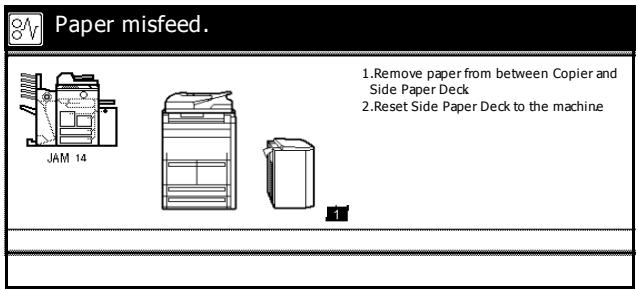
Precautions of the Pepaer Jam
- The suspended copy job is cleared when the power key is pressed to be off or the main power switch is turned off.
- Leave the main power switched ON (I) while clearing paper jams.
Do not reuse jammed paper. - If the paper tears during removal, be sure to remove any loose scraps of paper from the copier. Scaps of paper left in the copier could cause subsequent jamming.
1 Press the release lever of the side feeder to detach the side feeder from the copier.
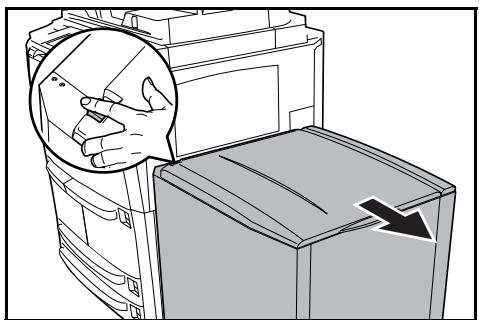
2 Remove the paper jammed in the connecting slot of the side feeder.
If the paper tears, remove any loose scraps from the copier.
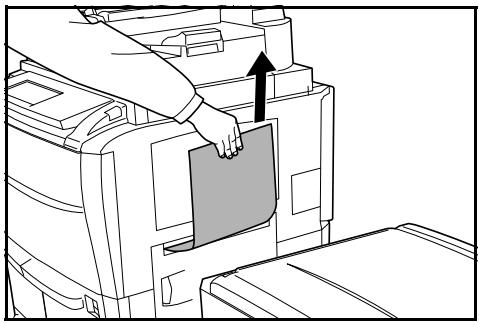
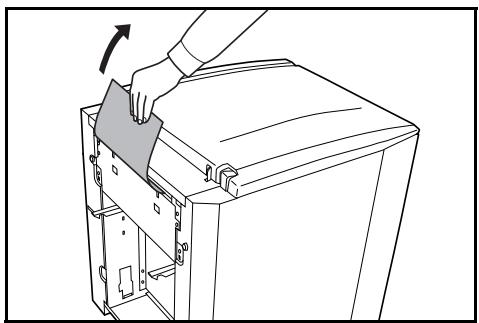
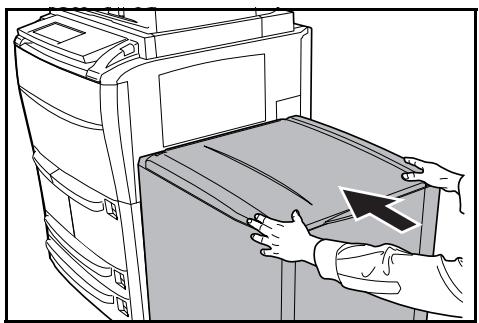
3 Attach the side feeder to the copier by returning it to the original position.
NOTE: When Paper misfeed is displayed on the touch panel, follow the steps below.
4 Open the top cover of the side feeder.
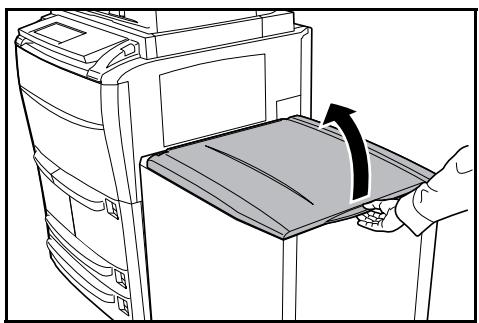
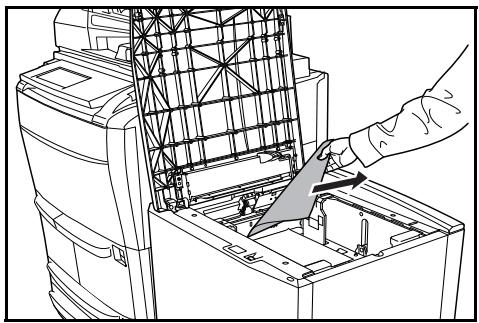
5 Remove the jammed paper.
If the paper tears, remove any loose scraps from the copier.
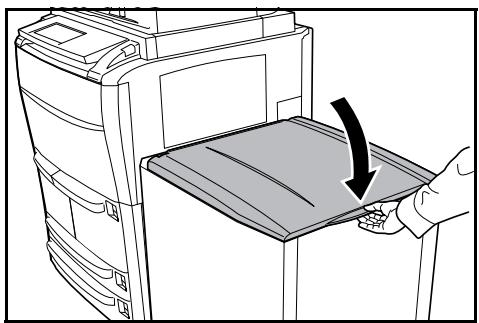
6 Close the top cover of the side feeder softly.
Specifications
| Paper Size | Inch models: 11 × 17", 8 1/2 × 14", 8 1/2 × 11", 11 × 8 1/2"Metric models: A3, A4, A4R |
| Supported Paper | Weight: 60 ~ 200 g/m2Paper Types: Plain, recycled, colored paper, and thick paper. |
| Dimensions(W) × (D) × (H) | 670 mm × 580 mm × 705 mm26 3/8" × 22 13/16" × 27 3/4" |
| Weight | Approx. 45 kg/Approx. 99.21 lbs. |
2 Deutsch
Sicherheitshinweise
Caution: The power plug is the main isolation device! Other switches on the equipment are only functional switches and are not suitable for isolating the equipment from the power source.
2004/108/EC, 2006/95/EEC, 93/68/EEC y 1999/5/EC
This equipment has been tested and found to comply with the limits for a Class B digital device, pursuant to Part 15 of the FCC Rules. These limits are designed to provide reasonable protection against harmful interference in a residential installation. This equipment generates, uses and can radiate radio frequency energy and, if not installed and used in accordance with the instructions, may cause harmful interference to radio communications. However, there is no guarantee that interference will not occur in a particular installation. If this equipment does cause harmful interference to radio or television reception, which can be determined by turning the equipment off and on, the user is encouraged to try to correct the interference by one or more of the following measures:
Reorient or relocate the receiving antenna.
- Increase the separation between the equipment and receiver.
- Connect the equipment into an outlet on a circuit different from that to which the receiver is connected.
- Consult the dealer or an experienced radio/TV technician for help.
The use of a non-shielded interface cable with the referenced device is prohibited.
CAUTION — The changes or modifications not expressly approved by the party responsible for compliance could void the user's authority to operate the equipment.
This device complies with Part 15 of FCC Rules and RSS-Gen of IC Rules.
Operation is subject to the following two conditions; (1) this device may not cause interference, and (2) this device must accept any interference, including interference that may cause undesired operation of the device.
- The above warning is valid only in the United States of America.
2004/108/EC, 2006/95/EEC, 93/68/EEC et 1999/5/EC
This equipment has been tested and found to comply with the limits for a Class B digital device, pursuant to Part 15 of the FCC Rules. These limits are designed to provide reasonable protection against harmful interference in a residential installation. This equipment generates, uses and can radiate radio frequency energy and, if not installed and used in accordance with the instructions, may cause harmful interference to radio communications. However, there is no guarantee that interference will not occur in a particular installation. If this equipment does cause harmful interference to radio or television reception, which can be determined by turning the equipment off and on, the user is encouraged to try to correct the interference by one or more of the following measures:
Reorient or relocate the receiving antenna.
- Increase the separation between the equipment and receiver.
- Connect the equipment into an outlet on a circuit different from that to which the receiver is connected.
- Consult the dealer or an experienced radio/TV technician for help.
The use of a non-shielded interface cable with the referenced device is prohibited.
CAUTION — The changes or modifications not expressly approved by the party responsible for compliance could void the user's authority to operate the equipment.
This device complies with Part 15 of FCC Rules and RSS-Gen of IC Rules.
Operation is subject to the following two conditions; (1) this device may not cause interference, and (2) this device must accept any interference, including interference that may cause undesired operation of the device.
- The above warning is valid only in the United States of America.
Nom des pieces
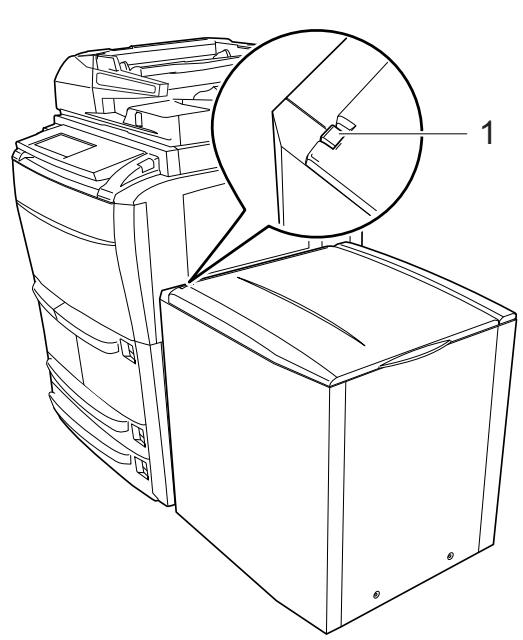
5 Retirez le papier coince.
2004/108/EC, 2006/95/EEC, 93/68/EEC e1999/5/EC
This machine has passed all quality controls and final inspection
QUALITY CERTIFICATE
- Deutsch
- Symbols
- INSTALLATION PRECAUTIONS
- Environment
- CAUTION
- Other precautions
- Handling of plastic bags
- WARNING
- PRECAUTIONS FOR USE
- Cautions when using this product
- Safety Instructions Regarding the Disconnection of Power
- DECLARATION OF CONFORMITY
- TO
- Part Names
- Loading Paper
- Before Loading Paper
- Loading Paper in the Side Feeder
- Loading Paper indicator
- Troubleshooting
- Solving Malfunctions
- Responding to Error Messages
- Paper Jams
- Precautions of the Pepaer Jam
- Specifications
- Sicherheitshinweise
- Nom des pieces
- QUALITY CERTIFICATE
Brand : KYOCERA
Model : PF-660
Category : Printer