
SMBABY1 - Baby monitor LEXIBOOK - Free user manual and instructions
Find the device manual for free SMBABY1 LEXIBOOK in PDF.


| Product type | Babyphone (baby monitor) |
| Brand | LEXIBOOK |
| Model | SMBABY1 |
| Baby unit power supply | AC adapter 230V-50 Hz or 4 C 1.5 V batteries (not included) |
| Parent unit power supply | AC adapter 230V-50 Hz (not included) or 4 LR6/AA 1.5 V batteries (not included) |
| Main functions | Babyphone (sound or continuous transmission), night light, comfort zone indicator (temperature/humidity), sleep guardian (5 sound/light modes), temperature display, channel selection (1-3), comfort zone alarm, out of range indicator |
| Transmission modes | Sound activation (default) and continuous transmission |
| Number of channels | 3 channels (CH1, CH2, CH3) |
| Range | Not specified in the manual, typical range 50 to 100 m in open field |
| Comfort zone indicator | Green LED (optimal conditions: temperature 16-20°C, humidity 40-60%); Red LED (out of zone) |
| Sleep guardian | 5 modes: light show, light + sound effects, light + music, sound effects, music; automatic activation on crying (8 min) or manual |
| Temperature display | In degrees Celsius or Fahrenheit (selectable) |
| Comfort zone alarm | Yes, adjustable ON/OFF, duration 3 minutes |
| Care and cleaning | Wipe with a soft dry cloth; unplug before cleaning; do not use detergents |
| Safety instructions | Do not expose to water, humidity, heat; do not open; do not use near water; do not overload sockets |
| Spare parts and repairability | No user-serviceable parts; refer all repairs to qualified personnel |
| Warranty | 2 years, proof of purchase required; manufacturer's warranty excluding wear and misuse |
| Package contents | 1 baby unit, 1 parent unit, 1 AC adapter (for baby unit), 1 user manual |
| Environment | Device recyclable; do not dispose of with household waste; drop off at a collection point |
| General information | Designed and developed in Europe, made in China; reference SMBABY1 |
Frequently Asked Questions - SMBABY1 LEXIBOOK
User questions about SMBABY1 LEXIBOOK
0 question about this device. Answer the ones you know or ask your own.
Ask a new question about this device
Download the instructions for your Baby monitor in PDF format for free! Find your manual SMBABY1 - LEXIBOOK and take your electronic device back in hand. On this page are published all the documents necessary for the use of your device. SMBABY1 by LEXIBOOK.
USER MANUAL SMBABY1 LEXIBOOK
The graphic symbols on the back cover of the set mean the following:

The lightning flash with arrowhead symbol within an equilateral triangle is intended to alert the user to the presence of uninsulated "dangerous voltage" within the product's enclosure that may be of sufficient magnitude to constitute a risk of electric shock to persons.

The exclamation point within an equilateral triangle is intended to alert the user to the presence of important operating and maintenance (servicing) instructions in the literature accompanying the appliance.
WARNING:
This is not a toy.
- Please avoid using this unit in places of high temperature or humidity over prolonged periods of time as damage may occur.
- Exposure to direct sunlight in places such as car interiors may cause the unit to become warped and/or lead to malfunctioning.
- Avoid using or storing this unit in dusty or sandy locations.
- To reduce the risk of fire or electric shock, do not expose this appliance to rain or moisture.
- The apparatus shall not be exposed to dripping or splashing and no objects filled with liquids, such as vases, shall be placed on the apparatus.
- The mains plug is used as the disconnect device, the disconnect device shall remain readily operable.
- In order to disconnect the apparatus from the mains completely, the mains plug should be disconnected from the mains socket outlet completely.
CLASS 1 LASER PRODUCT
Important safety instructions
- Read these instructions. Keep these instructions. Heed all warnings. Follow all instructions.
- Do not use this unit near water.
- Clean only with a dry cloth.
- Do not block any ventilation openings. Install in accordance with manufacturer's instructions.
- Do not install near any heat sources such as radiators, heat registers, stoves or other apparatus (including amplifiers) that produce heat.
- Do not defeat the safety purpose of the polarized or grounding-type plug. A polarized plug has two blades with one wider than the other. A grounding-type plug has two blades and a third grounding prong. The wide blade or the third prong is provided for your safety. If the provided plug does not fit into your outlet, consult an electrician for replacement of the obsolete outlet.
- Protect the power cord from being walked on or pinched particularly at plugs, convenience receptacles, and the point where they exit from the unit.
- Only use attachments/ accessories specified by the manufacturer.
- Unplug this unit during lightning storms or when unused for long periods of time.
- Refer all servicing to qualified service personnel. Servicing is required when the unit has been damaged in any way, such as the following: the power-supply cord or plug has been damaged; liquid has been spilled or objects have fallen into the unit; and/or the unit has been exposed to rain or moisture, does not operate normally, has changed its performance or has been dropped.
- The apparatus shall not be exposed to dripping or splashing and no objects filled with liquids, such as vases, shall be placed on the apparatus.
- Do not overload wall outlet. Use only power source as indicated.
- Use replacement parts as specified by the manufacturer.
- The product may be mounted to a wall only if recommended by the manufacturer.
- Upon completion of any service or repairs to this product, ask the service technician to perform safety checks.
Unpacking the device
When unpacking, ensure that the following elements are included:
1 x baby unit
1x parent unit
1 x DC adapter
1 x instruction manual
WARNING: All packaging materials, such as tape, plastic sheets, wire ties and tags are not part of this product and should be discarded.
Power sources
Baby Unit
The SMBABY1 baby unit operates with 4 x C size 1,5V - - - batteries (not included) or on AC 230V - 50Hz.
AC operation
- Check that the unit is switched off.
- Connect one end of the adapter to the DC IN jack located on the right side of the unit.
- Plug the other end of the adapter into any convenient AC 230V - 50Hz power outlet.
Battery installation
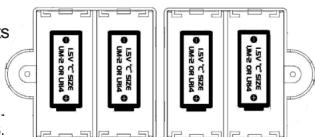
- Using a screwdriver, open the two battery compartments located at the back of the baby unit.
- Insert 2 × C size batteries (not included) in each compartment observing the polarity indicated in the compartments, and as per the diagram shown opposite.
- Close the battery compartments and tighten the screws. Note: The adapter must be disconnected from the DC IN jack on the rear of the unit in order to let the product operate on battery power.
Parent Unit
The SMBABY1 parent unit operates with 4 x AA/LR6 size 1.5V —— batteries (not included) or on AC 230V - 50Hz.
AC operation (adapter not included)
- Check that the unit is switched off.
- Connect one end of the adapter to the DC IN jack located on the left side of the unit.
- Plug the other end of the adapter into any convenient AC 230V - 50Hz power outlet.
Battery installation
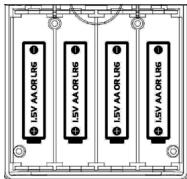
- Using a screwdriver, open the battery compartment located at the back of the parent unit.
- Insert 4 × AA / LR6 size batteries (not included) observing the polarity indicated in the compartment, and as per the diagram shown opposite.
- Close the battery compartment and tighten the screw. Note: The adapter must be disconnected from the DC IN jack on the rear of the unit in order to let the product operate on battery power.
Non-rechargeable batteries are not to be recharged. Rechargeable batteries are to be removed from the product before being charged. Rechargeable batteries are only to be charged under adult supervision. Different types of batteries or new and used batteries are not to be mixed. Only batteries of the same or equivalent type as recommended are to be used. Batteries are to be inserted with the correct polarity. Exhausted batteries are to be removed from the product. The supply terminals are not to be short circuited. Do not throw batteries into a fire. Remove the batteries if you are not going to use the product for a long period of time.
WARNING: If the units malfunction or receive an electrostatic shock, press the RESET buttons. If this proves to be ineffective, remove the batteries and insert them again.
Product features
Baby unit (picture A)
- Night light
- "Comfort Zone" button
- "Sleep Guardian" Start/Stop button
4.DC IN 6V - + - Volume button
- "Night light" On/Off button
- "Sleep Guardian" mode selector switch
- "Sleep Guardian" sensitivity selector switch
- Battery compartment
- Baby unit table stand
- "Baby monitor" transmission mode selector switch
- Transmission channel selector switch
- Battery compartment
Parent unit (picture B)
- LCD screen
- LED
- "Baby monitor" On/Off button
- "Comfort Zone Alarm" On/Off button
- "Temperature display C^ / F^ " button
- On/Off/Volume button
- Transmission channel selector switch
- Integrated speaker
- Battery compartment
Using the Baby Unit
Place the unit in the child's bedroom, on a side table using the removable stand, on the door handle or above the bed using a strap (not included).
"Sleep guardian" feature
- Use the selector switch located on the top of the unit to turn on or turn off ("OFF" position) the "Sleep Guardian" function or to select one of the 5 modes:
Mode 1: Lightshow
Mode 2: Lightshow and sounds
Mode 3: Lightshow and music
Mode 4: Sounds
Mode 5: Music
- If the baby cries, the "Sleep Guardian" feature will start automatically for 8 minutes.
- You can adjust the sensibility of the "Sleep Guardian sensor" with the slider on the back of the unit.
- Use the volume button on the top of the product to adjust the volume level.
- The "Sleep Guardian" feature can also be started or stopped manually with the "Star" button on the front
Night light mode
Use the "Night light" On/Off button located on the top of the unit to switch on or switch off the light in the moon.
"Comfort Zone" indicator
Press the cloud-shaped "Comfort Zone" button on the front of the Baby unit and the light in the moon will indicate if the conditions in the baby's room are comfortable.
- Green indicates good conditions (temperature between 16 and 20 degrees C^ and humidity between 40 and 60% ).
- Red means out of comfort zone (temperature not between 16 and 20 degrees C^ or humidity not between 40 and 60% ).
"Baby Monitor" transmission mode
Use the transmission mode switch located at the back of the Baby unit to select the desired transmission mode.
- Noise activated (default mode): the transmission starts only when noise is detected in the Baby's room.
- Permanent transmission from the Baby unit to the Parent unit.
Note: This mode will use up the batteries more quickly.
Transmission channel selection
Use the channel selection switch on the back of the unit to select a transmission channel (1, 2 or 3) for the Baby unit.
Using the Parent Unit
Switch the parent unit On/Off
Use the volume switch on the right side of the Parent unit to turn it on or turn it off. The LED lights up when the unit is powered on. Adjust the volume of the baby monitor with the wheel.
Turn the "Baby Monitor" feature On/Off
Press the "Baby Monitor" On/Off button to switch on or switch off the "Baby Monitor" feature.
This function allows you to listen to the child's room.
Transmission channel selection
Use the channel selection switch to select a transmission channel (1, 2 or 3) for the parent unit.
Important note: The channel selected for the Parent unit must be the same as the one chosen for the Baby unit. If the channels are different, the Parent unit will not be able to receive the data sent by the Baby unit.
Temperature display in Celsius/Fahrenheit
Use the « Temperature » button located on the front to toggle the temperature display between Celsius and Fahrenheit.
LCD screen icons
- The temperature and humidity display and the "comfort zone" icons show the condition in the baby's room ( : outside the comfort zone, optimal conditions).
-
The "Sleep Guardian" icons indicate if the "Sleep guardian" function has been switched on and which mode is selected. If the feature has been activated by the baby crying, these icons will flash (★: Lightshow mode, ▲: Sounds mode, □: Music mode).
-
The "Night light" icon is displayed when the "Night light" feature has been switched on.
- If the Parent unit is out of range and does not receive any signal from the Baby unit, the LED will flash continuously and the "out of range" icon is displayed on screen.
Note: This icon will also be displayed after the Parent unit is switched on until it finds the signal from the Baby unit.
Comfort Zone Alarm

Use the alarm selector _OFF to turn on or off the "Comfort Zone Alarm":
OFF position: the alarm is disabled.
ON position: when the alarm is switched on, it will ring if the conditions of the baby's room are outside of the Comfort Zone.
Note: The alarm keeps on ringing for 3 minutes or until the Alarm switch is moved to the "Off" position.
Maintenance and warranty
To prevent fire or shock hazard, disconnect your unit from the AC power source when cleaning. The finish on your unit may be cleaned with a dust cloth and cared for as other furniture. Use a soft, clean cloth moistened with plain, lukewarm water to clean the exterior of the unit. Use caution when cleaning and wiping the plastic parts. Mild soap and a damp cloth may be used on the front panel.
NOTE: Please keep this instruction manual, it contains important information. This product is covered by our 2-year warranty. For any claim under the warranty or after sale service, please contact your distributor and present a valid proof of purchase. Our warranty covers any manufacturing material and workmanship defect, with the exception of any deterioration arising from the non-observation of the instruction manual or from any careless action implemented on this item (such as dismantling, exposition to heat and humidity, etc.). It is recommended to keep the packaging for any further reference. In a bid to keep improving our services, we could implement modification on the colours and the details of the product shown on the packaging.
Reference: SMBABY1
©2008 LEXIBOOK®
Designed and developed in Europe - Made in China
Lexibook UK Ltd,
Unit 10 Petersfield Industrial Estate,
Bedford Road, Petersfield,
Hampshire, GU32 3QA, United Kingdom.
Helpline: 0808 1003015, http://www.lexibook.com


Environmental Protection
Unwanted electrical appliances can be recycled and should not be discarded along with regular household waste! Please actively support the conservation of resources and help protect the environment by returning this appliance to a collection centre (if available).
DECLARATION OF CONFORMITY
We, Lexibook® S.A.
hereby declare under our full and sole responsibility, that the product:
Name: Musical Baby Soother & Monitor
Reference / type: SMBABY1
Maker: Lexibook®
to which this declaration refers, complies with the essential requirements and any other
provisions stated in Directive R&TTE (1999/5/EC).
Suitable for use within the European Union member states.
Julian Chung
QA Manager
Lexibook Ibérica S.L.
Copyright © 2008 LEXIBOOK®
Copyright © 2008 LEXIBOOK®
Name: Monitor Bebè Musical
Copyright © 2008 LEXIBOOK®
CLASS-1 LASER PRODUKT
Copyright © 2008 LEXIBOOK®
VEILIGHEIDSINSTRUCTIES

LET OP GEVAAR VOOR ELECTRISCH SCHOK NIET OPENEN

LET OP: OM HET RISICO VAN EEN ELEKTRISCHE SCHOK TE VERMINDEREN, VERWIJDER DE BEHUIZING (ACHTERKANT) NIET. IN HET APPARAAT ZITTEN GEEN ONDERDELEN DIE DOOR DE GEBRUKER DEGAREPERED ZOUDEN KUNDEN WORDEN. LAAT REPARATIONS UITVOEREN DOOR GEKWALIFICEERD PERSONEEL.
"Comfortzone" indicator
Copyright © 2008 LEXIBOOK®
SMBABY1IM0308
YOUR OPINION MATTERS / VOTRE AVIS COMPTE
Zip code/Code Postal: Country/Pays: City/Ville:
Phone/Telphone: Email: