
DMPJ1 - Educational Toys LEXIBOOK - Free user manual and instructions
Find the device manual for free DMPJ1 LEXIBOOK in PDF.



| Product Type | Educational Toy - MP3 Player / Storyteller / Night Light |
| Brand | LEXIBOOK |
| Model | DMPJ1 |
| Power Supply | 3 AAA/LR03 1.5V batteries (included) or 9V AC adapter (not included) |
| Main Functions | MP3 player, storyteller, night light, message recording, karaoke mode |
| Supported Audio Formats | MP3, WAV (44.1 kHz / 16 bit or lower) |
| Storage | Micro SD card reader (not included) - automatic folders: "Music", "Night Light", "Story" |
| Connectivity | Mini-USB port, headphone jack, external microphone input (not included), 9V AC input |
| Dimensions | Approx. 20 x 15 x 5 cm (estimation) |
| Weight | Approx. 300 g (estimation) |
| Display | LCD screen |
| Speakers | 2 built-in speakers |
| Microphone | Built-in microphone + external microphone input |
| Package Contents | 1 player, 3 AAA batteries, 1 wrist strap, 1 pair of headphones, 1 USB cable, 1 CD-Rom, 1 user manual |
| Care and Cleaning | Clean with a slightly damp cloth, no detergent. Protect from moisture and heat. |
| Safety | Not suitable for children under 36 months (small parts). Use under adult supervision. |
| Warranty | 2 years, excluding wear and misuse |
| Repairability | Accessible Reset button. No spare parts provided by the manufacturer. |
Frequently Asked Questions - DMPJ1 LEXIBOOK
User questions about DMPJ1 LEXIBOOK
0 question about this device. Answer the ones you know or ask your own.
Ask a new question about this device
Download the instructions for your Educational Toys in PDF format for free! Find your manual DMPJ1 - LEXIBOOK and take your electronic device back in hand. On this page are published all the documents necessary for the use of your device. DMPJ1 by LEXIBOOK.
USER MANUAL DMPJ1 LEXIBOOK
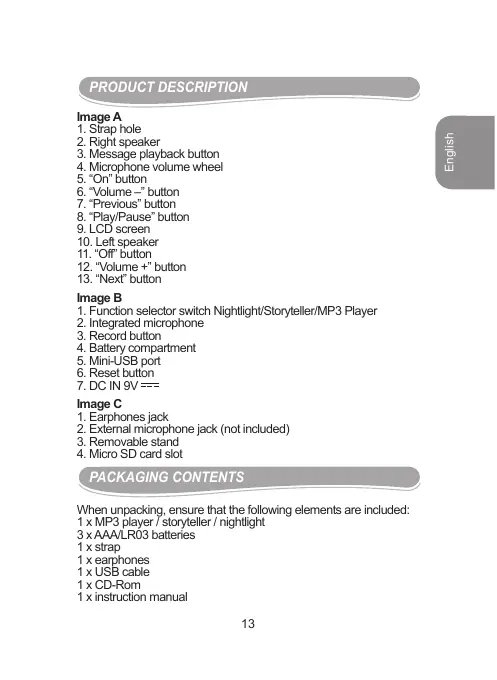
- Strap hole
- Right speaker
- Message playback button
- Microphone volume wheel
- "On" button
- "Volume -" button
- "Previous" button
- "Play/Pause" button
- LCD screen
- Left speaker
- "Off" button
- "Volume +" button
- "Next" button
Image B
- Function selector switch Nightlight/Storyteller/MP3 Player
- Integrated microphone
- Record button
- Battery compartment
- Mini-USB port
- Reset button
7.DC IN 9V = = =
Image C
- Earphones jack
- External microphone jack (not included)
- Removable stand
- Micro SD card slot
PACKAGING CONTENTS
When unpacking, ensure that the following elements are included:
1 x MP3 player / storyteller / nightlight
3 x AAA/LR03 batteries
1x strap
1 x earphones
1xUSB cable
1 x CD-Rom
1 x instruction manual
WARNING: All packaging materials, such as tape, plastic sheets, wire ties and tags are not part of this product and should be discarded.
GETTING STARTED
Removing the battery tab
Before you start using this product, carefully remove the battery tab located at the rear of the unit.
Turn on and turn off the product
To turn on the DMPJ1, press the "On" button. To turn it off, press the "Off" button.
Note:
- Without playback, the unit will automatically switch off after 3 minutes of inactivity.
- If the unit does not start when you pressed "On", press the Reset button located on the back side.
BATTERY INFORMATION
The DMPJ1 operates with 3 × 1.5V = = = = = = = = = = = = = = = = = = = = = = = = = = = = = = = = = = = = = = = = = = = = = = = = = = = = = = = = = = = = = = = = = = = = = = = = = = = = = = = = = = = = = = = = = = = = = = = = = = = = 0 (included) or on AC 230V - 50Hz (AC cable not included). This product is supplied with batteries for demonstration purposes. They should be replaced with new batteries before use.
Battery installation
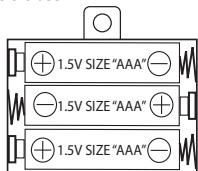
- To install the batteries, remove the stand then using a screwdriver, open the battery compartment cover located at the back of the unit.
-
Insert 3 × 1.5V = = = = = = = = = = = = = = = = = = = = = = = = = = = = = = = = = = = = = = = = = = = = = = = = = = = = = = = = = = = = = = = = = = = = = = = = = = = = type batteries (included) observing the polarity indicated in the compartment and as per the diagram shown opposite.
-
Close the battery compartment and tighten the screw.
Note:
-
The AC power cord must be disconnected from the AC socket on the rear of the unit in order for the product to operate on battery power.
-
If you hear interference noise during playback when using headphones or if the eyebrows stop their movement when the buttons are pressed, it means the batteries are running low. Replace the batteries regularly.
AC operation
- Check that the unit is switched off.
- Insert the small end of the AC cord (not included) into the AC socket at the back of the unit.
- Plug the other end of the AC cord into any convenient AC 230V - 50Hz power outlet.
Note: the socket-outlet shall be installed near the equipment and shall be easily accessible.
Non-rechargeable batteries are not to be recharged. Rechargeable batteries are to be removed from the product before being charged. Rechargeable batteries are only to be charged under adult supervision. Different types of batteries or new and used batteries are not to be mixed. Only batteries of the same or equivalent type as recommended are to be used. Batteries are to be inserted with the correct polarity. Exhausted batteries are to be removed from the product. The supply terminals are not to be short circuited. Do not throw batteries into a fire. Remove the batteries if you are not going to use the product for a long period of time.
WARNING: Mal-function or loss of memory may be caused by strong frequency interference or electrostatic discharge. Should any abnormal function occur, reset the unit or remove the batteries and insert them again, or unplug the AC/DC adapter from the mains socket and replug it again.
INSTALLING THE LIGHTSTARMP3 SOFTWARE
Follow these instructions to install the LightStarMP3 program on your PC system.
- Insert the CD Software (included) in your CD-ROM drive.
- Click "Start", then "My Computer" and double-click your CD-ROM drive.
- Double-click the "Setup.exe" file to launch the installation.
- Select the installation program language and click the "Ok" key.
- Follow the instructions to install the LightStarMP3 software.
- Once the software has been installed, click "Finish".
Note: Make sure the DMPJ1 is not connected to your computer before installing the software. 15
INSTALLING THE MICROSD CARD
You must install a micro SD card in the unit in order to use all the functions of the DMPJ1.
- Using a screwdriver, remove the screw from the card slot lid.
- Lift the lid then push the micro SD card firmly into the slot until you hear a "click" sound.
- Close back the lid and tighten the screw.
When you insert the micro SD card for the first time, 3 folders are automatically created: 'Music', 'Nightlight', and 'Story'.
These folders are used to store downloaded melodies, lullabies and stories as described in the following section.
IMPORTANT NOTE: you cannot use the different modes of the DMP.J1 if there is no micro SD card inserted in the unit.
DOWNSLOADING MEODIES, LULLABIES AND STORIES
Downloading audio files from your computer:
You can use the unit's mini-USB port to connect the DMPJ1 to your computer and download melodies, lullabies and stories in MP3 or WAV format (WAV files need to be in 44.1 KHz/ 16 bit or lower).
- Connect the unit to your computer using the provided USB cable. The LightStarMP3 program will start automatically.
Note:
- If the unit is switched off when you connect it to your computer, press the "On" button to switch it on.
- If the LightStarMP3 software doesn't start automatically when you connect the DMPJ1, start the program manually. Double click the program icon on the desktop if you have created a shortcut during the installation. Or click "Start", "All Programs", select "LightStarMP3" then click "LightStarMP3" again.
- Click the "Add" button to browse through your folders. Double-click the desired MP3 or WAV audio files to add them to your audio file list.
- Tick the files to be downloaded into the DMPJ1, one by one.
- Select the target folder for the files by clicking the corresponding tab in the lower part of the screen: "Music Folder", "Story Folder" or "Nightlight Folder".
Note: you can also drag-and-drop the desired files to transfer them.
- Click the "Download" button to convert the audio files and download them into the unit.
Note: you must click the "Download" button to transfer the file(s) into the player.
- Once the files have been downloaded into the micro SD card, their names appear in the corresponding section in the lower part of the screen. The playback order of the files can be changed by drag-and-drop. Then click the "Save Playlist" button to confirm and store the change.
Note: you must click the "Save Playlist" button to confirm the new playback order of the audio files.
Other commands description:
Sound files
- Tick the files you want to erase, then click the "Delete" button to delete them from the list.
- Click the "Clear" button to delete all the files from the list (even when they are not ticked).
- Click the "Select All" button to select all the files in the list.
- Click the "Unselect All" button to unselect all the files in the list.
- Click the "Erase Message" button to delete the message recorded by the parents.
Micro SD card contents:
- Tick the files you want to erase, then click the "Delete" button to delete them from the list.
- Click the "Select All" button to select all the files in the list.
- Click the "Unselect All" button to unselect all the files in the list.
- Click the "Save Playlist" button to save the playback order of the files.
- Click the "Get more Content" button to go directly to the Lexbook's website and download new stories (refer to next paragraph).
Downloading stories from Lexibok's website:
Visit Lexibook's website to download additional stories: http://www.lexibook.com.
MP3 PLAYER MODE
To listen to the MP3 or WAV files downloaded in the unit:
- Press the "On" button then slide the function selector switch on the "MP3 Player" position.
-
Press the "Play/Pause" button to play the songs one by one in the order you saved them in the unit. Press the button once again to pause playback. 17
-
Press the "Next" button to play the next song.
- During playback, press the "Previous" button to jump to the beginning of the current song. Press the "Previous" button again to play the previous song.
- During playback, press and hold the "Next" or "Previous" buttons to fast-forward/backward in the current song.
- Use the "Volume +^+ " and "Volume -^- " buttons to increase or decrease the volume level.
- You can plug any normal earphones with a 3.5mm jack plug into the earphones jack located on the right arm of the star. When the earphones are in use, the integrated speakers are automatically turned off.
CAUTION: Too high volume, especially when using headphones, can damage your hearing. For this reason, please turn the volume down before connecting the headphones.
Sing along mode (karaoke mode)
In MP3 Player mode, you can connect an external microphone (reference MIC01, sold separately) to the microphone jack located on the left arm of the star. You can then sing along to the tunes downloaded into the unit.
You can adjust the volume of the microphone with the volume wheel.
Note: the built-in microphone at the back of the unit (to record messages) cannot be used with the sing along function.
STORYTeller
To listen to the stories downloaded into the unit:
- Press the "On" button then slide the function selector switch on the "Storyteller" position
- Press the "Play/Pause" button to play the stories one by one in the order you saved them in the unit. Press the button once again to pause playback.
- Press the "Next" button to listen to the next story.
- During playback, press the "Previous" button to jump to the beginning of the current story. Press the "Previous" button to play the previous story.
- During playback, press and hold the "Next" or "Previous" buttons to fast-forward/backward in the current story.
- Use the "Volume + " and "Volume - buttons to increase or decrease the volume level.
- You can plug any normal earphones with a 3.5mm jack plug into the earphones jack located on the right arm of the star. When the
earphones are in use, the integrated speakers are automatically turned off.
CAUTION: Too high volume, especially when using headphones, can damage your hearing. For this reason, please turn the volume down before connecting the headphones.
NIGHTLIGHT MODE
Place the DMPJ1 on a side table using the removable stand or on the door handle using the strap.
To activate the nightlight mode:
- Press the "On" button then slide the function selector switch on the "Nightlight" position to enable the night light mode. The stars' arms will light up.
- Press the "Play/Pause" button to playback in a loop all the melodies and lullabies downloaded into the "Nightlight" folder of the micro SD card.
- The "Play/Pause", "Next", "Previous", "Volume+" and "Volume-" buttons can be used just as in the "MP3 Player" mode.
Note: in "Nightlight mode", the LCD screen turns itself off and the playback stops after around 12 minutes. The lights in the arms will continue to light. To wake the unit up, press any button.
RECORDING MODE
To record a message:
- Press and hold the "Record" button located at the back of the unit.
- Speak clearly into the built-in microphone to record your message or use an external microphone (not included) connected to the corresponding jack.
- Release the "Record" button to end the recording and save your message.
Note: a new recording automatically overwrites the previous saved message.
To listen to the recorded message:
Press the "Message Playback" button located on the star's mouth to listen to the message.
To delete the saved message without recording a new one:
- Connect the unit to your computer using the provided USB cable.
- After the LightStarMP3 program has started automatically, click the "Erase Message" button to delete the recorded message.
MAINTENANCE AND WARRANTY
Only use a soft, slightly damp cloth to clean the unit. Do not use detergent. Do not to expose the unit to direct sunlight or any other heat source. Do not immerse the unit in water. Do not dismantle or drop the unit. Do not try to twist or bend the unit.
NOTE: please keep this instruction manual, it contains important information.
This product is covered by our 2-year warranty.
For any claim under the warranty or after sale service, please contact your distributor and present a valid proof of purchase. Our warranty covers any manufacturing material and workmanship defect, with the exception of any deterioration arising from the non-observation of the instruction manual or from any careless action implemented on this item (such as dismantling, exposition to heat and humidity, etc.). It is recommended to keep the packaging for any further reference. Not suitable for children under 36 months old, as it contains small detachable elements which could be swallowed. In a bid to keep improving our services, we could implement modification on the colours and the details of the product shown on the packaging.
Reference: DMPJ1
Designed and developed in Europe - Made in China
©2009 LEXIBOOK®
Lexibook UK Ltd,
Unit 10 Petersfield Industrial Estate,
Bedford Road, Petersfield,
Hampshire, GU32 3QA
United Kingdom.
Helpline: 0808 1003015
www.lexibook.com
C E
Environmental Protection:
Unwanted electrical appliances can be recycled and should not be discarded along with regular household waste! Please actively support the conservation of resources and help protect the environment by returning this appliance to a collection centre (if available).

DESCRIPICION DEL PRODUCTO
Imagen A
MANUTENÇAO E GARANTIA
- IMAGE B
- IMAGE C
- PACKAGING CONTENTS
- GETTING STARTED
- REMOVING THE BATTERY TAB
- TURN ON AND TURN OFF THE PRODUCT
- NOTE
- BATTERY INFORMATION
- BATTERY INSTALLATION
- AC OPERATION
- INSTALLING THE LIGHTSTARMP3 SOFTWARE
- INSTALLING THE MICROSD CARD
- DOWNLOADING AUDIO FILES FROM YOUR COMPUTER
- OTHER COMMANDS DESCRIPTION
- SOUND FILES
- MICRO SD CARD CONTENTS
- DOWNLOADING STORIES FROM LEXIBOK'S WEBSITE
- MP3 PLAYER MODE
- TO LISTEN TO THE MP3 OR WAV FILES DOWNLOADED IN THE UNIT
- SING ALONG MODE (KARAOKE MODE)
- STORYTELLER
- TO LISTEN TO THE STORIES DOWNLOADED INTO THE UNIT
- NIGHTLIGHT MODE
- TO ACTIVATE THE NIGHTLIGHT MODE
- RECORDING MODE
- TO RECORD A MESSAGE
- TO LISTEN TO THE RECORDED MESSAGE
- TO DELETE THE SAVED MESSAGE WITHOUT RECORDING A NEW ONE
- MAINTENANCE AND WARRANTY
- ENVIRONMENTAL PROTECTION
- DESCRIPICION DEL PRODUCTO
- IMAGEN A
- MANUTENÇAO E GARANTIA
Brand : LEXIBOOK
Model : DMPJ1
Category : Educational Toys