
RPB2000 - Educational Toys LEXIBOOK - Free user manual and instructions
Find the device manual for free RPB2000 LEXIBOOK in PDF.

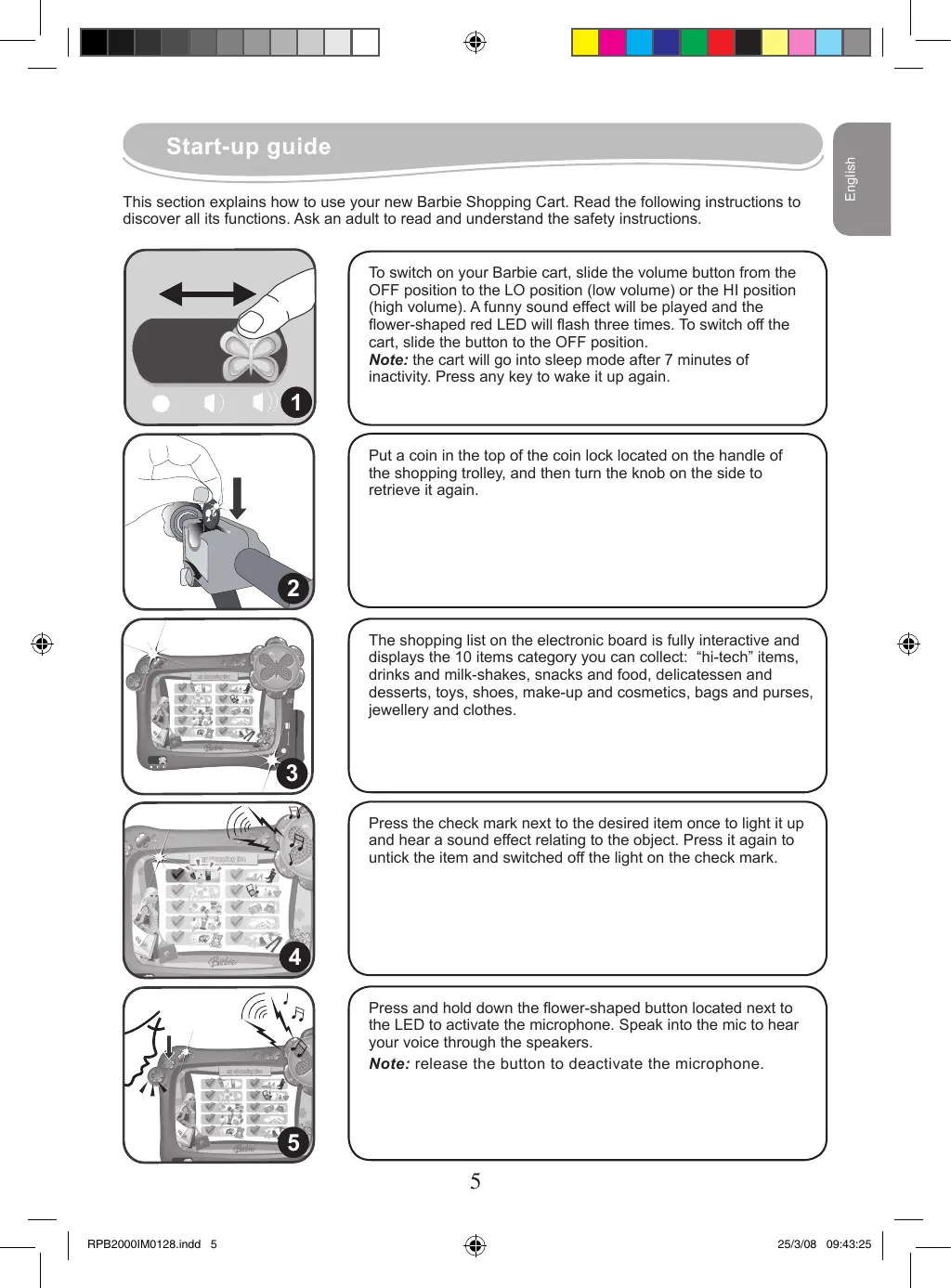


| Product type | Electronic shopping cart for Barbie doll |
| Brand | LEXIBOOK |
| Model | RPB2000 |
| Power supply | 3 LR6/AA 1.5 V alkaline batteries (not included) |
| Recommended age | From 36 months (caution: contains small parts) |
| Main features | Interactive shopping list with 10 item keys, amplified microphone, fake credit card reader, sound item sensor, automatic sleep mode (7 min) |
| Package contents | 1 shopping cart, 30 fake coins, 40 fake bills, 1 bag, 12 fake food items, 16 item cards, 8 fake electronic/makeup boxes, 1 instruction manual |
| Material | Plastic |
| Care and cleaning | Clean with a cloth slightly dampened with water, without detergent. Protect from humidity and heat. |
| Safety | Not suitable for children under 36 months due to small detachable parts. Remove packaging before use. Do not expose to a heat source. |
| Warranty | 2 years, covers material and assembly defects, excluding wear and tear and misuse. |
| Spare parts and repairability | Not specified. In case of malfunction, first check the batteries. |
| General information | Designed and developed in Europe, made in China. Reference: RPB2000. Website: www.lexibook.com |
Frequently Asked Questions - RPB2000 LEXIBOOK
User questions about RPB2000 LEXIBOOK
0 question about this device. Answer the ones you know or ask your own.
Ask a new question about this device
Download the instructions for your Educational Toys in PDF format for free! Find your manual RPB2000 - LEXIBOOK and take your electronic device back in hand. On this page are published all the documents necessary for the use of your device. RPB2000 by LEXIBOOK.
USER MANUAL RPB2000 LEXIBOOK
Chariot de courses Barbie Barbie Shopping Cart
91953 Courtaboeuf Cedex, France.
Service consommateurs: 0892 23 27 26 (0.34€ TTC/min)
www.lexibook.com
www.lexibookjunior.com
This section explains how to use your new Barbie Shopping Cart. Read the following instructions to discover all its functions. Ask an adult to read and understand the safety instructions.
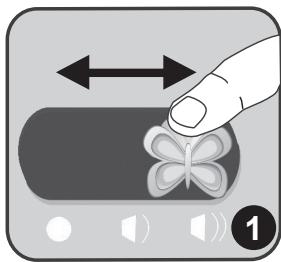
To switch on your Barbie cart, slide the volume button from the OFF position to the LO position (low volume) or the HI position (high volume). A funny sound effect will be played and the flower-shaped red LED will flash three times. To switch off the cart, slide the button to the OFF position.
Note: the cart will go into sleep mode after 7 minutes of inactivity. Press any key to wake it up again.
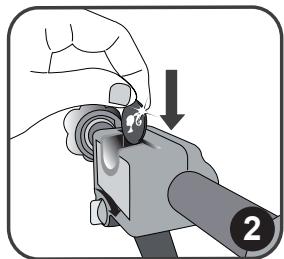
Put a coin in the top of the coin lock located on the handle of the shopping trolley, and then turn the knob on the side to retrieve it again.
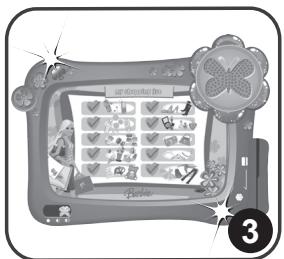
The shopping list on the electronic board is fully interactive and displays the 10 items category you can collect: "hi-tech" items, drinks and milk-shakes, snacks and food, delicatessen and desserts, toys, shoes, make-up and cosmetics, bags and purses, jewellery and clothes.
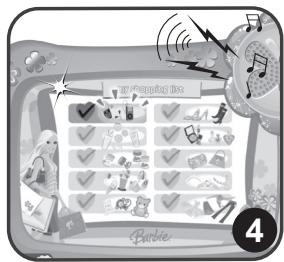
Press the check mark next to the desired item once to light it up and hear a sound effect relating to the object. Press it again to untick the item and switched off the light on the check mark.
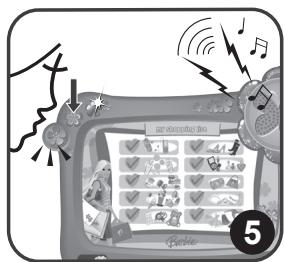
Press and hold down the flower-shaped button located next to the LED to activate the microphone. Speak into the mic to hear your voice through the speakers.
Note: release the button to deactivate the microphone.
uS16u3
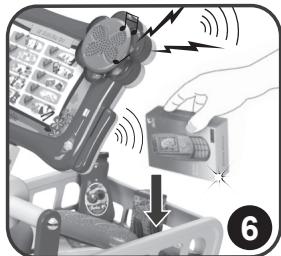
Every time you place an item into the cart, a "beep" sound effect is played and the red LED on the top of the console flashes 2 times to indicate that you have picked up an item.
Note: the item must cross the light sensor located on the back of the console to make the "beep" sound effect.
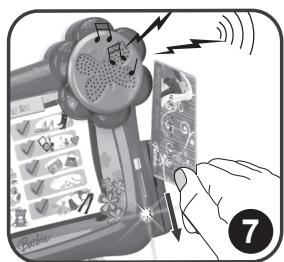
Swipe the fake credit card through the card slot on the right side of the cart to pay your items. The cart will play a fun double "beep" sound effect and the little light beside the scanner will flash twice.
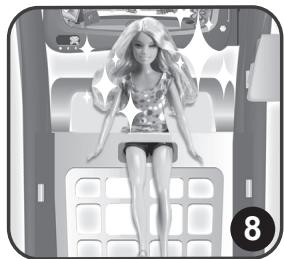
Use the special seat and go shopping with your favourite Barbie doll (not included)!
Contents of the packaging
1 Barbie Shopping Cart / 30 fake coins / 40 fake bills / 1 purse / 12 fake food items and cans / 16 items cards / 8 printed boxes / 1 instruction manual
WARNING: All packaging materials, such as tape, plastic sheets, wire ties and tags are not part of this toy and should be discarded for your child's safety.
Battery Information
The Barbie Shopping Cart operates with 3X1,5V-AA/LR6 alkaline type batteries (not included). Ask an adult to help you to find and install the correct batteries.
- Using a screwdriver, open the battery compartment cover located under the secret box.
- Install the 3 AA batteries observing the polarity indicated at the bottom of the battery compartment, and as per the diagram shown opposite.
- Close the battery compartment and tighten the screw.
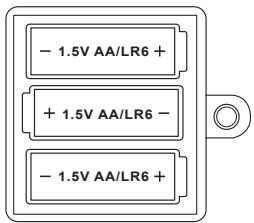
Non-rechargeable batteries are not to be recharged. Rechargeable batteries are to be removed from the toy before being charged. Rechargeable batteries are only to be charged under adult supervision. Different types of batteries or new and used batteries are not to be mixed. Only batteries of the same or equivalent type as recommended are to be used. Batteries are to be inserted with the correct polarity. Exhausted batteries are to be removed from the toy. The supply terminals are not to be short circuited. Do not throw batteries into a fire. Remove the batteries if you are not going to use the game for a long period of time.
WARNING: If the unit malfunctions or receives an electrostatic shock, turn the unit off and on again. If this proves to be ineffective, remove the batteries and insert them again.
Maintenance and Warranty
Only use a soft, slightly damp cloth to clean the unit. Do not use detergent. Do not to expose the unit to direct sunlight or any other heat source. Do not immerse the unit in water. Do not dismantle or drop the unit. Do not try to twist or bend the unit.
NOTE: please keep this instruction manual, it contains important information. This product is covered by our 2-year warranty. For any claim under the warranty or after sale service, please contact your distributor and present a valid proof of purchase. Our warranty covers any manufacturing material and workmanship defect, with the exception of any deterioration arising from the non-observation of the instruction manual or from any careless action implemented on this item (such as dismantling, exposition to heat and humidity, etc.). It is recommended to keep the packaging for any further reference. Not suitable for children under 36 months old, as it contains small detachable elements which could be swallowed. In a bid to keep improving our services, we could implement modification on the colours and the details of the product shown on the packaging.
Reference: RPB2000
Designed and developed in Europe - Made in China
Lexibook UK Ltd,
Unit 10 Petersfield Industrial Estate,
Bedford Road, Petersfield,
Hampshire, GU32 3QA, United Kingdom
Helpline: 0808 1003015
www.lexibook.com
www.lexibookjunior.com
Environmental Protection:
Unwanted electrical appliances can be recycled and should not be discarded along with regular household waste! Please actively support the conservation of resources and help protect the environment by returning this appliance to a collection centre (if available).

CE
oueds
Puesta en funciona
Lexibook Ibérica S.L.
Disappointing/Decevant
Satisfact
Brand : LEXIBOOK
Model : RPB2000
Category : Educational Toys