
JG200 - Voice recorder LEXIBOOK - Free user manual and instructions
Find the device manual for free JG200 LEXIBOOK in PDF.



| Product type | Electronic memory game |
| Brand | LEXIBOOK |
| Model | JG200 |
| Reference | JG200IM0025 |
| Power supply | 3 LR6 alkaline batteries 1.5 V (included) |
| Number of activities | 16 activities of memory, reflexes, speed and music |
| Players | 1 to 4 players depending on activity |
| Display | 16 numbered light indicators |
| Control | 4 color pads (Blue, Green, Yellow, Red) and an activity selector |
| Game layout | Lock/unlock button to alternate between circle and line mode |
| Demo mode | Yes, accessible from the selection menu |
| Sleep mode | Automatic after approximately 85 seconds of inactivity |
| Maintenance and cleaning | Use a soft cloth slightly dampened with water, no detergent |
| Safety | Not suitable for children under 36 months (small parts) |
| Warranty | 2 years, covers material or assembly defects |
| Manufacturing | Made in China |
| Support contact | 0821.23.3000 (technical support) |
Frequently Asked Questions - JG200 LEXIBOOK
User questions about JG200 LEXIBOOK
0 question about this device. Answer the ones you know or ask your own.
Ask a new question about this device
Download the instructions for your Voice recorder in PDF format for free! Find your manual JG200 - LEXIBOOK and take your electronic device back in hand. On this page are published all the documents necessary for the use of your device. JG200 by LEXIBOOK.
USER MANUAL JG200 LEXIBOOK
Your new Speed Memo is an exciting game with 16 activities about memory, reflexes, speed and music. Most of the games are displayed using the 16 numbered lights and played by hitting the coloured pads. Your Speed Memo also features a lock/release button allowing the player to change the layout of the game between 'circle' and 'in-line'. Several activities even offer the possibility to play up to 4 players! Please read this manual carefully to ensure you understand the operation of this unit and keep it for future reference.
Start up in 5 steps
STEP 1 Turn on the Speed Memo by sliding the Power Switch to the ON position.
STEP 2 The Power Up Introduction Sound and Light Effect is played. Wait for the sequence to finish OR skip by pressing any coloured pad.
STEP 3 The Activity Selection Mode Sound and Light Effects is played. Wait for the sequence to finish OR skip by pressing any key.
STEP 4 Once you are inside the Activity Selection Mode, Light 1 is on. Follow the image below and press the appropriate coloured pad repetitively until the light of the activity number of your choice is highlighted.
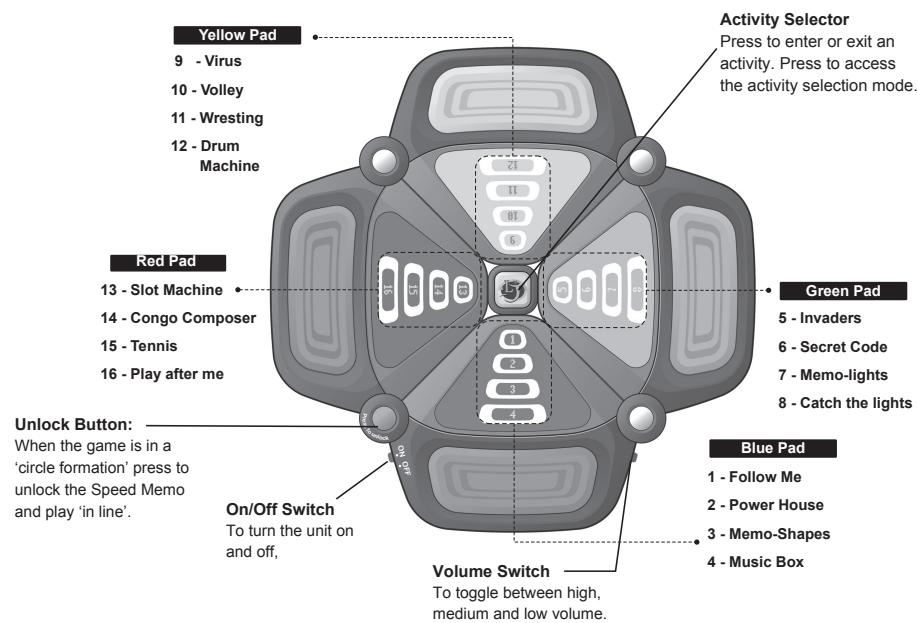
STEP 5 Press the Activity Button to confirm the selection. The Activity Selection Mode Sound and Light Effects is played. Either wait for the sequence to finish or skip by pressing any key.
Enjoy the game, it will begin immediately! For more details on the use of this game and how to play the activities, see the sections below.
Power Supply
Your Speed Memo works with 3 alkaline 1.5V - - - 2.25 Ah batteries type AA (included).
This game must be powered using only the specified batteries.
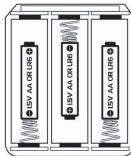
- Open the battery compartment cover located under the game.
- Install the 3 AA alkaline batteries observing carefully the polarity indicated at the bottom of the battery compartment.
- Close back the battery compartment.
Do not use rechargeable batteries. Do not recharge the batteries. Remove the storage batteries before recharging. Recharge storage batteries under adult supervision. Do not mix different types of battery and storage battery, or new and old batteries or storage batteries. Insert batteries and storage batteries according to the polarity. Remove used storage batteries from game. Do not short-circuit the battery or storage battery terminals. Keep batteries away from fire. If game remains unused for an extended period, remove batteries. Only batteries of the same or equivalent type as recommended are to be used.
RESET: If an abnormal operation is observed after having replaced the battery or in case of malfunction, use a pointed object (e.g. a paper clip) in order to press the RESET button located at the back of the unit. If the sound diminishes or the game no longer responds, the batteries may need changing.
How to use this manual
Here is a description of the symbols used in this manual:
| Coloured pads | Layout | Levels | Key |
| Blue pad = BLUE | In-circle = | = Easy level with slow pace. | Activity Selector = ACTIVITY |
| Green pad = GREEN | = Intermediate level with moderate pace. | ||
| Yellow Pad = YELLOW | In-line = | ||
| Red Pad = RED | = Difficult level with fast pace |
Demonstration Mode
From the activity selection menu, press BLUE + YELLOW + GREEN + RED together for 3 seconds to start the demo.
Sleep Mode & Press Me Feature
If the player performs no action for approximately 85 seconds, the unit will switch of lights and sounds and enter sleep mode.
Press Me Feature (from sleep mode) If the unit is in sleep mode, press BLUE to activate the demo mode.
For Play Mode (from sleep mode) If the unit is in sleep mode, press ACTIVITY to start from the power up sequence and enter the activity selection menu.
Activity Selection Mode
Use the activity selection mode to select a game. It can be accessed in the following ways:
- Push the Power Switch to the 'ON' position, wait or interrupt the power up sound and light effect by pressing one of the coloured pads, after which the unit automatically goes into the activity selection menu.
- Press the ACTIVITY button during the sleep mode, to start the power up sequence.
- Press the ACTIVITY button while in any game, to jump to the Activity Selection Mode and exit the game.
How to access an activity:
To choose an activity, you must highlight the corresponding light; activity 1 is light 1 and so on. Press repetitively the appropriate colour pad until the number of your choice is highlighted and press to begin the game.
For example, to play activity 05, Invaders Press the GREEN pad once and press ACTIVITY to enter the game. To play activity 12, Drum Machine Press the YELLOW pad 4 times and press ACTIVITY to enter the game.
ACTIVITY LIST
| 1. Follow Me | 1 Player |
Aim - Follow computer's lead.
To play - The computer plays a music note; the player must watch the lights and hear the sounds to follow the sequence. If player successfully follows the sequence dictated by the computer, the computer shall replay the previous sequence and add an additional note to the end. If the player is able to follow the computer for 16 notes, then the game is won. To play again, press one of the coloured key pads or press ACTIVITY to access the activity selection menu.
TIP : Remember the notes; try to hum the notes to help you remember.
| 2. Power House | 1 Player |
Aim - Win all the light panels.
To play - Watch the light sequence for the light panel. Panels are selected by a pre-determined sequence. Press the appropriate coloured button when the lights are lit, but be careful there are traps. Your have three lives. To proceed through the game, press the appropriate coloured pad while lights [4], [8], [12] or [16] is lit. Loose a life, when you stop the light on [1], [5], [9], [13], [3], [7], [11] & [15]. Instantly loose the game, when you stop the light on [2], [6], [10] & [14]. To play again, press one of the coloured key pads or press ACTIVITY to access the activity selection menu.
TIP : You must be quick to react. Learn the light patterns, then you can anticipate the light.
| 3. Memo-Shapes | 1 Player |
Aim - Remember the shapes and the sequence that are displayed. The same sequence of shapes is repeated until the user successfully remembers all 16 shapes. There are 6 different shapes:
big square, small square, diamond 1, diamond 2, line 1 and line 2.
To play - When the game round begins, you will hear a sound effect and 2 shapes will be displayed. Shapes are being displayed one after the other, press GREEN to select the shape when it appears. Remember you must select shapes in the order they are displayed If you select the wrong shape, you have to repeat the same sequence of shapes or press ACTIVITY to exit the game.
TIP : Take your time to learn the shapes, and then you can master the game.
| 4. Music Box | 1 Player | Variable levels |
Aim – Compose a tune, it will be recorded automatically.
To play - Use the following keys to play music:
| Do | BLUE | La | YELLOW + RED |
| Re | BLUE + GREEN | Ti | RED |
| Mi | GREEN | Do | BLUE |
| Fa | GREEN + YELLOW | To hear the notes recorded : | BLUE + YELLOW |
| So | YELLOW | To stop the lecture : | GREEN + RED |
Press Activity to exit the game.
TIP : Express yourself with the piano!
| 5. Invaders | 1 Player |
Aim – Avoid the invaders who descend from the lights [1], [5], [9] & [13] towards [4], [8], [12] & [16]. You win if you have survived without being captured.
To play - Move your player 'light' located on lights [4], [8], [12] & [16] around to avoid the descending invaders. Press BLUE to move to the blue section, from red or green. Press GREEN to move to the green section from blue or yellow Press YELLOW to move to the yellow section from green or red Press RED to move to the red section from yellow or blue. The game is instantly over when you are captured by the invaders or move into the invader. Press one of the coloured key pads to play again or ACTIVITY to access the activity sele menu.
TIP: Do not stay in one spot for too long; look for gaps where the enemies will not go.
| 6. Secret Code | 1 Player |
Aim – Find the secret colour combination
To play - Guess the combination of 4 colours by hitting the BLUE ^+ YELLOW ^+ GREEN ^+ RED pads in the desired order. If you hit one of the coloured pads in the right order, the light next to that colour will light up. Your have 4 attempts to guess. You win when the 4 light panels light up. To play again, press one of the coloured key pads or press ACTIVITY to access the activity selection menu.
TIP : Your guess is as good as mine!
- Memo-lights


1 Player

Aim - Remember the lights and their positions.
To play - At the beginning, you will hear a sound and the computer will light up one of the numbers. Press the GREEN pad whenever that number is lit up again. If you hit the GREEN pad at the right time, the computer will add one more light, forming a sequence of up to 8 lights. Based on memory, recreate the sequence to win.
To play again, press one of the coloured key pads or press ACTIVITY to access the activity selection menu.
TIP : Use the numbers to remember where to stop the light.
8.Catch the light

1 Player

Aim - Stop the light, win by stopping the light once on each colour section.
To play - Press BLUE to stop the light in the blue section.
Press GREEN to stop the light in the green section.
Press YELLOW to stop the light in the yellow section.
Press RED to stop the light in the red section.
Catch the light once, on each circle level to progress to the next. To win catch the light once on each section, for all 4 levels.
You loose a life if you press a key too early. The game is over if you loose 3 lives. Press one of the coloured key pads to play again or ACTIVITY to access the activity selection menu
TIP: There is no time limit, spend some time to watch the pattern and anticipate the position of the light.
- Virus

1 Player

Aim - Eradicate the spreading virus by shooting them down.
To play - You are the light located in front of the coloured pads.
Press RED to Shoot
Press BLUE to move your light clockwise
PressGREENto move light anti-clockwise
You must shoot the virus from the opposite section, example to shoot a virus located in the
red section you must shoot from the green section. If you wait too long in one position, the guns will jam and not fire. To play again, press one of the coloured key pads or press ACTIVITY to access the activity selection menu.
TIP: Keep on moving and try not to stop. You must be on the opposite end of the virus to shoot it.
| 10. Volley | 1 - 4 Player |
Aim - Do not let the ball drop to the floor on lights [4], [8], [12] or, [16].
To play - Press the coloured pads to bounce the light (representing a ball).
Avoid the lights reaching the ground. To play again, press one of the coloured key pads or press [ACTIVITY] to access the activity selection menu.
TIP : Try to keep the ball in the air and press the button early.
- Wrestling

2~4 Player(s)

Aim - Win by beating your opponent to reach the top. The lights will rise up depending how fast you can hit your button.
To play - Press the appropriate coloured pad representing your play panel as fast as you can to beat your opponent.
The faster the light blinks the closer you are to completing the current level, the first one to complete all 4 levels, wins. To exit the game press ACTIVITY
TIP: Just hit the button as fast as you can.
- Drum Machine


1 Player
Variable

Aim - Follow the rhythm played by computer. The computer will play a few notes from a drum sequence, the player should follow the rhythm.
To play - There are 20 bars to a song, the computer will play one bar at a time, each bar will consist of a number of drum beats; the player must follow the beat of the song. To follow the beat, the player must try to be accurate to the timing and the rhythm of the beats. If the player repeats the rhythm correctly the computer adds another bar to the sequence which the player needs to repeat.
Computer will blink lights [1], [2], [3] & [4] waiting for player to press a key to select the song. Select the song by using the light number as indicator (like in the activity selection mode).
Light Song
Light Song
01 Level 1 - March
02 Level 1 - Bounce
03 Level 1 - 8 Beat
04 Level 2 - March
05 Level 2 - Bounce
06 Level 2 - 8 Beat
07 Level 3 - March
08 Level 3 - Bounce
09 Level 3 - 8 Beat
10 Level 4 - March
11 Level 4-Bounce
12 Level 4 - 8 Beat
Press RED to confirm selection, and start game.
Once the song has been selected, lights [1], [2], [5], [6], [9], [10], [13] & [14], will blink, then the computer plays one bar from the song.
Lights [1], [2], [9] & [10] will blink to indicate that the sequence is finished and the player has to repeat the rhythm. To repeat the beat the player has to get the timing right. For a more challenging game, the player can also try to use the same percussion instruments as the computer.
| [D1] | Tom (3) | BLUE + GREEN + YELLOW + RED | [D7] [D5] | BLUE + YELLOW |
| [D2] | Rim Shell | BLUE + GREEN + YELLOW | [D7] [D6] | BLUE + RED |
| [D3] | Snare Drum | GREEN | [D7] [D4] | BLUE + YELLOW + RED |
| [D4] | Crash | YELLOW + RED | [D7] [D3] | BLUE + GREEN |
| [D5] | Hi Hit Open | YELLOW | [D3] [D5] | YELLOW + GREEN |
| [D6] | Hi Hat Closed | RED | [D3] [D6] | GREEN + RED |
| [D7] | Bass Drum | BLUE | [D3] [D8] | GREEN + YELLOW + RED |
| [D8] | Ride Cymbal | BLUE + GREEN + RED |
If the player misses, the sequence will be repeated. To exit the game press (ACTIVITY)
TIP : Listen to the beat, count in your head, and remember the rhythm.
- Slot machine

1 Player

Aim - Computer can randomly select a pattern of 4 lights; the player must match this pattern by stopping the 4 moving lights in the correct position.
To play - Computer will blink the lights that are selected randomly, as soon as the lights stop blinking a sound effect is heard. Then like slot machines the lights begin to rotate. Press BLUE to stop the light in the blue section. Press GREEN to stop the light in the green section. Press YELLOW to stop the light in the yellow section. Press RED to stop the light in the red section.
The player must stop all four lights in the dictated position to win. To play again, press one of the coloured key pads or press ACTIVITY to access the activity selection menu.
TIP: Try to stop the lights while they are accelerating, it will be harder when they reach top speed.
- Conga Composer


1 Player Variable levels
Aim - Compose a beat, it will be recorded automatically.
To play - The player needs to press any buttons or button combinations and create a rhythm.
| Tom (3) | BLUE + GREEN + YELLOW + RED | Hi Hat Closed | RED |
| Rim Shell | BLUE + GREEN + YELLOW | Bass Drum | BLUE |
| Snare Drum | GREEN | Ride Cymbal | BLUE + GREEN + RED |
| Crash | YELLOW + RED | Replay | BLUE + YELLOW |
| Hi Hit Open | YELLOW | Pause | GREEN + RED |
Press ACTIVITY to exit this activity and return to the activity selection menu.
TIP: Express yourself with drums!
- Tennis


1~4 Player(s)

Aim - Play tennis: hit the ball back pressing the appropriate coloured button.
To play - Players can only hit the ball when it has reached the lights [4], [8], [12] or [16]. This is the player's hitting range. If a player presses the button while the ball is not within hitting range, then game is over for that player. The last remaining player is the winner. Players will loose if they do not hit the ball in time when it reaches the hitting range. To play again, press one of the coloured key pads or press ACTIVITY to access the activity selection menu.
TIP: Watch the light. Press the button only when it reaches the last light of your playing field.
- Play after me


2 Players

Aim - Similar to Activity 1, but it is player one who dictates the sequence.
To play – Notice the difference in the flashing lights that determine which player's turn is it.
Player 1 - lights [1], [2], [5], [6], [9], [10], [13] and [14] blink Player 2 - lights [3], [4], [7], [8], [11], [12], [15] and [16] blink.
Player one goes first, followed by player two. If player two cannot follow the sequence dictated by player one, then player one shall win. If player two successfully follows player one but player one makes a mistake when repeating the sequence then player two shall win. If player two successfully follows player one for 16 notes, then player two shall win. To play again, press one of the coloured key pads or press ACTIVITY to access the activity selection menu.
TIP : Player 1, try to out smart your opponent by playing tricky combinations and beat.
Player 2, your task is harder, try to remember the combinations and play the notes in a different beat to muddle Player One's concentration
Maintenance
To clean the game, use only a soft cloth moistened with water; do not use any detergent product. Do not expose the game to direct sunlight or to any other source of heat. Do not get the game wet. Do not dismantle or drop the game. Remove the batteries if the product is not going to be used for an extended period of time.
Warranty
NOTE: Please keep this instruction manual, it contains important information. This product is covered by our 2-year warranty.
For any claim under the warranty or after sale service, please contact your distributor and present a valid proof of purchase. Our warranty covers any manufacturing material and workmanship defect, with the exception of any deterioration arising from the non-observation of the instruction manual or from any careless action implemented on this item (such as dismantling, exposition to heat and humidity, etc.). It is recommended to keep the packaging for any further reference.
In a bid to keep improving our services, we could implement modification on the colours and the details of the product shown on the packaging.
Not suitable for children under 36 months old, as it contains small detachable elements which could be swallowed.
Reference: JG200
© 2005 LEXIBOOK®
Deutsch
Einleitung
| 3. Memoriza as Formas | 1 Jogador |
LEXIBOOK Electronica Lda
Quinta dos Loios
Praceta Jose Domingos dos Santos, 6B-8A
2835-343 Lavradio-Barreiro Portugal
Farnham Road, Bordon
Hants, GU35 0NH United Kingdom
Freephone helpline: 0808 100 3015

http://www.lexibookjunior.com
Designed in Europe - Made in China