
CS 315 - Turntable LENCO - Free user manual and instructions
Find the device manual for free CS 315 LENCO in PDF.



| Product type | Digital car radio with RDS reception |
| Power supply | 12 V DC, negative ground |
| Dimensions (W x D x H) | 178 x 107 x 50 mm |
| Output power | 4 x 40 W (max) |
| Power consumption | 15 A (max) |
| Radio frequency ranges | FM: 87.5-108 MHz / MW: 522-1620 kHz |
| Supported audio formats | MP3, WMA |
| Auxiliary inputs | AUX IN socket (3.5 mm) on front panel |
| USB ports and memory card | USB interface (front) and SD/MMC card reader |
| Radio functions | RDS, PTY, TA, AF, presets (6 per band), automatic search |
| Sound settings | Bass (±10 dB at 100 Hz), Treble (±10 dB at 10 kHz), Balance, Fader |
| Random and repeat playback | Yes (RDM, RPT, INT) |
| Mounting | DIN front or rear (method A or B) |
| Reset button | Yes (RESET) accessible with a thin object |
| Maintenance and cleaning | Clean the front panel socket with a cotton swab soaked in isopropyl alcohol |
| Protection fuse | Yes, replaceable in case of problem |
Frequently Asked Questions - CS 315 LENCO
User questions about CS 315 LENCO
0 question about this device. Answer the ones you know or ask your own.
Ask a new question about this device
Download the instructions for your Turntable in PDF format for free! Find your manual CS 315 - LENCO and take your electronic device back in hand. On this page are published all the documents necessary for the use of your device. CS 315 by LENCO.
USER MANUAL CS 315 LENCO
MEMOIRE PROGRAMMES NON
MUSICAUX
TYPE DE PROGRAMME
OPTION RDS
Appuyez 2 seconds, SEL TA SEEK
/ALARM RETUNE L/RETUNE S
PI SOUND / MUTE ON/OFF
| MIMOIRE PROGRAMMES MUSICAUX | TYPE DE PROGRAMME | MEMOIRE PROGRAMMES NON MUSICAUX | TYPE DE PROGRAMME |
| M1 | POP | M1 | NEWA |
| ACTUALITES | |||
| ROCK | IMPORTANTES | ||
| M2 | EASY | M2 | SPORT |
| EDUCATION | |||
| LEGERE | PIECES RADIOPHONIQUES | ||
| M3 | MUSIQUE CLASSIQUE | M3 | CULTURE |
| SCIENCES | |||
| AUTRES | DIVERS | ||
| M4 | JAZZ | M4 | METEO |
| FINANCE | |||
| COUNTRY | ENFANTS | ||
| M5 | MUSIQUE NATIONALE | M5 | SOCIAL |
| RELIGION | |||
| ANCIENS SUCESS | QUESTIONS PAR TELEPHONE | ||
| M6 | FOLK | M6 | VOYAGES |
| LOISIRS | |||
| DOCUMENTaires |
FONCTIONNEMENT AVEC LECTEUR USB
FONCTIONNEMENT SD/MMC
PLL Synthesizer Stereo Radio
Automatic Memory Storing
RDS (Radio Data System) Operation
USB Interface
SD/MMC Interface
- Auxiliary Input Function
TABLE OF CONTENTS
Installation 3
DIN Front-Mount (Method A)............3
Installing the unit 3
Removing the unit 4
DIN Rear-Mount (Method B) 4
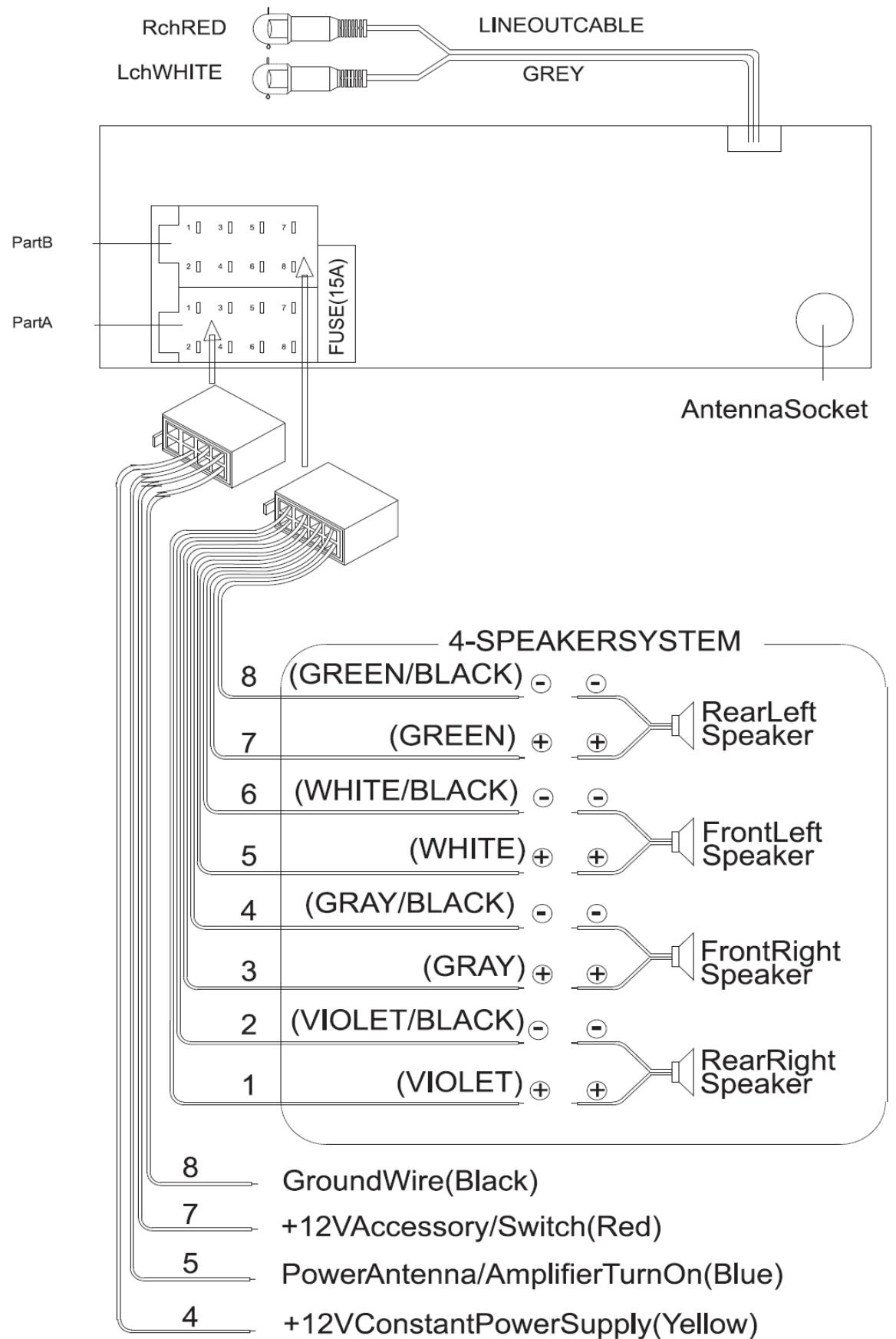
Wiring Connection.. 6
General Operation 7
Switching on/off the unit 7
Sound adjustment 7
Display information. 8
Liquid Crystal Display. 8
Radio operation 9
Switching to radio mode 9
Selecting the frequency band. 9
Selecting station 9
Automatic memory storing&
program scanning 9
Station storing 9
RDS (radio data system) operation... 9
USB play operation. 11
SD/MMC operation 11
Specification 12
Trouble shooting 13
Notes:
- Choose the mounting location where the unit will not interfere with the normal driving function of the driver.
- Before finally installing the unit, connect the wiring temporarily and make sure it is all connected up properly and the unit and the system work properly.
- Use only the parts included with the unit to ensure proper installation. The use of unauthorized parts can cause malfunctions.
- Consult with your nearest dealer if installation requires the drilling of holes or other modifications of the vehicle.
Install the unit where it does not get in the driver's way and cannot injure the passenger if there is a sudden stop, like an emergency stop.
If installation angel exceeds 30^ from horizontal, the unit might not give its optimum performance.
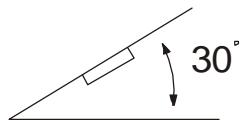
- Avoid installing the unit where it would be subject to high temperature, such as from direct sunlight, or from hot air, from the heater, or where it would be subject to dust, dirt or excessive vibration.
DIN FRONT/REAR-MOUNT
This unit can be properly installed either from "Front" (conventional DIN Front-mount) or "Rear"(DIN Rear-mount installation, utilizing threaded screw holes at the sides of the unit chassis). For details, refer to the following illustrated installation methods.
DIN FRONT-MOUNT (Method A) Installation Opening
This unit can be installed in any dashboard having an opening as shown below:
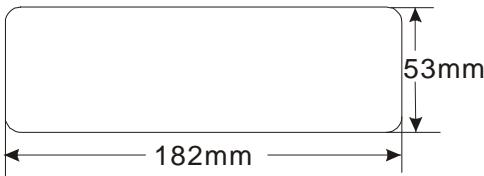
Installing the unit
Be sure you test all connections first, and then follow these steps to install the unit.
- ke sure the ignition is turned off, and then disconnect the cable from the vehicle battery's negative (-) terminal.
2.sconnect the wire harness and the antenna.
3.ft the top of the outer trim ring then pull it out to remove it.
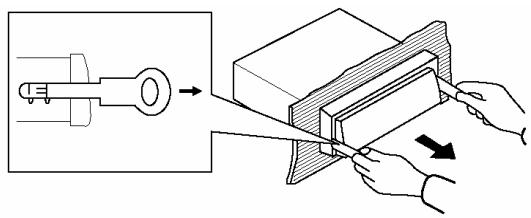
4.e two supplied keys release tabs inside the unit's sleeve so you can remove it. Insert the keys as far asthey will go (with the notches facing up) into the appropriate slots at the middle left and right sides of the unit. Then slide the sleeve off the back of the unit.
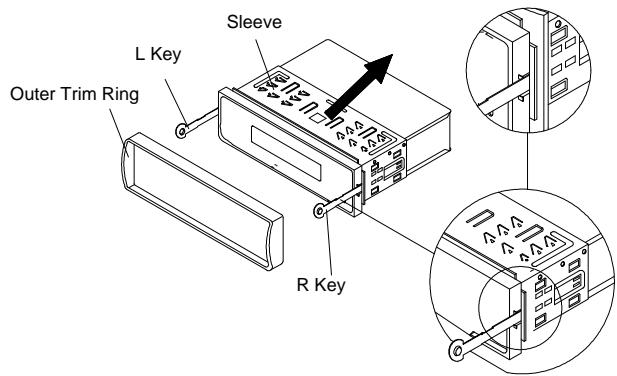
5.unt the sleeve by inserting the sleeve into the opening of the dashboard and bend open the tabs located around the sleeve with a
screwdriver. Not all tabs will be able to make contact, so examine which ones will be most effective. Bending open the appropriate tabs behind the dashboard to secure the sleeve in place.
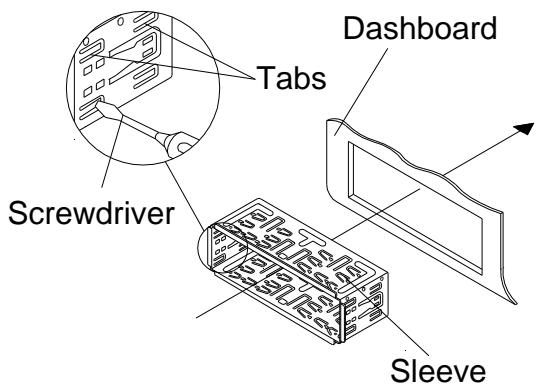
6.connect the wire harness and the antenna and be careful not to pinch any wires or cables.
7.ide the unit into the sleeve until it locks into place.
8. further secure the unit, use the supplied metal strap to secure the back of the unit in place. Use the supplied hardware (Hex Nut (M5mm) and Spring Washer) to attach one end of the strap to the mounting bolt on the back of the unit. If necessary, bend the metal strap to fit your vehicle's mounting area. Then use the supplied hardware (Tapping Screw (5x25mm) and Plain Washer) to attach the other end of metal strap to a solid metal part of the vehicle under the dashboard. This strap also helps ensure proper electrical grounding of the unit. Note to install the short threading terminal of the mounting bolt to the back of the unit and the other long threading terminal to the dashboard.
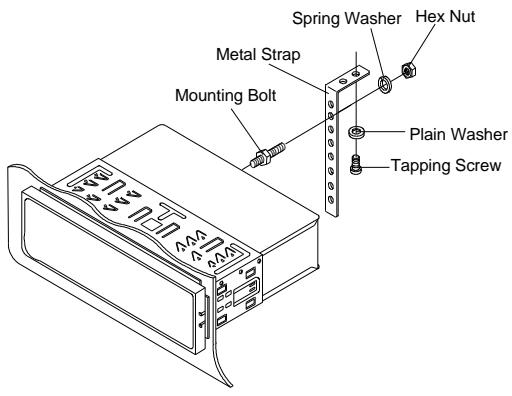
9.econnect the cable to the vehicle battery's negative (-) terminal. Then replace the outer trim ring.
Removing the unit
1.e sure the ignition is turned off, then disconnect the cable from the vehicle battery's negative (-) terminal.
2.move the metal strap attached the back of the unit (if attached).
3.ft the top of the outer trim ring then pull it out to remove it.
4.sert both of the supplied keys into the slots at the middle left and right sides of the unit, then pull the unit out of the dashboard.
DIN REAR-MOUNT (Method B)
If your vehicle is a Nissan, Toyota, follow these mounting instructions.
Use the screw holes marked T (Toyota), N (Nissan) located on both sides of the unit to fasten the unit to the factory radio mounting brackets supplied with your vehicle.
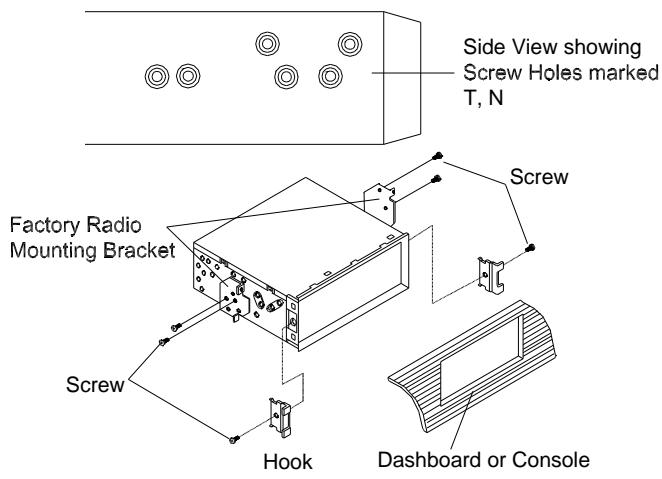
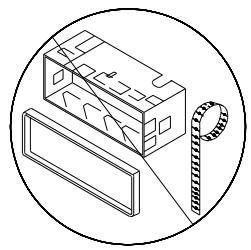
To fasten the unit to the factory radio mounting brackets.
1.e a screwdriver to loose the hook's screws on the front left and right sides of the unit and remove the hooks.
2.ign the screw holes on the bracket with the screw holes on the unit, and then tighten the screws (5x5mm) on each side.
Note: the outer trim ring, sleeve and the metal strap are not used for method B installation.
SWITCHING ON/OFF THE UNIT
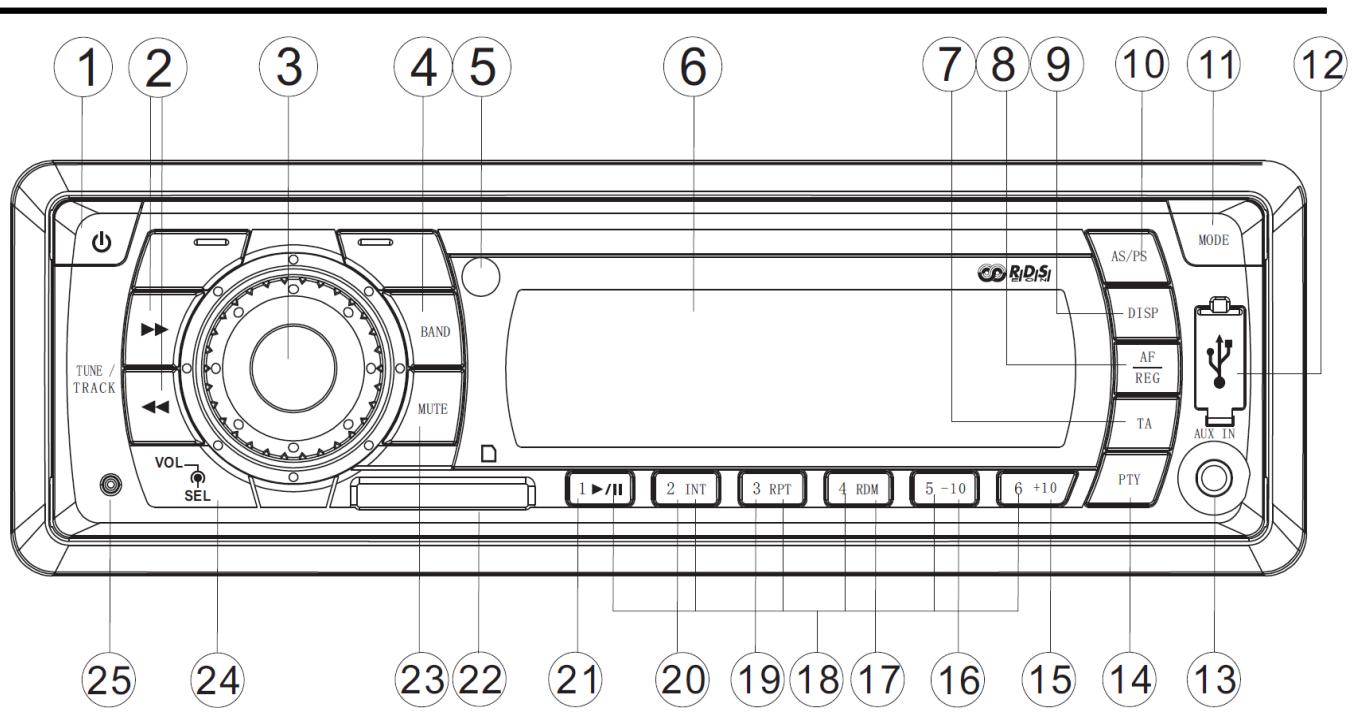
Press any button (1) to turn on the unit. When system is on, press button (1) to turn off the unit.
SOUND ADJUSTMENT
Press SEL button (3) shortly to select the desired adjustment mode. The adjustment mode will change in the following order:
$$ \begin{array}{c c c c}\rightarrow&\text {V O L}&\rightarrow&\text {B A S} \rightarrow \text {T R E} \rightarrow \text {B A L} \rightarrow \text {F A D} \rightarrow \text {L O U D}\(\text {v o l u m e})&(\text {b a s s})&(\text {t r e b l e}) (\text {b a n c l e})&(\text {f a d e r})\end{array} $$
By rotating the knob (3) clockwise or anticlockwise, it is possible to adjust the desired sound quality.
Press SEL button (3) for several seconds, it is activated as the following functions for user's selection.
TA SEEK or ALARM PI SOUND or MUTE RETUNE L or S MASK DPI or ALL BEEP 2'nd, ALL or OFF
a). SEEK OR TA ALARM
- TA SEEK mode:
When newly tuned station does not receive TP information for several seconds, the radio retunes to next
station which has not the same station (PI) as the last station, but has the TP information.
When TP information gets lost at the current station for retune time which is set by RETUNE SHORT (30 sec.) or RETUNE LONG (90 sec.), the radio start to retune to next same PI station. When same PI station does not catch in 1 cyclic search, the radio retunes to next station with TP information.
- TA ALARM mode:
When this mode is selected, any automatic retune mode is not activated. Only double beep sound (ALARM) is output.
When newly tuned station does not have TP information for several seconds, beeps come out.
When TP information gets lost at the current station for retune time, the beep sound is out-putted.
When newly tuned station has not RDS signal, "PI SEEK" is suppressed somewhat.
b).I SOUND or PI MUTE
While AF switching is implemented in C201 station, AF can switch to 100
MHz, which is non genuine AF (where, different PI with same AF) in short "DIP".
If a car cruises that critical area back and forth, an oscillation
phenomenon can be occurred, because the different PI code can be received from 100 MHz with “XXX” PI.
The car radio has special procedure to reduce even this kind of unavoidable situation however there is a limit to be escaped from this serious case perfectly.
In that serious case, 2 mode is selectable as follows:
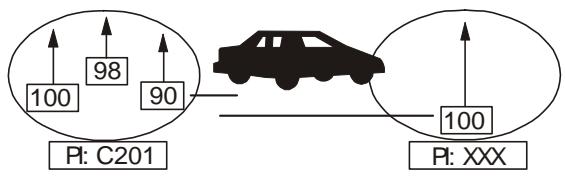
- PI SOUND mode:
When above different PI sound (DIP) is heard once in a while, the DIP's sound will be heard for a short time.
PI MUTE mode:
Under above same situation, a mute sound will be heard for a short time.
c).ETUNE L or RETUNE S mode
The initial time of automatic TA search or PI search modes is selected.
When PI information is not caught for retune time, the radio starts to retune to next same PI station.
When same PI station does not catch 1 cyclic search, the radio goes to last station and waits for several minutes until PI code is received.
- RETUNE L mode:
- Selected as 90 seconds.RETUNE S mode:
Selected as 30 seconds.
d).ASK DPI or MASK ALL mode
The AF frequency (which has different PI or NO RDS signal with high field strength) is masked during checking PI when the unit searches AF. The unit doesn't search this AF (DIP) for few minutes. In the case of the AF of NO RDS signal with high field strength, if the real AF is wrongly masked as DIP by some interference, the unit hesitates to search real Afs. For this reason, the unit has the user option (MASK DPI) which doesn't mask the AF of NO RDS signal with high field strength. In MASK DPI mode, the wrong sound or long mute (according to PI SOUND or PI MUTE) can be heard from the AF station which has NO RDS signal and of which the field strength is higher than that of the currently tuning AF (station). But, these phenomenons are rare and the user will hardly hear the wrong sound in whole Europe.
- MASK DPI mode:
Masked only the AF which has different PI.
- MASK ALL mode:
Masked the AF which has different PI and NO RDS signal with high field strength.
e).BEEP
ON/OFF mode
- BEEP ON
The beep is generated when every key is pressed.
- BEEP OFF mode:
The beep is disabled.
Exhibit current frequency and activated functions on the display (6).
DISPLAY INFORMATION
- Press DISP button (9) to show the time.
LIQUID CRYSTAL DISPLAY
AUXILIARY INPUT
The unit can be connected to a portable audio player through the AUX IN jack (13).
USB INTERFACE
On the front panel of the unit, there is an USB interface (12). You can connect an USB driver through this interface (12).
RADIO OPERATION
SWITCHING TO RADIO MODE
Press MODE button (11) shortly to select radio mode, the radio mode appears in the display together with the memory band and frequency.
At radio mode, press BND/LOU/ENT button (4) shortly to select the desired band.
The reception band will change in the following order:

SELECTING STATION
Press button (2) or button (24) shortly to activate automatic seek function.
Press for several seconds until "MANUAL" appears on the display, the manual tuning mode is selected. If both buttons have not been pressed for several seconds, they will return to seek tuning mode and "AUTO" appears on the display.
AUTOMATIC MEMORY STORING & PROGRAM SCANNING
Automatic memory storing
Press AS/PS button (10) for several seconds, the radio searches from the
current frequency and checks the signal strength until one cycle search is finished. And then the strongest stations are stored into the corresponding preset number button.
- Program scanning
Press AS/PS button (10) shortly to scan preset station. When the field strength level is more than the threshold level of stop level, the radio is holding at that preset number for several seconds with release mute, then searches again.
STATION STORING
Press any one of the preset buttons (18) (1 to 6) to select a station, which had been stored in the memory. Press this button for several seconds, current station is stored into the number button.
RDS FUNCTION
1.AF / REG
- AF / REG key directs the activation of AF SEARCH.
- AF indicator is displayed when AF is ON, AF search is activated when reception is bad.
During FM MODE, when AF is ON, SEEK, SCAN, AUTO, MEMORY function can only receive and save.
2.TA is turned ON / OFF and TA indicator is displayed.
When traffic announcement is transmitted, regardless of the mode, traffic announcement is received.
- when TA is on, SEEK,SCAN, AUTO MEMORY function can be received or saved or saved only when traffic program identification code has been received.
When TA is ON, traffic program identification code is not received during specified time. TA ALARM : NOTA / TP is displayed and alarm is set off TA SEEK : TA SEEK is activated.
3.PTY
- Previously PTY is displayed when PTY key is pressed. If there are no keys entered for 2 seconds, previously selected PTY is searched. During 1 LOOP, id desired PTY is not found, NO PTY is displayed.
- Program types are SPEECH and MUSIC.
By pressing PTY once, MUSIC is entered. When PTY is pressed the second time, SPEECH is entered.
M1-M6 keys can be used to select the desired program type.
MUSIC MENORY
PROGRAM TYPE
SPEECH MEMORY
PROGRAM TYPE
RDS OPTION
PRESE 2 seconds, SEL TA SEEK /
ALARM RETUNE L / RETUNE S
PI SOUND / MUTE ON/OFF
| MUSIC MENORY | PROGRAM TYPR | SPEECH MEMORY | PROGRAM TYPR |
| M1 | POP | M1 | NEWA |
| AFFAIRS | |||
| ROCK | INFORMATION | ||
| M2 | EASY | M2 | SPORT |
| EDUCATION | |||
| LIGHT | DRAMA | ||
| M3 | CLASSIC | M3 | CULTURE |
| SCIENCE | |||
| OTHER | VARIED | ||
| M4 | JAZZ | M4 | WEATHER |
| FINANCE | |||
| COUNTRY | CHILDREN | ||
| M5 | NATIONAL | M5 | SOCIAL |
| RELIGION | |||
| OLDIES | PHONE IN | ||
| M6 | FOLK | M6 | TRAVEL |
| LEISURE | |||
| DOCUMENT |
USB PLAY OPERATION
On the front panel of the unit, there is an USB interface (12). You can connect an USB driver through this interface (12).
When you connect an USB driver through the interface, the unit will search the MP3 files or WMA files in the USB driver and start to play MP3 files or WMA files automatically. If in other mode, you can also press MODE button (11) to select USB mode.
It supports the MP3/WMA file in the device, the operation please refer to the following instruction.
SELECTING SONGS IN SINGLE STEP
Press button (24) or button (2) to move to the previous song or the following song. Track number shows on display.
SELECTING DIRECTORY UP/DOWN
Press -10 button (16) or +10 button (15) to select up ten songs or down ten songs.
PAUSING PLAYING
Press button (21) to pause playing. Press it again to resume playing.
PREVIEWING ALL FILES
Press INT button (20) to INTRO each file stored in USB device. Shortly press again to stop intro and start to play.
REPEATING PLAYING
Press RPT button (19) to continuously repeat the same file. Press it again to stop repeat.
PLAYING IN RANDOM ORDER
Shortly press RDM button (17) to play all files stored in USB device in random order. Press it again to cancel the function.
CAUTION:
When there are important files in the USB device, do not connect it to the main unit to play, because any wrong operation may cause files loss. And our company assumes no responsibility for this.
SD/MMC OPERATION
There is a SD/MMC interface (22) on the front panel of the unit.
When you insert a SD/MMC card in the SD/MMC interface, the unit will search the MP3 files or WMA files in the card and start to play MP3 files or WMA files automatically. The operation is the same with the USB play operation described above.
If in other mode, you can also press MODE button (11) to select SD/MMC mode. When there are important files in the SD/MMC card, do not connect it to the main unit to play.
RESET FUNCTION
RESET button (25) must be activated with either a ballpoint pen or thin metal object. The RESET button is to be activated for the following reasons:
- Initial installation of the unit when all wiring is completed.
- All the function buttons do not operate.
- Error symbol on the display.
Note: if press RESET button (25), the unit can't work yet, please use a cotton swab soaked in isopropyl alcohol to clean the socket on the front panel.
SPECIFICATION
GENERAL
Power Supply Requirements : DC 12 Volts, Negative Ground
Chassis Dimensions : 178 (W) x 107 (D) x 50 (H)
Tone Controls
-
Bass (at 100 Hz) : ±10 dB
-
Treble (at 10 kHz) : ±10 dB
Maximum Output Power
4x40 watts
Current Drain
- 15 Ampere (max.) (For High Power Version)
RADIO
| For 3 Bands (Europe) FM | For 2 Bands (Europe) FM | |
| Frequency Coverage | 87.5 to 108 MHz | 87.5 to 108 MHz |
| IF | 10.7 MHz | 10.7 MHz |
| Sensitivity (S/N=30dB) | 4 μ V | 4 μ V |
| Stereo Separation | >25dB | >25dB |
| MW | MW | |
| Frequency Coverage | 522 to 1620 kHz | 522 to 1620 kHz |
| IF | 450 kHz | 450 kHz |
| Sensitivity (S/N=20dB) | 36 dBu | 36 dBu |
TROUBLE SHOOTING
Before going through the checklist, check wiring connection. If any of the problems persist after checklist has been made, consult your nearest service dealer.
| Symptom | Cause | Solution |
| No power. | The car ignition switch is not on. | If the power supply is connected to the car accessory circuits, but the engine is not moving, switch the ignition key to "ACC". |
| The fuse is blown. | Replace the fuse. | |
| No sound. | Volume is in minimum | Adjust volume to a desired level. |
| Wiring is not properly connected. | Check wiring connection. | |
| The operation keys do not work. | The built-in microcomputer is not operating properly due to noise. | Press the reset button. |
| The radio does not Work. The radio station automatic selection does not work. | The antenna cable is not connected. | Insert the antenna cable firmly. |
| The signals are too weak. | Select a station manually. |
If at any time in the future you should need to dispose of this product please note that: Waste electrical products should not be disposed of with household waste. Please recycle where facilities exist. Check with your Local Authority or retailer for recycling advice. (Waste Electrical and Electronic Equipment Directive)
MANUAL DEL USUARIO
SD/MMC bediening. 12
Specifications 12
Probleem oplossen 13
Opmerkingen:
2. PI SOUND of PI MUTE
LIQUID CRYSTAL DISPLAY (LCD)
2.TA .(Traffic Announcement)
RDS OPTION - OPCJA RDS
WCISNIJ 2 SEKUNDY - SEL => TA
SEEK => ALARM => RETUNE L =>
RETUNE S => PI SOUND / MUTE => ON/OFF
| ZAPROGRAMO WANE PROGRAMY MUZYCZNE | TYP PROGRAMU | ZAPROGRAMO WANE PROGRAMY MÓWIONE | TYP PROGRAMU |
| M1 | MUZYKA ROZRYWKO WA | M1 | NAJŚwieżsZE INFORMACJE |
| PUBLICYSTYCNY | |||
| MUZYKA ROCKOWA | |||
| M2 | MUZYKA ŁATWA | M2 | INFORMACYJNY |
| SPORTOWY | |||
| EDUKACYJNY | |||
| M3 | MUZYKA LEKKA | M3 | |
| DRAMAT | |||
| MUZYKA KLASYCZNA | KULTURALNY | ||
| INNA | NAUKOWY | ||
| RÓZNORODNY | |||
| M4 | MUZYKA JAZZOWA | M4 | PROGNOZA POGODY |
| FINANSOWY | |||
| MUZYKA COUNTRY | |||
| M5 | MUZYKA KRAJOWA | M5 | DLA DZIECI |
| SPOŁECZNY | |||
| RELIGIJNY |
OBSLUGA USB
If at any time in the future you should need to dispose of this product please note that: Waste electrical products should not be disposed of with household waste. Please recycle where facilities exist. Check with your Local Authority or retailer for recycling advice. (Waste Electrical and Electronic Equipment Directive)
800-0C3023-01
- FONCTIONNEMENT AVEC LECTEUR USB
- FONCTIONNEMENT SD/MMC
- TABLE OF CONTENTS
- Installation 3
- Notes:
- DIN FRONT/REAR-MOUNT
- DIN FRONT-MOUNT (Method A) Installation Opening
- Installing the unit
- Removing the unit
- DIN REAR-MOUNT (Method B)
- SWITCHING ON/OFF THE UNIT
- SOUND ADJUSTMENT
- DISPLAY INFORMATION
- LIQUID CRYSTAL DISPLAY
- AUXILIARY INPUT
- USB INTERFACE
- RADIO OPERATION
- SWITCHING TO RADIO MODE
- SELECTING STATION
- AUTOMATIC MEMORY STORING & PROGRAM SCANNING
- STATION STORING
- RDS FUNCTION
- 3.PTY
- USB PLAY OPERATION
- SELECTING SONGS IN SINGLE STEP
- SELECTING DIRECTORY UP/DOWN
- PAUSING PLAYING
- PREVIEWING ALL FILES
- REPEATING PLAYING
- PLAYING IN RANDOM ORDER
- CAUTION:
- SD/MMC OPERATION
- RESET FUNCTION
- SPECIFICATION
- GENERAL
- RADIO
- TROUBLE SHOOTING
- MANUAL DEL USUARIO
- Opmerkingen:
- PI SOUND of PI MUTE
- LIQUID CRYSTAL DISPLAY (LCD)
- OBSLUGA USB
Brand : LENCO
Model : CS 315
Category : Turntable