
CDP 440 - Mp3 player GRUNDIG - Free user manual and instructions
Find the device manual for free CDP 440 GRUNDIG in PDF.


| Product Type | Portable CD/MP3 player |
| Brand | Grundig |
| Model | CDP 440 |
| Dimensions (W x H x D) | 133 x 31.5 x 137 mm |
| Weight (without batteries) | Approx. 0.3 kg |
| Power supply | AC adapter 6 V DC (included) or 2 LR6 (AA) alkaline / rechargeable Ni-Cd batteries |
| Power consumption | AC adapter 6 V / 450 mA (positive center pin) |
| Disc formats | 8 cm and 12 cm audio CD |
| Digital Anti-Shock (DAS) | 40 seconds buffer memory |
| Playback modes | Normal play, repeat 1, repeat all, intro, random, program (20 tracks) |
| Additional functions | Ultra Bass System (UBS), key lock (LOCK), auto-off |
| Outputs | 3.5 mm stereo headphone jack, 3.5 mm stereo Line Out jack |
| Frequency response | 20 Hz - 20 kHz |
| Signal-to-noise ratio | > 80 dB (weighted) |
| Channel separation | > 52 dB |
| D/A conversion | 1 bit, linear digital filter |
| Headphone output power | 2 x 15 mW (DIN 45324, 10% THD) |
| Line Out output voltage | 0.6 V +/- 1.5 dB |
| Included accessories | AC adapter/charger, stereo headphones, warranty card, user manual |
| Maintenance | Do not touch the lens. Clean the casing with a soft, slightly damp cloth. Clean CDs from the center outwards with a soft, lint-free cloth. |
| Laser safety | Class 1 laser product (CLASS 1 LASER PRODUCT) |
| Battery recycling | Do not dispose of used batteries with household waste. Return them to the dealer or a collection point. |
| Compliance | EU directives 89/336/EEC, 73/23/EEC and 93/68/EEC. Safety according to VDE 0860 and IEC 65. |
Frequently Asked Questions - CDP 440 GRUNDIG
User questions about CDP 440 GRUNDIG
0 question about this device. Answer the ones you know or ask your own.
Ask a new question about this device
Download the instructions for your Mp3 player in PDF format for free! Find your manual CDP 440 - GRUNDIG and take your electronic device back in hand. On this page are published all the documents necessary for the use of your device. CDP 440 by GRUNDIG.
USER MANUAL CDP 440 GRUNDIG
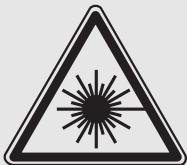
CLASS 1 LASER PRODUCT
WARNING!
OM APPARATEN ANVÄNDS PÀ ANNAT SÄTT
AN I DENNA BRUKSANVISNING
SPECICERATS, KAN ANVANDAREN
UTSÄTTAS FÜR OSYNLIG LASERSTRÄNING,
SOM OVERSKRIDER GRANSEN FÜR
LASERKLASS 1.
VAROITUS
LAITTEEN KAYTTAMINEN MUULLA KUIN
TASSA KAYTTOOHJEESA MAINITULLA TAVALLA
SAATTAA ALTISTAA KAYTTAJAN
TURVALISUJSLUOKAN I YIITTAVALLE
NAYKYMATTOMALLE LASERSATEILYLE.
| English | Page |
| General | 10 |
| Controls | 10-11 |
| DAS / LOCK | 11 |
| Power Supply | 12 |
| CD-Player | 13-14 |
| Technical Data | 15 |
| Troubleshooting | 15 |
| Service | 64 |
- Never write on a CD or attach any sticker to the CD.
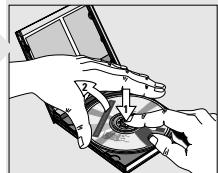
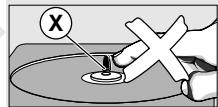
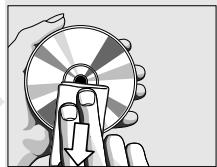
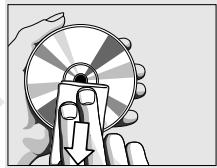
- To take the CD out of its box easily, press the centre spindle while lifting the CD.
- Always hold the CD at the edge and always store it in its box after use with the label facing up.
- Do not expose the CD player, batteries or CDs to rain and dampness (e.g. dripping or splashing), sand and dust or to excessive heat caused by heating equipment, or to direct sunlight, for example inside a car parked in the sun.
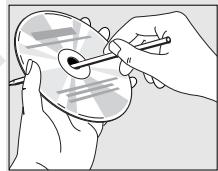
- When a newly purchased CD does not stay on the hub, this is caused by small burrs around the center hole of the CD.
- Remove the burrs by rubbing the edge of the center hole with a pen or other such instrument.
Maintenance
- The lens of the CD player should never be touched!
- The mechanical parts of the CD player contain self-lubricating bearings and must not be oiled or lubricated.
- You can clean the CD player cabinet with a soft and slightly dampened chamois leather.
Do not use any cleaning agents as they may have a corrosive effect. - The lens may cloud over when the set is suddenly moved from cold to warm surroundings. Playing a CD is then not possible. Leave the CD player in a warm environment until the moisture evaporates.
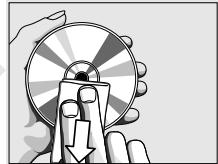
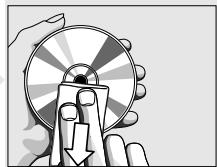
- To remove dust and dirt from the CD, breathe on the CD and wipe it with a soft, lint-free cloth in a straight line from the center towards the edge. Cleaning agents may damage the CD.
Warning
CLASS 1 LASER PRODUCT means that the laser's construction makes it inherently safe so that the legally prescribed maximum permissible radiation values can never be exceeded.
CAUTION: Using any equipment or devices other than those described and specified in these operating instructions, or tampering with the unit in any way, can result in dangerous exposure to radiation.
CONTROLS
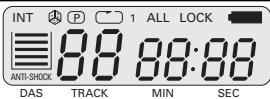
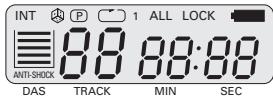
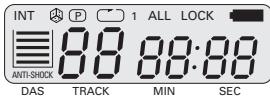
The display indicates:
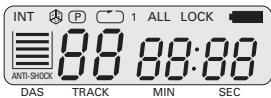
P: during programming or programme playback
: during the RANDOM function
INTRO: during the INTRO function
ALL: during the REPEAT function (repeat all)
1 flashing: repeat one title
LOCK: when LOCK is activated and any button is pressed.
T : flashing: the batteries are weak; continuously: the battery voltage is too low. 品 track number
88:88: playing time
when DAS is activated
Earphone control jack (PHONE)
- Connect the supplied earphones (3.5 mm jack plug) to the PHONE jack.
USING EARPHONES - Caution...
Do not play your earphones at a high volume.
Operation at high volume can endanger yourself and others in traffic. You should therefore always adjust the volume so that you can still notice ambient noises (e.g. horns, rescue vehicles, police cars, etc.)
Note: This CD portable/headphone set complies with the requirements of article LL44.5 and 6 of the Public Health Code.
The performances of this product guarantee optimal listening at medium volume. Continuous use at high volume can damage the user's hearing.
CONTROLS
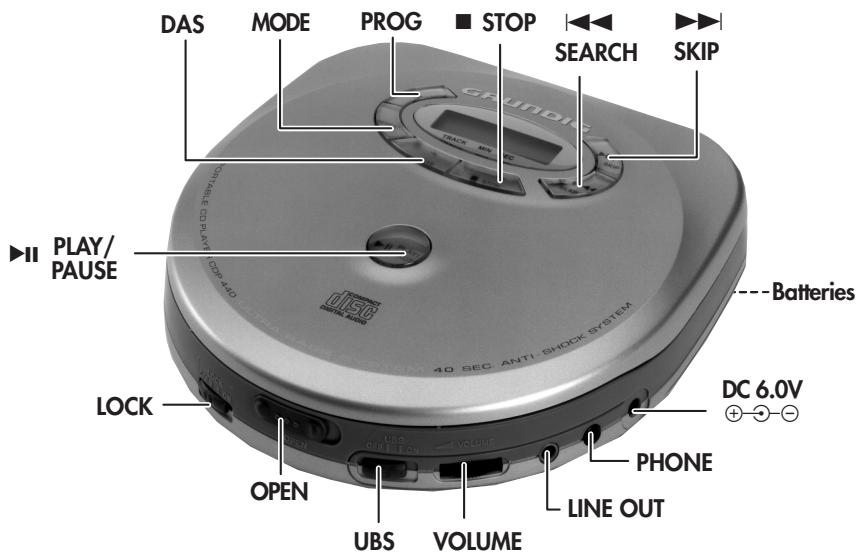
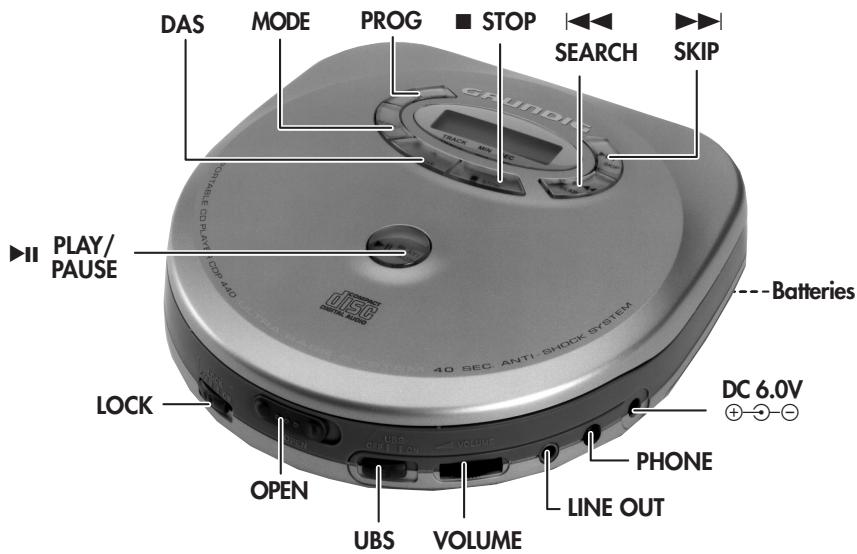
| ▶II PLAY/ PAUSE | - to start and interrupt playback |
| PROG | - to select the program function - to store musical pieces in a program using activated programming mode |
| MODE | - to select the play functions |
| DAS | - to switch the DAS function on and off |
| STOP | - to stop playback |
| SEARCH | - to skip and search backward |
| SKIP | - to skip and search forward |
| DC 6.0 V | |
| ⊕-⊕-⊕ | - jack for external power supply |
| PHONE | - earphone jack (3.5 mm) |
| LINE OUT | - jack for connection to a HiFi system. |
| VOLUME | - to adjust the volume |
| UBS | - (Ultra Bass System) to boost the bass response |
| OPEN | - to open the lid of the CD player |
| LOCK | - to lock all button functions |
Bottom of the set:
| Batteries | - for inserting 2 LR 6 (AA) alkaline batteries or rechargeable batteries. |
DAS / LOCK
DAS - Digital Anti shock System
The DAS memory of the model CDP 440 stores the CD data (music) for 40 seconds in advance in order to prevent interruption during play caused by shock and vibration.
The DAS memory of the model CDP 410 stores the CD data for 10 seconds in advance.
- Activate the DAS memory by pressing the DAS button once.
- The Anti Shock symbol in the display starts filling, the display shows for example:
- The state of the DAS symbol in the display changes according to the state of the DAS memory.
- To disable this function, press the DAS button once more.
Note: When switching the DAS feature on and off, CD play will be delayed or interrupted for a short time.
- As the Digital Anti shock System requires more energy, it is advisable to switch it off when the playing conditions are good, in order to save battery life.
Lock function
The 'LOCK' function locks the button function to prevent accidental activation (for example while travelling).
- Set LOCK to ON position.
Now, the CD player buttons will not operate. The 'LOCK' indication lights up on the display. - To deactivate this function, reset LOCK to OFF.
- The device cannot be switched on in LOCK ON position.
POWER SUPPLY
Batteries
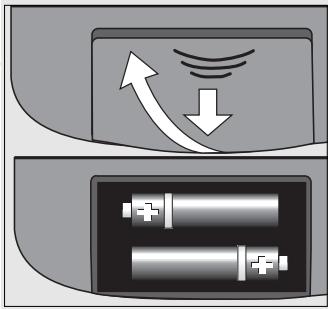
- Open the battery compartment and insert as indicated two alkaline batteries type LR6, AM3, AA or insert two rechargeable Nickel-Cadmium batteries.
- Remove the batteries if they are empty or if the CD player is not to be used for a long time.
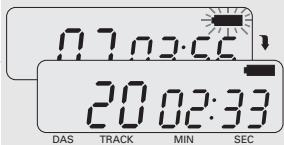
The display indicates when the battery voltage is too low:
- When the indicator flashes, the batteries are getting too weak.
- When appears continuously, the battery voltage is too low and the CD player will soon shut down.
Note:
The battery supply is switched off when the DC IN 6.0 V socket is in use.
When changing over to battery supply, pull out the plug from the DC IN 6.0 V socket.
Mains adapter (supplied)
1 Make sure that the local voltage corresponds to the voltage of the adapter.
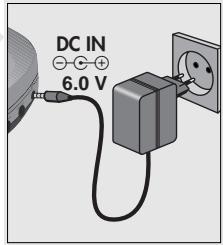
2 Connect the supplied mains adapter (6.0 V/450 mA Direct Current plus-pole to the centre pin) to the player's DC IN 6.0 V jack and to the wall outlet.
- Always disconnect the adapter if you are not using it.
Note:
The CD-player remains connected to the mains even when it is switched off. The unit is only fully isolated from the mains if the mains adapter is removed from the wall socket.

Note on Environmental Protection
Do not throw exhausted batteries in the household refuse.
Hand over the old batteries to your dealer or public collecting points when buying new ones.
Recharging Nickel-Cadmium batteries (size AA)
Your mains adapter also works as a charger. This is only possible with Ni-Cd batteries (size AA) 1.2 V/600mAh.
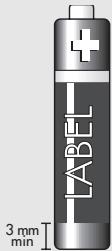
Note: As a quick reference when buying the Ni-Cd batteries, be sure that the metal cap on the negative pole is exposed more than 3mm as illustrated.
- Charge the batteries prior to first use and also if the batteries have not been used for a long period.
- Install the rechargeable batteries in the battery compartment as described before.
- Connect the AC adapter to the CD-player and then to the wall outlet.
- The batteries should be allowed to recharge for 8 hours for full capacity.
- The ambient temperature for recharging should be between 5^ and 40^ .
- The player can be operated while the batteries are being recharged.
Line out
Reproduction through a stereo system
- Turn down the volume of your stereo system.
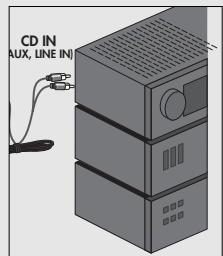
- Connect a signal lead to the LINE OUT jack of the CD player and to the input jacks CD IN, AUX(iliary) or LINE IN of the other set (amplifier, receiver, radio cassette recorder etc.).
- Adjust the sound with the controls of the stereo system.
Inserting a CD
- Open the lid by sliding the OPEN button and lifting the lid gently.
- Insert an audio CD, printed side up.
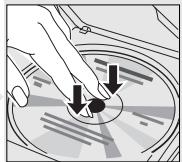
- Push gently on the CD center so that it fits onto the hub.
- In addition to standard 12 cm CD's, you can also play 8 cm CD singles without an adapter.
- Close the lid by pushing it gently on its right-hand side.
- The CD-player scans the contents list of the CD.
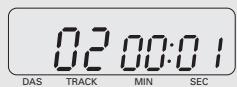
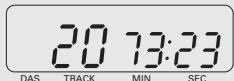
The total playing time and the total number of tracks appear on the display.
Press II PLAY/PAUSE to start playback.
Removing the CD:
- Open the CD door only if the CD player is in position STOP.
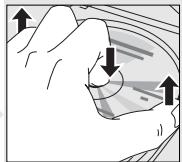
- To take out the CD, open the CD lid by sliding the OPEN switch and lifting the lid gently.
- Hold the CD by its edge and press the hub gently.
Playing a CD
- Press▶II PLAY/PAUSE to start playback.
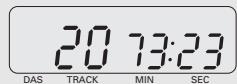
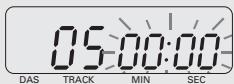
- The display shows the current track number and its elapsed playing time.
- Adjust the sound using the VOLUME and UBS controls.
- For brief interruptions, press PLAY/PAUSE.
- The playing time indication starts flashing.
To resume playback, press▶II PLAY/PAUSE again. - To stop playback, press STOP.
- The total playing time and number of tracks will then appear on the display.
- If you press the STOP button again, you will switch off the set.
- If no button is pressed for 30 seconds, the set will switch off automatically.
-
The CD player also goes to position STOP:
-
by opening the CD lid;
- when the end of the CD is reached;
- if the batteries run down or if the power supply is interrupted.
Automatic Power-Off
This CD-player is equipped with an automatic power-off function.
- In STOP mode, the player automatically shuts down approximately 30 seconds after the last operation.
- If you press STOP while the set is in STOP mode, the player also shuts down.
To reactivate the player, press I PLAY/PAUSE.
SEARCH / SKIP
Selecting another track during play
- Press SEARCH or SKIP until the required track number appears in the display.
The selected track begins to play.
Starting with a particular track
- Press SEARCH or SKIP until the required track number appears in the display.
- Press PLAY/PAUSE.
- Play starts from the selected track.
Searching for a passage during play
- Hold SEARCH | down to search backwards to the beginning.
- Hold SKIP I down to search forwards to the end.
Note: This function can be described as 'audibly' searching for a title.
During the search, volume is reduced and returns to its adjusted level as soon as the button is released.
Selecting a different playback mode
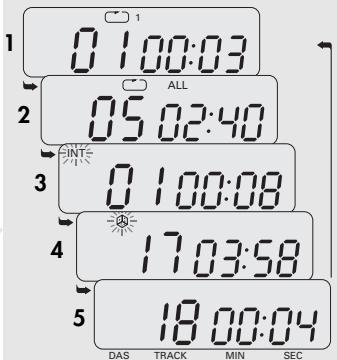
The MODE button enables you to choose among five different play modes.
- Press the MODE button repeatedly until the desired play format appears on the display indicator.
1 REPEAT 1: repeats only the chosen title.
2 REPEAT ALL: repeats all titles on the CD.
3 INTRO: plays the first 10 seconds of each title on the CD; the CD player stops play after the last title.
4 RANDOM: plays titles in random order until all titles have been played once; the CD player then stops.
5 No entry: normal play. - The RANDOM function cannot be activated while another program is in operation.
- To return to normal play mode, press the MODE button until the display indicator is blank.
- To shut down the CD player, press the STOP button twice.
Programming
By programming the player you can play up to 20 tracks in any desired order. If you exceed the maximum of 20 tracks, the programme function will start again from the beginning. You may store each track more than once.
Storing a programme
- Insert a CD and close the compartment.
- Press the PLAY-PAUSE button to read the CD.
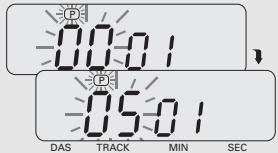
- Press the PROG button and the display will flash the letters P.
- Select the first desired track using SKIP-SEARCH K or ▷▶I.
- The display shows e.g.:
- Store this number by pressing the PROG button.
- The display shows:
- Select and store in this way all desired titles.
Note:
While playing a programme, it is possible to use SEARCH or SKIP to select the desired programmed tracks.
Playing the programme
Press PLAY-PAUSE II.
- Playback starts with the first track of the programme.
- The display shows P.
- After the last track playback stops.
The total playing time and number of tracks appear on the display.
Note:
While playing a programme, it is possible to use
SKIP-SEARCH or to select the desired programmed tracks.
Checking the programme
- Press the PROG button repeatedly until P flashes on the display.
Each press of the PROG button will now show each stored number in the order entered. - Then, ^ appears again.
- You can now add tracks to the sequence as described above (up to 20).
Erasing the programme
The contents of the memory will be erased:
- when you switch off the player;
- if the batteries become exhausted or if the power supply is interrupted in another way.
- when the CD compartment is opened.
TECHNICAL DATA
Power Supply
AC power adapter .......DC 6.0 V -Theta external
Battery operation. 2 × 1.5V (LR6, AM3, AA)
Output power DIN 45324, 10% THD
Earphone output. 2× 15mW
Line output. 0.6 V +/-1.5 dB
Connections
Line Out 3.5 mm stereo
DC connector. 3.5 mm Ø (6.0 V)
Earphones: 3.5 mm Ø, stereo
CD Player
Frequency range: 20 Hz - 20 kHz
S/N ratio, weighted 80 dB
Channel separation. > 52 dB
D/A conversion 1 bit linear digital filter
Dimensions (w × h × d)....133 mm × 31.5 mm × 137 mm
Weight (without batteries) approx. 0.3kg
Supplied accessories
AC power adapter/battery charger
Stereo earphones
Guarantee sheet
Instructions for Use
This unit meets the CEE regulations concerning interference radiation.
This product fulfills European directives 89/336/EEC, 73/23/EEC and 93/68/EEC.
This unit complies with the safety regulations according to VDE 0860 / BS 415 and thus with the international safety regulation according to IEC 65.
The type plate is located on the bottom of the set.
Subject to technical alterations and alterations in styling E. and O.E.
TROUBLESHOOTING
If a fault occurs, first check the points listed below before taking the set for repair.
If you are unable to remedy a problem by following these hints, consult your dealer or service centre.
WARNING: Under no circumstances should you try to repair the set yourself, as this would invalidate
the guarantee.
| Problem | Possible Cause | Remedy |
| No power or no CD play start Display: no indication | Batteries/rech. batt. Batteries incorrectly inserted Batteries are empty The LOCK switch is in the ON position Contact pins are dirty | Insert the batteries correctly Change/recharge the rechargeable batteries LOCK switch in position OFF Clean them with a cloth |
| AC power adapter Loose connection | Connect the adapter securely | |
| CD play does not start or interrupts Display: no indication or d'15c | CD lid is not securely closed Moisture condensation CD is not or incorrectly inserted CD is badly scratched CD is dirty | Close the lid securely Leave the player in a warm place until the moisture evaporates Insert a CD, label facing up Use another CD Clean the CD |
| Play does not start from the first track | RANDOM or PROGRAM is activated | Switch off RANDOM or PROGRAM |
| No sound or bad sound quality | PAUSE is activated Loose or wrong connections Volume is not turned up Earphones worn the wrong way round Earphone plug is dirty Strong magnetic fields near the CD player Electrostatic discharge from the user via the CD player The earphone is plugged into the LINE OUT socket. | Press▶II PLAY/PAUSE Check connections Adjust the volume Pay attention to the L (left) and R (right) indications Clean the earphone plug Change the player's position or connections Press SEARCH | ← or SKIP ▷ once or press▶II PLAY/PAUSE twice Plug earphone into PHONE socket |
GENERAL
Manipulation des CD
CLASS 1 LASER PRODUCT
CONTROLLI
Il visore indica:
Collegamento DC. 3,5 mm Ø (6,0 V)
Cuffie stereo 3,5 mm stereo
Lettore CD
Conversion D/A............1 bit linear digital filter
Dimensioni (I × a × p)....133 mm × 31,5 mm × 137 mm
Note: This CD portable/headphone set complies with the requirements of article L44.5 and 6 of the Public Health Code.
The performances of this product guarantee optimal listening at medium volume. Continuous use at high volume can damage the user's hearing.
CONTROLOS
II PLAY/ -para iniciar e interrormper a PAUSE reproducao
PROG -para selecionar a funcao do programa
Conector DC. 3,5 mm Ø (6,0 V)
CLASS 1 LASER PRODUCT
Conector DC 3,5 mm (6,0 V)
Conversion D/A............1 bit linear digital filter
Dimensiones (an x al x pr) ... 133 mm x 31,5 mm x 137 mm
Peso (sin pilas) ..aprox. 0,3 kg
Accesorios:
CLASS 1 LASER PRODUCT
Het display toont:
D/A conversie 1 bit linear digital filter
Afmetingen (b× h× l) ...133 mm x 31,5 mm x 137 mm
Gewicht (zonder batterijen) ca. 0,3 kg
CLASS 1 LASER PRODUCT
KONTROLLER
Display indikerar:
Channel separation. >52 dB
D/Aomvandling 1 bit linear digital filter
Dimensioner (b x h x d) ... 133 mm x 31,5 mm x 137 mm
Vikt (utan batterier) ca. 0,3 kg
D/A-munto 1 bit linear digital filter
Mitat (L × K × S) ....133 mm × 31,5 mm × 137 mm