
FR-2 - Digital Accordion ROLAND - Free user manual and instructions
Find the device manual for free FR-2 ROLAND in PDF.


| Product type | Digital accordion |
| Brand | Roland |
| Model | FR-2 (also FR-2b) |
| Playing modes | Normal (bass and chord), right-hand bass, free bass |
| Number of internal songs | 8 |
| Accordion sounds (right hand) | 5: Classic, Jazz, I-Folk, D-Folk, Bandoneon |
| Orchestral sounds (right hand) | 6: Acoustic, Fretless, Fingered, Picked, Tuba Mix, Bowed |
| Free bass systems | 5: Minor 3rd, Bajan, Fifth, N. Europe, Finnish |
| FUNCTION settings | Master tuning, musette tuning, transposition, balance, levels, metronome, reverb, chorus, bellows curve, etc. |
| Valve noise (right hand) | Adjustable from Off to +40 (default 0) |
| Button noise (left hand) | Adjustable from Off to +40 (default 0) |
| Configurable MIDI channels | Roland (MD=1, Bass=2, Chord=3) or Other (MD=1, Bass=3, Chord=2) |
| Bellows expression transmission | Off, On, Arranger (default Arranger) |
| MIDI settings backup | Dump TX via SysEx |
| Reference caps included | Yes, for marking bass buttons |
| Additional MIDI features | Octave transposition, program change transmission, arranger control |
| Stored settings | Most parameters are stored (except TENSION: temporary) |
| System update | Update information included in the manual |
Frequently Asked Questions - FR-2 ROLAND
User questions about FR-2 ROLAND
0 question about this device. Answer the ones you know or ask your own.
Ask a new question about this device
Download the instructions for your Digital Accordion in PDF format for free! Find your manual FR-2 - ROLAND and take your electronic device back in hand. On this page are published all the documents necessary for the use of your device. FR-2 by ROLAND.
USER MANUAL FR-2 ROLAND
Kindly take note of the following
The following functions have been added or changed as a result of a system software update for both FR-2 models (FR-2 and FR-2b).
Bass-to-Treble mode
The FR-2 also provides a mode in which it can be used like a bassoon accordion. In this mode, the bass part is played with the right hand. The bass and chord buttons are inactive (a real bassoon accordion doesn't have bass/chord buttons and can only be played with one hand).
(1) Press SET ⑤ + register ⑤ to activate Bass-to-Treble mode.
(2) Use the Treble registers ⑥ to select the desired bass-to-treble sound.
These sounds are not the same as the ones you can usually select with the bass registers. (The bass registers cannot be used in this mode.)
There are five accordion sounds and six orchestral sounds. The numbers in the table below refer to the Treble registers you need to press.
| Bass-to-Treble sounds | |
| Accordion sounds | Orchestral sounds |
| 1 Classic | 6a Acoustic |
| 2 Jazz | 6b Fretless |
| 3 I-Folk | 7a Fingered |
| 4 D-Folk | 7b Picked |
| 5 Bandoneon | 8a Tuba Mix |
| 8b Bowed | |
Each register 6 8 allows you to select two orchestral sounds. Press it once to select the "a" sound, and again to select the "b" sound. Pressing it a third time will select the "a" sound again.
(3) Start playing the bass part with your right hand. See also the notes below.
(4) Press SET + register 5 again to leave Bass-to-Treble mode. You can also leave this mode by pressing and holding the SONG/DEMO button (to listen to the demo songs), by pressing the SONG/DEMO button (to select Song mode) or by pressing SET + register 4 (to select Free Bass mode).
Notes regarding Bass-to-Treble mode
In Bass-to-Treble mode...
-
The bass & chord part (left hand) is not available (the bass & chord buttons do nothing).
-
The accordion volume (registers 1 5 ) can be set with the "Treble/Bass & Chord Balance" parameter; the orchestral bass volume (registers 6 8 ) is set with the "Orchestra Bass Level" parameter.
- The FR-2 transmits and receives on MIDI channel "2" (Bass & Free Bass channel).
- The following functions are not available:
Set selection
Playing drum sounds with the bass and chord buttons
Orchestral Bass part
Orchestral Chord part
Bass registers (the bass & chord parts are not available)
Octave UP & DOWN
Free Bass mode & sounds
The FR-2 also provides a Free Bass mode. A free-bass system on an accordion allows performers to play melodies and their own chords with their left hand. In this "free" mode, each left-hand button therefore only triggers one note. The available range covers three octaves or even more.
Using the Free Bass section
(1) Press SET ⑤ +register4to activate Free Bass mode.
(2) Use the bass registers to select the desired Free Bass sound.
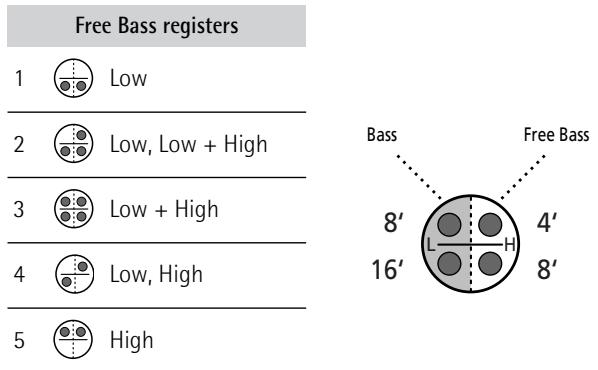
(3) Press SET + register 4 again to return to normal bass and chord mode.
Orchestral sounds for the Free Bass section
Instead of accordion sounds, you can use orchestral sounds in Free Bass mode:
(1) Press SET ⑤ +register4to activate Free Bass mode.
(2) Press the ORCH CHORD button ④ (it lights).
(3) Check whether the LEFT REGISTER button ③ lights. If it doesn't, press it.
(4) Use the bass registers to select the desired sound.
| ORCH FREE BASS sounds | |||
| 1 | Strings | 4 | Organ |
| 2 | Clarinet | 5 | Choir |
| 3 | Flute | ||
(5) While Orch Free Bass mode is active, you can assign a different accordion register to the bass rows by switching off the LEFT REGISTER button (it must be dark). Then, press the desired bass register.
(6) Press the ORCH CHORD button ④ again to return to normal Free Bass mode.
(7) Press SET + register 4 again to return to normal Bass & Chord mode.
Changing the playback tempo of educational songs
The tempo of the FR-2's educational songs can be changed to your liking by proceeding as follows.
(1) Briefly press the SONG/DEMO ⑩ button.
(2) Press and hold the SONG/DEMO button. It flashes, and the register assigned to the last song you selected lights.
Note: The metronome is not available while the Song function is used. If it is running while you switch on the Song function, it will stop.
(3) Use registers 1 8 to select the desired song.
(4) Move the bellows. The first movement of the bellows starts the song after a short while, subsequent moves allow you to control the song's volume (expression).
(5) Press the SONG/DEMO button to exit the Song selection level.
(6) Use the and ⑧ buttons to set the desired tempo.
Press [DEC] to decrease the tempo, or [INC] to increase it. The tempo value you select here is remembered by the FR-2. Each of the 8 internal songs can have its own modified tempo value.
To return to a song's preset tempo, select it (see above) and press the [DEC] and [INC] buttons simultaneously.
Note: When you load the factory settings, all internal songs are reset to their factory-set tempo.
(7) Press the SONG/DEMO button again to leave the Song function.
New FUNCTION parameters
As a result of the FR-2's expanded functionality, two additional buttons (28, 29, 30, 32, 33, FR-2b) or keys (Bb1, C#3, Eb3, F#3, Eb4, FR-2) can now be used to select functions:
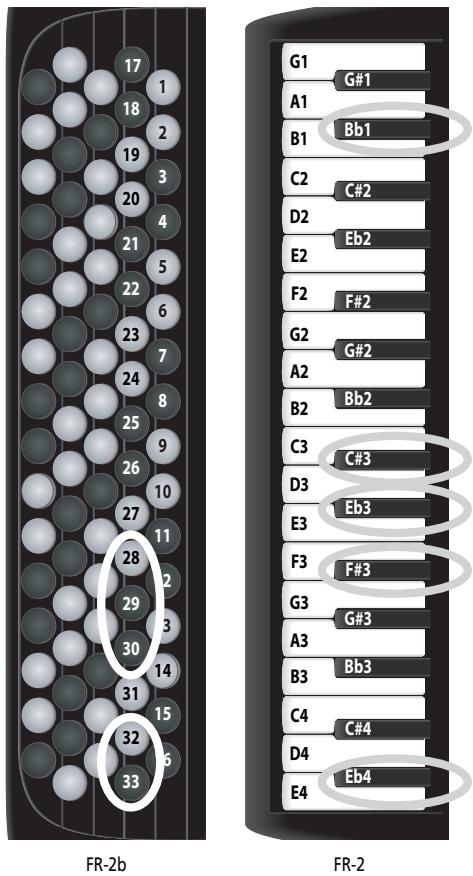
Note: See page 6 for an overview of functions you can set on the FR-2.
The basic procedure is still the same:
(1) Press and hold the SET ⑤ register until it starts flashing.
(2) Press the indicated key or Treble button. (Key names with a "#" or "b" symbol refer to black keys.) The SET register now flashes rapidly, and the Treble keyboard can once again be used to play notes.
(3) Use registers 1 8 ⑥ to select one of the suggested values.
Alternatively, use the [DEC] or [INC] button to select the desired value. Sometimes, there are more options than can be selected with the 8 registers.
(4) Press the SET register twice to leave the FR-2's FUNC-TION mode.
Here are the new functions:
| Function | FR-2b/FR-2 | Memorized |
| Treble Valve Noise | [C#3]/[28] | OK |
| Off, -40~0~+40 | Default setting: 0 |
You will probably agree that electronic sounds must not only reproduce the basic timbre of an existing sound, but also the original instrument's behavior and typical "noises" in order to be perceived as authentic. In the case of a guitar that would be the sliding noise of the fingers. An accor
dition, on the other hand, produces mechanical valve noises that cannot be suppressed on an acoustic instrument. Use this parameter to specify how prominent the noise produced by the simulated Treble valves should be. The settings you can select with the registers are:
| 1 | -40 | 5 | +13 |
| 2 | -27 | 6 | +27 |
| 3 | -13 | 7 | +40 |
| 4• | 0 |
| Function | FR-2b/FR-2 | Memorized |
| Bass Button Noise | [Eb3]/[29] | OK |
| Off, -40~0~+40 | Default setting: 0 |
The bass section of almost all accordion instruments can be played via buttons. Such buttons produce a typical noise when pressed. Use this parameter to specify how prominent that button noise should be. The settings you can select with the registers are:
| 1 | -40 | 5 | +13 |
| 2 | -27 | 6 | +27 |
| 3 | -13 | 7 | +40 |
| 4• | 0 |
| Function | FR-2b/FR-2 | Memorized |
| MIDI TX Channels | [Eb4]/[30] | OK |
| Roland, Other | Default setting: Roland | |
This parameter allows you to specify which channels the FR-2's sections should use to transmit MIDI messages. By default, all Roland V-Accordion instruments use MIDI channel "1" for the Treble section, MIDI channel "2" for the bass buttons and MIDI channel "3" for the chord buttons. Certain accordions with MIDI functionality use MIDI channel "3" for the bass part (and channel "2" for the Chord buttons). Selecting "Other" may therefore be more convenient to use your existing sound module without changing its receive channel settings. There are only two options here that can be selected with the following registers:
| 1● | Roland | Treble= 1, Bass= 2, Chord= 3 |
| 2 | Other | Treble= 1, Bass= 3, Chord= 2 |
| Function | FR-2b/FR-2 | Memorized |
| Orchestra Free Bass Level | [B►1]/[32] | OK |
| -40~Std~40 | Default setting: Std | |
This parameter allows you to set the level of the ORCHES-TRA FREE BASS sound for a better balance with the other available sections.
The settings you can select with the registers are:
| 1 | -40 | 5 | +13 |
| 2 | -27 | 6 | +27 |
| 3 | -13 | 7 | +40 |
| 4● | 0 |
| Function | FR-2b/FR-2 | Memorized |
| Free Bass Mode | [F#3]/[33] | OK |
[1] Minor 3rd, [2] Bajan, [3] Fifth, Default setting: [1]
[4] N. Europe, [5] Finnish
This parameter allows you to choose the note system used in Free Bass mode. In the owner's manual, we already mentioned that there are a vast number of accordion varieties. The same is true of Free Bass systems. Your FR-2 contains the most popular ones.
| 1• | Minor 3rd | 4 | N. Europe |
| 2 | Bajan | 5 | Finnish |
| 3 | Fifth |
Be aware that the system you select here is only used when you activate the FR-2's Free Bass mode. It is of no consequence for the "regular" Bass mode. See the illustration on page 5 for the note assignments.
Note: This parameter is not reset when you load the factory defaults (see the owner's manual).
Note: The FR-2 is supplied with several reference caps designed to help you locate the bass buttons without looking at them. See also the owner's manual.
(The following function has changed.)
| Function | FR-2b/FR-2 | Memorized |
| Bellows Expression TX | [B3]/[23] | OK |
| Off, On, Arranger | Default setting: Arranger | |
The strength/speed with which the bellows is pressed or pulled influences the sound – which corresponds to an acoustic accordion's response. This effect can be translated into a MIDI message most external instruments understand.
| 1 | Off |
| 2 | On |
| 3● | Arranger |
If you want to use the bellows for expressive purposes, switch this parameter on (register 2). If you don't (because the external instrument is too sensitive and therefore changes its volume too often), switch it off (register 1).
The default setting (register 3) has almost the same effect as "on", except that bellows expression messages are only transmitted on MIDI channels 1 and 4. This is the recommended setting when you use the FR-2 to control an arranger module.
Archiving your settings via MIDI (Dump TX)
MIDI can also be used for transmitting parameter settings from the FR-2/FR-2b to an external MIDI device and back.
Archiving your settings with a sequencer
The "Dump TX" parameter allows you to transmit the contents of the global area (which contains the FUNCTION settings), and the User Programs to a second FR-2b or FR-2, an external sequencer, computer or data filer. Sending these data to other instruments (a digital piano, synthesizer, etc.) does nothing at all. That's because the setting data are special MIDI messages only one model (or model family) understands. They are called "system exclusive messages" - or "SysEx" for short. By transmitting them to a second FR-2, however, you can "copy" the settings of your V-Accordion to that of a friend, colleague or student.
A sequencer or data filer does not know what the messages mean and so does not use them in any way. It merely records them. Afterwards, you only need to start playback on your sequencer or data filer to transmit the settings back to the FR-2.
(1) Connect the FR-2's MIDI OUT/IN socket to the sequencer's/computer's MIDI IN socket.
Note: Your computer needs to be equipped with (or connected to) an appropriate MIDI interface.
(2) Set the "MIDI Out/In" parameter (page 27 in the owner's manual) to "Out".
(3) If you are working with a computer, launch the sequencer program.
(4) Create or select an empty song.
(5) Create (or select) an empty track.
The track's MIDI channel is of no importance here. You need to ensure, however, that the sequencer/program accepts SysEx data. If necessary, switch off the MIDI filter in question (see the manual of your sequencer or software).
(6) Activate the record-ready mode of the track you selected/created.
Note: Do not change the tempo on your sequencer/in the software. By default, most sequencers/programs use the tempo value = 120 . Leave it that way (or else do whatever is necessary to ensure that the new tempo value is stored along with the data).
(7) Press and hold the SET ⑤ register until it starts flashing.
(8) Press the Bb3 key or button "31".
See p. 2 for the location.
The SET ⑤ register now flashes rapidly, and register ① also flashes.
(9) Start recording on your sequencer/computer.
Wait until the count-in (one or two measures) is finished, then...
(10) Press register 1 on the FR-2 to start the transmission of the bulk data.
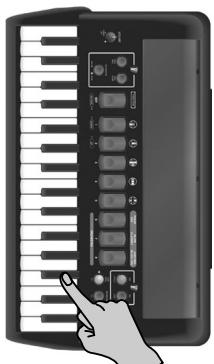
Register 1 now flashes at a faster rate.
Note: Press the SET register if you do not want to transmit your settings after all.
(11) Wait until register ① stops flashing and the SET register's flashing pattern returns to normal speed, then stop recording on your sequencer.
(12) Name the "song" (it may only contain data so far) and save it to hard or floppy disk.
See below for how to transmit the settings back to the FR-2 at a later stage.
(13) Press the SET register twice to leave the FR-2's FUNC-TION mode.
The FR-2 not only sends SysEx data to external devices (see above), it also receives them.
(1) Connect the FR-2's MIDI socket to the sequencer's/computer's MIDI OUT socket.
Note: Your computer needs to be equipped with (or connected to) an appropriate MIDI interface.
(2) Set the "MIDI Out/In" parameter (page 27 in the owner's manual) to "In".
(3) If you are working with a computer, launch the sequencer program.
(4) Load the song that contains the data you want to transmit.
(5) On your sequencer, perform all necessary actions to ensure that it transmits SysEx data.
See its manual for details.
Note: Be aware that by proceeding, you replace all internal settings.
(6) Start playback of the data file or song on your sequencer, etc.
(7) Wait until the FR-2 returns to normal functioning.
Note: Wait until the sequencer's or computer's data transmission is completed before stopping playback on your sequencer. Failure to do so will render your FR-2 inoperable. If that happens, you need to initialize it (see the owner's manual).
(8) Stop playback of your sequencer.
Note: At the end of bulk data reception the "MIDI Out/In" parameter is automatically set to "Out" so that you can normally play the FR-2.
To our regret, the FR-2's owner's manual states that there are 16 internal songs. There are, in fact, 8 internal songs. Please correct this item accordingly. We apologize for any inconvenience this may cause.
■Sending Bulk data (back) to the FR-2
About the internal songs
Free Bass Mode
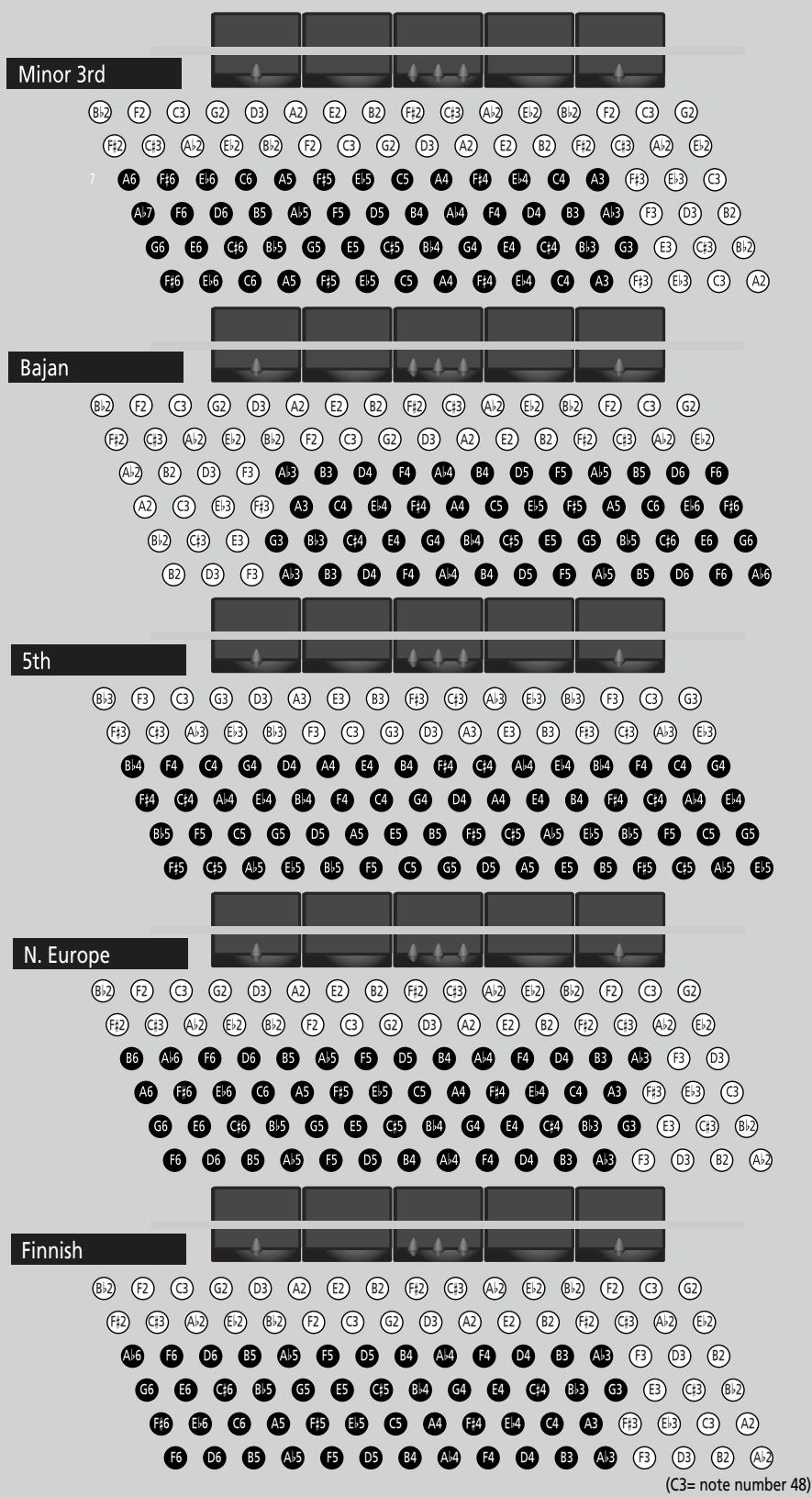
Note: The note names on the bass buttons correspond to the MIDI note numbers. The note range of the Bass part is 1 octave.
Note: The actual sound range depends on the type of reed and footage.
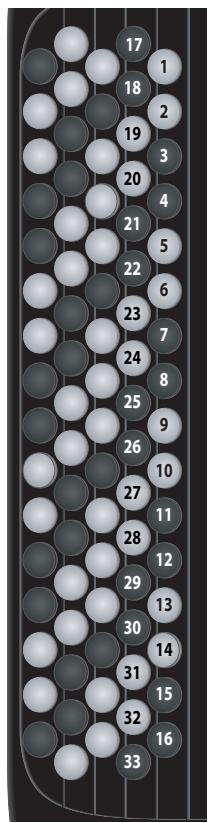
Parameter overview
| Function | Button (FR-2b) | Key (FR-2) | Setting range | Default | Memorized |
| Master Tune | 1 | G1 | 415~440~460Hz | 440 | OK |
| Musette Detune | 2 | G#1 | Dry, Classic, F-Folk, American L, American H, Nord Eur, German L, D-Folk L, Italian L, German H, Alpine, Italian H, D-Folk H, French, Scottish | Depends on the selected Set. | OK |
| Transpose | 3 | A1 | -6~0~5 | 0 | POWER |
| Orchestra Free Bass Level | 32 | Bb1 | -40~0~40 | 0 | OK |
| Treble/Bass & Chord Balance | 4 | B1 | b1~b63, 0, t1~t63 | 0 | POWER |
| Orchestra Level | 5 | C2 | -40~0~40 | 0 | OK |
| PAD Sound Level | 6 | C#2 | -40~0~40 | 0 | OK |
| Orchestra Bass Level | 7 | D2 | -40~0~40 | 0 | OK |
| Orchestra Chord Level | 8 | Eb2 | -40~0~40 | 0 | OK |
| Metronome Tempo | 9 | E2 | 20~250 | 96 | OK |
| Metronome Time Signature | 10 | F2 | 1/4, 2/4, 3/4, 4/4, 5/4, 6/4, 6/8, 9/8 | 4/4 | OK |
| Metronome Level | 11 | F#2 | Off, Low, Medium, High | Medium | OK |
| Reverb Level | 12 | G2 | 0~127 | 48 | OK |
| Reverb Type | 13 | G#2 | Room 1, Room 2, Room 3, Hall 1, Hall 2, Plate, Delay, Panning Dly | Plate | OK |
| Chorus Level | 14 | A2 | 0~127 | 16 | OK |
| Chorus Type | 15 | Bb2 | Chorus 1, Chorus 2, Chorus 3, Chorus 4, FBackChr, Flanger, Short Delay, Short Dly FB | Short Delay | OK |
| Bellows Curve | 16 | B2 | Fixed Low, Fixed Med, Fixed High, X-Light, Light, Standard, Heavy, X-Heavy | Standard | OK |
| Treble Octave Tx | 17 | C3 | -3~0~3 | 0 | OK |
| Treble Valve Noise | 28 | C#3 | Off, -40~0~40 | 0 | OK |
| Orchestra Octave TX | 18 | D3 | -3~0~3 | 0 | OK |
| Bass Button Noise | 29 | Eb3 | Off, -40~0~40 | 0 | OK |
| Bass Octave TX | 19 | E3 | -3~0~3 | -1 | OK |
| Chord Octave TX | 20 | F3 | -3~0~3 | 1 | OK |
| Free Bass Mode | 33 | F#3 | Minor 3rd, Bajan,Fifth, N.Europe, Finnish | Minor 3rd | |
| Orchestra Bass Octave TX | 21 | G3 | -3~0~3 | 0 | OK |
| Orchestra Chord Octave TX | 22 | A3 | -3~0~3 | 1 | OK |
| Dump TX | 31 | Bb3 | Register 1 to transmit | - | |
| Bellows Expression TX | 23 | B3 | Off, On, Arranger | Arranger | OK |
| MIDI Out/In | 24 | C4 | Out, In | Out | POWER |
| Button brightness | 25 | C#4 | Day, Night | Day | POWER |
| Program Change TX | 26 | D4 | Off, On | Off | OK |
| MIDI TX channel | 30 | Eb4 | Roland, Other | Roland | OK |
| Arranger Control | 27 | E4 | Off, On | On | OK |
"POWER": Reset when you switch off the FR-2.
"OK": Can be saved in the Global area (common to all Sets).
Note: The default settings of the following parameters have changed: "Bellows Expression TX" (Off), "Program Change TX" (Off), "Chord Octave TX" (1), "Bass Octave TX" (-1), "Orchestra Chord Octave TX" (1).
Roland®
FR-2 FR-2b

[1] Minor 3rd, [2] Bajan, [3] Fifth, Vorgabe: [1]
[4] N. Europe, [5] Finnish
| 1● | Minor 3rd | 4 | N. Europe |
| 2 | Bajan | 5 | Finnish |
| 3 | Fifth |
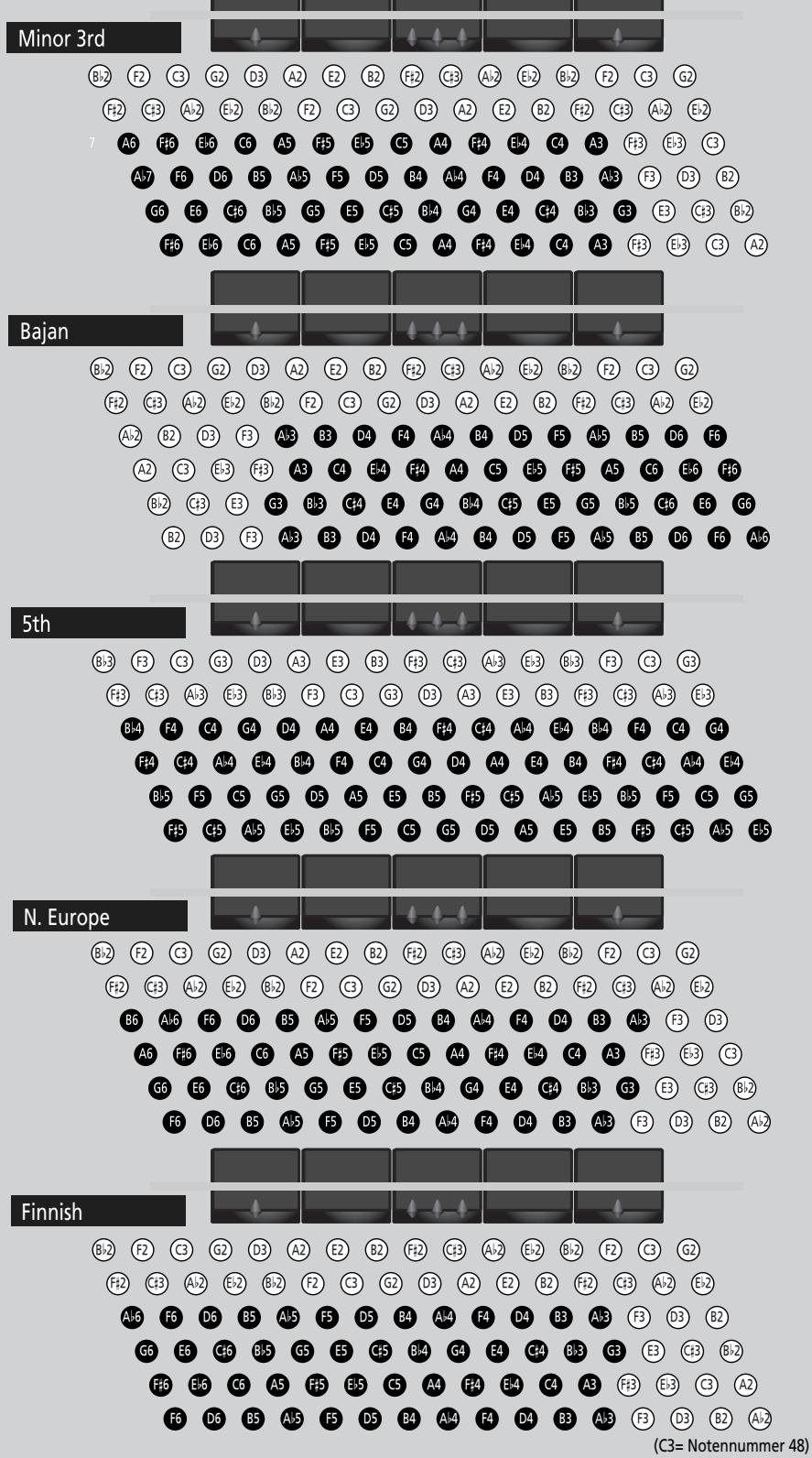
MIII-Modus (Free Bass)
| Sons ORCH FREE BASS | ||
| 1 | Strings | 4 Organ |
| 2 | Clarinet | 5 Choir |
| 3 | Flute | |
| 1● | Minor 3rd | 4 | N. Europe |
| 2 | Bajan | 5 | Finnish |
| 3 | Fifth |