CQ-C1300AN - Car stereo PANASONIC - Free user manual and instructions
Find the device manual for free CQ-C1300AN PANASONIC in PDF.


User questions about CQ-C1300AN PANASONIC
0 question about this device. Answer the ones you know or ask your own.
Ask a new question about this device
Download the instructions for your Car stereo in PDF format for free! Find your manual CQ-C1300AN - PANASONIC and take your electronic device back in hand. On this page are published all the documents necessary for the use of your device. CQ-C1300AN by PANASONIC.
USER MANUAL CQ-C1300AN PANASONIC
MP3 WMA CD Player/Receiver with CD Changer Control
CQ-C1400N
MP3 WMA CD Player/Receiver
CQ-C1300AN/C1300GN
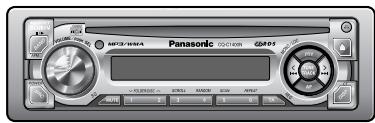
(CQ-C1400N)
WMA MP3

Matsushita Electric Industrial Co., Ltd.
Web Site: http://www.panasonic.co.jp/global/
YEFM284135 ND1203-0 Printed in China
- Please read these instructions carefully before using this product and keep this manual for future reference.
-itte lesen Sie these Bedienungsanleitung vor der Verwendung thesees Produktes aufmerksam durch und bewahren Sie sie danach fur spate Nachschlagzwecke sorgfaltig auf. - Prière de dire ces instructions attentivement avant d'utiliser le produit et garder ce manuel pour l'utilisation ultérieure.
- Leest u deze instructie alstublieft zorgvuldig door voor u dit product in gebruik neemt en bewaar deze handleiding voor later gebruik.
- Lásigenom denna bruksanvisning noga innanprodukten tas i bruk. Spara bruksanvisingen für framtida behov.
- Si prega di leggere attendamente queste istruzioni prima di usare quello prodotto e di conservare quello manuale per usi futuri.
- Lea con atencion estas instrucciones antes de utiliser el producto y guarde estemanual para poderlo consultar enel futuro.
- Przechytaj uwaznie instrukcje obslugi przyrozpieczemicu uzywania urzadzenia i zachowaj są do uzytku w przyszlósci.
Introduction
CQ-C1400N
MP3 WMA CD Player/Receiver with CD Changer Control
CQ-C1300AN/C1300GN
MP3 WMA CD Player/Receiver
Contents
Precautions 10
Features 10
Accessories 11
Remote Control Unit (Option) 11
General 12
Radio 14
Radio Data System (RDS) 16
CD and MP3/WMA 22
CD Player 23
MP3/WMA Player 24
CD Changer Control 28
Audio Setting 30
Anti-Theft System 32
Fuse 33
Maintenance 33
Notes on Discs 33
Troubleshooting 34
Specifications 39
Laser Product
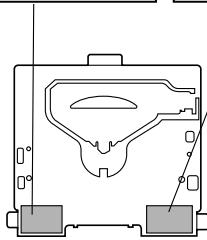
Label Indications and Their Locations
CAUTION
LASER RADIATION
WHEN OPEN.
DO NOT STARE INTO BEAM.
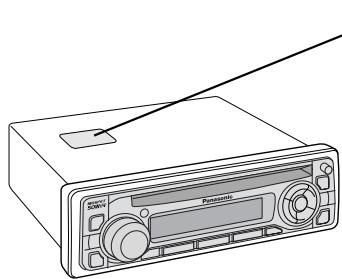
CLASS 1 LASER PRODUCT
- APPREIL À LASER DE CLASSE
- KLASS 1 LASER APPARAT
LUOKAN 1 LASERPLAITE
Caution: This product utilizes a laser.
Use of controls or adjustments or performance of procedures other than those specified herein may result in hazardous radiation exposure.
Laser products:
Wave Length: 780 nm
Laser Power: No hazardous radiation is emitted with safety protection
Do not take apart this unit or attempt to make any changes yourself.
This unit is a very intricate device that uses a laser pickup to retrieve information from the surface of compact discs. The laser is carefully shielded so that its rays remain inside the cabinet.
Therefore, never try to disassemble the player or alter any of its parts since you may be exposed to laser rays and dangerous voltages.
Caution Label
CAUTION LASER RADIATION WHEN OPEN. DO NOT STARE INTO BEAM.
ADVARSEL LASERS
TRALING NAR DEKSEL
APNES.
STIRR IKE INN I
STRALEN.
- Panasonic welcomes you to their constantly growing family of electronic products owners. We endeavor to give you the advantages of precise electronic and mechanical engineering, manufactured with carefully selected components, and assembled by people who are proud of the reputation their work has built for our company. We know this product will bring you many hours of enjoyment, and after you discover the quality, value and reliability we have built into it, you too will be proud to be a member of our family.
Precautions
When Driving
Keep the volume level low enough to be aware of road and traffic conditions.
When Washing Your Car
Do not expose the product, including the speakers and CDs, to water or excessive moisture. This could cause electrical shorts, fire, or other damage.
When Parked
Parking in direct sunlight can produce very high temperatures inside your car. Give the interior a chance to cool down before switching the unit on.
Use the Proper Power Supply
This product is designed to operate with a 12 V DC, negative ground battery system.
Features
Large-sized volume control
An large-sized rotary volume control that looks like one belonging to a Hi-Fi audio system is featured.
CD Changer Control (only for CQ-C1400N)
You can connect the optional CD changer unit. For details, refer to the operating instructions on the CD changer unit.
Disc Mechanism
Do not insert coins or any small objects. Keep screwdrivers and other metallic objects away from the disc mechanism and disc.
Service
This product is made of precision parts. Do not attempt to disassemble or adjust any parts. For repair, please consult your nearest authorized Panasonic Service Centre.
For installation
This product should be installed in a horizontal position with the front end up at a convenient angle, but not more than 30^ .
Note:
- The preset memory is cleared to return to the original factory setting when the power connector or battery is disconnected.
MP3/WMA Playback from CD-R/RW
You can play your MP3/WMA (Windows Media Audio) files as well as regular CDs. With up to 10 to 12 times* the capacity of a conventional CD, a single MP3/WMA-encoded disc can keep you entertained throughout your entire journey.
- Depending on bit rate.
Note:
- This operating instruction manual applies to the following models. The differences among these models are mentioned below.
- All illustrations represent model CQ-C1400N unless otherwise specified.
| Features Model | CQ-C1400N | CQ-C1300AN | CQ-C1300GN |
| LCD Colour | White | Amber | Green |
| Key Colour | Red | Amber | Green |
| Face Colour | Plating silver | Plating black | Plating black |
| CD Changer Control | Supported | Not supported | Not supported |
| Maximum Power Output | 50 W | 45 W | 45 W |
| Pre-out | Front / Rear | Rear | Rear |
Accessories
(1)
Operating
Instructions (YEFM284135)
Q'ty: 1
(2)
Installation
Instructions (YEFM293250)
(YEFM293251)
Q'ty: 1 set
(3)
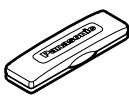
Removable Face
Plate Case
(YEFA131646)
Q'ty: 1
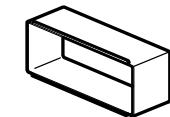
(4)
Mounting Collar
(YEFX0215873)
Q'ty: 1
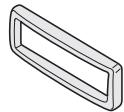
(5)
Plate
05609)
Q'ty: 1
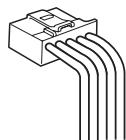
(6)
Power
Connector (YEAJ02874)
Q'ty: 1

(7)
ISO Antenna Adapter
Lock Cancel Plate
YEP0FZ3264)
Q'ty: 1 set
Mounting Bolt
#

Wai
Mounting Bolt
(YEFM07405)
Q'ty: 1
Note:
- The number in parenthesis underneath each accessory part name is the part number for maintenance and service.
- Mounting Collar ④ and Trim Plate ⑤ are mounted on the main unit at shipment.
Remote Control Unit (Option)
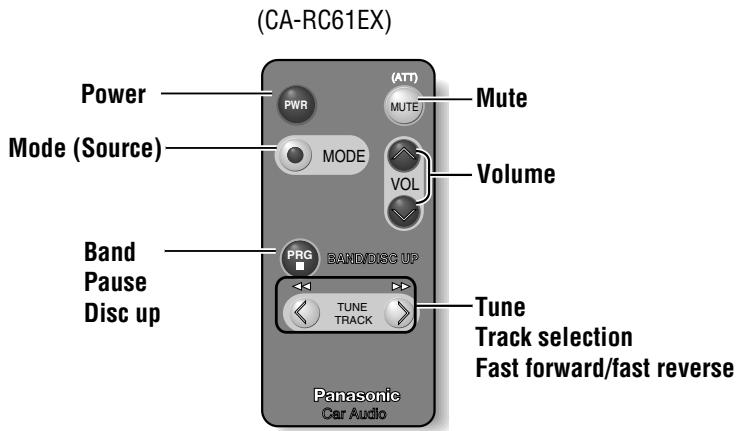
- The optional remote control is available from your local dealer. (CA-RC61EX)
General
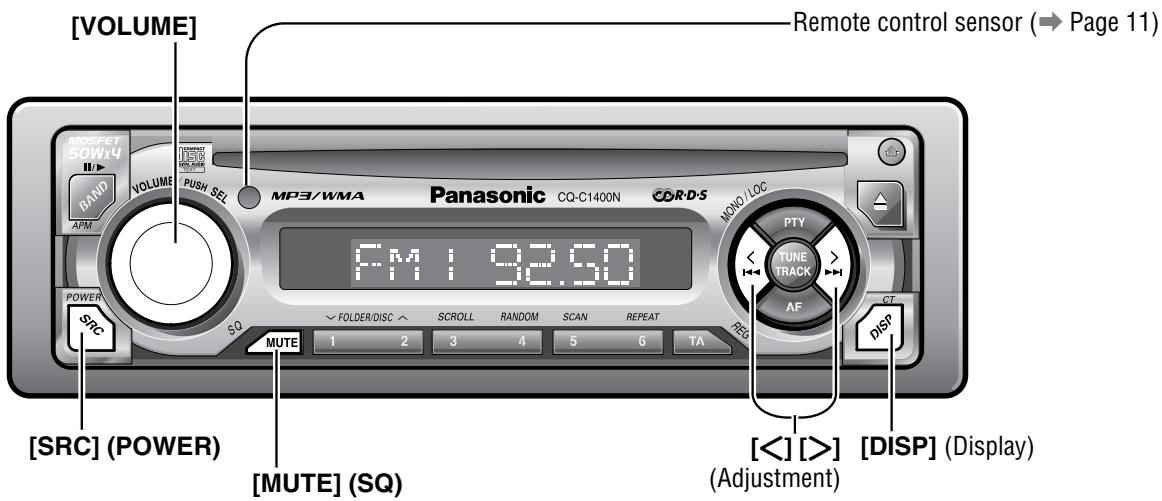
Power
Turn your car's ignition key to ACC or ON position.
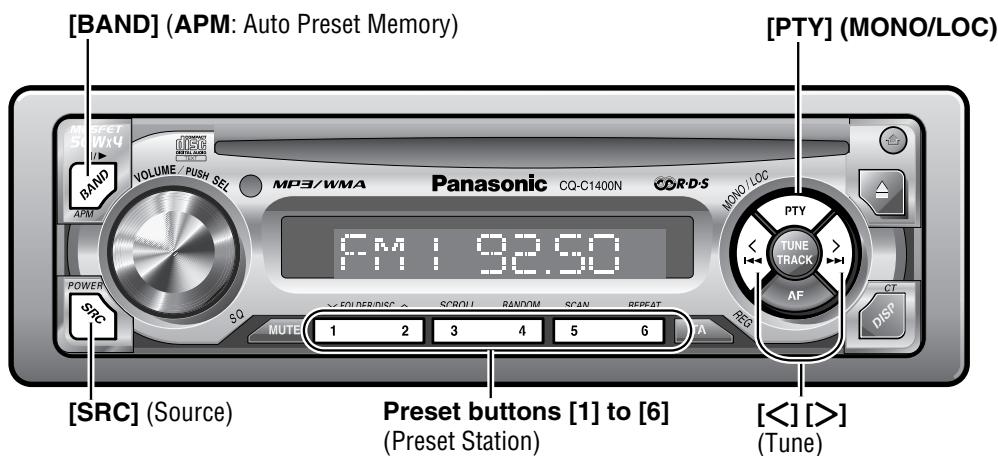
ON: Press [SRC] (POWER).

OFF: Press [SRC] (POWER) again and hold for more than 1 second.
Demonstration Message
When the power is switched on for the first time, a demonstration message appears on the display.
Press [DISP] to change to regular mode.



Scrolling
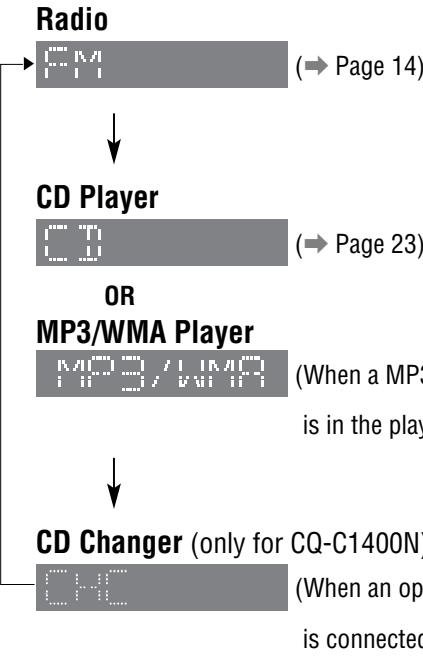
Source
Press [SRC] (Source) to change the source.
Volume
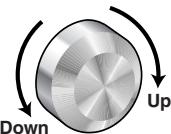


Default: 18
Setting Range : 0 to 40
Note:
- The volume level can be set independently for each source. (For radio, one volume setting for AM, one volume setting for all FMs)
Mute MUTE
ON: Press [MUTE].
OFF: Press [MUTE] again.
SQ (Sound Quality)
SQ is a function that can call up various sound types at the touch of button in accordance with your listening music type. Press and hold [MUTE] (SQ) for more than 2 seconds to select the sound type as follows:
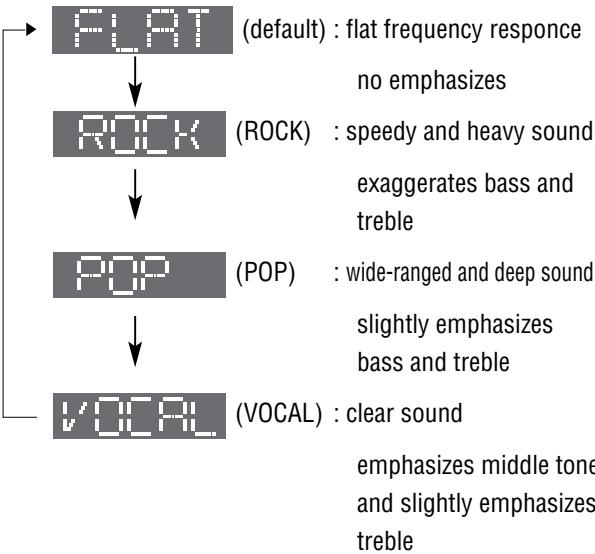
Note:
- If no operation takes place for more than 5 seconds in the SQ mode, the display returns to the regular mode.
- Settings of SQ, bass/treble are influenced one another. If the influence mentioned above causes distortion to audio signal, readjust bass/treble or volume ( Page 30).
Clock Setting
The 24-hour system is used for the clock.
Note:
- Adjust the clock when "NO CT" appears on the screen.
Select the radio AM mode. ( Page 14)


Press and hold [DISP] (CT) for more than 2 seconds.

Adjust the hour.
[ ] : put back hour.

Press [DISP] (CT)

Adjust the minute.
> : put forward minute.
[ ] : put back minute.

Press [DISP] (CT).

Note:
- When a broadcast of FM Radio Data System is received, the clock is put right automatically by the Clock Time service. (→ Page 16)
Radio Mode
Press [SRC] (Source) to select the radio mode.
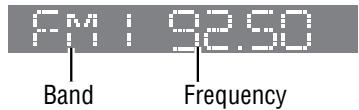
Radio Mode Display
Band
Press [BAND].
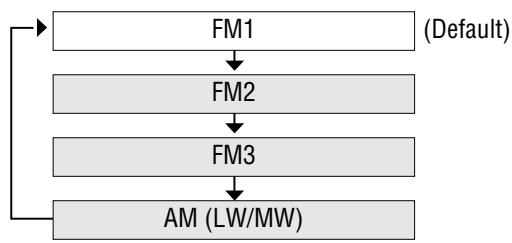
3 Tuning
>:Higher frequency
[<] : Lower frequency
Press and hold [> or [ ] for more than 0.5
seconds, then release. Seeking will start.
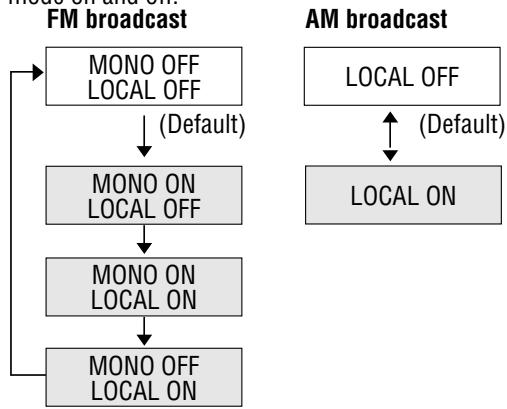
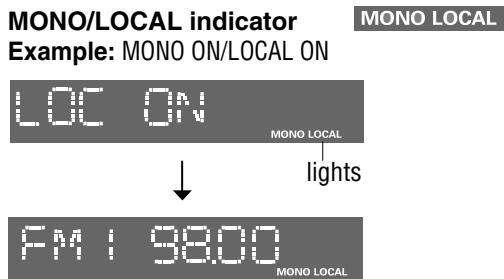
Mono/Local Selection
MONO : Monaural reception. Select MONO to reduce noise when receiving a weak stereo broadcast.
LOCAL:Only stations with good reception are detected in seek tuning.
FM broadcasts
Press and hold [PTY] (MONO/LOC) to change the mode. Release when at the desired point.
AM broadcast
Press [PTY] (MONO/LOC) to switch LOCAL mode on and off.
Station Preset
Up to 6 stations can be stored in each of the FM1, FM2, FM3 and AM (LW/MW) band selections.
Caution:
- To ensure safety, never attempt to preset stations while you are driving.
Auto Preset Memory (APM)
Automatically save stations with good reception in the preset memory.
① Select a band. (→ Previous page)
② Press and hold [BAND] (APM: Auto Preset Memory) for more than 2 seconds.
The 6 stations with good reception will be automatically saved in the memory under preset number 1 to 6.
Once set, the preset stations are sequentially scanned for 5 seconds each. (scanning)
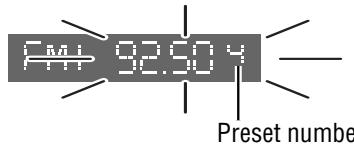
Manual Preset Memory
Manually save a station in preset memory.
① Select a band and frequency. (→ Previous page)
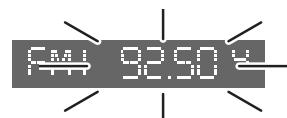
② Press and hold one of the preset buttons from [1] to [6] until the display blinks once.
Note:
- To stop the scanning, press one of the buttons from [1] to [6].
- Only RDS stations will be saved at default setting (AF ON). To select non RDS stations too, set AF OFF. ( Page 17)
Note:
- New stations overwrite existing saved stations after following this procedure.
Preset Station Calling
① Select a band. (→ Previous page)
② Press one of the preset button from [1] to [6].
Radio Data System (RDS)
RDS Basics
Some FM stations are broadcasting added data compatible with RDS. This radio set offers convenient functions using such data.
RDS service availability varies with areas. Please understand if RDS service is not available in your area, the following service is not available, either. This chapter explains the summary and operation regarding RDS.
The following functions are available when receiving RDS stations.
Program Service Name (PS) Display
The name of station is displayed.
T
Program Type (PTY) Display
RDS FM stations provide a program type identification signal.
Example: news, rock, classical music, etc. (→ Page 19)
111
Alternative Frequency (AF)
When reception is poor, an RDS station broadcasting the same program is tuned in automatically.
Traffic Program (TP)
Some RDS FM stations periodically provide traffic announcement.
The station which broadcast the traffic announcement is called Traffic Program (TP).
Traffic Announcement (TA)
Radio announcements on traffic conditions.
Clock Time (CT) Service
When receiving an RDS station, the CT service automatically adjusts the time.
"NO CT" is displayed in areas where CT service is not available. ( Page 13 for Clock Setting)

Program Identification (PI)
Each program has its own number. This may be used to search for another frequency on which the same program is broadcast.
Region (REG)
Each region has its own number. This may be used to identify the region where the station you are now listening to is located.
↑
1
01
图4
am:
s
m
III
the
Te,
glo
II.
F
with
33 n.h.
the
ar.r
Race
pnt
050 ion
wi
ullb
1
1
5
1
□
F
F
:T
The
fre
equ
enc
cy i
is o
cha
ng
ed a
else
0
\~
m = 311
Note:
- When REG mode is switched from OFF to ON or vice versa, AF mode turns on automatically.
Alternative Frequency (AF)
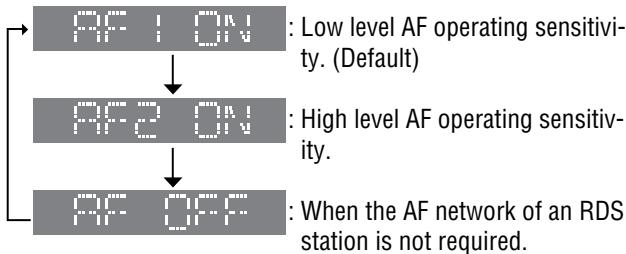
Alternative Frequency (AF) Mode AF
Press [AF] to select one of the following AF modes: AF ON : AF, Best Station Research and PI seek funct active.
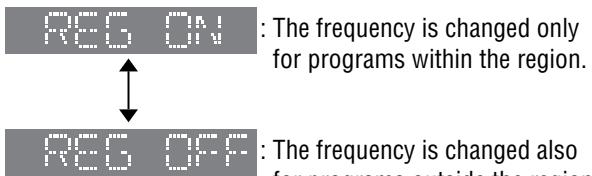
Region (REG) Mode
Changes the selection range of AF, Best Station Research and PI seek.
Press and hold [AF] (REG) for more than 2 seconds to switch on and off.
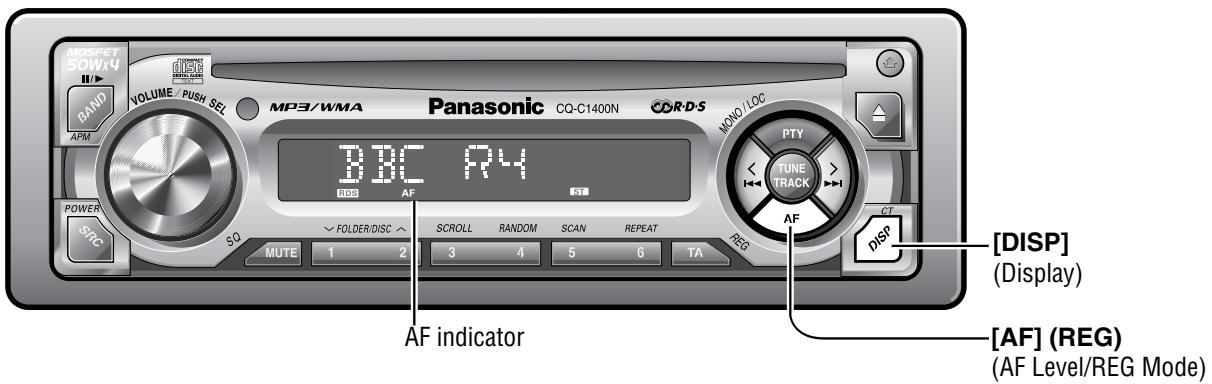
Display Change
Press [DISP] (Display) to change the display as follows.
PS (Program Service Name) (Default)
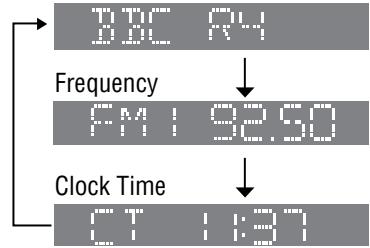
Preset Memory (AF ON Setting)
Preset Station Calling (Best Station Research) AF self-tuning allows you to select a station with good reception from the same network when the preset tuning activated.
For Poor Reception (PI Seek)
If reception becomes poor when tuning in a preset station, press the same preset number button. The same station with better reception will be searched for. Press the same preset number button again to cancel.
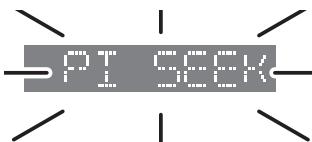
Note:
- For PI Seek, cancel the TA mode first, then execute PI Seek.
Radio Data System (RDS) (continued)
Traffic Announcement (TA)
Some RDS FM stations periodically provide traffic information.
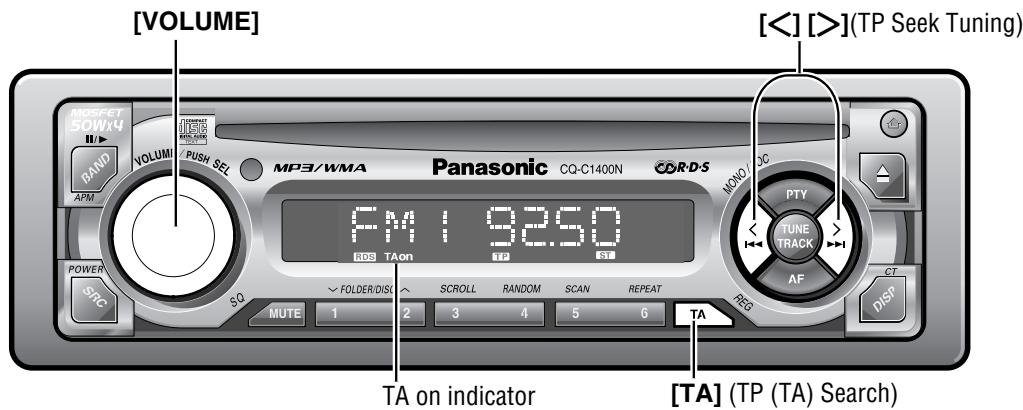
TP (TA) Search TAon (Default: OFF)
While the unit is receiving a non-TP station or TP station with poor reception, the unit will seek a TP station with good reception by pressing [TA] (TA mode) during reception of an FM station. When the TP station received begins a traffic announcement, you can hear it from the unit even in the other modes (TA standby or CD or MP3/WMA).
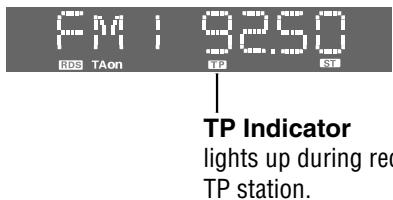
TA Standby Mode
Being set to TA on in another mode, the unit will be automatically switched to the radio mode and make a traffic announcement when it begins. The traffic announcement having finished, the unit will return to the previous mode.
To listen to only traffic announcements
While listening to an FM station which is not currently broadcasting traffic announcement, turn the [VOLUME] to the counterclockwise to set the volume to 0. The traffic announcement will be output at the TA volume level.
Other TA functions
TA Volume Set: Traffic announcements are broadcast at the TA volume level. (→ Page 30)
TP Seek Tuning: When TA ON is selected, only TP station will be searched. Press and hold [ ] or [> for more than 0.5 seconds, then release. Seeking will start.
TP Auto Preset Memory: When TA ON is selected, only TP station will be memorized automatically. (→ Page 15 for auto preset memory)
TP Auto Search: When reception of a TP station becomes poor, TP Auto Search will automatically search for a TP station with better reception.
Program Type (PTY) Reception
RDS FM stations provide a program type identification signal. (Example: news, rock, classical music, etc.)
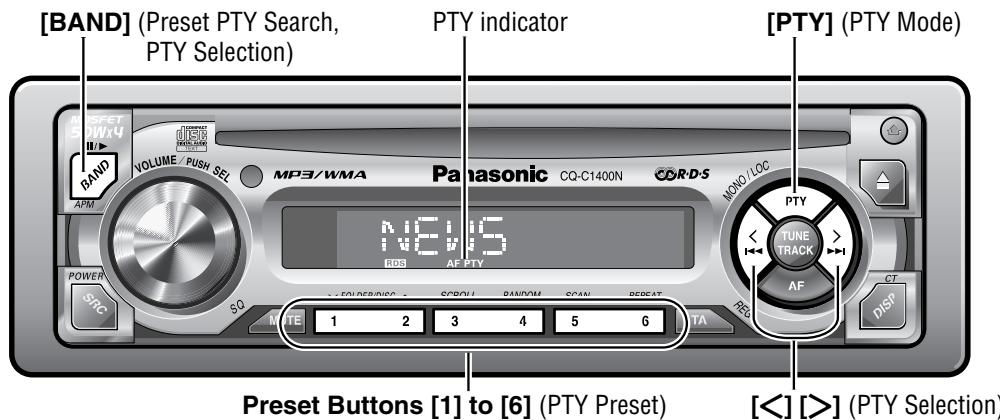
Program Type (PTY) Mode
Press [PTY] to switch the PTY display mode on and off. The PTY function described below becomes enabled after selecting to the PTY mode.
PTY Selection
① Press > to change the program type as shown below. ([<]: opposite direction)
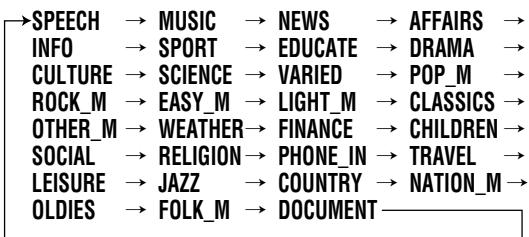
② Select the desired program type and press [BAND]. Search will start to tune in to a station broadcasting the selected program type.

Press [BAND] again to cancel.
Note:
- When there is no corresponding program type station, "NONE" is displayed for 2 seconds.
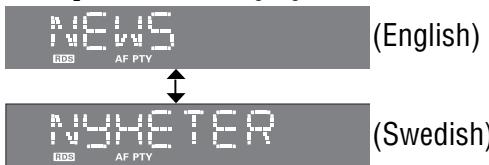
PTY display in Swedish
Press and hold [SEL] for more than 2 seconds to open the PTY display language.
Turn [VOLUME] to switch the language as follows
PTY Preset
PTY Preset Call
Program types are stored in memory under preset buttons from [1] to [6] as shown in the tables on the next page. To tune in the desired program type, press any of preset buttons from [1] to [6].
Preset PTY Search
① Select a program type by pressing the preset button. The preset program type appears on the display for 5 seconds.
Example: Press preset button [1].
② Press the same preset button again (or press [BAND]) to tune in the desired program type station.
Example: Press preset button [1] again.
Press [BAND] again to cancel.
Note:
- When there is no corresponding program type station, "NONE" is displayed for 2 seconds.
PTY Preset Change
① Select a program type by using PTY Selection or pressing PTY Preset buttons.
② Press and hold one of the buttons from [1] to [6] for more than 2 seconds.
Example: Press and hold preset button [2] for more than 2 seconds.
Radio Data System (RDS) (continued)
PTY Preset (Default)
| Preset No. | Program Type | When PTY search is activated, these program type is receivable. |
| 1 | NEWS | NEWS |
| 2 | SPEECH | AFFAIRS, INFO, EDUCATE, DRAMA, CULTURE, SCIENCE, VARIORED, WEATHER, FINANCE, CHILDREN, SOCIAL, RELIGION, PHONE IN, TRAVEL, LEISURE, DOCUMENT |
| 3 | SPORT | SPORT |
| 4 | POP_M | POP_M |
| 5 | CLASSICS | CLASSICS |
| 6 | MUSIC | ROCK_M, EASY_M, LIGHT_M, OTHER_M, JAZZ, COUNTRY, NATIONAL_M, OLDIES, FOLK_M |
Use to note changes in preset stations.
| Preset No. | FM1 | FM2 | FM3 |
| 1 | |||
| 2 | |||
| 3 | |||
| 4 | |||
| 5 | |||
| 6 |
Other PTY functions
PTY Language Selection: The language displayed on the screen is selectable. (English or Swedish) ( Page 19)
Other RDS functions
Enhanced Other Network (EON)
EON
FM 9250
EON indicator
When EON data is received, the EON indicator lights and the TA and AF functions are expanded as follows.
TA: Traffic information from the current and other network stations can be received.
AF: The frequency list of preset RDS stations is updated by EON data.
EON enables the radio to make fuller use of RDS information. It constantly updates the AF list of preset stations, including the one that is currently tuned in to. For example, if you preset a station far from home, you will later be able to receive the same station at an alternative frequency, or any other station serving the same program. EON also keeps track of locally available TP stations for quick reception.
Emergency Announcement Reception
When an emergency announcement is broadcast, the unit is automatically switched to receiving that broadcast. (Even when in CD mode, MP3/WMA mode, CD changer mode (only for CQ-C1400N).) During receiving the emergency announcement, "ALARM" appears on the display.
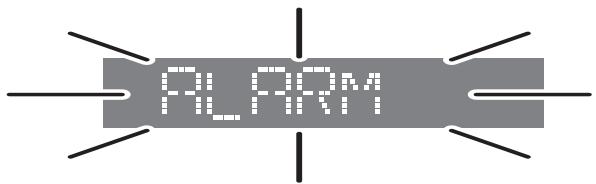
Note:
- Emergency announcements are broadcast at the TA volume level. (→ Page 30)
CD and MP3/WMA
Caution:
- This unit does not support 8 cm discs.
- Do not use irregularly shaped discs. ( Page 33)
- Do not use discs that have a seal or label attached.
- Do not insert foreign matter into the disc slot.
Note:
Refer to the section on "Notes on MP3/WMA" (→ Page 26) and "Notes on CD-Rs/RWs" (→ Page 33).
- A disc which has both CD-DA data and MP3/WMA data on it may not be reproduced normally (For example, it may be reproduced without sound).
Available Discs
CD-DA
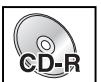


MP3/WMA
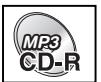


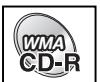


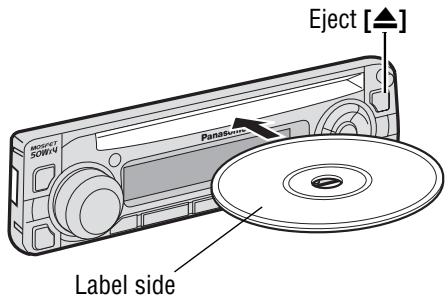
Disc Insert
Insert a disc.
Note:
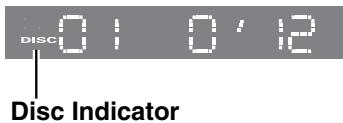
- Do not insert a disc when DISC indicator lights because a disc is already loaded.
Playback will start automatically after recognize the data of the loading disc.
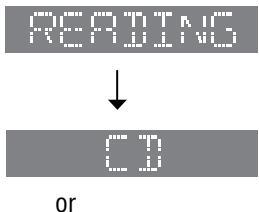

It may take some time to start playing.
( Page 24 about MP3/WMA player)
Disc Eject
Press [▲] to stop CD/MP3/WMA play and eject the disc.
CD Player
- Do not watch the scroll display while driving.
When CD is in the player
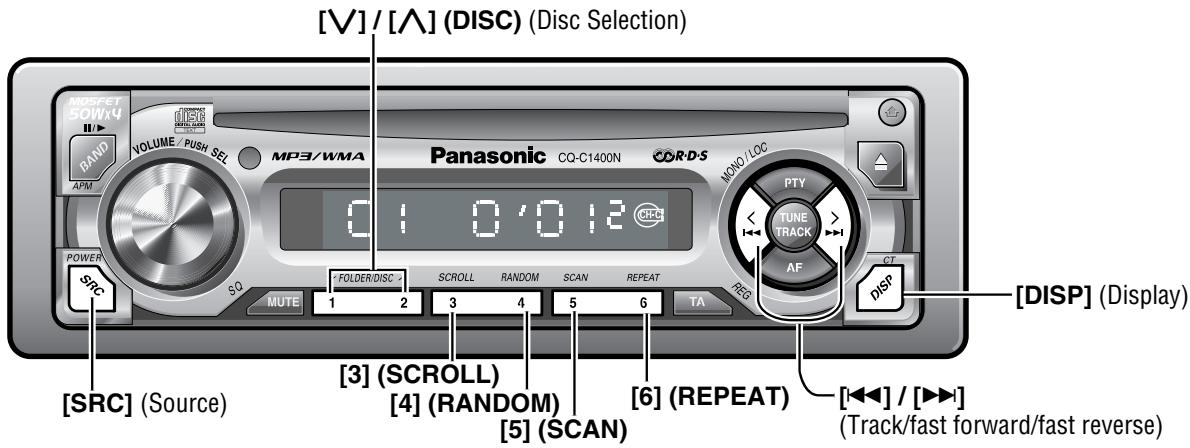
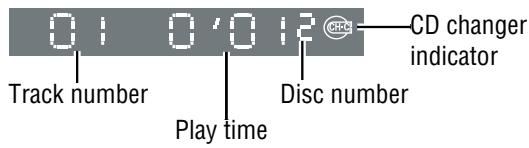
Press [SRC] (Source) to select the CD player mode and playback starts.
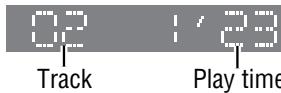
Display Change
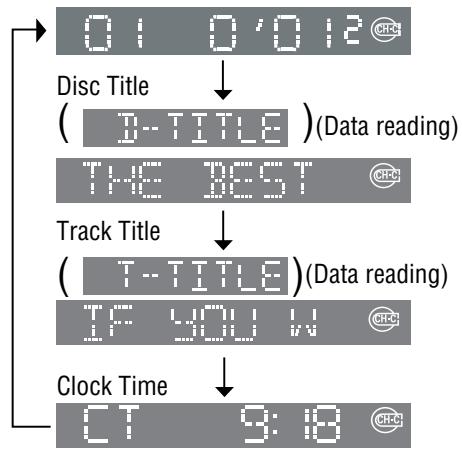
Press [DISP] (Display).
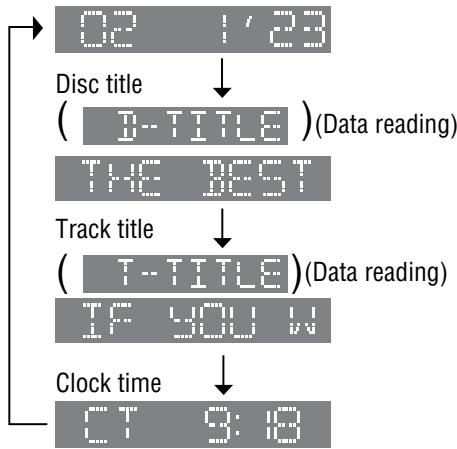
Note:
- "NO TITLE" is displayed when there is no information on the disc.
- Press [3] (SCROLL) to have an another circle scroll while a title is displayed.
Track Selection

Next track

Beginning of the current track
For the previous track, press twice.
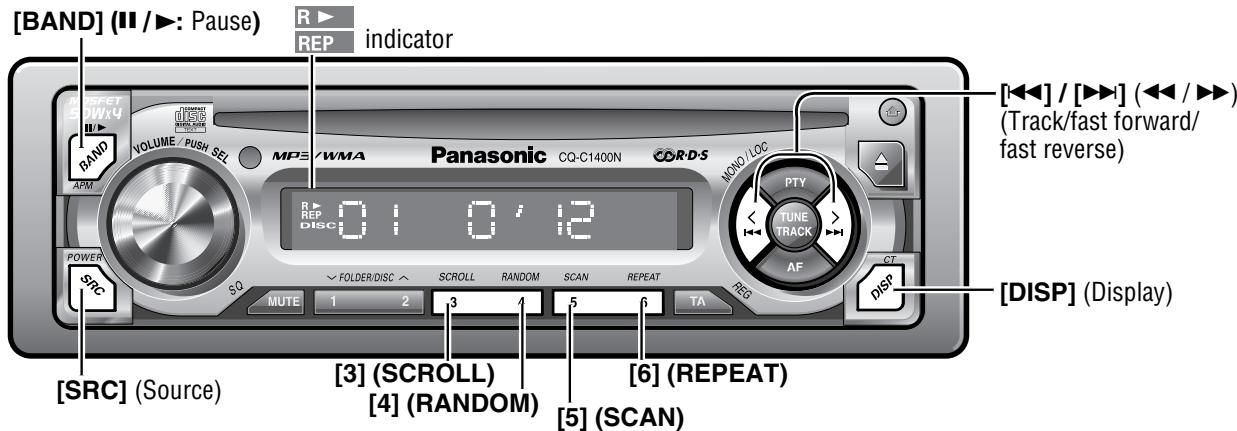
Pause (II /▶)
Press [BAND] (II /▶).
Press [BAND] ( / ) again to cancel.
Random Play

All the available tracks are played in a random sequence.
Press [4] (RANDOM).
R> lights.
Press [4] (RANDOM) again to cancel.
Scan Play
The first 10 seconds of each track is played in sequence.
Press [5] (SCAN).
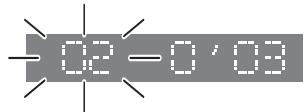
Press [5] (SCAN) again to cancel.
Repeat Play

The current track is repeated.
Press [6] (REPEAT)
REP lights.
Press [6] (REPEAT) again to cancel.
Fast Forward/Fast Reverse
Press and hold

:Fast Forward

(▲): Fast Reverse
Release to resume the playback.
MP3/WMA Player
- Do not watch the scroll display while driving.
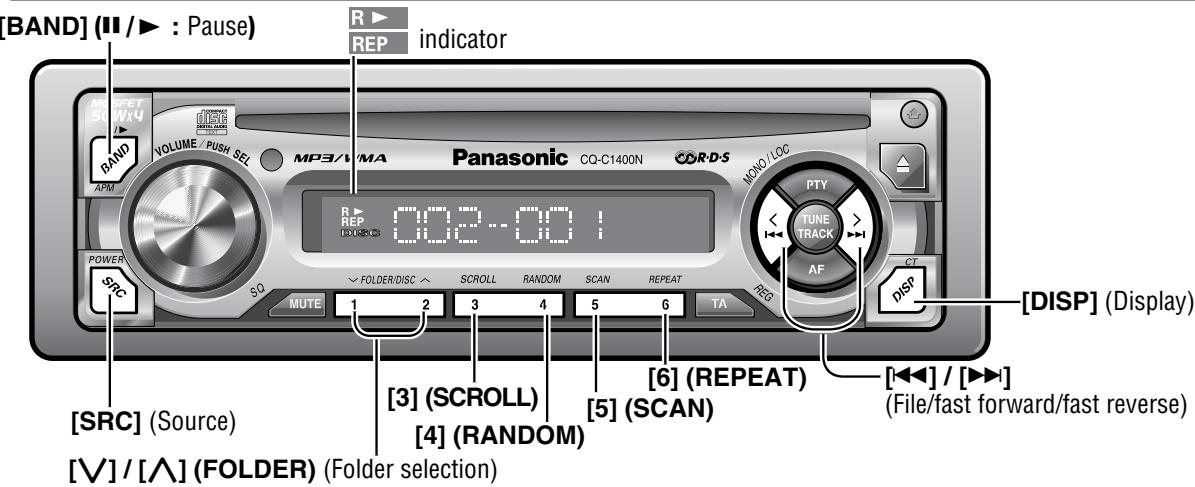
When CD is in the player
Press [SRC] (Source) to select the MP3/WMA player mode and playback starts.
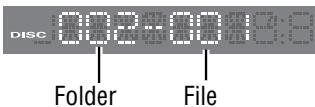
Display Change
Press [DISP] (Display).
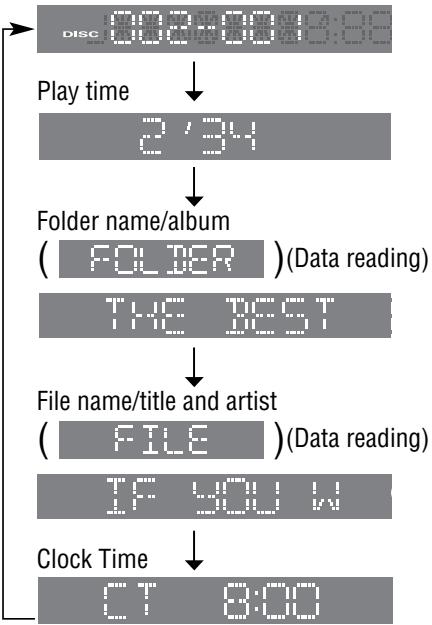
Note:
- "NO NAME" is displayed when there is no information on the disc.
- Press [3] (SCROLL) to have an another circle scroll while a title is displayed.
ID3/WMA Tag Setting
Press and hold [3] (SCROLL) for more than 2 seconds.
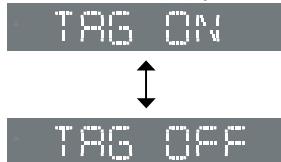
When a folder name is displayed:
TAG ON: The album title is displayed.
TAG OFF: The folder name is displayed
When a file name is displayed:
TAG ON: The title/artist name is displayed.
TAG OFF: The file name is displayed.
Folder Selection
[A] : Next folder
[V]: Previous folder
File Selection
[▶▶] : Next file
[开始]:Beginning of the current file.
For the previous file, press twice.
Fast Forward/Fast Reverse
Press and hold
[▶▶] (▶▶): Fast Forward
[ ] ( ) : Fast Reverse
Release to resume normal playback.
Pause (II /▶)
Press [BAND] (II / >).
Press [BAND] ( / ) again to cancel.
Random Play
All the available files are played in a random sequence.
Press [4] (RANDOM).
R> lights.
Press [4] (RANDOM) again to cancel.
Folder Random Play
All the files on the current folder are played in a random sequence.
Press and hold [4] (RANDOM) for more than 2 seconds
R > blinks
Press and hold [4] (RANDOM) again for more than 2 seconds to cancel.
Scan Play
The first 10 seconds of each file is played in sequence.
Press [5] (SCAN)
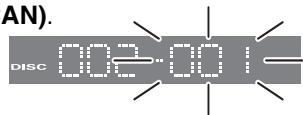
Press [5] (SCAN) again to cancel.
Folder Scan Play
From the next folder, the first 10 seconds of the first file on each folder is played in sequence.
Press and hold [5] (SCAN) for more than 2 seconds.
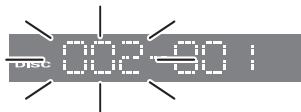
Press and hold [5] (SCAN) again for more than 2 seconds to cancel.
Repeat Play
The current file is repeated.
REP
Press [6] (REPEAT).
REP lights.
Press [6] (REPEAT) again to cancel.
Folder Repeat Play
The current folder is repeated.
REP
Press and hold [6] (REPEAT) for more than 2 seconds.
REP blinks
Press and hold [6] (REPEAT) again for more than 2 seconds to cancel.
Notes on MP3/WMA
What is MP3/WMA?
MP3 (MPEG Audio Layer-3) and WMA (Windows Media™ Audio) are the compression formats of digital audio. The former is developed by MPEG (Motion Picture Experts Group), and the latter is developed by Microsoft Corporation. Using these compression formats, you can record the contents of about 10 music CDs on a single CD media (This figures refer to data recorded on a 650 MB CD-R or CD-RW at a fixed bit rate of 128 kbps and a sampling frequency of 44.1 kHz).
Note:
- MP3/WMA encoding and writing software is not supplied with this unit.
- CD writing software is not supplied with this unit.
Points to remember when making MP3/WMA files
Common
- High bit rate and high sampling frequency are recommended for high quality sounds.
- Selecting VBR (Variable Bit Rate) is not recommended because playing time is not displayed properly and sound may be skipped.
- The playback sound quality differs depending on the encoding circumstances. For details, refer to the user manual of your own encoding software and writing software.
MP3
It is recommended to set the bit rate to "128 kbps or more" and "fixed".
WMA
It is recommended to set the bit rate to "64 kbps or more" and "fixed".
- Do not set the copy protect attribute on the WMA file to enable this unit to play back.
- WMA Version 9 is supported. However, the new functions in Version 9 (WMA pro, Loss-less, and the combination of 64 kbps and 48kHz ) are excluded.
Caution: Never assign the“.mp3”, or“.wma” file name extension to a file that is not in the MP3/WMA format. This may not only produce noise from the speaker damage, but also damage your hearing.
Display Information
Displayed items
CD-TEXT
- Dis c title
Track title
MP3/WMA
- Folder name
- File name
MP3 (ID3 tag)
- Album
- Title and Artist
WMA (WMA tag)
- Album
- Title and Artist
Displayable characters
- Displayable length of file name/folder name: within 96 characters
- Name files and folders in accordance with the standard of each file system. Refer to the instructions of writing software for details.
- ASCII character set and special characters in each language can be displayed.
ASCII character set
A to Z, a to z, digits 0 to 9, and the following symbols: (space)! " # $ % & ' ( ) * + , - . / :;< = >? @ [ \ ] ^ _ ` {1}
Special characters

A A a a

a

0 0 0 0 o o o o

U U u u u
Note:
- With some software in which MP3/WMA format files have been encoded, the character information may not be displayed properly.
- Undisplayable characters and symbols will be converted into an asterisk(※)
Recording MP3/WMA files on a CD-media
- You are recommended to minimize the chances of making a disc that contains both CD-DA files and MP3/WMA files.
- If CD-DA files are on the same disc as MP3 or WMA files, the songs may not play in the intended order, or some songs may not play at all.
- When storing MP3 data and WMA data on the same disc, use different folders for each data.
- Do not record files other than MP3/WMA files and unnecessary folder on a disc.
- The name of MP3/WMA file should be added by rules as shown in the following descriptions and also comply with the rules of each file system.
- You may encounter trouble in playing MP3/WMA files or
displaying the information of MP3/WMA files recorded with certain writing software or CD recorders.
- The file extension“.mp3” or“.wma” should be assigned to each file depending on the file format.
- This unit does not have the play list function.
- Although Multi-session recording is supported, the use of Disc-at-Once is recommended.
Supported file systems
ISO 9660 Level 1/Level 2, Apple Extension to ISO 9660, Joliet, Romeo
Note: Apple HFS, UDF 1.50, Mix CD,CD Extra is not supported.
Compression formats (Recommendation: "Points to remember when making MP3/WMA files" on the previous page )
| Compression method | Bit rate | VBR | Sampling frequency |
| MPEG 1 audio layer 3 (MP3) | 32 k-320 kbps | Yes | 32, 44.1, 48 kHz |
| MPEG 2 audio layer 3 (MP3) | 8 k-160 kbps | Yes | 16, 22.05, 24 kHz |
| Windows Media Audio Ver. 2, 8, 9 | 64 k-192 kbps | No | 32, 44.1, 48 kHz |
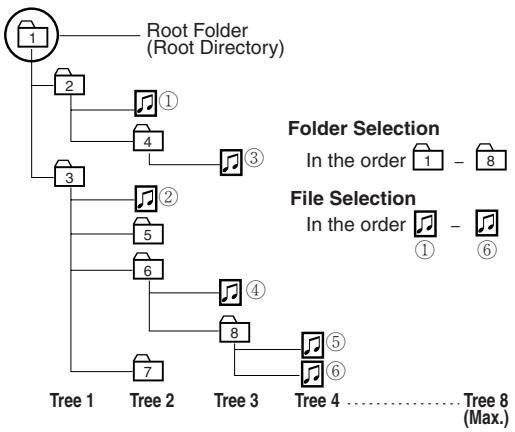
Folder selection order/file playback order
Maximum number of files/folders
Maximum number of files/folders: 999 (files + folders)
Maximum number of files in one folder: 255
Maximum depth of trees: 8
Maximum number of folders: 255 (Root folder is included.)
Note:
- This unit counts the number of folders irrespective of the presence or absence of MP3/WMA file.
- If the selected folder does not contain any MP3/WMA files, the nearest MP3/WMA files in the order of playback will be played.
- Playback order may be different from other MP3/WMA players even if the same disc is used.
- "ROOT" appears when displaying the root folder name.
Windows Media, and the
Windows logo are trademarks, or registered trademarks of Microsoft Corporation in the United States and/or other countries.

Copyright
It is prohibited by copyright laws to copy, distribute and deliver copyrighted materials such as music without the approval of copyright holder except enjoying yourself personally.
No warranty
Above description complies with our investigations as of December 2003. It has no warranty for reproducibility and displayability of MP3/WMA.
CD Changer Control (only for CQ-C1400N)
- CD changer functions are designed for optional Panasonic CD changer unit.
- Do not watch the scroll display while driving.
CD Changer Mode
Preparation:
- Connect the CD changer, and load a magazine (CDs).
Press [SRC] (Source) to select the CD changer mode and playback starts.
- Load a magazine with CDs when "NO DISC" is displayed.
Display Change
Press [DISP] (Display).
Note:
- "NO TITLE" is displayed when there is no information on the disc.
- Press [3] (SCROLL) to have an another circle scroll while a title is displayed.
Disc Selection
[A]: Next disc
[VI]: Previous disc
Track Selection
[▶]: Next track
[1: Beginning of the current track. For the previous track, press twice.
Fast Forward/Fast Reverse
Press and hold
[▶▶] (▶▶): Fast Forward
[ ] ( ): Fast Reverse
Release to resume the playback.
Note:
- CD text is displayed when the unit is connected to a CD changer capable of recognizing CD text (CX-DP9061EN).
- Trouble may occur while playing CD-Rs. Refer to the section on "Notes on CD, CD Media (CD-R, CD-RW, CD-ROM)" (→ Page 33)
-
This unit does not support the following through the CD changer.
-
CD-RW playback. (except when CX-DP880N is connected)
- MP3/WMA playback.
- Pausing does not function in the CD changer mode.
Random Play

All the available tracks are played in a random sequence.
Press [4] (RANDOM)
R lights.
Press [4] (RANDOM) again to cancel.
Disc Random Play

All the available tracks on the current disc are played in a random sequence.
Press and hold [4] (RANDOM) for more than 2 seconds. Rblinks.
Press and hold [4] (RANDOM) again for more than 2 seconds to cancel.
Scan Play
The first 10 seconds of each track is played in sequence.
Press [5] (SCAN).
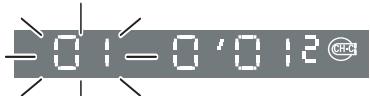
Press [5] (SCAN) again to cancel.
Disc Scan Play
From the next disc, the first 10 seconds of the first track of all the discs is played in sequence.
Press and hold [5] (SCAN) for more than 2 seconds.

Press and hold [5] (SCAN) again for more than 2 seconds to cancel.
Repeat Play
The current track is repeated.
Press [6] (REPEAT)
REP lights.
Press [6] (REPEAT) again to cancel.
Disc Repeat Play
The current disc is repeated.
Press and hold [6] (REPEAT) for more than 2 seconds.
REP blinks.
Press and hold [6] (REPEAT) again for more than 2 seconds to cancel.
Audio Setting
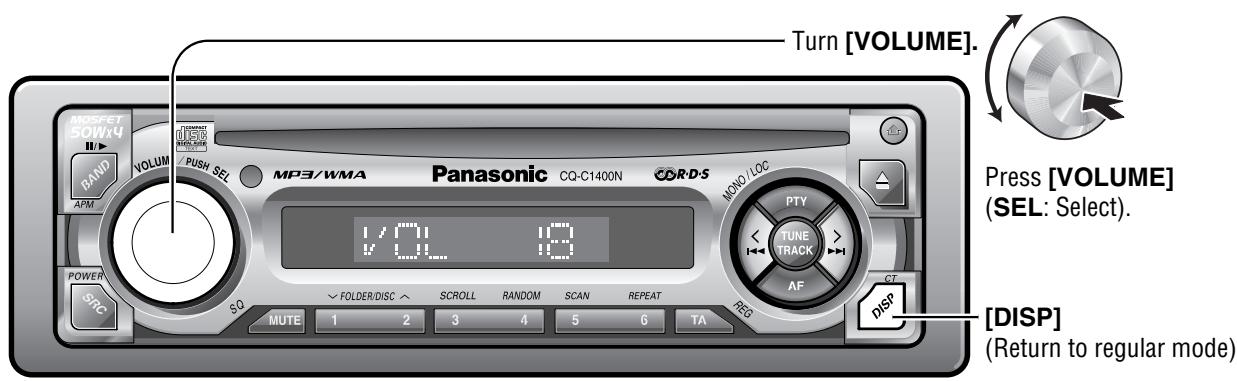
Volume
Default:18
Setting range:0 to 40
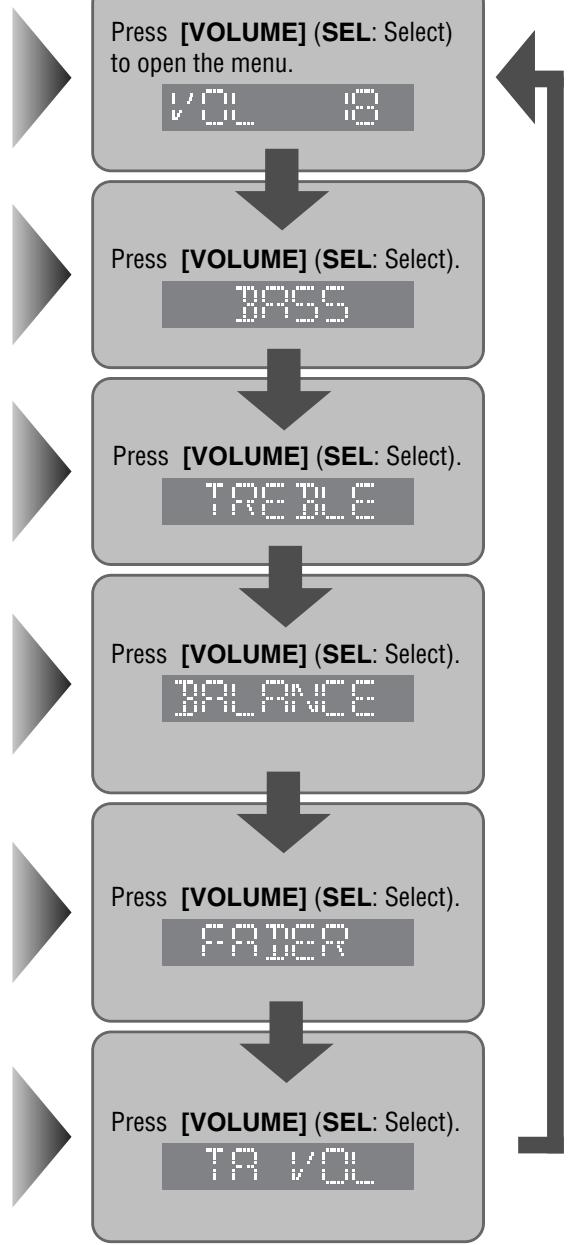
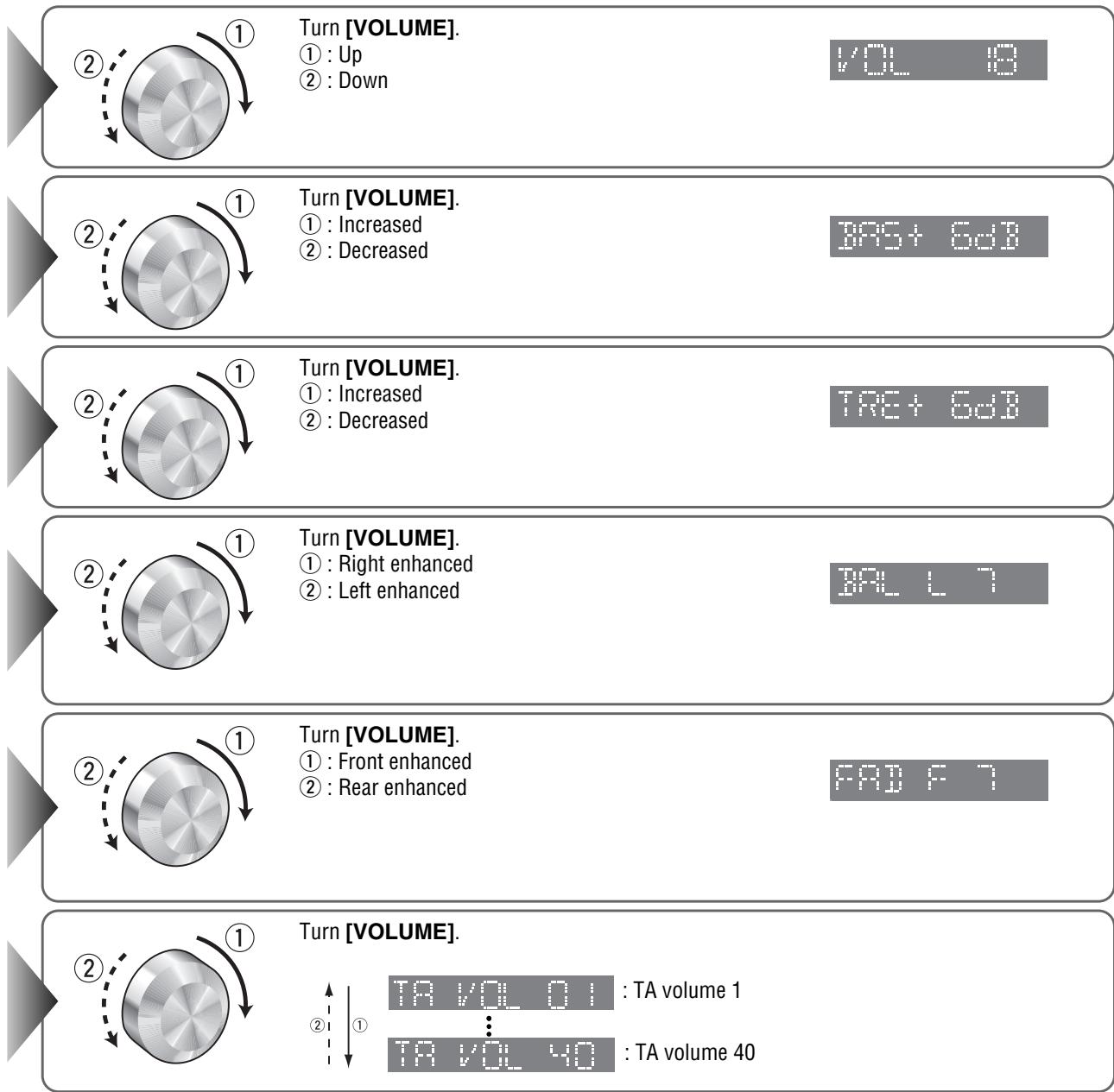
Bass/Treble
You can adjust the bass and treble sound.
Default: BAS (bass) 0 dB
TRE (treble) 0 dB
Setting range: -12dB to +12dB (by 2 dB)
Balance/Fader
You can adjust the sound level among the right, left, front and rear speakers.
Default: BAL (balance) CNT (centre)
FAD (fader) CNT (centre)
Setting range: 15 levels each
TA Volume Set
Traffic announcement are broadcast at the TA volume level.
Default:18
Setting range : 1 to 40
Note:
- Press [DISP] to return to the regular mode.
- If no operation takes place for more than 7 seconds in audio mode (2 seconds in the volume mode) setting, the display returns to regular mode.
Anti-Theft System
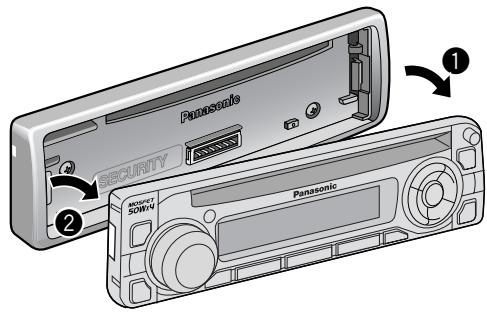
This unit is equipped with a removable face plate. Removing this face plate makes the radio totally inoperable.
Remove the Removable Face Plate
Switch off the power of the unit.
2 Press the release button [ ]
3 Pull on the right side of the unit.
Gently press the bottom of the case and open the cover. Place the face plate into the case and take it with you when you leave the car.
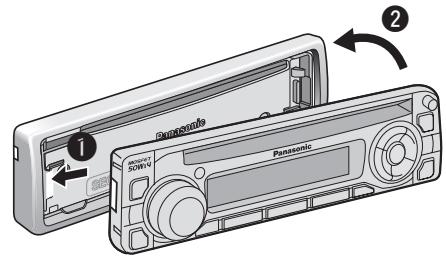
Install Removable Face Plate
Slide the left side of the removable face plate in place.
Press the right end of removable face plate until "click" is heard.
Panel Removal Alarm
This alarm sounds to warn you not to forget to remove the panel before leaving your car.
PANELY
"PANEL !" is displayed and an alarm sounds when turning off the power of this unit or turning the ignition switch of your car to OFF.
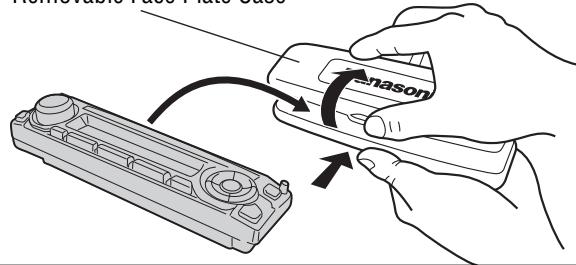
Removable Face Plate Case
Caution:
- This face plate is not waterproof. Do not expose it to water or excessive moisture.
- Do not remove the face plate while driving your car.
- Do not place the face plate on the dashboard or nearby areas where the temperature rises to high level.
- Do not touch the contacts on the face plate or on the main unit, since this may result in poor electrical contacts.
- If dirt or other foreign substances get on the contacts, wipe them off with a clean and dry cloth.
- To avoid damaging the front panel, do not push it down or place objects on it while it is open.
Fuse
Use fuses of the same specified rating (15 A). Using different substitutes or fuses with higher ratings, or connecting the unit directly without a fuse, could cause fire or damage to the unit.
If the replacement fuse fails, contact your nearest authorized Panasonic Service Centre.
Maintenance
Your product is designed and manufactured to ensure the minimum of maintenance. Use a dry, soft cloth for routine exterior cleaning. Never use benzine, thinner, or other solvents.
Notes on Discs
Notes on CD/CD Media (CD-R, CD-RW, CD-ROM)
If you use commercial CDs, they must have either of these labels shown at right.

DIGITAL AUDIO

DIGITAL AUDIO
TEVT
How to hold the disc
- Do not touch the underside of the disc.
- Do not scratch on the disc.
- Do not bend the disc.
- When not in use, keep disc in the case.
Do not use irregularly shaped discs.
Do not leave discs in the following places:
- Direct sunlight
Near car heaters - Dirty, dusty and damp areas
- Seats and dashboards
Disc cleaning
Use a dry, soft cloth to wipe from the center outward.
Do not attach any seals or labels to your discs.
Do not write anything on the disc label with a pointed pen or hard-point pen.
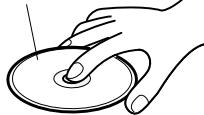
Label side


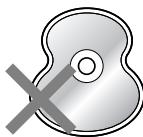
Do not use irregularly shaped discs.
<Correct:
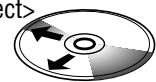
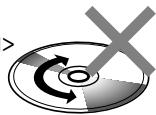
Notes on CD-Rs/RWs
- You may have trouble playing back some CD-R/RW discs recorded on CD recorders (CD-R/RW drives), either due to their recording characteristics or dirt, fingerprints, scratches, etc. on the disc surface.
- CD-R/RW discs are less resistant to high temperatures and high humidity than ordinary music CDs. Leaving them inside a car for extended periods may damage and make playback impossible.
- Some CD-R/RWs can not be played back successfully thanks to incompatibility among writing software, a CD recorder (CD-R/RW drive) and the discs.
- This player cannot play the CD-R/RW discs if the session is not closed.
- This player cannot play the CD-R/RW discs which contains other than CD-DA or MP3/WMA data.
- Be sure to observe the instructions of CD-R/RW disc for handling it.
Troubleshooting
If You Suspect Something Wrong
Check and take steps as described below.
If the described suggestions do not solve the problem, it is recommended to take the unit to your nearest authorized Panasonic Service Centre. The product should be serviced only by qualified personnel.
Caution:
- Do not use the unit in an irregular condition, for example, without sound, or with smoke or foul smell, which can cause ignition or electric shock. Immediately stop using the unit and call the store where you purchased it.
- Never try to repair the unit by yourself because it is dangerous to do so.
Common
Problem
No power to the unit
Sound is not generated
The demonstration screen displayed and no operable
Noise
Noise is made in step with engine revolutions.
Some operations are not executable.
Possible cause Possible solution
The power cord (battery, ACC and ground) is connected in the wrong way. Check the wiring.
Fuse blowout
Eliminate the cause of fuse blowout and replace the fuse with new one. Consult your dealer.
MUTE is set to ON
Set MUTE to OFF.
There is contact between the external mute lead and the chassis.
Connect the external mute lead correctly. If the lead is unused, insulate it.
The wiring of the speaker line are not correct, or a break or poor contact arises.
Check the wiring in accordance with the wiring diagram. (Installation Instructions)
You cannot operate the unit while the demonstration screen appears.
Press [DISP] to end the demonstration screen.
If the demonstration screen appears frequently, there is a possibility that poor contact or wrong wiring arises between the battery lead of the unit and the battery cable of the car. (The battery lead should be always powered.)
Check the battery wiring in accordance with the wiring diagram.
There is an electromagnetic-wave generator such as a cellular phone near the unit or its electrical lines.
Keep an electromagnetic-wave generator such as a cellular phone away from the unit and the wiring of the unit. In case that noise cannot be eliminated due to the wiring harness of the car, consult your dealer.
The contact of the ground lead is poor.
Make sure that the ground lead is connected to an unpainted part of the chassis securely.
Alternator noise comes from the car.
Change the wiring position of the ground lead.
Mount a noise filter on the power supply.
Some operations are not executable in particular modes such as menu mode.
Read the operating instructions carefully and cancel the mode. In case the unit is still out of order, consult the dealer.
Common (continued)
Problem
No sound from speaker(s)
The speaker channels are reversed between right and left.
The sound field is not clear in the stereo mode. Central sound is not settled.
Radio
Problem
Poor reception or noise
Stereo broadcast is received only in mono.
Only nearby stations can be received.
The number of auto preset stations is less than 6.
Preset stations cannot be stored.

Possible cause Possible solution
BAL/FAD setting is not appropriate.
Readjust BAL/FAD.
There is a break, a short circuit, poor contact or wrong wiring regarding the speaker wiring.
Check the speaker wiring.
The speaker wiring is confused between right and left.
Perform the speaker wiring in accordance with the wiring diagram.
The plus and minus terminals at right and left channels of speakers are connected reversely.
Perform the speaker wiring in accordance with the wiring diagram.
Possible cause Possible solution
Antenna installation or wiring of antenna cable is faulty.
Check whether the antenna mounting position and its wiring are correct. In addition, check to see whether the antenna ground is securely connected to the chassis.
No power is supplied to the antenna amplifier (when using a film antenna, etc.).
Check the wiring of the antenna battery lead.
The MONO mode is active.
Cancel the MONO mode.
The LOCAL mode is active.
Cancel the LOCAL mode.
The number of receivable stations is less than 6.
Move to an area where receivable stations number is maximum, and try presetting.
The LOCAL mode is active.
Cancel the LOCAL mode.
The contact of the battery lead is poor, or the battery lead is not always powered.
Make sure that the battery lead is connected securely, and preset stations again.
Troubleshooting (continued)
RDS
Problem
PS does not appear even if an RDS station is tuned into. ("NONE" appears.)
Receiving programs differs from PTY that was already set up.
"NO PTY" appears when selecting PTY.
The clock (CT) does not indicate accurate time.
An AF station cannot be received even if EON is set to ON.
Possible cause Possible solution
A PS code cannot be received for the reason of bad receiving conditions, etc.
A PS code appears if it is received. Wait for a while until conditions change.
When the station changed between programs, the unit could not receive the PTY code.
An appropriate program is searched for and tuned into after receiving a corresponding PTY code. Therefore, wait for a while.
Any specified PTY programs cannot be received. There is no desired program being broadcast in your area.
Select another PTY, or wait until a desired program starts.
The unit received a station that broadcasting time that is not appropriate for you, or the unit is receiving a station that does not broadcast time.
Receive a station that broadcasting time that is appropriate for your area, or adjust CT manually.
There is little difference in receiving conditions between the current station and AF stations. Update of AF list ended in failure.
Wait until AF list is successfully updated. For unstable reception, tune into a stable station by hand.
CD
Problem
No playback or disc ejected
Sound skipping or noise
Sound skipping due to vibration
Disc unrejectable
Possible cause Possible solution
The disc is inserted upside down.
Insert a disc correctly.
There is a flaw or foreign material on the disc.
Remove the foreign material, or use a flawless disc.
There is a flaw or foreign material on the disc.
Remove the foreign material, or use a flawless disc.
The unit is not sufficiently secured.
Secure the unit to the console box with the rear support strap, etc.
The unit is tilted at over 30^ in the front-to-end direction.
Make the angle 30^ or less.
A label is peeled off from the CD in the unit.
Refer repair to the dealer where you purchased the unit.
The microcontroller in the unit operates abnormally due to noise or other factors.
Press the reset switch. If there is no reset switch, unplug the power cord and plug it again. In case the unit is still out of order, consult the dealer.
MP3/WMA
Problem
No playback or disc ejected
The CD-R/RWs that are playable on other devices are not playable on this unit.
Sound skipping or noise
Note:
Refer to "Notes on MP3/WMA". (→ Page 26)
Possible cause Possible solution
The disc has unplayable formatted data
Refer to the description about MP3/WMA for playable sound data except CD-DA (i.e. music CD).
The unit plays back the first track of a MIX mode CD.
Skip the first track.
The playability of some CD-R/RWs may depend on the combination of media, recording software and recorder to be used even if these CD-R/RWs are playable on other devices such as a PC.
Make CD-R/RWs in different combination of media, recording software and recorder after referring to the description about MP3/WMA.
There is a flaw or foreign material on the disc.
Remove the foreign material, or use a flawless disc. For MP3/WMA, refer to the description about MP3/WMA.
Troubleshooting (continued)
Error Display Messages
CD/MP3/WMA
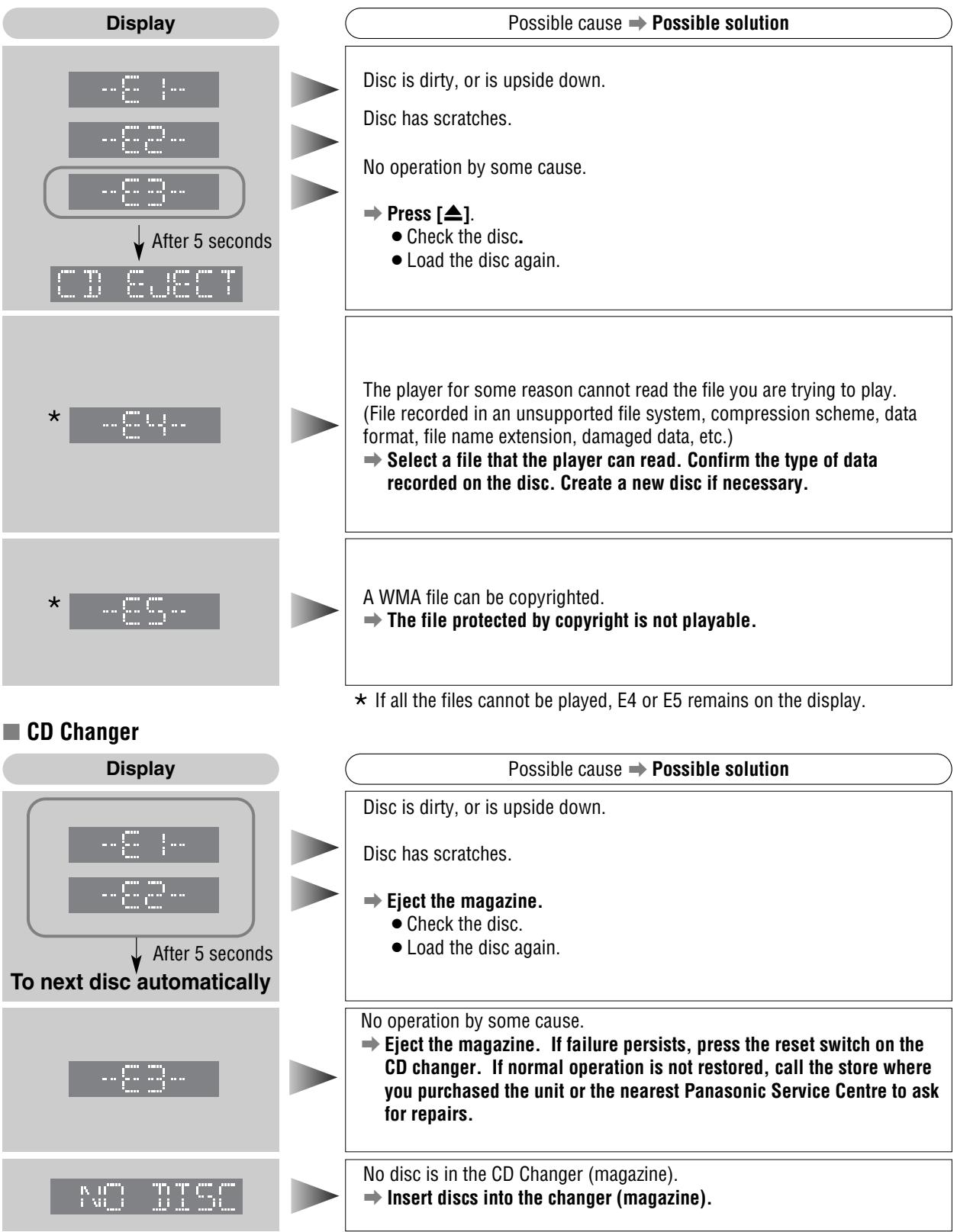
CD Changer (continued)
Display




Possible cause Possible solution
Disconnected
Verify the wiring.
Reading
Wait for a while.
Note: Messages in the action and display sections of the error chart vary with changers. Refer to the operating instructions for the CD changer for details.
Specifications
| General | FM Stereo Radio | ||
| Power Supply | DC 12 V (11 V - 16 V), Test Voltage 14.4 V, Negative Ground | Frequency Range : 87.5 - 108 MHz Usable Sensitivity : 6 dB/μV (S/N 30 dB) Stereo Separation : 35 dB (at 1 kHz) | |
| Tone Controls (Bass) | ±12 dB at 100 Hz | ||
| Tone Controls (Treble) | ±12 dB at 10 kHz | ||
| Current Consumption | Less than 2.5 A (CD mode, 0.5 W 4-Speaker) | Frequency Range : 531 - 1 602 kHz Usable Sensitivity : 28 dB/μV (S/N 20 dB) | |
| Maximum Power Output | 50 W x 4 (at 4 Ω)(C1400N) 45 W x 4 (at 4 Ω) (C1300AN/C1300GN) | LW Radio | |
| Power Output | 22 W x 4 (DIN45 324, at 4 Ω) | Frequency Range : 153 - 279 kHz Usable Sensitivity : 32 dB/μV (S/N 20 dB) | |
| Speaker Impedance | 4 - 8 Ω | ||
| Pre-Amp Output Voltage | 2.5 V (CD mode) | CD Player | |
| Pre-Amp Output Impedance | 200 Ω | Sampling Frequency : 8 times oversampling DA Converter : 4 DAC System | |
| Dimensions (W x H x D) | 178 x 50 x 155 mm | Pick-Up Type : Astigma 3-beam Light Source : Semiconductor laser | |
| Weight | 1.4 kg | Wavelength : 780 nm Frequency Response : 5 Hz - 20 kHz (±1 dB) Signal to Noise Ratio : 96 dB Total Harmonic Distortion : 0.01 % (1 kHz) Wow and Flutter : Below measurable limits Channel Separation : 75 dB | |
Note: Specifications and design are subject to modification without notice due to improvements.
Sales and Support Information
Customer Care Centre
For UK customers: 08705 357357
For Republic of Ireland customers: 01 289 8333
- Visit our website for product information
E-mail: customer.care@panasonic.co.uk
Direct Sales at Panasonic UK
- Order accessory and consumable items for your product with ease and confidence by phoning our Customer Care Centre Monday - Friday 9:00am - 5:30pm. (Excluding public holidays).
- Or go on line through our Internet Accessory ordering application at www.panasonic.co.uk.
- Most major credit and debit cards accepted.
- All enquiries transactions and distribution facilities are provided directly by Panasonic UK Ltd.
It couldn't be simpler! - Also available through our Internet is direct shopping for a wide range of finished products, take a browse on our website for further details.
Before Installation/Vor dem Einbau Avant l'installation/Voor de installation
Consult a professional for installation.
- Verify the radio using the antenna and speakers before installation.
Wenden Sie sich zum Einbau an einen Fachmann.
- Probieren Sie den Radiobetrieb vor dem Einbau mit Antenne und Lautsprechn aus.
Prenez contact avec un spécialiste pour le montage.
Vérifiez l'autoradio avant de procédéur au montage.
Vraag een vakman voor de installmentie.
- Controller voor de installatione of de radio werk met de antennene en de luidspeakers.
Mounting angle side to side : horizontal (mm) : 0.65
front to fear : 0-30°
Exclusively operated with 12-volt battery with
Connect the power lead (red) very last.
(for non-ISO connector
SchlieBen Sie den Versorgungsleiter
(rot) zum Schluss an (wenn kein ISO-
Stecker verwendet wird).
Raccorder le fil d'alimentation (rouge)
en defnier. (pour un connecteur non-ISO)
Sluit de strobiformaad (1000) pas net allemaatst aan. (voort een nicht-JSO aansluting).
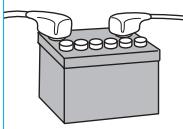
Strip about 5mm of the lead ends for connection (for non-ISO connector).
Apply insulating tape to bare leads.
Secure loosened leads
MP3 WMA CD Player/Receiver with CD Changer Control
CQ-C1400N
MP3 WMA CD Player/Receiver
CQ-C1300AN/C1300GN
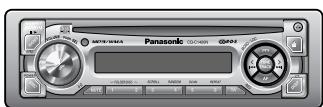
(CQ-C1400N)
WMA MP3

Matsushita Electric Industrial Co., Ltd.
Web Site : http://www.panasonic.co.jp/global/
YEFM293250 ND1203-0 Printed in China
Installation/Einbau/Montage/Installatie
How to install the unit/Einbau des Gerätes/Mode de montage de l'appareil/Installeren van het toestel
Cautions: Wear gloves for safety.
Bend appropriate tabs to secure the unit
without backlash.
(1) Screw the bolt into the main unit.
(1) Secure the rear of the main unit.
(1) Snap the right and left springs into each hole.
Remove the front panel.
Nehmon Sio das
until you hear a click.
② Pull the main unit while pushing the plate inwards
pushing the plate inward.
Using the rubber cushion (Option)
Bear support bracket. To the unit
(supplied with car) An das Gerät
Einbauleiste (vorhanden im Côté apparéil
fourni avc yco
Achter-steunbeugel
Battery Cable reconnection
When this unit is installed in dashboard,
ensure that there is sufficient air flow .
around the unit to prevent damage from
overheating, do not block any ventilation.
holes on the unit
WICHTIG
Warning: Do not connect the power connector until the whole wiring is completed.
IGN or ACC 12 V supply 12 V-Versorgung (IGNV/ACC)
Alimentation
IGN ou ACC
IGN of ACC 12 V
stroomvoorziening
Car-side connector
Steckverbinder am Fahrzeug
Connecteur cête voiture
Precautions (ISO Connector)
The pin arrangement of the power connector
conforms to ISO standard.
Please check that the pin arrangement of the pin is as shown in Figure 12.
connector in your car conforms to ISO standard. For car types A and B, change the wiring of the
For car types A and B, change the wiring of the red and yellow leads as shown at below:
red and yellow leads as shown at below. After connection, insulate the portions marked (※)
with insulating tape
Note: For cars other than types standard, A and B.
please consult your local car shop
B. F1 and F2 had the same phenotypes
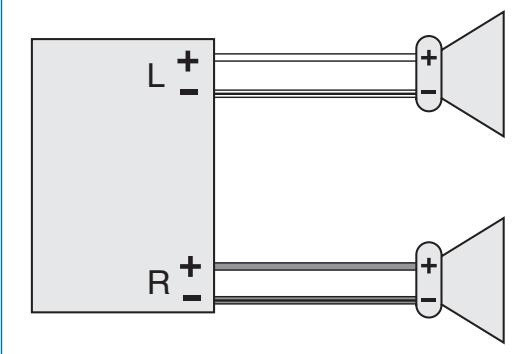
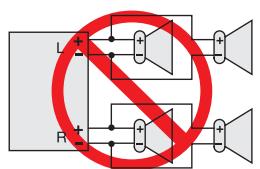
Do not connect more than one speaker to
one set of speaker leads. (except for connecting to a tweezer)
Use ungrounded speakers only.
Allowable input : 45 W or more (CQ-C1300AN/C1300GN)
:50W or more (CQ-C1400N)
Impedance:4-8Ω Distances between speaker and amplifier:20 cm or more
Distance between speaker and amplifier: 30 cm of more
(CQ-C1300AN/C1300GN)
Impédance: 4 - 8 Q. : 50 W ou davantage (CQ-C1400N)
Impedance: 4 - 8 s2 Distance entre le bac
Distance entre le haut-pauleur et l'implicateur: 30 cm ou davantage
Gebruik ulsliutend ongeaarde luidsprekers. Toegestaan ingangsvermögen: 45 W of bo
1000000000000000000000000000000000000000000000000000000000000000000000000000000000
(50 W of hoger (CQ-C1400N)
Impedantie: 4 - 8 Ω
Do not use a 3-wire type speaker system
having a common earth lead.