
HSM1344 - Shredder HSM - Free user manual and instructions
Find the device manual for free HSM1344 HSM in PDF.


| Product type | Document shredder |
| Brand | HSM |
| Model | HSM 1344 |
| Cut type | Strip cut |
| Shred size | 4 x 50 mm |
| Sheet capacity | Up to 10 sheets (80 g/m²) |
| Feed width | 220 mm |
| Bin volume | 20 liters |
| Noise level | 55 dB (A) |
| Cutting speed | 3 m/min |
| Power supply | 230 V, 50 Hz |
| Motor power | 200 W |
| Weight | 9.5 kg |
| Dimensions (W x D x H) | 390 x 280 x 600 mm |
| Main functions | On/Off, reverse, overload indicator |
| Safety | Automatic shut-off in case of overload, motor thermal protection |
| Maintenance and cleaning | Oil the cutting blades regularly with special cutting oil |
| Spare parts and repairability | Available from HSM after-sales service |
Frequently Asked Questions - HSM1344 HSM
User questions about HSM1344 HSM
0 question about this device. Answer the ones you know or ask your own.
Ask a new question about this device
Download the instructions for your Shredder in PDF format for free! Find your manual HSM1344 - HSM and take your electronic device back in hand. On this page are published all the documents necessary for the use of your device. HSM1344 by HSM.
USER MANUAL HSM1344 HSM
OPERATING INSTRUCTIONS
PAPER SHREDDER
OPERATING INSTRUCTIONS
PAPER SHREDDER
OPERATING INSTRUCTIONS
PAPER SHREDDER
OPERATING INSTRUCTIONS
PAPER SHREDDER
OPERATING INSTRUCTIONS
PAPER SHREDDER
English: Paper shredder HSM Classic 225.2 9
1 Proper use, warranty
Check the name plate on the back of the machine to find out the cutting width and mains voltage for your document shredder and observe the applicable instructions in the operating manual.
The shredder is designed for destroying paper. Depending on the cutting type, it can also handle small quantities of the following materials:
| Shred width (mm) 3.9 5.8 3.9x40 | 1.9x15 | |||
| Credit and charge cards | ● | ● | ● | ● |
| CDs, floppy discs | ● | ● | ● | |
Its sturdy drive mechanism is not damaged by paper clips and staples. Only on machines with safety level HS Level 6 (1 x 5 mm) can the paper not contain staples or paper clips.
The warranty period for the document shredder is 2 years. There is a special warranty for the HSM solid steel cutting rollers in the document shredder, which is provided independently of the guarantee, and remains valid for the entire service life of the machine (HSM Lifetime Warranty). Exceptions to this are document shredders with security levels 5 and HS level 6. This warranty and guarantee exclude wear and damage caused by improper handling or actions taken by third parties.
Note: Document shredders with a particle cutting unit also come with an optional device for lubricating the cutting unit. Note the documentation enclosed for the oiler if your machine is equipped with one.
2 Safety instructions
Classification
| Safety notice Explanation | |
| WARNING Failure to observe this warning can lead to serious or fatal injury. | |
| Notice Failure to observe this instruction can cause damage. |

Before using the machine for the first time, read the operating manual, and keep it for later use and to
pass on to any subsequent users. Observe all safety instructions on the machine.

WARNING
Dangerous for children and others!

The machine may not be used by persons (including children under 14 years of age) with limited physical, sensory or mental capabilities or with a lack of experience and
knowledge, unless they are supervised by a responsible person or are instructed by them on the use of the machine. Children must be supervised to ensure they do not play with the machine. Do not leave the document shredder switched on when it is unattended.

WARNING
Risk of injury!
Do not reach into the paper feed slot.

Risk of injury from being pulled in!
Keep long hair, loose articles of clothing, ties, scarves, jewellery, etc. away from feed opening. Material with the tendency to form loops, e.g. tapes, strapping material, etc. must not be shredded.

WARNING
Dangerous mains voltage!
Improper handling of the machine can lead to an electric shock.
- Before you insert the power plug, make sure that the voltage and frequency of your power supply comply with the information on the name plate.
- Make sure that the power plug is easily accessible.
- Make sure that no water gets into the shredder. Do not immerse the power cable or the power plug in water.
- Never touch the power plug with wet hands.
- Never pull the plug out of the socket using the power cable. Always pull out the plug directly.
- Only use the machine in a dry room indoors. Never operate the machine in damp rooms or in the rain.

Check the machine and cable regularly for damage. Switch the shredder off if it is damaged or not working correctly or before relocating or cleaning it and disconnect it from the mains.
- Keep the machine, the plug and cable away from open fire and hot surfaces. The ventilation slots must not be blocked or covered and there must be at least 5 cm space between the shredder and any wall or furniture.

Service work may only be carried out by HSM Customer Service or by the service technicians of our contractual partners.
See page 72 for our customer service addresses.
Notice Danger from improper use
Only operate this machine in accordance with the instructions outlined in "Proper use".
3 Machine components

1 Door 2 Paper feeding opening 3 Feed opening for disks and CDs 4 Safety instructions 5 LEDs
Paper shredder is ready for operation.
Paper jam or motor overloaded

Cut material container full or door open
6 Rocker switch
▲: On ▼: Off, Reverse
7 Name plate
4 Scope of delivery
- Paper shredder, ready for connection, in carton packing
- 5 Bags for shredded material • Special cutting block oil 50 ml (cross cut)
- Operating instructions
Accessories
• 10 waste bags, order no. 1.410.995.100 • Special cutting block oil 250 ml order No.: 1.235.997.403
See page 72 for our customer service addresses.
5 Commissioning
- Undo the wing screws securing the unit during transportation.

- Open the door of the document shredder. • Take the frame (A) and a waste bag.
- Place the waste bag on the frame and fold over the top approx. 20 cm.
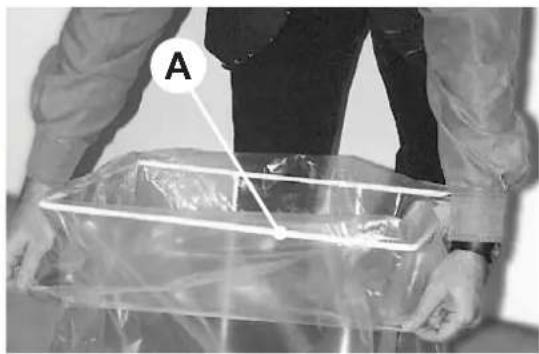
- Slide the frame (with bar B facing the front of the cupboard) again into the guide rails.

- Close the door of the document shredder.
- Plug the machine into a properly installed socket.
6 Operation

WARNING
Before switching the machine on, make sure that you observe all safety instructions.
Switching the paper shredder on

- Press rocker switch ▲. ▶ Rocker switch locks in place. ▶ Green LED lights. ▶ Paper shredder is ready for operation (standby).
Feed paper

- Insert the paper to be destroyed. See “Technical data” for sheet capacity. ▶ Automatic start stop control starts the cutting system automatically. ▶ Paper is pulled into cutting system and shredded. ▶ When the paper feeding
opening is free again, the cutting system automatically switches off after approx. 3 sec and returns to standby.
Shredding CDs and disks (see "Proper Use")

Feed CDs and disks through the slot in the safety element. This protects you from splinters.
Switching paper shredder off

- Tap rocker switch ▼. ▶ Switch returns to zero position.
7 Troubleshooting
Paper jam
You have fed in too much paper.

▶ Red LED lights. The cutting device runs in reverse for approx. 2 seconds automatically. ▶ Paper is pushed out.
Notice: Do not press rocker switch alternately forwards/backwards (▲ - ▼). Cutting unit could be damaged.
- Pull out the paper from the paper feed opening. If the paper is too low and cannot be taken out: Activate the rocker switch ▼ several times briefly. Light barrier must be free of obstacles.
- Acknowledge the fault by switching the machine off and on again. • Separate paper stack.
- Press rocker switch ▲.
- Feed in paper successively.
Shredded material container full

Red LED lights. ▶ Paper shredder switches off.
Empty the cut material container immediately because if it is too full, malfunctions can occur in the cutting system.

- Switch the equipment off by tapping the rocker switch ▼.
- Remove the full shredded material bag and insert a new bag.
Door open

Red LED lights. ▶ Paper shredder switches off. - Check whether the front door is closed properly.
For all other malfunctions, check whether the motor was overloaded before contacting our customer service. Let the shredder cool down for approx. 15 – 20 mins. before using it again.
For all other malfunctions, before calling customer service please check
- if the motor was overloaded Let the shredder cool down for approx. 15 – 20 mins. before using it again.
- if the light barrier is soiled with paper dust.
Clean the light barrier in the paper feed using a dry brush or cloth.
8 Cleaning and maintenance

WARNING
Dangerous mains voltage!
Switch off the shredder and pull out the mains plug.
When cleaning only use a soft cloth and a mild soap-water solution. However, no water must enter the equipment.
Check that the door switch is working properly:

WARNING
If the following procedure cannot be performed, switch off the document shredder, disconnect the mains plug and contact customer service.
- Insert the mains plug and switch on the shredder.
- Feed in a sheet of paper and open the front door while the paper is being drawn in. The cutting unit must turn off immediately and the "door open" indicator must light up.
- Close the door. The cutting unit must not yet restart.
- Pull the paper out of the feed opening. The light barrier must be clear.
- Switch off the machine and then switch back on. The cutting unit starts when paper is fed in.
Oil the cutting unit when cutting performance decreases or the device becomes noisy, or every time you empty the waste container (Cross cut only):
- Spray special cutting apparatus oil through the paper feed opening along the entire width on to the cutting rollers.
- Run cutting system backwards (▼) without feeding paper. ▶ Paper dust and particles are shaken off.
9 Disposal / Recycling

Electrical and electronic old devices contain a variety of valuable materials, but also hazardous substances which were required for function and safety. Incorrect disposal or handling can be dangerous to your health and the environment. Never dispose of old devices in the household waste. Observe the current applicable regulations and use the collection points for returning and recycling electric and electronic devices. Dispose of all the packaging materials also in an environmentally-responsible way.
10 Technical data
| Cutting type Strip cut Cross cut | ||||||
| Shred size (mm) 5.8 3.9 3.9 x 40 1.9 x 15 0.78 x11 1 x 5 | ||||||
| Safety rating German DIN 32757 - 1 | 2 | 2 | 3 | 4 | 5 | Level 6* |
| Cutting ca pa ci ty** (Sheet), DIN A4 70 g/m 80 g/m2 | 40 - 42 32 - 33 | 31 - 33 25 - 27 | 25 - 27 20 - 22 | 17 - 19 12 - 14 | 10 - 11 7 - 9 | 7 - 8 6 - 7 |
| Weight | 44 kg | 52 kg | ||||
| Noise level (Idle running/ load) | 56 dB(A) / 62 dB(A) | 56 dB(A) / 70 - 73 dB(A) | ||||
| Cutting speed | 126 mm/s | 135 mm/s | ||||
| Lo ading width | 300 mm | |||||
| Voltage | 230 V, 50 Hz 100 V, 50/60 Hz - 115 V, 60 Hz | |||||
| Power for the maximum number of sheets | 1400 W | |||||
| Operating mode | Continuous operation | |||||
| Ambient conditions in operation: Temperature Relative humidity Height above sea-level (MSL) | -10°C to +40°C max. 90%, without condensation max. 2,000 m | |||||
| Dimensions W x D x H (mm) | 501 x 472 x 877 | |||||
| Volume of shredded material bag | 120 l | |||||
* HSM-specification ** The maximum number of sheets (DIN A4, 70 g/m² or 80 g/m²), fed lengthways, which can be cut in one cycle. The performance data is determined when the motor is cold and the cutting device is freshly oiled. A weaker mains voltage or a different mains frequency to the one specified could result in less sheet capacity and increased noise during operation. The sheet capacity can vary depending on the structure and properties of the paper and on the way it enters. The performance data in 80 g/m² is calculated.
EC Declaration of Conformity
The manufacturer HSM GmbH + Co. KG, Austrasse 1 - 9, D-88699 Frickingen hereby declares that the machine, referred to here as
document shredder HSM Classic 225.2
corresponds to the health and safety requirements of the following EC directives listed below due to its conception and design of the version in which it was put into circulation by us:
Low voltage directive 2006 / 95 / EEC
EMC directive 2004 / 108 / EC
Applied standards and technical specifications:
• EN 55014-1:2006 • EN 61000-4-2:1995 + A1:1998 + A2:2001 • EN 55014-2:1997 + A1:2001 + A2:2008 • EN 61000-4-4:2004 • EN 61000-3-2:2006 • EN 61000-4-5:2006 • EN 61000-3-3:1995 + A1:2001 + A2:2005 • EN 61000-4-6:2007 • EN 13849-1:2008 • EN 61000-4-11:2004 • EN 62233:2008 • EN 50366:2003 + A1:2006 • EN 60950-1:2006 + A11:2009 + A1:2010
Rolf Gasteier - Technical Director
WARNING Danger of injury.
1 Door
WARNING
▶ Switch returns to zero position.
WARNING
Risk of injury!
- Open the door of the shredder.
- Remove the frame (A) and a bag for shredded material.
- Place the bag for shredded material into the frame, and fold the top edge over by about 20 cm.

- Close the door of the shredder.
- Plug the power cord into a properly installed electrical outlet.
6 Operation

WARNING
88699 Frickingen / Germany
Tel. +49 7554 2100-0
Fax. +49 7554 2100 160
info@hsm.eu
www.hsm.eu
HSM (UK) Ltd.
14 Attwood Road / Zone 1
Burntwood Business Park
Burntwood
Staffordshire
WS7 3GJ
Tel. +44(0) 1543.272.480
Fax +44(0) 1543.272.080
info@hsmuk.co.uk
www.hsmuk.co.uk
HSM of America LLC
419 Boot Road
Downingtown, PA 19335
Tel. (484) 237-2308
(800) 613-2110
Fax (484) 237-2309
customerservice@hsmofamerica.com
info@hsmofamerica.com
www.hsmofamerica.com
HSM Polska SP. z.o.o.
ul. Emaliowa 28
02-295 Warszawa
Tel. +48 / 22 862 23 69 / 70
Fax +48 / 22 862 23 68
info@hsmpolska.com
www.hsmpolska.com
HSM France SAS
Parc de Genève
240, Rue Ferdinand Perrier
69800 SAINT-PRIEST
FRANCE
Tél: +33 (0) 810.122.633
Fax: +33 (0) 4.72.51.74.81
France@hsm.eu
HSM GmbH + Co. KG
Barcelona office
C/Tona
Unit 15 "El Lago"
Pol. Ind. Monguit


- 1 PROPER USE, WARRANTY
- 2 SAFETY INSTRUCTIONS
- CLASSIFICATION
- WARNING
- DANGEROUS MAINS VOLTAGE
- NOTICE DANGER FROM IMPROPER USE
- 3 MACHINE COMPONENTS
- 4 SCOPE OF DELIVERY
- ACCESSORIES
- 5 COMMISSIONING
- 6 OPERATION
- SWITCHING THE PAPER SHREDDER ON
- FEED PAPER
- SHREDDING CDS AND DISKS (SEE "PROPER USE")
- SWITCHING PAPER SHREDDER OFF
- 7 TROUBLESHOOTING
- PAPER JAM
- SHREDDED MATERIAL CONTAINER FULL
- DOOR OPEN
- 8 CLEANING AND MAINTENANCE
- CHECK THAT THE DOOR SWITCH IS WORKING PROPERLY
- 9 DISPOSAL / RECYCLING
- EC DECLARATION OF CONFORMITY
- WARNING DANGER OF INJURY
- RISK OF INJURY
- HSM (UK) LTD
- HSM OF AMERICA LLC
- HSM POLSKA SP. Z.O.O
- HSM FRANCE SAS
- HSM GMBH + CO. KG
Brand : HSM
Model : HSM1344
Category : Shredder