USER MANUAL BCB 7030 AA HOTPOINT
Instructions for use
Remove the ice cube tray (if available), fill it with water to 2/3 and put it back in the freezer. Under no circumstances use sharp objects to remove the ice.
Removing the drawers (depending on the model):
Pull the drawers out as far as they go, lift them up and remove them. To free up more space, the drawers can be removed from the freezer compartment.
Place the food on the wire shelf or rollers, making sure the door is properly closed.
In models with an internal
freezer compartment, fresh food can be frozen. The amount of food that can be frozen within 24 hours is indicated on the rating plate.
How to freeze fresh food:
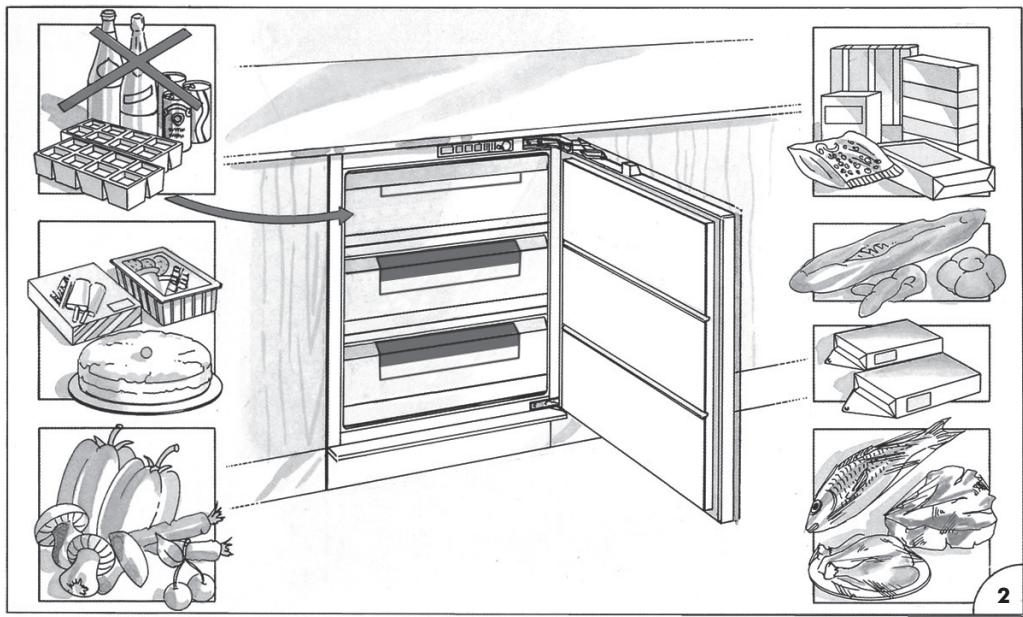
- Place the food on the wire shelf, if available (figure 1), or directly on the bottom of the freezer compartment (figure 2).
- Place the food in the middle of the compartment, so that it does not come into contact with already frozen food. Leave a gap of about 20 mm between packages (figures 1 and 2).
Figure 1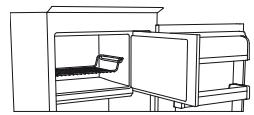
Figure 2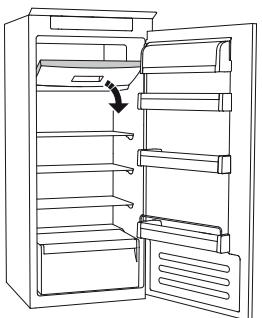
DEFROSTING THE FREEZER COMPARTMENT (depending on the model)
In models with a No Frost system, the defrosting process is automatic. In other models, the formation of frost is normal.
The amount and speed of frost formation depend on the ambient temperature and the frequency of door openings. It is recommended to set a lower temperature or activate the fast freeze function (if available) (see the user manual) a few hours before removing food from the freezer, so that it stays frozen longer during defrosting. To defrost, switch off the appliance and remove the drawers. Place the frozen food in a cool place. Leave the freezer door open to allow the ice to melt. To prevent water from leaking during defrosting, place an absorbent cloth at the bottom of the freezer and wring it out regularly. Wipe out the freezer and dry it thoroughly. Switch the refrigerator back on and put the food back in.
STOP FROST SYSTEM (depending on model)
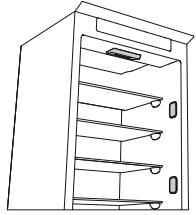
The STOP FROST system (depending on model) facilitates defrosting of the freezer compartment. The special STOP FROST shelf (figure 1) is designed for easy collection of water, which reduces the duration of defrosting of the freezer compartment.
(depending on model)
The compartment with zero temperature Active0 is designed specifically for maintaining low temperature and proper humidity for longer storage of products (for example, meat, fish, seafood, and vegetables).
The Active0 function with humidity control technology ensures optimal preservation of partially packaged products.
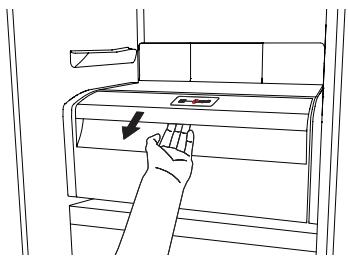
Switching the compartment on and off
When the compartment is switched on, the internal temperature is approximately 0°C.
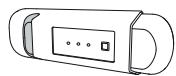
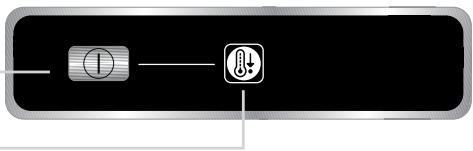
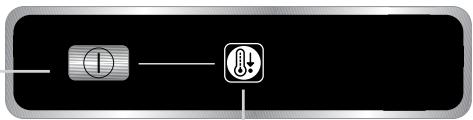
To switch on the compartment, press the button shown in the figure and hold it for more than a second until the symbol lights up.
The lit symbol indicates that the compartment is working. To switch off the compartment, press the button again and hold it for more than a second. To completely switch off the compartment, you must pull out the drawer.
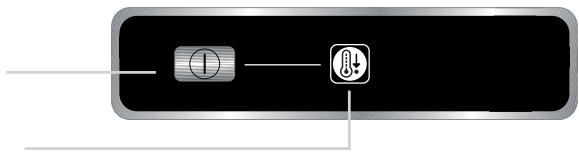
For the zero-temperature compartment Active0 to function correctly, it is necessary:
- that the refrigerator compartment is switched on; - that the temperature is set between +2°C and +6°C; - to activate the zero-temperature compartment, you must insert the drawer;
- that none of the following special functions are selected: "Cooling mode", "Cooling off", "Vacation" (if present); in this case, you must remove products from the compartment.
Notes:
- if the symbol does not light up when you switch on the compartment, check that the drawer is inserted correctly; if the problem persists, contact an authorized service center.
- If the compartment is switched off and the drawer is open, the symbol on the control panel may turn off automatically and then turn on again when the drawer is inserted back into place.
- Depending on the position of the drawer, weak sounds may be heard, which is normal.
- When the drawer is switched on, the temperature in it depends on the overall temperature of the refrigerator compartment. In this case, it is recommended to store fruits and vegetables that are not sensitive to cold (e.g., peas, onions, apricots, carrots, spinach, lettuce, etc.).
Important: if the drawer is switched on and it contains products with high moisture content, condensation may form on the shelves. In this case, temporarily switch off the function. Be careful when placing small products and small containers on the upper shelf of the drawer with zero temperature, so that they do not accidentally fall into the space between the shelves and the back wall of the refrigerator compartment.
To remove the drawer with zero temperature,
perform the following steps:
- For easier cleaning, it is recommended to empty (and if possible remove) the lower drawer; - Switch off the drawer; - Remove the drawer by lifting it upwards; - Remove the white plastic shelf under the drawer;
Note: The upper shelf and side holders are not removable.
To use the drawer with zero temperature again, carefully insert the white plastic shelf above the drawer, then insert the drawer and switch on the function. To increase the volume of the refrigerator compartment and reduce energy consumption, it is recommended to switch off the drawer with zero temperature and remove it.
From time to time, clean the drawer and its parts with a cloth soaked in warm water (do not immerse the white shelf or the drawer in water) with a neutral detergent intended for cleaning refrigerators. Do not use abrasive cleaners.
Before cleaning the drawer (including the outside), it is necessary to remove the drawer and disconnect the electrical supply to the drawer.
Technical assistance for service centers
Before contacting a service center:
Switch the appliance back on to check if the fault has been resolved. If not, switch it off again and repeat the procedure after an hour.
If after checking according to the troubleshooting table and switching the appliance on, it still does not function correctly, contact the service center and clearly describe the problem, specifying:
the fault; the model;
Serial number of the device (indicated on the nameplate inside the device); - service number (if any) (number after the word SERVICE on the nameplate inside the device).
SERVICE
0000 000 0000
Note:
Replacement of the door performed by a service center representative is not considered warranty service.
ANFAI PET PAIДАЛAHY
Smoking is strictly prohibited.
Electric shock hazard. The temperature of the signal may be high.
Expert: If smoking is not allowed, the temperature of the smoke may rise to 4-5 degrees.
SMOKING DEVICE MAINTENANCE AND CLEANING
Clean the smoking device with a dry cloth or a slightly damp cloth; do not use abrasive cleaners. If the cleaning cloth is not provided, use a soft, dry cloth. To avoid damage to the device, do not use any liquids.
Before cleaning, unplug the device from the power outlet.
Do not immerse the smoking device in water (see figure).
When cleaning the device, do not use a wet cloth or any liquid; unplug it from the outlet first.
TROUBLESHOOTING (FOR THE USER)
The lamp is designed for use with the specified type of lamp. It is intended for use in luminaires designed for this type of lamp. The lamp is intended for use in technical maintenance and during the sale period, only with the specified lamp.
Type 1
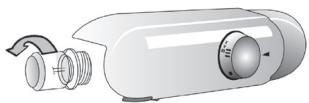
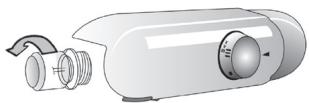
To install the lamp, turn it counterclockwise as shown in the figure. Install the lamp within 5 minutes.
Lamp
No
- Short-circuit-proof lamp (only for luminaires) for technical maintenance only
Short-circuit-proof lamp
Type 2
If it is necessary to replace the short-circuit-proof lamps with other lamps, contact technical maintenance.
Short-circuit-proof lamps are used in LED lamps to protect against short circuits, internal wiring faults, and damage to the luminaire.
INSTALLATION INSTRUCTIONS
Install the lamp, turn it counterclockwise (if applicable) and remove it. Before installation, disconnect the power supply. Do not install the lamp if the socket is damaged.
MAINTENANCE INSTRUCTIONS
Install the lamps correctly, and keep the lamps away from water. Check the lamps and replace them if necessary. If the lamp is damaged, replace it with a new one (electronic version).
TOHA3bITKbIbEJIMI
Toa3bITkbl 6eIiMi 6aJIbH TaFamdap KHe CcyIHdApDbI CaTayfMaMkiHik 6epei.
Toha3bItkbI 6eJIi mABTOMaTTb Tpyde ToJbIK epitjnei.
BenimHin iihderi apkbl 6etihde cy tamhbnapbHbH 60nybl ABOMaTTb epity Ke3ehHIn 6enrici 60bln TaibnAbbl. Epirer cy Tery Ky6bipbHa 6afblTajdaI JxHe KeHH 6ylnaHaTBH KOHTeHepDe XINHanaDbI.
YIriCHe 6aJIaHaHbIcTbEhIM apHaBbI «HeJIdIK rpaIyc» 6eJIIMImeH JkaIbIKTaIybl MyMkiH, OJI 6aJIbH eT XeHE 6aJIbIKtbl caKtay yuHIn aca OHtaIbI.
Eckepy: ToHa3bITKbIUtBih Kepek-KapaKaTapbH bIDbc MaunHaCbHda Ta3aJaMaHbI3.
EckepTne: opTaHbIH TeMnepaTypacbI, ecikTepeH aUbIy JxNliri XHe KpybIbIbIHbIH opHaJIacybl Eki 6eIIMdepderi iXKi TeMnpaTypacbHa ecep etyi MymKIn. TeMnepaTypanapdbIOcbI KaJaInapra caikec opHaTbIHbI3.
Eckptne: eTe bInfaIbI JkaFdaInapDa TOHa3bITkbIbI 6eJIIMiHde, aCipece eIHeK cpeJepDe KOHNecAT Tsy3inyi MymkiH. MyHdai JkaFdaIa Da cybIKbIK bap KOHTeHepJIepDi (MbICaNbI, copNa KybIbIFAH bIDc) Jxaby, cybIKbIFBI KEN TaFamApDbI (MbICaNbI, KekHicTeP) opay XaHe KaBbIKTaIFaH JkaFdaIa JKeJNeTkiWti KOCY YcbIHbIaNbI.
Xemic XeHe KekHic Xawirih WbIrapy (yJrire 6aunahbcTb)
JXawikTi cbtpKa Kapai MymKihirHHe aIbIC etin TapbHb3 Da, Xofapbl KeTepin LbIFapbl3. Jemic XaHe KekHic XawiriHn bIfapblnybH OHaJIaTy ywiH eki TEmeHI ecIK cepenepiH 6ocatbln,(XaHe MymKihirHWe bIfapbln any) keIH XawikTI bIfapy KaKeT BoNybl MymKih.
JenTeKiwXhe6akTepnraFkapcbi nicti 6oJdbipMaHbIH cy3ri
(ynrre 6aaiNaHbictb)
Jendtkiw 6nimdep iwiHderi TemnpaTypbIH TapaiybiH xhe caikeiHte TaFamapdbIH caTanyih kacapbIn,waMadaH TbIC bIfAinblkTbI a3aTadbl.KeJeTeTy aMafBih 6eremeH3. Jendtkiw Kojlmeh Kocbina/ewipine anadbl (Kbicka Hcckayblkbl kapaHb3); erep Jeeldtkiw Kocynb6oNca, kaxet 6oJFaHaOn abTomattb Typde Kymblc icTeiDi.
M¥3ДАТКыIlБθЛIMI
BeneK My3dAmkblu 6eIimi 6ap ynai
The device must be installed by a qualified specialist (the first connection to the mains). It is possible to connect the device to the mains without a qualified specialist. Within 24 hours after connecting the device to the mains, the qualified specialist must check the connections. To ensure the possibility of safe operation of the device in the event of a short circuit, the qualified specialist must install a fuse in the supply line. When installing the device, follow the instructions. To avoid electric shock, fire, and damage to the device, it is necessary to install the device correctly.
Installation
From the mains (junction box) 2/3 of the cable length, connect to the device. To remove the device, press the latches on the sides. Removing the cover (if necessary)
Remove the cover by pressing the latches and pulling it towards you. To avoid damage to the device, do not pull the cable.
Connect the cable to the terminal block or to the connector, then tighten the screws.
Electrical connection
The device must be connected to the mains by a qualified specialist. Within 24 hours after connecting the device to the mains, the qualified specialist must check the connections.
The device must be connected to the mains as follows:
- Connect the cable to the terminal block (1) or to the connector (2) under the cover. - Place the cable in the cable gland and tighten the nut, leaving a gap of 20 mm between the cable and the cover (see figures 1 and 2).
Figure 1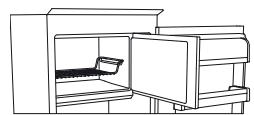
Figure 2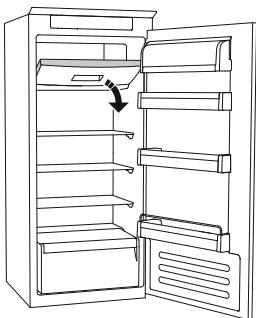
Technical service
Before contacting technical service:
Check the fuse and replace it if necessary. If the fuse is blown, replace it with a new one of the same rating. If the device still does not work after replacing the fuse, contact technical service and describe the problem.
Fuse - 1
Household refrigerating appliances (freezers and refrigerators) - Technical characteristics and test methods
SERVICE
0000 000 0000
Warning:
If the technical maintenance is not carried out, the appliance may not operate correctly and the service warranty may be void.
USING THE APPLIANCE
Plug the appliance into an electrical outlet.
In models equipped with an electronic control, a sound signal may sound. To turn off the sound signal, press the button for turning off the sound signal. Install an anti-odor filter in the ventilation grille to eliminate unpleasant odors, as shown on the packaging (the filter is supplied with the appliance).
Note. After switching on the appliance, wait 4-5 hours before placing food inside, until the temperature inside reaches the required storage temperature.
CLEANING THE APPLIANCE
Regularly clean the appliance with a soft cloth and warm water with a mild neutral detergent, suitable for cleaning the interior surfaces of the refrigerator. Do not use abrasive cleaners. To ensure proper drainage of thawing water, regularly clean the drain hole located on the rear panel of the refrigerator compartment, above the container for fruits and vegetables, using the tool supplied with the appliance (see figure).
Before performing any cleaning or maintenance work, unplug the appliance from the electrical outlet.
Cleaning the appliance, unplug it from the outlet or disconnect it from the electrical supply.
REPLACING THE LAMP OR LED INDICATOR (depending on the model)
Before replacing the lamp, unplug the appliance from the electrical outlet. Then follow the instructions depending on the type of lamp, as they may differ for your model. Replace the old lamp with a new one (their characteristics must match). The lamp can be purchased by contacting a service center or an authorized dealer.
Fig. 1.
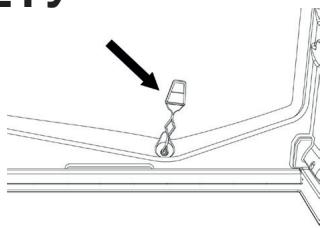
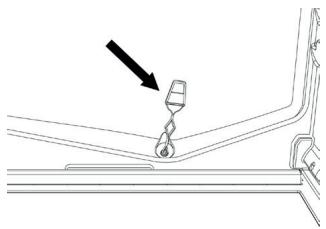
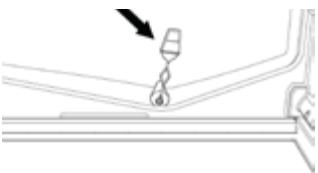
Remove the protective film against scratches, as shown in the figure. Wait 5 minutes before reconnecting the device.
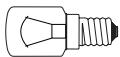
Incandescent lamp (max 25 W)
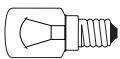
Incandescent lamp
or
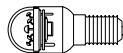
- The LED indicator (with such functions) can be purchased at the Customer Service Center.
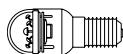
LED indicator
Fig. 2.
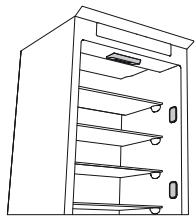
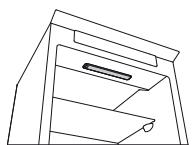
If the appliance is equipped with LED indicators (as shown in the figure below) that need to be replaced, contact the Customer Service Center.
LED indicators last longer than conventional lamps, providing better lighting and not harming the environment.
Instructions for use
Fridge with freezer compartment
| DEUTSCH | Gebrauchsanweisung | Seite 4 |
| FRANÇAIS | Mode d'emploi | Page 10 |
| ENGLISH | Instructions | Page 16 |
| NEDERLANDS | Gebruiksaanwijzing | Pagina 22 |
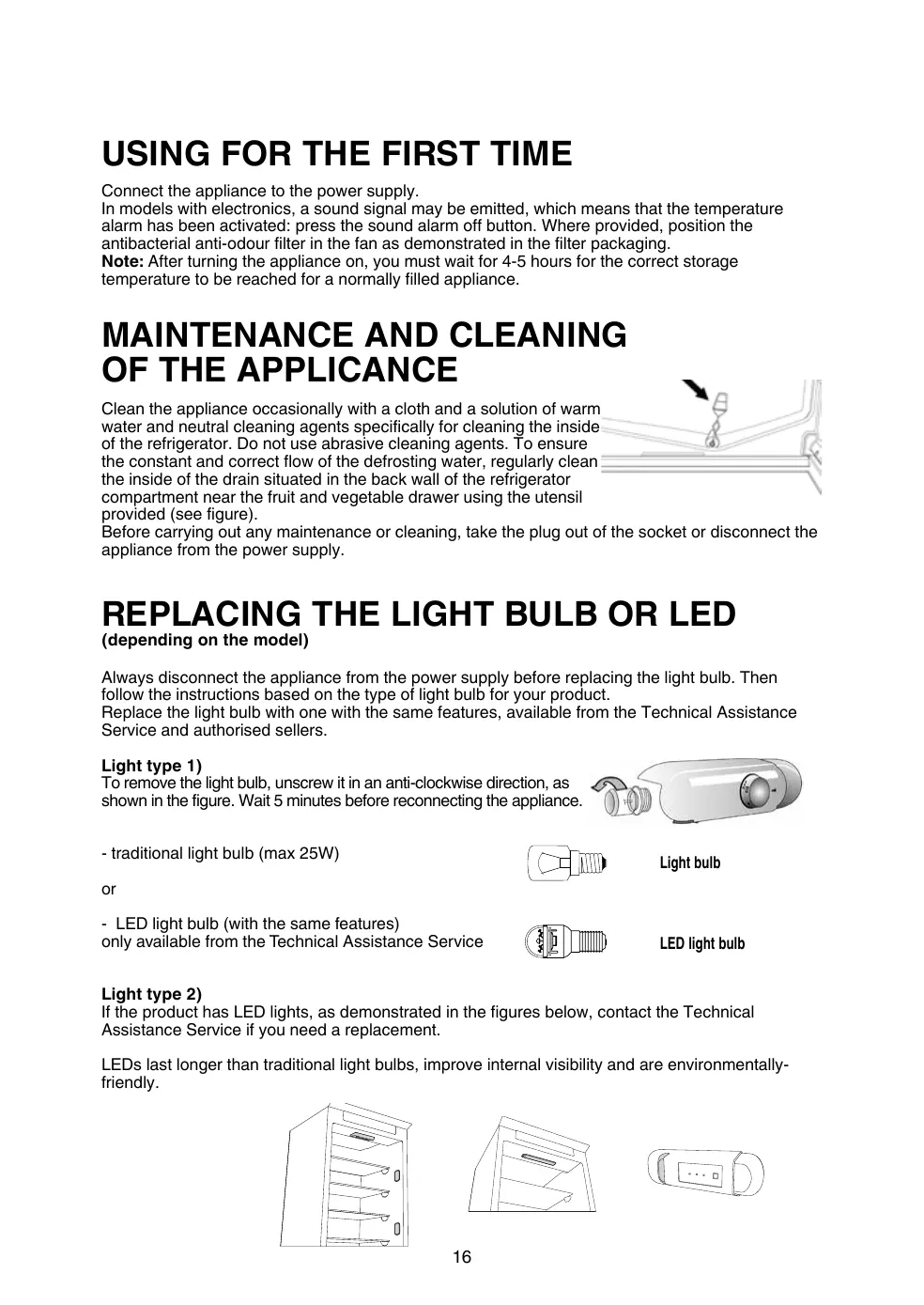
USING FOR THE FIRST TIME
Connect the appliance to the power supply.
In models with electronics, a sound signal may be emitted, which means that the temperature alarm has been activated: press the sound alarm off button. Where provided, position the antibacterial anti-odour filter in the fan as demonstrated in the filter packaging.
Note: After turning the appliance on, you must wait for 4-5 hours for the correct storage temperature to be reached for a normally filled appliance.
MAINTENANCE AND CLEANING OF THE APPLIANCE
Clean the appliance occasionally with a cloth and a solution of warm water and neutral cleaning agents specifically for cleaning the inside of the refrigerator. Do not use abrasive cleaning agents. To ensure the constant and correct flow of the defrosting water, regularly clean the inside of the drain situated in the back wall of the refrigerator compartment near the fruit and vegetable drawer using the utensil provided (see figure).
Before carrying out any maintenance or cleaning, take the plug out of the socket or disconnect the appliance from the power supply.
REPLACING THE LIGHT BULB OR LED
(depending on the model)
Always disconnect the appliance from the power supply before replacing the light bulb. Then follow the instructions based on the type of light bulb for your product.
Replace the light bulb with one with the same features, available from the Technical Assistance Service and authorised sellers.
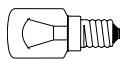
Light type 1)
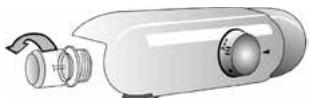
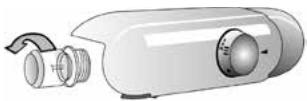
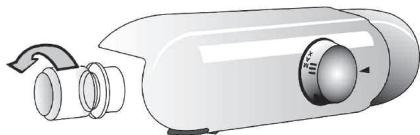
To remove the light bulb, unscrew it in an anti-clockwise direction, as shown in the figure. Wait 5 minutes before reconnecting the appliance.
- traditional light bulb (max 25W)
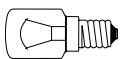
Light bulb
or
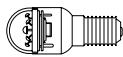
- LED light bulb (with the same features)
only available from the Technical Assistance Service
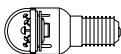
LED light bulb
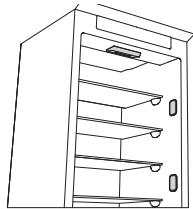
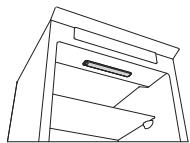
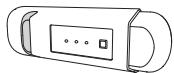
Light type 2)
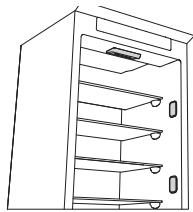
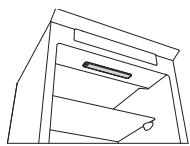
If the product has LED lights, as demonstrated in the figures below, contact the Technical Assistance Service if you need a replacement.
LEDs last longer than traditional light bulbs, improve internal visibility and are environmentally-friendly.
IN THE EVENT OF NON-USE OF THE APPLIANCE
Disconnect the appliance from the power supply, empty it, defrost it (if necessary) and clean it. Keep the doors slightly ajar to let air circulate inside the compartments. By doing this, you avoid the development of mould and bad odours.
IN THE EVENT OF AN INTERRUPTION TO THE POWER SUPPLY
Keep the doors closed so the food stays cold for as long as possible. Do not re-freeze food that has partially defrosted. If there is a prolonged power cut, the black out alarm may also activate (in products with electronics).
REFRIGERATOR COMPARTMENT
The refrigerator compartment allows for the storage of fresh food and drink.
The refrigerator compartment defrosts completely automatically.
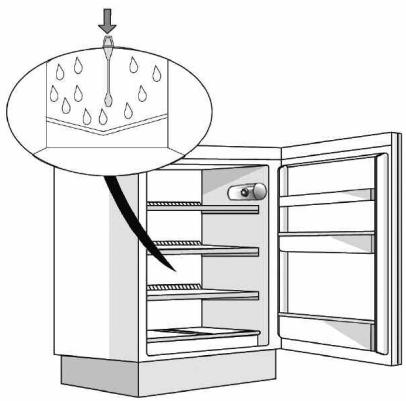
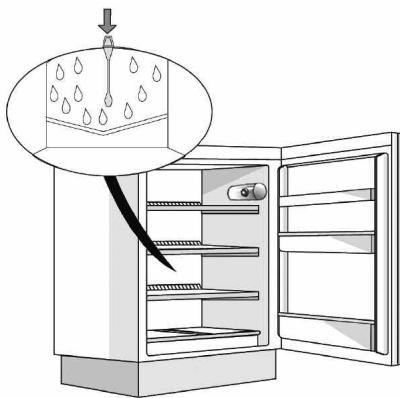
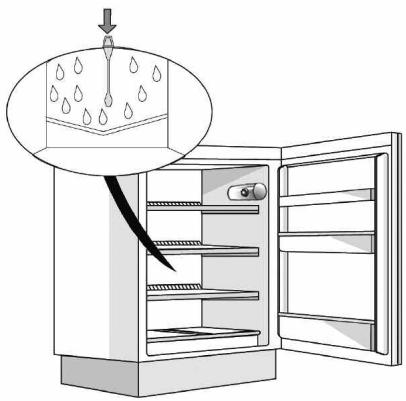
The occasional presence of drops of water on the internal back wall of the compartment is a sign of the automatic defrosting phase. The defrosting water is channelled into a drain and then collected in a container, where it evaporates.
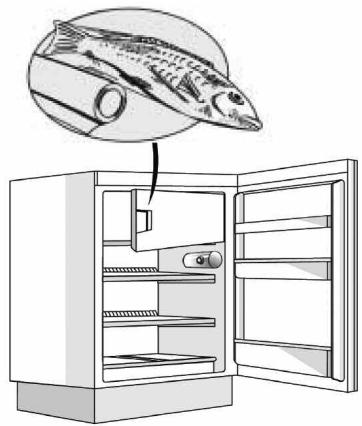
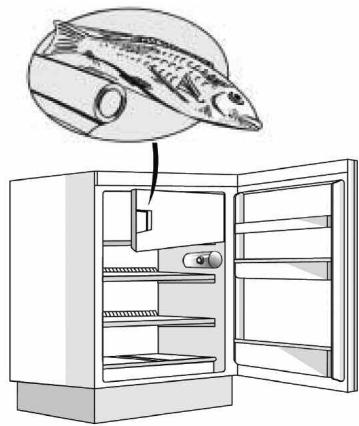
Depending on the model, the product may be equipped with a special "Zero Degrees" compartment, which is ideal for storing fresh meat and fish.
Warning: do not clean refrigerator accessories in a dishwasher.
Note: the ambient temperature, how often the doors are opened and the position of the appliance may affect the internal temperatures in the two compartments. Set the temperatures depending on these factors.
Note: in very humid conditions, condensation may form in the refrigerator compartment, especially on the glass shelves. In this case, it is recommended that you close containers with liquids in (e.g. a pot of stock), wrap up food with a high water content (e.g. vegetables) and turn on the fan, if there is one.
Removing the fruit and vegetable drawer (depending on the model)
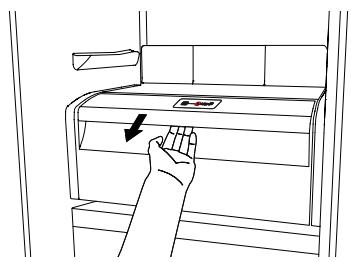
Pull the drawer outwards as far as it will go, lift it up and take it out.
To make it easier to remove the fruit and vegetable drawer, it may be necessary to empty (and possibly remove) the two lower door shelves and then continue to remove the drawer.
Fan and antibacterial anti-odour filter (depending on the model)
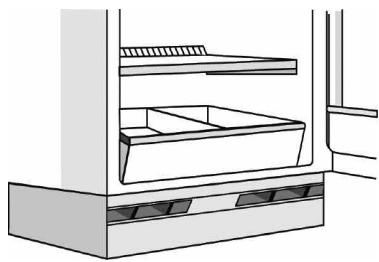
The fan allows for the even distribution of the temperatures inside the compartments and, consequently, better preservation of the food and reduction of excess humidity. Do not obstruct the ventilation area. The fan can be turned on/off manually (see the Quick Guide); if it is turned on, it operates automatically when necessary.
FREEZER COMPARTMENT
Model with separate freezer compartment
The freezer compartment ** allows for the storage of frozen food (for the period indicated on the packaging) and the freezing of fresh food. The quantity of fresh food that can be frozen in 24 hours is written on the rating plate. Arrange the fresh food in the freezing area inside the freezer compartment (see Quick Guide), leaving enough space around the food packages to allow air to circulate freely. It is advisable that you do not re-freeze food that has partially defrosted. It is important to wrap the food in a way that prevents the ingress of water, humidity or condensation.
Making ice cubes
Fill 2/3 of the ice tray (if available) with water and put it back in the freezer compartment. Do not use sharp or pointed objects to remove the ice under any circumstances.
Removing the drawers (depending on the model)
Pull the drawers outwards as far as they will go, lift them up and remove them. To get more volume, the freezer compartment can be used without the drawers.
Make sure that the door is closed properly after putting the food back on the grilles/shelves.
Models with an internal product compartment
In the freezer compartment *** you can also freeze fresh food. The quantity of fresh food that can be frozen in 24 hours is written on the rating plate.
How to freeze fresh food:
- Arrange the food on the grille, if present (figure 1), or directly on the bottom of the compartment (figure 2).
- Put the food in the middle of the compartment without it coming into contact with food that is already frozen, keeping a distance of about 20 mm (figures 1 and 2).
Figure 1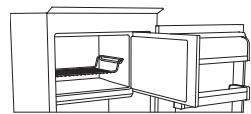
Figure 2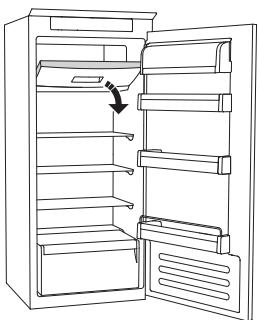
HOW TO DEFROST THE FREEZER COMPARTMENT
(depending on the model)
For frost-free models, it is not necessary to carry out any defrosting procedures.
For other models, the build-up of frost is a normal occurrence.
The quantity and speed of frost accumulation vary depending on the ambient conditions and how often the door is opened. It is advisable to set the temperature colder or, if available, turn on the quick freeze function (see Quick Guide) four hours before removing the food from the freezer compartment, to prolong the preservation of the food during the defrosting phase. To defrost, turn the appliance off and remove the drawers. Put the frozen food in a cool place. Leave the door open to allow the frost to melt. To prevent the water from escaping during the defrost, it is advised that you place an absorbent cloth on the bottom of the freezer compartment and wring it out regularly.
Clean the inside of the freezer compartment and dry it carefully.
Turn the appliance back on and put the food back inside.
STOP FROST SYSTEM (depending on the model)
The STOP FROST SYSTEM (available depending on the model) facilitates the defrost procedure for the freezer compartment. The STOP FROST accessory (figure 1) is designed to collect some of the frost that forms in the freezer compartment and it is easy to remove and clean, therefore reducing the time needed to defrost the inside of the freezer compartment.
To remove the frost on the STOP FROST accessory, follow the cleaning procedure demonstrated below.
PROCEDURE TO CLEAN THE STOP FROST ACCESSORY
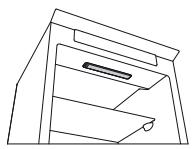
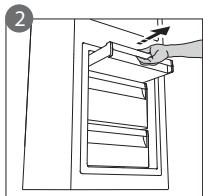
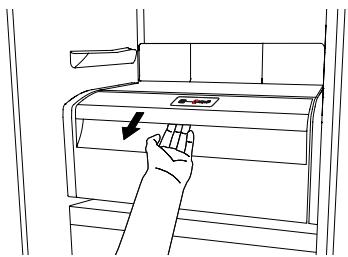
- Open the freezer compartment door and remove the upper drawer (figure 2).
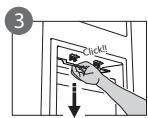
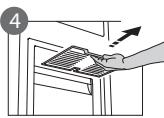
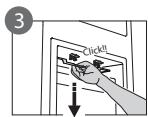
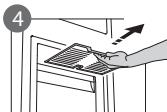
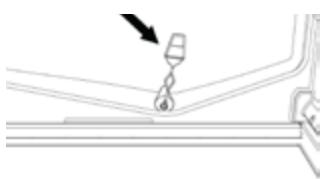
- Unfasten the STOP FROST accessory (figure 3) and remove it (figure 4), taking care not to drop it on the glass shelf below. Note: if the accessory is jammed or difficult to remove, do not keep trying to remove it, but proceed with the complete defrost of the freezer compartment.
- Close the door to the freezer compartment.
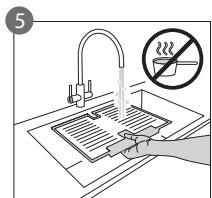
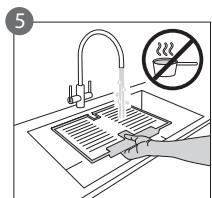
- Remove the frost on the accessory by rinsing it under running (not hot) water (figure 5).
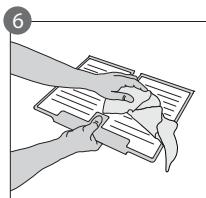
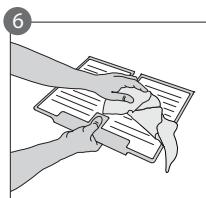
- Let the accessory drip dry and dry the plastic parts with a soft cloth.
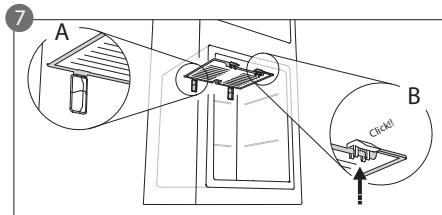
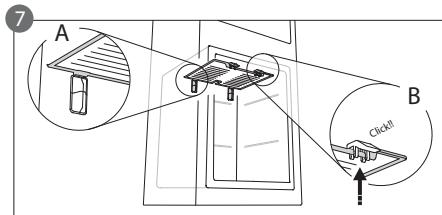
- Reinsert the accessory by placing the back part on the projections shown in figure 7-A, then refasten the handle of the accessory to the clasps above (figure 7-B).
- Reinsert the upper drawer and close the door to the freezer compartment.
It is possible to clean the STOP FROST accessory on its own without completely defrosting the freezer compartment. Cleaning the STOP FROST accessory regularly helps to reduce the need to completely defrost the freezer compartment.
Note: the product specifications, including volume and energy, are calculated without the STOP FROST accessory.
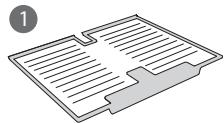
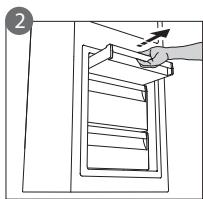
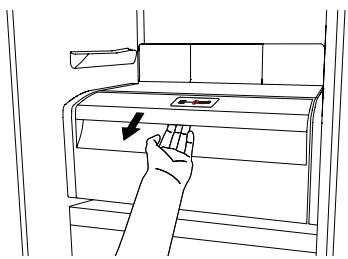
"ZERO DEGREES" COMPARTMENT
(depending on the model)
The "Zero Degrees" compartment is specifically designed to maintain a low temperature and the correct humidity to preserve fresh food for longer (for example, meat, fish, fruits and winter vegetables).
Humidity control technology coupled with Activ0° provides the best food preservation when the food is not completely packed.
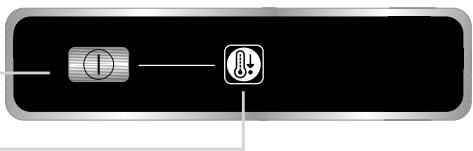
Turning on and turning off the compartment
The internal temperature of the compartment is approximately 0° when the compartment is turned on.
To turn on the compartment, press the button shown in the figure for more than one second until the symbol lights up.
The lit symbol means that the compartment is working. Press the button again for more than one second to turn off the compartment. To turn off the compartment completely, you must remove the drawer.
For the correct functioning of the "Zero Degrees" compartment, it is necessary that:
- the refrigerator compartment is turned on
- the temperature is between +2°C and +6°C
- the drawer in the "Zero Degrees" compartment must be inserted for it to be turned on
- one of the following special functions is not selected: Stand-by, Cooling-Off, Vacation (if present), in this case, remove the food contained in it.
Note:
- if the symbol does not light up when you turn on the compartment, check that the drawer is properly inserted; if the problem persists contact the authorised Technical Assistance Service.
- if the compartment is turned on and the drawer is open, the symbol in the control panel may automatically turn off. The symbol will light up again when the drawer is inserted
- regardless of the state of the compartment, you may hear a faint noise, which you should consider as normal
- when the compartment is not in operation, the temperature inside it depends on the general temperature of the refrigerator compartment. In this case, it is advised that fruits and vegetables that are not sensitive to cold (berries, apples, apricots, carrots, spinach, lettuce, etc.) are stored in it.
Important: if the compartment is turned on and food with a high water content is present, condensation may form on the shelves. In this case, turn the function off temporarily.
Be careful when positioning food and containers that are small in size on the upper shelf of the "Zero Degrees" compartment in order to prevent them accidentally falling between the shelf and the back wall of the refrigerator compartment.
Removing the "Zero Degrees" compartment:
Carry out the following steps:
- To make it easier to remove the compartment, we recommend that you empty (and possibly remove) the lower door shelves.
- Turn off the compartment.
- Remove the compartment by rotating it upwards.
- Remove the white plastic shelf under the compartment.
Note: it is not possible to remove the upper shelf and side supports.
To use the "Zero Degrees" compartment again, carefully reposition the white plastic shelf under the compartment before inserting the drawer and turning the function back on.
To have a larger refrigerator volume and to reduce energy consumption, it is recommended that you turn off the "Zero Degrees" compartment and remove the compartment.
Clean the compartment and its components occasionally using a cloth and a solution of warm water (taking care not to submerge the white plastic shelf under the drawer) and neutral cleaning agents specifically for cleaning the inside of the refrigerator. Do not use abrasive cleaning agents.
Before cleaning the compartment (also externally) it is necessary to remove the drawer to disconnect the electrical supply for the compartment.
TECHNICAL ASSISTANCE SERVICE
Restart the appliance to check if the problem has been solved. If not, disconnect the appliance again and repeat the procedure after one hour.
If, after having completed the checks listed in the guide for malfunctions and after restarting the appliance, your appliance continues to function incorrectly, contact the Technical Assistance Service, clearly describing the problem and stating:
the type of malfunction the model
- the type and serial number of the appliance (written on the rating plate)
- the Service number (if available) (the number that is after the word SERVICE on the rating plate placed inside the appliance)
SERVICE 0000 000 00000
Note:
Reversing the doors of the appliance, if carried out by the Technical Assistance Service, is not considered as a warranty claim.
Nederland Home Product Service (ATAG)
Postbus 249
6920 AE Duiven
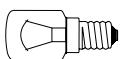
- LED bulbs (with the same functions) can only be obtained from a service center.
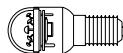
Bulbs for LED indicator lights
Bulb type 2)
Button for the light bulb
N
- Light bulb for the lamp (with the same characteristics) can only be obtained from the technical service department.
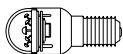
Light bulb for the lamp
Bulb type 2)
If the product is equipped with LED bulbs, as shown in the figure below, contact the technical service department if you need a spare bulb.
The LED bulbs last longer than standard bulbs, are energy-efficient, and are environmentally friendly.
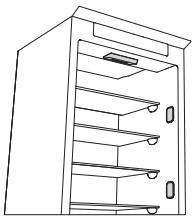
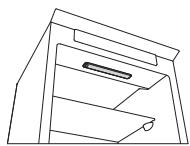
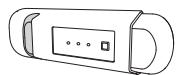
Freezer compartment of the product
In the freezer compartment, you can freeze fresh and frozen food. The amount of frozen food that can be frozen in 24 hours is indicated on the rating plate.
How to freeze fresh food:
- Place the food on the shelves, if available (Figure 1), or directly on the bottom of the compartment (Figure 2).
- Place the food in the center of the compartment so that it does not come into contact with already frozen food, leaving a distance of about 20 mm (Figures 1 and 2).
Figure 1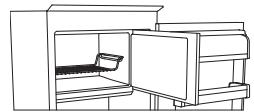
Figure 2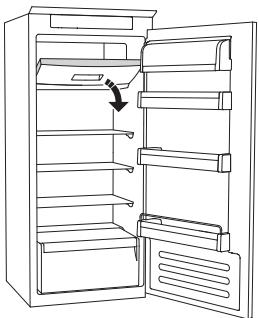
HOW TO DEFROST THE FREEZER COMPARTMENT (depending on model)
For the model without a defrosting procedure, it is not necessary to perform a defrosting procedure.
For models with manual defrosting, defrosting is normal.
The amount and speed of defrosting vary depending on the ambient conditions and the frequency of door opening. It is recommended to set a lower temperature, if available, and to enable the fast freezing function (see the quick guide) four hours before removing food from the freezer compartment, to extend the storage time of food during the defrosting process. To defrost, unplug the appliance and remove the food. Place the frozen food in a cool place. Leave the door open to allow the frost to melt. To avoid water spillage during defrosting, it is recommended to place an absorbent cloth in the lower part of the freezer compartment and to wring it out regularly.
Clean the interior of the freezer compartment and dry it thoroughly.
Plug the appliance back in and put the food back inside.
ICE MAKING SYSTEM
(depending on model)
The ice making system (depending on model) facilitates the defrosting procedure of the freezer compartment. The ice making accessory (Figure 1) is designed to collect part of the frost that forms in the freezer compartment, and is easy to remove and clean, which reduces the time needed to defrost the interior of the freezer compartment.
To remove the frost from the ice making accessory, follow the cleaning procedure described below.
CLEANING PROCEDURE FOR THE ICE MAKING ACCESSORY
- Open the freezer compartment door and remove the lower drawer (Figure 2).
- Tilt the ice making accessory (Figure 3) and remove it (Figure 4), being careful not to drop it on the floor. Note: if the accessory is blocked or difficult to remove, do not force it, but proceed to the defrosting of the freezer compartment.
- Close the refrigerator door to the freezer compartment.
- Remove the accessory by pulling it towards you (but not upwards) (Figure 5).
- Leave the accessory to drain and dry the plastic parts with a soft cloth. -Reinstall the accessory by placing the rear part onto the guides shown in Figure 7-A, then insert the front part of the accessory into the fixing opening (Figure 7-B). -Replace the rear cover and close the refrigerator door to the freezer compartment.
You can clean only the accessory for dispensing ice without completely defrosting the freezer compartment. Regular cleaning of the accessory for
dispensing ice helps reduce the need for completely defrosting the freezer compartment.
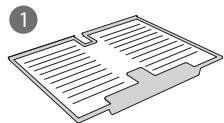
Note: Product specifications, including volume and energy, are calculated without the accessory for dispensing ice.
FREEZER COMPARTMENT
(Depending on model)
The "Freezer Compartment" is specially designed for freezing fresh food and storing frozen food for a longer time (e.g., meat, fish, fruits, and vegetables).
The humidity control technology combined with active ventilation ensures better food preservation when they are not fully packaged.
Switching the compartment on and off
The internal temperature of the compartment is approximately 0° when the compartment is switched on.
To switch on the compartment, press the button shown in the figure for more than one second until the symbol lights up.
The light symbol indicates that the compartment is working. Press the button again for more than one second to switch off the compartment. To switch off the compartment completely, you must remove the plug.
For the proper functioning of the "Freezer Compartment", it is necessary:
- The compartment should be switched on.
- The temperature should be between +2°C and +6°C.
- The switching on of the compartment, "Zero degree", must be done so that it is switched
- on from the special functions and not be disabled: Ready, Cooling-Off, Vacation (if available), in which case food storage is delayed.
Note:
- If the symbol does not light up when you switch on the compartment, check that the plug is correctly inserted; if the problem persists, contact the technical support department.
- If the compartment is switched on and the plug is open, the control panel symbol may switch off automatically. The symbol will light up again when the plug is inserted.
- Regardless of the state of the compartment, you may hear a slight noise, which should be considered normal.
- When the compartment is not working, the temperature in it depends on the general temperature in the refrigerator compartment. In this case, we recommend that you store foods and vegetables that are not sensitive to cold (e.g., dairy products, onions, carrots, spinach, lettuce, etc.) in it.
Important: If the compartment is switched on and there is food with high water content, condensation may form on the shelves. In this case, switch off the function temporarily. Pay special attention when placing food and containers with small size on the top shelf of the "Zero degree" compartment, to prevent them from falling between the shelf and the back wall of the refrigerator compartment.
Removing the "Zero degree" compartment:
Remove the special shelves:
-To facilitate the removal of the compartment, we recommend that you empty it (and possibly remove) the additional shelves on the door - switch off the compartment - remove the compartment by turning it upwards - remove the white plastic cover under the compartment.
Note: the handles and supports cannot be removed.
To use the "Zero degree" compartment again, place the white plastic cover back under the compartment, insert the plug and switch on the function.
Before cleaning the appliance and replacing the lamp, it is recommended to disconnect the compartment and remove it.
Clean the compartment and its components using a brush and warm water solution (and be careful to avoid getting the gasket wet) and a neutral cleaning agent, specially designed for cleaning the interior of the refrigerator. Do not use abrasive cleaning agents.
Before cleaning the compartment (inside and out), it is necessary to remove the gasket in order to disconnect the connection to the compartment.
TECHNICAL ASSISTANCE SERVICE
Before contacting the technical assistance service:
Reset the device to check if the problem is resolved. If not, disconnect the device again and repeat the procedure after one hour.
If after completing the checks, the instructions for malfunctions, and after resetting, the device continues to work incorrectly, contact the technical assistance service, describe the problem and indicate:
Malfunction type and model
Type and serial number of the device (see the table with basic data) - service number (if available) (see the label "SERVICE" on the table with basic data, placed inside the device)
SERVICE 00000000000
Note:
Repair of the device, if performed by the technical assistance service, is not considered under warranty.
| Българсн | Инструкции за у鞘тpeба | Станица 4 |
| HRVAT | Uputama za uporabu | Stranica 10 |
| ROMÁNă | Instruktiuni de/utilizare | Pagina 16 |
| SRPSKI | Uputstvo za upotrebu | Strana 22 |
FIRST USE
- The refrigerator compartment should be turned on
- The temperature is between +2°C and +6°C
- The blade in the "Zero degrees" section should be inserted to enable switching - the degree of relationship between the two types of edema is unknown.
Note:
Perform these steps:
Models with internal compartment
(LED)
(1)
Jn 1
(1) ε = 0. C₄²
(LED)
(LED)
J
STOP
FROST
STOP FROST
(1)
Aa
a 1
J 1
"“i"
0
i 1
J 1
5.
Instructions for use
Instructions for use
Switching on the appliance
- Plug in the appliance
- When the appliance is plugged in, it is normally factory set to a temperature of 5°C.
Adjusting the temperature
For temperature adjustment, see the enclosed product sheet.
Note:
Ambient air temperature, the frequency of door opening, the introduction of hot food and unsuitable appliance positioning can all affect the internal temperature of the refrigerator, which may differ from that shown on the display.
Storing food in the refrigerator compartment:
Cover food to prevent it drying out. The distance between the shelves and the rear wall inside the refrigerator ensures the free circulation of air. Do not place food in direct contact with the rear wall of the refrigerator compartment. Do not place hot food in the refrigerator. Store liquids in closed containers.
Important:
Storing vegetables with a high water content can cause condensation to form on the glass shelves; this will not affect the correct operation of the appliance.
MEAT & FISH BOX (depending on model)
The Meat & Fish box was designed specially to keep foods fresher for longer, without altering nutritional values or original freshness. Do not store fruit or vegetables in this box, as the temperature may drop below 0°C, causing water contained in the food to freeze.
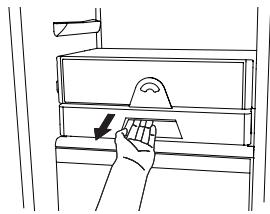
Temperature Adjustment
The temperature inside the Meat & Fish box is indicated by the position of the arm on the door of the box, and depends on the general temperature of the refrigerator compartment.
We recommend setting the temperature of the refrigerator compartment between +2° and +6°. To work out if the temperature inside the Meat & Fish box is correct, refer to the pictures below:
When the arm points to the left, you need to raise the temperature in the refrigerator compartment.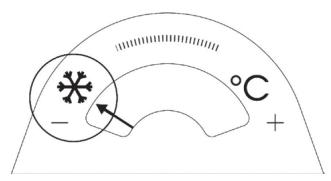
When the arm is in the middle, the temperature is ok.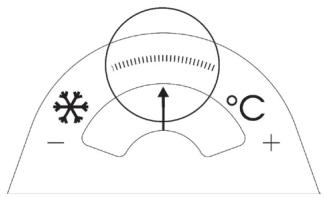
When the arm points to the right, you need to lower the temperature in the refrigerator compartment.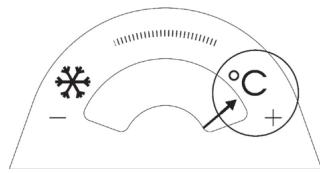
Important: when the function is activated and foods with a high water content are present, condensation may form on the shelves. In this case, disable the function temporarily.
Removing the Meat & Fish compartment:
To ensure correct operation of the product, adequate preservation of food and to optimise energy consumption, it is advisable not to remove the Meat & Fish compartment if the symbol (see Quick Guide) is not present on the control panel. In all other cases, the Meat & Fish compartment can be removed to obtain more space inside the refrigerator.
Proceed as follows:
- Remove the compartment drawer (Figure 1).
- Remove the drawer cover by releasing the bottom side clips (Figure 2).
To reinstate the Meat & Fish compartment, make sure to refit the drawer cover before inserting the drawer and reactivating operation.
- Press the "Meat & Fish compartment function" button on the control panel for 3 seconds, until the yellow indicator goes off.
To optimise energy consumption, it is advisable to deactivate the Meat & Fish compartment and remove its components (except the shelf above the crisper drawers).
Fig. 1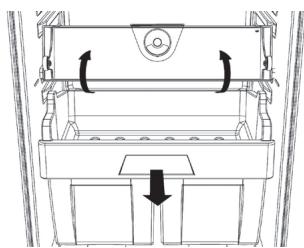
Fig. 2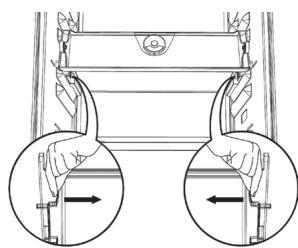
"ZERO DEGREES" BOX (depending on the model)
The "Zero Degrees" box is specifically designed to maintain a low temperature and a suitable humidity level, in order to keep foods fresher for longer (e.g. meat, fish, fruit and winter vegetables).
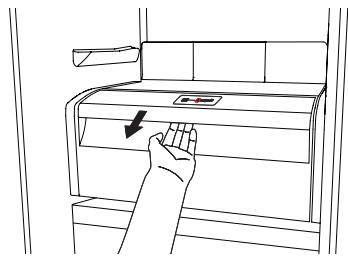
Activating and deactivating the box
The temperature inside the box, when active, is approximately 0° .
To activate the compartment, press the button shown in the figure for more than 1 second, until the symbol lights up
The symbol lit indicates that the compartment is functioning. Press the button again for more than 1 second to deactivate the compartment
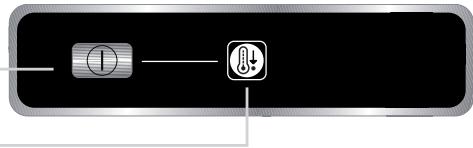
The following factors are vital for the "Zero Degrees" box to work properly:
- the refrigerator compartment must be switched on
- the temperature of the refrigerator compartment must be between +2°C and +6°C
- the box must be inserted to enable activation
- no special functions must have been selected (Standby, Cooling-Off, Vacation – where applicable).
If one of these special functions has been selected, the "Zero Degrees" box must be deactivated manually, and any fresh food inside it removed. If manual deactivation does not take place, the box will be deactivated automatically after 8 hours.
Note:
- if the symbol does not light up when the box is activated, check that the box is properly inserted; if the problem persists, contact your nearest authorized After-sales Service
- if the box is active and the drawer open, the symbol on the control panel may be deactivated automatically. If the drawer is inserted, the symbol will become active again
- Irrespective of the state of the box, a slight noise may be heard: this is normal and is not a cause for concern.
- When the box is not active, the temperature inside it depends on the general temperature inside the refrigerator compartment. In this case, we recommend it is used to store fruit and vegetables which are not sensitive to cold temperatures (fruits of the forest, apples, apricots, carrots, spinach, lettuce, etc.).
Important: If the function is activated and food with high water content is present, condensate may form on the shelves. In this case, temporarily deactivate the function.
When placing small containers and food products on the top shelf of the "zero degrees" compartment, make sure they do not accidentally fall between the drawer and the back of the refrigerator compartment.
Removing the "Zero Degrees" box:
The "Zero Degrees" box can be removed to create more space inside the refrigerator. In this case proceed as follows:
- To facilitate removal, we recommend emptying (and if necessary, removing) the two lower door trays.
- Switch off the box.
- Pull out the drawer and the white plastic shelf underneath the box.
Note: the upper shelf and the side supports cannot be removed.
To restore "Zero Degrees" box operation, make sure you replace the white plastic shelf underneath the box before inserting the drawer and reactivating the function. To optimise energy consumption, we recommend you deactivate the "Zero Degrees" box and remove it.
Clean the box and all its parts regularly, using a cloth and a solution of warm water and neutral detergent specifically formulated for refrigerator interiors (take care not to immerse the white plastic shelf underneath the box in water).
Before cleaning the box (including the outside), remove the drawer so as to disconnect the box from the electricity supply.
Never use abrasive detergents.
HOW TO USE THE FREEZER COMPARTMENT (if present)
The freezer compartment can also be used for freezing fresh food. The quantity of fresh food that can be frozen in 24 hours is shown on the rating plate.
Freezing fresh food
- The recommended position for fresh food is that indicated in Fig. 1, if a wire shelf is present, or that in Fig. 2 for models with no wire shelf.
- Place food in the middle of the compartment, * making sure it does not touch already frozen food, but is placed at a distance of approx. 20 mm (fig. 1 and 2).
The table alongside shows the recommended maximum storage time for frozen fresh foods.
When purchasing frozen food products:
- Make sure the packaging is not damaged, since the product quality may have deteriorated. If the package is swollen or has damp patches, it may not have been stored under optimal conditions and defrosting may have already begun.
- When shopping, leave frozen food purchases until last and transport the products in a thermally insulated cool bag.
- Place the items in the compartment as soon as you get home.
- If food has defrosted even partially, do not re-freeze it. Consume within 24 hours.
- Avoid, or reduce temperature variations to the minimum. Respect the best-before date on the package. Always follow the storage instructions on the frozen food packages.
Making ice cubes
- Fill the ice cube tray 2/3 full and place it in the compartment * ***.
- Do not use sharp or pointed instruments to detach the tray if it is stuck to the bottom of the compartment.
- Bend the ice tray slightly to remove the cubes.
Fig. 1 Fig. 2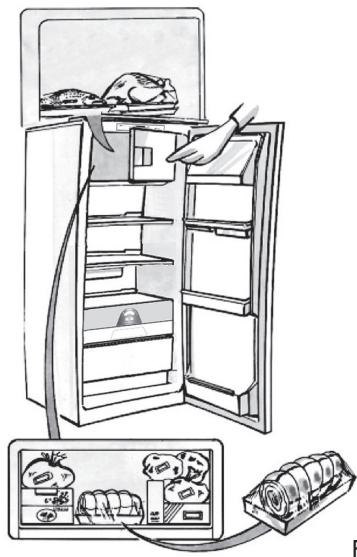
HOW TO DEFROST THE APPLIANCE
Before defrosting the appliance, unplug it or switch off the power at the mains. Defrosting of the refrigerator compartment is completely automatic. Droplets of water on the rear wall of the refrigerator compartment indicate that the periodic automatic defrost cycle is in progress. The defrost water is automatically routed to a drain outlet and into a container from which it evaporates.
Clean the defrost water drain outlet regularly using the tool supplied with the appliance in order to ensure defrost water is removed correctly. (Fig. 1)
Defrosting the compartment (if present)
Defrost the × × × compartment once or twice a year or when ice formation is excessive. It is perfectly normal for ice to form. The amount of ice which forms and the rate at which it accumulates will vary depending on ambient conditions and the frequency with which the freezer door is opened. Ice formation is concentrated at the top of the compartment and does not affect the efficiency of the appliance.
If possible, defrost the freezer when it is nearly empty.
- Remove the food from the freezer compartment and group together in a cool place or in a cool bag.
- Leave the door open to allow the frost to melt.
- Clean the interior of the freezer with a sponge and warm water and/or neutral detergent. Do not use abrasive substances.
- Rinse the interior and dry thoroughly.
- Put the food back into the freezer.
- Close the door.
Plug the appliance back in and switch on, following the instructions in chapter "How to operate the refrigerator compartment". The settings and selections made prior to switching off will be restored.
Fig. 1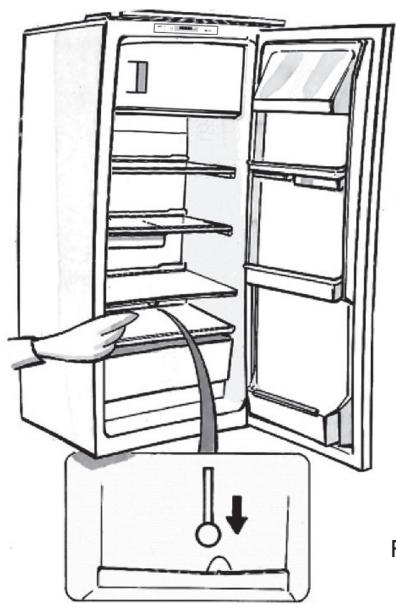
CLEANING AND MAINTENANCE
Before any cleaning or maintenance operation, unplug the appliance from the mains or disconnect the electrical power supply.
- Clean the inside of the refrigerator compartment periodically with a sponge dampened in warm water and/or neutral detergent. Rinse and dry with a soft cloth. Do not use abrasive products.
- The separators must not be washed in water but simply cleaned with a damp sponge.
- Clean the inside of the freezer compartment when defrosting.
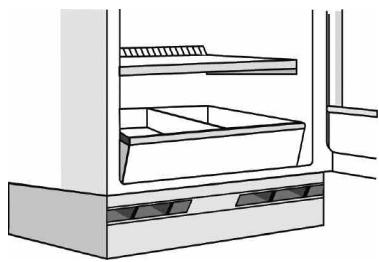
- Clean the air vents and condenser at the rear of the appliance regularly with a vacuum cleaner or brush.
- Clean the outside with a damp cloth. Do not use abrasive products, scourers, stain-removers (e.g. trichlorethylene acetone) or vinegar.
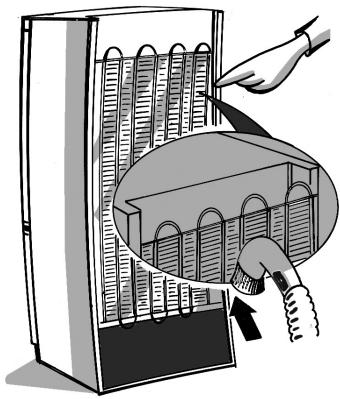
Prolonged disuse
- Empty the refrigerator.
- Disconnect the appliance from the mains power supply.
- Defrost and clean the interior.
- In the event of prolonged disuse, leave the appliance door open to prevent mould, odours and oxidation from forming.
- Clean the appliance.
- Clean the inside of the low temperature compartment (where present) when defrosting.
- Clean the inside of the refrigerator compartment periodically with a sponge dampened in warm water and/or neutral detergent. Rinse and dry with a soft cloth. Do not use abrasive products.
AFTER-SALES SERVICE
- See if you can solve the problem yourself with the help of the Trouble-shooting guide.
- Switch the appliance off and then on again to check if the problem has been eliminated. If it has not, switch off the appliance again and repeat the operation after one hour.
- If the problem persists after this course of action, contact After-sales Service.
Specify:
the type of fault the appliance model
- The Service number (the number after the word SERVICE on the rating plate inside the appliance)
- Your full address
- Your telephone number and area code
SERVICE
0000 000 0000
Note:
The direction of door opening can be changed. If this operation is performed by After-sales Service it is not covered by the warranty.
INSTALLATION
- Install the appliance away from heat sources. Installation in a hot environment, direct exposure to the sun or installation near heat sources (heaters, radiators, cookers) will increase power consumption and should therefore be avoided.
- If this is not possible, the following minimum distances must be respected:
- 30 cm from coal or paraffin stoves; 3 cm from electric and/or gas stoves.
- Fit the spacers (if supplied) on the rear of the condenser positioned at the back of the appliance.
- Install the appliance in a dry, well-ventilated place, and ensure it is level, using the front adjustment feet if necessary. Clean the interior.
- Fit the accessories.
- Regulations require that the appliance be earthed. The manufacturer declines all liability for injury to persons or animals and for damage to property resulting from failure to observe the above procedures and reminders.
- If the plug and socket are not of the same type, have the socket replaced by a qualified electrician.
- Do not use extension leads or adapters.
Disconnecting the appliance
It must be possible to disconnect the appliance by unplugging it or by means of a two-pole switch fitted upline of the socket.
Electrical connection
- Electrical connections must be made in accordance with local regulations.
- Voltage and power consumption are indicated on the rating plate inside the appliance.
ELECTRICAL CONNECTION FOR GREAT BRITAIN AND IRELAND ONLY
Warning - this appliance must be earthed
Fuse replacement
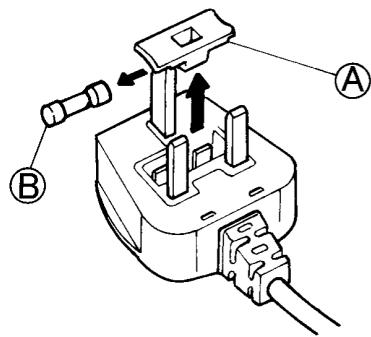
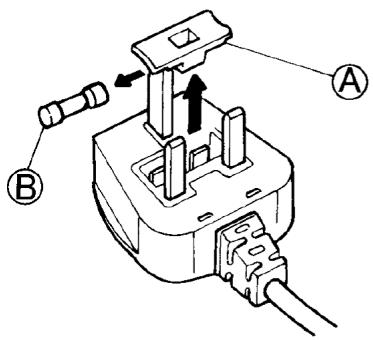
If the mains lead of this appliance is fitted with a BS 1363A 13amp fused plug, to change a fuse in this type of plug use an A.S.T.A. approved fuse to BS 1362 type and proceed as follows:
- Remove the fuse cover (A) and fuse (B).
- Fit replacement 13A fuse into fuse cover.
- Refit both into plug.
Important:
The fuse cover must be refitted when changing a fuse and if the fuse cover is lost the plug must not be used until a correct replacement is fitted.
Correct replacement are identified by the colour insert or the colour embossed in words on the base of the plug.
Replacement fuse covers are available from your local electrical store.
For the Republic of Ireland only
The information given in respect of Great Britain will frequently apply, but a third type of plug and socket is also used, the 2-pin, side earth type.
Socket outlet / plug (valid for both countries)
If the fitted plug is not suitable for your socket outlet, please contact After-sales Service for further instruction.
Please do not attempt to change plug yourself. This procedure needs to be carried out by a qualified technician in compliance with the manufactures instructions and current standard safety regulations.
MEAT & FISH COMPARTMENT
(with the freezer)
DEFROSTING THE APPLIANCE
CLEANING AND MAINTENANCE
Temperature regulation
Temperature regulation
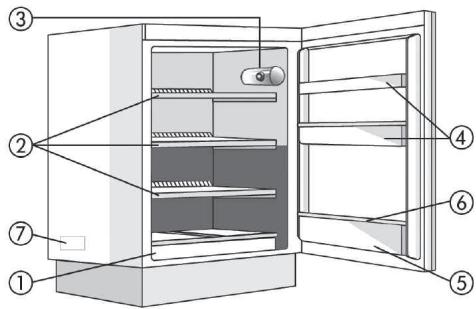
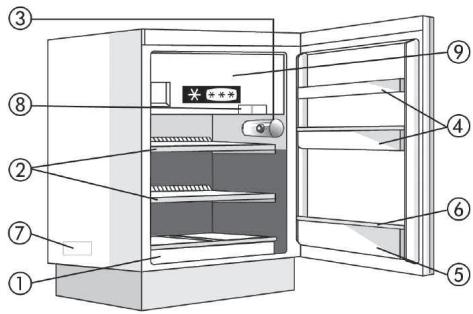
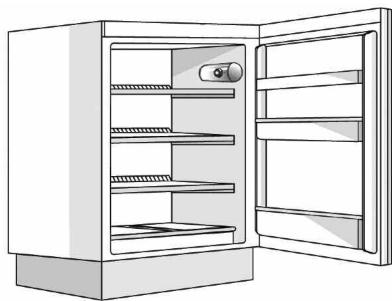
A. Refrigerator compartment
- Drawer for fruit and vegetables
- Shelves / Compartment with shelves
- Thermostat control knob and light switch
- Door compartments
- Bottle shelf
- Removable bottle holder
- Rating plate (on the side of the fruit and vegetable drawer)
- Ice cube tray
- Door of the low-temperature compartment
B. Low-temperature compartment, if marked

Coldest zone

B. Low-temperature compartment (if present)

Coldest zone

Warning: The manufacturer reserves the right to change the model. All grilles, doors, and internal panels are removable.
Important: The refrigerator's accessories must not be washed in the dishwasher.

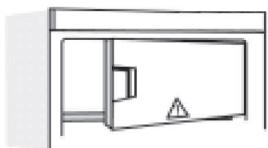
Important: Keep the appliance doors closed!
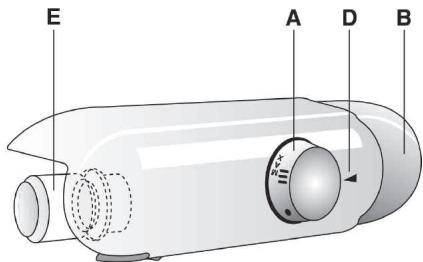
CONTROL ELEMENTS
A. Thermostat knob B. Light switch D. Thermostat indicator E. Lamp
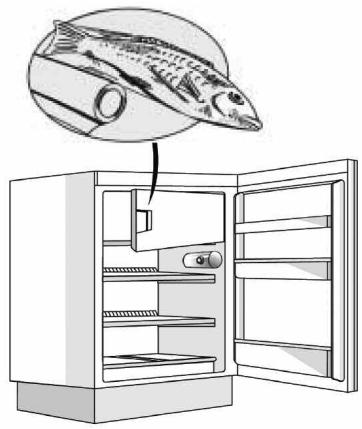
PREPARING ICE CUBES
Fill the ice cube tray with water to 3/4 full and place it on the bottom of the low-temperature compartment.
If the tray sticks to the bottom of the low-temperature compartment, do not try to remove it with sharp or pointed tools.
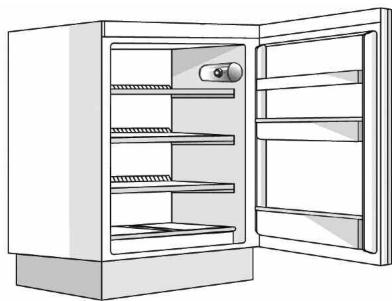
DEFROSTING THE LOW-TEMPERATURE COMPARTMENT
For optimal appliance performance, it is recommended to defrost the low-temperature compartment at least twice a year, as well as when the ice layer on its walls reaches 3 mm. If possible, defrost the freezer when it contains a minimum of products.
- Remove all products from the freezer, wrap them in newspaper, and place them close together in a cool place or in a thermos bag.
- Disconnect the appliance from the power supply.
- Leave the doors open to speed up the melting of the ice.
- Remove the melted water with a sponge.
- Wipe the surface with a soft cloth dampened with a neutral detergent solution. Do not use abrasive products.
- Rinse thoroughly with water and dry all surfaces.
Do not use abrasive products.
CLEANING AND CARE
5. The interior light does not work.
Perform the checks indicated in point 1, then
- Disconnect the appliance from the electrical supply. Replace the burnt-out bulb. The power of the new bulb must match the original or not exceed the maximum value (W) indicated next to the lamp. Screw the bulb in counterclockwise, as shown in the figure.
Before replacing, it is necessary to install the fuse cover in place. If the cover was lost, do not use the appliance until a spare cover is installed.
For frozen products, follow the instructions below:
- Check that the packaging is not damaged, as this can lead to product deterioration. If the packaging is damaged or has signs of moisture, it is possible that the product has been partially thawed and should be refrozen. - When purchasing, buy frozen products last and transport them in a cool bag. Place products in the freezer compartment as soon as possible. - If products have partially thawed, do not refreeze them. Such products should be consumed within 24 hours. - Avoid or minimize temperature fluctuations.
Store the product according to the best before date indicated on the packaging.
Always follow the storage conditions for frozen products indicated on the packaging.
Frozen food storage
- Fill the ice cube tray with water up to 3/4 and place it in the lower part of the freezer compartment.
Do not use sharp objects to remove the ice tray, as they may damage the lower part of the compartment.
Defrosting frozen food at low temperature
For optimal productivity, it is recommended to defrost frozen food at low temperature. To reduce the rise in temperature, place it on plates or in the refrigerator. If possible, defrost frozen food when it is almost at the threshold.
- Remove the product from the freezer, wrap it in newspaper and place it in a cold place or in a cooler bag.
- Disconnect the appliance from the power supply.
- Leave the door open so that the ice thaws.
- Sponge-like body.
- Clean the compartment with a cloth soaked in warm water and neutral detergent. Do not use abrasive agents.
- Rinse and dry thoroughly.
- Note. Do not try to scrape off ice with sharp metal instruments; do not heat the compartment with external devices.
Cleaning the refrigerator compartment
Periodically clean the interior surfaces of the refrigerator compartment.
Defrosting of the refrigerator compartment occurs completely automatically.
The water drops on the back wall of the refrigerator compartment indicate that the automatic defrosting cycle is in progress. The water automatically flows into the drain hole and collects in the container, from where it then evaporates.
Regularly drain the water from defrosting through the drain hole using the tool provided with the appliance. Before performing any maintenance work, disconnect the appliance from the power supply.
Use a sponge soaked in warm water and/or neutral detergent. Wipe with a soft cloth. Do not use abrasive agents.
Clean the device and the condenser on the rear wall with a soft cloth or brush. Clean the outer surfaces of the device with a damp cloth.
During prolonged shutdown
- Remove everything from the refrigerator and disconnect it from the power supply.
- Disconnect the device from the power source.
- Defrost the frozen food and clean and dry the interior of the device.
- Leave the door open to prevent the formation of unpleasant odors.
Troubleshooting guide:
- If the device does not work, check the following points. If the device still does not work after these checks, it may be necessary to contact a qualified technician. Before contacting service, check the following points.
- Check that the temperature setting is correct. If the food is frozen, do not increase the temperature. Leave it for 24 hours.
- Do not set the temperature below the minimum level or it will freeze. Check the door seal and the door closure.
- Do not place hot food in the refrigerator.
Making ice cubes
Fill the ice cube tray 3/4 full with water and place it in the freezer compartment. If the tray sticks to the freezer compartment, loosen it with a knife or warm water.
Do not use sharp objects to remove ice from the freezer compartment.
Do not use the device if the ambient temperature is above 3 mm thick. If possible, insert the plug at a right angle.
- Remove the plug from the socket, place it on the newspaper, and store it in a dry place or in a plastic bag.
- Be careful when handling the main power cord.
- To avoid injury, keep the door closed.
- Rinse with clean water. 5. Clean with a damp cloth and mild detergent. Do not use abrasive cleaners.
- Keep the device and the cord away from heat sources.
Caution: Do not use sharp objects to remove the device; do not touch the hot surface with your hands.
Instructions for using the device
Clean the device with a soft cloth.
The device operates automatically.
The device automatically performs the cleaning process in the upper part of the tank. If the water level is too high, the device will automatically stop and then drain into the container.
Clean the filter with clean water and dry it before reinstalling.
When installing the device, be careful not to damage the power cord.
Clean the damp cloth and/or the filter with mild detergent.
- Do not immerse the device in water. Do not use abrasive cleaners.
The poultry farmers must ensure that the heaters and fans are not placed in a way that creates a fire hazard.
Safety precautions
1. Do not place the heater near flammable materials. 2. Do not leave the poultry house unattended while the heater is on. 3. Place the heater on a stable surface and keep it away from water. 4. Keep the doors open to allow ventilation if there is no electricity.
HEATER OPERATION
Do not place the heater near flammable materials or leave it unattended. Do not allow children or pets near it. Keep the poultry house clean and dry. To cook food, place it in the heater and set the thermostat to the desired temperature. Do not attempt to disassemble the heater. Do not leave the heater on overnight.
TROUBLESHOOTING
1. The poultry are cold.
Is the heater plugged in? Is the power cord connected to the outlet? Is the main power switch on? Is the thermostat set correctly?
2. The temperature in the room is not rising.
Is the heater blocked? Is the poultry house door closed? Is the thermostat set correctly? Are the air vents open?
3. The heater temperature is too low.
- Is the thermostat set correctly?
4. Water is leaking under the heater.
- Is the water supply connected properly?
5. Check the operation of the device.
To check the operation of the device, follow the instructions in section 1:
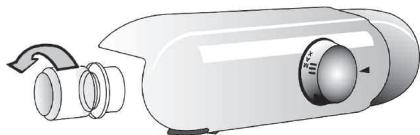
Turn off the device at the main switch. - Check the condition of the battery and the main components as indicated in the manual. - To start the device: press the button shown in the figure.
6. Check the temperature of the device.
- Is the temperature of the device within the specified limits?
Note:
- If the device is used for other purposes (e.g., starting with a cold engine, etc.), this is considered misuse.
MAINTENANCE
Contact the service center:
1. If the problem cannot be solved with the help of the instructions, contact the service center. 2. If the device is not working properly, turn it off. If it still does not work, turn it off and wait for one hour before turning it on again. 3. If the problem persists after that, contact the service center.
Provide the following information:
Device type, serial number, service number (as indicated on the rating plate of the device),
SERVICE (as indicated on the device),
Your name, address, and phone number.
SERVICE
Eckenptne:
This device must be grounded. If malfunction or breakdown occurs, grounding provides a path of least resistance for electric current to reduce the risk of electric shock.
GROUNDING INSTRUCTIONS
This appliance must be grounded. If it should malfunction or breakdown, grounding provides a path of least resistance for electric current to reduce the risk of electric shock. This appliance is equipped with a cord having an equipment-grounding conductor and a grounding plug. The plug must be plugged into an appropriate outlet that is properly installed and grounded in accordance with all local codes and ordinances.
Improper connection of the equipment-grounding conductor can result in a risk of electric shock. Check with a qualified electrician or service representative if you are in doubt as to whether the appliance is properly grounded. Do not modify the plug provided with the appliance – if it will not fit the outlet, have a proper outlet installed by a qualified electrician.
- If the appliance and outlet are not compatible, have the outlet replaced by a qualified electrician. Do not use an adapter.
GROUNDING APPLIANCE
This appliance must be grounded. If it should malfunction or breakdown, grounding provides a path of least resistance for electric current to reduce the risk of electric shock. This appliance is equipped with a cord having an equipment-grounding conductor and a grounding plug. The plug must be plugged into an appropriate outlet that is properly installed and grounded in accordance with all local codes and ordinances.
ELECTRICAL SHOCK HAZARD
Electrical appliances must be properly grounded. Refer to the troubleshooting section for any issues with the power cord or plug. - Do not operate the appliance in wet areas.
FOR APPLIANCES CONNECTED TO A POWER SUPPLY BY A CORD AND PLUG
Service – This appliance must be serviced by qualified personnel.
REPLACING THE FUSE
If the appliance is fitted with a BS 1363A 13 amp plug, to replace the fuse, use a BS 1362 fuse approved by A.S.T.A. and proceed as follows:
- CaKaTHaBbIPbBII KaKNaBbIH (A) KHe caKaTHaBbIPbIIbTbI (B) anbIn TaCTaHbI3.
- AImactby 13 A caKaTaHDbipfbIiTbI KaKnaK iUiHe CaIbIHbI3.
- Ekeyih de aibip iihike KaiaTa opHaTbIbI3.
MaHbI3AbI:
CaKaTaHDbipfBtB aybictbipy Ke3iHde caKaTaHDbipfBtI KaKnaFb KaTApOpHaTbIyblKepek, an CaKaTaHDbipfBtI KaKnaFb JxofaJFaH 60nca,Tnicti aIMaCTbipy 6eIWeirOpHaTNaFaHwa aBip naJaDanaHbImaybl KepeK.
TnictaJImactbipy6JIuIeTIyctiEHHdIpMeMeHHeMece aIbIPdbIn yCTIHderi ce3depe 6aIbpaaiBIN TypFaH TycneHaHbIKTaIaNbl.
AImactbipy caKaTahDbipfblk KaKnakTapbiH jeprilikTi 3JeKtpnik Ka6dbIkTap dyKeHHeH catbIn anyFa 6oJaDbI.
TeK IpranDna Pecny6nKaCbHa apHaIraH
UTeNceIbIk po3eTKa / Tok aIbIpbl (eki eJ ywiH kapaMdbI)
Erepka6biktaIHaTOKaibpblWTeNceIbdkip03eKaHbI3 yuihJkapamdb6oIIMaca,KocbIMwaHyckayanyuWiH Kenilik6oibHwaKbImetKepeCy6eIiMe He xa6apnacbHbI3.TOKaibpblE36betIHweaybcTbpyFa epekeTTeh6eHiz3.BynpoueypaEnDipyHiHyckaynapbl MeH JeprinikTi cTaHdapTTbKayinc3diK epexeepine CcIKec 6JIiKTExHHKaIbIKMaMaH TaapanbHaH opbHdaIybi Kepek.
Gebrauchsanweisung Instructions for use Mode d'emploi Gebruiksaanwijzing Istruzioni per l'uso
Brugsanvising Bruksanvising Käyttoohje Manual de'utilisation Instruções para el uso

The appliance you have just bought, marked by the symbol , allows the freezing - in of fresh and cooked food, the production of ice cubes and the storage of frozen food. Please read these instructions carefully, as they include a description of your appliance and the useful hints to enable you to achieve the best performances required to freeze fresh food and to store already frozen food.
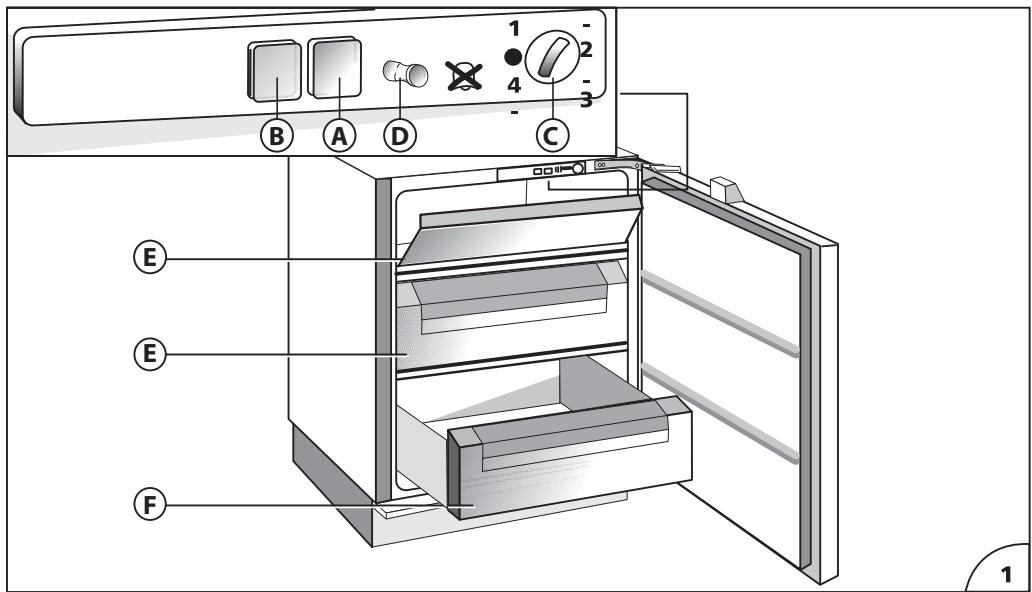
DESCRIPTION OF THE APPLIANCE (Fig. 1) Control panel
A) Operation control lamp (green light) B) Temperature control lamp (red alarm light) C) Temperature control knob (thermostat) D) Open door alarm switch (if present) E) Baskets (freezing - in and storage baskets) F) Storage basket only. G) Eutectic system: remove from drawer F and insert into the high compartment E to optimise the product's consumption.
Some models are supplied with containers filled with cooling liquid (eutectics).
INSTALLATION
Ensure that the appliance is not damaged. Transit damages must be reported to your dealer within 24 hours of receipt of the appliance. The appliance should not be installed close to heat sources such as cookers, central heating, boilers, sunlight, etc. It must however be located in a well ventilated dry space.
Attention: Accessibility to the plug has to be guaranteed even after installation of the appliance to disconnect it, if required. Alternatively, connect the appliance to the mains by means of a two-pole switching device with contact separation of 3 mm situated in an accessible position.
ELECTRICAL CONNECTION AND OPERATION
Please check that the voltage indicated on the rating plate situated inside the compartment corresponds to the voltage in your home. The earthing of this appliance is compulsory by law. The manufacturer will accept no liability for injury to persons or damage to objects arising from the non observance of this requirement.
When the appliance is plugged in, if the thermostat knob is not set to symbol ●, the green and the red lamps (A) and (B) (Fig. 1) light up. The green control light always remains alight and indicates the operation of the appliance. The red control light remains alight until the set operation temperature has been attained. It lights up again when the temperature inside the freezer rises due to frequent or prolonged door opening, and when the appliance has been loaded with fresh food to be frozen.
ADJUSTMENT OF THE TEMPERATURE
The thermostat (Fig. 1) controls the temperature inside the appliance. Position ● indicates that the operation of appliance is interrupted. The ideal storage temperature of frozen food for a long time is -18°C. In normal ambient conditions (temperature between +20°C and +25°C), we suggest you adjust the thermostat control knob to a middle position. To obtain colder or warmer temperatures than -18°C, turn the thermostat control knob to the highest or lowest setting respectively. We remind you that internal temperatures are affected by the location of the appliance, the temperature of the surrounding air, the frequency of the door opening. The setting of the thermostat may have to be varied to allow for these factors. To check the temperature of the food stored, place the thermometer (if delivered) under the food; if it is placed on the food it will indicate the temperature of the air which does not correspond to that of the food stored.
USE OF THE FREEZER COMPARTMENT
This appliance is equipped with an acoustic alarm which sounds when the door is left open (if present).
FREEZING IN (Fig. 2)
The amount of fresh food which can be frozen in a 24 hours period at an ambient temperature of +25°C is stated on the rating plate.
Do not store warm foods in the freezer. Never re-freeze partially or completely defrosted foods. Prepare and wrap foods to be frozen in aluminium or plastic foils or place them in appropriate containers. Label the packets indicating the freezing-in date and the contents. The freezer compartment maintains the storage temperature for 15 hours approx. even in case of power failure.
We suggest however you leave the door closed during this time.
Fizzy drinks should not be frozen and some products, such as flavoured water ices, should not be consumed too cold.
Note: Due to the efficiency of the door seal, it is not always possible to open the freezer door immediately after closing it. Wait some minutes before trying to open it.
PRODUCTION OF ICE CUBES
3/4 fill the ice cube trays with water and place them in the low temperature compartment. If the trays stick to the bottom of the compartment, do not detach them with sharp or cutting instruments, which could damage the appliance. Use, if necessary, the handle of a spoon. To allow removal of ice cubes from plastic trays, bend them slightly.
Attention: Do not eat ice cubes or ice lollies immediately after removal from the low temperature compartment as they may give rise to cold burns.
STORAGE OF FROZEN FOOD
When buying frozen food, it is suggested to use thermal bags or cold boxes. They should be the last purchases made and should be well wrapped in newspaper. When home, store them in the compartment, with the least possible delay. In any case these foods have to be used within the date printed on the packet.
THAWING
Here are some basic suggestions:
Raw vegetables: Do not thaw - put straight into boiling water and cook as usual.
Meat (large cuts): Thaw in the refrigerator without unwrapping them. Before cooking, leave at room temperature for some hours.
(Small cuts): Thaw at room temperature or cook directly.
Fish: Thaw in the refrigerator without unwrapping or cook directly before being completely thawed.
Previously cooked food: Re-heat in the oven without removing from its aluminium container.
Fruit: Thaw in the refrigerator.
DEFROSTING
Generally you need to defrost two or three times a year when the layer of frost reaches a 3 mm thickness. We suggest you periodically remove the frost from the freezing plate by means of a plastic scraper. Avoid using sharp or cutting instruments. Defrosting should be carried out when the quantity of food stored is minimum. Wrap the frozen food into several layers of newspaper (or in a cover) and place them in the refrigerator or in a cool place. Adjust the thermostat control knob to position, disconnect the appliance from the mains and leave the door open. Remove the baskets by pulling forward and up. Do not use commercial defrosting products as they could contain dangerous components. At completion of defrosting, clean and dry the appliance carefully. Reconnect the freezer to the mains supply. Reload the freezer with the frozen food.
MAINTENANCE AND CLEANING
A periodic and proper maintenance will ensure a longer life to your appliance. Disconnect the appliance from the mains supply before any intervention. Clean periodically the appliance with a solution of water and vinegar. Rinse and dry thoroughly. Never use abrasive or detergents. Clean periodically the door gasket with water and dry carefully. Avoid soiling the door gasket with oil or other grease which could damage it. After cleaning, reconnect the appliance to the mains supply.
HINTS FOR HOLIDAYS
If you plan to be away for a long time, disconnect the appliance from the mains, empty and clean the inside. Leave the door open to prevent the appliance from smelling musty. If you plan to be away for a short time, let the appliance operate normally.
SERVICE
The incorrect operation of the appliance is not always due to a fault but it may also result from poor installation or usage. To prevent unnecessary service calls for which you will be charged, we suggest you consult this trouble-shooting guide.
If the red light is on continuously or flashing, the internal temperature is too high.
Check that:
- the door is not properly shut;
- the thermostat control knob is correctly set (see chapter "Adjustment of the temperature");
- the freezer is not near a source of heat;
- there is a large build up of frost on the inner walls; the air flow is not restricted.
If the compressor functions continuously. Check that:
- the ambient temperature is too warm;
- the door is not being opened too frequently. The appliance is excessively noisy. Check that: the appliance is level.
The appliance does not operate. Check that:
- the thermostat control knob is not set to position ;
- there is not a power failure;
- the plug is making good contact with the supply socket;
- any automatic circuit breakers have tripped or any fuses blown;
- the supply cable is intact (see also Note).
Note: When replacing a damaged supply cord, be sure the new cord is correctly clamped. If you have followed this trouble shooting guide and your freezer still does not work properly, get in touch with your Retailer or Service Agent. State clearly what is wrong and the type and serial number of your freezer.
PRESENTATION OF THE DEVICE
Kpeac (eayaka kouatia): Eanaywote ta 0to yuyeio xwpi v bayalete tn oukeuaia touc. Piv to ayepma, aonote to oE thepuokpaoia domegaiou ia liye c wpc.
TIPS BEFORE THE HOLIDAY
CLEANING WITH THE FREEZER
CLEANING AND MAINTENANCE