
SI DC30 BA1 - Dishwasher HOTPOINT - Free user manual and instructions
Find the device manual for free SI DC30 BA1 HOTPOINT in PDF.
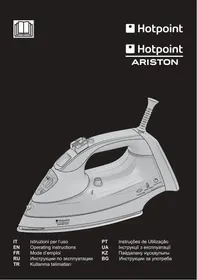



| Product type | Steam iron |
| Brand | HOTPOINT |
| Model | SI DC30 BA1 |
| Power supply | 220-240 V ~ 50/60 Hz |
| Power | 2400 W |
| Water tank capacity | 300 ml |
| Main functions | Steam shot, Spray, Vertical steam, Anti-drip, Auto-off, Auto-Clean |
| Soleplate type | Ceramic soleplate |
| Safety | Auto-off (30 s horizontal, 10 min vertical) |
| Care and cleaning | Auto-Clean function recommended after each use with tap water |
| Cord length | Approx. 2 m |
| Weight | Approx. 1.5 kg |
| Warranty | 2 years (parts and labor) |
| Repairability | Spare parts available through Hotpoint-Ariston approved service |
Frequently Asked Questions - SI DC30 BA1 HOTPOINT
User questions about SI DC30 BA1 HOTPOINT
0 question about this device. Answer the ones you know or ask your own.
Ask a new question about this device
Download the instructions for your Dishwasher in PDF format for free! Find your manual SI DC30 BA1 - HOTPOINT and take your electronic device back in hand. On this page are published all the documents necessary for the use of your device. SI DC30 BA1 by HOTPOINT.
USER MANUAL SI DC30 BA1 HOTPOINT
EN Operating instructions
FR Mode d'emploi
RU Operating instructions
TR Operating instructions
GENERAL SAFETY INSTRUCTIONS
- Do not operate the iron in case of damaged plug, power cord or appliance, or in the presence of visible damage or water leaks from the appliance. In such a case the appliance must be inspected by the Hotpoint authorized technical staff in order to avoid dangerous situations. If the appliance was dropped, do not operate it.
- The appliance is not intended to be used by individuals (children included up to 8 years of age) with impaired physical, sensory or mental capabilities, inexpert individuals or individuals who are not familiar with the product, unless they are supervised by a person responsible for their safety, or by individuals who have not received preliminary instructions on the use of the appliance.
- Supervise children to prevent them from playing with the appliance.
- Never leave the appliance unattended when the plug is connected into the electrical socket.
- After each use of the appliance, when filling and emptying the water reservoir, as well as when cleaning the appliance, set the steam regulator to Off. Then place the appliance in a stable position, using the stand, and disconnect the plug from the electrical socket.
- The appliance must be used and placed on a stable, flat horizontal surface. The use on an ironing board is recommended.
- For your safety, all repairs or maintenance operations must be carried out exclusively by the Hotpoint authorized technical staff.
- Keep the iron and its cord out of reach of children less than 8 years of age when it is energized or cooling down.
- Cleaning and user maintenance shall not be made by children without supervision.
- When placing the iron on its stand, ensure that the surface on which the stand is placed is stable.
- The plug must be removed from the socket-outlet before the water reservoir is filled with water.
- This steam iron is equipped with the safety device Power off system. When the plug has been connected, move the iron to switch it on.
GENERAL SAFETY RULES
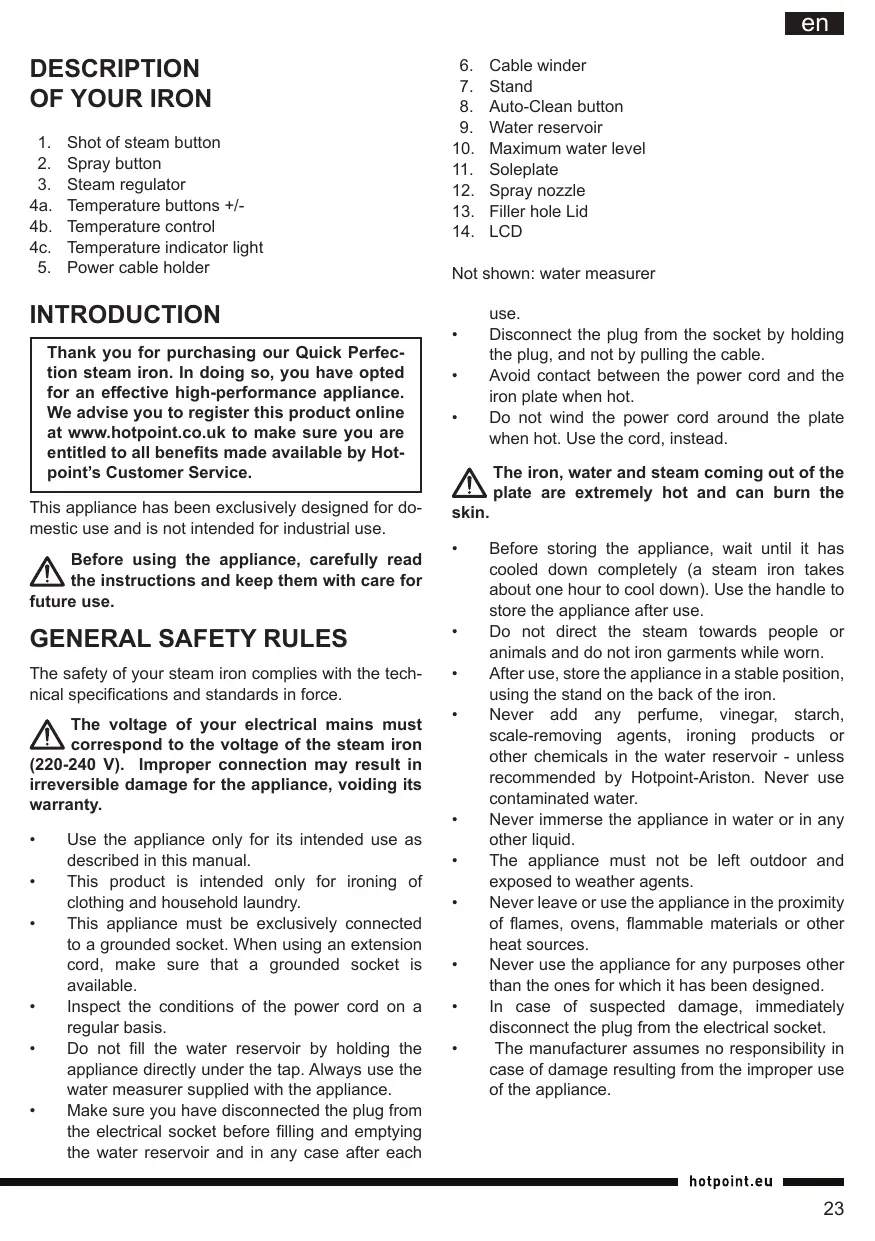
- Shot of steam button
- Spray button
- Steam regulator
4a. Temperature buttons +/- 4b. Temperature control 4c. Temperature indicator light 5. Power cable holder
INTRODUCTION
Thank you for purchasing our Quick Perfection steam iron. In doing so, you have opted for an effective high-performance appliance. We advise you to register this product online at www.hotpoint.co.uk to make sure you are entitled to all benefits made available by Hotpoint's Customer Service.
This appliance has been exclusively designed for domestic use and is not intended for industrial use.
Before using the appliance, carefully read the instructions and keep them with care for future use.
GENERAL SAFETY RULES
The safety of your steam iron complies with the technical specifications and standards in force.
The voltage of your electrical mains must correspond to the voltage of the steam iron (220-240 V). Improper connection may result in irreversible damage for the appliance, voiding its warranty.
Use the appliance only for its intended use as described in this manual. This product is intended only for ironing of clothing and household laundry. - This appliance must be exclusively connected to a grounded socket. When using an extension cord, make sure that a grounded socket is available. - Inspect the conditions of the power cord on a regular basis. - Do not fill the water reservoir by holding the appliance directly under the tap. Always use the water measurer supplied with the appliance. Make sure you have disconnected the plug from the electrical socket before filling and emptying the water reservoir and in any case after each
- Cable winder
- Stand
- Auto-Clean button
- Water reservoir
- Maximum water level
- Soleplate
- Spray nozzle
- Filler hole Lid
- LCD
Not shown: water measurer
use.
- Disconnect the plug from the socket by holding the plug, and not by pulling the cable.
- Avoid contact between the power cord and the iron plate when hot.
- Do not wind the power cord around the plate when hot. Use the cord, instead.
The iron, water and steam coming out of the plate are extremely hot and can burn the skin.
Before storing the appliance, wait until it has cooled down completely (a steam iron takes about one hour to cool down). Use the handle to store the appliance after use. - Do not direct the steam towards people or animals and do not iron garments while worn. After use, store the appliance in a stable position, using the stand on the back of the iron. - Never add any perfume, vinegar, starch, scale-removing agents, ironing products or other chemicals in the water reservoir - unless recommended by Hotpoint-Ariston. Never use contaminated water. - Never immerse the appliance in water or in any other liquid. - The appliance must not be left outdoor and exposed to weather agents. - Never leave or use the appliance in the proximity of flames, ovens, flammable materials or other heat sources. - Never use the appliance for any purposes other than the ones for which it has been designed. - In case of suspected damage, immediately disconnect the plug from the electrical socket. - The manufacturer assumes no responsibility in case of damage resulting from the improper use of the appliance.
BEFORE USE
Before using the appliance for the first time, remove all stickers, protective plastic or cardboard case from the soleplate of the iron.
Make sure that all adhesive parts have been removed from the soleplate with a dampened soft cloth and eliminate any residues or particles from the manufacturing process, by repeatedly filling and emptying the water reservoir.

When switching on the iron for the first
time, you may notice an unpleasant odour, a
little smoke and some impurities that will disappear in a few minutes. When using the steam function for the first time, do not direct the steam jet on the garments because of the possible presence of manufacturing residues in the steam dispenser.

Never add any perfume, vinegar, starch,
other chemicals in the water reservoir - unless recommended by Hotpoint-Ariston. Never use contaminated water.
Filling the water reservoir (A)

We recommend using demineralised water.
Before filling the iron with water, make sure that the iron is switched off and disconnected from the electrical socket.
- Set the steam regulator (3) to Off.
- Tilt the iron in such a position to make water entrance easier.
- Open the lid of the filler hole (13) and fill the water reservoir using the water measurer supplied with the iron. Never fill the water reservoir above the maximum water level (10).
- Close the lid of the filling hole.
USING THE IRON
In order to make reading this instructions manual easier and identify the model of your Quick Perfect iron, refer to the graphics on page II.

Your iron is supplied with Power Off System
safety device which automatically switches
the iron off when it is left unattended or tips over and ensures maximum safety.
Selecting the temperature and adjusting the steam (B1)

- Connect the plug of the appliance into a grounded socket (220-240V).
- The LCD (14) lights up in red and starts flashing to indicate that the iron is reaching the set temperature.
- Use the temperature buttons +/- (4a) to select the desired temperature. An acoustic signal is emitted every time you press one of the two buttons, the display lights up and starts flashing to indicate that the steam iron is reaching the selected temperature.
- When the iron reaches the set temperature, an acoustic signal is emitted, the LCD lights up in green and the set temperature is shown in fixed mode to indicate that the iron is ready for use.
- Make sure to check the garment label in order to identify the fabric type. In case of doubts, it is recommended not to use the spray function and iron a hidden corner in order to determine the most appropriate temperature and avoid damaging the fabric. In case of very delicate fabrics, such as silk, wool, and synthetic materials, iron the garment inside out to prevent shiny marks. Start ironing the garments that require a lower temperature, such as synthetic fabrics.

Fabrics with this symbol on the label must not be ironed.
| GARMENT LABEL | FABRIC TYPE | TEMPERATURE INDICATION | STEAM INDICATION |
| synthetic | ○●○ | Off | |
| silk mixed cotton | ●●○ | Off | |
| wool mixed wool | ○○○ | ||
| cotton | ●●● | ||
| linen jeans | ○○○ |
- Select the steam level with the steam regulator (3) or move it to Off to iron without steam. When steam ironing, make sure that the water level in the reservoir is at least 1/4.
Selecting the temperature and adjusting the steam (B2)

- Connect the plug of the appliance into a grounded socket (220-240V).
- Use the temperature control (4b) to select the desired temperature. If you go from a lower temperature to a higher temperature, the temperature indicator light (4c) will light up until the selected temperature is reached.
- When the iron reaches the set temperature, an acoustic signal is emitted and the temperature indicator light goes off.
- We recommend to check the garment label in order to identify the fabric type. In case of doubts, it is recommended not to use the spray function and iron a hidden corner in order to determine the most appropriate temperature and avoid damaging the fabric. In case of very delicate fabrics, such as silk, wool, and synthetic materials, iron the garment inside out to prevent shiny marks. Start ironing the garments that require a lower temperature, such as synthetic fabrics.

Fabrics with this symbol on the label must not be ironed.
| GARMENT LABEL | FABRIC TYPE | TEMPERATUR INDICATION | STEAM INDICATION |
| synthetic | MIN | Off | |
| silk mixed cotton | Off | ||
| wool mixed wool | |||
| cotton | |||
| linen jeans | LINEN |
- Select the steam level with the steam regulator (3) or move it to Off to iron without steam. When steam ironing, make sure that the water level in the reservoir is at least 1/4.
USE


The iron starts producing steam as soon as it reaches the set temperature.

If the water in the reservoir is finished, it may be necessary to press the shot of steam button several times to (re)activate the pump, after filling the water reservoir again.
steam button several times to (re)activate the pump, after filling the water reservoir again.
Ironing without steam (C1)
- Set the steam regulator (3) to Off (=no steam).
- Select the recommended ironing temperature with the temperature buttons +/- (4a) (see step B1 and chapter "Using the iron", section "Selecting the temperature and adjusting the steam").
Steam ironing (D1)
- Check that the water level in the reservoir is higher than 1/4.
- Select the appropriate steam with the steam regulator (3) and the recommended ironing temperature with the temperature buttons +/- (4a) (see step B1 and chapter "Using the iron", section "Selecting the temperature and adjusting the steam").
Ironing with shot of steam (E1)
The shot of steam function allows you to eliminate persistent wrinkles. You can use this function both in no-steam and steam ironing mode.
- Check that the water level in the reservoir is higher than 1/4.
- Select the recommended ironing temperature with the temperature buttons +/- (4a) (see step B1 and chapter "Using the iron", section "Selecting the temperature and adjusting the steam").
- Press the shot of steam button (1) to obtain an extra steam flow when ironing. If the shot of steam function has not been used for some time, it may be necessary to press the button repeatedly to activate the pump.
USE

Ironing without steam (C2)
- Set the steam regulator (3) to Off (=no steam).
- Select the recommended ironing temperature with the temperature control (4b) (see step B2 and chapter "Using the iron", section "Selecting the temperature and adjusting the steam").
Steam ironing (D2)
- Check that the water level in the reservoir is higher than 1/4.
- Select the appropriate steam with the steam regulator (3) and the recommended ironing temperature with the temperature selector (4b) (see step B2 and chapter "Using the iron",
section "Selecting the temperature and adjusting the steam").
Ironing with shot of steam (E2)
The shot of steam function allows you to eliminate persistent wrinkles. You can use this function both in no-steam and steam ironing mode.
- Check that the water level in the reservoir is higher than 1/4.
- Select the recommended ironing temperature with the temperature control (4b) (see step B2 and chapter "Using the iron", section "Selecting the temperature and adjusting the steam").
- Press the shot of steam button (1) to obtain an extra steam flow when ironing. If the shot of steam function has not been used for some time, it may be necessary to press the button repeatedly to activate the pump.
FEATURES
Spray function (F)
The spray function is used to dampen the garment in order to remove persistent wrinkles easily. You can use the spray function both in no-steam and steam ironing mode at any temperature.
- Check that the water level in the reservoir is higher than 1/4.
- With the iron in horizontal position, press the spray button (2) to dampen the garment.
Vertical steam function (G)
The vertical steam function is useful to eliminate wrinkles from hanging garments, curtains, etc. You can use this function by simply placing the iron in vertical position. All functions of the appliance will remain unchanged also in this position (refer to chapter "Use" according to the model).

Do not direct steam towards people or animals and do not iron garments while
Anti-drip function
The iron is provided with anti-drip function in order to automatically interrupt the steam distribution when the temperature is too low, thus preventing water dripping out of the soleplate.

Do not use steam with low temperatures (see chart in step B1 and B2 chapter "Using on", according to the type of iron you are).
Automatic Stand-by function (H1)
LCD
The automatic switch-off function guarantees total safety.
This function automatically switches off the iron when it is not used for a few minutes. In particular:
- the iron switches off automatically after 30 seconds when left unattended in the ironing position or sideways;
- the iron switches off automatically after 10 minutes when left unattended in the rest position (vertical).
If you leave the iron unattended, the display flashes a green light and an acoustic signal is emitted to inform that the automatic stand-by function is active.
Simply move the iron or press the temperature buttons +/- (4a) to switch it back on.

Wait until the display becomes red before starting ironing again.
Automatic switch-off function (H2)

The automatic switch-off function guarantees total safety.
This function automatically switches off the iron when it is not used for a few minutes. In particular:
- the iron switches off automatically after 30 seconds when left unattended in the ironing position or sideways;
- the iron switches off automatically after 10 minutes when left unattended in the rest position (vertical).
If you leave the iron unattended an acoustic signal is emitted to inform that the automatic switch-off function is active.
Simply move the iron to switch it back on.

Wait until the temperature indicator light turns off before starting ironing again.
CLEANING AND MAINTENANCE
After use (I)
- Set the steam regulator (3) to Off, disconnect the appliance plug from the electrical socket and let the iron cool down.
- Empty the water reservoir (9).
- Wind the cord around the cable winder (6) and store the iron in vertical position, in a dry safe place.

Never store the iron in horizontal position. Always use the stand at the back of the iron.
Cleaning (J)

Never use aggressive and/or abrasive substances to clean the plastic parts and on soleplate.
- Set the steam regulator (3) to Off, disconnect the appliance plug from the electrical socket and let the iron cool down.
- Use a dry or slightly dampened soft cloth to clean the upper part of the iron.
- For the ordinary cleaning and/or removal of stains or other residues deposited on the plate, clean with a dampened soft cloth and dry.
- Use a dampened cotton tip to eliminate scale in the steam holes that may impair the performance of your iron.

In order to keep the soleplate perfectly smooth and polished, avoid contacts with objects, do not iron sharp objects, such as pins, studs and hinges in order to avoid chipping the plate.
- Regularly rinse the reservoir with clean water. After cleaning, always empty the water reservoir.
Auto-Clean Function (K1)
If you have been using water from the tap, we recommend starting the Auto-Clean function after ironing.

The use of the Auto-Clean function should not be deemed the same as using demineralized water on a regular basis.
- Check that the appliance is disconnected from the electrical socket and the steam regulator is (3) set to Off.
- Fill the water reservoir (9) up to the maximum water level (10).
- Connect the plug of the appliance into a grounded socket (220-240V).
- Set the temperature to the maximum value with the temperature buttons +/- (4a).
- Wait at least 2 or 3 minutes to warm the iron completely.
- Holding the iron above the sink or a container
made of resistant material, press the Auto-Clean button (8) and shake gently.

Steam and boiling water will come out of the soleplate with scale residues and other impurities. Never use plastic containers for this operation.
- Switch off the iron and disconnect it from the electrical socket.
- Set the steam selector to the maximum position.
- Allow water to come out of the holes for at least 30 minutes.
- Slide the iron gently on a cloth to eliminate any stains from the soleplate.
- Before using the iron again, press the shot of steam button (1) repeatedly to eliminate any scale residues.

When performing this operation, keep the iron away from the garments in order not to damage them.
Auto-Clean Function (K2)

If you have been using tap water, we recommend starting the Auto-Clean function after ironing.

The use of the Auto-Clean function should not be deemed the same as using demineralized water on a regular basis.
- Check that the appliance is disconnected from the electrical socket and the steam regulator (3) is set to Off.
- Fill the water reservoir (9) up to the maximum water level (10).
- Connect the plug of the appliance into a grounded socket (220-240V).
- Set the temperature to the maximum value with the temperature control (4b).
- Wait at least 2 or 3 minutes to warm the iron completely.
- Holding the iron above the sink or a container made of resistant material, press the Auto-Clean button (8) and shake gently.

Steam and boiling water will come out of the soleplate with scale residues and other impurities. Never use plastic containers for this action.
- Switch off the iron and disconnect it from the electrical socket.
- Set the steam select to the maximum position.
- Allow water to come out of the holes for at least 30 minutes.
- Slide the iron gently on a cloth to eliminate any stains from the soleplate.
- Before using the iron again, press the shot of steam button (1) repeatedly to eliminate any scale residues.

When making this operation, keep the iron away from the garments in order not to damage them.
TIPS
If your Compact Generator is not equipped with the Optimal Soleplate Temperature technology, you may find the following tips useful.
- Sort the garments out according to the fabric types. This will reduce the need to adjust the temperature according to the different fabrics.
- Start with the garments that require a low ironing temperature and continue with the garments requiring higher ironing temperatures. If you are not sure about the composition of the fabric, try ironing a hidden part such as a seam, hem or internal section. Start with a low temperature and gradually increase it until you find the ideal ironing setting.
- When you reduce the Compact Generator's temperature to iron delicate garments, wait approximately 2 minutes to let the iron reach the new settings. Pure wool (100% wool) garments can be steam-ironed as long as the temperature is set to wool. We recommend using a cotton cloth to prevent any shiny marks on the garment.
- Never iron areas with obvious perspiration marks because the heat will fix the stains and make them permanent.
DISPOSAL OF OLD ELECTRICAL APPLIANCES
The European Directive 2012/19/UE on Waste Electrical and Electronic Equipment (WEEE), requires that old household electrical appliances must not be disposed of in the normal unsorted municipal waste stream.
Old appliances must be collected separately in order to optimise the recovery and recycling of the materials they contain and reduce the impact on human health and the environment.
The crossed out "wheeled bin" symbol on the product reminds you of your obligation, that when you dispose of the appliance it must be separately collected. Consumers should contact their local authority or retailer for information concerning the correct disposal of their old appliance.
TROUBLESHOOTING
Problem
The soleplate remains cold and does not warm up.
The temperature indicator light turns on and off.
Steam comes out in reduced quantity or does not come out.
Impurities come out from the soleplate and stain the garments.
Water is dripping out of the soleplate
Possible cause / Solutions
- The plug may not be inserted into the electrical socket, or it may not make contact.
- Check that the temperature is not set to MIN.
- The temperature indicator light turns on to indicate that the iron is getting hot. The indicator light turns off when the set temperature is reached.
The steam regulator is set to Off. Not enough water in the water reservoir. Fill the water reservoir. - The iron is not sufficiently hot and/or the anti-drip function is active. Replace the iron in vertical position, using the stand, and wait until the temperature indicator light turns off or the LCD becomes red before starting to iron. - The plate temperature may be too low due to the excessively frequent activation of the shot of steam button. Slightly increase the interval between steam shots.
- There may be residues in the vaporisation chamber. Make the cleaning operations (see chapter "Cleaning and maintenance", section "Auto-Clean Function" according to the model).
- You are using perfume, vinegar, starch, vinegar, starch, scale-removing agents, ironing products or other chemical substances. Remember that these substances may damage the product. Rinse the water reservoir.
- You are using starch. You can use starch directly on the inside out of the fabrics and in any case never in the water reservoir. The garment was not washed correctly or has some soap residues. You are ironing a new garment that was not washed for the first time.
- The soleplate temperature may be too low due to the excessively frequent activation of the shot of steam button. Slightly increase the interval between steam shots. The soleplate temperature is set to a too-low temperature.
- You have replaced the iron horizontally without emptying it and/or without setting the steam regulator to Off. You did not close the lid of the filler hole correctly.
- You have used the shot of steam function with a too-low temperature. We recommend to use these functions with temperatures higher than .
- You are using perfume, vinegar, starch, vinegar, starch, scale-removing agents, ironing products or other chemical substances. Remember that these substances may damage the product. Rinse the water reservoir.
The soleplate is dirty or dark and may stain the fabrics.
- You are using a too-high temperature. Clean the soleplate (see chapter "Cleaning and maintenance", section "Cleaning").
- You are using starch. You can use starch directly on the inside out of the fabrics and in any case never in the water reservoir. The garment was not washed correctly or has some soap residues. You are ironing a new garment that was not washed for the first time.
The spray function does not work.
Not enough water in the water reservoir. Fill the water reservoir.
DESCRIPTION OF THE APPLIANCE
Causes / Possible solutions
Filling the reservoir (A)

We recommend using demineralized water.
Before filling the iron with water, check that it is unplugged from the mains socket.
- Set the steam regulator (3) to the off position.
- Hold the iron in a position that facilitates filling with water.
- Open the filling flap (13) and pour water into the iron using the special measuring cup provided. Never exceed the maximum fill level (10) of the reservoir.
- Close the filling hole cap.
USING THE IRON
For your convenience and to find your iron model Quick Perfection, see the diagram on page II.
Setting the temperature of the soleplate (B1)

- Insert the plug of the appliance into an earthed mains socket (220-240 V).
- The LCD display (14) lights up red and starts blinking, indicating that the iron is heating up to the set temperature.
- Using the temperature adjustment buttons +/- (4a), set the desired temperature. Each press of one of these buttons produces a sound signal, the LCD display lights up and starts blinking, indicating that the iron is heating up to the set temperature.
- When the iron reaches the set temperature, a sound signal sounds again, the LCD display lights up green, showing the temperature, which means that the iron is ready for use.
- Turn the garment inside out for ironing to determine the type of fabric. In case of doubt, it is not recommended to use the spray function at the beginning; iron a small inconspicuous area of the garment to determine the most optimal temperature to avoid damaging the clothes. Pay special attention to delicate garments made of silk, wool, and synthetic materials, turning them inside out to avoid shiny marks. Start ironing with items that require a lower temperature, for example, those made of synthetic fabrics.

Fabrics with this symbol on the label cannot be ironed.
Do not direct steam at people or animals and do not iron clothes worn by people.
Anti-drip system
The iron has an anti-drip system, thanks to which the water supply is automatically interrupted at too low a temperature, thus preventing water leaks from the holes in the soleplate of the iron.

Do not use it at low
temperatures. (See the table in points B,
B2, "Using the iron", B3 depending on your iron model).
Automatic shut-off function (H1)

If you leave the iron unattended, an audible signal sounds,
warning you about the automatic shut-off function.
To switch the iron back on, simply change its position.

Wait until the temperature indicator goes out before resuming ironing.
CLEANING AND CARE
After use (I)
- Set the temperature control (3) to the off position, disconnect the plug from the wall outlet and let the iron cool down.
- Empty the water from the reservoir (9).
- Wind the power cord around the special part of the iron's body (6) and store the iron in an upright position in a dry place.

Do not lay the iron flat; always place it on
the heel rest at the rear of the iron's body.
Cleaning (J)

Never use abrasive substances
n/nnn a6pa3NBhble ry6kn.
- Set the steam regulator (3) to the OFF position, disconnect the appliance plug from the wall socket and let the iron cool down. 2. To clean the upper part of the iron, use a soft dry cloth or a slightly damp cloth. 3. For regular care and removal of limescale deposits on the soleplate, use a damp cloth and wipe it dry.
- To remove limescale deposits from the steam outlet holes in the soleplate, which may reduce the efficiency of your iron, you can use a cotton swab.

To maintain the smoothness of the soleplate
Avoid contact with metal objects and do not place it on rough surfaces, such as zippers or metal buttons, as they may scratch the soleplate.
- Regularly empty the water reservoir and rinse it with clean water. After cleaning, always pour out the water from the reservoir.
Auto-Clean function (K)
LCD
If using tap water, it is recommended to use the Auto-Clean function at least once a month.

Using the Auto-Clean function
Auto-Clean is not a substitute for regular
use of demineralized water.
- Make sure the appliance is unplugged and the steam regulator (3) is in the OFF position.
- Fill the water reservoir (9) up to the maximum level (10).
- Plug the appliance cord into a grounded wall socket (220-240 V).
- Set the temperature to the maximum value using the +/- thermostat buttons (4a).
- Wait 2-3 minutes for the iron to heat up to the set temperature. 6. Hold the iron over a sink made of resistant material, press the AutoClean button (8) and gently shake the appliance.
In this way, steam with water will be produced, containing possible scale particles and other impurities. Do not use plastic containers for this operation.
- Turn off the iron and unplug it from the mains.
- Set the steam regulator to the maximum power position. 9. Let the water flow out of the holes for 30 minutes.
- Without pressing, run the iron over unwanted fabric to remove any possible stains left by water.
- Before the next use, press the steam shot button (1) several times to remove scale residues.

Do not perform this operation over laundry to avoid stains.
Auto-Clean function (K)

If you use tap water, it is recommended to use the Auto-Clean function at the end of each use.

Using the Auto-Clean function does not replace regular
use of demineralized water.
- Check that the appliance is unplugged from the mains and that the steam regulator (3) is in the off position.
- Fill the water reservoir (9) up to the maximum level (10).
- Insert the plug of the appliance into a grounded wall outlet (220-240 V).
- Set the temperature to the maximum value using the thermostat +/-
(4b).
- Wait 2-3 minutes for the iron to heat up to the set value. 6. Holding the iron over a sink made of non-flammable material, press the AutoClean button (8) and gently shake the appliance.

In this way, steam with water will come out of the soleplate, containing
possible scale particles and impurities. Do not use plastic containers for this operation.
- Turn off the iron and disconnect it from the mains.
- Set the thermostat knob to the maximum power position. 9. Let water drip from the holes for 30 minutes.
- Without pressing, iron a piece of unwanted fabric to remove any possible stains left by water.
- Before the next use, press the steam burst button (1) several times to remove any scale residues.

Do not perform this operation on linen to avoid stains.
RECOMMENDATIONS
Sort the laundry for ironing by fabric type. This will help avoid frequent temperature adjustments for different fabrics. - Start ironing with fabrics that require the lowest temperature, and continue as the temperature increases. - If you are unsure about the fabric type of a garment, try ironing a small hidden part, for example, the inside hem or an inside seam. Start ironing at a low temperature and gradually increase it, setting the optimal temperature. When you set the iron temperature for delicate items, wait about 2 minutes so that the iron can reach the set temperature. - Items made of pure wool (100% wool) can be ironed with steam at a temperature suitable for wool. It is recommended to iron cotton fabrics to avoid shiny spots on the items. Never iron wet stains. Note: The thermostat regulates the temperature, making them non-adjustable.
TROUBLESHOOTING
Malfunction
Possible causes / Solutions
The iron remains on and does not heat up.
Water drops leak from the iron.
The iron temperature may be too low due to too frequent use of the spray button. Increase the interval between sprays. The iron temperature is too low. You placed the iron in a horizontal position without emptying the water or without turning the steam regulator to the off position. The water tank cap is not tightly closed. You used the spray button at too low a temperature. We recommend using this function at a higher temperature. ● Water was added to the tank: descaling agent, starch, anti-scale agent, or other chemical substances. Remember that these substances can damage the appliance. Carefully rinse the water tank.
The iron's soleplate is dirty or has darkened and may stain laundry.
- You are using the iron at too high a temperature.
- Clean the iron's soleplate (see paragraph "Cleaning and care", paragraph "Cleaning"). You are using starch. Starch can be used directly on the wrong side of the fabric and in any case never put it in the water tank.
- The item was poorly rinsed or detergent remained on it. You ironed a new, unwashed item.
The spray function does not work.
There is not enough water in the tank. Add water to the tank.
SERVICE AND MAINTENANCE
Free hotline: 88003333887*
- (The service is free for subscribers of all landline numbers and throughout the territory of Russia)
We care about our customers and strive to provide high quality service. We constantly improve our products to make your experience with the appliance simple and pleasant.
CARE FOR THE APPLIANCE
Professional care products line: recommended by Hotpoint Ariston to extend the life of your appliance and reduce the likelihood of breakdowns. The Professional care products line is designed with your appliance's features in mind. The products are manufactured in Italy in compliance with high European quality, safety, and usage standards. Learn more on the website www.hotpoint-ariston.ru in the "Service" section and ask in stores in your city.
AbTopn3OBaHHbIe cepBnCHbIe cHTpbI
Ytobb6bTb6bnke KHaunm NOTpeBnteJAM, Mblco3dJIIN shpOKyO cepBnCHyO cTeB,OCo6eHHOCTbIOKOTOpO JBnETc BbICOKa NOIROTOBAk, npocceCNOHAJIIN3M N YecTHOCTb CepBnCHbIXMaCTepOB.
Função Auto-Clean (K2)

Iepsh Hix 3anOBHnT npacky BDOIO, nepekoHaTeCra, I0 BOHA BmKHeHa i BnIka BNTaHyTa 3 pOeTKN.
- BctaHOBiTb peryIaTOp napn (3) B noJIoXeHHa Off (= Bic γC HIc γI napn).
- Haxinitb npacky B take noJoxKeHH, 06 noJerWHTBxID BOIN.
- BiKpnIte KpUkcy OTbOpy DnA 3anOBHeHHB Odn (13) i 3anOBHiTb pe3epByap 3a DonomorOcneiaJIbHOI CKJHKn 3 KomIIeKtY NOCTaAHHH. Hi B
KOMy pa3i He nepeBnUyTe MaKcMaJIbHNI pIbeHb 3aNoBHeHHra (10) B pe3epByapi. 4. 3akpiTe KpiuKy OTbOpy IJIa 3anOBHeHHB ODOIO.
BVKOPNUCTANIIPACKI
IooB nonerwnBawe 03haHOMenneHH 3 cIMMdoBIDNkOM 3 IHCTpyKiziamn i dI3HaTNCbIbWe npo Bnachy Moen npackn Quick Perfection, Mn nIdroTyBaJIr rpaqiHi 3O6paKeHH Ha CToPJHJI.
Bn6ip TempeaTyprni peRyIIOBaHnHa napi (B1)

- BCTaBTe BnIky npnIady B eNeKtpnHy po3EtKy, OCHaIeHOIO CnpaBHOIO CNCTeMOIO 3a3EmJHNN (220-240B).
- PidokpnctaniHn Dncnne (14) cnaaxye cepBOHm CbTIOM i pO3noHnAe 6bnMaTn, Bka3yOnn Ha Te, 0o npacka 6bnb3Ka Do DocarHeHHa 3aDaHnx TEMnepaTyPHNX XapakTePncTnK.
- 3a DoNOMOROIO KHOHOK HanaHTyBaHHa TEMnepatypn +/- (4a) o6eipb baxaHy TEMnepatpy. KoXhoro pa3y npri NaTnCKaHNi Ha ONDy 3 DBOX KHOJOK LyHae 3ByKOBm CnHaN, PK-DinCpnei cnaIaxye i po3nouHae 6nImaTu, BkazuyuHa Ha Te, Uo npacka Doocrae o6paHy TEMnepatypy.
- Kolni npacka doocarhe 3adaHOI Temnepaotypn, 3HOBy nponyhae 3ByKOBNI cHnA, PKDinCJIne Cnajaxye 3eJeHmCBiTnOM i BkazanaHa Temnepaotypa He 6JImMaTmE, BkAzyUHn Ha Te, IIO npacka rOToBA dIra BVKOpNCTaHHJ.
- Before ironing, check the label on the garment to determine the ironing temperature. If in doubt, it is recommended not to use the steam function and to iron a not too damp cloth, choosing a lower temperature and avoiding ironing such fabrics. In the case of particularly delicate fabrics, such as silk, wool and synthetic materials, it is necessary to iron the garments inside out to avoid shiny marks. Start ironing with those fabrics that require the lowest temperatures, for example, garments made of synthetic fabrics.
| ETNUKETKA PEUEN | ТПТКАНИН | ВКAZIBKII SCIOДО TEМПЕРATУРИ | ВКAZIBKII SCIOДО ПAPIN |
| СИNTETNUHII | ○●○ | Off | |
| SUOBK БавOBнA 3MIIaHOrO cKnIaDy | ●●○ | Off | |
| BOBnA BOBnA 3MIIaHOrO cKnIaDy | ○○○ | ||
| БавOBnA | ●●● | ||
| ЛьОН Джинс | ○○○ |
- Select the steam supply mode using the steam regulator (3) or move the regulator to the Off position (= no steam) to iron without steam. During ironing with the steam function, make sure that the water level in the reservoir is not less than 1/4
Selecting the temperature regulator (B2)

- Insert the appliance plug into an electrical outlet equipped with a proper grounding system (220-240V).
- Using the temperature regulator (4b), select the desired temperature. When switching from low to high temperature, the temperature indicator (4c) lights up until the selected temperature is reached.
- When the iron reaches the set temperature, the sound signal sounds again and the temperature indicator turns off.
- We recommend checking the label on the garment to be ironed to determine the ironing temperature. If in doubt, it is better not to use the steam function and to iron a not too damp cloth, choosing a lower temperature and avoiding ironing such fabrics. In the case of particularly delicate fabrics, such as silk, wool and synthetic materials, it is necessary to iron the garments inside out to avoid shiny marks. Start ironing with those fabrics that require the lowest temperatures, for example, garments made of synthetic fabrics.
| ETNIKETKA PEUEN | ТПТКАИNHIN | ВКАЗIBКИ ΜΙΟΥΟ TEМЕРАΤΥΝΙ | ВКАЗIBКИ ΣΙΟΥΟ ΠΑΝΥΝΙ |
| СИNTETNUHIN | MIH | Off | |
| SUOBK Бавовна 3Mιχаного СКладу | Off | ||
| BOBHA BOVBHA 3Mιχаного СКладу | |||
| Бавовна | LINEN | ||
| Льон Джинс |
- Select the steam supply mode using the steam regulator (3) or move the regulator to the Off position (= no steam) to iron without steam. During ironing with the steam function, make sure that the water level in the reservoir is not less than 1/4
OPERATING MODES


The iron will start emitting steam shortly before reaching the set temperature.

If the water in the reservoir boils, it may be unevenly
Pressing the steam button activates or reactivates the pump to refill the reservoir with water.
Ironing without steam (C1)
- Set the steam regulator (3) to the Off position (= no steam).
- Select the recommended ironing temperature using the temperature setting knob +/- (4a) (see Phase B, and in the section "Using the iron", paragraph "Selecting the temperature and steam regulation").
Place the iron on the base (D1).
- Before use, pour water into the reservoir up to 1/4 of its volume.
- Set the steam regulator using the steam control knob (3) and the recommended temperature using the buttons.
Set the temperature using the +/- buttons (4a) (see "Selecting the temperature and steam regulation" section).
To switch on the iron again, simply move it.

Wait until the temperature indicator turns off, then start ironing.
Cleaning
After use (1)
- Set the steam regulator (3) to the Off position (= no steam), unplug the iron from the electrical outlet and wait for the iron to cool down.
- Empty the water reservoir (9).
- Wind the power cord around the special cord storage (6) and store the iron vertically in a safe and dry place.

Do not leave the iron in a horizontal position; use the heel rest at the rear of the iron.
Cleaning (J)

Do not use abrasive or corrosive materials to clean the soleplate and the outer parts of the iron.
- Set the steam regulator (3) to the Off position (= no steam), unplug the iron from the electrical outlet and wait for the iron to cool down.
- For ironing the upper parts of the garment, use a dry iron or a damp cloth. 3. To remove shine or other marks from the fabric, use a damp cloth, then wipe the surface dry.
- To remove stains or dirt from the soleplate, let the iron cool down, then clean it with a damp cloth.

To keep the soleplate always perfectly smooth, avoid contact with hard objects, do not iron over zippers, buttons, snaps, or other metal parts. 5. Regularly clean the water tank with clean water. After use, always empty the water tank.
Auto-Clean function (K)

If using tap water, it is recommended to use the Auto-Clean function after ironing.

Using the Auto-Clean function cannot be considered as a substitute for using demineralized water.
The plug is not inserted into the socket or there is no contact. - Check that the temperature is not set to MIN (minimum).
The temperature indicator does not light up and does not go out.
- The temperature indicator lights up to show that the iron is heating. When the set temperature is reached, the indicator goes out.
Steam comes out in small amounts or not at all.
Set the steam regulator to the Off position (no steam). Not enough water in the water tank. Fill the water tank. - The iron is not hot enough and/or the steam function is set. Place the iron in a vertical position, using the special support (heel), and wait until the temperature indicator goes out or the ready light comes on. After that, you can start ironing. The temperature of the soleplate is too low if you press the steam button frequently. Slightly increase the interval between steam bursts.
Dirt comes out of the soleplate or stains appear on the fabric.
There are scale deposits in the steam chamber. Perform the cleaning operation (see section "Cleaning and Maintenance", paragraph Auto-Clean function, depending on the model). If you use starch, vinegar, or other chemicals, they may damage the product. Rinse the water tank with water. If you use starch, you can apply it directly to the reverse side of the fabric, but never in the water tank. - The item being ironed is not suitable for ironing or has a protective coating. You are ironing a new garment that has not been washed yet.
Water drips from the soleplate.
The soleplate temperature is too low to produce steam. The steam function is used frequently, but the interval between steam bursts is slightly longer. The soleplate temperature is set to a very low value. You placed the iron horizontally without first emptying it and/or without setting the steam regulator to Off (= no steam). You filled the water tank incorrectly. You used the steam function at a very low temperature. We recommend using this function at a higher temperature. You use distilled water, vinegar, starch, anti-scale agents, descaling agents, or other chemicals. Please note that such chemicals may damage the iron. Rinse the water tank with water.
The soleplate of the iron is dirty and may leave stains on fabrics.
You use a very high temperature. Clean the soleplate of the iron (see section "Cleaning and Maintenance", paragraph "Cleaning"). You use starch. Starch can be sprayed directly onto the reverse side of the fabric, but never into the water tank. The garment is starched, which causes sticking, or it has been ironed incorrectly. You iron a new garment from the front and it has been ironed.
Power Off System: The appliance is connected to the mains.
Temperature setting and steam boost (B1)

- Insert the plug into a properly earthed socket (220-240 V).
- When the set temperature is reached, the steam boost button (14) can be pressed to produce a steam burst.
- To set the temperature, press the temperature buttons + / - (4a). The temperature indicator lights up and the iron starts heating. Once the set temperature is reached, the indicator goes out.
- When the set temperature is reached, the steam boost button can be pressed to produce a steam burst. The steam boost function is only available at high temperatures.
- To determine the type of fabric, read the care label. If you are unsure, start with the lowest temperature and increase it gradually. For delicate fabrics such as silk, wool, and synthetics, iron on the reverse side to avoid shiny marks. For synthetic fabrics, start with a low temperature and increase it gradually.

Fabrics with this care label must not be ironed.
| КИМ КИЛAKLUACbl | MATA TYPI | temпература Корсetedkilii | БY KОретkedkilii |
| СИNTETИКа | ○●○ | Off | |
| жibeк .apалас мakта | ●●○ | Off | |
| ЖУH .apалас жУH | ○○○ | ||
| мakта | ●●● | ||
| Зыfvьд ДжIMнсbl | ○○○ |
- If the water tank is not filled to the MAX level, or if you want to iron without steam, you can use the iron without inserting the water tank. When ironing without steam, make sure the water tank is empty or filled to less than 1/4.
Temperature setting and steam boost (B2)

- Insert the plug into a properly earthed socket (220-240 V).
- To set the temperature, press the temperature buttons (4b). When you switch from a lower to a higher temperature, the temperature indicator light (4c) will illuminate until the set temperature is reached.
- The set temperature is indicated by the temperature indicator light.
- To select the type of material, refer to the table. If you are unsure, use the lowest temperature setting and the shortest time to avoid damaging the material. For delicate items such as silk, wool, and synthetic fabrics, iron on the reverse side or use a pressing cloth. Synthetic materials should be ironed at a lower temperature to prevent damage.

Materials with this symbol must not be ironed.
| КИМ КИЛAKLUACbl | MATA TYPI | STEMПЕРATYPA КИPCETKILI | БY KИPCETKILI |
| СИNTETINKA | MIMH | Off | |
| Жібек аразлас мakта | Off | ||
| ЖУн аразлас кун | W | ||
| мakта | 3blIFbIP | ||
| 3ыIFыр ДЖIMHCbl |
- To select or bypass this function, press this button (3) repeatedly until the desired setting is displayed. When bypassing, the water in the water tank will not be heated to 1/4 of the set temperature.
IRONING


The iron will start heating when the set temperature is reached.

If water is added to the tank, it is possible to use the steam function to remove wrinkles after ironing.
Bypass ironing (C1)
- Press this button (3) repeatedly to select the bypass mode.
- Select the ironing temperature using the +/- temperature buttons (4a) (see "Ironing Temperature Selection" and "Temperature Setting and Adjustment").
Steam ironing (D1)
- Ensure the water level in the tank is above 1/4 full.
- Select the ironing temperature using the temperature buttons (4a) (see "Ironing Temperature Selection" and "Temperature Setting and Adjustment").
Steam burst ironing (E1)
This function can be used to remove stubborn wrinkles. It can be used in both dry and steam ironing modes.
- Set the container water level to 1/6 using the upper mark.
- +/- Set the pump temperature (4a) to the desired temperature using the temperature setting and display (B1) and the "Temperature setting and display" label.
- When pumping, to avoid this, press the button (1) briefly. If this function is not available, it may be necessary to press the button several times to remove the air.
Drain

Pump switch (C_2)
- Place the container (3) under the drain (drain valve).
- +/- Set the pump temperature (4b) to the desired temperature using the temperature setting and display (B2) and the "Temperature setting and display" label.
Pump switch (D_2)
- Set the container water level to 1/4 using the upper mark.
- Place the container (3) under this valve and set the pump temperature (4b) to the desired temperature using the temperature setting and display (B2) and the "Temperature setting and display" label.
Pump switch (E_2)
This function may cause the pump to run dry. This function should only be used in the pump and drain modes.
- Set the container water level to 1/4 using the upper mark.
- +/- Set the pump temperature (4b) to the desired temperature using the temperature setting and display (B2) and the "Temperature setting and display" label.
- When pumping, to avoid this, press the button (1) briefly. If this function is not available, it may be necessary to press the button several times to remove the air.
Selecting functions (F)
The selection functions are designed to facilitate the selection of the required programs by the user. The selection function can be used without restrictions at any temperature that is safe for the device.
- Do not immerse the container in water deeper than 1/6 of its height.
- To select the desired program, press the selection button (2) without a lock.
Ironing function (G)
The ironing function is used to remove wrinkles from clothes, linens, etc. To use this function, the iron must be placed on a flat surface. The other functions are not available in this mode (see the "Ironing" section in the instructions).
Do not leave the device unattended and do not use it while it is plugged in.
Auto shut-off function
When the temperature is too high, this device automatically turns off to prevent damage to the water tank and to save energy. This is the auto shut-off function.
When the temperature is too high, do not use this function (see the "Ironing" section for instructions on using the iron).
Functions (H)

The automatic shut-off function is a safety feature.
This function automatically turns off the device after a certain period of inactivity. For example:
If the iron is left on a flat surface without being moved, it will turn off automatically after 30 seconds; if it is left in an upright position (on its heel), it will turn off after 10 minutes.
Do not use abrasive or corrosive cleaning agents, as they may damage the surface and impair the function of the device.
Do not use the device if the ambient temperature is above or below the specified temperature range (4°C).
Before using the device, read the instruction manual carefully.
After use (I)
- Turn off the device (3), unplug it from the power outlet, and let it cool down.
- Empty the water container (9).
- Place the coffee maker on a flat surface (6), plug it in, and turn it on using the switch.

Do not immerse the device in water. Be careful not to spill water on the back of the device.
Cleaning (J)

Do not use abrasive sponges or cleaning agents to clean the appliance.
- Turn off the device (3), unplug it from the power outlet, and let it cool down.
- To clean the device, use a soft, damp cloth without abrasive agents.
- To remove stubborn dirt and limescale, wipe with a soft, damp cloth and dry thoroughly.
- To ensure the device functions properly, use only recommended accessories.

To avoid the risk of electric shock, do not immerse the appliance, cord, or plug in water or other liquids. Otherwise, the device may be damaged. 5. Drain the water from the container through the drain hose. After draining, rinse the container with clean water.
Auto-off function (K)

If you have used hot water, the auto-off function will activate after the device is turned off.

Using the auto-off function is considered as using the water that has been heated to the set temperature.
- Unplug from the wall outlet and allow the device to cool down for at least 3 minutes.
- Fill the water container (9) up to the maximum level mark (10).
- Plug the device into a wall outlet (220-240 V).
- Set the temperature to the maximum level using the temperature control (4a).
- Wait for 2-3 minutes for the device to heat up.
- Place the device on a stable surface made of heat-resistant material, then press the auto-off button (8) and start the device.

Do not use abrasive cleaners or sharp objects to clean the device. Use a soft cloth for cleaning.
- Turn off the device and unplug it from the wall outlet.
- Set the device to the maximum level.
- Wait for 30 minutes for the device to cool down.
- Place the iron on its heel on a stable surface and let it cool down completely.
- Before first use, remove any protective film or stickers from the soleplate.
Auto shut-off function (K2)

If the iron is left unattended for a long time, the auto shut-off function will activate.

The auto shut-off function activates when the iron is left in a vertical position for a certain period of time.
- Unplug the iron from the power outlet and let it cool down before cleaning.
- Fill the water tank (9) up to the maximum level mark (10).
- Plug the iron into a power outlet (220-240 V) that is properly grounded.
- Set the temperature using the temperature dial (4b) to the maximum or minimum as needed.
- For steam ironing, hold the iron in a vertical position for 2-3 minutes.
- Place the iron on a heat-resistant surface or on its heel, and press the auto shut-off button (8) to reset it.

Clean the soleplate with a soft cloth and lukewarm water. Do not use abrasive cleaners or metal scouring pads.
- Unplug the iron and let it cool down.
- Set the temperature dial to the maximum position.
- Wait for about 30 minutes until the iron has cooled down completely.
- TabaHda KaIbIn KoIraH daKTapDbI KeTipy Ushin YtikTi uSybepek yCTimeH akblpbiHdAn CblPfblTbIHbI3.
- YtikTi KaItaDah NaIdaIaHb6ac 6ypbH KaIbIn KOIO MymKiH KAnDbIKTapdbKeTipy yuIH by aFbIHbI TyIMeciH (1) 6ipHeWe pet 6acbHb3.

ByhOpbHaFaH Ke3eYtIKTI KImdepEnaynak YcTaHbI3, eTnece onap KipneHHyMmKiH.
KEHEC
KnIMdepi MaTa TypHe cAnKeC cypbInTaHbI3. OHIN apKaCbIHJa TemNepaTypaHbI ap TpyPi MaTajapFa KaTa-KaTa peTtey KaKet 6oJMaIbI.
TEmeH yTikTey TeMnepaTypacbIH KaKet eTeTIH 3aTTapdAn 6actan, 6iptiHden OdaH Kofapbl yTikTeY TeMnepaTypacbIH KaKet eTeIH KNIMdepre Keuhi3. MaTaHbIn KypamblHa KaTbIcTb KymaHi3 6oJca, tiric xepi, weti Hemece iKxKi Xaftb CnAeTb Keipin6eBtiN 6ip xepiH ytkTeN kepiH3. TeMeH Tempepatypaanh 6actan, eH KonaiNbI ytkTey npametpiH taby ysiH TempepatypaHbI 6iptiHden KeTePi3. Həzik KIMdepdi yTikTey yuHIn yTikTey TemnepaTypacbIH TeMeHdTeKeH Ke3de, yTik KaHa npametpre XeTKeHWe 7aAMaMeH 2 MmHy TkyTih3. Tata xynHHEN (100% xyn) xacanfah KIMdepdi Temnepatypa xynHre opHaTbIbI typrAh 6oNca, ytIKTe bepyre 6oJadbl. KmIme XbJIbIpaK xepnep KaJmaybl yuHm MaKTaJaH xacanfah MaTaHbI KOJdaHFaH xEH. Tep ciHreJxepnepDi yTikTeyIi 60MaHbI3: KblzU DaKTapDbI 6ekitin, onapdbI KeTneiTIn KblaDbI.
KbI3MET KOPCETY
Bi3 e3 TbIHybInapMbI3Fa KbI3Met KepcTeM3 XHe cepBnCTIK KbI3METI KOFapI DeHReIe YcbHyf TaPbICaMbI3. Ci3re KpyblfImeh OHai XHe KOJaNbI XMybIC JAcayFa MymkiHik bepy yuH e3 HImdpeim3di y3dkci3 KeTinDipin Otbyf TaPbICaMbI3.
KypbJnfbifa Kytim Kepecy
KypbInfbFa Kytim KepcTyre apHAnrH Hotpoint Ariston yCbHAtbH KypblnfbHbH Professional KeC6n 6yIMdApbHbH Jenici KypblnfbHbH KondaHbc Mep3IMh Y3apTaBbXeHe OHbH cbHbN kany KayniH a3aTaNbI.
Professional Kcci6n 6yIbIMdapbIHbH XeJIcI KypIbIbIb3DbH epeKwEJIkTePi Eckepe OtbpIn XacanFaH. OhIMdep Cana, kONOrna XHe KOJaHy Kayinci3diri 6oBbHua Eyponanblk XoFapbl ctAndaptTAPbl KaTaN CaTaN OTbpIN ITanra XacanFaH. TOnblk AknapaTbI www.hotpoint-ariston. ru Be6-cainbHIn "KbI3Met Kepcety" 6enlmiHen KapaHbI3 XKeHe KaNAbI3Dafl DyKeHepDeh CypaHbI3.
Yekinetti Kbi3Met KepcTey optanbIKtapbl
Θ3 TtbyHyybInapbIMbI3fa JxakbHbpak bOly yuH we6ep MaMaHdapbIhIn XOFaPbI DeHreJeri Kacib DaBbHdbfBi MeH eDinirime H epeKweneHetIH KbI3MeT KepcTe Jxeninepi H KaIbITactbIpdk.
Akay naIda 6oIraH kaFdaIa
KbI3Met Kepcety opTaIbIbHa xa6apnacap anIbIHda, akayIbIKbI e3iH3 Ty3eTIN Kepyre TbIpblcbI3 ("AkaayblkTap JHe OnapblTy3eTJxKoIaPabI" TapaybIH KapaHb3).
To receive service, you must contact the service center by phone.
Before contacting the service center, please have the following information ready.
When contacting the service center, please provide the following information:
Safety instructions; model and serial number (S/N) of the appliance as indicated on the rating plate; model and serial number of the appliance as indicated on the rating plate;
You can also find information on the website www.hotpoint-ariston.ru in the "Service" section.
DISPOSAL

This appliance is marked in accordance with European Directive 2012/19/EU on Waste Electrical and Electronic Equipment (WEEE).

By ensuring this product is disposed of correctly, you will help prevent potential negative consequences for the environment and human health.
The symbol on the product or on its packaging indicates that this product shall not be treated as household waste. Instead, it shall be handed over to the applicable collection point for the recycling of electrical and electronic equipment. For more detailed information about recycling of this product, please contact your local city office, your household waste disposal service or the shop where you purchased the product.
Ensure that the product is disposed of correctly.
SAFETY INSTRUCTIONS
Safety
Important safety instructions
Read the instructions carefully.
Do not use the appliance if the power cord or plug is damaged. Contact the service center.
Temperature indicator lamp is on, one lamp.
Temperature indicator lamp is on when the device is operating. If the temperature is too high, the indicator lamp will turn on.
By this time, the water has been heated or boiled.
This device is intended for household use. The water container is not sealed. The water container is full. The device is equipped with a safety function against overheating and/or overpressure. Before using the device, check that the temperature indicator lamp is off or that the water is not boiling. The water temperature may be lower than the set temperature due to the amount of water. There may be a gap between these values.
The water tank is empty, fill it.
- There may be limescale deposits in the water tank. Follow the instructions in the "Cleaning and Maintenance" section to remove limescale using vinegar, citric acid, or a descaling agent. Do not use abrasive cleaners. The water container is not sealed. Limescale has been removed. Limescale may be deposited on the inside of the tank, but it will not be harmful if the water container is used. Do not use if it is damaged or has cracks.
- Do not use if damaged or without the device.
The water tank is empty.
The water temperature may be lower than the set temperature due to the amount of water. There may be a gap between these values. The water temperature is lower than the set temperature. Do not use the device if it is damaged or has been dropped. Do not use if the power cord is damaged. When the temperature is low, the water function is not available. These functions are available when the temperature is higher. Do not use vinegar, citric acid, or a descaling agent. Do not use abrasive cleaners. The water container is not sealed.
The water tank may be dirty or have limescale, and the water may be dirty.
Do not use high temperatures. Clean the water tank (see the "Cleaning and Maintenance" section). Limescale has been removed. Limescale may be deposited on the inside of the tank, but it will not be harmful if the water container is used. Do not use if it is damaged or has cracks. Do not use if damaged or without the device.
The steam function is not working.
The water container is not sealed. The water container is full.
Not shown: level for measuring water
Measure the level for measuring water and fill the container.
Make sure the appliance is disconnected from the power supply before filling the water reservoir and in all cases before use. Disconnect the appliance from the power supply, not by pulling the cable. Avoid contact between the power cable and the soleplate while it is hot. Do not wind the power cable around the soleplate while it is hot. Instead, wind the cable.
The soleplate, water and steam are very hot; they can burn the skin.
- Always store the iron upright, wait for it to cool down completely (about an hour). Use the heel rest for storing the iron after use. Do not point the iron at people or animals and do not iron clothes while wearing them. After use, store the iron in a stable position with the help of the heel rest. Never add perfume, vinegar, starch, or other chemicals to the water reservoir unless recommended by Hotpoint-Ariston. Never use dirty water. Never immerse the iron in water or other liquids.
- The iron must not be left outdoors or exposed to atmospheric conditions. Never leave or use the iron near flames, stoves, flammable materials, or other heat sources. Never use the iron for purposes
other than those for which it was designed.
In case of damage, immediately disconnect the iron from the electrical contact. The manufacturer is not responsible for damage caused by improper use of the iron.
BEFORE USE
Before using the iron for the first time, remove all stickers, protective films, or cardboard packaging from the soleplate surface.
Make sure that all adhesive parts have been removed from the soleplate with a damp cloth, and that all residues or parts from the manufacturing process have been removed by rinsing the water reservoir several times.
When using the iron for the first time, you may notice an unpleasant smell, slight smoke, or residues that will disappear within a few minutes. When using the steam function for the first time, do not point the steam jet at clothes, as there may be manufacturing residues in the steam dispenser. Never add perfume, vinegar, starch, or other chemicals to the water reservoir unless recommended by Hotpoint-Ariston. Never use dirty water.
Do not point the iron at people or animals and do not iron clothes while wearing them.
ANTI-DRIP FUNCTION
The iron is equipped with an anti-drip function that automatically regulates the steam distribution when the temperature is too low, thus preventing water drops from falling onto the soleplate.
Do not use the iron at low temperatures (see the graph in section B1 and B2, chapter "Use of the iron", depending on the model of iron you use).
The auto-off function guarantees complete safety.
This function automatically turns off
when the device is not used for several minutes. Specifically:

- The device turns off automatically after 30 seconds when left unattended in the ironing or steam position;
The device turns off automatically after 10 minutes when left unattended in the upright (vertical) position.
If you leave the device unattended, the indicator will flash and an audible signal will sound to inform you that the auto-off function is active.
Simply move the device or press the temperature buttons +/- (4) to switch it back on.

Wait until the indicator turns solid before you start ironing again.
Auto-off function (H2)

The auto-off function guarantees complete safety.
This function automatically turns off the device when it is not used for several minutes. Specifically:
The device turns off automatically after 30 seconds when left unattended in the ironing or steam position; the device turns off automatically after 10 minutes when left unattended in the upright (vertical) position.
If you leave the device unattended, an audible signal will sound to inform you that the auto-off function is active. Simply move the device to switch it back on.

Wait until the temperature indicator turns off before you start ironing again.
Stay with the device. Never use plastic containers for collecting.
- GENERAL SAFETY INSTRUCTIONS
- GENERAL SAFETY RULES
- INTRODUCTION
- BEFORE USE
- FILLING THE WATER RESERVOIR (A)
- USING THE IRON
- SELECTING THE TEMPERATURE AND ADJUSTING THE STEAM (B1)
- SELECTING THE TEMPERATURE AND ADJUSTING THE STEAM (B2)
- USE
- IRONING WITHOUT STEAM (C1)
- STEAM IRONING (D1)
- IRONING WITH SHOT OF STEAM (E1)
- IRONING WITHOUT STEAM (C2)
- STEAM IRONING (D2)
- IRONING WITH SHOT OF STEAM (E2)
- FEATURES
- SPRAY FUNCTION (F)
- VERTICAL STEAM FUNCTION (G)
- ANTI-DRIP FUNCTION
- AUTOMATIC STAND-BY FUNCTION (H1)
- AUTOMATIC SWITCH-OFF FUNCTION (H2)
- CLEANING AND MAINTENANCE
- AFTER USE (I)
- CLEANING (J)
- AUTO-CLEAN FUNCTION (K1)
- AUTO-CLEAN FUNCTION (K2)
- TIPS
- DISPOSAL OF OLD ELECTRICAL APPLIANCES
- TROUBLESHOOTING
- PROBLEM
- POSSIBLE CAUSE / SOLUTIONS
- DESCRIPTION OF THE APPLIANCE
- CAUSES / POSSIBLE SOLUTIONS
- FILLING THE RESERVOIR (A)
- WE RECOMMEND USING DEMINERALIZED WATER
- SETTING THE TEMPERATURE OF THE SOLEPLATE (B1)
- FABRICS WITH THIS SYMBOL ON THE LABEL CANNOT BE IRONED
- DO NOT DIRECT STEAM AT PEOPLE OR ANIMALS AND DO NOT IRON CLOTHES WORN BY PEOPLE
- ANTI-DRIP SYSTEM
- AUTOMATIC SHUT-OFF FUNCTION (H1)
- CLEANING AND CARE
- AUTO-CLEAN FUNCTION (K)
- USE OF DEMINERALIZED WATER
- RECOMMENDATIONS
- MALFUNCTION
- POSSIBLE CAUSES / SOLUTIONS
- SERVICE AND MAINTENANCE
- CARE FOR THE APPLIANCE
- ABTOPN3OBAHHBIE CEPBNCHBIE CHTPBI
- FUNÇÃO AUTO-CLEAN (K2)
- BVKOPNUCTANIIPACKI
- BN6IP TEMPEATYPRNI PERYIIOBAHNHA NAPI (B1)
- SELECTING THE TEMPERATURE REGULATOR (B2)
- OPERATING MODES
- PLACE THE IRON ON THE BASE (D1)
- CLEANING
- AFTER USE (1)
- USING THE AUTO-CLEAN FUNCTION CANNOT BE CONSIDERED AS A SUBSTITUTE FOR USING DEMINERALIZED WATER
- TEMPERATURE SETTING AND STEAM BOOST (B1)
- FABRICS WITH THIS CARE LABEL MUST NOT BE IRONED
- TEMPERATURE SETTING AND STEAM BOOST (B2)
- MATERIALS WITH THIS SYMBOL MUST NOT BE IRONED
- IRONING
- BYPASS IRONING (C1)
- STEAM BURST IRONING (E1)
- DRAIN
- PUMP SWITCH (C_2)
- PUMP SWITCH (D_2)
- PUMP SWITCH (E_2)
- SELECTING FUNCTIONS (F)
- IRONING FUNCTION (G)
- AUTO SHUT-OFF FUNCTION
- FUNCTIONS (H)
- AUTO-OFF FUNCTION (K)
- AUTO SHUT-OFF FUNCTION (K2)
- THE AUTO SHUT-OFF FUNCTION ACTIVATES WHEN THE IRON IS LEFT IN A VERTICAL POSITION FOR A CERTAIN PERIOD OF TIME
- CLEAN THE SOLEPLATE WITH A SOFT CLOTH AND LUKEWARM WATER. DO NOT USE ABRASIVE CLEANERS OR METAL SCOURING PADS
- BYHOPBHAFAH KE3EYTIKTI KIMDEPENAYNAK YCTAHBI3, ETNECE ONAP KIPNEHHYMMKIH
- KEHEC
- KBI3MET KOPCETY
- KYPBJNFBIFA KYTIM KEPECY
- YEKINETTI KBI3MET KEPCTEY OPTANBIKTAPBL
- AKAY NAIDA 6OIRAH KAFDAIA
- DISPOSAL
- SAFETY INSTRUCTIONS
- SAFETY
- IMPORTANT SAFETY INSTRUCTIONS
- AUTO-OFF FUNCTION (H2)
Brand : HOTPOINT
Model : SI DC30 BA1
Category : Dishwasher