
T 275 - Coin and bill counter Ratiotec - Free user manual and instructions
Find the device manual for free T 275 Ratiotec in PDF.


| Product Type | Coin and Banknote Counter |
| Brand | Ratiotec |
| Model | T 275 |
| Dimensions (W x D x H) | 320 x 280 x 230 mm |
| Weight | 5.2 kg |
| Power Supply | Mains 220-240 V, 50/60 Hz |
| Power Consumption | 60 W |
| Types of Banknotes Counted | Euros and other currencies |
| Types of Coins Counted | All coins from 1 cent to 2 euros |
| Banknote Hopper Capacity | 200 banknotes |
| Coin Hopper Capacity | 500 coins |
| Counting Speed (Banknotes) | Up to 1,200 banknotes/minute |
| Counting Speed (Coins) | Up to 600 coins/minute |
| Counterfeit Detection | UV, MG, IR, double detection |
| Main Functions | Counting, totaling, sorting by value, counterfeit alarm |
| Display | Backlit LCD screen |
| User Interface | Control panel with keys |
| Noise Level | < 70 dB |
| Maintenance and Cleaning | Clean the sensors and rollers regularly with a dry cloth. Use the recommended cleaning kit. |
| Safety | Automatic stop in case of jam, counterfeit detection |
| Spare Parts and Repairability | Rollers, belts, sensors available; repair by an authorized technician |
| Included Accessories | Power cable, coin tray, quick start guide |
Frequently Asked Questions - T 275 Ratiotec
User questions about T 275 Ratiotec
0 question about this device. Answer the ones you know or ask your own.
Ask a new question about this device
Download the instructions for your Coin and bill counter in PDF format for free! Find your manual T 275 - Ratiotec and take your electronic device back in hand. On this page are published all the documents necessary for the use of your device. T 275 by Ratiotec.
USER MANUAL T 275 Ratiotec
natural_image
Stacked documents and computer monitors in a machine (no visible text or symbols)Instruction manual
rapidcount T 100 / T 200 / T 225 / T 275
Bedienungsanleitung
rapidcount T 100 / T 200 / T 225 / T 275
natural_image
Stacks of printed documents and digital interface panels, no visible text or symbolsInhalt / contents
Seite / page

Instruction manual 4 - 13

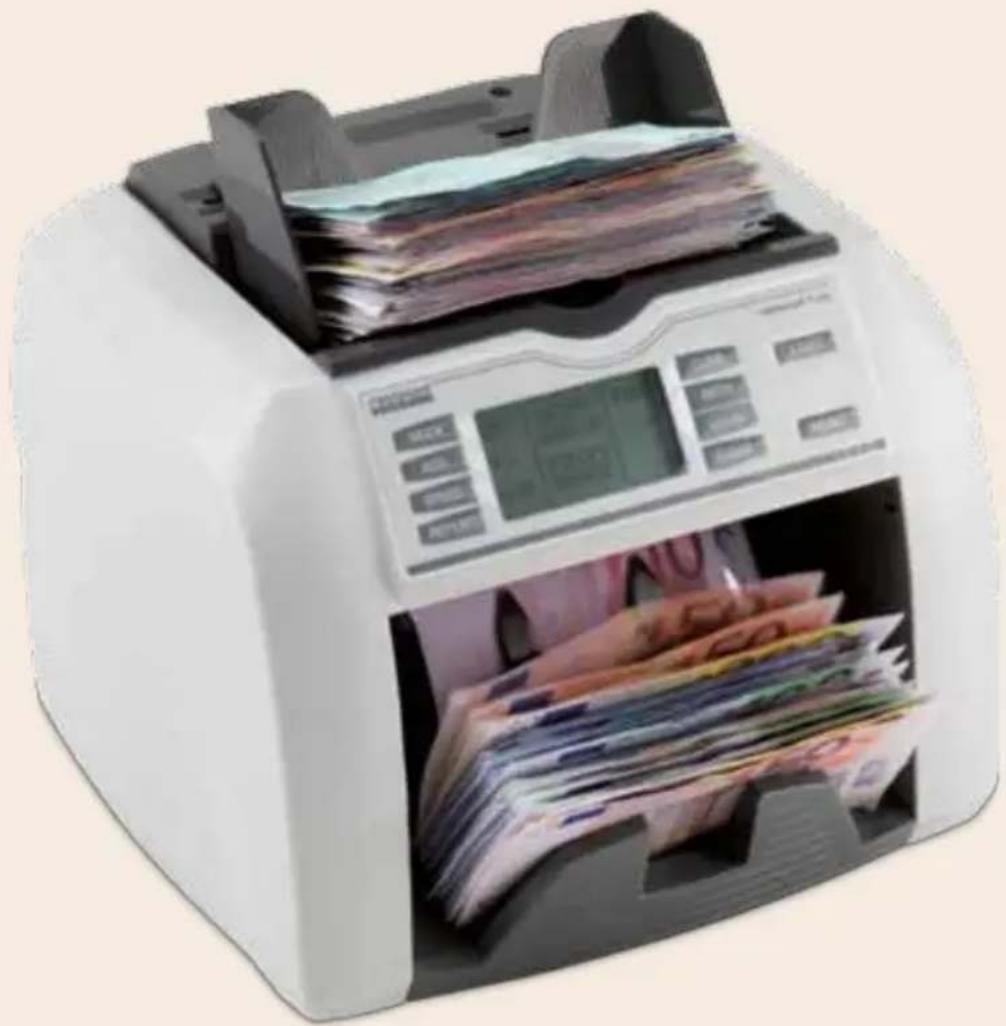
Thank you for deciding on the rapidcount T banknote counter from ratiotec. You made a good choice with the purchase of this quality product. With this device you will be able to count large amounts of banknotes both quickly and easily.
The rapidcount T is available in the following four models:
- rapidcount T 100: Item counter (counts sorted notes, with UV check)
- rapidcount T 200: Item counter (counts sorted notes, with UV, IR and MG check)
- rapidcount T 225: Value counter (counts unsorted notes, with UV check)
- rapidcount T 275: Value counter (counts unsorted notes, with UV, IR, and MG check and magnetic code recognition).
Please read the operating instructions through carefully to ensure a smooth and fault-free operation. We additionally recommend an annual maintenance of the product. The ideal counting capacity is limited to 0,8 million banknotes per year. If you exceed this amount the message SERVICE will occur in the display every time you start the machine. In order to use the machine please press the START key.
Contents
Operating elements / Control panel
Operation
Functions
Settings
Error messages
Cleaning and maintenance
Notes
Technical data
Front / Rear / Control panel
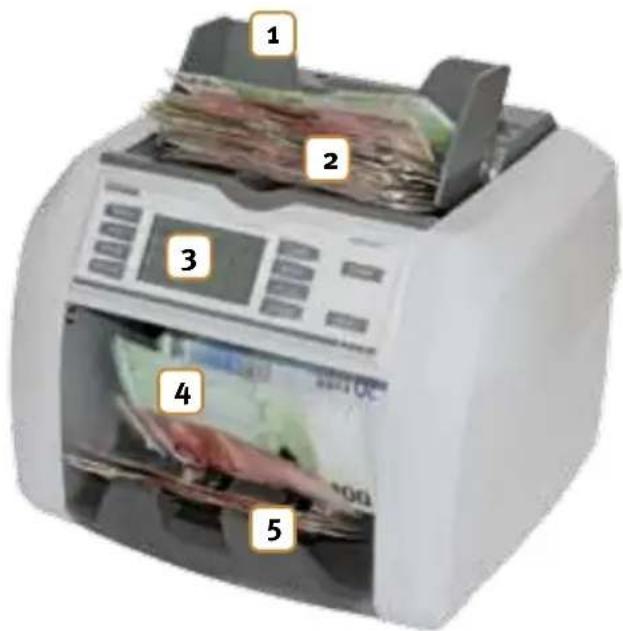
Front of the device
- Feeder rails: Adjustable banknote feeder
- Banknote feeder
- Display
- Banknote ejector
- Banknote stacker
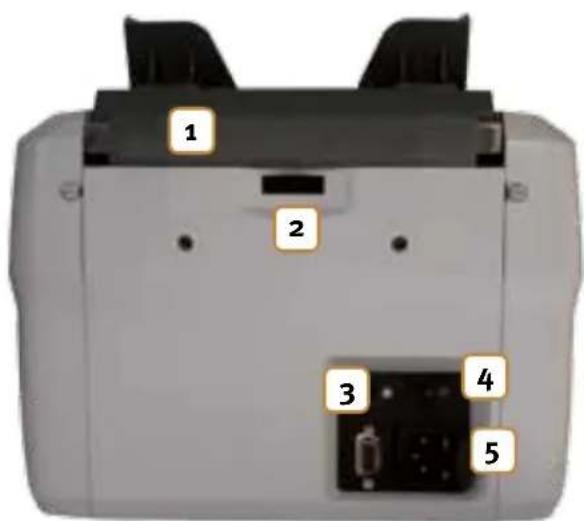
Rear of the device
- Flexible transport handle
- Adjusting screw for banknote feeder
- Serial connection for document printer (Note: This only applies to the rapidcount T 275!)
- ON/OFF switch
- Connection for the mains cable, and position of replaceable visible type fuse
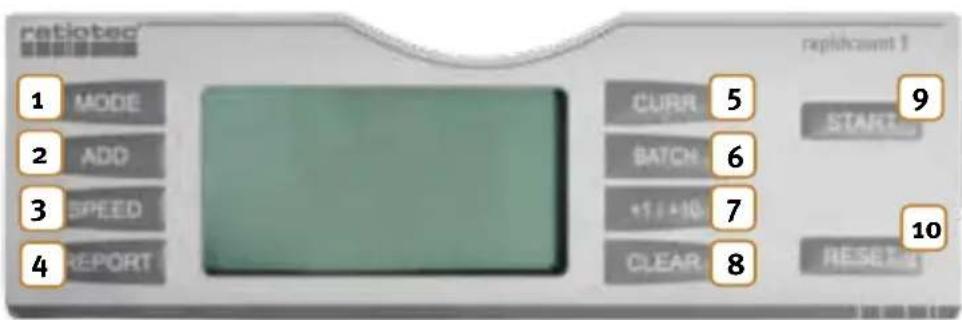
Control panel
- Select counting mode
- Count and add
- Set counting speed
- Counting report display
- Select currency
- Stacking / Bundle function
- Manual adjustment of bundle amount in steps of +1 or +10
- Delete bundle amount
- Start counting procedure when stack of banknotes is inserted and autostart is deactivated / restart of counting procedure when suspected counterfeit money is reported or in case of other error message.
- Reset the counting result to zero
Operation
Connect the mains cable and switch the machine on. The machine will now run a self-test.
After the test is successfully completed, the device is ready for use. In the case of an error message, please read the chapter on error messages to see how to proceed.
Place the stack of banknotes to be counted in the centre of the banknote feeder.
Note: The models rapidcount T 100 and rapidcount T 200 can only count stacks of sorted banknotes.
If autostart is activated, the banknote counter will start the counting procedure automatically after approx. 2 seconds.
Note: If autostart is deactivated, the counting procedure is initiated by pressing START.

The banknotes are counted and transported through the banknote ejector into the stacker. The count can be read on the display. In the case of models T 200, T 225 and T 275, the authenticity of the banknotes is also checked simultaneously during the counting procedure.
Functions, common functions of all rapidcount T models
START
When held down for an extended period, this button gives you the opportunity to change between autostart and manual start:
Autostart:
The counting procedure starts approx. 2 seconds after you have placed the banknotes in the banknote feeder.
Manual start:
The counting procedure only starts after the START button is pressed.
In addition, you can confirm continuation of the counting procedure using the START button after an error has been reported or after the ejection of a suspicious banknote.
SPEED
You can select the counting speed of the banknote counter by choosing between "Low" and "Hi". This can be freely set, independent of the counting mode. The more heavily worn the banknotes requiring counting, the slower the counting speed should be. This prevents unnecessary error messages due to features that are hard to assess. Furthermore, at a higher speed, banknotes are subject to greater strain, so they may become damaged.
BATCH
The bundle function lets you count an exact number of banknotes as a bundle and this can be set independent of the counting mode. The function is activated using the BATCH button. After pressing this button, you can select from a series of predefined values: 100 → 50 → 20 → 10 → 5 → 0 → 100. If you want to count off a different number of banknotes, press the +1/+10 button to increase the preset value in steps. To increase by +1, press the button briefly; to increase by +10, press for an extended period. The required number of banknotes per bundle will be shown on the display next to the BATCH button. If the banknote counter is set to a bundle quantity of 20 banknotes, for example, it will stop automatically after this number has been counted. You can delete the bundle quantity and/or deactivate the BATCH function by pressing the CLEAR button.
Note: The bundle function stops automatically when the stated quantity is reached, even if the banknote counter is counting a stack of mixed banknotes.

ADD
If the addition function is activated, the display next to the ADD button reads "Yes"; if it is not activated, the display reads "No".
No:
Once the counting procedure is completed, the result is deleted as soon as you remove all the banknotes from the receiver compartment.
Yes:
Once the counting procedure is completed, the counting result is not deleted, even after all the bank-notes have been removed from the stacker. Each further counting procedure is added to the previous one. The added value is deleted by pressing on the RESET button.
Note: The addition value is deleted when the addition mode is switched off.

CURR
You can select the currency using this button. The currency currently set is shown on the display next to the CURR button. The Euro is the supported factory setting.
Model-dependent functions of rapidcount T banknote counters:
rapidcount T 100
Mode
Count:
Describes the item counting mode of the banknote counter. The checking of UV features is not activated.
UV:
During item counting, the checking of UV features is also activated.
REPORT
When this button is pressed after the counting procedure, the display shows the count result in a clear form. Repressing the button or starting a new counting procedure brings back the standard display mode.
rapidcount T 200
Mode
Count: Describes the item counting mode of the banknote counter. The authenticity check on the banknotes is not activated.
Check: During item counting, the checking of format, UV, infrared and magnetic features is also activated.
REPORT
When this button is pressed after the counting procedure, the display shows the count result in a clear form. Repressing the button or starting a new counting procedure brings back the standard display mode.
rapidcount T 225
Mode
Count: Describes the item counting mode of the banknote counter. The checking of UV features is not activated. The number of banknotes is counted.
Sort: This mode describes the counting of sorted banknotes, e.g. the counting of a stack of 10 Euro banknotes. The value and the number of inserted banknotes are determined. The first banknote fed in (the lowest banknote of the placed stack!) is used as a reference value. If there are foreign banknotes in the stack, i.e. notes that do not correspond to the reference value, this will be signalled by an error message and the device will stop immediately. The foreign banknote can be removed from the banknote compartment and you can continue the counting procedure using the START button.
Mix: Counting of unsorted banknotes.
REPORT
When this button is pressed after the counting procedure, the display shows the number of all bank-notes counted, as well as the total in a clear form. Repressing the button or starting a new counting procedure brings back the standard display mode.
Note: If a document printer is connected to the printer connection of the banknote

counter, a document can also be printed in parallel to the display if the button is held down for an extended time.
rapidcount T 275
Mode
Count: Describes the item counting mode of the banknote counter. The authenticity check is not activated. The number of banknotes is counted.
Sort: This mode describes the counting of sorted banknotes, e.g. the counting of a stack of 10 Euro banknotes. The value and the number of inserted banknotes are determined. The first banknote fed in (the lowest banknote of the placed stack!) is used as a reference value. If there are foreign banknotes in the stack, i.e. notes that do not correspond to the reference value, this will be signalled by an error message and the device will stop immediately. The foreign banknote can be removed from the banknote compartment and you can continue the counting procedure using the START button. During counting, a check on colours, as well as format, UV, infrared and magnetic features, is also activated.
Mix: Counting of unsorted banknotes. During counting, the check on colours, as well as format, UV, infrared and magnetic features, is also activated.
REPORT
When this button is pressed after the counting procedure, the display shows the number of all bank-notes counted, as well as the total in a clear form. Repressing the button or starting a new counting procedure brings back the standard display mode.

Note: If a document printer is connected to the printer connection of the banknote
counter, a document can also be printed in parallel to the display if the button is held down for an extended time.
Settings
Each model of the rapidcount T series automatically configures and adjusts itself when the device is switched on. However, if the banknotes are not being fed in correctly, you can rectify the fault using the feeder setting. To this end, there is an adjusting screw on the rear of the device for manual regulation of the feeder pressure. Use this to manually change the pressure.
Insert a banknote and hold it fast when switching the machine on. If you feel tension, the machine is correctly set. If this is not the case, change the incline of the banknote feeder using the adjusting screw on the rear of the device. If you turn the adjusting screw clockwise, the pressure of the feeder on the banknotes increases. If you turn it anti-clockwise, the pressure is reduced.
Caution: In low temperatures, wait 3 minutes after switching on before starting counting (possible minimal condensation formation on the sensors).

Note: Depending on the quality of the banknotes, they may stick to each other if the pressure is too strong or too weak. In this case, vary the feeder until transportation runs perfectly.

Error messages
The rapidcount T is a reliable banknote counter. However, error messages may occur, not least because the banknote counter may check banknotes that are classified as suspicious. As described in the previous chapter, the banknote counter configures itself automatically each time it is switched on. This includes a test of all the sensors.
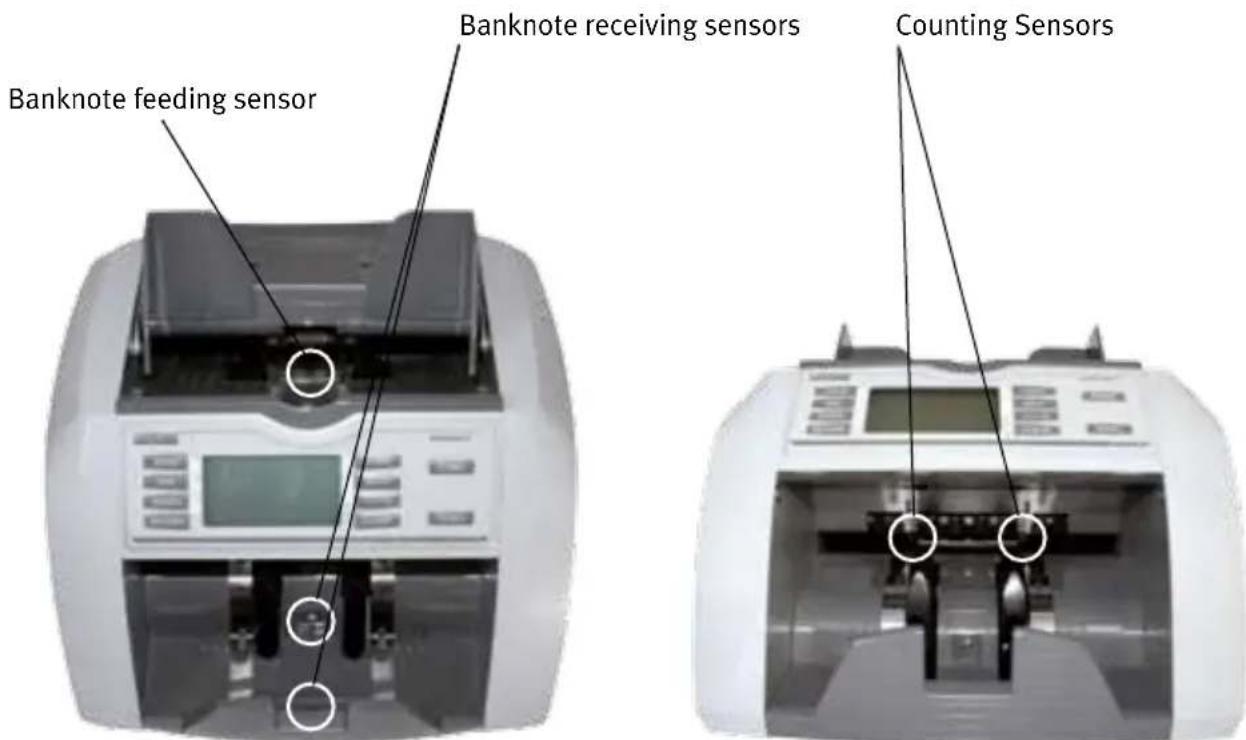
Overview of the sensors:
The following error messages can occur during the test:
Error message when starting the machine:
| Error message Cause Action | ||
| Fluorescence sensor (not visible) | The UV sensor is very dirty, covered by a foreign body or in direct sunlight. | Lift the infeed flap slightly upwards and check whether there are foreign bodies in the device. Remove any dust using compressed air. |
| Banknote feeding sensor (see figure) | The sensor is covered by inserted banknote(s) or is very dirty. | Remove the inserted banknote(s). Clean the sensor. |
| Banknote receiving sensor (see figure) | The sensor is covered by banknote(s) in the compartment or is very dirty. | Remove the banknote(s). Clean the sensor. |
| Left counting sensor (see figure) | The sensor is covered by a foreign body or is very dirty. | Remove the foreign body. Clean the sensor. |
| Right counting sensor (see figure) | The sensor is covered by a foreign body or is very dirty. | Remove the foreign body. Clean the sensor. |
| Ext IR sensor (not visible) | The sensor strip is covered by a foreign body or is very dirty. | Remove the foreign body by manually moving the transport rollers in the banknote feeder. Remove dust from the sensor technology using compressed air. |
| Rotate speed sensor The sensor technology to check the movement status has failed. | Contact the ratiotec service team. | |
| Internal memory fault The banknote counter was switched off during a counting procedure. It is in an undefined state. | Reset the device to the factory settings. Hold down the CLEAR button and switch the device on. “-DEF-H-” will appear in the display. Confirm using RESET. | |
| Device shows no function The power consumption of the bank-note counter was briefly too high. The fuse blew to protect the machine. | Remove the defective fuse next to the power cable connection and replace it with a new one. | |
In addition to these error messages that may occur when the banknote counter system starts, there are numerous messages to indicate a suspected counterfeit banknote. See the following table:
Error messages in operation:
| Error message Cause Action | |||
| Magnetic feature fail |  | The banknote fed is seriously damaged, dirty or is suspect of being counterfeit. | Remove the last ejected banknote. Check whether the banknote is genuine and place the banknote in the middle of the feeder. Continue the counting by pressing the START button. |
| Slant notes Remove all | The banknote counter has drawn in the banknote at an angle. | Remove all the banknotes from the stacker and restart the counting procedure. | |
| Chained notes Remove all | Several notes stuck together have been drawn in and have been identified as one single note. | Remove all the banknotes from the stacker and restart the counting procedure. | |
| Double notes Remove all | More than one note was drawn in at the same time. | Remove all the banknotes from the stacker and restart the counting procedure. | |
| Incomplete notes Remove all | An incomplete banknote was drawn in. | Remove all the banknotes from the stacker and restart the counting procedure. | |
| UV error | The banknote fed is seriously damaged, dirty or is suspect of being counterfeit. | Remove the last ejected banknote. Check whether the banknote is genuine and continue the counting procedure by pressing the START button. | |
| IR error | The banknote fed is seriously damaged, dirty or is suspect of being counterfeit. | Remove the last ejected banknote. Check whether the banknote is genuine and continue the counting procedure by pressing the START button. | |
| Width error | The banknote fed is seriously damaged, dirty or is suspect of being counterfeit. | Remove the last ejected banknote. Check whether the banknote is genuine and continue the counting procedure by pressing the START button. | |
| Denomination different(only on rapidcount T 275) | The banknote counter is in value counting mode, single sort counting. The banknote does not correspond to the expected reference type. | Remove the last ejected banknote.Continue the counting procedure by pressing the START button. | |
| Cannot Judge denomination | The evaluated features do not correspond, i.e. it is impossible to clearly allocate the banknote using its value. | Remove the last ejected banknote.Check whether the banknote is in order and continue the counting procedure by pressing the START button. | |
| Receiver stack full | The stacker of the banknote counter holds a maximum of 220 banknotes.You have exceeded the maximum number. | Remove all the banknotes from the banknote stacker. The banknote counter is again ready for use. | |
Cleaning and maintenance
Regular cleaning and maintenance of the device is imperative in order to guarantee perfect operation. Deposits that build up over time, such as dust on optical sensors, can lead to an increasing number of error messages. For this reason, the following device components must be cleaned regularly:
- Infeed sensor: To recognise the inserted banknotes.
- Receiver sensor: To recognise banknotes located in the receiver.
To clean these sensors, only use a microfaser cloth or cotton buds lightly moistened with water. Aggressive cleaners can attack the surface of optical sensors and render them unusable under certain circumstances.
Use the correct cleaning set and the compressed air spray.

| Technical data rapidcount T 100 rapidcount T 200 rapidcount T 225 rapidcount T 275 | ||||
| Maximum counting speed | 1000 1000 1000 1000 | |||
| Feeder capacity 300 300 300 300 | ||||
| Stacker capacity 220 220 220 220 | ||||
| Power input 60W 60W 60W 60W | ||||
| Operating temperature | 0 °C - 40 °C 0 °C - 40 °C | 0 °C - 40 °C 0 °C - 40 °C | ||
| Item counting | ✓ | ✓ | ✓ | ✓ |
| Format recognition | ✓ | ✓ | ✓ | ✓ |
| Check on UV features | ✓ | ✓ | ✓ | ✓ |
| Check on magnetic features | - | ✓ | - | ✓ |
| Check on IR features | - | ✓ | - | ✓ |
| Read out of magnetic thread | - | - | - | ✓ |
| Value determination | - | - | ✓ | ✓ |
| Document printing function | - | - | ✓ | ✓ |
| Available currencies | Euro / others optional | Euro / others optional | Euro / others optional | Euro / others optional |
| Addition function | ✓ | ✓ | ✓ | ✓ |
| Bundle function | ✓ | ✓ | ✓ | ✓ |
| Automatic start | ✓ | ✓ | ✓ | ✓ |
| Power supply | 230 V / 50 Hz | 230 V / 50 Hz | 230 V / 50 Hz | 230 V / 50 Hz |
| Dimensions | 234 x 287 x 248 | 234 x 287 x 248 | 234 x 287 x 248 | 234 x 287 x 248 |
| Weight | 7,0 kg | 7,0 kg | 7,0 kg | 7,0 kg |
Einleitung
Utilizzo
Manejo
Bediening
Operação
KASUTAMINE
Χρήση
Banknote receiving sensors
Counting Sensors
Опериране
Banknote receiving sensors

Obsluha
Obsluha
System requirements:
Windows 7/XP/Vista
Administration rights / Access to internet
You may find the license number (sequence of 24 numbers) for installation of the ratiotec update manager here:
- For ratiotec devices after 01-01-2014 at the rear of the machine.
- For ratiotec devices that require update kit on the cover of the cd or on the box.
- For licenses that were bought separately on the delivery note or on the bill.
- 2 x Click!
- 2 x clic!
4

• Lizenznummer der Software eingeben
- Insert license number
- Inserire il numero di licenza
5

• NET Framework ist bereits installiert: Abrechen
• NET Framework is already installed: Cancel
• NET Framework è già installato: Annulla
6

A) Update-Kabel anschließen
A) Connect update cable
A) Collega il cavo di aggiornamento
B) Bestätigen
B) Confirm
B) Confirmare
7

- 2 x Click!
- 2 x clic!
9
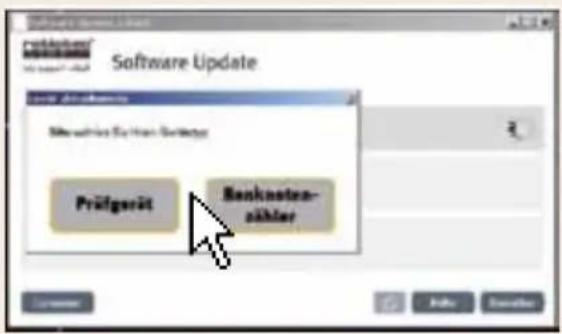
- Bei Banknotenzählmaschinen: Seriennummer der Maschine eingeben
• Banknote counting machines: insert serial number of the machine - Conta banconote: inserire il numero di serie della macchina
11

12
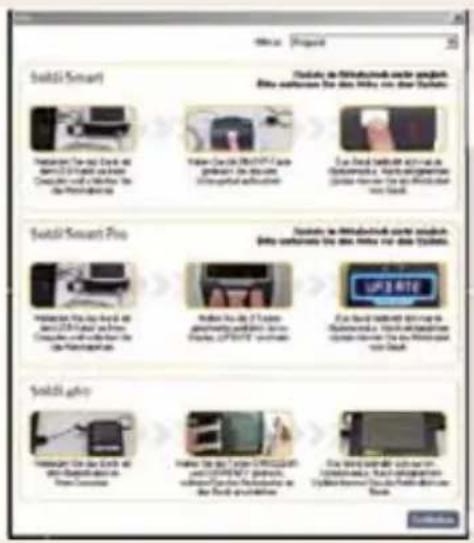
- Prüfgeräte: Hilfe öffnen, Gerät auswählen und Anweisungen folgen
- Detector: Open help file, choose your device and follow the instructions
- Verificare banconote: Aprire il file di aiuto, scegliere il dispositivo e seguire le istruzioni
13
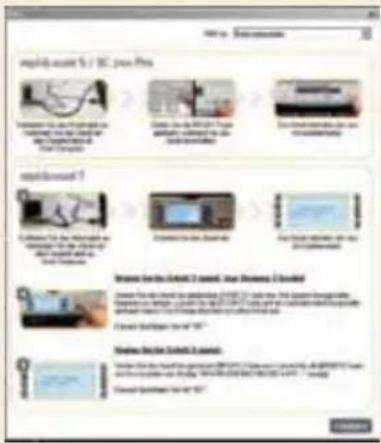
Open help file, choose your device and follow the instructions
natural_image
Simple line drawing of a trash bin with crossed lines indicating no waste or plastic (no text or symbols)European Standard concerning the waste from electrical and electronic equipment (WEEE) (European Union only)
-GB- This equipment is marked with the above recycling symbol. It means that at the end of the life of the equipment you must dispose of it separately and not place it in the normal domestic unsorted waste stream. Please send it back to the distributor. This will benefit the environment for all.

- Instruction manual
- rapidcount T 100 / T 200 / T 225 / T 275
- Inhalt / contents
- Contents
- Front / Rear / Control panel
- Front of the device
- Rear of the device
- Control panel
- Operation
- Functions, common functions of all rapidcount T models
- START
- Autostart:
- Manual start:
- SPEED
- BATCH
- ADD
- No:
- Yes:
- CURR
- Model-dependent functions of rapidcount T banknote counters:
- rapidcount T 100
- Mode
- Count:
- UV:
- REPORT
- rapidcount T 200
- rapidcount T 225
- rapidcount T 275
- Settings
- Error messages
- Overview of the sensors:
- Cleaning and maintenance
- Einleitung
- Utilizzo
- Manejo
- Bediening
- Operação
- KASUTAMINE
- Χρήση
- Опериране
- Obsluha
- System requirements:
- You may find the license number (sequence of 24 numbers) for installation of the ratiotec update manager here:
- 4
- 5
- 6
- 7
- 9
- 11
- 12
- 13
- European Standard concerning the waste from electrical and electronic equipment (WEEE) (European Union only)
Brand : Ratiotec
Model : T 275
Category : Coin and bill counter