
Audio Link Digital Surround - Audio/video extension EBODE - Free user manual and instructions
Find the device manual for free Audio Link Digital Surround EBODE in PDF.


| Product Type | Wireless audio/video extender (transmitter and receiver) |
| Brand | ebode |
| Model | Audio Link Digital Surround (ALDS58) |
| Category | Audio/video extender |
| Transmission technology | Digital, 128x oversampling |
| Transmission frequency | 5.8 GHz |
| Maximum range (line of sight) | 30 meters |
| Typical range (through walls) | 10 meters |
| Output power (receiver) | 2 x 18 W RMS |
| Frequency response | 2 Hz - 20 kHz |
| Signal-to-noise ratio | 91 dB (A-weighted) |
| Harmonic distortion | 0.04% @ 20 W |
| Audio latency | Less than 1 ms |
| Transmitter power supply | 9V DC 300mA |
| Receiver power supply | 24V DC 1500mA |
| Kit contents | 1 transmitter, 1 receiver, 2 power adapters, 2 short speaker cables |
| Intended use | Wireless audio transmission to passive speakers (rear) |
| Safety precautions | Indoor use only, avoid moisture, do not disassemble, do not short-circuit outputs |
| Maintenance | Clean with a dry cloth. Do not use solvents. |
| Repairability | Do not repair yourself. Contact a qualified technician. |
Frequently Asked Questions - Audio Link Digital Surround EBODE
User questions about Audio Link Digital Surround EBODE
0 question about this device. Answer the ones you know or ask your own.
Ask a new question about this device
Download the instructions for your Audio/video extension in PDF format for free! Find your manual Audio Link Digital Surround - EBODE and take your electronic device back in hand. On this page are published all the documents necessary for the use of your device. Audio Link Digital Surround by EBODE.
USER MANUAL Audio Link Digital Surround EBODE
Audio Link Digital Surround

natural_image
Two black electronic devices, one with a spool and the other a device with a circular button labeled 'eb de' (no additional text or symbols visible)ALDS58

User guide 2

Before using our product, please read this documents carefully.
Contents
- CONFORMITY OF USE
- INTRODUCTION
- CONTENTS OF THE KIT
- TECHNICAL SPECIFICATIONS
- CONNECTING THE TRANSMITTER
- CONNECTING THE RECEIVER
- PLACING THE TRANSMITTER AND RECEIVER
- OPERATING THE TRANSMITTER
- OPERATING THE RECEIVER
- FREQUENTLY ASKED QUESTIONS
1. Conformity of Use
For carefree and safe use of this product, please read this manual and safety information carefully and follow the instructions. The unit is registered as a device that does not cause or suffer from radio-frequency interference. It is CE approved and it conforms with the Low Voltage Directory. The safety and installation instructions must be observed. Technical manipulation of the product or any changes to the product are forbidden, due to security and approval issues. Please take care to set up the device correctly - consult your user guide. Young children should use the device only under adult supervision. No guarantee or liability will be accepted for any damage caused due to incorrect use of the equipment supplied, other than indicated in this owner's manual.
SAFETY WARNINGS
- To prevent short circuits, this product (except if specified for outdoor usage) should only be used inside and only in dry spaces. Do not expose the components to rain or humidity.
- Avoid strong mechanical tear and wear, extreme ambient temperatures, strong vibrations and atmospheric humidity.
- Do not disassemble any part of the product: no user-serviceable parts are inside. The product should only be repaired or serviced by qualified and authorized service personnel. Defected pieces must be replaced by original (spare) parts.
- Batteries: keep batteries out of the reach of children. Dispose of batteries as chemical waste. Never use old and new batteries or different types of batteries together. Remove the batteries when you are not using the system for a longer period of time.
When inserting batteries be sure the polarity is respected. Make sure that the batteries are not short circuited and are not disposed in fire (danger of explosion).
In case of improper usage or if you have opened, altered and repaired the product yourself, all guarantees expire. The supplier does not accept responsibility in the case of improper usage of the product or when the product is used for purposes other than specified. The supplier does not accept responsibility for additional damage other than covered by the legal product responsibility.
Thank you for purchasing this ebode product.
2. Introduction
Make your speakers wireless with the ALDS58 and eliminate long speaker cables to your rear speakers. The wireless amplifier receives a 5.8GHz signal which is transmitted in a digital format up to 30 meters away from the transmitter. Wireless Digital Audio at full CD quality due to uncompressed technique. Volume can be adjusted with your existing remote and on both transmitter and receiver to guarantee a perfect sound between your front and rear speaker. Stereo Amplifier with 2x40 Watts RMS Output power per channel.
3. Contents of the kit
• 1x 5.8 GHz Digital Audio transmitter,
• 1x 5.8 GHz Digital Audio receiver,
• 1x 9V DC 300mA Power Supply
• 1x 24V DC 1500mA Power Supply
- 2x short speaker cables.

natural_image
Two black electronic devices, one with a spool and the other a circular device labeled 'ab de' (no visible text or symbols on the devices themselves)4. Technical Specifications
Transmitter:
• Audio transmission method: Digital
• Transmitter frequency: 5.8 GHz
- Error correction: 1/2 rate FEC
• Audio sampling method: 128 times oversampling
• Transmitted data rate: >3 Mbps
- Transmitter operating range: max. 100 ft. line of sight, max. 30 ft. through walls and ceilings
Receiver:
• Output power: 2 * 18 W (RMS)
• Frequency response: 2 Hz ... 20 kHz
• Signal-to-noise ratio: 91 dB (Transmitter / Receiver, A-weighted)
• Total harmonic distortion: typ. 0.04 % @ 20 W
• Overall audio latency: < 1 ms
• Power efficiency: 90 %
• Channel separation: typ. 75 dB
• Automatic receiver power down feature
5. Connecting the transmitter
The transmitter connects either to a standard line-out audio interface via the supplied RCA cable or to a received speaker output via the supplied short speaker cables.
If the transmitter is connected via speaker cables, observe the polarity of the cable connection to ensure that the transmitter will be fed with a correct polarity signal. If one of the cables is switched (reversed), one speaker will receive an opposite polarity signal which will degrade sound performance.
The transmitter can also be connected to other audio outputs by using an appropriate adapter.
Connect the supplied small AC adapter's barrel-shaped plug into the DC 9V jack, and then plug the transformer into a standard AC outlet. We recommend the use of a surge protector to protect the transmitter from power surges.
Do not use both the speaker cables and RCA cable. Do not connect speakers to the transmitter. Do not connect the large AC adapter to the transmitter.
6. Connecting the receiver
Connect the DC power input of the receiver with the supplied large 24 V AC adapter (wallwart). The use of a surge protector is recommended to protect the receiver from power surges which may damage the receiver and connected speakers or may cause audio dropouts.
The receiver connects to regular passive loudspeakers via regular speaker cables (not included). Observe the correct polarity when connecting the speakers.
It is also possible to connect both speakers to separate receivers by using an additional receiver. In this case connect one speaker to the left audio output of the first receiver and the second speaker to the right audio output of the second receiver. One audio output of each receiver will not be used in this case.
Never short circuit any receiver audio output since this may damage the receiver. A clicking noise may be generated during receiver power up. Therefore, it is recommended to connect power to the receiver prior to connecting the speakers.
7. Placing the transmitter and receiver
For optimum reception, the receiver should be placed within the line of sight from the transmitter. If possible, the receiver should be placed right side up with its front toward the transmitter.
The transmitter should be placed at an elevation such that there are no obstacles between the transmitter and receiver (line of sight) in an area where there will be the least amount of traffic. We suggest that you place the transmitter on top of your audio source. Example 1 shows the optimum placement of the transmitter and receiver.
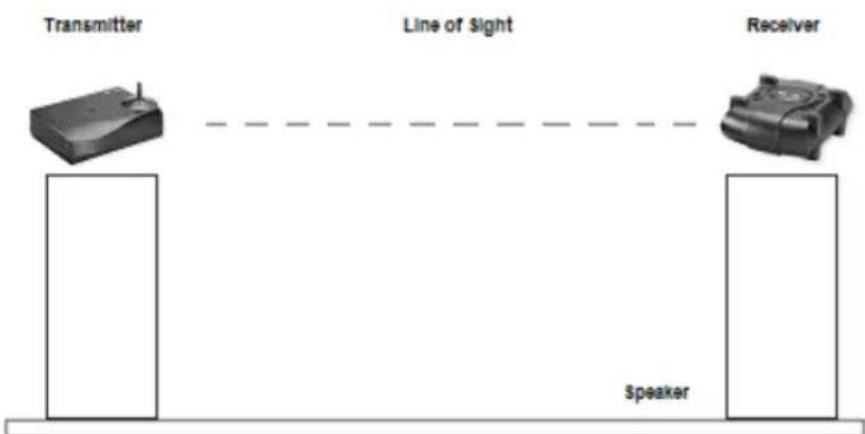
flowchart
graph LR
    A["Transmitter"] -->|Line of Sight| B["Receiver"]
    B -->|Speaker| C["Speaker"]
Example 1
The receiver can also be placed as shown in example 2. In this case, no line of sight exists and the operating range is reduced.
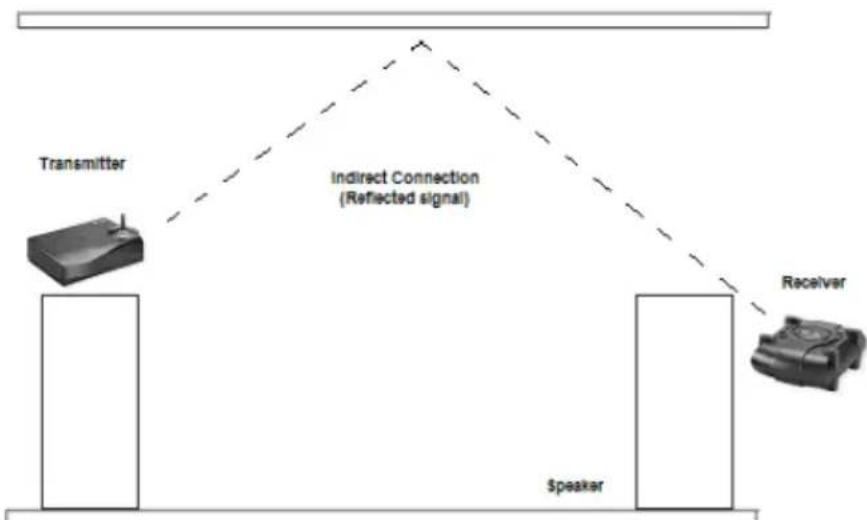
flowchart
graph TD
    A["Transmitter"] --> B["Indirect Connection (Reflected signal)"]
    B --> C["Receiver"]
    C --> D["Speaker"]
Example 2
You can mount the receiver vertically by using the 2 screw openings at the bottom of the receiver. If the receiver is mounted vertically, the operating range is reduced compared to mounting the receiver right side up.
The receiver incorporates a directional antenna which prefers signals transmitted toward the front of the receiver. Therefore, the front of the receiver should always be facing toward the direction of the strongest transmitter signal. By properly orienting the receiver, interference from other signal sources can be minimized.
We suggest that you experiment with placement in order to find the best location for the transmitter and receivers.
Note: This product will not work properly from within an enclosed metal cabinet.
8. Operating the transmitter
After powering up the transmitter, the transmit light will go on for approximately five seconds while the transmitter initializes.
After initialization, the transmit light will go out.
Initially, set the transmitter volume control to a middle setting.
Once audio is detected at the audio input, the transmit light will go on and the transmitter will transmit the audio signal.
When audio is no longer detected, the transmitter will go into standby mode after approximately one minute. The transmit light will go out. During standby mode, no signal is transmitted.
9. Operating the receiver
As soon as a valid transmitter signal is received by the receiver, the receiver will output the received audio signal to the speaker outputs. You can change the audio level by adjusting the receiver volume control.
In order to achieve maximum transmission quality, the transmitter volume control should be set to match the audio level of your audio source as follows:
1) Set the receiver volume control to a low level to prevent clipping inside the receiver.
2) Set your audio source to output the maximum audio level that you will encounter during normal operation.
3) Turn the transmitter level control knob to the position that yields maximum audio loudness to the speakers without any clipping (distortion). If the transmitter level is set too low, the dynamics of the transmission are not fully used. If the level is set too high, audio clipping (distortion) will occur inside the transmitter.
4) Turn the receiver volume control to a setting that yields the desired volume from the speakers.
If no audio signal is received for more than 20 minutes, the receiver will go into standby mode (power-down mode).
- Frequently Asked Questions
| Problem | Possible Cause | Solution |
| The transmit light does not go on after DC power is applied to the transmitter | Faulty AC adapter or faulty power outlet | Check the power outlet and the AC adapter; if possible, check for correct voltage of the AC adapter. |
| The transmit light goes out after a few seconds and does not light again | No audio present at audio input | Check the audio connection to the transmitter and ensure that there is audio present. |
| Transmitter hung up | Disconnect and then reconnect DC power. | |
| No audio at amplifier | Faulty AC adapter or faulty power outlet | See under “Faulty AC adapter or faulty power outlet” above. |
| Transmitter volume control set too low | Adjust the transmitter volume control. | |
| Amplifier volume control set too low | Adjust the amplifier volume control. | |
| Strong interference | See under “Strong Interference” on next page. | |
| Audio is distorted | Transmitter volume control set too high | Adjust the transmitter volume control until clipping stops. |
| Amplifier volume control set too high | Adjust the amplifier volume control until clipping stops. | |
| Strong interference | See under “Strong Interference” on next page. | |
| Speaker audio level is too low | Transmitter volume control set too low | Adjust the transmitter volume control to achieve the desired audio level. |
| Amplifier volume control set too low | Adjust the amplifier volume control to achieve the desired audio level. | |
| Speaker audio level is too low | Audio signal too weak | Increase the output level of the audio source (connect transmitter to an adjustable output by using an adapter if necessary). |
| Audio drops out intermittently or crackles | Strong interferenceUnstable power supply | In some cases, there may be strong interference preventing proper reception of the audio signal which can be caused by 5.8 GHz cordless telephones or 5.8 GHz wireless networks. Either eliminate the interference, locate the base unit of the cordless phone in another room, set the wireless network to use the 5.1 GHz frequency band rather than 5.8 GHz, relocate the transmitter, relocate or reorient the amplifier.Ensure that the power outlet delivers a stable voltage. Very strong surges or voltage fluctuations may cause audio dropouts. Try using a surge protector. |
| Audio is noisy | Strong interference | See under “Strong Interference” on previous page. |
| Transmitter volume control set too low | Adjust the transmitter volume control. | |
| Audio signal too weak | See under “Audio signal too weak” on previous page. | |
| Transmitter range is extremely short | Strong interference | See under “Strong Interference” on previous page. |
| Too many obstacles | Audio will drop out if there are too many obstacles between the transmitter and the amplifier (see page 4), try relocating the amplifier or transmitter to improve reception or use a model 1600 transmitter. |
Questions? Please visit our website www.ebodeelectronics.eu for FAQ and our contact details.
INHALT
natural_image
Two black electronic devices, one with a circular button and the other a rectangular device (no visible text or symbols)4. Technische Daten
Sender:
flowchart
graph TD
    A["Transmitter"] --> B["Indirect Connection (Reflected signal)"]
    B --> C["Receiver"]
    C --> D["Speaker"]
Vorbild 2
VEILIGHEIDSWAARSCHUWINGEN
natural_image
Two black electronic devices, one with a circular vent and the other a cylindrical device (no visible text or symbols)4. Technische specificaties
Zender:
flowchart
graph TD
    A["Transmitter"] --> B["Indirect Connection (Reflected signal)"]
    B --> C["Receiver"]
    C --> D["Speaker"]
Voorbeeld 2
natural_image
Two black electronic devices, one with a spool and the other a circular device labeled 'eb de', shown against a white background (no text or symbols on the devices themselves).4. Tekniska specifikationer
Sändare:
natural_image
Two black electronic devices, one with a spool and the other a circular device labeled 'ab de' (no visible text or symbols on the devices themselves)flowchart
graph TD
    A["Transmitter"] -->|Indirect Connection (Reflected signal)| B["Receiver"]
    B --> C["Speaker"]
Exemple 2
natural_image
Two black electronic devices, one with a circular button labeled 'ab de' and the other a rectangular base with a spout (no visible text or symbols on the devices themselves)5. Conectar o transmissor
flowchart
graph TD
    A["Transmitter"] --> B["Indirect Connection (Reflected signal)"]
    B --> C["Receiver"]
    C --> D["Speaker"]
Exemplo 2
DECLARATION OF CONFORMITY
Hereby, ebode electronics, declares that this ebode ALDS58 is in compliance with the essential requirements and other relevant provisions of the following Directives:
Directive 2004/108/EC of the European Parliament and of the Council of 15 December 2004 on the approximation of the laws of the Member States relating to electromagnetic compatibility
Directive 2006/95/EC of the European Parliament and of the Council of 12 December 2006 on the harmonization of the laws of Member States relating to electrical equipment designed for use within certain voltage limits
Directive 2002/95/EC of the European Parliament and of the Council of 27 January 2003 on the restriction of the use of certain hazardous substances in electrical and electronic equipment
Directive 2005/32/EC of the European Parliament and of the Council of 6 July 2005 establishing a framework for the setting of eco design requirements for energy-using
Technical data and copies of the original Declaration of Conformity are available and can be obtained from ebode electronics: PB 25, NL-4264ZG, the Netherlands.
CE
User Information for Consumer Products Covered by EU Directive 2002/96/EC on Waste Electric and Electronic Equipment (WEEE)
This document contains important information for users with regards to the proper disposal and recycling of ebode products. Consumers are required to comply with this notice for all electronic products bearing the following symbol:

Environmental Information for Customers in the European Union
European Directive 2002/96/EC requires that the equipment bearing this symbol on the product and/or its packaging must not be disposed of with unsorted municipal waste. The symbol indicates that this product should be disposed of separately from regular household waste streams.
It is your responsibility to dispose of this and other electric and electronic equipment via designated collection facilities appointed by the government or local authorities. Correct disposal and recycling will help prevent potential negative consequences to the environment and human health.
For more detailed information about the disposal of your old equipment, please contact your local authorities, waste disposal service, or the shop where you purchased the product.
DECLARATION OF CONFORMITY TO R&TTE DIRECTIVE 1999/5/EC for the European Community, Switzerland, Norway, Iceland and Liechtenstein
Product category: general consumer (category 3).
English: This equipment is in compliance with the essential requirements and other relevant provisions of the European R&TTE Directive 1999/5/EC
Also available from ebode: Bluetooth Speaker and Bluetooth receiver

natural_image
Close-up of a black circular electronic device with white branding and a small circular logo on the front face (no readable text or symbols)Bluetooth Speaker BTS30
Use the BT Sound to share the music on your smartphone, tablet or laptop wirelessly with your friends. As the BT Sound is small in size you can enjoy your favourite songs any place, any time, any where! Ideal for parties, festivals or while travelling.
Bluetooth Receiver BTR30
Transmit the music from you smartphone, tablet or laptop wireless to your BT Sound Receiver. You easily hook this up to your amplifier, stereo set or your car audio system. Enjoy your favourite songs with all your friends at home, and on the go!

natural_image
Black electronic device labeled 'ebode' with cable and speaker ports (no readable text beyond branding)ebode is focusing on wireless audio and video products, that are affordable, innovative and plug & play. The products provide you with comfort in your home, help you to avoid wires, and make sure you can stream your personal audio and video to where ever you want to look or listen to it. For more ebode products and information, please visit www.ebodeelectronics.eu.
Also available from ebode: Bluetooth Speaker and Bluetooth receiver

natural_image
Black ebo de camera with visible sensor and antenna (no text or symbols on device body)WideEye IP Camera IPV38WE
The indoor camera comes with a standard 6.0mm lens or you can choose the 3.6mm WIdeEye lens. They are both pan and tilt and can be set as a motion detector which records videos, photos and sound. They have a build-in microphone and speaker.
Dome IP Camera IPV68
The dome camera is a waterproof camera for both outdoor and indoor use. The camera can Pant, Tilt, has 3x Optical Zoom and 640 x 480 pixels (300k) MPEG4 resolution. It has a metal housing, an easy user interface and is fully plug and play.

natural_image
Black spherical security camera with 'ebode' branding, no visible text or symbols on the device itselfebode is focusing on wireless audio and video products, that are affordable, innovative and plug & play. The products provide you with comfort in your home, help you to avoid wires, and make sure you can stream your personal audio and video to where ever you want to look or listen to it. For more ebode products and information, please visit www.ebodeelectronics.eu.
ebode
www.ebodeelectronics.eu



- Audio Link Digital Surround
- ALDS58
- Contents
- Conformity of Use
- SAFETY WARNINGS
- Thank you for purchasing this ebode product.
- Introduction
- Contents of the kit
- Technical Specifications
- Transmitter:
- Receiver:
- Connecting the transmitter
- Connecting the receiver
- Placing the transmitter and receiver
- Operating the transmitter
- Operating the receiver
- INHALT
- Technische Daten
- Sender:
- VEILIGHEIDSWAARSCHUWINGEN
- Technische specificaties
- Zender:
- Tekniska specifikationer
- Sändare:
- Conectar o transmissor
- DECLARATION OF CONFORMITY
- User Information for Consumer Products Covered by EU Directive 2002/96/EC on Waste Electric and Electronic Equipment (WEEE)
- Environmental Information for Customers in the European Union
- DECLARATION OF CONFORMITY TO R&TTE DIRECTIVE 1999/5/EC for the European Community, Switzerland, Norway, Iceland and Liechtenstein
- Also available from ebode: Bluetooth Speaker and Bluetooth receiver
- Bluetooth Speaker BTS30
- Bluetooth Receiver BTR30
- WideEye IP Camera IPV38WE
- Dome IP Camera IPV68
- ebode
Brand : EBODE
Model : Audio Link Digital Surround
Category : Audio/video extension