
Adixxion GC-XA2 - Sports camera JVC - Free user manual and instructions
Find the device manual for free Adixxion GC-XA2 JVC in PDF.


| Product Type | Sports Camera |
| Brand | JVC |
| Model | Adixxion GC-XA2 |
| Dimensions (W x H x D) | 110 x 60 x 40 mm (approx.) |
| Weight | 120 g (approx., without accessories) |
| Power Supply | Rechargeable Li-ion battery, 5V USB charging |
| Video Resolution | Full HD 1080p at 30 fps, 720p at 60 fps |
| Photo Resolution | Up to 8 megapixels |
| Field of View | Wide angle lens (approx. 160°) |
| Connectivity | WiFi, USB 2.0, HDMI output |
| Storage | MicroSD card slot (not included), up to 32 GB |
| Waterproof | With included housing, up to 40 m depth |
| Image Stabilization | Electronic stabilization |
| Main Functions | Video recording, photo capture, time-lapse, loop recording |
| Care and Cleaning | Wipe with a soft, dry cloth; avoid solvents |
| Safety Warnings | Keep away from children; do not disassemble; avoid exposure to extreme heat |
| Spare Parts and Repairability | Battery, USB cable, mounts, and waterproof housing available separately |
| General Information | Compatible with JVC Adixxion app for remote control and live viewing |
Frequently Asked Questions - Adixxion GC-XA2 JVC
User questions about Adixxion GC-XA2 JVC
0 question about this device. Answer the ones you know or ask your own.
Ask a new question about this device
Download the instructions for your Sports camera in PDF format for free! Find your manual Adixxion GC-XA2 - JVC and take your electronic device back in hand. On this page are published all the documents necessary for the use of your device. Adixxion GC-XA2 by JVC.
USER MANUAL Adixxion GC-XA2 JVC
natural_image
Line drawing of a digital camera with front, side, and lens components (no text or symbols)ENGLISH
DEUTSCH
FRANÇAIS
ITALIANO
ESPAÑOL
PORTUGUÊS
NEDERLANDS
POLSKI
РУССКИЙ
SVENSKA
УКРАЇНСЬКА
SUOMI
- Before use, be sure to read "Safety Precautions" (p.2) to use the product correctly.
- Malfunction due to water immersion and other damage caused by misuse by the customer is not covered by warranty.

Detailed User Guide
For more details on operating this product, please refer to the "Detailed User Guide" at the following website.
■http://manual3.jvckenwood.com/
Safety Precautions
CAUTION:
- To prevent shock, do not open the cabinet.
There are no user serviceable parts inside.
Refer servicing to qualified personnel.
NOTES:
- The rating plate and safety cautions are on the bottom of the unit.
- The serial number plate is on the battery mount of the camera.
CAUTION:
- The mains plug shall remain readily operable.
- Remove the mains plug immediately if the camcorder functions abnormally.
WARNING:
- The camcorder should not be exposed to excessive heat such as direct sunshine, fire or the like.
- The battery pack and the camcorder with battery installed should not be exposed to excessive heat such as direct sunlight, fire or the like.
If a malfunction occurs, stop using the camcorder immediately and consult your local JVC dealer.
CAUTION:
- When the equipment is installed in a cabinet or on a shelf, make sure that it has sufficient space on all sides to allow for ventilation (10 cm or more on both sides, on top and at the rear).
- When discarding batteries, environmental problems must be considered, and the local rules or laws governing the disposal of these batteries must be followed strictly.
- Do not point the lens directly into the sun. This can cause eye injuries, as well as lead to the malfunctioning of internal circuitry.
There is also a risk of fire or electric shock.
- Do not use a tripod on unsteady or unlevel surfaces. It could tip over, causing serious damage to the unit.
SOME DO'S AND DON'TS ON THE SAFE USE OF EQUIPMENT
This equipment has been designed and manufactured to meet international safety standards but, like any electrical equipment, care must be taken if you are to obtain the best results and safety is to be assured.
DO read the operating instructions before you attempt to use the equipment. DO ensure that all electrical connections (including the mains plug, extension leads and interconnections between pieces of equipment) are made properly and in accordance with the manufacturer's instructions. Switch off and withdraw the mains plug when making or changing connections.
DO consult your dealer if you are ever in doubt about the installation, operation
or safety of your equipment.
DO be careful with glass panels or doors on equipment.
DON'T continue to operate the equipment if you are in any doubt about it working normally, or if it is damaged in any way — switch off, withdraw the mains plug and consult your dealer.
DON'T remove any fixed cover as this may expose dangerous voltages.
DON'T leave equipment switched on when it is unattended unless it is specifically stated that it is designed for unattended operation or has a standby mode. Switch off using the switch on the equipment and make sure that your family knows how to do this. Special arrangements may need to be made for infirm or handicapped people.
DON'T use equipment such as personal stereos or radios so that you are distracted from the requirements of road safety. It is illegal to watch television whilst driving.
DON'T listen to headphones at high volume, as such use can permanently damage your hearing.
DON'T obstruct the ventilation of the equipment, for example with curtains or soft furnishings. Overheating will cause damage and shorten the life of the equipment.
DON'T use makeshift stands and NEVER fix legs with wood screws — to ensure complete safety always fit the manufacturer's approved stand or legs with the fixings provided, according to the instructions.
DON'T allow electrical equipment to be exposed to rain or moisture.
ABOVE ALL
- NEVER let anyone, especially children, push anything into holes, slots or any other opening in the case — this could result in a fatal electrical shock;
- NEVER guess or take chances with electrical equipment of any kind — it is better to be safe than sorry!
Rated Current Consumption: 520 mA
CAUTION:
— Read Before Use —
Notes on this equipment
- The camcorder shall not be exposed to excessive heat such as direct sunshine, fire or the like.
The built-in battery may explode if it becomes hot.
- The battery is not charged when purchased. Charge the battery before using it for the first time.
- Do not drop this unit or subject it to excessive shock or vibration.
- Before recording, be sure to conduct a trial recording.
- Store the recorded data periodically on a computer.
JVC shall not be liable for any damage or loss of data.
- Do not press the surface of the screen forcefully or subject it to strong impact.
Doing so may damage or break the screen.
- When using the unit in a low temperature environment (-10°C or below), the operating time may be shortened, or it may not function properly.
Waterproof Function
This camera is equipped with a waterproof function.
This camera can make recordings in marine water and fresh water.
We recommend selecting [Blue (marine)]/[Green (marine)] in White Balance for underwater scenes.
The waterproof function is tested in accordance with JVC test standards and it does not assure damage-free or trouble-free operation.
The waterproof function cannot be guaranteed if the camcorder is subject to impact.
Consult with the dealer if the camcorder is subject to impact.
Waterproof Function : IEC Standard publication 529 IPX8.
- The cover for the ports must be firmly closed.
- Do not use this product in water deeper than 5 m.
- Do not use in the following locations:
Place with higher water pressure than specified, in hot springs, or water of 40^ C or higher.
- Supplied accessories are not waterproof.
■ Malfunction due to water immersion (IPX8 5m, 30minutes) and other damage caused by misuse by the customer is not covered by warranty.
Before use, be sure to read the "Detailed User Guide" at our website.
— Maintenance After Use —
- After use in water or a dusty environment, rinse the camera as soon as possible with still fresh water in a basin.
- Always keep the lens clean and wipe the water droplets off the camera with a soft and dry cloth.
• Air-dry the camera completely in a shaded area.
■ The waterproof function of the ports is not guaranteed in all environments or conditions.
(IPX8 5 m, 30 minutes)
Dear Customer, [European Union] This apparatus is in conformance with the valid European directives and standards regarding electromagnetic compatibility and electrical safety. The European representative of JVC KENWOOD Corporation is: JVC Technical Services Europe GmbH
Konrad-Adenauer-Allee 1-11 61118 Bad Vilbel Germany
CAUTION:
- Dispose of used batteries according to the instructions.
- Risk of explosion if battery is replaced by an incorrect type.
A copy of the Declaration of Conformity with regard to the R&TTE Directive 1999/5/EC can be downloaded from the following Web site: http://www3.jvckenwood.com/ecdoc/

Hereby, JVC declares that this unit GC-XA2BE is in compliance with the essential requirements and other relevant provisions of Directive 1999/5/EC. This unit GC-XA2BE is made in China.
WirelessLAN
- This device is a 2.4 GHz wideband transmission system (transceiver), intended for use in all EU member states and EFTA countries, except in France and Italy where restrictive use applies.
- In Italy the end-user should apply for a license at the national spectrum authorities in order to obtain authorization to use the device for setting up outdoor radio links and/or for supplying public access to telecommunications and/or network services.
- This device may not be used for setting up outdoor radio links in France, and in some areas the RF output power may be limited to 10 mW EIRP in the frequency range of 2454 - 2483.5 MHz. For detailed information the end-user should contact the national spectrum authority in France.

Information on Disposal of Old Electrical and Electronic Equipment and Batteries (applicable for countries that have adopted separate waste collection systems)


Products and batteries with the symbol (crossed-out wheeled bin) cannot be disposed as household waste.
Old electrical and electronic equipment and batteries should be recycled at a facility capable of handling these items and their waste by-products. Contact your local authority for details in locating the recycle facility nearest to you. Proper recycling and waste disposal will help conserve resources whilst preventing detrimental effects on our health and the environment.
Notice: The sign "Pb" below the symbol for batteries indicates that this battery contains lead.
Checking the Accessories

natural_image
Isometric view of a rectangular block with three circular symbols on top and an arrow pointing downward (no text or labels)Battery (BN-VH105)
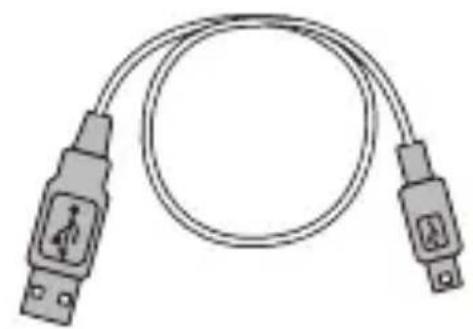
natural_image
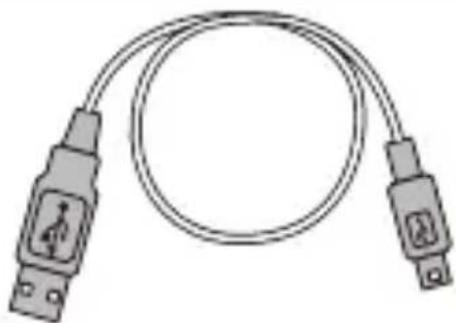
Illustration of a dual-up cable with two USB connectors and a central connector (no text or symbols)USB cable

natural_image
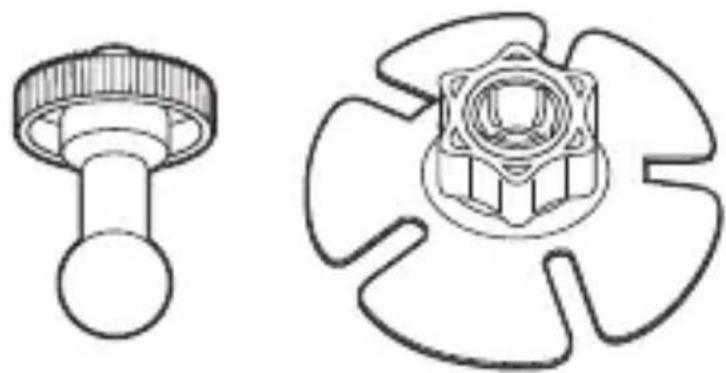
Technical line drawings of two mechanical components: a knob-like device and a gear-like component (no text or symbols)Wide flexible mount (Pod part/Base part)
- Remove any dirt or moisture before attaching accessories.
- Once attached, the fl exible mount cannot be removed.
- The knob of the fl exible mount is attached to the base part when purchased. Remove the knob before assembling the fl exible mount.
Assembling the Flexible Mount
When you fix the camera to a helmet, etc., attach the flexible mount to the tripod mounting hole of the camera.
① Remove the knob from the base part.
Turn the knob in the direction indicated.
② Insert the pod part into the knob.
③ Attach the pod part to the base part.
Be careful not to pinch your finger.
④ Fasten the knob firmly.

natural_image
Diagram of a mechanical component with directional arrow, no text or symbols present
natural_image
Mechanical diagram showing a shaft and nut assembly with a directional arrow (no text or symbols)
natural_image
Diagram of a mechanical assembly with a central component and directional arrow, no text or symbols present
natural_image
Mechanical component diagram showing a gear and shaft assembly with directional arrow (no text or symbols)Component Names and Functions
Record/SET button
Recording mode: starts/stops recording Playback mode: starts or pauses playback
Power button
+ / > button
LCD monitor

switches to the recording mode/ playback mode.

Battery slot (inside)
Port/slot cover latch SD slot (inside)
MENU/DELETE button
Recording mode: displays the menu Playback mode: deletes a file
Mini USB Port (inside)
Tripod socket
When attaching an optional product not manufactured by JVC, make sure that the product conforms to 1/4 ISO 1222. Attaching a product with a long screw may cause a malfunction.

natural_image
Technical line drawing of a cassette tape with no text or symbolsStrap hook.
Use a strap or something similar to prevent the camera being dropped.
Charging the Battery
① Load the battery.
① Slide the port/slot cover latch in the direction indicated.
② Slide and open the cover in the direction indicated while holding down the latch.
③ Insert the battery in the correct direction (+/-) while pulling the blue lever to the left.
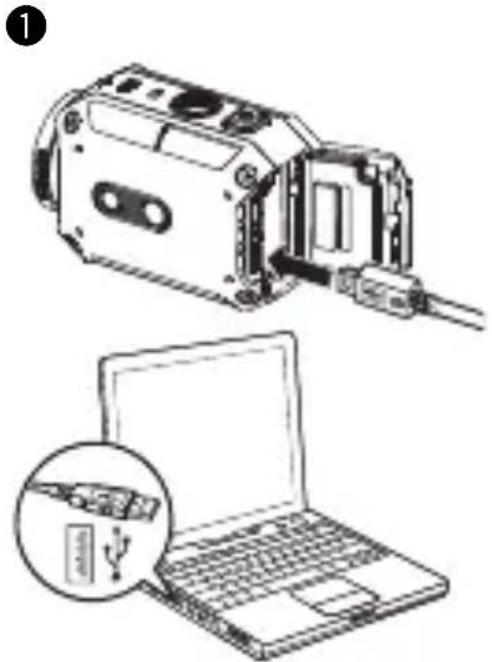
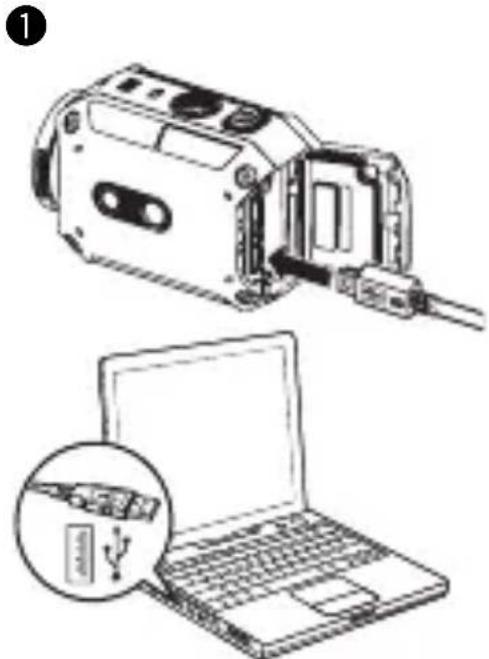
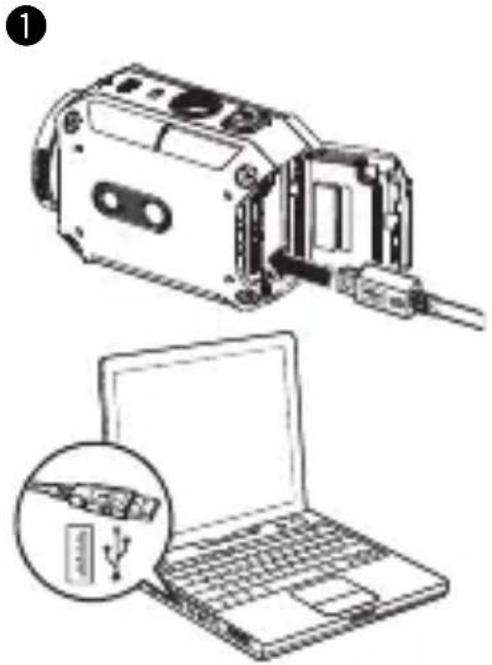
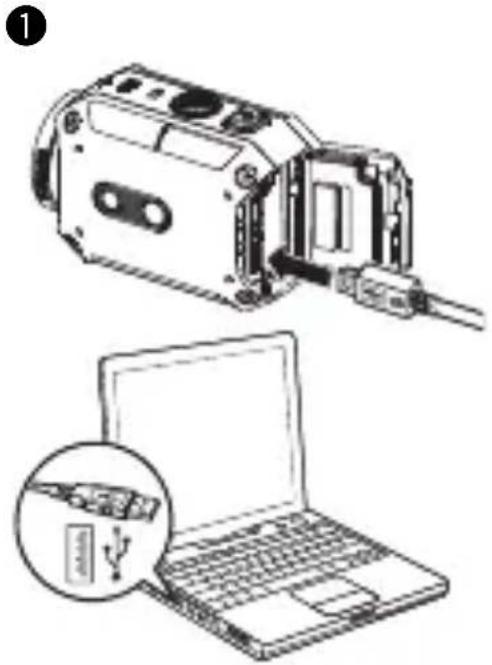
② Charge the battery.
① Connect the USB cable.
② Press < or > to select "Adapter", and press SET.
• The Access LED lights during charging.
- The approximate charging times are 5 hours (when connected to a PC) and 2.3 hours (when connected to the AC adapter).
The Access LED turns off when charging is complete. Remove the USB cable and close the cover firmly.
①

②
natural_image
Illustration of a device with an open lid and a laptop, showing internal components and a close-up of its screen (no text or symbols present)
Inserting an SD Card
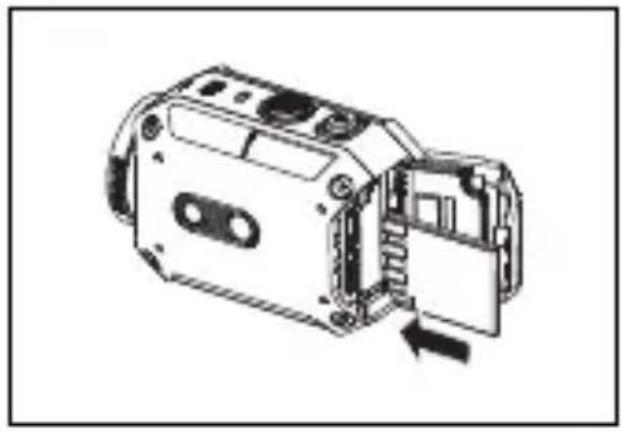
- Insert a separately purchased SD card into the SD slot firmly, until the card is locked.
• To remove the SD card, push the card in once, and pull it out straight. - When using a new SD card, format the card in the menu screen.
natural_image
Technical line drawing of a mechanical device with internal components and an arrow indicating assembly (no text or symbols)Operation is confirmed with the following manufacturers' SD cards.
Class 4 or higher SD/SDHC/SDXC cards (up to 128GB)
When recording with 1080p60 (1080p50), Class 6 or higher is required.
- SanDisk - TOSHIBA
Setting the Clock
① Press and hold Power for 2 seconds to turn the power on.
② Press MENU.
③ Press < or > to select "Setup", and press SET.
④ Press < or > to select "More", and press SET.
⑤ Press < or > to select "Time Setting", and press SET.
⑥ Press < or > to adjust the year, and press SET.
⑦ Repeat the previous step to adjust the month, day, hour, and minute.
- The screen in step ⑥ appears the first time the camera is used.
Recording
① Turn the power on.
Press and hold Power for 2 seconds.
② Press Record to start recording.
Press Record again to stop recording.
③ Zoom in or out if necessary.
</- : Zoom out
+ / >: Zoom in

■ To switch to the photo capturing mode
① Press MENU.
② Press < or > to select "Photo", and press SET.
③ Press < or > to select "Photo" again, and press SET.
- The approximate available recording time is about 60 minutes (1080p30/25) using the battery.
- Do not remove the battery or the SD card while the access LED is lit.
- The power is automatically turned off if no operation is performed for 5 minutes.
Watching or Deleting Videos/Photos
① Switch to the playback mode.
Press Play to switch back to the recording mode.
② Press < or > to select a file.
③ Press SET to start playback.


natural_image
Technical line drawing of a camera housing with labeled components and connection lines (no text or symbols beyond basic labels)■ To delete a file
① Press < or > to select the file you wish to delete.
② Press MENU.
③ Press < or > to select "Yes", and press SET.
Button operations during playback
| Video Photo | ||
| SET Play/Pause – | ||
| < / - | During playback: Fast rewindDuring pause: Previous file | Previous file |
| + / > | During playback: Fast forwardDuring pause: Next file | Next file |
■ Available functions
● Monitoring the camera view
You can check the camera view and operate the camera from an Android or iOS device.
- Broadcasting using Ustream (*1)
You can broadcast camera footage in real-time using Ustream.
- Uploading to YouTube (*1)
You can upload files to YouTube.
(*1): To use these functions, you must register wireless LAN settings and a service account in advance using a PC, Android or iOS application.
For more details, please refer to the "Detailed User Guide".
■ To monitor the camera view
① Download the appropriate application.
Download "ADIXXION sync." (freeware) from Google Play (for Android devices) or App store (for iOS devices) and install.
② Set the Wi-Fi function of the camera to on.
① Press MENU.
② Press < or > to select "Wi-Fi Menu", and press SET.
③ Press < or > to select "ON", and press SET.
4 Confirm the displayed camera ID and KEY.
- Power consumption will increase while the Wi-Fi setting is on. Set the Wi-Fi setting to off when not in use.
③ Set the Wi-Fi function of your device to on.
Android device:
① Touch "Settings" on the application list.
② Touch "Wireless & network".
③ Touch "Wi-Fi" to turn the Wi-Fi on.
Using Wi-Fi (continued)
iOS device:
① Touch "Settings".
② Touch "Wi-Fi".
③ Touch "Wi-Fi" to turn the Wi-Fi on.
④ Touch Camera ID (JVC-******) on the list.
⑤ Enter the KEY.
- The display and procedure may differ depending on the device you use.
④ Start "ADIXXION sync.".
① Touch "ADIXXION sync." on the application list.
② Touch the detected camera.
If the camera cannot be found, confirm that the Wi-Fi setting is set to on and touch "Refresh".
③ Enter the KEY.
■ Applications for Windows/Mac OS PCs
By installing the application, you can perform the same operations as on the Android/iOS application on Windows or Mac OS PCs.
- Download the application at the following website.
http://www3.jvckenwood.com/english/download/gc-xa2/index.html
Troubleshooting
| Problem Check | |
| Cannot turn on the camera/ The power turns off suddenly | Recharge the battery pack. |
| Cannot connect to the Wi-Fi/ Wi-Fi connection cuts off | Try to connect again in a better reception environment. If you are far from the receiver, there is interference, or if there is a microwave or another wireless device nearby, the communication speed may slow down or the connection may not be established. |
| The thermometer icon appears. | The inside of the camera has become overheated. Turn off the unit and wait for a while until the camera cools down. |
| "Wrong Adapter" is displayed and power turns off. | The power is automatically turned off to protect the electrical circuit if the AC adapter input exceeds 5V. |
| The image flickers. Turn the power off, and then turn it on again. | |
JVC
JVC KENWOOD Corporation
3-12, Moriyacho, Kanagawa-ku, Yokohama-shi, Kanagawa, 221-0022, Japan
ACTION-KAMERA
GC-XA2 BE
Grundlegende
Benutzeranleitung

natural_image
Line drawing of a digital camera with lens and buttons (no text or symbols)ENGLISH
DEUTSCH
FRANÇAIS
ITALIANO
ESPAÑOL
PORTUGUÊS
NEDERLANDS
POLSKI
РУССКИЙ
SVENSKA
УКРАЇНСЬКА
SUOMI
natural_image
Simple 3D diagram of a rectangular block with three circular symbols on top and an arrow pointing downward (no text or labels)Batterie (BN-VH105)
natural_image
Illustration of a dual-up cable with two USB connectors and a musical note symbol (no text or labels)USB-Kabel

natural_image
Technical line drawings of two mechanical components: a knob and a gear-like component (no text or symbols)natural_image
Diagram of a mechanical component with a central rotating element and directional arrow, no text or symbols presentnatural_image
Mechanical assembly diagram showing a bolt connected to a nut with a directional arrow (no text or symbols)natural_image
Diagram of a mechanical assembly with a central component and directional arrow, no text or symbols presentnatural_image
Mechanical component diagram showing a knob and rotating shaft with directional arrow (no text or symbols)Lautsprecher
Mikrofon
Zugriff-LED
Objektiv
②

natural_image
Illustration of a device with a battery and an open laptop, showing internal components (no text or symbols)
natural_image
Technical line drawing of a device with internal components and an arrow indicating a movement or assembly (no text or symbols present)natural_image
Line drawing of a portable electronic device with ports and cables (no text or symbols)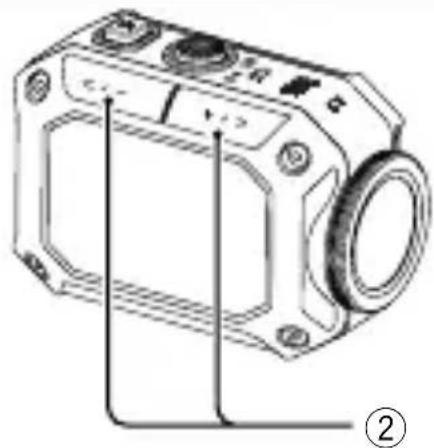
natural_image
Technical line drawing of a digital camera module with mounting holes and a circular lens (no text or symbols)natural_image
Line drawing of a digital camera with no visible text or symbolsENGLISH
DEUTSCH
FRANÇAIS
ITALIANO
ESPAÑOL
PORTUGUÊS
NEDERLANDS
POLSKI
РУССКИЙ
SVENSKA
УКРАЇНСЬКА
SUOMI
natural_image
Simple 3D diagram of a rectangular block with three circular symbols on top and an arrow pointing downward (no text or labels)Pile (BN-VH105)
natural_image
Illustration of two connected audio equipment cables with no text or symbolsCâble USB

natural_image
Technical line drawings of two mechanical components: a knob-like component and a fan-shaped component (no text or symbols)Fixation articulée large (Partie nacelle/Partie base)
natural_image
Diagram of a mechanical component with a central arrow and circular base, no text or symbols presentnatural_image
Mechanical diagram showing a shaft and nut assembly with a directional arrow (no text or symbols)natural_image
Diagram of a mechanical assembly with a central component and surrounding blades (no text or symbols)natural_image
Mechanical component diagram showing a knob and rotating shaft with directional arrow (no text or symbols)natural_image
Line drawings of a device and a laptop, showing internal components and a close-up of the laptop (no text or symbols present)
natural_image
Technical line drawing of a mechanical device with internal components and an arrow indicating a movement or assembly (no text or symbols present)
natural_image
Technical line drawing of a camera module with labeled parts and connection lines (no text or symbols beyond basic labels)natural_image
Line drawing of a digital camera with lens and buttons (no text or symbols)ENGLISH
DEUTSCH
FRANÇAIS
ITALIANO
ESPAÑOL
PORTUGUÊS
NEDERLANDS
POLSKI
РУССКИЙ
SVENSKA
УКРАЇНСЬКА
SUOMI
LAN senza filo (wireless)
natural_image
Simple 3D diagram of a rectangular block with three circular symbols on top and an arrow pointing downward (no text or labels)Batteria (BN-VH105)

natural_image
Illustration of a dual-up cable with two USB connectors and a musical note symbol (no text or labels)Cavo USB
natural_image
Technical line drawings of two mechanical components: a knob-like component and a four-bladed fan-like structure (no text or symbols)natural_image
Diagram of a mechanical component with directional arrow, no text or symbols presentnatural_image
Mechanical assembly diagram showing a bolt connected to a nut with a directional arrow (no text or symbols)natural_image
Diagram of a mechanical assembly with a central component and an arrow indicating motion (no text or symbols)natural_image
Mechanical component diagram showing a gear and valve assembly with directional arrow (no text or symbols)Altoparlante
Microfono
LED di accesso
Obiettivo
Presa HDMI mini (interna)
natural_image
Technical line drawing of a mechanical component with mounting holes and internal features (no text or symbols)natural_image
Illustration of a device with an open lid and a laptop, showing internal components and a close-up of its screen (no text or symbols present)
natural_image
Technical line drawing of a device with internal components and an arrow indicating a movement or assembly (no text or symbols present)
natural_image
Technical line drawing of a camera module with labeled components and connection lines (no text or symbols beyond basic labels)natural_image
Line drawing of a digital camera with lens and buttons (no text or symbols)natural_image
Simple 3D diagram of a rectangular block with three circular symbols on top and an arrow pointing downward (no text or labels)natural_image
Illustration of a dual-up cable with two USB connectors and a musical note symbol (no text or labels)Cable USB

natural_image
Technical line drawings of two mechanical components: a knob and a gear-like component (no text or symbols)Montura flexible ancha (Rótula/Base)
natural_image
Diagram of a mechanical component with a central arrow and circular base, no text or symbols present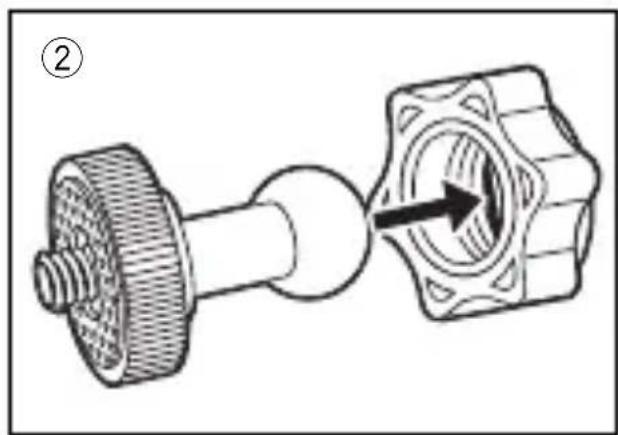
natural_image
Mechanical assembly diagram showing a shaft connected to a housing with a directional arrow (no text or symbols)
natural_image
Diagram of a mechanical assembly with a central component and surrounding blades, no text or symbols present.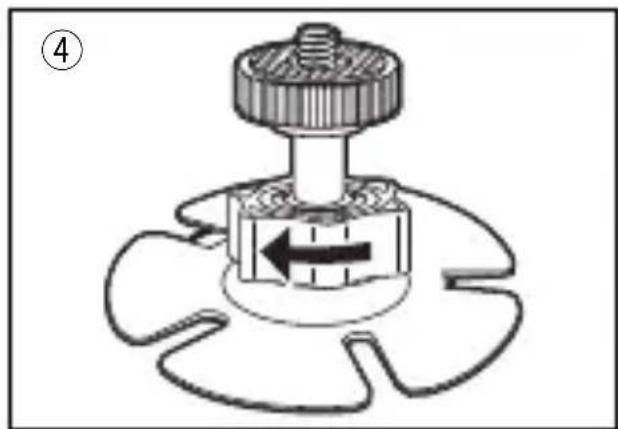
natural_image
Mechanical component diagram showing a knob and valve assembly with directional arrow (no text or symbols)Altavoz
Micrófono
LED de acceso
Objetivo
Conector Mini HDMI (interior)
Botón Play/Record
natural_image
Technical line drawing of a mechanical component with mounting holes and internal features (no text or symbols)Gancho
para correa
②

natural_image
Illustration of a device with a battery and an open laptop, showing internal components and a close-up of its circuit (no text or symbols present)
natural_image
Technical line drawing of a device with internal components and an arrow indicating a movement or assembly (no text or symbols present)
natural_image
Technical line drawing of a camera housing with labeled components and connection lines (no text or symbols beyond basic labels)natural_image
Line drawing of a digital camera with lens and buttons (no text or symbols)ENGLISH
DEUTSCH
FRANÇAIS
ITALIANO
ESPAÑOL
PORTUGUÊS
NEDERLANDS
POLSKI
РУССКИЙ
SVENSKA
УКРАЇНСЬКА
SUOMI
natural_image
Simple 3D diagram of a rectangular block with three circular symbols on top and an arrow pointing downward (no text or labels)Bateria (BN-VH105)

natural_image
Illustration of a dual-up cable with two USB connectors and a musical note symbol (no text or labels)Cabo USB

natural_image
Simple line drawing of a mechanical knob or dial (no text or symbols)
natural_image
Technical line drawing of a mechanical component with four blades and central hub (no text or symbols)natural_image
Diagram of a mechanical component with directional arrow, no text or symbols present
natural_image
Mechanical diagram showing a shaft connected to a nut with a directional arrow indicating motion (no text or symbols)
natural_image
Diagram of a mechanical assembly with a central component and surrounding blades (no text or symbols)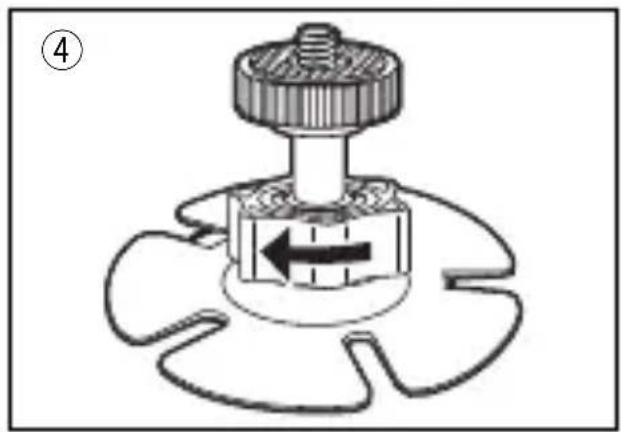
natural_image
Mechanical component diagram showing a gear and valve assembly with directional arrow (no text or symbols)Altifalante
Microfone
LED de acesso
Lente
Mini conector HDMI (dentro)
natural_image
Technical line drawing of a mechanical component with mounting holes and internal features (no text or symbols)Gancho
para correia
②

natural_image
Illustration of a device with a laptop and a separate view showing a close-up of its internal components (no text or symbols present)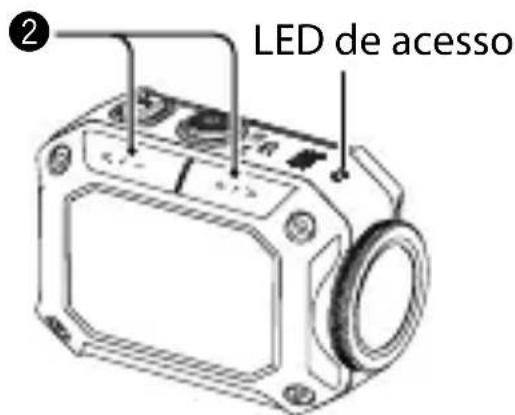
natural_image
Technical line drawing of a mechanical device with internal components and an arrow indicating assembly (no text or symbols)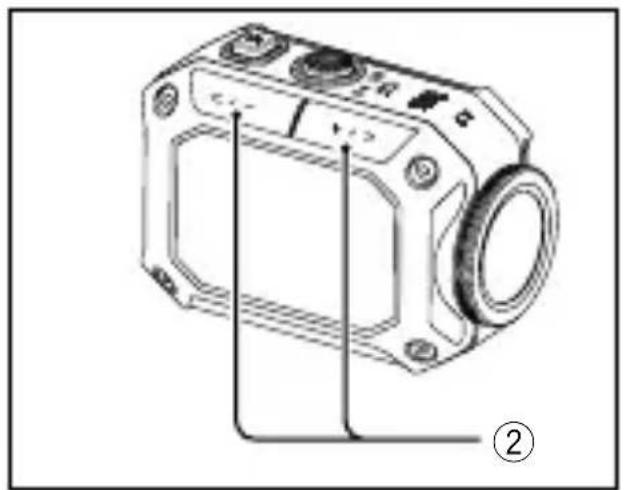
natural_image
Technical line drawing of a camera module with labeled parts and connection lines (no text or symbols beyond basic labels)natural_image
Line drawing of a digital camera with lens and buttons (no text or symbols)ENGLISH
DEUTSCH
FRANÇAIS
ITALIANO
ESPAÑOL
PORTUGUÊS
NEDERLANDS
POLSKI
РУССКИЙ
SVENSKA
УКРАЇНСЬКА
SUOMI
natural_image
Simple 3D diagram of a rectangular block with three circular symbols on top and an arrow pointing downward (no text or labels)Batterijen (BN-VH105)

natural_image
Illustration of a dual-up cable with two USB connectors and a musical note symbol (no text or labels)USB-kabel

natural_image
Technical line drawings of two mechanical components: a knob and a gear-like component (no text or symbols)natural_image
Diagram of a mechanical component with directional arrow, no text or symbols presentnatural_image
Mechanical component diagram showing a bolt and nut assembly with a directional arrow (no text or symbols)natural_image
Diagram of a mechanical assembly with a central component and directional arrow, no text or symbols presentnatural_image
Mechanical component diagram showing a knob and rotating shaft with directional arrow (no text or symbols)Luidspreker
Microfoon
Toegang-indicator
Lens
natural_image
Technical line drawing of a mechanical component with mounting holes and a central oval feature (no text or symbols)Riemhaak
②
natural_image
Illustration of a device with a battery and an open laptop, showing internal components and a close-up of its circuit (no text or symbols present)
natural_image
Technical line drawing of a mechanical device with internal components and an arrow indicating a movement or assembly (no text or symbols present)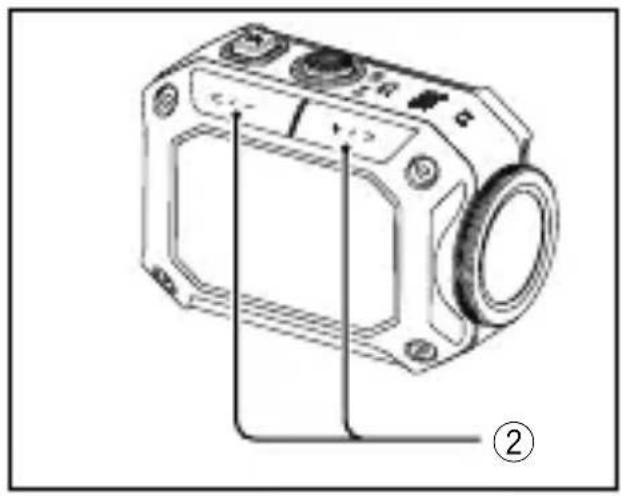
natural_image
Technical line drawing of a camera module with labeled parts and connection lines (no text or symbols beyond basic labels)natural_image
Line drawing of a digital camera with buttons and lens (no text or symbols)ENGLISH
DEUTSCH
FRANÇAIS
ITALIANO
ESPAÑOL
PORTUGUÊS
NEDERLANDS
POLSKI
РУССКИЙ
SVENSKA
УКРАЇНСЬКА
SUOMI
natural_image
Simple 3D diagram of a rectangular block with three circular symbols on top and an arrow pointing downward (no text or labels)Akumulator (BN-VH105)

natural_image
Illustration of a dual-up cable with two USB connectors and a musical note symbol (no text or labels)Kabel USB

natural_image
Technical line drawings of two mechanical components: a knob-like component and a fan-like structure (no text or symbols)natural_image
Diagram of a mechanical component with directional arrow, no text or symbols presentnatural_image
Mechanical assembly diagram showing a shaft connected to a housing with an arrow indicating direction (no text or symbols)natural_image
Diagram of a mechanical assembly with a central component and surrounding blades (no text or symbols)natural_image
Mechanical component diagram showing a gear and shaft assembly with directional arrows (no text or symbols)Głośnik
Mikrofon
Dioda LED
dostępu
Obiektyw
②
natural_image
Illustration of a device with an open laptop and a close-up of its internal components (no text or symbols)
natural_image
Technical line drawing of a mechanical device with an arrow indicating a component or assembly (no text or symbols present)
natural_image
Technical line drawing of a camera housing with mounting holes and a circular lens (no text or symbols)■ Aby usunąć plik
natural_image
Line drawing of a digital camera with buttons and lens (no text or symbols)ENGLISH
DEUTSCH
FRANÇAIS
ITALIANO
ESPAÑOL
PORTUGUÊS
NEDERLANDS
POLSKI
РУССКИЙ
SVENSKA
УКРАЇНСЬКА
SUOMI
natural_image
Simple 3D diagram of a rectangular block with three circular symbols on top and an arrow pointing downward (no text or labels)Аккумулятор (BN-VH105)

natural_image
Illustration of a dual-up cable with two USB ports and a musical note symbol (no text or labels)Кабель USB

natural_image
Technical line drawings of two mechanical components: a knob-like component and a fan-like structure (no text or symbols)natural_image
Diagram of a mechanical component with a central arrow and circular base, no text or symbols presentnatural_image
Mechanical assembly diagram showing a bolt and nut with a directional arrow indicating motion (no text or symbols)natural_image
Diagram of a mechanical assembly with a central component and surrounding blades (no text or symbols)natural_image
Mechanical component diagram showing a gear and lever mechanism (no text or symbols)Колонки
Микрофон
Динамик
Объектив
②
natural_image
Illustration of a device with an open circuit board and a laptop, showing internal components (no text or symbols)
natural_image
Technical line drawing of a mechanical device with internal components and an arrow indicating assembly (no text or symbols)
natural_image
Technical line drawing of a camera module with labeled parts and connection lines (no text or symbols beyond basic labels)natural_image
Line drawing of a camera module with no visible text or symbolsENGLISH
DEUTSCH
FRANÇAIS
ITALIANO
ESPAÑOL
PORTUGUÊS
NEDERLANDS
POLSKI
РУССКИЙ
SVENSKA
УКРАЇНСЬКА
SUOMI
natural_image
Simple 3D diagram of a rectangular block with three circular symbols on top and an arrow pointing downward (no text or labels)Batteri (BN-VH105)
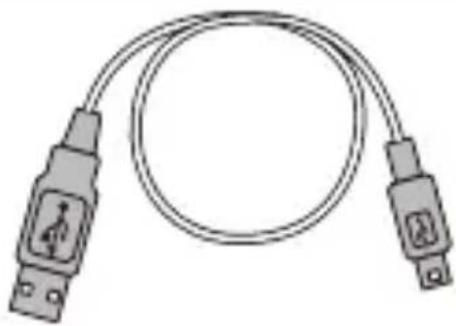
natural_image
Illustration of a dual-up cable with two USB connectors and a musical note symbol (no text or labels)USB-kabel

natural_image
Simple line drawing of a mechanical knob or dial (no text or symbols)
natural_image
Technical line drawing of a mechanical component with four blades and central hub (no text or symbols)natural_image
Diagram of a mechanical component with directional arrow, no text or symbols presentnatural_image
Mechanical assembly diagram showing a bolt connected to a nut with a directional arrow (no text or symbols)natural_image
Diagram of a mechanical assembly with a central component and an arrow indicating direction (no text or symbols)natural_image
Mechanical component diagram showing a knob and rotating shaft with directional arrow (no text or symbols)Högtalare
Mikrofon
Åtkomstlampa
Objektiv
natural_image
Technical line drawing of a mechanical component with mounting holes and a central oval feature (no text or symbols)Remögla
②

natural_image
Line drawings of a device and a laptop, showing internal components and a close-up of the laptop's screen (no text or symbols present)
natural_image
Technical line drawing of a mechanical device with internal components and an arrow indicating assembly (no text or symbols)
natural_image
Technical line drawing of a camera module with labeled parts and connection lines (no text or symbols beyond basic labels)natural_image
Line drawing of a digital camera with buttons and lens (no text or symbols)LYT2659-001A

ENGLISH
DEUTSCH
FRANÇAIS
ITALIANO
ESPAÑOL
PORTUGUÊS
NEDERLANDS
POLSKI
РУССКИЙ
SVENSKA
УКРАЇНСЬКА
SUOMI
natural_image
Simple 3D diagram of a rectangular block with three circular symbols on top and an arrow pointing downward (no text or labels)natural_image
Illustration of a dual-up cable with two USB connectors and a musical note symbol (no text or labels)Кабель USB

natural_image
Technical line drawings of two mechanical components: a knob-like component and a fan-like structure (no text or symbols)natural_image
Diagram of a mechanical component with directional arrow, no text or symbols presentnatural_image
Mechanical assembly diagram showing a shaft connected to a housing with an arrow indicating rotation (no text or symbols)natural_image
Diagram of a mechanical assembly with a central component and surrounding blades, no text or symbols present.natural_image
Mechanical component diagram showing a gear and shaft assembly with directional arrows (no text or symbols)Динамік
Мікрофон
Індикатор
доступу
Об'єктив
②

natural_image
Illustration of a device with an open lid and connected to a laptop, showing internal components and a close-up of its screen (no text or symbols present)
natural_image
Technical line drawing of a mechanical device with internal components and an arrow indicating a movement or assembly (no text or symbols present)
natural_image
Technical line drawing of a camera housing with mounting holes and a circular lens (no text or symbols)■ Щоб видалити файл
natural_image
Line drawing of a digital camera with lens and buttons (no text or symbols)ENGLISH
DEUTSCH
FRANÇAIS
ITALIANO
ESPAÑOL
PORTUGUÊS
NEDERLANDS
POLSKI
РУССКИЙ
SVENSKA
УКРАЇНСЬКА
SUOMI
natural_image
Simple 3D diagram of a rectangular block with three circular symbols on top and an arrow pointing downward (no text or labels)Akku (BN-VH105)

natural_image
Illustration of a dual-up cable with two USB connectors and a musical note symbol (no text or labels)USB-kaapeli

natural_image
Technical line drawings of two mechanical components: a knob-like component and a fan-like structure (no text or symbols)natural_image
Diagram of a mechanical component with a central arrow and circular base, no text or symbols present
natural_image
Mechanical diagram showing a bolt and nut assembly with a directional arrow (no text or symbols)
natural_image
Diagram of a mechanical assembly with a central component and surrounding blades, no text or symbols present.
natural_image
Mechanical component diagram showing a gear and shaft assembly with directional arrow (no text or symbols)natural_image
Technical line drawing of a cassette tape with no visible text or symbolsHihnakoukku
②

natural_image
Illustration of a device with an open lid and connected to a laptop, showing internal components and a close-up of its component (no text or symbols present)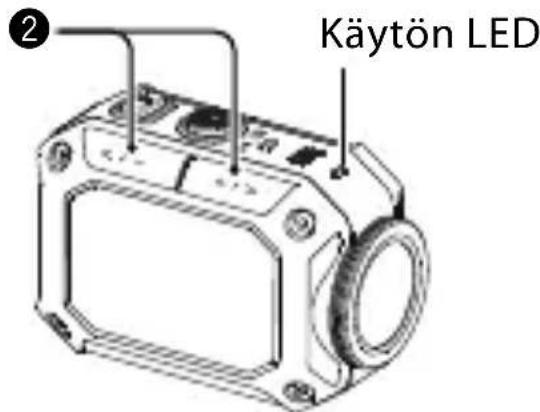
natural_image
Technical line drawing of a mechanical device with internal components and an arrow indicating a movement or assembly (no text or symbols present)
natural_image
Technical line drawing of a camera housing with mounting holes and a circular lens (no text or symbols)- Detailed User Guide
- Safety Precautions
- CAUTION:
- NOTES:
- WARNING:
- SOME DO'S AND DON'TS ON THE SAFE USE OF EQUIPMENT
- ABOVE ALL
- Waterproof Function
- — Maintenance After Use —
- WirelessLAN
- Information on Disposal of Old Electrical and Electronic Equipment and Batteries (applicable for countries that have adopted separate waste collection systems)
- Checking the Accessories
- Assembling the Flexible Mount
- Component Names and Functions
- Record/SET button
- Power button
- MENU/DELETE button
- Tripod socket
- Strap hook.
- Charging the Battery
- Inserting an SD Card
- Setting the Clock
- Recording
- ■ To switch to the photo capturing mode
- Watching or Deleting Videos/Photos
- ■ To delete a file
- ■ Available functions
- ■ To monitor the camera view
- Android device:
- Using Wi-Fi (continued)
- iOS device:
- ■ Applications for Windows/Mac OS PCs
- Troubleshooting
- JVC
- JVC KENWOOD Corporation
- GC-XA2 BE
- Grundlegende
- Benutzeranleitung
- LAN senza filo (wireless)
- Botón Play/Record
- Gancho
- para correa
- para correia
- Riemhaak
- ■ Aby usunąć plik
- Remögla
- Hihnakoukku
Brand : JVC
Model : Adixxion GC-XA2
Category : Sports camera