
Powershred 125Ci - Shredder FELLOWES - Free user manual and instructions
Find the device manual for free Powershred 125Ci FELLOWES in PDF.


| Product Type | Document Shredder |
| Cut Type | Cross-Cut (Micro-Cut) |
| Sheet Capacity | 12 sheets per pass |
| Bin Capacity | 22 liters |
| Shred Size | 4x38 mm (P-4 security level) |
| Security Level | P-4 (DIN 66399) |
| Operating Width | 10 inches (254 mm) |
| Dimensions (W x D x H) | 18.0 x 16.5 x 30.7 inches (457 x 419 x 780 mm) |
| Weight | 31.5 lbs (14.3 kg) |
| Power Supply | 120V AC, 60 Hz, 6.0 A |
| Duty Cycle | 10 minutes on / 40 minutes off |
| Jam Proof | Yes, 100% Jam Proof system |
| SafeSense Technology | Hands-free stop when hands touch paper entry |
| Auto Start/Stop | Yes |
| Reverse Function | Yes |
| Energy Saving | Sleep mode after 30 minutes of inactivity |
| Castors | Yes, locking castors |
| Waste Bin View | Removable bin with window |
| Maintenance | Oil shredder after every full bin or 30 minutes of use |
| Repairability | Replaceable cutting head; service by authorized tech |
| Warranty | 2 years limited warranty |
| Included Accessories | Shredder oil sample, waste bag |
Frequently Asked Questions - Powershred 125Ci FELLOWES
User questions about Powershred 125Ci FELLOWES
0 question about this device. Answer the ones you know or ask your own.
Ask a new question about this device
Download the instructions for your Shredder in PDF format for free! Find your manual Powershred 125Ci - FELLOWES and take your electronic device back in hand. On this page are published all the documents necessary for the use of your device. Powershred 125Ci by FELLOWES.
USER MANUAL Powershred 125Ci FELLOWES
natural_image
Exterior view of a modern office building (no signage)Please read these instructions before use. Do not discard: keep for future reference.
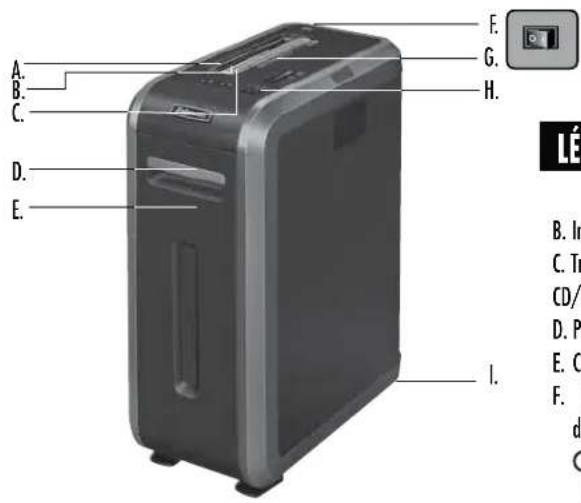
KEY
A. SafeSense® Technology
B. Paper entry
C. CD/Credit card safety flap
D. Door
E. Basket
F. Disconnect power switch
○ 1. OFF
1 2.0N
G. See safety instructions
H. Control Panel and LEDs
-
Reverse
-
ON/OFF
-
Forward
-
Auto
-
Overheat(red)
-
door open (red)
-
Bin full (red)
8 remove paper(red)
- SafeSense indicator (yellow)
CAPABILITIES
Will shred: Paper, plastic credit cards, CD/DVD, small paper clips and junk mail
Will not shred: Adhesive labels, continuous form paper, transparencies, newspaper, cardboard, large paper clips, folders, X-rays or plastic other than noted above
Paper shred size:
Cross-Cut (125Ci) 4mm x 38mm
Strip Cut (125i) 5.8mm
Maximum:
Sheets per pass, 80g paper (Cross-cut) 20*
Sheets per pass, 70g paper (Cross-cut) 22*
Sheets per pass, 80g paper (Strip-cut) 16*
Sheets per pass, 70g paper (Strip-cut) 18*
CDs/Cards per pass .... 1*
Paper entry width....230mm
* A4, paper at 220-240V, 50/60 Hz, 125Ci 4Amps, 125i 3.5Amps; heavier paper, humidity or other than rated voltage may reduce capacity. Maximum recommended daily usage rates: 3,300 (125Ci)/3,000 (125i) sheets; 100 cards; 10 CDs.
Fellowes SafeSense® shredders are designed to be operated in office environments ranging between 50 – 80 degrees Fahrenheit (10 – 26 degrees Celsius) and 40 – 80% relative humidity.
WARNING: IMPORTANT SAFETY INSTRUCTIONS — Read Before Using!



- Operation, maintenance, and service requirements are covered in the instruction manual. Read the entire instruction manual before operating shredders.
- Moving parts. Keep away from children and pets. Keep hands away from paper entry. Always set to off or unplug when not in use.
- Keep foreign objects — gloves, jewelry, clothing, hair, etc. — away from shredder openings. If object enters top opening, switch to Reverse (144) to back out object.
- DO NOT use aerosol products, petroleum based or aerosol lubricants on or near shredder. DO NOT USE "CANNED AIR" OR "AIR DUSTERS" ON SHREDDER. Vapors from propellants and petroleum based lubricants may combust causing serious injury.
- Sharp edges, DO NOT touch exposed cutting blades under shredder head.
-
Do not use if damaged or defective. Do not disassemble shredder. Do not place near or over heat source or water.
-
This shredder has a Disconnect Power Switch (F) that must be in the ON (I) position to operate shredder. In case of an emergency move switch to OFF (O) position. This action will stop shredder immediately.
- Avoid touching exposed cutting blades under shredder head.
- Use only designated entry for CDs/cards. Keep fingers away from CD entry.
- Do not put foreign objects in paper entry.
- Shredder must be plugged into a properly grounded wall outlet or socket of the voltage and amperage designated on the label. The grounded outlet or socket must be installed near the equipment and easily accessible. Energy converters, transformers, or extension cords should not be used with this product.
- FIRE HAZARD – Do NOT shred greeting cards with sound chips or batteries.
- For indoor use only.
• Unplug shredder before cleaning or servicing.
PAPER/CARD OR CD

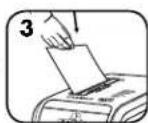
Plug in and put disconnect power switch in ON
(I) position

Press (○) ON to activate

Feed paper/card straight into paper entry and release
To shred CDs or credit card, rotate safety flap into place

Hold CD/card at edge, and feed into center of entry and release

When finished shredding set to OFF (○)

Do nothing and
shredder will go
automatically to sleep
mode after 2 minutes
of inactivity
ADVANCED PRODUCT FEATURES

100% JAM PROOF
Jam Proof System Eliminates paper jams and powers through tough jobs

SAFESENSE TECHNOLOGY
Patented SafeSense® Technology Stops shredding immediately when hands touch the paper entry

ENERGY SAVINGS SYSTEM™
Energy Savings System Optimal energy efficiency 100% of the time — in use and out of use.

100% JAM PROOF
Eliminates paper jams and powers through tough jobs.

flowchart
graph TD
    A["Advanced Jam Prevention- Electronically measures paper thickness to prevent paper jams:"] --> B["Up to RED: Too many sheets have been inserted."]
    A --> C["Up to YELLOW: Productivity is optimized."]
    A --> D["Up to GREEN: More sheets can be added."]
    B --> E["Remove several sheets until indicator is below red."]
    C --> E
    D --> E
    E --> F["Continue 100% Jam Proof Shredding\n100% JAM PROOF"]
    G["If a misfeed occurs: All indicators light up and shredder pauses for 3-6 seconds"] --> H["Wait for flashing to stop after automatic correction is complete. Regular shredding will resume."]
    I["If illuminates after paper has been reversed, press reverse and remove paper. Otherwise, regular shredding will resume."] --> F
*100% Jam Proof when used in accordance with user manual

SAFESENSE® SAFESENSE® TECHNOLOGY OPERATION
TECHNOLOGY
Stops shredding immediately when hands touch the paper opening.
SET-UP AND TESTING

Turn the shredder ON (_) to activate SafeSense®

Touch test area and look for the SafeSense ^® indicator to illuminate

SafeSense® is active and working properly
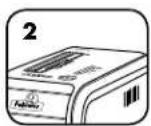
If hand is held on SafeSense® area more than 3 seconds shredder will shut off

ENERGY SAVINGS
SYSTEM
ENERGY SAVINGS SYSTEM
Optimal energy efficiency 100% of the time – in use and out of use.
- Saves energy in four ways: energy-efficient electronics, jam prevention, standby mode and sleep mode.
• Sleep Mode shuts down shredder after 2 minutes of inactivity.
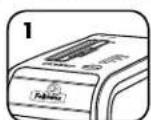
WHEN IN SLEEP MODE

In sleep mode
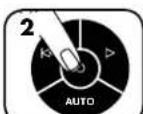
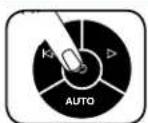
To get out of sleep mode touch control panel

insert paper
PRODUCT MAINTENANCE
CLEANING AUTO-START INFRARED SENSORS
Paper detection sensors are designed for maintenance free operation. However, on rare occasions the sensors may become blocked by paper dust causing the motor to run even if there is no paper present
(Note: two paper detection sensors are located in the center of the paper entry).
TO CLEAN THE SENSORS

Turn off and unplug shredder
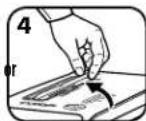
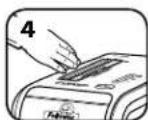
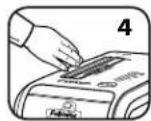
Locate Auto-start infrared sensor

Dip cotton swab in
rubbing alcohol

Using cotton swab, wipe away any contamination from the paper sensors
OILING SHREDDER

All cross-cut shredders require oil for peak performance. If not oiled, a machine may experience diminished sheet capacity, intrusive noise when shredding and could ultimately stop running. To avoid these problems, we recommend you oil your shredder each time you empty your waste bin.
FOLLOW OILING PROCEDURE BELOW AND REPEAT TWICE
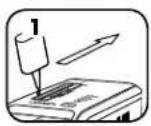
*Apply oil across entry

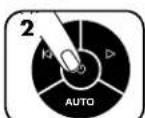
Press and hold forward (▷) 2-3 seconds

*Only use a non-aerosol vegetable oil in long nozzle container such as Fellowes 35250

TROUBLESHOOTING

Overheat Indicator: When the Overheat Indicator is illuminated, the shredder has exceeded its maximum operating temperature and needs to cool down. This indicator will remain illuminated and the shredder will not operate for the duration of the recovery time.

Bin Open: The shredder will not run if the bin is open. When illuminated, close the bin to resume shredding.

Bin Full: When illuminated, the shredder waste bin is full and needs to be emptied. Use Fellowes waste bag 36054.

Remove Paper: When illuminated, press reverse (1) and remove paper. Reduce paper quantity to an acceptable amount and refeed into paper entry.

SafeSense® Indicator: If hands are too close to the paper entry, the SafeSense® indicator will illuminate and the shredder will stop shredding. If SafeSense® is active for 3 seconds, the shredder will automatically turn off and the user must press the power button on the control panel to resume shredding.
Self Cleaning Cycle: Shredder periodically cycles in forward and reverse lasting 3-6 seconds (125Ci only).
LIMITED PRODUCT WARRANTY
Limited Warranty: Fellowes, Inc. ("Fellowes") warrants the parts of the machine to be free of defects in material and workmanship and provides service and support for 2 years from the date of purchase by the original consumer. Fellowes warrants the cutting blades of the machine to be free from defects in material and workmanship for 20 years from the date of purchase by the original consumer. If any part is found to be defective during the warranty period, your sole and exclusive remedy will be repair or replacement, at Fellowes' option and expense, of the defective part. This warranty does not apply in cases of abuse, mishandling, failure to comply with product usage standards, shredder operation using an improper power supply (other than listed on the label), or unauthorized repair. Fellowes reserves the right to charge the consumers for any additional costs incurred by Fellowes to provide parts or services outside of the country where the shredder is initially sold by an authorized reseller. ANY IMPLIED WARRANTY, INCLUDING THAT OF MERCHANTABILITY OR FITNESS FOR A PARTICULAR PURPOSE, IS HEREBY LIMITED IN DURATION TO THE APPROPRIATE WARRANTY PERIOD SET FORTH ABOVE. In no event shall Fellowes be liable for any consequential or incidental damages attributable to this product. This warranty gives you specific legal rights. The duration, terms, and conditions of this warranty are valid worldwide, except where different limitations, restrictions, or conditions may be required by local law. For more details or to obtain service under this warranty, please contact us or your dealer.
Australia Residents Only:
Our goods come with guarantees that cannot be excluded under the Australian Consumer Law. You are entitled to a replacement or refund for a major failure and for compensation for any other reasonably foreseeable loss or damage. You are also entitled to have the goods repaired or replaced if the goods fail to be of acceptable quality and the failure does not amount to a major failure. The benefits under Fellowes' Warranty are in addition to other rights and remedies under a law in relation to the shredder.
LÉGENDE
®
SAFESENSE TECHNOLOGY
SAFESENSE TECHNOLOGY
FONCTIONNEMENT DE LA TECHNOLOGIE SAFESENSE®
GARANTIE LIMITÉE DU PRODUIT
COMPONENTES
SAFESENSE TECHNOLOGY
SAFESENSE TECHNOLOGY
LEGENDE
®-Technologie
SAFESENSE TECHNOLOGY
SAFESENSE TECHNOLOGY
BETRIEB DER SAFESENSE®-TECHNOLOGIE
BESCHRÄNKTE PRODUKTGARANTIE
LEGENDA
SAFESENSE TECHNOLOGY
SAFESENSE TECHNOLOGY
TECNOLOGIA SAFESENSE®
IN MODALITÀ SOSPENSIONE

LEGENDA
® technologie
B. Papierinvoer
C. Cd/creditcard-veiligheidsklep
D. Deur
E. Opvangbak
SAFESENSE TECHNOLOGY
SafeSense® technologie
SAFESENSE TECHNOLOGY
WERKING VAN DE SAFESENSE® TECHNOLOGIE
BEPERKTE PRODUCTGARANTIE
TANGENT
®-teknologi
B. Inmatning
C. Säkerhetslucka
för CD/kreditkort
D. Dörr
E. Papperskorg
SAFESENSE TECHNOLOGY
natural_image
Front view of a modern remote control with no visible text or symbols on the device itselfSAFESENSE TECHNOLOGY
DRIFT MED SAFESENSE®-TEKNIK
OVERSIGT
® Teknologi
B. Papirindførsel
SAFESENSE TECHNOLOGY
SAFESENSE TECHNOLOGY
SAFESENSE® TEKNOLOGI - FUNKTION
NÄR MASKINEN ER I SLEEP MODE
I sleep mode
Rør ved kontrolpanelet for at bringe maskinen ud af sleep mode
eller
sæt papir i
VEDLIGEHOLDELSE AF PRODUKTET
RENG∅RING AF AUTOSTART INFRAR∅DE SENSORER
SELITYKSET
®-tekniikka
LAITTEEN LISÄTOIMINNOT

100% JAM PROOF
SAFESENSE TECHNOLOGY
SAFESENSE TECHNOLOGY
SAFESENSE®-TEKNIIKAN TOIMINTA
FORKLARING
®-teknologi
B. Papirinngang
C. Sikkerhetsklaff for CD/kort
D. Dor
E. Papirkurv
SAFESENSE TECHNOLOGY
SafeSense® Teknologi Stopper makuleringsmaskinen øyeblikkelig när hender berører papirinnføringen.

ENERGY SAVINGS SYSTEM™
Energisparingssystem Optimal energieffektivitet 100 % av tiden – både när maskinen er i bruk og ikke.

100% JAM PROOF
SIKRINGSSYSTEM MOT PAPIRSTOPP\*
SAFESENSE TECHNOLOGY
SAFESENSE®-TEKNOLOGI, DRIFT
Stopper makuleringsmaskinen øyeblikkelig när hender berører papirinnføringen.
OPPSETT OG TESTING
Slå makulatoren PÅ (_) or å aktivere SafeSense®
SAFESENSE TECHNOLOGY
Technologia SafeSense®
SAFESENSE TECHNOLOGY
SPOSÓB DZIAŁANIA FUNKCJI SAFESENSE®
SAFESENSE TECHNOLOGY
SAFESENSE TECHNOLOGY
РАБОТА ТЕХНОЛОГИИ SAFESENSE®
SAFESENSE TECHNOLOGY
natural_image
Front view of a black remote control with indicator lights and a power button (no text or symbols on the device itself)SAFESENSE TECHNOLOGY
ANAHTAR
B. Kağıt girişi
SAFESENSE TECHNOLOGY
natural_image
Black remote control with indicator lights and power button (no text or symbols)SAFESENSE TECHNOLOGY
SAFESENSE® TEKNOLOJISINİN ÇALIŞMASI
TLAČÍTKO
B. Otvor pro papír
SAFESENSE TECHNOLOGY
SAFESENSE TECHNOLOGY
SAFESENSE® - PROVOZ TECHNOLOGIE
LEGENDA
B. Vstup pre papier
SAFESENSE TECHNOLOGY
FUNGOVANIE TECHNOLÓGIE SAFESENSE®
JELMAGYARÁZAT
SAFESENSE TECHNOLOGY
natural_image
Front view of a black remote control with indicator lights and a 'AUTO' button (no text or symbols beyond the label)SAFESENSE TECHNOLOGY
A SAFESENSE® TECHNOLÓGIA ÜZEMELÉSE
TECLA
SAFESENSE TECHNOLOGY
SAFESENSE TECHNOLOGY
SAFESENSE TECHNOLOGY
SafeSense`tehnologija Zaustavlja uništavanje čim ruke dodirnu ulaz za papir.

ENERGY SAVINGS SYSTEM
SAFESENSE TECHNOLOGY
SAFESENSE® TEHNOLOGIJA
Rezanje prestaje čim ruke dodirnu otvor za papir.
POSTAVLJANJE I ISPITIVANJE

UKLJUČITE uništavač (○) da biste aktivirali SafeSense®
SAFESENSE TECHNOLOGY
SAFESENSE TECHNOLOGY
SAFESENSE® TEXHOLOGIJA
SIMBOLURI
A. Tehnologie SafeSense®
B. Punct de intrare
pentru hârtie
GARANTIE LIMITATĂ PENTRU PRODUS
الإمكانات

SAFESENSE TECHNOLOGY
نظام مقاوم للتكدس
natural_image
Front view of a black remote control with indicator lights and a power button (no text or symbols on the device itself)
SAFESENSE TECHNOLOGY

SAFESENSE TECHNOLOGY
natural_image
Front view of a black remote control with indicator lights and a power button (no text or symbols on the device itself)
SAFESENSE®
TECHNOLOGY
SafeSense 3

SafeSense®

SafeSense®
ה'�רְשָׁה

SafeSense
www.fellowes.com
תַלְרָה בְּרָה
"FELLOWES INC" (1) "FELLOWES INC" (2) "FELLOWES INC" (3) "FELLOWES INC" (4) "FELLOWES INC" (5) "FELLOWES INC" (6) "FELLOWES INC" (7) "FELLOWES INC" (8) "FELLOWES INC" (9) "FELLOWES INC" (10) "FELLOWES INC" (11) "FELLOWES INC" (12) "FELLOWES INC" (13) "FELLOWES INC" (14) "FELLOWES INC" (15) "FELLOWES INC" (16) "FELLOWES INC" (17) "FELLOWES INC" (18) "FELLOWES INC" (19) "FELLOWES INC" (20) "FELLOWES INC" (21) "FELLOWES INC" (22) "FELLOWES INC" (23) "FELLOWES INC" (24) "FELLOWES INC" (25) "FELLOWES INC" (26) "FELLOWES INC" (27) "FELLOWES INC" (28) "FELLOWES INC" (29) "FELLOWES INC" (30) "FELLOWES INC" (31) "FELLOWES INC" (32) "FELLOWES INC" (33) "FELLOWES INC" (34) "FELLOWES INC" (35) "FELLOWES INC" (36) "FELLOWES INC" (37) "FELLOWES INC" (38) "FELLOWES INC" (39) "FELLOWES INC" (40) "FELLOWES INC" (41) "FELLOWES INC" (42) "FELLOWES INC" (43) "FELLOWES INC" (44) "FELLOWES INC" (45) "FELLOWES INC" (46) "FELLOWES INC" (47) "FELLOWES INC" (48) "FELLOWES INC" (49) "FELLOWES INC" (50) "FELLOWES INC" (51) "FELLOWES INC" (52) "FELLOWES INC" (53) "FELLOWES INC" (54) "FELLOWES INC" (55) "FELLOWES INC" (56) "FELLOWES INC" (57) "FELLOWES INC" (58) "FELLOWES INC" (59) "FELLOWES INC" (60) "FELLOWES INC" (61) "FELLOWES INC" (62) "FELLOWES INC" (63) "FELLOWES INC" (64) "FELLOWES INC" (65) "FELLOWES INC" (66) "FELLOWES INC" (67) "FELLOWES INC" (68) "FELLOWES INC" (69) "FELLOWES INC" (70) "FELLOWES INC" (71) "FELLOWES INC" (72) "FELLOWES INC" (73) "FELLOWES INC" (74) "FELLOWES INC" (75) "FELLOWES INC" (76) "FELLOWES INC" (77) "FELLOWES INC" (78) "FELLOWES INC" (79) "FELLOWES INC" (80) "FELLOWES INC" (81) "FELLOWES INC" (82) "FELLOWES INC" (83) "FELLOWES INC" (84) "FELLOWES INC" (85) "FELLOWES INC" (86) "FELLOWES INC" (87) "FELLOWES INC" (88) "FELLOWES INC" (89) "FELLOWES INC" (90) "FELLOWES INC" (91) "FELLOWES INC" (92) "FELLOWES INC" (93) "FELLOWES INC" (94) "FELLOWES INC" (95) "FELLOWES INC" (96) "FELLOWES INC" (97) "FELLOWES INC" (98) "FELLOWES INC" (99) "FELLOWES INC" (100).
This product is classified as Electrical and Electronic Equipment. Should the time come for you to dispose of this product please ensure that it is not mixed with general household waste. For proper treatment, recovery and recycling, please take this product to a designated collection point. Please contact your local authority for further details of your nearest designated collection point.
French
UK Declaration of Conformity
Fellowes Ltd.
Unit 2 Ontario Drive, New Rossington, Doncaster, DN11 0BF, England declares that the product model(s) 125Ci/125i conforms to the requirements of:
Restriction of the Use of Certain Hazardous Substances in Electrical and Electronic Equipment Regulations 2012
Electromagnetic Compatibility Regulations 2016
The Waste Electrical and Electronic Equipment Regulations 2013
Electrical Equipment (Safety) Regulations 2016
Safety: BS EN 62368-1: 2014/A11:2017
EMC: BS EN 55014-1: 2017
BS EN 55014-2: 2015
BS EN 61000-3-2: 2014
BS EN 61000-3-3: 2013
Year Affixed: 2021
Itasca, Illinois, USA
January 1, 2021

John Fellowes
President & CEO
Declaration of Conformity
Fellowes Benelux B.V.
Gesworenhoekseweg 3a, 5047 TM Tilburg, The Netherlands declares that the product model(s) 125Ci/125i conforms to the requirements of:
[2011/65/EU+2015/863/EU] Restriction of Hazardous Substances Directive
[2014/30/EU] Electromagnetic Compatibility Directive
[2012/19/EU] Waste on Electrical and Electronic Equipment (WEEE) Directive
[2014/35/EU] Low Voltage Directive
Safety: EN 62368-1: 2014/A11:2017
EMC: EN 55014-1: 2017
EN 55014-2: 2015
EN 61000-3-2: 2014
EN 61000-3-3: 2013
Year Affixed: 2021
Itasca, Illinois, USA
January 1, 2021

John Fellowes
President & CEO

1789 Norwood Avenue, Itasca, Illinois 60143 • 1-800-955-0959 • www.fellowes.com


- KEY
- CAPABILITIES
- WARNING: IMPORTANT SAFETY INSTRUCTIONS — Read Before Using!
- ADVANCED PRODUCT FEATURES
- SAFESENSE® SAFESENSE® TECHNOLOGY OPERATION
- ENERGY SAVINGS
- ENERGY SAVINGS SYSTEM
- PRODUCT MAINTENANCE
- CLEANING AUTO-START INFRARED SENSORS
- TO CLEAN THE SENSORS
- OILING SHREDDER
- FOLLOW OILING PROCEDURE BELOW AND REPEAT TWICE
- TROUBLESHOOTING
- LIMITED PRODUCT WARRANTY
- Australia Residents Only:
- LÉGENDE
- FONCTIONNEMENT DE LA TECHNOLOGIE SAFESENSE®
- GARANTIE LIMITÉE DU PRODUIT
- COMPONENTES
- BETRIEB DER SAFESENSE®-TECHNOLOGIE
- BESCHRÄNKTE PRODUKTGARANTIE
- LEGENDA
- TECNOLOGIA SAFESENSE®
- WERKING VAN DE SAFESENSE® TECHNOLOGIE
- BEPERKTE PRODUCTGARANTIE
- TANGENT
- DRIFT MED SAFESENSE®-TEKNIK
- OVERSIGT
- SAFESENSE® TEKNOLOGI - FUNKTION
- VEDLIGEHOLDELSE AF PRODUKTET
- RENG∅RING AF AUTOSTART INFRAR∅DE SENSORER
- SELITYKSET
- LAITTEEN LISÄTOIMINNOT
- SAFESENSE®-TEKNIIKAN TOIMINTA
- FORKLARING
- SIKRINGSSYSTEM MOT PAPIRSTOPP\*
- SAFESENSE®-TEKNOLOGI, DRIFT
- SPOSÓB DZIAŁANIA FUNKCJI SAFESENSE®
- РАБОТА ТЕХНОЛОГИИ SAFESENSE®
- ANAHTAR
- SAFESENSE® TEKNOLOJISINİN ÇALIŞMASI
- TLAČÍTKO
- SAFESENSE® - PROVOZ TECHNOLOGIE
- FUNGOVANIE TECHNOLÓGIE SAFESENSE®
- JELMAGYARÁZAT
- A SAFESENSE® TECHNOLÓGIA ÜZEMELÉSE
- TECLA
- SAFESENSE® TEHNOLOGIJA
- SIMBOLURI
- GARANTIE LIMITATĂ PENTRU PRODUS
- الإمكانات
- French
- UK Declaration of Conformity
- Declaration of Conformity
Brand : FELLOWES
Model : Powershred 125Ci
Category : Shredder