
DNS-325 ShareCenter Shadow - NAS D-LINK - Free user manual and instructions
Find the device manual for free DNS-325 ShareCenter Shadow D-LINK in PDF.


| Product Type | 2-bay NAS (Network Attached Storage) |
| Dimensions (W x D x H) | 19.1 x 11.4 x 13.2 cm |
| Weight | 1.2 kg |
| Power Supply | 12 V DC, 4 A |
| Processor | Marvell Kirkwood 1.2 GHz |
| RAM | 256 MB |
| Storage Capacity | 2 SATA II bays, up to 4 TB total |
| Network Connectivity | 1 Gigabit Ethernet port (RJ45) |
| USB Connectivity | 2 USB 2.0 ports (front and rear) |
| Main Functions | File server, media server (DLNA), FTP server, automated backup, BitTorrent client |
| Supported File Systems | EXT3, FAT32, NTFS |
| Network Protocols | CIFS/SMB, AFP, NFS, FTP, HTTP |
| Noise Level | 25 dB (idle) |
| Operating Temperature | 0 to 40 °C |
| Operating Humidity | 20 to 80% (non-condensing) |
| Maintenance and Cleaning | Unplug the device, clean with a soft dry cloth. Do not use chemicals. |
| Security | Metal chassis, key-locked bays, encryption support |
| Spare Parts and Repairability | Removable hard drives, replaceable fan, external power adapter |
| Warranty | 2 years |
| General Information | 2-bay NAS for home and small business use. Compatible with Windows, Mac, Linux. |
Frequently Asked Questions - DNS-325 ShareCenter Shadow D-LINK
User questions about DNS-325 ShareCenter Shadow D-LINK
0 question about this device. Answer the ones you know or ask your own.
Ask a new question about this device
Download the instructions for your NAS in PDF format for free! Find your manual DNS-325 ShareCenter Shadow - D-LINK and take your electronic device back in hand. On this page are published all the documents necessary for the use of your device. DNS-325 ShareCenter Shadow by D-LINK.
USER MANUAL DNS-325 ShareCenter Shadow D-LINK
If any of these items are missing from your packaging, please contact your reseller.
PRODUCT SETUP
QUICK INSTALLATION

-
Remove the top cover from the ShareCenter Shadow.
-
Insert the hard disk drive(s) into an empty bay. Make sure the top (label side) of the hard disk drive is facing towards the left side of the ShareCenter. Push the drive into the slot until you feel it lock into place.
-
Re-attach the front panel once the drives have been installed.
-
Connect one end of the Ethernet cable to the ShareCenter Shadow's Ethernet port, and the other end into your Router. Next, connect the power cable to the power adapter and connect it to the ShareCenter Shadow's power port and then plug the power cable into your wall outlet or power strip. Press the power button on the front of the device to turn it on.
-
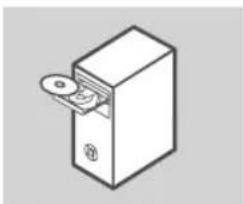
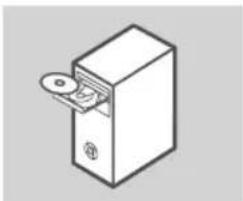
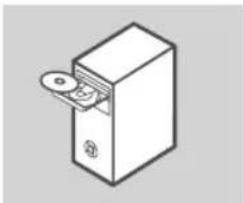
Remove the ShareCenter Shadow CD from the package and insert it into your computer.
Important: Ensure that your Internet connection is active. Do not connect any USB storage devices yet.
- Click the gray Start button on the welcome screen to begin the Setup Wizard. Follow the instructions on the screen.
Default IP: Determined by DHCP Default Username: admin Default Password: (leave this blank)
TROUBLESHOOTING
SETUP AND CONFIGURATION PROBLEMS
- WHAT IS THE SHARECENTER SHADOW'S DEFAULT USERNAME AND PASSWORD?
Type 'admin' for the username and leave the password blank.
- I HAVE LOST MY D-LINK CD, WHAT CAN I DO?
You can download the software drivers and user manual from the D-Link website. (See Technical Support below).
- WHAT HARD DRIVES ARE COMPATIBLE WITH THE SHARECENTER SHADOW?
Most SATA hard drives are compatible with the ShareCenter Shadow. Please visit your local D-Link support site listed on the Technical Support page for an updated list of compatible hard drives.
- THE HARD DISK LED ON MY SHARECENTER SHADOW IS ORANGE. IS MY DEVICE FAULTY?
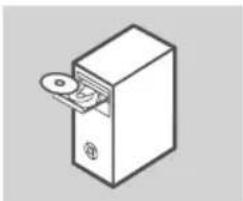
No. An orange light means that the hard drive (HD) inside the ShareCenter Shadow needs to be formatted before use. If you have not yet installed the ShareCenter Shadow or if you are inserting a replacement hard drive, the orange light will indicate that the HD needs to be formatted for use in the ShareCenter Shadow. Insert the Installation CD into your computer's CD/DVD drive and follow the instructions to use the Setup Wizard utility to format the inserted disk. A correctly formatted disk can be identified when the orange LED changes to white.
-
HOW CAN I ACCESS MY SHARECENTER SHADOW ON THE NETWORK?
-
You can access the device by clicking on the drive letter you have mapped to the device. For example, if you mapped the drive to 'G drive', open up windows explorer (not Internet Explorer) and type 'G:' into the address bar.
-
You may also access it like a regular Windows share on a network, by typing its IP address into Windows Explorer as
(e.g. \192.168.0.32), or by using FTP, in which case the address is ftp:// . -
HOW DO I RESET MY SHARECENTER SHADOW?
Locate the reset button on the back of the ShareCenter Shadow. Press and hold the button (using an implement such as a straightened paperclip) until the power LED on the front panel starts flashing. Allow a minute for the device to reset.
Note: Resetting the ShareCenter Shadow to the factory defaults will erase the current configuration settings. To reconfigure your settings, log into the ShareCenter Shadow Web interface or alternatively, reinstall the device using the Setup Wizard software supplied on the CD-ROM.
- THE DEVICE HAS A USB PORT. CAN I PLUG AN EXTERNAL HARD DRIVE INTO THIS PORT?
The ShareCenter Shadow does support external additional drives via the USB port. This port can also be used to connect a USB Printer, UPS, or USB Flash drive.
-
HOW DO I ACCESS THE FTP SERVER FROM THE INTERNET?
-
If the ShareCenter Shadow connects to the Internet though a NAT gateway or router, you may need to configure port forwarding. Forward the FTP port (TCP 21 by default) to the IP address of your ShareCenter Shadow.
- To access your FTP server from the Internet, use the public IP (or domain name) of your gateway or router (e.g. ftp://mydomain.com).
TECHNICAL SUPPORT
United Kingdom (Mon-Fri) website: http://www.dlink.co.uk FTP: ftp://ftp.dlink.co.uk Home Wireless/Broadband 0871 873 3000 (9.00am-06.00pm, Sat 10.00am-02.00pm) Managed, Smart, & Wireless Switches, or Firewalls 0871 873 0909 (09.00am-05.30pm) (BT 10ppm, other carriers may vary.)
Ireland (Mon-Fri)
All Products 1890 886 899 (09.00am-06.00pm, Sat 10.00am-02.00pm) Phone rates: €0.05ppm peak, €0.045ppm off peak times
PACKUNGS- INHALT
INHALT

INSTALLATIONS-CD
ENTHÄLT SETUP-ASSISTENTEN UND TECHNISCHE HANDBÜCHER
SHARECENTER SHADOW 2-BAY NETZWERKSPEICHER DNS-325
ETHERNETKABEL
CAT5 UTP
NETZKABEL
STROMADAPTER/NETZTEIL
natural_image
Simple line drawing of a box with two upward arrows indicating upward motion (no text or symbols)
natural_image
Simple line drawing of a rectangular box with two vertical bars and an arrow indicating direction (no text or symbols)
natural_image
Simple line drawing of a box with directional arrows, no text or symbols present

natural_image
Simple line drawing of a rectangular device with a slot and handle (no text or symbols)
CONFIGURATION DU PRODUIT
INSTALLATION RAPIDE

natural_image
Illustration of a D-Link package with open lid (no text or symbols)CD DI INSTALLAZIONE
http://www.dlink.it/support
natural_image
Simple line drawing of a 3D box with two upward arrows indicating motion (no text or symbols)
natural_image
Simple line drawing of a rectangular box with two vertical bars and an arrow indicating direction (no text or symbols)
natural_image
Simple line drawing of a box with directional arrows, no text or symbols present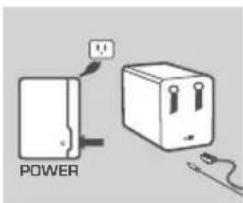
natural_image
Simple line drawing of a box with a slot and handle (no text or symbols)
natural_image
Illustration of an open D-Link package with no text or symbols on the box itselfPŁYTA INSTALACYJNA
ZAWIERA KREATORA INSTALACJI (SETUP WIZARD) ORAZ INSTRUKCJĘ OBSŁUGI
SHARECENTER SHADOW 2-DYSKOWA SIECIOWA PAMIĘĆ MASOWA
DNS-325
KABEL ETHERNET
CAT5 UTP
PRZEWÓD ZASILAJ ACY
ZASILACZ SIECIOWY
natural_image
Simple line drawing of a box with two upward arrows indicating motion (no text or symbols)
natural_image
Simple line drawing of a rectangular box with two vertical bars and an arrow pointing to one side (no text or symbols)
natural_image
Simple line drawing of a box with directional arrows, no text or symbols present
natural_image
Simple line drawing of a rectangular device with a slot and handle (no text or symbols)
PROBLEMY ZWI AZANE Z INSTALACJ A I KONFIGURACJ A
- JAKIE SĄ DOMYŚLNE NAZWA UŻYTKOWNIKA I HASŁO SHARECENTER SHADOW?
natural_image
Illustration of an open D-Link package with no text or symbols on the box itselfINSTALA ČNÍ CD
OBSAHUJE PRÜVODCE NASTAVENÍM A TECHNICKÉ NÁVODY
SHARECENTER SHADOW SÍ ŢOVÉ DATOVÉ ÚLOŽIŠT ěPRO 2 DISKY
DNS-325
ETHERNETOV KABEL
CAT5 UTP
NAPÁJECÍ P RÍVOD
NAPÁJECÍ ADAPTÉR
natural_image
Simple line drawing of a box with two upward arrows indicating upward motion (no text or symbols)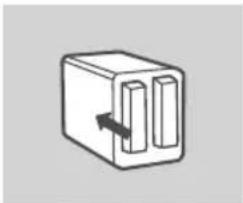
natural_image
Simple line drawing of a rectangular box with two vertical bars and an arrow pointing to one side (no text or symbols)
natural_image
Simple line drawing of a box with directional arrows, no text or symbols present
natural_image
Simple line drawing of a rectangular device with a slot and handle (no text or symbols)
natural_image
Illustration of a D-Link package with open lid (no text or symbols)TELEPÍT Ő CD
TARTALMAZZA A TELEPÍTŐ VARÁZSLÓT ÉS A MŰSZAKI KÉZIKÖNYVEKET
SHARECENTER SHADOW 2 REKESZES HÁLÓZATI TÁROLÓ
DNS-325
ETHERNET KÁBEL
CAT5 UTP
TÁPKÁBEL
TÁPADAPTER
natural_image
Simple line drawing of a box with two upward arrows indicating motion (no text or symbols)
natural_image
Simple line drawing of a rectangular box with two vertical bars and an arrow indicating direction (no text or symbols)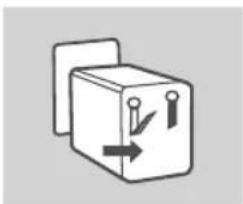
natural_image
Simple line drawing of a box with directional arrows, no text or symbols present
natural_image
Simple line drawing of a rectangular box with a slot inserted, no text or symbols present
natural_image
Illustration of an open D-Link package with no text or symbols on the box itselfINSTALLERINGS-CD-ROM
INKLUDERER INSTALLERINGSVEILEDER OG TEKNISKE BRUKSANVISNINGER
SHARECENTER SHADOW 2-STASJONS NETTVERKSLAGRING
DNS-325
ETHERNETKABEL
CAT5 UTP
STR∅MLEDNING
STR∅MADAPTER
natural_image
Simple line drawing of a box with two upward arrows indicating upward motion (no text or symbols)
natural_image
Simple line drawing of a rectangular box with two vertical bars and an arrow pointing to one side (no text or symbols)
natural_image
Simple line drawing of a box with directional arrows, no text or symbols present

natural_image
Simple line drawing of a rectangular device with a circular component inserted, no text or symbols present.
INHOLD AF EMBALLERING
INDHOLDSFORTEGNELSE



natural_image
Illustration of an open D-Link package with no text or symbols on the box itselfINSTALLATIONS-CD
OMFATTER INDSTILLINGSVEJLEDNING OG TEKNISKE MANUALER
SHARECENTER SHADOW 2-KABINETS NETVÄERKSLAGRING
DNS-325
ETHERNET-KABEL
CAT5 UTP
STRÖM-KABEL
SPÆNDINGS-ADAPTER
natural_image
Illustration of a D-Link package with open lid (no text or symbols)ASENNUS-CD
SISÄLTÄÄ OHJATUN ASENNUKSEN JA TEKNISET OPPAAT
SHARECENTER SHADOW 2 LEVYPAIKAN VERKKOTALLENNUSLAITE
DNS-325
ETHERNET-KAAPELI
CAT5 UTP
VIRTAJOHTO
LATURI
natural_image
Simple line drawing of a box with two upward arrows indicating motion (no text or symbols)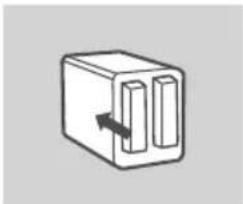
natural_image
Simple line drawing of a rectangular device with two vertical slots and an arrow indicating direction (no text or symbols)
natural_image
Simple line drawing of a box with directional arrows, no text or symbols present

natural_image
Simple line drawing of a rectangular device with a slot and handle (no text or symbols)
natural_image
Illustration of a D-Link package with open lid (no text or symbols)INSTALLATIONS-CD
INNEHÄLLER INSTALLATIONSGUIDE OCH TEKNISKA HANDBÖCKER
SHARECENTER SHADOW 2-BAY NETWORK STORAGE DNS-325
ETHERNET-KABEL
CAT5 UTP
STRÖMKABEL
NÄTADAPTER
natural_image
Simple line drawing of a box with two upward arrows indicating motion (no text or symbols)
natural_image
Simple line drawing of a rectangular box with two vertical bars and an arrow indicating direction (no text or symbols)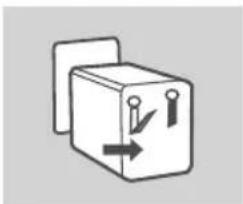
natural_image
Simple line drawing of a box with directional arrows, no text or symbols present

natural_image
Simple line drawing of a rectangular device with a slot and handle (no text or symbols)
natural_image
Illustration of a D-Link package with open lid (no text or symbols)CD DE INSTALAÇÃO
natural_image
Simple line drawing of a box with two upward arrows indicating motion (no text or symbols)
natural_image
Simple line drawing of a rectangular box with two vertical bars and an arrow pointing to one (no text or symbols)
natural_image
Simple line drawing of a cube with directional arrows and symbols, no text or labels present.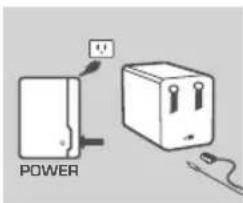

natural_image
Simple line drawing of a rectangular device with a slot and handle (no text or symbols)
D-Link Hellas Support Center
http://www.dlink.gr/support
natural_image
Illustration of a D-Link package with open lid (no text or symbols)INSTALACIJSKI CD
SADRŽI ČAROBNJAK ZA POSTAVLJANJE I TEHNIČKE PRIRUČNIKE
SHARECENTER SHADOW 2-BAY NETWORK
STORAGE DNS-325
ETHERNET KABEL
CAT5 UTP
KABEL ZA NAPAJANJE
STRUJNI ADAPTER
natural_image
Simple line drawing of a box with two upward arrows indicating motion (no text or symbols)
natural_image
Simple line drawing of a rectangular box with two vertical bars and an arrow indicating direction (no text or symbols)
natural_image
Simple line drawing of a box with directional arrows, no text or symbols present

natural_image
Simple line drawing of a rectangular device with a slot and handle (no text or symbols)
natural_image
Simple line drawing of a box with two upward arrows indicating motion (no text or symbols)
natural_image
Simple line drawing of a rectangular box with two vertical bars and an arrow indicating direction (no text or symbols)
natural_image
Simple line drawing of a box with directional arrows, no text or symbols present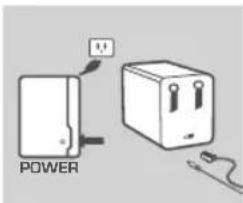

natural_image
Simple line drawing of a rectangular device with a slot and handle (no text or symbols)


Brand : D-LINK
Model : DNS-325 ShareCenter Shadow
Category : NAS