TVCC36010 - Surveillance Camera ABUS - Free user manual and instructions
Find the device manual for free TVCC36010 ABUS in PDF.


User questions about TVCC36010 ABUS
0 question about this device. Answer the ones you know or ask your own.
Ask a new question about this device
Download the instructions for your Surveillance Camera in PDF format for free! Find your manual TVCC36010 - ABUS and take your electronic device back in hand. On this page are published all the documents necessary for the use of your device. TVCC36010 by ABUS.
USER MANUAL TVCC36010 ABUS
natural_image
Close-up of a white and gray server camera with visible lens and sensor array (no text or symbols on body)These operating instructions belong with this product. They contain important information for putting it into service and operating it. This should be noted also when this product is passed on to a third party.
Therefore look after these operating instructions for future reference!
A list of contents with the corresponding page numbers can be found in the index on page 18.
FR
natural_image
Close-up of a white and gray ABUS security camera with visible lens and sensor array (no text or symbols on body)Version 11/2010
TVCC36000
TVCC36010
TVCC36500
TVCC36510
CE
natural_image
Pure mechanical diagram showing concentric rings with mounting holes and directional arrows (no text or symbols)natural_image
Technical diagram of a mechanical component with labeled parts and arrows indicating assembly or connection (no readable text or symbols)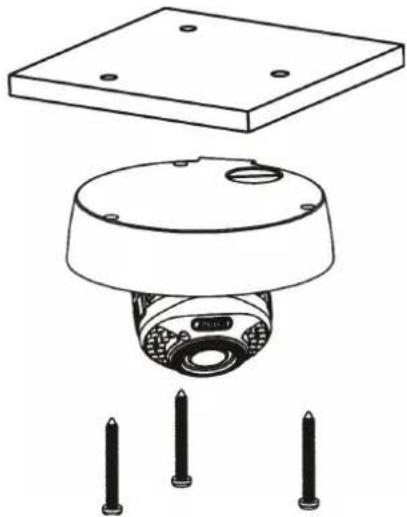
natural_image
Technical line drawing of a mechanical component with three pins and a base plate (no text or symbols)text_image
Technical diagram showing mechanical assembly with exploded view and close-up of internal components, labeled in Chinese.6.3 Anschlüsse
natural_image
Technical diagram of a mechanical assembly with 360° rotation indicator (no text or symbols)natural_image
Cross-sectional diagram of a mechanical device with 360° rotation indicator (no text or symbols beyond label)text_image
FAR NEAR WIDE TELEVandal proof 550 TVL outdoor dome camera

natural_image
Close-up of a white and gray ABUS security camera with visible lens and sensor array (no text or symbols on body)Version 11/2010
TVCC36000
TVCC36010
TVCC36500
TVCC36510
CE
Dear Customer,
Thank you for purchasing this product.
This product meets the requirements of the applicable European and national guidelines. The corresponding declarations and documents can be obtained from the manufacturer (www.abus-sc.com).
To maintain this condition and to ensure risk-free operation, you as the user must observe these operation instructions!
Before initial start-up, read through the complete operating instructions observing operating and safety instructions.
All company and product names mentioned in this document are registered trademarks. All rights reserved.
If you have any questions, please contact your installer or your local dealer!

Disclaimer
This user manual was prepared with greatest care. If you should notice omissions or inaccuracies, please inform us about these on the back of this manual given address.
The ABUS Security-Center GmbH & Co. KG assumes no liability for technical and typographical faults and reserves the right to make at any time modifications to the product or user manual without a previous announcement.
The company is not liable or responsible for direct and indirect subsequent damages which are caused in connection with the equipment, the performance and the use of this product.
No guarantee for the content of this document is taken.
Important safety instructions

The warranty will expire for damage due to non-compliance with these operating instructions. We shall not be liable for any consequential loss!

We do not accept liability for damage to property or personal injury caused by incorrect handling or non-compliance with the safety-instructions. In such cases the warranty will expire.
Dear customer,
The following safety instructions are intended not only for the protection of your health, but also for the protection of the device. Please read through the following points carefully:
- There are no parts on the inside of the product which need to be serviced. Apart from this, the license (CE) and the guarantee/warranty will lapse if you open/take the product apart.
- The product will be damaged even it falls from a low height.
- This device can be used in inside as well as outside.
- During the installation of the camera please take care that direct sunlight cannot fall onto the image sensor of the device. Please follow the installation instructions in the corresponding chapter of this user manual.
Avoid using the device under the following unfavorable ambient conditions:
- wetness or excessive air humidity
• extreme cold or heat - direct sunlight
- dust or combustible gases, vapors or solvents
• strong vibration
• strong magnetic fields, such as those found in the vicinity of machinery or loudspeakers - the camera should not positioned with opened iris towards the sun - this can lead to the destruction of the sensor.
- the camera may not be installed on unstable surfaces
General safety instructions:
- Do not leave packaging material lying around carelessly. Plastic/foil/bags and polystyrene parts etc. could become dangerous toys for children.
- For safety reasons don't give the camera into child hands due to them being able to swallow small parts.
- Please do not insert objects through the openings into the device.
- Use only accessories which are specified by the manufacturer. Please do not connect incompatible parts to the device.
- Please pay attention to the safety instructions and user manuals of the other connected devices.
- Check the device for damages before installation. If this should be the case please do not use it.
- Please adhere to the operational voltage limitations listed in the technical data. High voltage could destroy the device and pose a health hazard (electric shock).

During the installation into an existing video surveillance system make sure that all devices are disconnected from the low and supply voltage circuit.

If in doubt allow a professional electrician to mount, install and wire-up your device. Improper or make-do electrical connection to the mains does only represent at threat to you but also to other persons.
Wire-up the entire system making sure that the mains and low voltage circuit remain separated and cannot come into contact with each other in normal use or due to any malfunctioning.
Table of contents
- INTENDED USE 19
- EXPLANATION OF SYMBOL....19
- SCOPE OF DELIVERY 19
- FEATURES AND FUNCTIONS....19
- DESCRIPTION OF DEVICE....20
5.1 OVERVIEW – ITEM NUMBERS ...... 20
5.2 UNPACKING....20
- MOUNTING 20
6.1 CABLE ROUTING 20
6.2 MOUNTING OF THE CAMERA 20
6.3 CONNECTORS....22
6.4 CAMERA MODULE ADJUSTMENT 22
6.5 FOCUS AND ZOOM ADJUSTMENT 23
6.6 ADJUSTMENT OF IR LED INTENSITY AND CAMERA PARAMETER....23
- SERVICE AND CLEANING 24
7.1 FUNCTION TEST 24
7.2 CLEANING 24
-
DISPOSAL 24
-
TECHNICAL DATA 25
1. Intended use
The vandal proof 550TVL outdoor dome camera is equipped with a high quality image sensor. It is used for video surveillance in internal areas in connection with a recorder or monitor.
You can find a detailed description of functions in section "4. Features and functions".

Any other use than that described above can lead to damage to the product and in addition involve other risks. This does not include operation for other applications and would in case of doing so the guarantee and any related liability will lapse. This is also the case if any unauthorized changes or additions have been made to the product.
Please read through the entire manual carefully before putting this product into operation. This operating manual contains guidelines that are important for correct mounting and operating.
2. Explanation of symbol

A flash in the triangle is used if there is danger for the health, e.g. by an electric shock.

An exclamation mark in the triangle points to an important note in this user manual which must be minded.

This symbol can be found when you are to be given tips and information on operation.
3. Scope of delivery
• 550 TVL Outdoor dome camera
• Installation material (screws, pegs)
- DC 2-pin adapter
- User manual
4. Features and functions
- New light sensitive chip set for clear image in low noise environment
- Adjustable IR LEDs for surveillance in darkness (TVCC36500, TVCC36510)
- Easy Plug camera module for easy and fast installation
- 2nd video output for service purpose
- 3 axis camera bracket
• Protection grade IP66 for outdoor usage
5. Description of device
5.1 Overview – item numbers
| Item number | TVC | C36000 | TVC | C36010 | TVC | C36500 | TVC |
| Resolution 550 | TVL 550 TVL 550 | TVL 550 TVL | |||||
| Lens 3.6 mm | 2.8~10.5 mm 3.6 | mm 2.8~10.5 mm | |||||
| IR | - | - | √ √ | ||||
| Day/Night (removable IR cut filter) | - | - | √ √ | ||||
| Voltage 12 VDC | 12 VDC 12 VDC | 12 VDC | |||||
| Camera module |  |  | 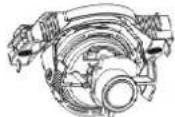 | 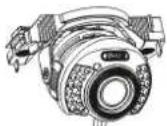 |
5.2 Unpacking
While you are unpacking the device please handle it with utmost care.

If you notice any damage of the original packaging, please check at first the device. If the device shows damages, please contact your local dealer.
6. Mounting
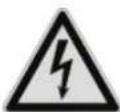
Attention!
Please disconnect the camera from power supply during the installation.
6.1 Cable routing
The cable can be routed to side (visible) or through the bottom side (hidden). To prevent from wetness a cable gland will be installed on the housing. Please fully screw the cable gland into the side or bottom opening, the remaining opening will covered by a flat supplied screw.
6.2 Mounting of the camera
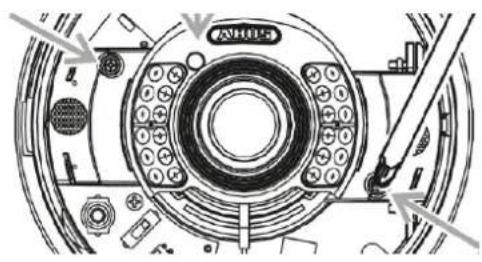
Please remove the dome head ring first by anti-clockwise rotation.
Then unscrew the fixing screws for the dome head and remove it.

natural_image
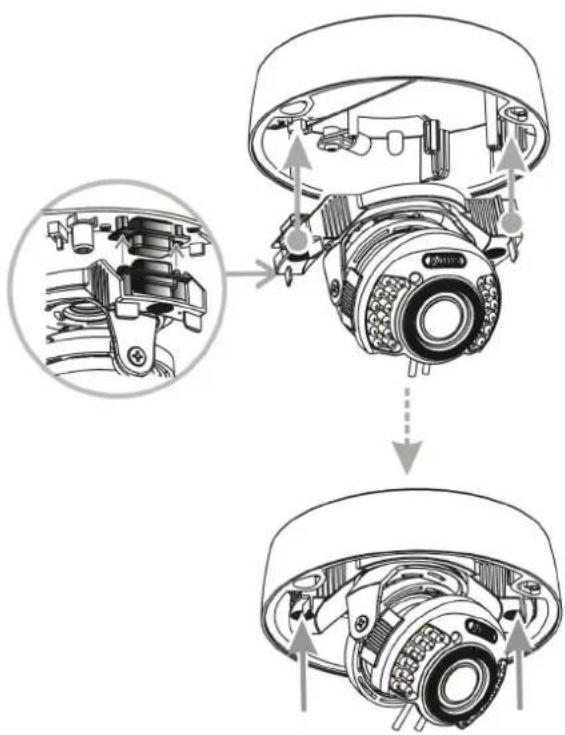
Pure mechanical diagram showing concentric rings with mounting holes and directional arrows (no text or symbols)For this camera type the camera module can be removed, and it is fixed by two fixing screws. Base part of the camera and camera module are connected by a 15 pin D-Sub joint. Unscrew the fixing screws, and carefully remove the camera module.
Place the base part to the desired installation position, mark the holes for fixing on the surface, and drill the fixing holes. Use the supplied screws and pegs to fix the base part on the surface. The cable rounting can be done to the side or through the base.
natural_image
Technical diagram of a mechanical assembly with labeled components (no readable text or symbols)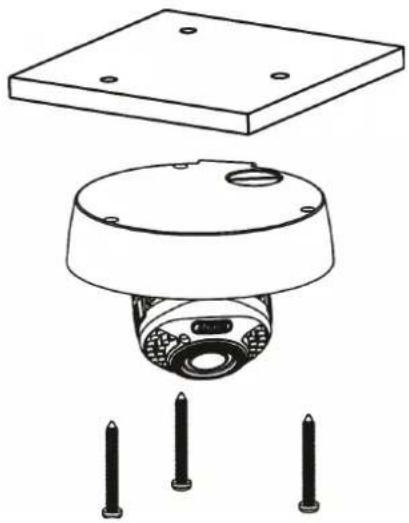
natural_image
Technical diagram of a mechanical sensor or camera module with mounting base and three pins (no text or symbols)Installation of the camera module
Bring the camera module close to the base part so that the 15 pin socket and plug position will match. At the opposite side of the 15 pin joint the module will be hold in position by two fixing bars. In case socket and plug will match please press the camera module on both outside handles in direction of the base part, until the 15 pin joint is fully latched. Please screw the two fixing screws for the camera module back.
Installation of the dome head
First please perform the steps of adjustment of viewing angle of the camera module as well as the adjustment of the lens.
The dome head will be fixed on the dome base by three screws. Please take care that the dome head will placed even to the dome base. The dome head ring will be fixed by clockwise rotation to the dome head.
text_image
Technical diagram of a mechanical assembly showing internal components and assembly steps with magnified views6.3 Connectors
Before you start with the installation please make sure that the supply voltage and the nominal voltage of the camera comply together.
Power supply & video signal Video output (for service purpose)

text_image
1 Video Output 2 Power Terminal Option 3 Power Input DC12V1 Video output (primäry), BNC (female), FBAS 1Vs-s
2 Power connector (round plug 5.5x2.1mm, 12 VDC) or DC 2-pin adapter
3 Videoausgang (sekundär, Service), Cinch (female) FBAS 1Vs-s
6.4 Camera module adjustment
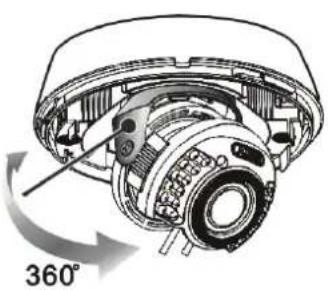
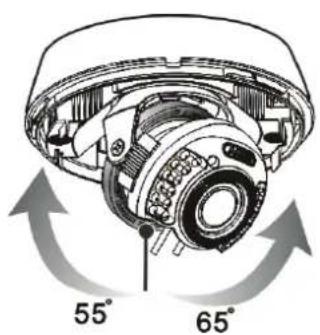
The camera module can be adjusted in 3 axis. The adjustment of the third axis often will be used on wall mount of the camera. The module rotation ( 1^st and 3^rd axis) must not be performed more than 360 degree.
Pan (1st axis)
natural_image
Cross-sectional diagram of a mechanical device showing internal components and a 360° rotation indicator (no text or symbols beyond the angle label)Tilt (2nd axis) Rotation (3rd axis)
text_image
55° 65°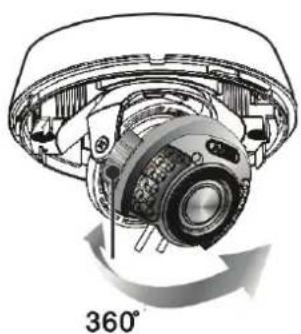
natural_image
Technical diagram of a mechanical component with 360° rotation indicator (no text or symbols on the diagram itself)6.5 Focus and zoom adjustment
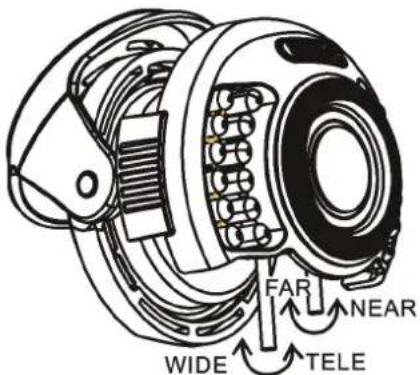
The cameras TVCC36010 and TVCC36510 are equipped with a vario focal lens. On the bottom side of the lens two adjustment handles for focus and zoom ratio are positioned. The handles additionally act as a fixing screw for the focus and zoom adjustment.
text_image
FAR NEAR WIDE TELEThe fixing handles can be rotated anti-clockwise for defixing. Please perform this with care to prevent the handles falling off the lens. Now please adjust zoom ratio and focus. Afterwards fix the handles by rotating clockwise.
| Function Beschreibung / Option | |
| Zoom ratio adjustment W | WIDE – Viewing angle wide, Zoom 0x (max.)TELE – Viewing angle narrow, Zoom 3.75x (max.) |
| Focus adjustment FAR – | Focus farNEAR – Focus near |
6.6 Adjustment of IR LED intensity and camera parameter
1 Iris level: Adjustment of the aperture of the auto iris lens (only for TVCC36010/ TVCC36510)
2 IR intensity: 3 levels for the IR light intensity are available (HI - 20 meter; MID - 10 meter; LOW - 5 meter).
3 BLC - Back light compensation (BLC=On; OFF=BLC deactivated)
AGC – Automatic gain control (AGC=Normal; HI=AGC+ 6dB)
DAY – Day/night switching (AUTO=B/W mode in night mode; DAY=color mode even in night mode)
IR IR LED activation (AUTO=Automatic activation of IR LEDs in low light environment; IR OFF=IR LEDs are permanently activated)

text_image
1 OUTDOOR HI MID LOW HI LOW INTDOOR 2 OFF o HI o DAY o AUTO 3 BLC0 AGCO AUTO IR OFF7. Service and cleaning
7.1 Function test
Check the technical safety of the product such as damage to the housing at regular intervals.
When it can be assumed that the safe operation is no longer possible, the product must be put out of service and precautions taken o ensure that it is not used unintentionally.
It must be assumed that safe operation is not longer possible if
- the device shows visible signs of damage
• the device no longer operates and - has been stored for longer periods under unfavorable conditions or
- has been subjected to considerable stress in transit.

Please note:
The product is absolutely maintenance-free for you. There are no components on the inside of the product to be checked or services by you, never open it.
7.2 Cleaning
Clean the product with a clean, soft cloth. To remove severe contamination, the cloth can be dampened with luke-warm water.

Make sure that no liquids can enter the equipment as the device can be destroyed. Never use chemical detergents as they could attack the surface of the device.
8. Disposal

Products which are labeled with this pictogram may not be disposed by the domestic rubbish. Please dispose the product in accordance with the prevailing legal regulations at the end of its life time.
Please consult your dealer or dispose the product over the municipal gathering point for electric scarp.
- Technical data
| Item number | TVCC36000 | TVCC36010 | TVCC36500 | TVCC36510 |
| TV standard | PAL | |||
| Resolution | 550 TVL | |||
| Bildaufnehmer | 1/3" Sharp HQ CCD | |||
| DSP | Sharp | |||
| Picture elements (total) | 795(H) x 596(V) | |||
| Picture elements (effective) | 752(V) x 582(H) | |||
| Signal-to-noise ratio | 48 dB | |||
| Minimum illumination (day) | 0.3 Lux @ F2.0 | 0.3 Lux @ F2.0 | 0.03 Lux @ F2.0 | 0.03 Lux @ F2.0 |
| Minimum illumination (night) | - - 0 Lux | @ F2.0 0 Lux @ | F2.0 | |
| Day/night | Color / B/W | Color / B/W | IR cut filter removable (ICR), Color / B/W | IR cut filter removable (ICR), Color / B/W |
| Lens | 3.6 mm, F2.0 | 2.8-10.5 mm, F2.0 | 3.6 mm, F2.0 | 2.8-10.5 mm, F2.0 |
| IR LEDs | - 24 LEDs, 850nm | |||
| IR Range | - 5 / 10 / 20 m | |||
| Horizontal angle of view | 71° | 101.8°~27.4° | 71° | 101.8°~27.4° |
| Electronic Shutter | AES | AI | AES | AI |
| Synchronisationi | Internal | |||
| Automatic gain control (AGC) | 20dB / 26dB (HI) | |||
| Backlight compensation (BLC) | BLC | |||
| White balance | AWB, 2700K~9500K | |||
| Control options | 4 x DIP switch, 1 x variable resistor | 5 x DIP switch, 1 x variable resistor | ||
| Protection class | IP66 | |||
| Video signal | 2 x FBAS, 1V s-s, 75 Ohm (BNC, Cinch), 5.5x2.1mm (DC) | |||
| Operating temperature | -10°C ~ +50°C | |||
| Humidity | 0~85%, not condensing | |||
| Nominal supply voltage | 12 VDC | |||
| Power consumption | Max. 100 mA | max. 120 mA (IR off), max. 300 mA (IR on) | ||
| Dimension (Hx∅) | 99.5 x 145 mm | |||
| Weight | 290 g 330 g 320 g 360 g | |||
| Certifications | CE, RoHS, Reach | |||
natural_image
Close-up of a white and gray security camera with visible lens and sensor array (no text or symbols on body)Version 11/2010
TVCC36000
TVCC36010
TVCC36500
TVCC36510
CE
natural_image
Pure mechanical diagram showing concentric rings with mounting holes and directional arrows, no text or symbols present.natural_image
Technical diagram of a mechanical component with no visible text or symbols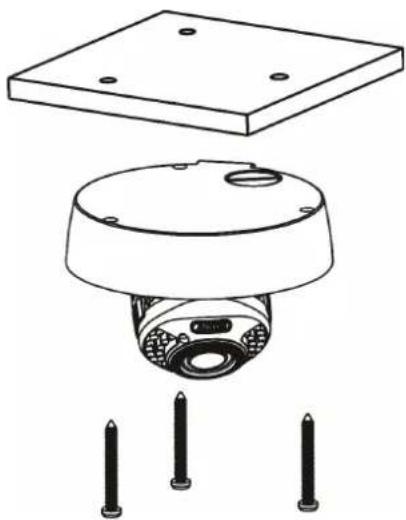
natural_image
Technical line drawing of a mechanical sensor or camera module with mounting base and three pins (no text or symbols)text_image
Technical diagram showing mechanical assembly with exploded view and close-up of internal components, labeled in Chinese.6.3 Raccordements
natural_image
Technical diagram of a mechanical assembly with 360° rotation indicator (no text or symbols present)natural_image
Technical diagram of a mechanical device with 360° rotation indicator (no text or symbols on the device itself)text_image
FAR NEAR WIDE TELEnatural_image
Close-up of a white and gray security camera with visible lens and sensor array (no text or symbols on body)TVCC36000 TVCC36010 TVCC36500 TVCC36510 1 / 2 0 CE 1 0
natural_image
Pure mechanical diagram showing concentric rings with mounting holes and directional arrows (no text or symbols)natural_image
Technical diagram of a mechanical assembly with labeled components (no readable text or symbols)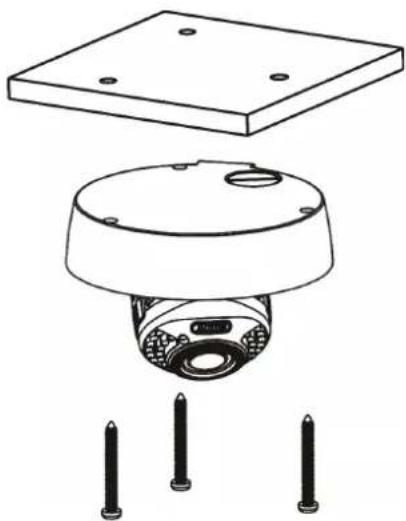
natural_image
Technical line drawing of a mechanical sensor or camera module with mounting base and three pins (no text or symbols)text_image
Technical diagram showing mechanical assembly with exploded view and close-up of internal components, labeled in Chinese.6.3 Aansluitingen
text_image
FAR NEAR WIDE TELEnatural_image
Close-up of a white and gray security camera with visible lens and sensor array (no text or symbols on body)Version 11/2010
TVCC36000
TVCC36010
TVCC36500
TVCC36510
CE
Kære kunde!
natural_image
Pure mechanical diagram showing concentric rings with mounting holes and directional arrows (no text or symbols)natural_image
Technical diagram of a mechanical assembly with labeled components (no readable text or symbols)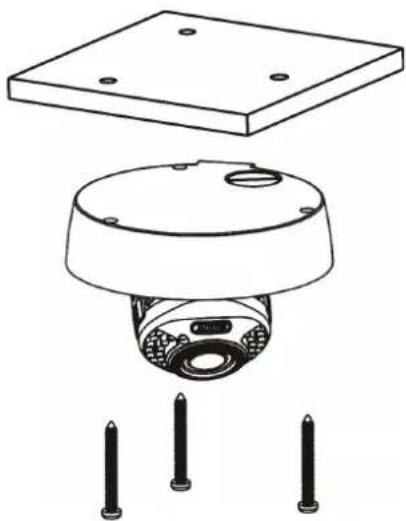
natural_image
Technical line drawing of a mechanical sensor or camera module with mounting base and three pins (no text or symbols)text_image
Technical diagram showing mechanical assembly with exploded view and close-up of internal components, labeled in Chinese.6.3 Tilslutninger
natural_image
Technical diagram of a mechanical device with 360° rotation indicator (no text or symbols on the device itself)6.5 Fokus- og zoomindstilling
text_image
FAR NEAR WIDE TELEThese operating instructions are published by ABUS Security-Center GmbH & Co.KG, Linker Kreuthweg 5, 86444 Affing, Germany. No reproduction (including translation) is permitted in whole or part e.g. photocopy, microfilming or storage in electronic data processing equipment, without the express written consent of the publisher. The operating instructions reflect the current technical specifications at the time of print. We reserve the right to change the technical or physical specifications.
© Copyright 11/2010 by ABUS Security-Center