
KA-S10 - Audio Amplifier KENWOOD - Free user manual and instructions
Find the device manual for free KA-S10 KENWOOD in PDF.


| Product Type | Stereo Audio Amplifier |
| Brand | KENWOOD |
| Model | KA-S10 |
| Dimensions (horizontal) | W 171 mm x H 67 mm x D 207 mm |
| Power Supply | AC 230 V, 50/60 Hz |
| Power Consumption | 28 W |
| Output Power (RMS) | 12 W + 12 W (8 Ω, 1 kHz, 10% THD) |
| Analog Inputs | 3 (D.AUDIO, CD, AUX) - sensitivity 140/250 mV |
| Subwoofer Preamp Output | 1 x RCA, level 1.8 V / impedance 2.9 kΩ |
| Frequency Response | 63 Hz ~ 12.5 kHz (DIN) |
| Features | Input selector, volume, N.B. circuit (3 bass levels) |
| Installation | Vertical or horizontal (mounting brackets included) |
| Included Accessories | 2 brackets, 1 RCA to 3.5 mm audio cable |
| Maintenance and Cleaning | Soft dry cloth; avoid thinner, benzene, alcohol |
| Safety | Speaker protection against short circuits |
| Repairability | Refer all servicing to qualified personnel |
Frequently Asked Questions - KA-S10 KENWOOD
User questions about KA-S10 KENWOOD
0 question about this device. Answer the ones you know or ask your own.
Ask a new question about this device
Download the instructions for your Audio Amplifier in PDF format for free! Find your manual KA-S10 - KENWOOD and take your electronic device back in hand. On this page are published all the documents necessary for the use of your device. KA-S10 by KENWOOD.
USER MANUAL KA-S10 KENWOOD
Caution : Read this page carefully to ensure safe operation.
Units are designed for operation as follows.
Australia AC 240 V only
Europe . AC 230 V only
Information on Disposal of Old Electrical and Electronic Equipment (applicable for EU countries that have adopted separate waste collection systems)
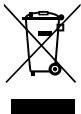
Products with the symbol (crossed-out wheeled bin) cannot be disposed as household waste.
Old electrical and electronic equipment should be recycled at a facility capable of handling these items and their waste byproducts.
Contact your local authority for details in locating a recycle facility nearest to you.
Proper recycling and waste disposal will help conserve resources whilst preventing detrimental effects on our health and the environment.
Safety precautions
WARNING: TO PREVENT FIRE OR ELECTRIC SHOCK, DO NOT EXPOSE THIS APPLIANCE TO RAIN OR MOISTURE.

CAUTION
BISK OF ELECTRIC SHOCK
DO NOT OPEN

CAUTION: TO REDUCE THE RISK OF ELECTRIC SHOCK, DO NOT REMOVE COVER (OR BACK). NO USER-SERVICEABLE PARTS INSIDE. REFER SERVICING TO QUALIFIED SERVICE PERSONNEL.

THE LIGHTNING FLASH WITH ARROWHEAD SYMBOL, WITHIN AN EQUILATERAL TRIANGLE, IS INTENDED TO ALERT THE USER TO THE PRESENCE OF UNINSULATED "DANGEROUS VOLTAGE" WITHIN THE PRODUCT'S ENCLOSURE THAT MAY BE OF SUFFICIENT MAGNITUDE TO CONSTITUTE A RISK OF ELECTRIC SHOCK TO PERSONS.

THE EXCLAMATION POINT WITHIN AN EQUILATERAL TRIANGLE IS INTENDED TO ALERT THE USER TO THE PRESENCE OF IMPORTANT OPERATING AND MAINTENANCE (SERVICING) INSTRUCTIONS IN THE LITERATURE ACCOMPANYING THE APPLIANCE.
Read Instructions - All the safety and operating instructions should be read before the product is operated.
Retain Instructions - The safety and operating instructions should be retained for future reference.
Heed Warnings - All warnings on the product and in the operating instructions should be adhered to.
Follow Instructions - All operating and use instructions should be followed.
- Cleaning - Unplug this product from the wall outlet before cleaning. Do not use liquid cleaners or aerosol cleaners. Use a damp cloth for cleaning.
- Attachments - Do not use attachments not recommended by the product manufacturer as they may cause hazards.
- Water and Moisture -This product shall not be exposed to dripping and splashing - for example, near a bath tub, wash bowl, kitchen sink, or laundry tub; in a wet basement; or near a swimming pool; and the like. Do not place an object containing liquid, such as a flower vase, on the appliance.
- Accessories - Do not place this product on an unstable cart, stand, tripod, bracket, or table. The product may fall, causing serious injury to a child or adult, and serious damage to the product. Use only with a cart, stand, tripod, bracket, or table recommended by the manufacturer. Any mounting of the product should follow the manufacturer's instructions, and should use a mounting accessory recommended by the manufacturer.
A product and cart combination should be moved with care. Quick stops, excessive force, and uneven surfaces may cause the product and cart combination to overturn.

- Ventilation - Slots and openings in the cabinet are provided for ventilation and to ensure reliable operation of the product and to protect it from overheating, and these openings must not be blocked or covered. The openings should never be blocked by placing the product on a bed, sofa, rug, or other similar surface. This product should not be placed in a built-in installation such as a bookcase or rack unless proper ventilation is provided or the manufacturer's instructions have been adhered to.
- Power Sources - This product should be operated only from the type of power source indicated on the product. If you are not sure of the type of power supply to your home, consult your product dealer or local power company.
- CAUTION - Polarization - This product may be equipped with a polarized alternating-current line plug (a plug having one blade wider than the other). This plug will fit into the power outlet only one way. This is a safety feature. If you are unable to insert the plug fully into the outlet, try reversing the plug. If the plug should still fail to fit, contact your electrician to replace your obsolete outlet. Do not defeat the safety purpose of the polarized plug.
- Power Cord Protection - Power-supply cords should be routed so that they are not likely to be walked on or pinched by items placed upon or against them, paying particular attention to cords at plugs, convenience receptacles, and the point where they exit from the product.
- Lightning - For added protection for this product during a lightning storm, or when it is left unattended and unused for long periods of time, unplug it from the wall outlet and disconnect the antenna or cable system. This will prevent damage to the product due to lightning and powerline surges.
- Overloading - Do not overload wall outlets, extension cords, or integral convenience receptacles as this can result in a risk of fire or electric shock.
-
Object and Liquid Entry - Never push objects of any kind into this product through openings as they may touch dangerous voltage points or short-out parts that could result in a fire or electric shock. Never spill liquid of any kind on the product.
-
Servicing - Do not attempt to service this product yourself as opening or removing covers may expose you to dangerous voltage or other hazards. Refer all servicing to qualified service personnel.
-
Damage Requiring Service - Unplug this product from the wall outlet and refer servicing to qualified service personnel under the following conditions:
a) When the power-supply cord or plug is damaged,
b) If liquid has been spilled, or objects have fallen into the product,
c) If the product has been exposed to rain or water,
d) If the product does not operate normally by following the operating instructions.
e) If the product has been dropped or damaged in any way, and
f) When the product exhibits a distinct change in performance – this indicates a need for service.
g) If an abnormal smell or smoke is detected.
- Replacement Parts - When replacement parts are required, be sure the service technician has used replacement parts specified by the manufacturer or have the same characteristics as the original part. Unauthorized substitutions may result in fire, electric shock, or other hazards.
- Safety Check - Upon completion of any service or repairs to this product, ask the service technician to perform safety checks to determine that the product is in proper operating condition.
16.Wall or Ceiling Mounting - This product should be mounted to a wall or ceiling only as recommended by the manufacturer. - Heat - This product should be situated away from heat sources such as radiators, heat registers, stoves, or other products that produce heat. Do not place a flaming object, such as a candle or lantern, or near the product.
- Power Lines - An outside antenna system should not be located in the vicinity of overhead power lines or other electric light or power circuits, or where it can fall into such power lines or circuits. When installing an outside antenna system, extreme care should be taken to keep from touching such power lines or circuits as contact with them might be fatal.
- Outdoor Antenna Grounding - If an outside antenna or cable system is connected to the product, be sure the antenna or cable system is grounded so as to provide some protection against voltage surges and built-up static charges. Article 810 of the National Electrical Code, ANSI/NFPA 70, provides information with regard to proper grounding of the mast and supporting structure, grounding of the lead-in wire to an antenna discharge unit, size of grounding conductors, location of antenna-discharge unit, connection to grounding electrodes, and requirements for the grounding electrode.
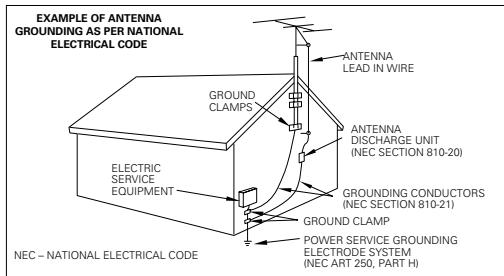
Notes:
- Item 7 is not required except for grounded or polarized equipment.
- Item 19 complies with UL in the U.S.A.
Caution: Read the pages marked carefully to ensure safe operation.
Before applying power. 2
Safety precautions 2
IMPORTANT SAFETY INSTRUCTIONS 3
Contents 4
Accessories 4
Special features 5
Important items. 5
Reference 5
Maintenance 5
Connections 6
Connecting the playback components 6
Connecting the speakers 7
Controls and indicators. 8
Vertical installation 8
Operation 9
In case of difficulty 10
Specifications 10
Accessories
Unpacking
Unpack the unit carefully and make sure that all the accessories are present.
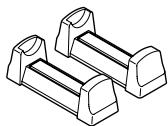
Stand (2)
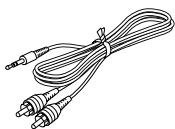
Audio cord (1)
(RCA plug - 3.5 mm plug)
If any accessories are missing, or if the unit is damaged or fails to operate, notify your dealer immediately. If the unit was shipped to you directly, notify your shipper immediately. Kenwood recommends that you retain the original carton and packing materials in case you need to move or ship the unit in the future.
Keep this manual handy for future reference.
For your records
Record the serial number, found on the back of the unit, in the spaces designated on the warranty card, and in the space provided below. Refer to the model and serial numbers whenever you call upon your dealer for information or service on this product.
Model KA-S10
Serial Number
Three sets of input connectors
Considering connection with a portable component with a low audio output level, an analog input with high input gain (D.AUDIO) is provided in addition to two analog inputs for ordinary desktop components (CD, AUX).
Subwoofer output connector
A subwoofer with built-in amplifier and pin jack input can be connected to this unit.
N.B. (Natural Bass) circuit
The bass sounds can be selected from three presets featuring different amplification center frequencies and levels according to the installation environment and size of the speakers.
Either vertical or horizontal installation
A pair of stands is provided for installing this unit vertically or on its side.
Important items
Reference
Caution on condensation
Condensation (of dew) may occur inside the unit when there is a great difference in temperature between this unit and the outside.
This unit may not function properly if condensation occurs. In this case, leave the unit for a few hours and restart the operation after the condensation has dried up.
Be specially cautious against condensation in a following circumstances:
When this unit is carried from one place to another across a large difference in temperature, when the humidity in the room where this unit is installed increases, etc.
Maintenance
Maintenance of the unit
When the front panel or case becomes dirty, wipe with a soft, dry cloth. Do not use thinner, benzine, alcohol, etc. for these agents may cause discoloration.
In regard to contact cleaner
Do not use contact cleaners because it could cause a malfunction. Be specially careful not to use contact cleaners containing oil, for they may deform the plastic component.
Connecting the playback components
CONNECTION PRECAUTIONS
Do not connect the power cord plug into the power outlet until all other connections are complete.
Before unplugging a cord or cable from the unit, be always sure to set the POWER switch to OFF and unplug the power plug from the power outlet.
CAUTION
Simply setting the POWER switch to OFF does not shut down the power supplied to the unit completely. To isolate this unit completely from the power supply, it is necessary to unplug the power cord from the power outlet.
To shut down the power supply to the unit immediately in case of an emergency, connect the power plug to an easily accessible power outlet.
CAUTION
Be sure to adhere to the following, or proper ventilation will be blocked causing damage or fire hazard.
- Do not place any objects impairing heat radiation onto the top of the unit.
- Leave some space around the unit (from the largest outside dimension including projection) equal to or greater than, shown below.
Top panel:50cm Back panel:10cm
- Do not place the equipment onto a bed, a sofa, a carpet, or similar. Sucked-in dust can cause fire.
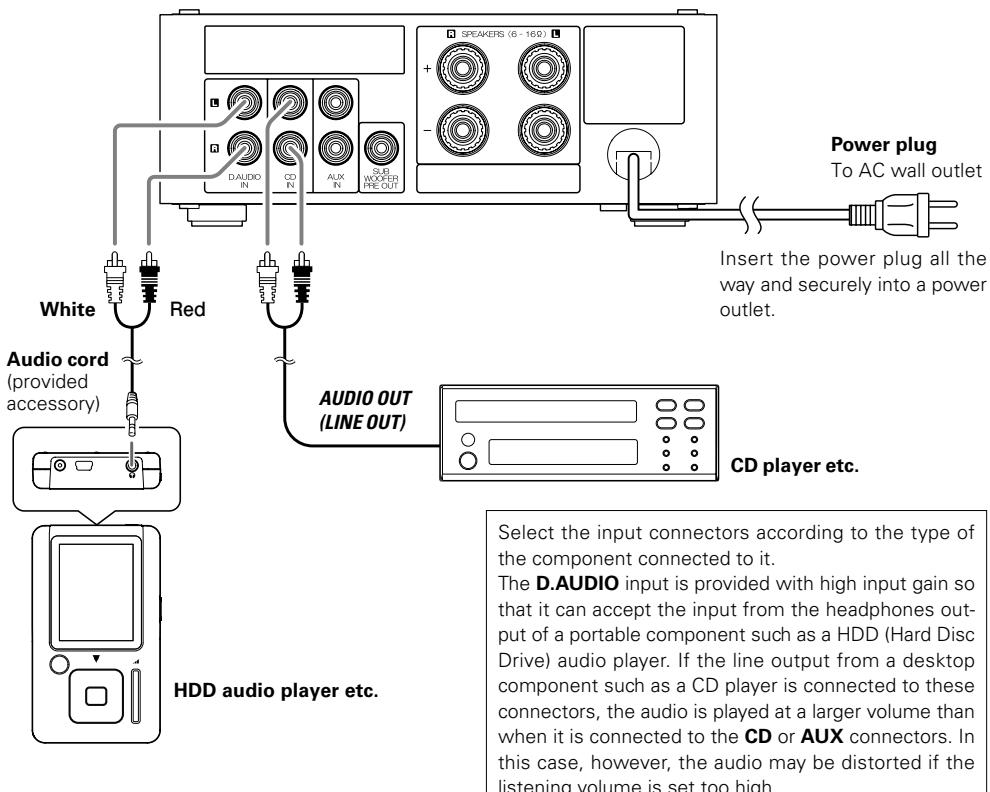
- In case an associated system component is connected, also read the instruction manual of the component.
- Be sure to insert all connection cords securely. If their connections are imperfect, the sound may not be produced or noise may interfere.
Connecting the speakers

CONNECTION PRECAUTIONS
Do not connect the power cord plug into the power outlet until all other connections are complete.
Before unplugging a cord or cable from the unit, be always sure to set the POWER switch to OFF and unplug the power plug from the power outlet.
Be careful so that the conductors of speaker wires do not contact other terminals or the case of the unit.
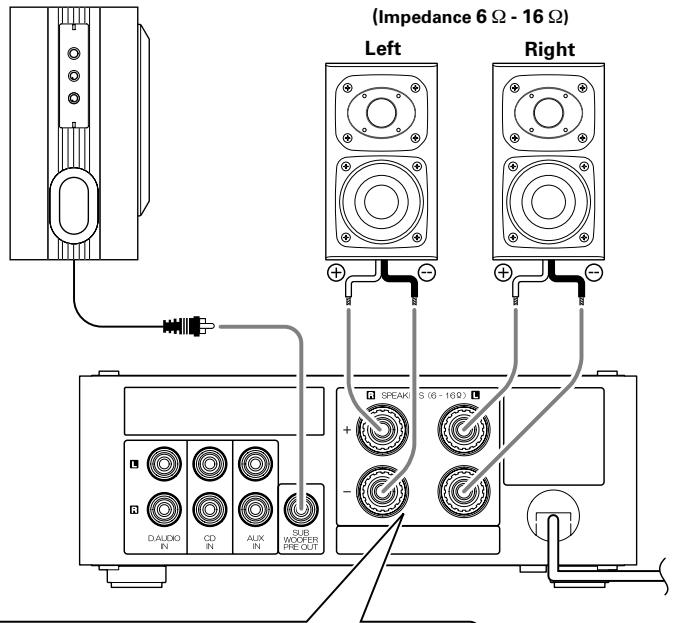
Powerd subwoofer
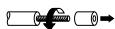
Strip coating

Loosen
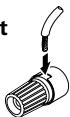
Insert

4 Secure

- Never short-circuit the "+" and "-" speaker cords. It may cause malfunction.
- If the "+" and "-" polarity are inverted, the sound will be unnatural with unclear positioning of musical instruments, etc.
- Be sure to insert all connection cords securely. If their connections are imperfect, the sound may not be produced or noise may interfere.
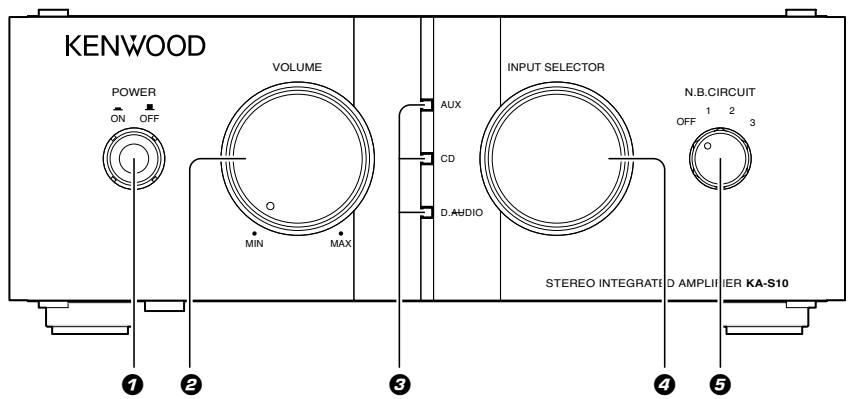
POWER switch
Switches the power ON and OFF.
2 VOLUME knob
Rotating the knob clockwise increases the volume level, and rotating the knob counterclockwise decreases the volume level.
Input indicator
The indicator for the input source selected with the INPUT SELECTOR knob lights up.
All of the indicators are extinguished when the power is switched OFF.
4 INPUT SELECTOR knob
Selects the input source (D.AUDIO, CD or AUX).
N.B. CIRCUIT knob
Adjusts the bass tone in three steps.
Select the position according to the speakers in use or your liking.
Vertical installation
The unit can be installed vertically, or on its left side, by using the pair of stands provided with it.
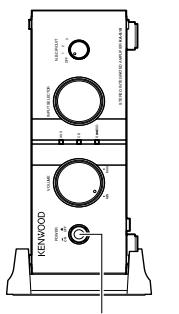
POWER switch
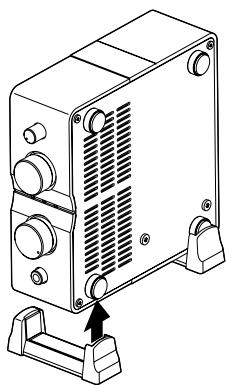

CAUTION
Be sure to observe the following cautions when installing the unit. Incorrect installation may cause the unit to turn over or topple down and cause injuries.
Always use the provided stands when installing the unit vertically.
- When installing the unit vertically, position it so that the POWER switch comes at the lower position as shown in the illustration.

CAUTION
When installing the unit, be careful not to block the ventilation openings to ensure sufficient heat radiation. Otherwise, the heat pooled inside the unit may cause malfunction or a fire hazard.
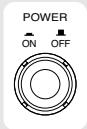
1. Switching the power on (off).
Press the POWER switch to switch the unit ON.
One of the input indicators light up when the power is switched ON.
To switch the unit OFF, press the POWER switch again. The input indicators should turn off when the power is OFF.
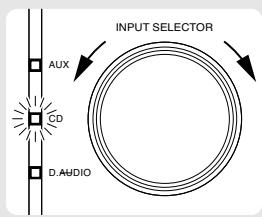
When CD is selected.
2. Selecting the desired input sources.
Turn the INPUT SELECTOR knob in either direction to select the source.
The input indicator for the selected input source lights up.
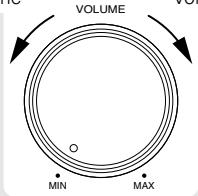
Decrease
volume
Increase
volume
3. Adjusting volume.
Turn the VOLUME knob in either direction to adjust the volume. Turning the knob clockwise increases the listening volume and turning the knob clockwise decreases it.
Adjusting the bass tone with N.B. (Natural Bass) CIRCUIT knob
Turn the N.B. CIRCUIT knob in either direction to adjust the low frequencies if necessary.

N.B.CIRCUIT
1 2 0

In general, the bass adjustment using the N.B. circuit is most effective when using compact speakers because the bass is often insufficient with these kinds of speakers. The N.B. CIRCUIT knob should be set to OFF with a subwoofer.
OFF: Normal playback (The N.B. circuit function is deactivated.)
1 : Enhances the low frequencies around 60 Hz.
2 : Enhances the low frequencies around 70 Hz.
3 : Enhances the low frequencies around 100 Hz.
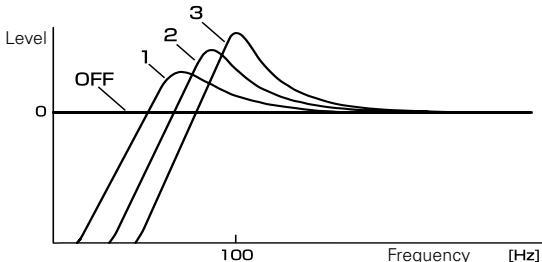
Image of enhancement effects of N.B. circuit
What seems to be a malfunction is not always so. Before calling for service, check the following table according to the symptom of your trouble.
| Symptom | Remedy |
| Sound is not produced. | • Connect properly referring to "Connections".→6→7 • Adjust to a required volume. • Select the desired input source with the INPUT SELECTOR knob.→9 |
| No sound is output or noise interferes. | • The speaker protection circuit may be activated. Read "Speaker protection circuit" below and remove short-circuiting of the speaker cords.→10 |
| Sound is not produced from the left or right speaker. | • Connect properly referring to "Connections".→6→7 |
| Sound volume is too low. | • Connect properly referring to "Connections".→6→7 • If the headphones output of a portable component is connected to the CD or AUX input connectors, reconnect it to the D.AUDIO input connectors.→6 |
| Sound is too loud and distorted. | • Connect properly referring to "Connections".→6→7 • If the line output of a desktop component such as a CD player is connected to the D.AUDIO input connectors, reconnect it to the CD or AUX input connectors.→6 |
Speaker protection circuit
The speaker protection circuit is activated when the unit is switched ON while the + and - speaker cords are shorted. When activated, the speaker protection circuit shuts off the audio output to protect both the unit and speakers. If the speaker cords are shorted, switch the unit OFF, unplug the power cord from the power outlet, and then reconnect the speaker cords properly by removing the short-circuiting. Plug the power plug into the power outlet and set the POWER switch to ON to reuse the unit.
Specifications
[Audio section]
Effective output power during STEREO operation (1 kHz, 10% T.H.D., at 8 Ω) ..... 12 W + 12 W (RMS) (1 kHz, 10% T.H.D., at 6 Ω) ..... 13 W + 13 W (RMS)
Rated output power during STEREO operation (63 Hz ~ 12.5 kHz, at 8 Ω) 10 W + 10 W (DIN) (63 Hz ~ 12.5 kHz, at 6 Ω) 11 W + 11 W (DIN) Total harmonic distortion 0.03 % (AUX IN, 1 kHz, 6 W, 8 Ω)
N.B.Circuit N.B.1. +3.0dB (at 60Hz 1 N.B.2. +5.0dB at 70Hz N.B.3. +7.5dB at 100Hz
Input (Sensitivity / Impedance) LINE (CD, AUX) 250 mV / 22 kΩ LINE (D.AUDIO) 140 mV / 48 kΩ
Output (Level / Impedance) SUBWOOFER PREOUT. 1.8 V/2.9 kΩ
[General]
Power consumption 28 W
Dimensions
Horizontal installation .171 mm (6-3/4") H 67 mm (2-5/8") D 207 mm (8-1/8") Vertical installation .W 89 mm (3-1/2") H 182 mm(7-3/16") D 207 mm (8-1/8") Weight (net) 2 kg (4.4 lb)
Notes: KENWOOD follows a policy of continuous advancements in development. For this reason specifications may be changed without notice.
- Sufficient performance may not be exhibited at extremely cold locations (where water freezes).
Installation vertical 17
Fonctionnement 18
Circuit N.B. (Natural Bass)
Installation vertical
0.03% (AUX IN, 1 kHz, 6 W, 8Ω)
Circuit N.B.
N.B. 1. +3,0 dB (sur 60 Hz)
N.B. 2. +5,0 dB (sur 70 Hz)
N.B. 3 +7,5 dB (sur 100 Hz)
Installation vertical
L:89mm H:182mm P:207mm
Poids (net) 2 kg
N.B. (Natural Bass) schakeling
Meer over contactreinigers
Circuito N.B. (Natural Bass)
(1 kHz, 10 % T.H.D., a 8 Ω) ..... 12 W + 12 W (RMS)
(1 kHz, 10% T.H.D., a 6Ω) 13W + 13W (RMS)
0.03% (AUX IN, 1 kHz, 6 W, 8Ω)
Circuit N.B.
N.B. 1. +3,0 dB (a 60 Hz)
N.B. 2 +5,0 dB (a 70 Hz)
N.B. 3 +7,5 dB (a 100 Hz)
L:89mm A:182mm P:207mm
Peso (netto) 2 kg
0.03% (AUX IN, 1 kHz, 6 W, 8Ω)
Circuit N.B.
N.B. 1. +3,0 dB (en 60 Hz)
N.B. 2. +5,0 dB (en 70 Hz)
N.B. 3 +7,5 dB (en 100 Hz)