
KTC-V300E - TV receiver KENWOOD - Free user manual and instructions
Find the device manual for free KTC-V300E KENWOOD in PDF.


| Product type | TV receiver for vehicle |
| Brand | KENWOOD |
| Model | KTC-V300E |
| Tuner dimensions (W x H x D) | 188 x 30 x 144 mm |
| Tuner weight | 680 g |
| Film antenna dimensions (W x H) | 345 x 94 mm |
| Total weight with antennas | 375 g (antennas only) |
| Operating voltage (tuner) | 14.4 V DC (11 - 16 V) |
| Power consumption (tuner) | 465 mA |
| Operating voltage (antennas) | 8 V DC |
| Power consumption (antennas) | 85 mA |
| Supported TV systems | PAL B/G, PAL I, SECAM D/K, SECAM B/G |
| Frequency ranges | VHF (channels 2-12 per standard), UHF 21-69 |
| Antenna input | 4-channel diversity (3.5 mm mini jack) |
| Antenna output impedance | 75 Ω |
| Operating temperature | -10 °C to +60 °C |
| Storage temperature | -30 °C to +85 °C |
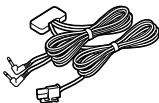
| Included accessories | Film antennas, cables (4.0 m and 5.5 m), clamps, cleaner, screws |
| Installation | Attach antennas to windshield, professional wiring recommended |
| Maintenance | Clean the glass surface with the provided cleaner before sticking |
| Safety | Disconnect battery before installation; do not obstruct airbags |
Frequently Asked Questions - KTC-V300E KENWOOD
User questions about KTC-V300E KENWOOD
0 question about this device. Answer the ones you know or ask your own.
Ask a new question about this device
Download the instructions for your TV receiver in PDF format for free! Find your manual KTC-V300E - KENWOOD and take your electronic device back in hand. On this page are published all the documents necessary for the use of your device. KTC-V300E by KENWOOD.
USER MANUAL KTC-V300E KENWOOD
Installation the TV Tuner Unit
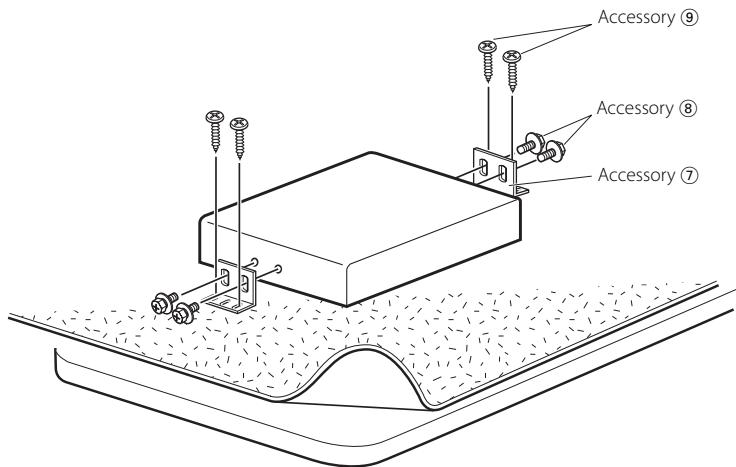
Securing to audio board
Use screws (Accessory ⑧ and ⑨) to fix TV Tuner onto an audio board or another.
Before installing the antenna
WARNING
- Mounting and wiring this product requires skills and experience. For safety's sake, leave the mounting and wiring work to professionals.
CAUTION
- Incar antennas have a lower reception sensitivity than antennas intended for outside mounting. The picture may not appear or may be disturbed if the signal in your area is weak.
- The film antennas are designed specially for use in car.
-
Do not attach the film antennas in the following places:
-
A place where the driver's view is blocked
- A place where safety parts such as an airbag are prevented from operating normally
-
On the surface of a glass such as a rear hatch glass which is frequently moved.
-
The reception sensitivity lowers in the following places:
-
A place where a heat reflection glass or mirror-type glass film is affixed
- A place where the film antenna of the factory-supplied radio already exists
- On the window where the heating wire already exists
- On the side of the vehicle (door, front quarter window, etc.)
- On the rear window
-
On a glass (heat reflecting glass, heat insulating glass, etc.) that blocks radio waves
-
Using the cleaner (Accessory 10), remove oil and dirt from the glass surface to which the film antennas are to be affixed.
- If the ambient temperature is low, warm the glass before starting the work.
- Before starting the work, confirm well the places where the film antennas (Accessory ① and ②) and the cables (Accessory ③ and ④) are to be installed. Once peeled off, the film antennas and double-stick tape lose adhesion.
- Do not fold or damage the film antennas.
- Noise generated by the air conditioner or monitor can cause poor TV reception.
- The film antennas cannot be installed depending on the vehicle model.
- The reception sensitivity can vary with the windshield wiper operation depending on the vehicle model.
- The reception sensitivity can vary depending on the relationship between the traveling direction of the vehicle (the pointing direction of the antennas) and the location of the broadcast station.
System connection
A To prevent short circuits, remove the key from the ignition and disconnect the terminal of the battery.
- Make sure to ground the unit to a negative 12V DC power supply.
- After the unit is installed, check whether the brake lamps, blinkers, wipers, etc. on the car are working properly.
- Thoroughly wipe away oil and other dirt from the installation surface. Please avoid installation on uneven surfaces.
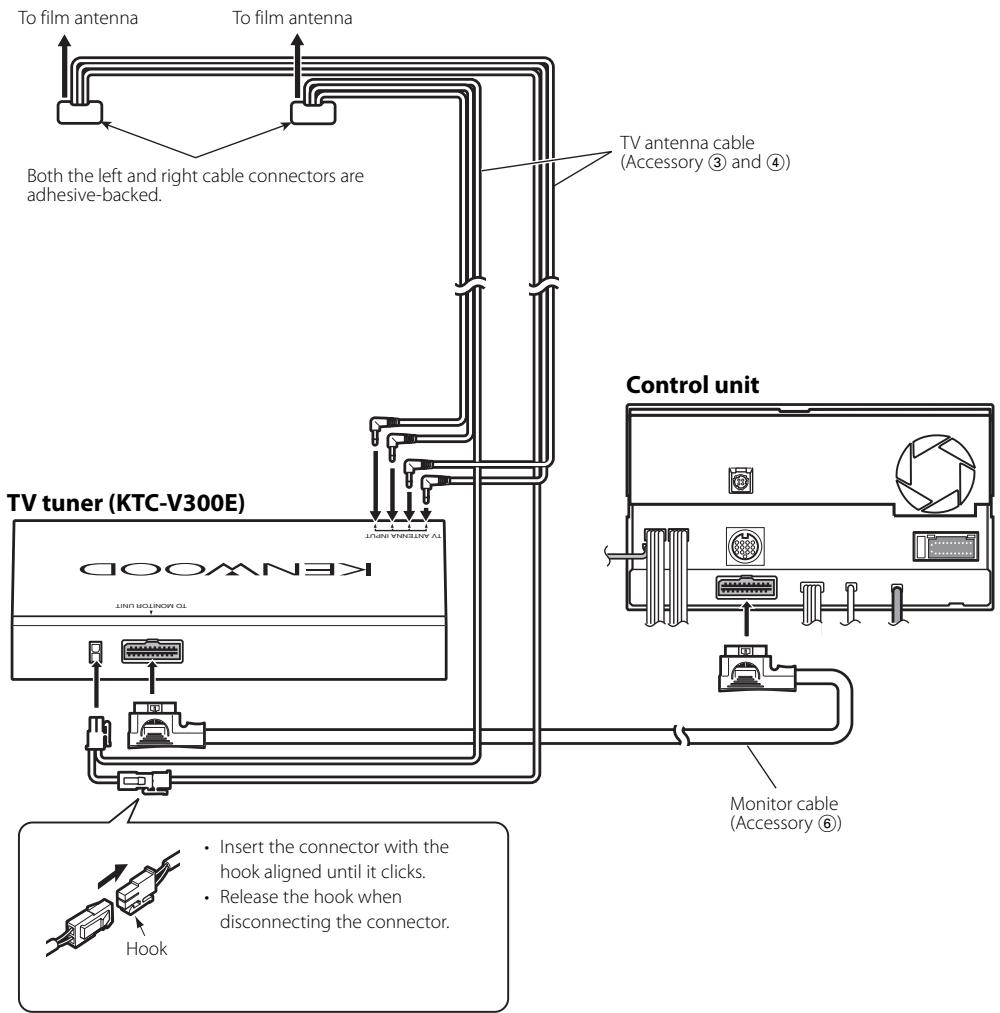
Wiring example
Select either one of the following wiring routes depending on the situation.
TV antenna cables (Accessory ③ and Accessory ④) are different in length. Use them appropriately to fit the wiring of the vehicle you are working on.
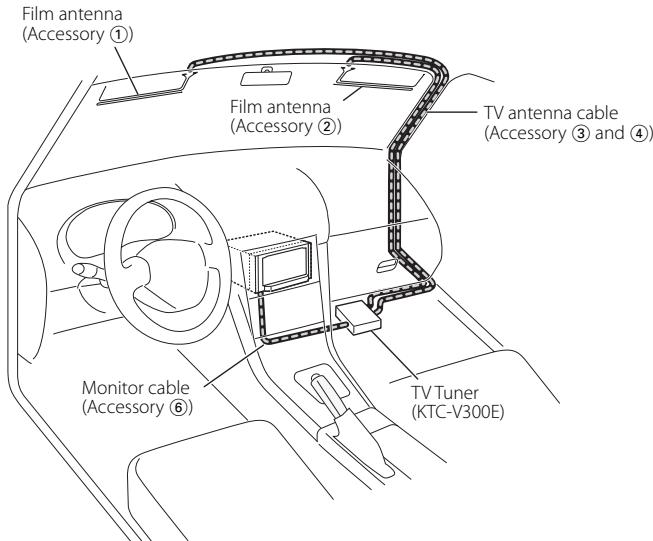
Example A
This example shows a case where the cables are routed on the passenger's seat side. For the right-hand-drive car, route the cables on the left side passenger's seat.
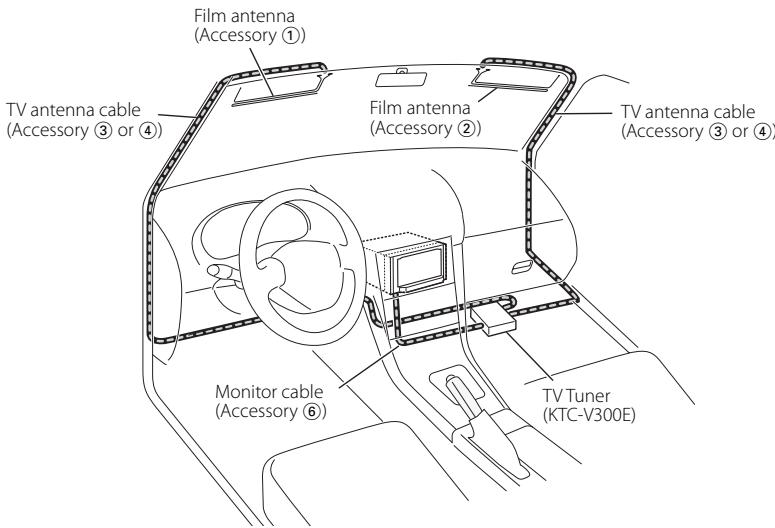
Example B
This example shows a case where it is difficult to route the cables near the rearview mirror.
Installation Procedure
1. Confirm the installation place.

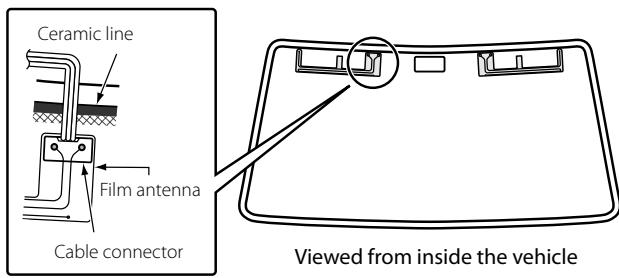
- Affix the film antennas and cable connectors to the front windshield following the laws and regulations of your country.
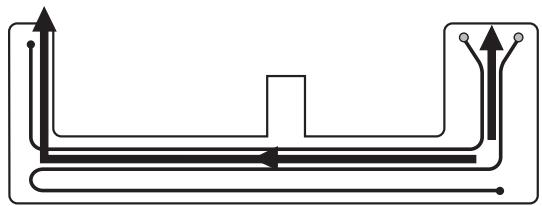
- Affix each film antenna so that it does not overlap the ceramic line. Affixing the antenna on the ceramic line will lose the adhesion force.
- Using the cleaner (Accessory 10), wipe dirt off the antenna installation surface.
3. Affix each film antenna.
1) Peel off the release paper (half-transparent sheet) [1] starting at the slit, and then affix the film antenna to the windshield.

- Once peeled off, the remaining portions of the antenna cannot be affixed again. Confirm the installation place again.
2) Peel off the release paper [2] starting at either slit, and affix the film antenna to the windshield.
3) Peel off the release paper [3] and release paper [4] and affix the film antenna to the windshield in the same manner as above.
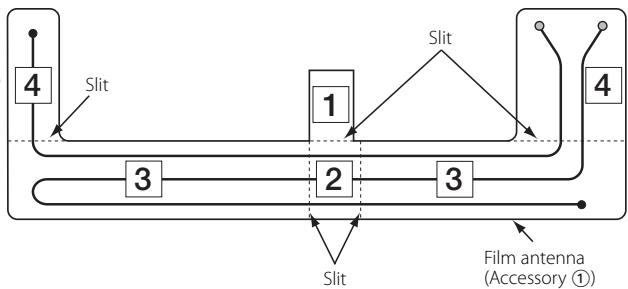

Either the left or right side of the film antenna can be affixed first.
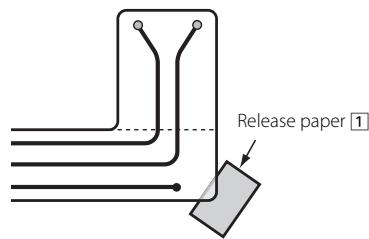
- Inserting the release paper ① under the corner of the film antenna as shown on the right allows you to peel off other sheets of release paper easily.
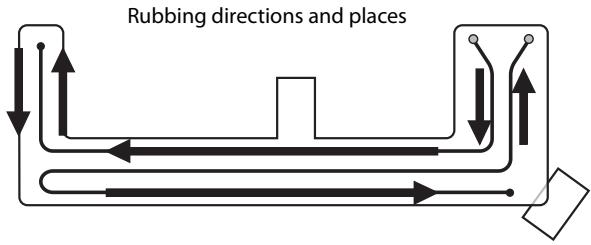
- Rub a rubber spatula against the transparent sheet to affix the antenna element to the windshield tightly. If the rubber spatula is not available, use a small board wrapped with cloth.
- Slowly peel off the transparent sheet along the element line.
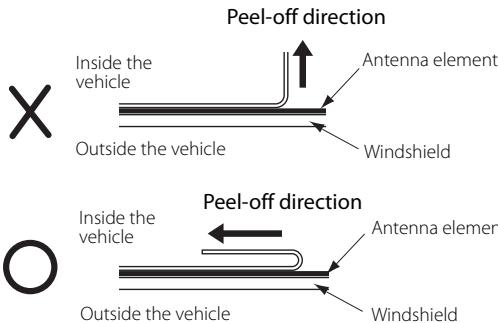
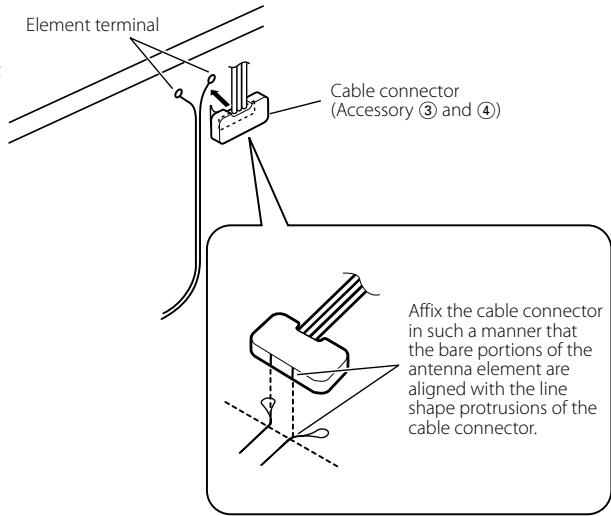
- Make sure that the antenna element has been affixed tightly, and then affix the cable connector to the element terminal.
- Route the cable and secure it with the supplied cable clamps (Accessory ⑤).
Specifications
Specifications subject to change without notice.
TV Tuner section
Colour system
: PAL/SECAM
Channel selection system
PLL frequency synthesiser system
Television system
PAL-B/G, PAL-I, SECAM-D/K, SECAM-B/G
Channel converge
VHF
(PAL-B/G): 2 - 12 ch/ A - H2 ch
(PAL-I): A - J ch
: Split carrier system
Antenna input
: 4-ch diversity (3.5 miniplug)
General
Operating voltage
: 14.4 V DC (11 V - 16 V)
Current consumption
:465mA
Dimensions (W×H×D)
: 188× 30× 144mm
Operational temperature range
: -10°C - +60°C
Storage temperature range
: -30 ℃ - +85 ℃
Weight
:680g
TV Antenna
Output impedance
Information on Disposal of Old Electrical and Electronic Equipment (applicable for EU countries that have adopted separate waste collection systems)

Products with the symbol (crossed-out wheeled bin) cannot be disposed as household waste. Old electrical and electronic equipment should be recycled at a facility capable of handling these items and their waste byproducts. Contact your local authority for details in locating a recycle facility nearest to you. Proper recycling and waste disposal will help conserve resources whilst preventing detrimental effects on our health and the environment.
Accessoires
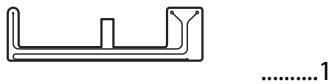
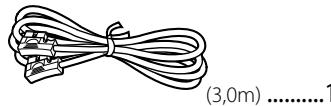
1
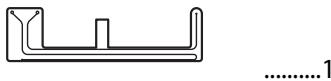
6
②
7
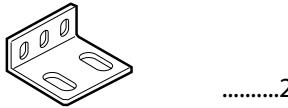
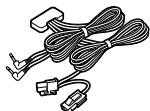
(3)
(4,0m) 1

8
(M4x8mm) .4
4
(5,5m) 1

9
(04x16mm) .4

(5)
6
10
1
Installation du tuner TV
(PAL-B/G) : 2 - 12 can./ A - H2 can.
(PAL-I) : A - J can.
(SECAM-D/K) : 1 - 12 can.
(SECAM-B/G) : 2 - 12 can.
UHF:21-69 can.
(PAL-I): A - J Kanal
(SECAM-D/K): 1 - 12 Kanal
(SECAM-B/G): 2-12 Kanal
UHF: 21 - 69 Kanai
Demodulationssystem
(PAL-B/G) : 2 - 12 can./ A - H2 can.
(PAL-I) : A - J can.
(SECAM-D/K): 1 - 12 can.
(SECAM-B/G) : 2 - 12 can.
UHF:21-69 can.
Sistema de television
PAL-B/G, PAL-I, SECAM-D/K, SECAM-B/G
(PAL-B/G) : 2 - 12 can./ A - H2 can.
(PAL-I) : A - J can.
(SECAM-D/K): 1 - 12 can.
(SECAM-B/G) : 2 - 12 can.
UHF:21-69 can.

- Installation the TV Tuner Unit
- Securing to audio board
- Before installing the antenna
- WARNING
- CAUTION
- System connection
- Wiring example
- Example A
- Example B
- Installation Procedure
- Confirm the installation place.
- Affix each film antenna.
- Specifications
- TV Tuner section
- General
- TV Antenna
- Information on Disposal of Old Electrical and Electronic Equipment (applicable for EU countries that have adopted separate waste collection systems)
- Accessoires
- Installation du tuner TV
Brand : KENWOOD
Model : KTC-V300E
Category : TV receiver