RTT77 - Turntable Ricatech - Free user manual and instructions
Find the device manual for free RTT77 Ricatech in PDF.


User questions about RTT77 Ricatech
0 question about this device. Answer the ones you know or ask your own.
Ask a new question about this device
Download the instructions for your Turntable in PDF format for free! Find your manual RTT77 - Ricatech and take your electronic device back in hand. On this page are published all the documents necessary for the use of your device. RTT77 by Ricatech.
USER MANUAL RTT77 Ricatech
TO PREVENT FIRE OR SHOCK HAZARD, DO NOT EXPOSE THIS APPLIANCE TO RAIN OR MOISTURE. DO NOT REMOVE COVER. PILOT LAMPS SOLDERED IN PLACE. NO USER SERVICEABLE PARTS INSIDE. REFER SERVICING TO QUALIFIED SERVICE PERSONNEL.

natural_image
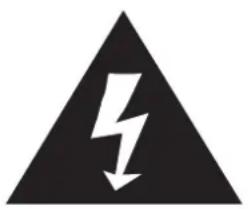
Black triangular warning symbol with a white lightning bolt and downward arrow (no text)The lighting flash with arrowhead symbol, within an equilateral triangle, is intended to alert user to the presence of uninsulated "dangerous voltage" within the product's enclosure that may be of sufficient magnitude to constitute risk of electric shock to persons.
CAUTION
RRISSKK OOFF EELLEECCT DDOO NNOOTT OOPPE
CAUTION: TO REDUCE THE RISK OF ELECTRIC SHOCK, DO NOT REMOVE COVER (OR BACK). NO USER - SERVICEABLE PARTS INSIDE. REFER SERVICING TO QUALIFIED SERVICE PERSONNEL.

text_image
C S S H OThe exclamation point within an equilateral triangle is intended to alert user to the presence of important operating and maintenance (servicing) instruction in the literature accompanying the appliance.
"Ventilation not being impeded."
"Do not exposed to dripping or splashing and that no objects filled with liquids, such as vases, shall be placed on the apparatus."
Specification
FREQUENCY
POWER SOURCE
ANTENNA
POWER CONSUMPTION
SPEAKER SIZE
SPEAKER OHM
SPEAKER WATT
POWER OUTPUT
REPLACEMENT NEEDLE
: FM 88 -108 MHz
AM 530 - 1600 KHz
: AC 230V - 50Hz
: External antenna for FM
Built-in ferrite bar for AM
: 12W
: 2" x 3" Dynamic type x 2
: 4 ohm
: 3-5W
: 1.2W x 2
: NP1
* DESIGN AND SPECIFICATIONS SUBJECT TO CHANGE WITHOUT NOTICE.
IMPORTANT SAFEGUARDS FOR AUDIO PRODUCTS
PLEASE READ CAREFULLY THE FOLLOWING IMPORTANT SAFEGUARDS THAT ARE APPLICABLE TO YOUR EQUIPMENT.
-
Read Instructions - All the safety and operating instructions should be read before the appliance is operated.
-
Retain Instructions - The safety and operating instructions should be retained for future reference.
-
Heed Warnings - All warnings on the appliance and in the operating instructions should be adhered to.
-
Follow Instructions - All operating and use instructions should be followed.
-
Water and Moisture - The appliance should not be used near water-for example, near a bathtub, washbowl, kitchen sink, laundry tub, in a wet basement, or near a swim ming pool and the like.
-
Carts and Stands - The appliance should be used only with a cart or stand that is recommended by the manufacturer.
6A. An appliance and cart combination should be moved with care. Quick stops, excessive force, and uneven surfaces may cause the appliance and cart combination to overturn.
-
Wall or Ceiling Mounting - The appliance should be mounted to a wall or ceiling only as recommended by the manufacturer.
-
Ventilation - The appliance should be situated so that its location or position does not interfere with-its proper ventilation. For example, the appliance should not be situated on a bed, sofa, rug, or similar surface that may block the ventilation openings or, placed in a built-in installation, such as a bookcase or cabinet that may impede the flow of air through the ventilation openings.
-
Heat - The appliance should be situated away from heat sources such as radiators, heat registers, stoves, or other appliances (including amplifiers) that produce heat.
-
Power Sources - The appliance should be connected to a power supply only of the type described in the operating instructions or as marked on the appliance.
-
Grounding or Polarization - Precautions should be taken so that the grounding or polarization means of an appliance is not impeded.
-
Power - Cord Protection - Power-supply cords should be routed so that they are not likely to be walked on or pinched by items placed upon or against them, paying particular attention to cords at plugs, and the point where they exit from the appliance.
-
Cleaning - The appliance should be cleaned only as recommended by the manufacturer.
-
Antenna - This product is designed for use with the antenna attached and should not be connected to any other external antennas.
-
Non-use Periods - The power cord of the appliance should be unplugged from the outlet when left unused for a long period of time.
16.Object and Liquid Entry - Care should be taken so objects do not fall and liquids are not spilled into the enclosure through openings
- Damage Requiring Service - The appliance should be serviced by qualified service personnel when:
A. The power-supply cord of the plug has been damaged; or
B. Objects have fallen, or liquid has been spilled into the appliance; or
C. The appliance has been exposed to rain; or
D. The appliance does not appear to operate normally or exhibits a marked change inperformance, or
E. The appliance has been dropped, or the enclosure damaged.
- Servicing - The user should not attempt to service the appliance beyond that described in the operating instructions. All other servicing should be referred to qualified service personnel.

LOCATION OF PARTS
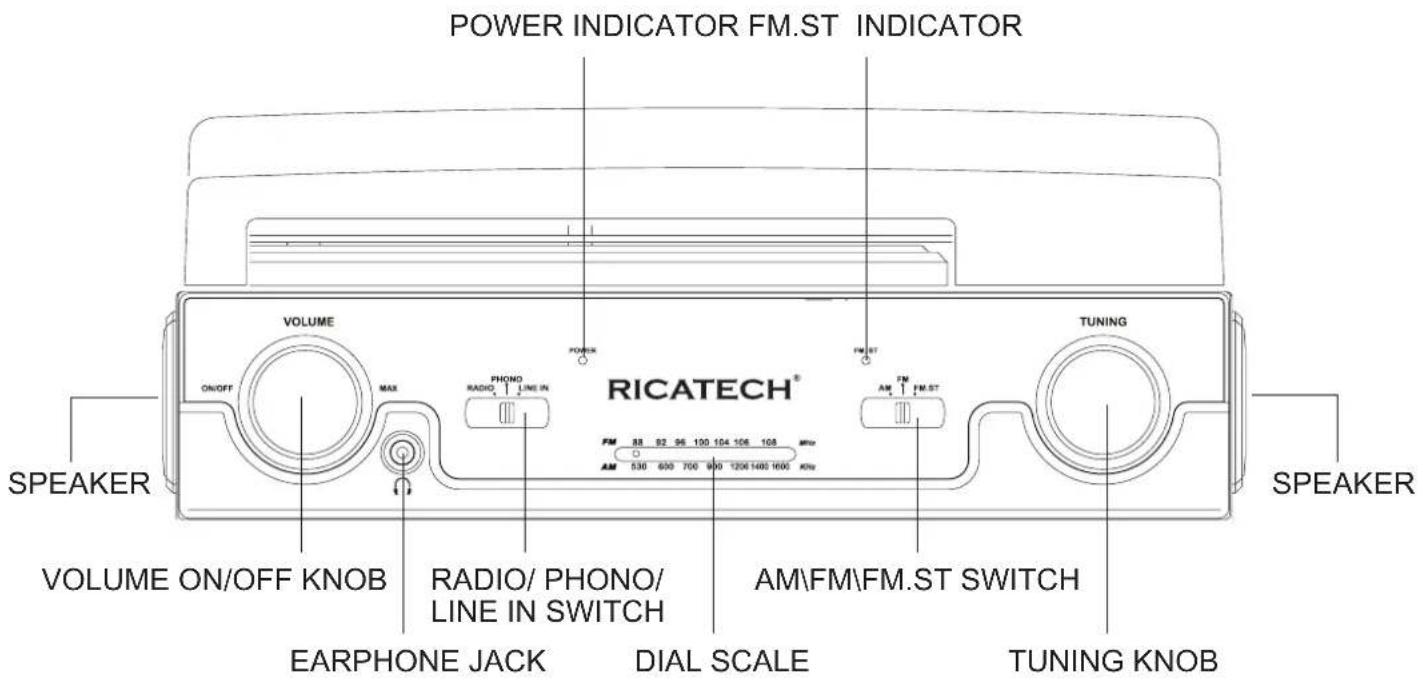
text_image
POWER INDICATOR FM.ST INDICATOR RICATECH® VOLUME ON/OFF MAX PHONO RADIO LINE IN FM 88 92 96 100 104 106 108 MHz AM 530 600 700 800 1206 1400 1600 KHz FM.ST TUNING AM FM.ST AM FM.ST SPEAKER VOLUME ON/OFF KNOB RADIO/ PHONO/ LINE IN SWITCH AM\FM\FM.ST SWITCH EARPHONE JACK DIAL SCALE TUNING KNOB SPEAKER
text_image
LID PIVOT POINTL ID PIVOP POINTLINE IN JACK LINE OUT JAC K LOCK HINGE —— EXTERNAL FM ANTENNA LINE IN R L LINE OUTLOCATION OF PARTS
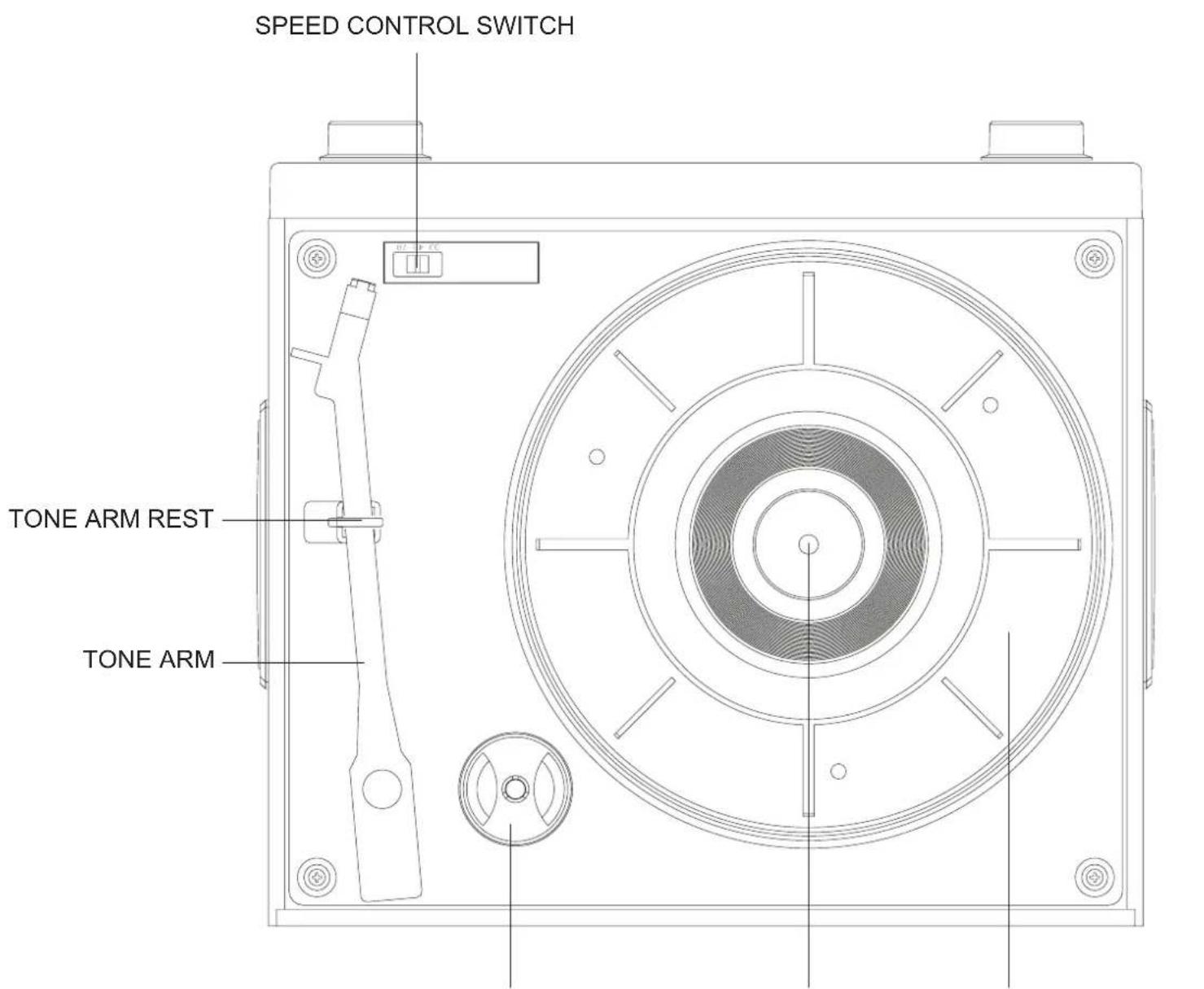
text_image
SPEED CONTROL SWITCH TONE ARM REST TONE ARMSPINDLE TURNTABLEADAPTER FOR
Unpacking
natural_image
Pure mechanical assembly diagram without any text, numbers, or symbols1 Remove packing materials from unit. Note: Save all packing materials.
2 Remove plastic bag covering radio.
3 Remove AC Adaptor from packing.
4 Untie antenna wire on back of radio.
5 Remove black tie-wrap from under the tone arm.
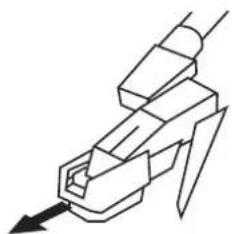
6 Remove white protective needle cover by gently pulling towards the front of the unit.
7 Install the top lid onto the unit
8 Untie the FM antenna and allow it to hang down in a straight line for optimum FM reception. If you have trouble tuning in an FM Station, move the external FM antenna for best reception. Do not connect FM antenna to outside antenna
Power Source
-
Unwind the AC POWER CORD at the back of the unit and connect it to a power outlet.
-
Plug A/C cord into appropriate outlet.
Lid Installation
1 Flip the LID LOCK HINGE towards the back of the unit.
2 Position LID over the turntable and press the lid onto the LOCK HINGE as shown below.
3 As you press the lid into place, align the PIVOT PINS on the LID with the LID PIVOT POINTS as shown below.
4 Press the LID all the way in until the PIVOT PINS snap into the LID PIVOT POINTS and the LOCK HINGE clicks into place.

natural_image
Mechanical assembly diagram showing a bracket with mounting holes and a rotating arrow (no text or symbols)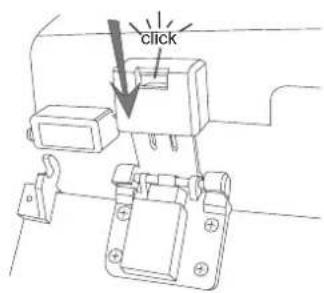
text_image
click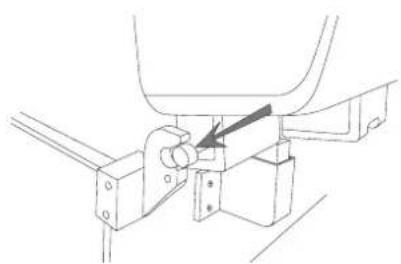
natural_image
Technical line drawing of a mechanical assembly with no visible text or symbolsTurntable Operation
Turn the unit on by rotating the VOLUME ON/OFF KNOB located on the front panel to the ON position
1 Set the FUNCTION SWITCH to PHONO mode.
2 Set the SPEED CONTROL SWITCH to the desired speed (33 1/3, 45 or 78 rpm). Place your record onto the turntable.
3 Move the TONE ARM slightly to the right side until you hear a click sound to activate the turntable.
4 Move the TONE ARM by hand over the record to the point you want the record to start. Adjust the VOLUME ON/OFF KNOB to your desired listening level.
5 At the end of the record, the TONE ARM will stop automatically. You must return the TONE ARM to the arm rest by hand.
ACCESSORY SUPPLIED:
Adaptor for 45 rpm records
This adaptor allows you to play 45 RPM records.
1 Place the 45 RPM adaptor over the spindle.
2 Gently place your 45 RPM record onto the turntable.
3 Follow the steps under turntable operation to your record.
Radio Operation
1 Set the FUNCTION SWITCH to RADIO mode.
2 Set the AM / FM / FM.ST SWITCH to the desired Band.
3 Select the desired radio station by rotating TUNING KNOB.
4 Adjust the VOLUME ON/OFF KNOB to the desired sound level.
Antenna
Antenna: for FM reception, the unit is provided with a FM WIRE ANTENNA, move the wire until the reception is clear and with no interferences. For AM reception, the unit is provided with a directional build-in ferrite antenna. Rotate the set to find the position in which the best reception is obtained. Do not connect the EXTERNAL FM ANTENNA to any outside antenna.

natural_image
Simple circular diagram with three petal-like shapes inside, no text or symbols present.Auxiliary Output
1 You can connect your radio to different sources using the auxiliary output.
2 Plug Auxiliary cables (not supplied) into the LINE OUT JACK.
3 Connect the other end of the Auxiliary cables into the input on your desired component.
4 See the owners' manual for the component for correction operation.
NOTE: The Auxiliary Output is a passive signal level output only and will not power speakers.
Auxiliary Input
1 You can connect external components to your unit by using the Auxiliary Input.
2 Plug Auxiliary cable into the LINE IN JACK on the back of your unit.
3 Set the FUNCTION SWITCH to LINE IN mode
4 Plug the other end of the Auxiliary cable into the output jack on your desired external component
5 Check the volume level of your external component.
6 See operator's manual for correct operation of the external component.
Headphone Jack Operation
1 Connect headphones to the Headphone Jack
2 Adjust volume to the desired listening level.
NOTE: When using headphones, the sound to the unit speakers will be cut off.
NOTE: Headphones not included with unit.
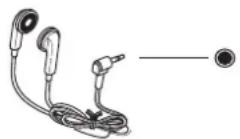
Headphone jack
The sound from all speakers is cut off
Troubleshooting
There is no Power
1 Make sure radio is plugged in correctly.
2 The unit is not turned on: Rotate the VOLUME ON/OFF KNOB from the OFF position past the "click" to turn on the unit.
There is no Sound
1 Check the volume level by turning the VOLUME ON/OFF KNOB.
2 Make sure headphones are not connected to the unit.
3 Check the position of the FUNCTION SWITCH.
Turntable will not work
1 Make sure the FUNCTION SWITCH is set to phono.
2 Try moving the tone arm to the right until you hear a click.
3 Make sure the protective needle cover is removed.
Recycling
natural_image
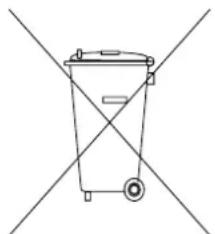
Simple line drawing of a trash bin with two crossed lines (no text or symbols)This crossed bin symbol on the appliance indicates that the product, at the end of its life must be disposed of seperatly from domestic waste, either by taking it to a separate waste disposal site for electric and electronic appliance or by returning it to your dealer when you buy another similar. The user responsible for taking the appliance to a special waste disposal site at the end of its life. If the disused appliance is collected correctly as separate waste, it can be recycled, treated and disposed of ecologically, this avoids a negative impact on both the environment and health, and contributed toward the recycling of the product's materials. For further information regarding the
waste disposal service available, contact your local waste disposal agency or the place of purchase.
CUSTOMER SUPPORT
You can contact the Ricatech customer service when you have a question or a problem with your Ricatech product. You can contact us by telephone and email.
For customer support by email, please sent a email to support@ricatech.com Please make sure that you mention the model number and serial number of the product, mention your name & address and describe your question or problem clearly.
Telephone
For customer support by telephone, please dial +32 3 3265694. One of our service staff will be ready to serve you. For full procedure please visit the website of Ricatech at: www.ricatech.com
Hereby, Ricatech B.V. declares that this turntable is in compliance with the essential requirements and other relevant provisions of Directive 1999/5/EC.
Ricatech B.V.
Cornusbaan 1
2908 KB Capelle a/d IJssel
The Netherlands
Nederlands
WAARSCHUWING :
STEL HET APPARAAT NIET BLOOT AAN REGEN OF VOCHT OM GEVAAR VOOR BRAND OF EEN ELEKTRISCHE SCHOK TE VOORKOMEN. DE BEHUIZING NIET VERWIJDEREN. CONTROLELAMPJES ZIJN OP HET APPARAAT GESOLDEERD. GEEN DOOR DE GEBRUIKER TE ONDERHOUDEN ONDERDELEN AAN DE BINNENKANT. LAAT ONDERHOUD OVER AAN GEKWALIFICEERD ONDERHOUDS PERSONEEL.

natural_image
Black triangular warning symbol with a white lightning bolt and downward arrow (no text)text_image
C S S H Onatural_image
Pure mechanical assembly diagram without any text, numbers, or symbolsnatural_image
Mechanical assembly diagram showing a bracket with mounting holes and a rotating arrow (no text or symbols)natural_image
Technical line drawing of a mechanical assembly with no visible text or symbolsnatural_image
Simple circular diagram with three petal-like shapes inside, no text or symbols present.Hereby, Ricatech B.V. declares that this turntable is in compliance with the essential requirements and other relevant provisions of Directive 1999/5/EC.
Ricatech B.V.
Cornusbaan 1
2908 KB Capelle a/d IJssel
The Netherlands
AVERTISSEMENT :
POUR ÉVITER TOUT RISQUE D'INCENDIE OU D'ÉLECTROCUTION, N'EXPOSEZ PAS CET APPAREIL À LA PLUIE OU À DE L'HUMIDITÉ. NE PAS RETIRER LE COUVERCLE. LES LAMPES PILOTES SONT SOUDÉES À LEUR EMPLACEMENT. NE CONTIENT AUCUNE PIÈCE RÉPARABLE PAR L'UTILISATEUR. CONFIEZ LES RÉVISIONS AU PERSONNEL DE SERVICE QUALIFIÉ.
natural_image
Black triangular warning symbol with a white lightning bolt and downward arrow (no text)text_image
C S S H Onatural_image
Pure mechanical assembly diagram without any text, numbers, or symbolsnatural_image
Mechanical assembly diagram showing a bracket with mounting holes and a rotating arrow (no text or symbols)natural_image
Technical line drawing of a mechanical assembly with no visible text or symbolsnatural_image
Abstract circular diagram with three petal-like shapes and a central dot (no text or symbols)Hereby, Ricatech B.V. declares that this turntable is in compliance with the essential requirements and other relevant provisions of Directive 1999/5/EC.
Ricatech B.V.
Cornusbaan 1
2908 KB Capelle a/d IJssel
The Netherlands
WARNUNG:
natural_image
Black triangular warning symbol with a white lightning bolt and downward arrow (no text)text_image
C S S H Onatural_image
Pure mechanical assembly diagram without any text, numbers, or symbolsnatural_image
Mechanical assembly diagram showing a bracket with mounting holes and a rotating arrow (no text or symbols)Installation des Deckels
natural_image
Technical line drawing of a mechanical assembly with no visible text or symbolsnatural_image
Abstract circular diagram with three curved segments and a central dot (no text or symbols)Radiobetrieb
Hereby, Ricatech B.V. declares that this turntable is in compliance with the essential requirements and other relevant provisions of Directive 1999/5/EC.
Ricatech B.V.
Cornusbaan 1
2908 KB Capelle a/d IJssel
The Netherlands
PRECAUCIONES :
PARA PREVENIR PELIGRO DE FUEGO O DE GOLPES, NO EXPONER EL APARATO A LA LLUVIA O A LA HUMEDAD. NO QUITAR LA TAPA. LOS PILOTO DE LUZ EST N SOLDADOS. S LO HAN DE MANIPULAR EL APARATO PERSONAL DE MANTENIMIENTO CUALIFICADO.

natural_image
Black triangular warning symbol with a white lightning bolt and downward arrow (no text)The lighting flash with arrowhead symbol, within an equilateral triangle, is intended to alert user to the presence of uninsulated "dangerous voltage" within the product's enclosure that may be of sufficient magnitude to constitute risk of electric shock to persons.
CAUTION
RRISSKK OOFF EELLEECCT DDOO NNOOTT OOPPE
CAUTION: TO REDUCE THE RISK OF ELECTRIC SHOCK, DO NOT REMOVE COVER (OR BACK). NO USER - SERVICEABLE PARTS INSIDE. REFER SERVICING TO QUALIFIED SERVICE PERSONNEL.
text_image
C S S H OThe exclamation point within an equilateral triangle is intended to alert user to the presence of important operating and maintenance (servicing) instruction in the literature accompanying the appliance.
"Ventilation not being impeded."
"Do not exposed to dripping or splashing and that no objects filled with liquids, such as vases, shall be placed on the apparatus."
ESPECIFICACIONES
ESPECIFICACIONES
RANGO DE FRECUENCIA
* DESIGN AND SPECIFICATIONS SUBJECT TO CHANGE WITHOUT NOTICE.
text_image
POWER INDICATOR FM.ST INDICATOR RICATECH® VOLUME ON/OFF MAX PHONO RADIO LINE IN FM ST FM ST AM FM ST AM FM ST TUNING SPEAKER VOLUME ON/OFF KNOB RADIO/ PHONO/ LINE IN SWITCH AM\FM\FM.ST SWITCH EARPHONE JACK DIAL SCALE TUNING KNOB SPEAKER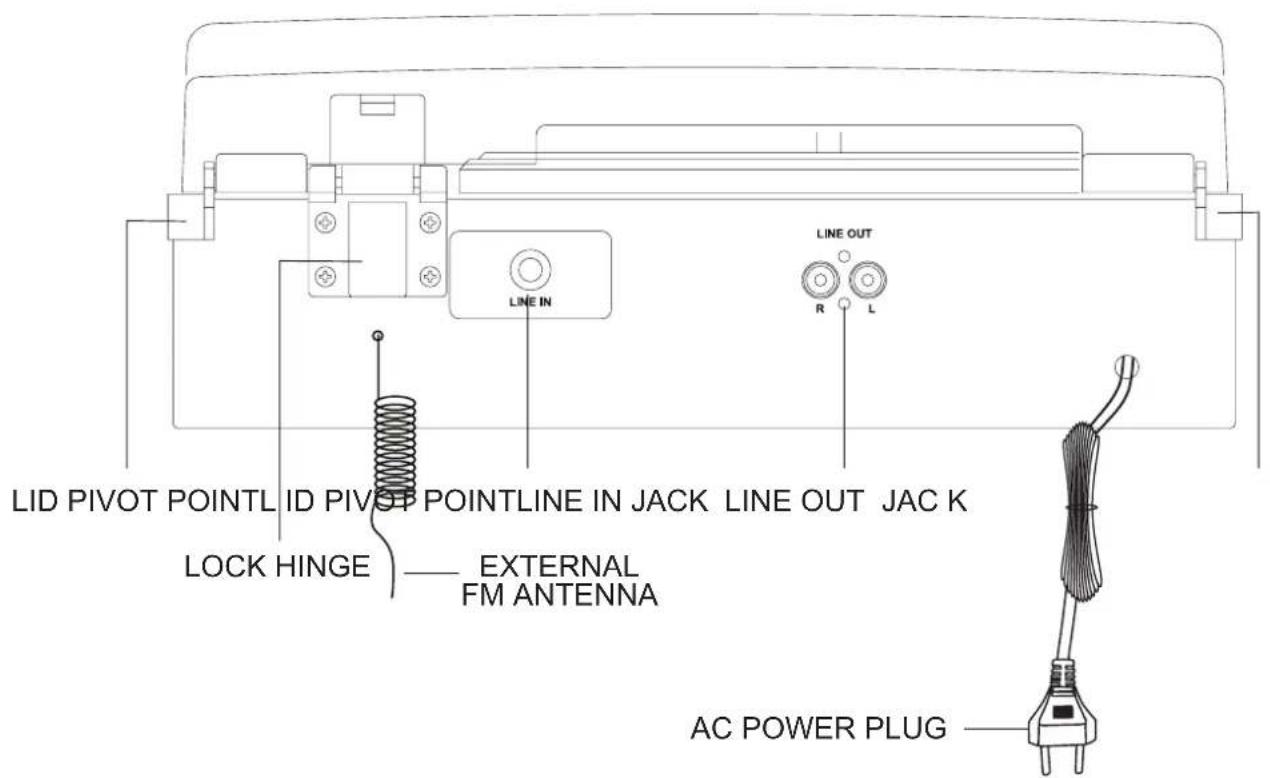
text_image
LID PIVOT POINTL ID PIVOP POINTLINE IN JACK LINE OUT JAC K LOCK HINGE —— EXTERNAL FM ANTENNA LINE IN R L LINE OUT AC POWER PLUGnatural_image
Pure mechanical assembly diagram without any text, numbers, or symbols- SACAR TODOS LOS MATERIALES DE LA UNIDAD (NOTA: GUARDAR TODOS LOS MATERIALES DE EMBALAJE).
- SACAR CON CUIDADO EL APARATO DEL CORCHO PROTECTOR Y SACARLO DE LA BOLSA DE PL STICO.
- AUNQUE EL DISCO SE PUEDE OIR CON LA TAPA ADJUNTA Y ABIERTA, ES RECOMENDABLE TIRARLA.
- QUITAR EL PROTECTOR BLANCO DE LA AGUJA, TIRANDO SUAVEMENTE HACIA LA PARTE DELANTERA DEL APARATO.
FUENTE DE ENERGÍA
natural_image
Technical line drawing of a mechanical clamp or bracket assembly with no visible text or symbols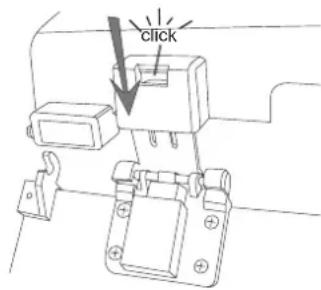
text_image
click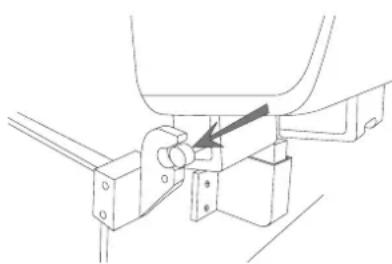
natural_image
Technical line drawing of a mechanical assembly with no visible text or symbolsPARA UTILIZAR EL TOCADISCOS
- GIRAR EL BOT N VOLUMEN ON-OFF, SITUADO EN EL PANEL FRONTAL, A LA POSICI N ON.
- AJUSTAR EL INTERRUPTOR FUNCTION AL MODO PHONE.
- COLOCAR EL CONTROL DE VELOCIDAD EN LA POSICI N DESEADA (33 1/3, 45 ó 78 RPM).
- COLOCAR EL BRAZO DEL TOCADISCOS MUY DESPACIO SOBRE EL DISCO. EL TOCADISCOS EMPEZAR A GIRAR AUTOM TICAMENTE.
- PONER EL BRAZO MANUALMENTE EN EL PUNTO DEL DISCO EN EL QUE QUER IS QUE EMPIECE. AJUSTAR EL VOLUMEN DESEADO.
- CUANDO LLEGUE AL FINAL DEL DISCO, EL TOCADISCOS TODAV A SEGUIR GIRANDO. DEB IS VOLVER A COLOCAR EL BRAZO MANUALMENTE A SU POSICI N INICIAL.
natural_image
Simple circular diagram with three petal-like shapes inside, no text or symbols present.ANTENA
PARA RECEPCI N DE FM, EL APARATO VIENE CON UNA CABLE DE ANTENA, MOVER EL CABLE HASTA TENER UNA BUENA RECEPCI N. PARA RECEPCI N DE AM, EL APARATO VIENE CON UNA ANTENA DIRECCIONAL. GIRAR PARA ENCONTRAR UNA BUENA POSICI N Y NO CONECTAR LA ANTENA EXTERNA
SALIDAS DE AUDIO
- CONECTE LOS CABLES AUXILIARES (NO INCLUIDOS) EN LA CLAVIJA LINE OUT Y CONECTE EL OTRO EXTREMO A OTRA UNIDAD EXTERNA.
- COMPROBAR QUE EL VOLUMEN DE LA UNIDAD EXTERNA.
- PARA M S INFORMACI N, CONSULTAR EL MANUAL DE LA UNIDAD EXTERNA.
AURICULARES
PARA ESCUCHAR LA UNIDAD CON AURICULARES (NO INCLUIDOS). CONECTAR LOS AURICULARES EN SU ENTRADA DEL APARATO. UNA VEZ CONECTADO, S LO SE ESCUCHAR A TRAV S DE LOS AURICULARES.
Salida Auxiliar
Hereby, Ricatech B.V. declares that this turntable is in compliance with the essential requirements and other relevant provisions of Directive 1999/5/EC.
Ricatech B.V.
Cornusbaan 1
2908 KB Capelle a/d IJssel
The Netherlands