
RMC200 - Turntable Ricatech - Free user manual and instructions
Find the device manual for free RMC200 Ricatech in PDF.


| Brand | Ricatech |
| Model | RMC200 |
| Product type | Turntable with AM/FM radio, CD player, cassette and auxiliary input |
| Power supply | Mains adapter 230 V~50 Hz, output 12 V DC / 1.2 A |
| Power consumption | 18 W |
| Radio bands | AM 530-1600 kHz, FM 88-108 MHz |
| FM antenna | External wire antenna, cannot be connected to an outdoor antenna |
| AM antenna | Directional built-in ferrite bar |
| Speakers | 2 x 4" dynamic type |
| Turntable speeds | 33 1/3, 45, 78 rpm |
| 45 rpm adapter | Included |
| CD player | Yes, with programming up to 20 tracks |
| Cassette player | Yes, playback only |
| Auxiliary input | 3.5 mm jack (LINE IN) |
| Headphone jack | 3.5 mm jack, cuts off speakers |
| Included accessories | Mains adapter, 45 rpm adapter |
| Maintenance and cleaning | Use a soft, dry cloth; clean according to manufacturer's recommendations |
| Safety | Do not expose to moisture; do not open the casing; risk of electric shock; invisible laser radiation for CD |
| Repairs | Entrust to qualified personnel; do not attempt to repair yourself |
| Customer service | Email: support@ricatech.com, Tel.: +32 3 3265694 |
| Website | www.ricatech.com |
Frequently Asked Questions - RMC200 Ricatech
User questions about RMC200 Ricatech
0 question about this device. Answer the ones you know or ask your own.
Ask a new question about this device
Download the instructions for your Turntable in PDF format for free! Find your manual RMC200 - Ricatech and take your electronic device back in hand. On this page are published all the documents necessary for the use of your device. RMC200 by Ricatech.
USER MANUAL RMC200 Ricatech
GB USER MANUAL NL GEBRUIKERSHANDLEIDING FR MODE D'EMPLOI
IMPORTANT SAFEGUARDS FOR AUDIO PRODUCTS
PLEASE READ CAREFULLY THE FOLLOWING IMPORTANT SAFEGUARDS THAT ARE APPLICABLE TO YOUR EQUIPMENT.
- Read Instructions - All the safety and operating instructions should be read before the appliance is operated.
- Retain Instructions - The safety and operating instructions should be retained for future reference.
- Heed Warnings - All warnings on the appliance and in the operating instructions should be adhered to.
-
Follow Instructions - All operating and use instructions should be followed.
-
Water and Moisture - The appliance should not be used near water-for example, near a bathtub, washbowl, kitchen sink, laundry tub, in a wet basement, or near a swimming pool and the like.
-
Carts and Stands - The appliance should be used only with a cart or stan that is recommended by the manufacturer.
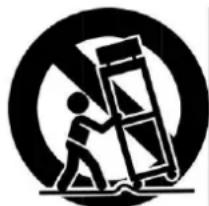
6A. An appliance and cart combination should be moved with care. Quick stops, excessive force, and uneven surfaces may cause the appliance and cart combination to overturn.
-
Wall or Ceiling Mounting - The appliance should be mounted to a wall or ceiling only as recommended by the manufacturer.
-
Ventilation - The appliance should be situated so that its location or position does not interfere with-its proper ventilation. For example, the appliance should not be situated on a bed, sofa, rug, or similar surface that may block the ventilation penings; or, placed in a built-in installation, such as a bookcase or cabinet that may impede the flow of air through the ventilation openings.
-
Heat - The appliance should be situated away from heat sources such as radiators, heat registers, stoves, or other appliances (including amplifiers) that produce heat.
-
Power Sources - The appliance should be connected to a power supply only of the type described in the operating instructions or as marked on the appliance.
-
Grounding or Polarization - Precautions should be taken so that the grounding or polarization means of an appliance is not impeded.
-
Power - Cord Protection - Power-supply cords should be routed so that they are not likely to be walked on or pinched by items placed upon or against them, paying particular attention to cords at plugs, and the point where they exit from the appliance.
-
Cleaning - The appliance should be cleaned only as recommended by the manufacturer.
-
This product is designed for use with the antenna attached and should not be connected to any other external antennas.
15.Non-use Periods - The power cord of the appliance should be unplugged from the outlet when left unused for a long period of time.
16.Object and Liquid Entry - Care should be taken so objects do not fall and liquids are not spilled into the enclosure through openings
- Damage Requiring Service - The appliance should be serviced by qualified service personnel when:
A. The power-supply cord of the plug has been damaged;or
B. Objects have fallen, or liquid has been spilled into the appliance;or
C. The appliance has been exposed to rain;or
D. The appliance does not appear to operate normally or exhibits a marked change in performance; or E. The appliance has been dropped, or the enclosure damaged.
- Servicing - The user should not attempt to service the appliance beyond that described in the operating instructions. All other servicing should be referred to qualified service personnel.
WARNING:
To reduce the risk of fire or electric shock, do not expose this appliance to rain or moisture.
CAUTION:
Use of controls or adjustments or performance of procedures other than those specified may result in hazardous radiation exposure..

The lighting flash with arrowhead symbol, within an equilateral triangle, is intended to alert user to the presence of uninsulated "dangerous voltage" within the product's enclosure that may be of sufficient magnitude to constitute risk of electric shock to persons.
CAUTION
RISK OF ELECTRIC SHOCK DO NOT OPEN
CAUTION: TO REDUCE THE RISK OF ELECTRIC SHOCK, DO NOT REMOVE COVER (OR BACK). NO USER - SERVICEABLE PARTS INSIDE. REFER SERVICING TO QUALIFIED SERVICE PERSONNEL.

The exclamation point within an equilateral triangle is intended to alert user to the presence of important operating and maintenance (servicing) instruction in the literature accompanying the appliance.

CAUTION
For Compact Disc Units Only:
INVISIBLE LASER RADIATION WHEN OPEN AND INTERLOCK FAILED OR DEFEATED. AVOID DIRECT EXPORSURE TO LASER BEAM.
- Marking plate was located on bottom enclosure
Specification
Frequency Range : AM 530 - 1600 KHz
: FM 88 - 108 MHz
Power Supply : SWITCHING ADAPTOR 230Vac/50Hz (DC 12V 1.2A)
Power Consumption : 18W
Antennas : External antenna for FM
: Built-in ferrite bar for AM
Speaker : 4" Dynamic type x 2
* DESIGN AND SPECIFICATIONS SUBJECT TO CHANGE WITHOUT NOTICE.
* Check that there are MP3 songs stored on the MP3/USB Device/Flash Drive/SD Card.
Getting Started
Unpacking
1 Remove packing materials from unit.
Note: Save all packing materials.
2 Remove plastic bag covering radio.
3 Remove plastic safety cover from A/C plug.
4 Remove tie from A/C cord and untie antenna wire on back of radio.
5 Open lid and remove styrofoam shipping material from turntable.
6 Remove black tie-wrap from under the tone arm.
7 Remove white protective needle cover by gently pulling towards the front of the unit.
8 Untie the FM antenna and allow it to hang down in a straight line for optimum FM reception. If you have trouble tuning in an FM station, move the external FM antenna for best reception. Do no connect FM antenna to outside antenna.
Power Source
- Plug the small end of the supplied ADAPTOR into the 12V DC INPUT JACK on the back of the unit.
- Insert the 2-pin plug of the AC ADAPTOR into an appropriate 230V AC Mains wall outlet socket.
Headphones Jack Operation
1 Connect headphones to the HEADPHONE JACK.
2 Adjust volume to the desired listening level.
NOTE: When using headphones, the sound to the unit speakers will be cut off.
Headphone Jack

The sound from all speakers is cut off.
NOTE: Headphones not included with unit.
Turntable Operation
Turn the unit on by rotating the ON/OFF-VOLUME ROTARY KNOB located on the front panel to the ON position.
1 Set the FUNCTION SWITCH to PH. for PHONO mode.
2 Set the SPEED CONTROL SWITCH to desire speed (33 1/3,45 or 78 rpm). Place the record on the turntable.
3 Use the CUE LEVER to raise the tone arm off its rest. Pull the TONE ARM slightly to the right side until hear the "click" sound to activate the turntable.
4 Move the tone arm over the record and use the cue lever to lower it to the point you want the record to start. Adjust the ON/OFF-VOLUME ROTARY KNOB to the desired listening level.
5 At the end of the record, the TONE ARM will stop automatically. You must return it to the TONE ARM REST by hand.
Accessory: ADAPTER FOR 45 RPM
This adaptor allows you to play 45 RPM records.
1 Place the 45 RPM adaptor over the spindle.
2 Gently place your 45 RPM record onto the turntable.
3 Follow the steps under turntable operation to play your record.

Cassette Operation
1 Set the FUNCTION SWITCH to TA. for CASSETTE mode.
2 Insert a prerecorded tape through the CASSETTE DOOR. Tape will slide into the cassette mechanism and start playing.
3 Adjust the volume level by turning the VOLUME KNOB.
4 For fast forwarding, press the CASSETTE EJECT/F.F half way in. Pressing again, will stop the fast forwarding and return the cassette to the playing mode.
5 To stop and eject the cassette, press the CASSETTE EJECT/F.F in completely.
6 When one side of the tape finishes playing, the cassette will automatically stop.
NOTE: Remove the tape from the unit when it is not in use or stopped.
Radio Operation
1 Set the FUNCTION SWITCH to RA. for RADIO mode.
2 Set the AM/FM BAND SWITCH to the desired band (AM or FM).
3 Select the desired radio station by rotating TUNING KNOB.
4 Adjust the ON/OFF-VOLUME ROTARY KNOB to the desired sound level.
Antenna
Antenna: for FM reception, the unit is provided with a FM WIRE ANTENNA, move the wire until the reception is clear and with no interferences. For AM reception, the unit is provided with a directional build-in ferrite antenna. Rotate the set to find the position in which the best reception is obtained. Do not connect the EXTERNAL FM ANTENNA to any outside antenna
CD Operation
Playing A CD
1 Set the FUNCTION SWITCH to CD. for CD mode.
2 Press the OPEN/CLOSE BUTTON to open the CD DOOR. Place a disc in the tray with the labeled side of the disc facing up.
3 Press the OPEN/CLOSE BUTTON again close the CD DOOR. The display will show “— —” for a few seconds, then the total number of tracks on the disc will be displayed. “00” will be shown when there is no disc inside the unit.
4 Press the PLAY BUTTON to start playback. The PLAY INDICATOR will light up.
5 Adjust the VOLUME ROTARY KNOB to the desired volume level.
6 To pause playback, press the PLAY/PAUSE BUTTON. The PLAY INDICATOR will flash. Press the PLAY BUTTON again to resume playback.
7 To stop playback, press the STOP BUTTON. The PLAY INDICATOR will go off.
Skip Forward And Skip Reverse
1 Press the FORWARD SKIP BUTTON or the BACKWARD SKIP BUTTON to select a track.
2 Press the PLAY BUTTON to start playing the selected track
Search Forward And Reverse During Play
PLAYBACK
1 Press and hold the FORWARD SKIP BUTTON or the BACKWARD SKIP BUTTON to search forward or backward though the selected track.
2 Release the button at the desired point, playback will resume automatically.
Programmed Playback
1 Press the PROGRAM BUTTON. "01" will shown on the display and the PROGRAM INDICATOR will flash.
2 Press the FORWARD SKIP BUTTON or the BACKWARD SKIP BUTTON to select a track.
3 Press the PROGRAM BUTTON again to store the selected track number.
4 Repeat steps 2 and 3 above to program other tracks.
5 Press the PLAY BUTTON to start Programmed playback. The PROGRAM INDICATOR will be on.
6 To erase the programmed sequence, press the STOP BUTTON twice or until the PROGRAM INDICATOR is off. Programmed tracks will also erase when the CD DOOR is opened.
NOTE: Maximum of 20 tracks can be programmed to play in any order.
Auxiliary Input
1 You can connect external components to your unit by using the Auxiliary Input.
2 Plug Auxiliary cable into the LINE IN JACK on the back of your unit.
3 Switch the LINE IN SWITCH to the ON position.
4 Plug the other end of the Auxiliary cable into the output jack on your desired external component.
5 Check the volume level of your external component.
6 See operators manual for correct operation of the external component.
NOTE: When not using the Auxiliary Input, make sure the LINE IN SWITCH is in the OFF position.
Troubleshooting
There is no Power
1 The AC plugged is not well connected.
2 Check to see that the ON/OFF volume knob is in the on position.
There is no Sound
1 Check the volume level by turning the volume knob.
2 Make sure the LINE IN SWITCH is in the OFF position if the LINE IN JACK is not being used.
Turntable will not work
1 Make sure the function switch is set to phono.
2 Try moving the tone arm to the right until you hear a click.
3 Make sure the protective needle cover is removed.
CD does not play
1 Check to make sure CD is inserted correctly(label side facing up).
2 Check that the surface of the CD is clean
3 Make sure function switch is set to CD.
CONTROL LOCATORS

CONTROL LOCATORS

Customer support
You can contact the Ricatech customer service when you have a question or a problem with your Ricatech product. You can contact us by telephone and email.
For customer support by email, please sent a email to support@ricatech.com Please make sure that you mention the model number and serial number of the product, mention your name & address and describe your question or problem clearly.
Telephone
For customer support by telephone, please dial +32 3 3265694. One of our service staff will be ready to serve you. For full procedure please visit the website of Ricatech at: www.ricatech.com
Ricatech B.V.
Cornusbaan 1
2908 KB Capelle a/d IJssel
The Netherlands
Nederlands
BELANGRIJKE VOORZORGSMAATREGELEN VOOR AUDIOPRODUCTEN
LEES AANDACHTIG DE VOLGENDE BELANGRIJKE VOORZORGSMAATREGELEN DIE VAN TOEPASSING ZIJN OP UW APPARATUUR.
PLAATS VAN ONDERDELEN
DRAAITAFEL
SPIL
ADAPTER VOOR 45 TPM PLAAT

TOONARMHENDEL
TOONARM
TOERENTALREGELAAR (33 1/3, 45,78 TPM)
TOONARMSTEUN
VEILIGHEIDSHAAK
LINE IN-AANSLUITING
LINE IN-SCHAKELAAR

AC-ADAPTER
EXTERNE ANTENNE

CASSETTE UITWERPEN / SNEL VOORUITSPOELEN
CASSETTEDEUR
KLANTENONDERSTEUNING
LEVIER DE SIGNAL
BRAS DE LECTURE
BOUTON DE CONTRÔLE DE VITESSE
(33 1/3, 45, 78 TR/MIN)
SUPPORT DU BRAS DE LECTURE
CROCHET DE SÉCURITÉ
INTERRUPTEUR LINE IN
PRISE LINE IN

ADAPTATEUR CA
ANTENNE EXTERNE
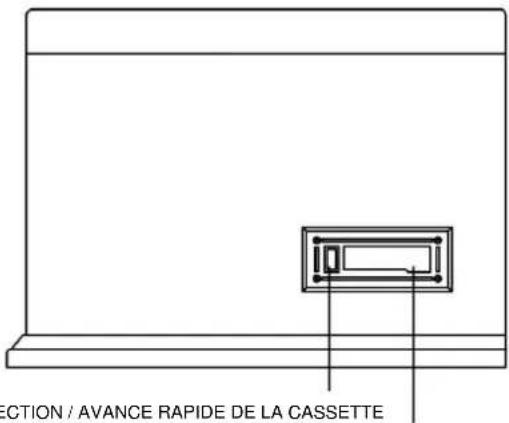
COMPARTIMENT CASSETTE
SERVICE CONSOMMATEUR
CUE-HEBEL
TONARM
GESCHWINDIGKEITSREGLER (33 1/3, 45, 78 U/MIN)
TONARMAUFLAGE


- IMPORTANT SAFEGUARDS FOR AUDIO PRODUCTS
- PLEASE READ CAREFULLY THE FOLLOWING IMPORTANT SAFEGUARDS THAT ARE APPLICABLE TO YOUR EQUIPMENT
- WARNING
- CAUTION
- MARKING PLATE WAS LOCATED ON BOTTOM ENCLOSURE
- SPECIFICATION
- GETTING STARTED
- UNPACKING
- POWER SOURCE
- HEADPHONES JACK OPERATION
- HEADPHONE JACK
- TURNTABLE OPERATION
- ACCESSORY: ADAPTER FOR 45 RPM
- CASSETTE OPERATION
- RADIO OPERATION
- ANTENNA
- CD OPERATION
- PLAYING A CD
- SKIP FORWARD AND SKIP REVERSE
- SEARCH FORWARD AND REVERSE DURING PLAY
- PLAYBACK
- PROGRAMMED PLAYBACK
- AUXILIARY INPUT
- TROUBLESHOOTING
- THERE IS NO POWER
- THERE IS NO SOUND
- TURNTABLE WILL NOT WORK
- CD DOES NOT PLAY
- CONTROL LOCATORS
- CUSTOMER SUPPORT
- TELEPHONE
- RICATECH B.V
- NEDERLANDS
- BELANGRIJKE VOORZORGSMAATREGELEN VOOR AUDIOPRODUCTEN
- LEES AANDACHTIG DE VOLGENDE BELANGRIJKE VOORZORGSMAATREGELEN DIE VAN TOEPASSING ZIJN OP UW APPARATUUR
- PLAATS VAN ONDERDELEN
- KLANTENONDERSTEUNING
- SERVICE CONSOMMATEUR
Brand : Ricatech
Model : RMC200
Category : Turntable