
HB 861 - Solar bench PHILIPS - Free user manual and instructions
Find the device manual for free HB 861 PHILIPS in PDF.
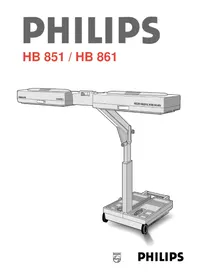


| Product Type | Sunbed |
| Brand | Philips |
| Model | HB 861 |
| Dimensions (L x l x h) | 75,8 x 51,5 x 26,4 cm |
| Weight | 32 kg |
| Power supply | 230 V~ 50 Hz, earthed plug |
| Lamp power | 2 x Philips HPA 400-500 W |
| Radiation type | Mainly UV-A, low amount of UV-B |
| Recommended tanning distance | 75 cm between UV filters and body |
| Integrated timer | Adjustable from 0 to 30 minutes, automatic shut-off |
| User memories | 4 individual memories |
| Protective goggles included | 2 pairs (ref. HB 072 or HB 071) |
| Thermal safety | Automatic shut-off in case of overheating |
| Maximum number of hours per year | 21 hours (1260 minutes) |
| Duration of first session | 8 minutes for all skin types |
| UV filter maintenance | Clean with a soft cloth soaked in white spirit |
| Lamp replacement | By a specialized dealer (Philips HPA 400-500 lamps) |
| UV filter replacement | Immediately if damaged, by a professional |
| Exterior cleaning | Damp cloth, without abrasive products |
| Transport and storage | Fold after cooling (15 min), wheels and transport handle |
| Warranty and service | Contact Philips Consumer Service or website www.philips.com |
Frequently Asked Questions - HB 861 PHILIPS
User questions about HB 861 PHILIPS
0 question about this device. Answer the ones you know or ask your own.
Ask a new question about this device
Download the instructions for your Solar bench in PDF format for free! Find your manual HB 861 - PHILIPS and take your electronic device back in hand. On this page are published all the documents necessary for the use of your device. HB 861 by PHILIPS.
USER MANUAL HB 861 PHILIPS
Keep page 3 open when reading these operating instructions.
- Before connecting the appliance to the mains socket, check if the voltage indicated on the rating plate corresponds with the mains voltage in your home. Water and electricity are a dangerous combination! Therefore, do not use the appliance in wet surroundings (e.g. in the bathroom or shower, or near a swimming pool).
- If you have just been swimming or have just taken a shower, dry yourself thoroughly before using the appliance.
- Remove the plug from the wall socket after use. Take care that children cannot play with the solarium.
- Let the solarium cool down first (± 15 min.) before closing and storing it away.
- Move the solarium only when folded in (fig. 2).
- Keep the ventilation openings in the upper casings and in the stand clear of obstruction when using the solarium.
- This solarium is fitted with an automatic thermal safety device. In case of insufficient cooling (e.g. when the ventilation apertures are blocked) the safety device will automatically switch off the solarium. Once the cause of the overheating has been removed and the solarium has cooled down sufficiently, the appliance will switch on again automatically.
- Do not exceed the advised session times or the maximum amount of "tanning hours". (See section "UV sessions: How often? And how long?")
- Do not select a shorter operational distance than the advised 75 cm (approx. 29.5").
- Do not treat each part or side of the body more often than once a day. Avoid intensive skin exposure to natural sunlight on the same day as a UV session.
- If you have any symptoms of illness, if you take any medicines and/or apply cosmetics which increase skin sensitivity, you should not have a UV-session. Special care is also necessary in cases of pronounced individual sensitivity to ultraviolet. When in doubt, please consult your doctor.
- A solarium is not to be used by people who get sunburnt without tanning when exposed to the sun, by persons suffering from sunburn, by children, or by persons who suffer (or have previously suffered) from skin cancer or who are predisposed to skin cancer.
- Consult your doctor if ulcers, moles or persistent lumps develop on the skin.
- Always wear the protective eye goggles while tanning to protect your eyes against excessive doses of ultraviolet, visible light and infrared. (Also refer to section "UV and your health".)
- Remove creams, lipstick and other cosmetics well in advance of a UV session.
- Do not use sunscreen lotions or creams.
- Do not use suntan lotions or creams.
- If your skin should feel taut after the sun tanning session, you may apply a moisturizing cream.
- Never use the solarium if a UV filter is damaged, broken or removed, or if the timer has become faulty.
- The UV filters will become rather warm during the sun tanning session. Avoid touching them.
- Colours may fade under the influence of the sun. The same effect may occur when using the appliance.
- Do not expect the appliance to yield better results than the natural sun.

The sun is the source of energy on which all life on earth depends. There are various kinds of solar energy: the sunlight enables us to see, we feel the warmth of the sunshine on our skin, and under the influence of the sun our skin is tanned.
These three effects are due to three specific components of the sun radiance spectrum, each of the components having their own wave lengths.
The sun radiates electro-magnetic vibrations with widely different wave lengths. The wave lengths of heat rays or "infrared" (IR) are longer than the wave lengths of visible light. And the wave lengths of "ultraviolet" (UV), which tans our skin, are shorter than these.
Science has managed to reproduce these three kinds of solar radiation: heat (e.g. Infraphil), light (lamps) and UV (solariums, sun couches etc.)
UV-A, UV-B and UV-C
Ultraviolet (UV) is subdivided into UV-A (longer wave lengths), UV-B and UV-C (shorter wave lengths).
UV-C seldom reaches the earth as it is filtered out by the atmosphere.
UV-A and UV-B cause the tanning effect of the skin.
In fact there are two processes which produce tanning, and they are simultaneously effective:
- "Indirect tanning". Primarily UV-B stimulates the production of a substance called "melanin", which is necessary for tanning. The effect does not show until a couple of days after the sunbath.
- "Direct tanning". The UV-A and also a part of the visible light cause quicker browning without reddening or "getting sunburnt".
The solarium
This solarium emits predominantly UV-A, and also a very small amount of UV-B.
It possesses some important features which make tanning at home comfortable and convenient.
The unique type of sun lamp used in this solarium emits light, warmth and ultraviolet, just like the natural sun.
You can position this solarium so that using it really resembles lying in the sun: your whole body is tanned evenly, from head to toe.
For your convenience, but also to prevent unintended prolonged exposure (e.g. after falling asleep), timer-controlled automatic switch-off after 30 minutes tanning is incorporated. As it is with the natural sun, it's wise not to have too much of the good thing! (See section "UV and your health".)
UV and your health
After an excessive exposure to ultraviolet (from the natural sun or from your solarium), the skin may develop sunburn.
Beside numerous other factors, such as excessive exposure to the natural sun, improper and excessive use of your solarium will increase the risk of skin and eye disease.
The nature, intensity and duration of the radiation on one hand, and the sensitivity of the individual on the other, are decisive on the degree in which these affects can occur.
The more skin and eyes are exposed to UV, the more risk increases of diseases such as inflammation of the cornea and/or conjunctiva, damaging of the retina, cataract, premature aging of the skin and skin tumours.
Certain medicines and cosmetics increase the sensitivity to UV.
Therefore, it is of great importance
- that you follow the instructions in sections "Important" and "UV sessions: how often? And how long?";
- that you select the advised operational distance of 75 cm (approx. 29.5");
- that you do not exceed the maximum amount of tanning hours per year (i.e. 21 hours or 1260 minutes);
- that you always wear the provided goggles while tanning.
UV sessions: how often? And how long?
Take one tanning session a day for 5 to 10 days. Wait at least 48 hours after the first session before taking the second session.
After this 5 to 10-day course you can take a break from tanning.
One month after the tanning course, your skin will have lost most of its tan again. You can then start a new tanning course.
If you want to retain your tan, do not stop tanning after the course but continue taking one or two tanning sessions a week.
Regardless of the tanning method you choose, always make sure you do not exceed the maximum number of tanning hours, which is 21 hours (= 1260 minutes) a year for this solarium.
Example:
Suppose you are taking a 10-day course, consisting of an 8-minute tanning session on the first day and 20-minute tanning sessions the subsequent nine days.
The total course will last (1 x 8 minutes) + (9 x 20 minutes) = 188 minutes.
You could take 6 of these courses a year (because 6 x 188 minutes = 1128 minutes).
Of course the maximum number of tanning hours applies to each part or side of the body that is tanned separately (e.g. the back and front side of the body).
As is shown in the table, the first session of a tanning course always lasts 8 minutes, irrespective of the sensitivity of the skin.
| Duration of the UV session(for each separately treated part of 1st 2nd 3rd 4th 5th 6th 7th 8th 9th the body) in session session session session session sessionsminutes | ||||||||||
| - for persons with very sensitive skin: 8 10 | 10 10 10 10 | 10 10 10 10 | ||||||||
| - for persons with normal sensitive skin: | 8 | 20-25 | 20-25 | 20-25 | 20-25 | 20-25 | 20-25 | 20-25 | 20-25 | 20-25 |
| - for persons with less sensitive skin: | 8 | 30*) | 30*) | 30*) | 30*) | 30*) | 30*) | 30*) | 30*) | 30*) |
| *) or longer, dependent upon skin sensitivity. | ||||||||||
- If you feel the tanning session is too long for you (e.g. because your skin starts to feel taut), shorten every session by, for instance, 5 minutes.
General description (fig. 1)
A Handgrip
B Wheels
© Clips with lock and keys (The solarium can be locked up)
D Stand
E Handgrip
F Handgrip
G Locking screw for height adjustment
H Distance meter
Sun lamps (type Philips HPA 400 - 500)
Reflectors
K UV filters
Upper casings
The upper casings are each equipped with a fan for cooling the sun lamps.
M Mains cord
N Remote control
Memo knobs for four persons
P Protective goggles (2x)
(Type n°. HB 072 / service n°. 4822 690 80147 - illustrated - or type n° HB 071 / service n°. 4822 690 80123 - not illustrated - )
Section switches to switch the sun lamps of each upper casing on/off independently.
Making the solarium ready for use

- In the "transport position" you can easily move and store your solarium (fig. 2).
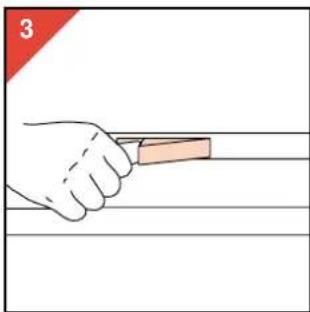
- Unlock the upper part of the solarium from the base by pushing on the shorter side of the clips (fig. 3).
- The upper part will automatically move upwards a short distance. The solarium will then be in the position depicted in the illustration (fig. 4).


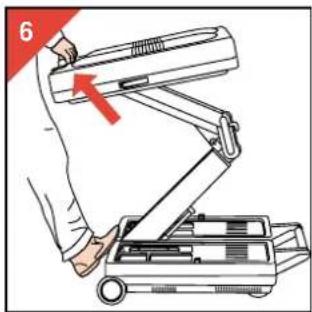
- Pull the stand D and the upper part of the solarium upwards. Use handgrip F (fig. 5, 6).

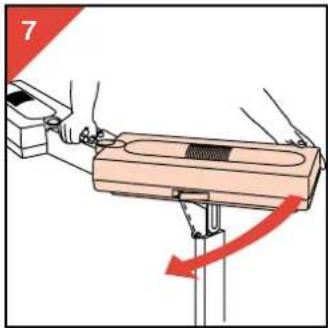
- After this, fold the two upper casings out until they stop (fig. 7).
Note: the solarium cannot be switched on unless the upper cases are completely in line.
- Height adjustment

Operational distance (UV filters - body) = 75 cm (approx. 29.5")
It is advisable to make the solarium ready for use and adjust the height where you actually want to use the appliance. Position the folded-out solarium against e.g. your bed. The operational distance (i.e. the space between the UV filters and your body) should be 75 cm (approx. 29.5").
Distance UV filters - bed = 95 cm (approx. 37.4").
In most cases it will be easier to set the distance between the solarium and the bed. For the volume of your body you may include an average of 20 cm (8"). Consequently you set the height in such manner that the space between the UV filters and the bed is 95 cm (approx. 37.4").
Note: hold the upper part of the stand firmly while setting or changing the height adjustment.
- Set the section switches

- If you wish to treat the entire body, set both section switches 🔒 to position I (fig. 9).

- If you wish to treat a section of the body (upper part or legs), set only the corresponding section switch to position I.
- Ensure that the other switch is in position O(fig. 10,11).

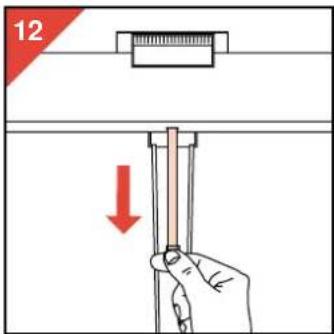


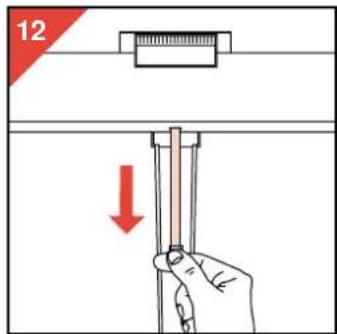
- Pull the distance meter out of the appliance until the required height (e.g. 90 cm or 36.5").
- Loosen locking screw (one or two turns anti-clockwise).
- Slide out and adjust the stand till the required height.
- Screw in locking screw firmly (turn clockwise).
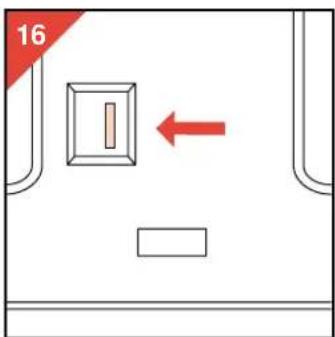
- Moving the lever in the direction of the arrow will make the meter roll up inside the appliance. The solarium is now ready for use.
The remote control unit

- The appliance is connected to the mains power (fig. 17).
a Time setting button for 0-30 minutes. Start button. When this button is pressed the sun lamps and the timer are switched on. Please check the position of the section switches 🔒. Pause / repeat button. If the session must be interrupted (e.g. when the telephone rings), press this button. The sun lamps will go out and in the display the remaining time for the session will remain blinking. You can also press this button during the last minute of a session to repeat the set time (e.g. to treat the other side of the body). d Blink signal. This signal indicates that the timer is counting down the time. e Pilot light. This light illuminates as long as the appliance is connected to the mains supply. Bleeper. This sound signal indicates that the last minute of the time set for the tanning session has been entered. (If you should wish the solarium to operate longer than the set time, it is advisable to set the new time now. Alternatively, you can press button in the last minute of a session to repeat the set time. 9 Display. You can use the display for setting the timer. During the session the display shows the remaining time.
Attention
- The following illustrations show in red print which push-button must be actuated. • In the following cases you will see 0.007 in the display:
- after inserting the plug into a wall socket;
- at the end of the tanning session (blinking during the first three minutes);
- after a mains failure. In these situations the sun lamps are switched off.

- Setting the duration of the tanning session (fig. 18). When pushing + the time reading scrolls up. When pushing - the time reading scrolls down. For fast scrolling you can keep the button depressed.

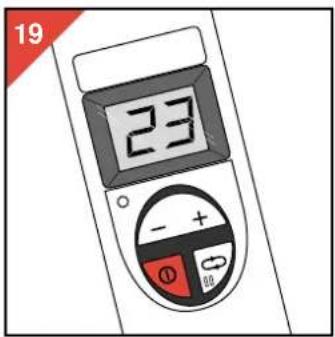
- Switching on the sun lamps (fig. 19). - Press button Ⓓ. Blink signal ⓑ will become visible and in the display the preset session time will be shown. The timer will count down the session time. During the last minute of the session a sound signal ⓕ will be audible. In this minute you can press button Ⓔ to repeat the session time or set a new session time. In this manner you avoid a three minutes' waiting time. (The lamps need three minutes to cool down before they can be restarted.)

- Repeating the session time (in the last minute) (fig. 20): - Press button ⬆. The previously set tanning session time appears in the window. The bleeper signal stops.

- Setting a different session time (in the last minute) (fig. 21): - Set the new tanning session time. Then press button ①. As soon as this button is pressed the sound signal will stop and the new session time will enter.
If you do not use the facilities "Repeating the session time" (fig. 20) or "Setting a different session time" (fig. 21), the solarium will switch off automatically as soon as the set session time has elapsed.
Extra facilities
- Interruption of the tanning session (e.g. telephone) (fig. 22, 23).


- Press button ↩.
The sun lamps are now switched off. The blink signal is no longer visible.
The remaining tanning session time is displayed blinking.
- After three minutes the blinking stops. Subsequently you can restart the sun lamps by pressing button ①.
• Using the solarium shorter than the set time? (fig. 24)
- Press button ①. The sun lamps are now switched off. Set the new session time.
- Wait until the time reading in the display stops blinking. Then press push button ① again.

After the UV tanning session

Memos (fig. 25).
- On one of the session memos 📞 you can note down how many sessions you have had. There are four such memos, for four users.
- Let the solarium cool down for 15 minutes before folding it up and storing it away. In the meantime you can store the mains cord and the remote control unit in the lower casing. Be careful to ensure that they do not get stuck when the appliance is folded in.
Making the solarium transportable


You can fold in the solarium and make it transportable in the following manner:
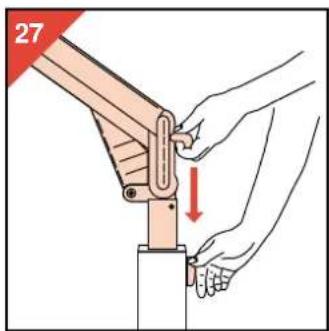
- Hold the upper part of the stand with one hand. Loosen the locking screw G (one or two turns anti-clockwise) (fig. 26). - Slide in the stand fully (fig. 27)...


... and tighten the locking screw © by turning it clockwise (fig. 28).
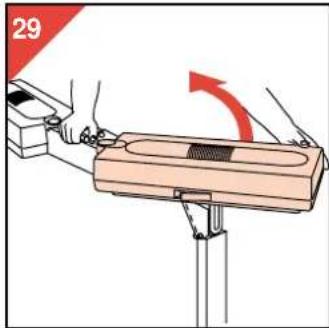
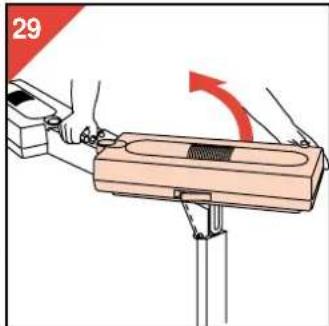
- Fold the two upper casings towards each other (fig. 29).


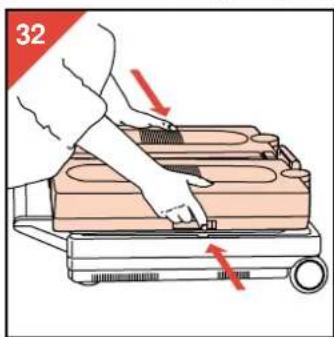
- Move the upper part of the appliance first backwards (fig. 30) and then downwards (fig. 31). (See the arrows.)
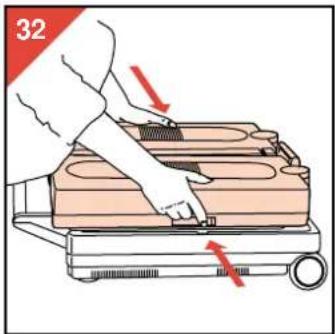
- Finally fasten the upper casings to the stand by closing the clips (fig. 32). (Press to close.)
- If so required, you can lock the clips with the key provided.
After use you can store the solarium e.g. (horizontally) under a bed or (vertically) in a cupboard.
Cleaning
• Always unplug the solarium and let it cool down before cleaning. - You can clean the outside of the solarium with a damp cloth. Make sure that no water runs into the appliance. - Do not use abrasives or scourers, or liquids such as petrol or acetone. - You may clean the UV filters with white spirit sprinkled on a soft cloth.
Replacing the sun lamps and/or UV filters
In the course of time (in normal family use after some years) the efficiency of the sun lamps will gradually decrease. If this happens, you may increase the tanning session time or have the sun lamps replaced.
The UV filters protect against undesired radiation. It is therefore important to have a damaged or broken filter replaced right away.
Have the sun lamps and UV filters replaced only by authorized service personnel: only these have the required skill and dispose of the original replacement parts.

The lamps of solariums contain substances which may pollute the environment.
When discarding lamps, please ensure that they are separated from the normal household refuse and that they are disposed of at an officially assigned place.
For U.K. only:
Fitting a different plug
This appliance is fitted with a BS 1363 13 Amp. plug. Should you need to replace the plug, connect the wires as follows:
Green/yellow wire to the Earth terminal ( ± ) of the new plug. Brown wire to the Live (L) terminal of the new plug. Blue wire to the Neutral (N) terminal of the new plug.
Always fit the same value of fuse as that originally supplied with your appliance.
Only use BS 1362 approved fuses. As a guide only: Appliances under 700 W can have a 3 Amp. fuse (red) and all others should have a 13 Amp. fuse (brown).
When disposing of an old plug (particularly the moulded type which has been cut from the mains cord) always remove the fuse as the plug could be dangerous if ever inserted in a live socket.
Information & service
If you need information or if you have a problem, please visit the Philips Web site at www.philips.com or contact the Philips Customer Care Centre in your country (you will find its phone number in the worldwide guarantee leaflet). If there is no Customer Care Centre in your country, turn to your local Philips dealer or contact the Service Department of Philips Domestic Appliances and Personal Care BV.
Solarium does not operate as required?
If the solarium should not operate as required, this may be due to a defect. In this case do not hesitate to apply to your dealer or to a Service Centre.
However, it is also possible that the appliance has not been installed according to the instructions or is used incorrectly. If this is the case, you will be able to solve the problem immediately.
You may check the following section before contacting your dealer or Service Centre.
Problem
| Solarium does not switch on. | - Mains plug is not in wall socket.- No mains power. (Please check with other appliance.)- The lamps are still too warm to restart. (Allow the lamps to cool down for approx. 3 minutes.)- Ventilation was insufficient and the automatic thermal safety device has switched the appliance off. (Remove the cause of overheating (e.g. take towel away from ventilation opening(s)) and wait for 10 minutes before switching on again.)- The two upper casings have not been folded out. (Please refer to section "Making the solarium ready for use".)- The section switches are not in the required position. |
| The power fuse switches the mains power off when switching on or while using the solarium. | - Check the fuse to which the solarium has been connected.The proper type for your solarium is a 13 A or 16 A normal fuse or a slow reacting automatic fuse. |
| The browning is not according to your expectations. | - You use an extension cord which is too long and/or does not allow the required power levels. Please apply to your dealer.In general, we advise not to use an extension cord.- You followed a course which is not the most appropriate for your skin type.- The operational distance is larger than indicated.- After using for a long time the UV production of the lamps decreases.(With normal use this will not be noticeable before years.)You may compensate for this effect by selecting longer treatment times or have the sun lamps replaced. |
Important



Height adjustment


Height adjustment

Treatment distance (UV-A filters - body) = 75 cm
Distance UV-A filters - bed = 95 cm





Height adjustment

Switch on the lamps (fig. 19)


- Loosen the locking knob G (turn one or two turns counterclockwise).




- Loosen the locking knob G (turn one or two turns counterclockwise).



- UV-A, UV-B AND UV-C
- THE SOLARIUM
- UV AND YOUR HEALTH
- UV SESSIONS: HOW OFTEN? AND HOW LONG
- EXAMPLE
- GENERAL DESCRIPTION (FIG. 1)
- MAKING THE SOLARIUM READY FOR USE
- HEIGHT ADJUSTMENT
- OPERATIONAL DISTANCE (UV FILTERS - BODY) = 75 CM (APPROX. 29.5")
- DISTANCE UV FILTERS - BED = 95 CM (APPROX. 37.4")
- THE REMOTE CONTROL UNIT
- ATTENTION
- EXTRA FACILITIES
- AFTER THE UV TANNING SESSION
- MAKING THE SOLARIUM TRANSPORTABLE
- CLEANING
- REPLACING THE SUN LAMPS AND/OR UV FILTERS
- FITTING A DIFFERENT PLUG
- INFORMATION & SERVICE
- SOLARIUM DOES NOT OPERATE AS REQUIRED
- IMPORTANT
- TREATMENT DISTANCE (UV-A FILTERS - BODY) = 75 CM
- DISTANCE UV-A FILTERS - BED = 95 CM
Brand : PHILIPS
Model : HB 861
Category : Solar bench