IP-1500 - Effect machine Antari - Free user manual and instructions
Find the device manual for free IP-1500 Antari in PDF.


User questions about IP-1500 Antari
0 question about this device. Answer the ones you know or ask your own.
Ask a new question about this device
Download the instructions for your Effect machine in PDF format for free! Find your manual IP-1500 - Antari and take your electronic device back in hand. On this page are published all the documents necessary for the use of your device. IP-1500 by Antari.
USER MANUAL IP-1500 Antari
natural_image
Black outdoor spray gun (DFOG IP-1500) with label and mounting bracket, no visible text or symbols beyond brandingEnglish Français Deutsch · · 中文
Antari IP-1500 Fog Machine User Manual
Thank you for choosing the Antari IP-1500 splash-waterproof Fog Machine. This model is particularly designed for outdoor applications. The IP protection class is 65. The housing of the machine is made of solid stainless steel. This makes the machine completely protected against spray water, and ensures powerful, dry and clean fog in humid and damp environments. The IP-1500 has an ergonomic design and is very user-friendly.
Prior to use, we suggest that you carefully read all of the instructions. Following the instructions found in this user manual will ensure your safety while operating the machine, and easily achieve the most satisfactory light and thin fog effect; it will also make you understand how to maintain the machine in order to extend the product life cycle.

CAUTION
This machine is spray-waterproof only.
Immersing it in water can damage it.
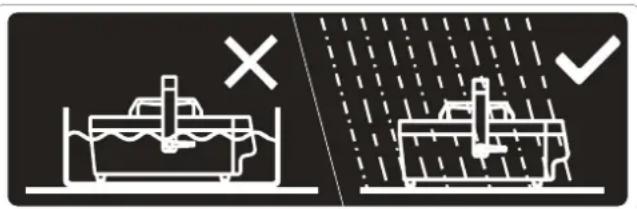
text_image
Diagram illustrating ship lock conditions with 'X' and checkmark symbols indicating no lock and liquid level• Danger of Electric Shock
- The IP-1500 is designed for both outdoor and indoor applications. Prior to use, please verify that an earth leakage circuit breaker (ELCB) is installed.
- Use a grounded electrical outlet. Prior to use, take care to determine that the unit is installed at the rated voltage.
◆ Unplug the machine when not in use.
Danger of Burns
No user serviceable and modifiable parts inside. Do not disassemble the housing nor do any modification; otherwise damage of the device or danger of burn may be caused.
This device is for adult use only and must be installed out of the reach of children. Never leave the unit running unattended.
The output nozzle becomes very hot during operation (about 200^ C). Position the fog machine in a well-ventilated area. Please leave about 50 cm space around the machine.
■ Never add flammable liquids of any kind (such as oil, gas, perfume) to the fog liquid.
■ Use only dealer-recommended Antari high-quality liquid FLG Heavy Fog Liquid or FLR Light Fog Liquid. Please do not use any other liquid which may cause erosion of inner parts.
■ Never drink fog liquid. If it is ingested, call a doctor immediately. If fog liquid comes in contact with skin or eyes, rinse thoroughly with water.
If your Antari IP-1500 Fog Machine fails to work properly, discontinue use immediately. Let the machine cool down before packing it securely (preferably in the original packing material), and returning it to your Antari dealer for service.
Pay attention to all warning labels and instructions printed on the exterior of your Antari Fog Machine, particularly before initial use and from time to time whenever necessary.
Unpacking and inspection
Open the shipping carton and verify that all equipment necessary to operate the system has arrived intact. If any equipment is missing contact your Antari dealer immediately. Before beginning your initial setup on your fog machine, make sure that there is no evident damage caused by transportation. In the event that the unit's housing or cable is damaged, do not plug it in and do not attempt to use it until after contacting your Antari dealer for assistance.
The shipping carton should contain the following items:
- IP-1500 fog machine with handle
- Outdoor power cord 2 meters long
- Clear color PU pipe including one filter
-
W-1 wireless controller
-
Hanging bracket with screws
- User Manual
Assembly
- Open the carton and carefully remove all packing materials.
- Place the fog machine on a flat surface and make sure that no foreign objects, water or dust can enter the air vents at the bottom of the machine.
- Unscrew the fluid inlet, connect the screw with the PU pipe and insert the PU pipe, then screw back the nut. Make sure they are connected securely.
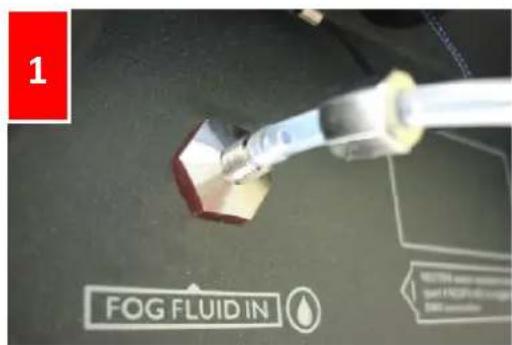
text_image
1 FOG FLUID IN
text_image
2 FOG FLUID INSetup

text_image
Antari IP-1500 TIMER VOLUME- Plug the power cord into a grounded electrical outlet. This machine is particularly designed for outdoor applications. Please pay special attention to the waterproof feature of the socket.
- Insert one end of the liquid pipe with filter into a liquid tank, which is to be placed on a flat surface.
- The design of this machine does not include an additional power switch. When connecting the machine to a power outlet it is powered on. The display will indicate "Antari IP-1500" followed by "Wireless Setup". During the next 15 seconds, the machine is in wireless setup mode for registering wireless controllers. It is possible to register up to 5 controllers with the machine during this period. It is also possible to use
a single controller for parallel control of an unlimited number of machines. Just power on the machines simultaneously and register the controller. If there is no wireless controller registered in wireless setup mode, the machine will keep the record of the previous operation.
In order to register a wireless controller press button A or B. Always direct the controller towards the receiver underneath the display. When the registration process is started, a beeping sound will occur followed by a flashing display. After 15 seconds, the machine exits the wireless setup mode and the display indicates "Wireless Setup OK". At this point, no further controller can be added. Then the fog machine starts with the warm-up process and the display indicates "Warming Up".
- The warm-up time takes around 9.5 minutes. While the unit is warming up, fog output will not be possible yet. Once the warm-up process is completed, the display will indicate “Ready To Fog” and additionally a “W” for wireless if this function is activated. Afterwards, the liquid sucking process is indicated on the display. During the initial start-up, there will repeatedly be air in the liquid pipe that prevents the machine’s sensor from detecting the fog liquid. In this case, the display will indicate “Empty Fluid”. Please press the button VOLUME at the control panel, in order to force the machine to draw the liquid from the tank. During this pumping process, the motor will make a “Bo Bo Bo” noise, which is a normal reaction. Before the sensor can detect the fluid, the display will switch between “Ready To Fog W” and “Empty Fluid”.
Operation
The built-in control panel on the rear of the machine features an LCD panel displaying all operation statuses of the fog machine. The control panel allows the user to customize fog machine functions by adjusting the fogging duration, interval, and volume as well as the DMX address and the wireless function. There are four buttons on the control board. All current operating parameters are automatically stored in non-volatile memory, allowing the machine to be powered down without losing function settings.
Control buttons:




TIMER
VOLUME
Function / Up / Down / Stop
After warming up and sufficient fluid intake, the display will indicate "Ready To Fog W" and fog output will be possible. You can now program the necessary menu settings with the
control panel.
1. Menu settings with the button FUNCTION
Setting time intervals for timer operation
Press the button FUNCTION until the display indicates "Interval Set". Use the buttons UP and DOWN to adjust the intervals between the individual fog outputs in timer mode within the range of 1 and 200 seconds.
Setting the output duration for timer operation
Press the button FUNCTION until the display indicates "Duration Set". Use the
buttons UP and DOWN to adjust the duration of the fog outputs in timer mode within the range of 1 and 200 seconds.
Setting the fog output volume for timer operation
Press the button FUNCTION until the display indicates "Timer Out". Use the buttons TIMER UP and VOLUME DOWN to adjust the fog output volume in timer mode within the range of 1 % and 100 %.
Setting the fog output volume for continuous operation
Press the button FUNCTION until the display indicates "Volume Output". Use
the buttons UP and DOWN to adjust the fog output volume in continuous mode within the range of 1 % and 100 %.
Setting the DMX512 address
Press the button

FUNCTION until the display indicates "DMX Address". Use the


buttons UP and DOWN to adjust the DMX512 start address. Please refer to chapter DMX512 settings for more information on DMX operation.
Switching the wireless function on and off
Press the button

FUNCTION until the display indicates "Wireless On". Use the


buttons UP and DOWN to deactivate the wireless function (indication "Wireless Off") and to reactivate it (indication "Wireless On").
2. Continuous operation

Press the button Volume, to activate continuous fog output. The display indicates "Volume" followed by the value that was set in menu item "Volume Output".
To stop the fog output, press the button VOLUME once again.

3. Timer operation
In the timer mode, the fog machine will automatically emit fog. The time intervals, duration and fog volume depend on the corresponding menu settings. Press the button

TIMER
TIMER, to activate the timer mode. The display indicates the set time interval.
The unit counts down to 0 seconds and emits fog. To deactivate the timer mode, press
the button TIMER again.
4. Hibernate Mode
Press the button FUNCTION until the display indicates “Hibernate Mode”. Use the button TIMER UP and VOLUME DOWN to turn it “ON” or “OFF”. Hibernate mode is a power saving feature that will automatically shut down when DMX signal stops and turn machine back on once DMX signal is detected.
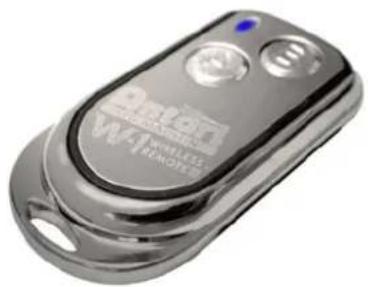
W-1 Wireless Controller
natural_image
Close-up of a metallic remote control device with two buttons and a blue indicator light (no readable text or symbols)With the wireless controller, it is possible to emit fog via radio over a distance of up to 50 meters.
Press button A, to emit fog. The button A has the same function as the button VOLUME on the control panel, i.e. the fog output depends on the setting of menu item "Volume Output". The display indicates "Volume" followed by the defined value. As additional control, the LED lights. To stop the fog output, press button B.
DMX Connector Pin Assignment
The machine provide 3 or 5 pin XLR connector for DMX connection. Diagram below indicate pin assignment information
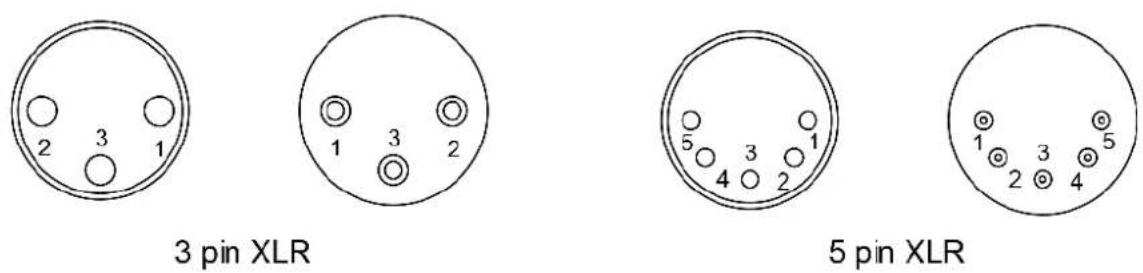
| Pin | Function |
| 1 | Ground |
| 2 | Data- |
| 3 | Data+ |
DMX512 Settings
The IP-1500 is equipped with a DMX512 system. For connecting a DMX controller, 5-pin male-female XLR connections are provided at the back of the machine. The machine uses one control channel for adjusting the output volume. The channel has a DMX value range of 0 to 255. After connecting a DMX controller, timer functions such as output duration and interval can be programmed using the DMX controller or the DMX control software. In DMX mode, the machine cannot be controlled via the built-in control panel nor the W-1 wireless controller anymore. By using the DMX protocol, fog machines, lighting effects, and other special effects machines can be interconnected and easily controlled
| DMX VALUE | FUNCTION |
| 0~5 | off (no output) |
| 6~249 | output volume control (5~95%) |
| 250~255 | maximum output volume (100%) |
Note
-
This machine is particularly designed for outdoor applications. Please always unplug the machine when it is not in use. When reconnecting the power cord, please make sure there are no foreign objects nor water at the bottom that could prevent proper ventilation.
-
Please use Antari FLG or FLR water-based fog liquid in order to ensure a satisfactory performance with thin fog.
Technical Specifications
| Model | IP-1500 |
| Power supply | 100~120V AC 50/60 Hz 220~240V AC 50/60 Hz |
| Power consumption | 1,500 W |
| Output volume | 20,000 cu.ft/ min (approx. 566 m3/min.) |
| Fluid consumption | 11 min./liter (100% output) |
| Weight | 13.5 kg |
| Dimensions (LxWxH) | 355 x 249 x 147 mm |
| Warm-up time | 10 min. |
| Wireless controller | W-1 |
Please read and save these instructions.
text_image
Diagram illustrating ship dynamics with a cross indicating failure and a checkmark indicating completion or rejection.Stromschlaggefahr
natural_image
Close-up of a metallic wireless remote control device (no visible text or symbols on the device body)text_image
Diagram showing two scenarios of a ship navigating water with a cross and checkmark indicating failure or rejection.natural_image
Close-up of a metallic Wi-Fi remote control device with two buttons and a blue indicator light (no readable text or symbols beyond branding)text_image
Diagram showing two scenarios of a ship navigating water, with a 'X' indicating failure and a checkmark indicating completion.避免觸電的安全使用方式
For current product information visit Antari at:www.antari.com
For information requests please contact us at:sales@antari.com