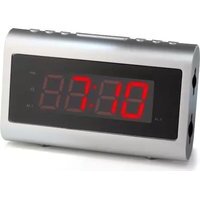
CL-1471 - Alarm Clock AudioSonic - Free user manual and instructions
Find the device manual for free CL-1471 AudioSonic in PDF.


| Product type | Clock radio |
| Brand | AudioSonic |
| Model | CL-1471 |
| Power supply | Mains 230V AC (AC cord) with backup battery 2 x 1.5V AAA (not included) |
| Radio bands | AM 530-1600 kHz, FM 87.5-108 MHz |
| Alarm functions | Dual alarm (AL1 and AL2) with day selection, radio or buzzer mode |
| Snooze | Duration 9 minutes, repeat for up to 30 minutes |
| Sleep | Timer from 15 to 90 minutes (radio on) |
| Nap (countdown) | Timer from 10 to 90 minutes (radio off) |
| Display | LED with brightness dimmer (high, low, auto off after 15s) |
| Calendar | Day, month, year display |
| Daylight saving time (DST) | Yes, switching via dedicated button |
| Auxiliary input | 3.5mm jack for external audio source |
| FM antenna | Extendable wire |
| AM antenna | Internal (rotate the device for better reception) |
| Backup alarm | Independent mini buzzer on battery in case of power failure |
| Reset | Reset button on the back (ballpoint pen) |
| Cleaning | Soft dry cloth, do not use abrasive or solvent products |
| Safety | Do not expose to water, flames, do not obstruct ventilation |
| LED class | I |
Frequently Asked Questions - CL-1471 AudioSonic
User questions about CL-1471 AudioSonic
0 question about this device. Answer the ones you know or ask your own.
Ask a new question about this device
Download the instructions for your Alarm Clock in PDF format for free! Find your manual CL-1471 - AudioSonic and take your electronic device back in hand. On this page are published all the documents necessary for the use of your device. CL-1471 by AudioSonic.
USER MANUAL CL-1471 AudioSonic
natural_image
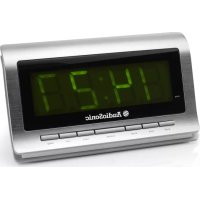
Silver digital alarm clock with dual buttons and a digital display showing 17:00 (no text or symbols on the device itself)INSTRUCTION MANUAL
GEBRUIKERSHANDLEIDING
BEDIENUNGSANLEITUNG
MODE D'EMPLOI
MANUAL DE INSTRUÇÕES
INSTRUKCJE OBSŁUGI
ENGLISH
Instruction Manual
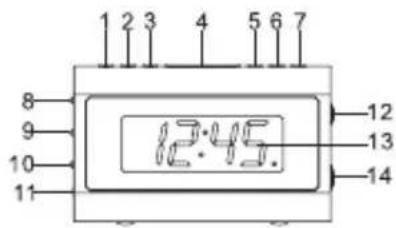
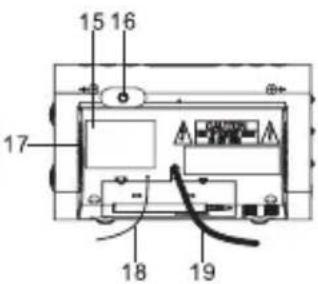
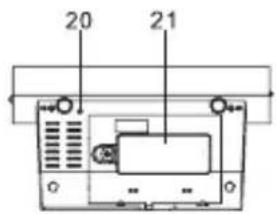
Location of controls
- ALARM 1 ON / OFF button
- << / YEAR-MONTH-DAY button
-
/ DST button
- SNOOZE / SLEEP / NAP button
- MODE button
- ALARM 2 ON / OFF button
- ON / OFF button
- AM/FM BAND switch
- DISPLAY LIGHT DIMMER LOW / HIGH / AUTO OFF switch
- ALARM RADIO / BUZZER switch
- LINE IN jack
- VOLUME knob
- LED DISPLAY
- TUNING knob
- RATING LABEL
- ALARM SET button
- SPEAKER
- FM ANTENNA
- AC POWER CORD
- RESET button
- BATTERY COMPARTMENT
Power connection
Plug the AC POWER CORD (19) to a household outlet AC source. This unit is equipped with a battery backup system, which requires two AAA size batteries (not included). Insert the batteries in the BATTERY COMPARTMENT (21), making certain that the positive and negative (+ and -) battery terminals are attached to the corresponding terminals on the plate in the battery compartment. If an AC power failure occurs, the clock automatically switches to the battery power supply, the clock and timer memory continue running. When the AC power resumes, the clock switches back to AC again.
Time, calendar and alarm settings
A. Setting time and calendar
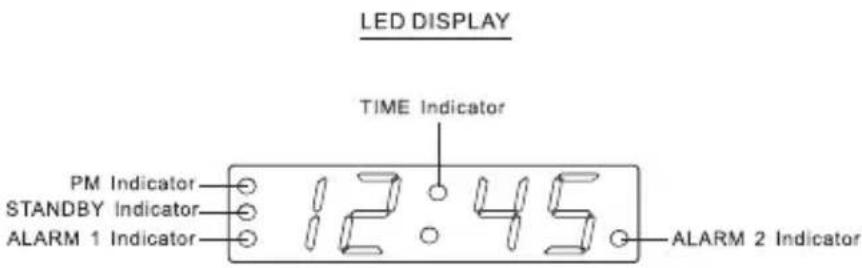
Press MODE button (5) in normal mode and keep depress over 2 seconds to enter time set mode, after enter the setting mode, press MODE button (5) to change the mode cycle as follows:
Normal mode → Year → Month → Day → 12/24 H → RTC Hour → RTC Min → Normal mode
Action (during data adjustment):
- Press << / YEAR-MONTH-DAY button (2) to adjust data backward.
- Press >> / DST button (3) to adjust data forward.
- Keep depress << / YEAR-MONTH-DAY button (2) or >> / DST button (3) button for 2 seconds to enable auto backward/forward.
B. Setting alarm 1 and alarm 2
Press ALARM SET button (16) during normal mode and keep depress over 2 seconds to enter the alarm set mode, after entering the setting mode, press the ALARM SET button (16) to change the mode cycle as follows:
Normal mode → AL.1 Hour → AL.1 Min → AL.1 Weekday Alarm → AL.2 Hour → AL.2 Min → AL.2 Weekday alarm → Normal mode
Select alarm weekday mode as follows
1-5 Monday to Friday
1-7 Whole week
6-7 Saturday and Sunday
1-1 One day of the week
Action (during data adjustment):
- Press << / YEAR-MONTH-DAY button (2) to adjust data backward.
- Press >> / DST button (3) to adjust data forward.
- Keep depress << / YEAR-MONTH-DAY button (2) or >> / DST button (3) button for 2 seconds to enable auto backward/forward.
Setting alarm output and switching alarm on/off
A. Setting the alarm output
Set the ALARM RADIO / BUZZER switch (10) to the radio position to select wake up by radio or to the beep position to select wake up by buzzer.
Set the DISPLAY LIGHT DIMMER LOW / HIGH / AUTO OFF switch (9) to the AUTO OFF position (the display will switch off automatically in 15 seconds). When the alarm sounds, the display will automatically switch on again.
B. Switching alarm on/off
Press ALARM 1 ON / OFF button (1) to toggle on and off alarm output function.
Press ALARM 2 ON / OFF button (6) to toggle on and off alarm output function.
Alarm duration and snooze function
A. Alarm duration
Buzzer alarm or Radio alarm will continue output for 30 minutes if no key's are pressed, then it will stop automatically and wait for same alarm time on the next day.
B. Snooze function
- During alarming, press SNOOZE / SLEEP / NAP button (4) will enable snooze function, buzzer alarm or radio alarm will stop.
- Snooze interval is 9 minutes
- Snooze will continue unless the ON / OFF button (7) is pressed to end the radio- or buzzer alarm. The alarm will stop automatically after 30 minutes.
- Set the DISPLAY LIGHT DIMMER LOW / HIGH / AUTO OFF switch (9) to the AUTO OFF position (the display will switch off automatically in 15 seconds). When the alarm sounds, the display will automatically switch on again. Press the SNOOZE / SLEEP / NAP button (4) to enable the snooze function, stopping the alarm and turning off the display.
Change display content
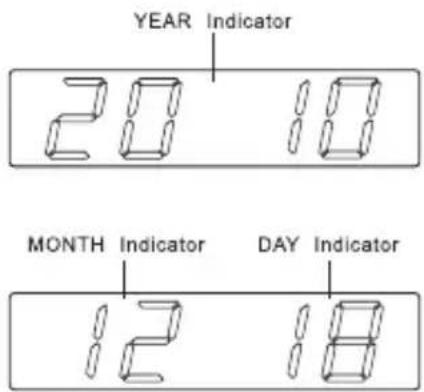
Press the << / YEAR-MONTH-DAY button (2) to switch to display the Year/Month/Day, after 5 seconds timeout the display will switch back to time automatically.
Sleep function
When the radio is turned on, press the SNOOZE / SLEEP / NAP button (4) to turn on the sleep mode. The sleep time will keep flashing for 10 seconds, during that time press the SNOOZE / SLEEP / NAP button (4) again to change the duration from 90 to 15 minutes. Press the ON / OFF button (7) to cancel the sleep function.
Nap function (countdown timer)
When the radio is turned off, press SNOOZE / SLEEP / NAP button (4) to turn on NAP mode, the NAP time will keep flashing by 10 seconds, within 10 seconds and press SNOOZE / SLEEP / NAP button (4) button can change the duration from 90 min – 10 min. The alarm buzzer will sound for 30 min and then shut off automatically. To stop the alarm buzzer, press the ON / OFF button (7). Press the SNOOZE / SLEEP / NAP button (4) button has no effect during alarm operation. Press the ON/OFF button (7) to cancel the NAP function.
Display light dimmer
When the radio is turned off, set the DISPLAY LIGHT DIMMER LOW / HIGH / AUTO OFF (9) to the AUTO OFF mode, the LED display will automatically turn off in 15 seconds. Press any key button to turn the display on.
DST – Daylight Saving Time (summer- and wintertime)
Press the >> / DST button (3) and hold it for 3 seconds to toggle between the summer- en wintertime.
Radio operation
- Press the ON / OFF button (7) to turn the radio on.
- Set the AM/FM BAND switch (8) to the desired waveband.
- Select the station by using the TUNING knob (14).
- Turn the VOLUME knob (12) to adjust volume as required.
- Press the ON / OFF button (7) again to turn the radio off.
Notes:
- The AM band uses an internal directional aerial, rotate the radio for best reception.
- Ensure that the FM antenna (18) is completely unrolled and extended for best FM reception.
Line in jack
The LINE IN jack (11) can be used to playback alternate audio signal sources on the unit speakers. This LINE IN jack (11) requires a 3.5mm audio cable for an input signal (3.5mm audio cable is not included).
Specifications
Frequency : AM 530 – 1600 kHz FM 87,5 – 108 MHz
Battery backup : 2 x 1,5V AAA battery (not included) Power source : AC230V \~ 50Hz, 5W
Reset
The RESET button (20) is located on the back of the unit. Use a ballpoint pen to press the RESET button (20) whenever you change the batteries, or when the unit is not performing as expected. This will return all settings to the default value, you will lose any stored data (alarm and clock settings).
Alarm battery back-up system
This clock radio includes a alarm battery back-up circuit that can wake you up even if the power is ‘off’ at the selected wake up time. The clock display will be off and the radio will not operate, but a separate mini-buzzer will turn ‘on’ automatically to wake you up, even if you had selected the ‘wake to radio’ option. The alarm will sound for 30 seconds and then shut off automatically. To stop the alarm buzzer immediately, press the power ON / OFF button (7). Pressing the SNOOZE / SLEEP / NAP button (4) has no effect during battery back-up alarm operation.
WARNING
- No flame sources, such as lighted candles, should be placed on the apparatus.
- Do not place the product in closed bookcases or racks without proper ventilation.
- The mains plug is used as the disconnect device, the disconnect device shall remain readily operable.
- The ventilation should not be impeded by covering the ventilation openings with items, such as newspapers, table-cloths, curtains, etc.
- It shall not be exposed to dripping or splashing and that no objects filled with liquids, such as vases, shall be placed on the apparatus.
- Do not connect FM antenna to outside antenna.
- The unit should not be exposed to direct sunlight, very high or low temperature, moisture, vibrations or placed in dusty environment.
- Do not use abrasive, benzene, thinner or other solvents to clean the surface of the unit. To clean, wipe it will mild non-abrasive detergent solution and clean soft cloth.
- Never attempt to insert wires, pins or other such objects into the vents or opening of the unit.
- Class I LED product.
Do not dispose of the device with the household waste. This product must be disposed
of according to EU directive 2002/96/EC-WEEE (Waste Electrical and Electronic equipment). Return the device to a collection point. Observe the applicable regulations. Contact your municipality, if in doubt.

CAUTION
- Danger of explosion if battery is incorrectly replaced.
- Replace only with the same or equivalent type battery.
- Batteries shall not be exposed to excessive heat such as sunshine, fire or the like.
- Attention should be drawn to the environmental aspects of battery disposal.
DUTCH
Pile: 2 x 1,5V AAA (non incluse)
Source d'alimentation: CA230V \~ 50Hz, 5W
Remise à zéro
- ENGLISH
- Instruction Manual
- Location of controls
- Power connection
- Time, calendar and alarm settings
- Setting time and calendar
- Setting alarm 1 and alarm 2
- Setting alarm output and switching alarm on/off
- Setting the alarm output
- Switching alarm on/off
- Alarm duration and snooze function
- Alarm duration
- Snooze function
- Change display content
- Sleep function
- Nap function (countdown timer)
- Display light dimmer
- DST – Daylight Saving Time (summer- and wintertime)
- Radio operation
- Notes:
- Line in jack
- Specifications
- Reset
- Alarm battery back-up system
- WARNING
- CAUTION
- DUTCH
- Remise à zéro
Brand : AudioSonic
Model : CL-1471
Category : Alarm Clock