
KZ-1228 - Coffee machine TRISTAR - Free user manual and instructions
Find the device manual for free KZ-1228 TRISTAR in PDF.


| Product Type | Coffee machine with built-in grinder |
| Brand | TriStar |
| Model | KZ-1228 |
| Power | 1000 W |
| Supply Voltage | 220-240 V ~ 50/60 Hz |
| Protection Class | I |
| Water Tank Capacity | Up to 12 cups (max approx 1.5 L) |
| Grinder Capacity | Approx. 250 g coffee beans |
| Main Functions | Built-in grinding, strength selection (mild, medium, strong), programmable timer, automatic shut-off after 2h, anti-drip function, removable water filter |
| Housing Material | Plastic |
| Carafe | Glass, graduated |
| Hot Plate | Yes, keeps warm for 2 hours |
| Coffee Filter | Permanent (reusable) filter included |
| Water Filter | Yes, with holder, replaceable |
| Included Accessories | Grinder cleaning brush, water filter, permanent filter, glass carafe, instruction manual |
| Maintenance and Cleaning | Clean grinder with brush, regular descaling (water + descaling agent), rinse with water after descaling |
| Safety | Automatic shut-off after 2h, overheat protection, filter compartment lock, anti-drip |
| Spare Parts and Repairability | Replacement water filter available, permanent filter, brush; repairs by authorized dealer |
| Warranty | 24 months (receipt required) |
| Dimensions (approx.) | 250 x 280 x 380 mm (estimated) |
| Weight (approx.) | 3.5 kg (estimated) |
Frequently Asked Questions - KZ-1228 TRISTAR
User questions about KZ-1228 TRISTAR
0 question about this device. Answer the ones you know or ask your own.
Ask a new question about this device
Download the instructions for your Coffee machine in PDF format for free! Find your manual KZ-1228 - TRISTAR and take your electronic device back in hand. On this page are published all the documents necessary for the use of your device. KZ-1228 by TRISTAR.
USER MANUAL KZ-1228 TRISTAR
natural_image
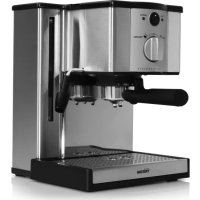
Exterior view of a Tristar coffee maker with digital display and glass coffee jar (no visible text or symbols)eN Instruction manual
NI Gebruiksaanwijzing
FR Mode d'emploi
De Bedienungsanleitung
eS Manual de usuario
PT Manual de utilizador
PI Instrukcja obsługi
IT Manuale utente
sv Användare
KZ-1228
*** TRISTAR
Dear customer,
We are delighted that you have chosen this coffee machine. With your new coffee machine, you can grind your fresh coffee beans in the integrated coffee mill. We hope you have a lot of fun with your new coffee machine.
SAFETY INSTRUCTIONS
Before using the device for the first time, please read the instructions carefully and store them in a safe place. If the device is given to someone else, it should always be accompanied by these instructions. The manufacturer and importer will not be hold responsible if the directions in these instructions are not observed!

Intended use
- This device is intended for preparing coffee and grinding coffee beans.
- Use the coffee mill only to grind coffee beans. The device is not intended for grinding food other than coffee.
- The device is not designed to be operated with an external timer or a separate remote control system.
- This device is for personal use only and is not intended for commercial applications.
- The device must only be used as described in the operating instructions. Any other use is deemed to be improper.

Danger of Injury
- Please keep the packaging and the device out of the reach of children and pets.
- This device should not be used by people (including children) with impaired sensory or mental faculties or who do not have adequate experience and/or knowledge of such devices, unless they are supervised by a person responsible for their safety, or have received instructions from such a person on how to use the device.
- Children must be supervised in order to ensure that they do not play with the device.
- Danger of scalding! Hot steam will emerge from the ventilation opening during use. Avoid coming into contact with hot steam.
- Danger of burns! Parts of the product (e. g. hotplate and glass pot) will become very hot during use. Avoid coming into contact with hot parts of the device.
HEALTH-SPECIFIC SAFETY INSTRUCTIONS
Damage to health as a result of contamination! Clean the device before using it for the first time. It is possible that manufacturing residues may still be adhering to the surfaces. It is essential that you follow the cleaning instructions as explained in the "Care and Descaling" chapter.

Setup and connection
- Use only indoors, in dry areas and not near a sink, for example.
• Always place the device on a dry, level, firm and heat-resistant surface. - Maintain a sufficient distance from heat sources such as hobs or ovens in order not to damage the device.
- The device should only be connected to a properly installed socket with earthing contacts.
- The socket must also be readily accessible after connection. The mains voltage must be the same as that stated in the technical data of the device. Only use suitable extension cables whose technical data is the same as that of the device.
- Ensure that it is not possible for others to trip over the connected mains cable. Do not allow the cable to hang over the edge of tables or kitchen counters. Others may become caught and pull the device down.
- Position the cable in such a way that it does not become squashed or bent and does not come into contact with hot surfaces.
\*\*\* TRISTAR
Instruction manual

uSe
- Always check the device for damage before putting it into operation. If the device, lead or plug shows visible signs of damage, the device must not be used. Do not use the device if it has malfunctioned or has been fallen.
- If the device is broken, do not attempt to repair it yourself. In the event of damage, please contact our customer service department.
- Remove the mains plug from the mains socket - if you are not going to use the device over a longer period of time - if a fault occurs during operation - before a thunderstorm - before you clean it.
- When you want to remove the mains plug from the socket, always pull the plug and not the cable.
- Never immerse the device in water or other liquids. Ensure that the device, lead or plug do not fall into water or become wet. Should the device fall into water, switch off the power supply immediately.
- Please make sure that no water gets into the grinding mechanism of the device.
- Never touch the device, cable or plug with wet hands.
- Do not leave the device unattended when it is switched on.
- Do not drop the device or allow it to be knocked violently.
• To make coffee, use only fresh drinking water at room temperature.
- Never place the glass pot on a hot stovetop or other hot surfaces.
- Do not use the coffee machine without water. Always fill the water reservoir with at least two cups of water.
- Never use the device when the glass pot is damaged. Only use the glass pot with this device.
• The prepared coffee is hot; be careful when handling hot liquids.
- Never reach into the blades of the grinding mechanism – they are sharp!
- Never fill water into a machine that is already on. In the worst case, you could scald yourself on a sudden burst of steam.
- The hotplate gets very hot. Do not touch it or place objects on it.
- Only use the accessories supplied or accessories expressly recommended by the manufacturer.
- Let the device cool down for at least 10 minutes after each use before adding fresh coffee.
- When the device is on, the hotplate switches off automatically after two hours and remains very hot in this period.
- Do not place the device below kitchen wall units or similar cupboards. The rising steam could cause damage to them!
- Never fill the hot glass pot with ice cold water.
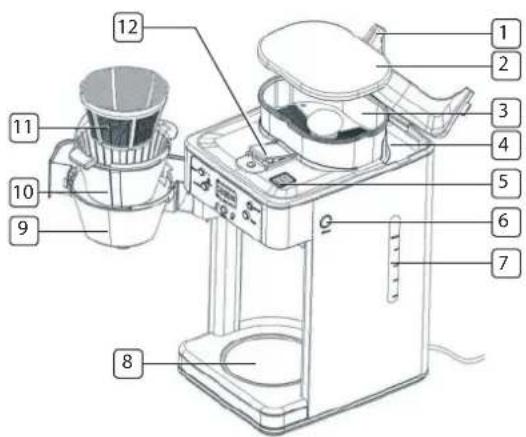
PARTS DESCRIPTION
- Water reservoir lid
- Coffee bean container lid
- Grinding mechanism
- Water reservoir
- Ventilation opening
- Button for unlocking filter compartment
- Water level indication
- Hotplate
- Filter compartment
- Filter compartment insert
- Permanent filter
- Opening for cleaning the coffee mill
Not shown:
- Brush for cleaning the coffee mill
- Glass pot
• Water filter with water filter bracket
• These operating instructions
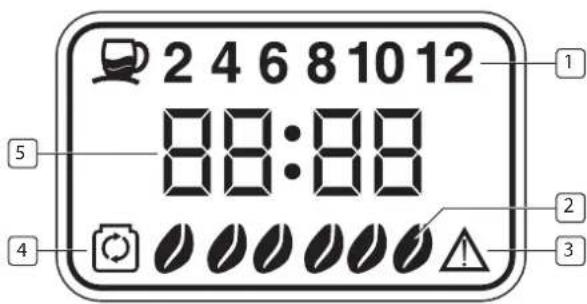
DISPLAY
- Shows the number of cups you would like to brew (2-12 Cups button).
- Shows the preset coffee strength (Coffee strength button).
- Error message (see the "Troubleshooting" chapter)
- Shows, together with the word "FILTER", that the water filter needs to be exchanged.
- Shows the time.
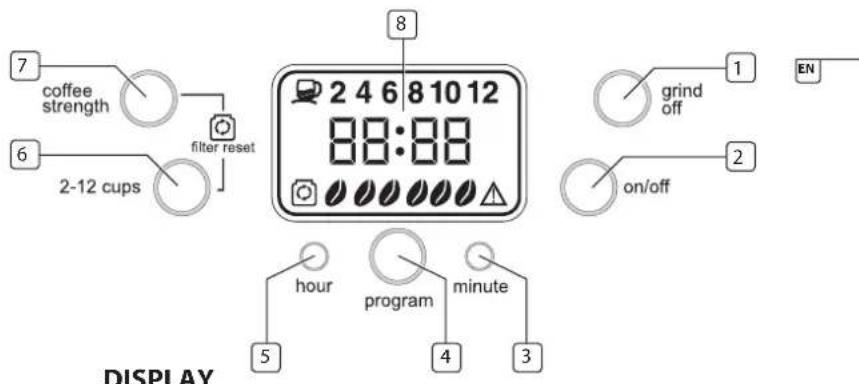
CONTROL PANEL
- Grind Off: button to switch off the grinding mechanism.
- On/Off: button to switch the device on and off.
- Minute: button to set the minutes of the clock.
- Program: button for setting the timer.
- Hour: button to set the hours of the clock.
- 2-12 Cups: button to set the number of cups you would like to brew.
- Coffee strength: button to set the coffee strength.
- Display (The display light automatically switches off after approx. 1 minute. You can activate it again by pressing any button.)
BEFORE INITIAL USE
Before you can use the device, you must:
- unpack the items supplied,
- clean the device.
UNPACKING

PLEASE NOTE!
- Keep children and animals away from the packaging material. There is a danger of suffocation!
- Unpack all parts and check the scope of supply for completeness; also check for transport damage. If you find any damage to the components, do not use them (!), but contact our customer service department.
CLEANING

PLEASE NOTE!
Do not use corrosive or abrasive cleaning agents to clean the device. These could damage the surface.
- Press the button for unlocking the filter compartment on the side of the device.
- Remove the filter compartment insert together with the permanent filter.
- Now clean the filter compartment insert and permanent filter with hot water and a little detergent if necessary.
-
Then dry all parts thoroughly and place them in the coffee machine again.
-
We recommend that, prior to first use, you operate the device three times with just water (no coffee) to flush through all the lines etc. Please ensure that you have switched on the Grind Off function if you want to flush the device with water. Before first using the device, also observe the notices in the "Use" chapter.
USE

PLEASE NOTE!
- The device has no automatic water-dosing function. Therefore, fill only as much water as you need into the water reservoir.
- Make sure that the filter cover is placed on correctly as otherwise the device will not start the brewing procedure!
- Make sure that the maximum marking of the water level indication is not exceeded when you pour water into the water reservoir of the device. Take care when pouring in water: To make it impossible to overfill the water reservoir, there is an opening on the back of the water reservoir from which excess water can escape.
Commissioning and making Basic Settings
- Place the device on a level, firm and heat-resistant surface.
- Connect the device to a mains socket that has been properly installed.
- The preset time "12:00" will appear on the display.
- Set the time using the Hour and Minute buttons.
BREWING COFFEE WITH FRESHLY GROUND BEANS
- Open the water reservoir lid.
- Pour the desired amount of water into the water reservoir. On the water level indication, you can see how many cups of water you have already poured into the water reservoir. Always fill the water reservoir with at least two up to a maximum of 12 cups of water. Use the glass jar to fill the water reservoir with water.
- Then close the water reservoir lid.
- Open the filter compartment by pressing the unlocking button on the side of the device.
- Place the filter compartment insert, the permanent filter and the filter compartment cover into the filter compartment. Make sure that all parts are placed in correctly as otherwise the coffee machine will not start the brewing procedure.
- Close the filter compartment.
- NOTE, before you start making coffee check if the permanent filter is empty.
- Fill coffee beans into the grinding mechanism of the coffee machine. Then place the lid of the grinding mechanism back on.
- Place the glass pot on the hotplate.
- Use the 2-12 Cups button to set the number of cups you would like to brew.
- You can press the Coffee strength button to set the coffee strength. You have a choice of three levels which are shown to you on the display as follows:

mild

medium

strong
The level mild represents a mild coffee flavour, the level medium represents a medium coffee flavour and the level strong represents an aromatically strong coffee flavour.
- Press the On/Off button to switch on the device. The On/Off button lights up.
- As soon as you have pressed the On/Off button, the grinding procedure begins. After the grinding procedure, the brewing procedure starts immediately. The grinding process can be noisy, this sound is normal for such devices.
- After the brewing procedure, you can take the glass pot from the hotplate and serve the coffee.
- After the brewing procedure, the hotplate remains on for another two hours and then switches off automatically.
- If you would like to turn off the coffee machine before the two hours are up, press the On/Off button.
- Clean the device after use as described in the "Care and Descaling" chapter.
Tip: The coffee machine has a non-drip valve. You can also take the glass pot from the hotplate during the brewing procedure and pour yourself a cup of coffee. But be careful: You should place the glass pot back on the hotplate within 20 seconds to prevent the coffee filter from overflowing with water!
Brewing coffee with Powder coffee
- Open the water reservoir lid.
- Pour the desired amount of water into the water reservoir. On the water level indication, you can see how many cups of water you have already filled in the water reservoir. Always fill the water reservoir with at least two up to a maximum of 12 cups of water. Use the glass jar to fill the water reservoir with water.
- Then close the water reservoir lid.
- Open the filter compartment by pressing the unlocking button on the side of the device.
- Place the filter compartment insert and the permanent filter into the filter compartment. Make sure that all parts are placed in correctly as otherwise the coffee machine will not start the brewing procedure.
\*\*\* TRISTAR
Instruction manual
- Pour the coffee powder into the permanent filter.
- Insert the filter compartment cover into the filter compartment and close the filter compartment.
- Place the glass pot on the hotplate.
- Press the Grind Off button to switch off the grinding mechanism of the coffee machine. The Grind Off button lights up.
- Press the On/Off button to switch the device on. The On/Off button lights up.
- As soon as you have pressed the On/Off button, the brewing procedure begins.
- After the brewing procedure, you can take the glass pot from the hotplate and serve the coffee.
- After the brewing procedure, the hotplate remains on for another two hours and then switches off automatically.
- If you would like to turn off the coffee machine before the two hours have passed, press the On/Off button.
- Clean the device after use as described in the "Care and Descaling" chapter. The coffee machine has a non-drip valve. You can also take the glass pot from the hotplate during the brewing procedure and pour yourself a cup of coffee. But be careful: You should place the glass pot back on the hotplate within 20 seconds to prevent the coffee filter from overflowing with water!
Timer Function
The coffee machine has an automatic coffee brewing function. You can select a starting time at which the coffee machine automatically starts the brewing procedure. To do so, take the following steps.
-
Fill the coffee machine as described in the "Brewing Coffee with Freshly Ground Beans" and "Brewing Coffee with Powder Coffee" sections according to whether you would like to brew coffee with freshly ground beans or with powder coffee.
-
You should now set the starting time at which the coffee machine automatically starts the brewing procedure by pressing the Program button for 3 seconds until the Program button flashes. Now set the automatic starting time using the Hour and Minute buttons.
- Press the Program button again to confirm your entry. The Program button will now light up without flashing.
- The current time then appears on the display again.
- The brewing or grinding procedure now starts at the set time.
Tip: You can also start the grinding or brewing procedure at any time before the set starting time. To do this, press the Program button once to switch of the timer and then press the On/Off button to start the grinding or brewing procedure manually. - After the brewing procedure, you can take the glass pot from the hotplate and serve the coffee.
- After the brewing procedure, the hotplate remains on for another two hours and then switches off automatically.
- If you would like to turn off the coffee machine before the two hours have passed, press the On/Off button.
- Clean the device after use as described in the "Care and Descaling" chapter.
CHANGING WATER FILTER
To produce a more aromatic coffee flavour, the device has a water filter which is inserted in the water reservoir. If the symbol and the word "FILTER" are shown on the display, the water filter should be replaced.
- Open the water reservoir lid and pull out the water filter by its bracket.
-
Open the lower part of the water filter bracket, take out the water filter and dispose of it.
-
Insert a new water filter and then close the water filter bracket again.
- Place the water filter bracket back into the water reservoir. Make sure that the water filter is seated correctly in the slot in the water reservoir.
- To delete the symbol on the display, press the Coffee Strength button and the 2-12 Cups button simultaneously.
Tip: The absence of a water filter does not stop the device from working properly.
CARE AND DESCALING

PLEASE NOTE!
- The hotplate is very hot after use! Let it cool down first before cleaning it.
- Never immerse the device, the cable or the plug in water.
-
Do not use corrosive or abrasive cleaning agents to clean the device. These could damage the surface.
-
Clean the coffee mill using the cleaning brush.
- Adjust the screw at the opening for cleaning the coffee mill with the shaft end of the cleaning brush to the "Open" symbol. The cover will open up and you can then remove any excess coffee powder with the cleaning brush
- Then close the cover again by pressing down on the cover and adjusting the screw on the opening for cleaning the coffee mill with the shaft end of the cleaning brush to the "Closed" symbol 🔒
- Then press the unlocking button on the side of the device and open the filter compartment.
- Remove the filter cover, take out the permanent filter and dispose of the coffee powder.
- Clean the filter cover, the permanent filter and the filter compartment insert with hot water and a little detergent if necessary.
- Then dry all parts thoroughly and place them in the coffee machine again.
- If necessary, clean the coffee machine and hotplate with a damp cloth and then with a dry one.
DESCALING
If the water only runs very slowly through the device or the device is louder than usual during the brewing procedure, you should descale it.
- Pour the mixture consisting of water and descaling agent into the water reservoir and switch on the device. Pay attention to the directions for use of the descaling agent in regard to the ratio of water to descaling agent.
- Let the mixture run through the machine completely. Repeat this procedure if the water still runs through slowly.
- After descaling, let water (without coffee) run through the device at least three times to flush the lines etc.
- Please ensure that you have switched on the Grind Off function if you want to flush the device with water or descale it.
TROUBLESHOOTING
If the device should stop working properly, check whether you are able to correct the problem yourself. Do not try to repair a faulty device yourself!
Problem Possible cause/solution
| The device does not work | Is the plug inserted in the mains socket correctly?Is the mains socket defective? Try another mains socket.Check the fuse of the main connection.Is the coffee filter correctly inserted?Is the filter placed correctly?Is the glass pot sitting correctly on the hotplate? |
| appears on the display. | Pull the plug out of the socket to reset all of the settings you have made. Check whether the filter compartment insert, the permanent filter are positioned correctly, whether the cover for cleaning the coffee mill is closed correctly and then try to start the brewing procedure again. |
Problem Possible cause/solution
| The device beeps, but shows no error message. | Is the filter placed correctly? |
TECHNICAL DATA
Model: KZ-1228
Voltage supply: 220V-240V \~ 50Hz/60Hz
Output: 1000 W
Protection class: 1
GUARANTEE
- Tristar is not liable for damages occurred through:
o In case the appliance has fallen.
o In case the appliance has been technically changed by the owner or another third party.
o In case of improper use of the appliance.
o In case of normal wear of the appliance.
- By executing repairs the original warranty period of 2 years will not be extended, nor the right to a complied new warranty. This warranty is only legal on European soil. This warranty does not overrule the European directive 1944/44CE.
- Always keep your receipt, without this receipt you can not claim any form of warranty whatsoever.
- Damage caused by not following the instruction manual will lead to a void The following are excluded from the warranty: all defects and damage of warranty, if this results in consequential damages Tristar will not be liable caused by improper handling or unauthorised attempts to repair. The same applies for normal wear.
- Tristar will not be liable for material damage or personal injury caused by improper use or if the safety instructions are not properly executed.
- Cleaning, as mentioned in this manual, is the only necessary maintenance for this appliance.
- When the appliance should be repaired, make sure that this will be performed by an authorized company.
- This appliance may not be amended or changed.
- If problems arise during the 2 years from the date of purchase, which are covered by the factory warranty, you can go back to the point of purchase to replace it for a new one.
- For questions or compliances please contact your retailer "point of purchase."
- This appliance is covered with a 24 month guarantee starting on the date of purchase (receipt).
- Only material or manufacturing defects are included in this warranty.
- If you wish to make a claim please return the entire machine in the original packaging to your dealer together with the receipt.
- Damage to accessories does not mean automatic free replacement of the whole appliance. In such cases please contact our hotline. Broken glass or breakage of plastic parts are always subject to a charge.
- Defects to consumables or parts subject to wearing, as well as cleaning, maintenance or the replacement of these parts are not covered by the guarantee and hence are to be paid!
- The guarantee lapses in case of unauthorized tampering.
- After the expiry of the guarantee repairs can be carried by the competent dealer or repair service against the payment of the ensuing costs.
Warranty Terms
The following are excluded from the warranty: all defects and damage caused by improper handling or unauthorised attempts to repair. The same applies for normal wear.

GUIDELINES FOR PROTECTION OF THE ENVIRONMENT
This appliance should not be put into the domestic garbage at the end of its durability, but must be offered at a central
point for the recycling of electric and electronic domestic appliances. This symbol on the appliance, instruction manual and packaging puts your attention to this important issue. The materials used in this appliance can be recycled. By recycling used domestic appliances you contribute an important push to the protection of our environment. Ask your local authorities for information regarding the point of recollection.
Packaging
The packaging is 100% recyclable, return the packaging separated.
Product
This device is equipped with a mark according to the European Directive 2002/96/EC on Waste Electrical and Electronic Equipment (WEEE). By ensuring that this product will be correctly processed into waste, it will help prevent possible negative consequences for the environment and human health.
EC declaration of conformity
This appliance is designed to come into contact with food and is designed in accordance with EC Directive89/109/EEC. This device is designed, manufactured and marketed in accordance with the safety objectives of the Low Voltage Directive "No 2006/95/EC", the protection requirements of the EMC Directive 2004/108/EC "Electromagnetic Compatibility" and the requirement of Directive 93/68/EEC.
\*\*\* TRISTAR
Gebruiksaanwijzing
Geachte klant,
COMPOSITION ET VUE GÉNÉRALE DE L'APPAREIL
FR
TEILEBEZEICHNUNG
ES

OPIS CZEŚCI

\*\*\* TRISTAR
Instrukcja obsługi
DESCRIZIONE PARTI
DISPLAY
BESKRIVNING AV DELAR
DISPLAY
5015 BH Tilburg, The Netherlands
www.tristar.eu
KZ-1228



- SAFETY INSTRUCTIONS
- Intended use
- Danger of Injury
- HEALTH-SPECIFIC SAFETY INSTRUCTIONS
- Setup and connection
- \*\*\* TRISTAR
- uSe
- PARTS DESCRIPTION
- Not shown:
- DISPLAY
- CONTROL PANEL
- BEFORE INITIAL USE
- UNPACKING
- PLEASE NOTE!
- CLEANING
- Commissioning and making Basic Settings
- BREWING COFFEE WITH FRESHLY GROUND BEANS
- Brewing coffee with Powder coffee
- Timer Function
- CHANGING WATER FILTER
- CARE AND DESCALING
- DESCALING
- TROUBLESHOOTING
- TECHNICAL DATA
- GUARANTEE
- Warranty Terms
- GUIDELINES FOR PROTECTION OF THE ENVIRONMENT
- Packaging
- Product
- EC declaration of conformity
- Gebruiksaanwijzing
- COMPOSITION ET VUE GÉNÉRALE DE L'APPAREIL
- TEILEBEZEICHNUNG
- OPIS CZEŚCI
- Instrukcja obsługi
- DESCRIZIONE PARTI
- BESKRIVNING AV DELAR
Brand : TRISTAR
Model : KZ-1228
Category : Coffee machine